Windows 7 Keyboard problems (numlock/capslock/scroll lock)

  • Thread Author
I have a problem,
I understand that I am a junior member, but the only reason I created an account is because of this problem, even though I have been browsing this site for a while now.
Anyways, whenever I press Capslock/numlock/scroll lock, I get a small box at the bottom right of my screen that says for example "numlock: ON." This does not create any problems, but it does get very annoying! If you have any ideas on how to fix this, please let me know.

Thanks
Val Samsonov
 

cybercore

New Member
Joined
Jul 7, 2009
Messages
15,641
Hi and welcome to the forums. : )

There is absolutely no problem with being a 'junior' at this forum, everyone is welcome.

Control Panel --> Keyboard --> Key settings tab --> scroll down to Caps lock and double click it --> uncheck the box marked 'Displays CAPS Lock status on screen'.
 

vsams14

New Member
Joined
Jul 8, 2010
Messages
14
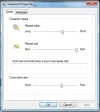
I have seen that reply to similar problems, and have tried it, but I don't have a key settings tab in the keyboard settings menu!
I just have a speed tab (general) and a hardware tab. Maybe because I have a laptop the built in keyboard does not offer this?
either way, thanks for trying but this wont work, heres a screenshot of the problem, and the keyboard settings menu:
keyboardsettingsmenu.webpcapsprob.webp
 

Joe S

Excellent Member
Joined
Jan 12, 2009
Messages
3,793
Mine doesn't have those tabs either It looks like his screen shot.
Joe
 

andreal

New Member
Joined
Sep 13, 2010
Messages
2
t I don't have a key settings tab in the keyboard settings menu either. and that caps lock image in the corner is ridiculous and annoying. help!
 

cybercore

New Member
Joined
Jul 7, 2009
Messages
15,641
t I don't have a key settings tab in the keyboard settings menu either. and that caps lock image in the corner is ridiculous and annoying.
Anyways, whenever I press Capslock/numlock/scroll lock, I get a small box at the bottom right of my screen that says for example "numlock: ON." This does not create any problems, but it does get very annoying!

Is Control Panel >> Ease of Access >> Make the keyboard easier to use>>Turn on toggle keys >> On or Off?
 

vsams14

New Member
Joined
Jul 8, 2010
Messages
14
Is there any way to turn off/lock a thread, because my computer was having some other problems, and I got bored, and re-installed the os from a recovery disk that I had created earlier. Everything is fine now!
 

Back
Top