

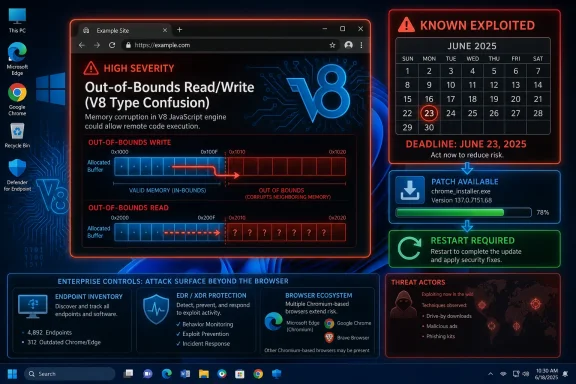
A Browser Bug Becomes an Enterprise Clock
CVE-2026-11645 is the kind of vulnerability that looks deceptively narrow on paper. It lives in V8, the JavaScript and WebAssembly engine used by Chrome and the broader Chromium ecosystem. The NVD description says the bug allowed a remote attacker to execute arbitrary code inside Chrome’s sandbox by convincing a user to open a crafted HTML page.
That wording matters. This is not an exposed VPN appliance, an unpatched Exchange server, or a forgotten management console listening on the internet. It is a client-side bug, and the “attack surface” is the ordinary act of browsing the web. The user interaction requirement in the CVSS vector is not much comfort when the interaction can be as trivial as visiting a malicious or compromised page.
Google’s advisory reportedly noted that an exploit exists in the wild, while leaving technical details restricted. That is standard practice for Chrome memory-safety issues: publish enough to force patching, withhold enough to avoid giving copycat exploit developers a cookbook. The result is a familiar asymmetry. Defenders get a CVE number, a version threshold, and a vague component name; attackers may already have the exploit.
CISA’s decision to add the issue to the Known Exploited Vulnerabilities catalog on June 9 turns the situation from vendor advisory into policy pressure. Federal civilian agencies have until June 23, 2026, to remediate under Binding Operational Directive 22-01 rules. Private-sector IT shops are not bound by that deadline, but they should treat it as a useful escalation signal.
V8 Is Where “Just a Web Page” Stops Being Reassuring
V8 has become one of the most security-critical pieces of software on a Windows PC. It parses, optimizes, and executes JavaScript and WebAssembly at enormous speed, and that performance depends on complex just-in-time compilation, speculative assumptions, memory management, and type handling. The same machinery that makes web apps feel native also gives attackers a rich target.
Out-of-bounds read and write bugs are dangerous because they cross the line between a logic mistake and memory corruption. An out-of-bounds read can disclose information that the program should not expose. An out-of-bounds write can alter memory that the program should not touch. Together, they are the raw ingredients of modern exploitation.
The NVD record lists CWE-125 and CWE-787, which map to out-of-bounds read and out-of-bounds write. That pairing is more worrying than either weakness alone. A read primitive can help bypass memory layout randomization; a write primitive can help steer execution. In a JavaScript engine, those capabilities often form the scaffolding for arbitrary code execution.
Chrome’s sandbox still matters. The description says code execution happens inside a sandbox, which means exploitation of this CVE alone may not automatically equal full system compromise. But “inside the sandbox” is not the same as “harmless.” Attackers can steal browser-accessible data, chain the flaw with another escape, or use the foothold as part of a broader intrusion path.
The Sandbox Is a Speed Bump, Not a Seat Belt
Browser sandboxes are one of the great quiet successes of modern desktop security. They constrain renderer processes, limit filesystem access, and force attackers to chain multiple vulnerabilities for full device control. But the mythology around sandboxing sometimes goes too far, especially in patch prioritization meetings.
A sandboxed renderer compromise can still be operationally useful. The browser is where users authenticate to cloud services, view documents, access email, manage SaaS consoles, and maintain active sessions. Even without a kernel exploit or a browser escape, attackers may be able to interact with data and tokens exposed to the compromised browser context.
That is why the phrase “execute arbitrary code inside a sandbox” should not lull anyone into treating this as a second-tier concern. The workstation has changed. For many organizations, the browser is the new shell, the new file viewer, the new identity broker, and the new thin client for business-critical systems.
The practical risk depends on the exploit chain. If attackers only have a renderer exploit, the blast radius may be narrower. If they pair it with a sandbox escape, privilege escalation, credential theft, or malicious OAuth flow, the browser bug becomes the opening move in a much larger campaign. CISA’s KEV listing means defenders should assume someone has already found a useful way to operationalize it.
Chrome’s Fast Patch Machine Still Depends on Human Restarts
Chrome’s update system is one of the better patch delivery mechanisms in consumer software. It downloads updates automatically for most users, applies them with minimal ceremony, and exposes a simple version check at the browser’s help page. That machinery is why browser vendors can ship fixes at the tempo required by modern exploitation.
The weak point is the restart. Chrome can download the update, stage it, and nag the user, but the old vulnerable process may continue running until the browser is relaunched. On personal machines, that delay might last hours. On enterprise desktops, shared workstations, kiosk sessions, virtual desktops, and always-open admin browsers can stretch that delay into days.
For CVE-2026-11645, the safe operational threshold is straightforward: Chrome needs to be at the fixed desktop build line, reported as 149.0.7827.102 or 149.0.7827.103 depending on platform and rollout channel. The exact minor build nuance is less important than the inventory question: is any managed endpoint still below the fixed release?
That is where consumer-grade advice — “just update Chrome” — stops being adequate. Enterprise administrators need telemetry from endpoint management, software inventory, EDR, vulnerability scanners, or browser management tooling. They also need proof that the updated binary has been launched, not merely downloaded.
The Chromium Ecosystem Makes the Patch Story Messier
The user-facing CVE entry names Google Chrome, but Windows environments rarely run Chrome alone. Microsoft Edge, Brave, Opera, Vivaldi, embedded Chromium runtimes, Electron applications, and third-party software components can all depend on Chromium-derived code. A flaw in V8 is therefore not automatically contained by patching Google’s browser.
This is where the industry’s consolidation around Chromium becomes a double-edged bargain. The upside is that one world-class browser engine receives intense security scrutiny and rapid patches. The downside is monoculture: when a high-value bug lands in a shared engine, the affected surface can sprawl far beyond one application icon on the taskbar.
Microsoft Edge typically tracks Chromium fixes quickly, and Windows administrators should verify Edge’s patched state alongside Chrome. The same is true for any Chromium-based browser allowed by policy. In unmanaged environments, users may have installed multiple browsers, each with its own update path and restart behavior.
Electron deserves special attention. Many desktop apps bundle Chromium and V8, and they do not necessarily inherit Google Chrome updates automatically. A chat client, password manager front end, developer tool, productivity app, or internal line-of-business application may carry its own Chromium runtime. The practical question is not only “Did Chrome update?” but “Where else is V8 present?”
NVD’s Missing Scores Are Not Permission to Wait
The NVD record for CVE-2026-11645 initially lacked NIST CVSS scoring while showing a CISA-ADP CVSS 3.1 base score of 8.8. That can look messy to readers who expect vulnerability databases to behave like finished encyclopedias. In reality, modern CVE publication is a rolling process: vendor reports, enrichment, CPE mappings, weakness classifications, government catalogs, and third-party scoring may arrive at different times.
The absence of a NIST-enriched score should not change the response. The vendor shipped a fix. The vulnerability affects a high-exposure browser component. The attack path is remote through crafted web content. CISA added it to KEV because exploitation is known. Those facts are more operationally important than waiting for every database field to settle.
CPE data is also imperfect early in a CVE’s life. The NVD change history cited Chrome versions before 149.0.7827.103 across Windows, Linux, and macOS, but software inventory tools may lag, normalize product names differently, or miss per-user browser installs. That gap is exactly why administrators should not outsource judgment to a single scanner result.
The better posture is to treat NVD as one input, not the control plane. Use it to identify the CVE and affected version range, then validate against vendor release notes, browser management dashboards, endpoint telemetry, and CISA KEV status. Vulnerability management is increasingly a data reconciliation job, not a database lookup.
Windows Administrators Have Three Different Problems
For WindowsForum readers, the Windows angle is not that this is a Windows vulnerability. It is not. The Windows angle is that Chrome and Chromium-based software sit on millions of Windows endpoints, often outside the tidy boundaries of operating system patch management.
The first problem is coverage. Microsoft’s monthly cumulative updates do not patch Google Chrome. Windows Update handles Edge and Windows components, but Chrome lives in its own update channel unless managed through enterprise tooling. If a patch dashboard says “fully compliant” because Patch Tuesday succeeded, it may still be blind to a live browser zero-day.
The second problem is user context. Chrome often installs per machine in managed fleets, but per-user installs and stale profiles still exist. Developers, contractors, power users, and local admins may have alternate channels such as Beta, Dev, Canary, portable builds, or side-loaded Chromium derivatives. A browser inventory that only checks the standard Program Files path will miss real exposure.
The third problem is enforcement. Many organizations can deploy the update quickly but hesitate to force browser restarts during business hours. That hesitation is understandable, especially where browser sessions contain unsaved work or critical dashboards. But for an exploited V8 flaw, soft compliance is not enough. Users need a relaunch deadline, and high-risk groups may need forced closure.
The Threat Model Is a Compromised Page, Not a Suspicious Download
The old mental model of endpoint compromise still leans heavily on executables, attachments, macros, and installers. CVE-2026-11645 belongs to a different category. The payload can be web content, and the delivery mechanism can be a page view.
That changes both prevention and detection. Web filtering may help if the malicious infrastructure is known, but it will not reliably block exploitation through compromised legitimate sites, malvertising, watering-hole pages, or targeted links. Email security may catch some lures, but browser exploitation does not require a victim to download and run a file.
EDR may see suspicious post-exploitation behavior if the attacker breaks out of the browser or drops tooling. But a renderer exploit that stays within browser boundaries may be harder to distinguish from normal web activity. The more cloud-centric the workflow, the more valuable in-browser access becomes.
Administrators should therefore avoid framing this as a malware-only problem. It is a browser integrity problem, an identity exposure problem, and potentially a session theft problem. That means patching is the primary control, with detection and containment playing catch-up after the fact.
The “High” Rating Understates the Urgency
Chrome marked the issue as high severity, and the CISA-ADP CVSS 3.1 vector yields an 8.8. That is a serious score, but it can be misleading in organizations trained to reserve emergency response for “critical” vulnerabilities only. CVSS is useful, but it does not fully capture exploit availability, ubiquity, or attacker incentives.
A remotely reachable browser bug under active exploitation can outrank a theoretical critical flaw in a niche product. Exposure matters. Exploitability matters. User behavior matters. Chrome is ubiquitous, the web is hostile by default, and V8 bugs are historically attractive to sophisticated attackers.
The user interaction requirement lowers the score, but in browser exploitation that requirement is nearly baked into the product’s purpose. Users browse. They click links. They load pages from search results, messaging apps, documentation sites, admin portals, and vendor dashboards. Calling that “user interaction” is formally correct and operationally underwhelming.
This is why KEV should override severity complacency. Once a vulnerability is known to be exploited, defenders are no longer debating whether it might become interesting. They are racing against exploitation that has already crossed the line from theoretical to real.
Google’s Secrecy Is Frustrating, but Defensible
Security teams often want more detail than browser vendors provide during zero-day response. What is the exploit primitive? Which platforms are being targeted? Are attacks broad or targeted? Is there a known sandbox escape? Are there indicators of compromise? Was the exploit found by Google’s internal teams, an external researcher, or incident response?
The public record for CVE-2026-11645 answers only a few of those questions. It identifies the component, the weakness class, the affected version range, and the existence of exploitation. That is enough to patch, but not enough to build a rich detection strategy.
The frustration is real. Defenders want specificity because specificity lets them prioritize, hunt, and explain risk to leadership. But premature disclosure of exploit details can expand the attacker pool before patch adoption reaches critical mass. Browser vendors have learned, painfully, that technical transparency has timing consequences.
The right reading is not that Google is hiding an unimportant bug. It is that the bug is important enough for details to remain restricted until the patched population is larger. For administrators, that should sharpen the urgency rather than soften it.
Patch Management Needs to Treat Browsers Like Tier-Zero Software
There was a time when browser updates could be treated as userland hygiene. That era is gone. The browser now fronts identity providers, password managers, SaaS consoles, privileged admin panels, ticketing systems, CI/CD dashboards, cloud portals, and remote management interfaces.
That makes browsers part of the privileged access path. A compromised browser session on an administrator workstation can be more valuable than local code execution on a low-value endpoint. The browser may hold active sessions to Azure, Microsoft 365, Google Workspace, GitHub, AWS, Okta, Salesforce, ServiceNow, or internal control panels.
Organizations that already separate admin workstations from everyday browsing have an advantage. Organizations that allow privileged administration from general-purpose browsing sessions should treat exploited browser CVEs as a direct identity risk. The question is not merely whether the endpoint gets owned; it is whether the attacker can ride the user’s authenticated state.
For Windows shops, this argues for stricter browser controls on privileged access workstations. Keep Chrome and Edge updated aggressively. Limit extensions. Separate admin and daily-use profiles. Enforce phishing-resistant MFA where possible. Reduce the number of places where a browser compromise can become an administrative compromise.
The Version Number Is the First Audit Test
The immediate audit is simple. Any Chrome desktop build prior to the fixed 149.0.7827.102/.103 line should be treated as vulnerable. The version threshold from the CVE entry says “prior to 149.0.7827.103,” while reporting around the release indicates platform-specific fixed builds for Windows, macOS, and Linux.
That nuance is worth handling carefully. Security teams should not write brittle compliance logic that assumes only one exact build string across every platform. Instead, they should map the fixed builds by OS and channel, then verify with the vendor’s enterprise release data and local telemetry.
On Windows, administrators can check Chrome through the browser UI, registry inventory, installed application data, file version metadata, or endpoint management platforms. In larger environments, browser cloud management and software inventory tools should be used to find lagging devices. The most important metric is not how many machines downloaded the update; it is how many active endpoints have relaunched into the fixed build.
The second audit test is Chromium-adjacent software. Edge, alternative browsers, Electron apps, and embedded runtimes should be reviewed according to their own vendor advisories. A Chrome fix does not magically patch every V8 copy on a Windows fleet.
CISA’s Deadline Should Be Treated as a Floor, Not a Goal
CISA’s June 23 due date gives federal civilian agencies two weeks from catalog addition to remediate. That is a compliance window, not a risk-based ideal. For an actively exploited browser bug, two weeks is a long time.
Private organizations often use KEV deadlines as prioritization inputs, and that is sensible. But the more exposed the software, the shorter the internal target should be. Internet-facing appliances may need emergency action because they are reachable without user interaction. Browser zero-days need emergency action because every user is a potential delivery path.
A reasonable enterprise response is measured in hours for high-risk users and one or two business days for broad fleet convergence. Exceptions should be explicit, tracked, and temporary. If a device cannot update Chrome because of compatibility concerns, it should lose access to sensitive workflows until remediated.
That may sound harsh, but browser exploitation rewards soft edges. A single unpatched executive laptop, help desk workstation, developer machine, or admin browser can create disproportionate risk. Patch exceptions are sometimes necessary; invisible exceptions are not.
The Real Failure Mode Is Assuming Auto-Update Solved It
Chrome auto-update is good enough that many organizations have stopped thinking about browser patching as a distinct discipline. CVE-2026-11645 shows why that complacency is risky. Auto-update reduces average exposure, but security incidents are made from outliers.
Some machines are powered off during rollout. Some browsers stay open for days. Some users dismiss relaunch prompts. Some update services are broken. Some devices are unmanaged. Some applications embed older Chromium components. Some virtual desktop images are stale. Some security tools report installed version but not running version.
Those are not edge cases in a large Windows environment; they are the environment. A patch program that assumes update success without measurement is a belief system, not a control. CVE-2026-11645 is a good moment to test whether browser patching is actually observable.
The strongest organizations will use this event as a drill. How quickly can they identify vulnerable browsers? How quickly can they force relaunches? Can they distinguish Chrome from Edge from Electron? Can they report compliance by business unit and risk tier? Can they find unmanaged installs? If not, the next exploited V8 bug will expose the same weakness again.
The Small Details That Decide Whether This Becomes a Problem
The practical response to CVE-2026-11645 is not complicated, but it is easy to under-execute. The danger is not that administrators do not know Chrome should be updated. The danger is that they cannot prove it happened everywhere that matters.
- Organizations should verify that Chrome is running a fixed 149.0.7827.102/.103 build or later, not merely that an update package was offered.
- Administrators should force or strongly enforce browser relaunches for users who remain on vulnerable builds after a short grace period.
- Security teams should check Microsoft Edge and other Chromium-based browsers separately instead of assuming Google’s patch covers the whole fleet.
- Asset inventories should look for Electron and embedded Chromium applications that may carry their own V8 runtimes.
- High-risk users, including administrators, executives, developers, and help desk staff, should be prioritized because browser compromise can expose privileged sessions.
- CISA’s June 23, 2026, KEV deadline should be treated as the outer boundary for compliance-driven environments, not the ideal remediation date.
CVE-2026-11645 will probably not be remembered for its technical novelty; V8 memory corruption bugs are now part of the grim rhythm of browser security. Its real lesson is operational. The modern Windows endpoint is patched not only through Windows Update, but through a fast-moving stack of browsers, runtimes, extensions, and bundled engines. Organizations that can see and restart that stack quickly will treat this as a routine emergency; organizations that cannot will keep discovering that “automatic updates” are only automatic until the attacker finds the machine that missed them.