

Microsoft 365 Apps on Windows Server 2022 should be treated as a migration workload now, not as a platform that remains strategically current until Server 2022 leaves Extended Support. Most RDS administrators should either upgrade compatible session hosts to Windows Server 2025 or move users to Windows 11-based desktops; holding at Version 2608 is a defensible bridge only when the organization has a funded, tested exit plan before October 10, 2028.
Microsoft’s support schedule creates three separate deadlines. Feature development stops when Version 2608 reaches the applicable update channel, normal Microsoft 365 Apps support ends with Windows Server 2022 Mainstream Support on October 13, 2026, and security-only Office servicing continues for two more years.
Microsoft says Windows Server 2022 devices will receive Microsoft 365 Apps feature updates until Version 2608 is released. Those installations will then remain on Version 2608 and receive security updates through October 10, 2028, according to Microsoft’s Windows Server support guidance for Microsoft 365 Apps.
That does not mean Word, Excel, Outlook, PowerPoint, or other installed apps suddenly stop opening. It means Server 2022 becomes a frozen Office platform: security fixes continue, but new features and feature-level improvements do not.
The timing is less precise than a conventional end-of-support date. As of July 14, 2026, Current Channel and Microsoft’s newly unified enterprise channel were on Version 2606, while Microsoft had not published Version 2608 release details. The practical freeze therefore depends on when Version 2608 becomes available to each organization’s channel, rather than on one confirmed global date.
Administrators should not turn “2608” into an assumed August deadline or schedule a production change around an unannounced release day. The meaningful trigger is when Version 2608 is actually offered to the channel assigned to a particular Server 2022 installation.
The next boundary is fixed. Microsoft 365 Apps support on Windows Server 2022 ends on October 13, 2026, when the operating system leaves Mainstream Support. Windows Server 2022 itself remains in Extended Support until October 14, 2031, but that longer OS lifecycle does not extend full Microsoft 365 Apps support.
This distinction matters in support cases. A server can remain supported as a Windows Server operating system while its Microsoft 365 Apps deployment is outside the normally supported configuration.
Use the organization’s existing endpoint management, software inventory, configuration management, or vulnerability-management platform to build a report containing at least:
Create a separate exception list for hosts that cannot yet move. Each exception should name an owner, explain the blocker, identify the intended replacement, and carry a target date. Without those fields, “hold at 2608” can quietly become an unplanned production standard.
Microsoft’s parallel changes around Windows 10 and Microsoft 365 Apps offer a useful warning: an operating system may continue functioning after the preferred Office configuration has stopped advancing. WindowsForum’s earlier coverage of the Windows 10 feature-update cutoff showed the same need to separate application servicing, operating-system servicing, and real-world usability rather than treating them as one deadline.
That provides a longer runway, but it is not a permanent resolution. An organization beginning a substantial RDS redesign should consider whether migrating to another server platform for roughly three additional years of full Microsoft 365 Apps support is preferable to moving users onto a Windows client-based desktop model.
Server 2025 is the stronger choice when the current environment depends heavily on RDS collections, established server management practices, local infrastructure, or applications already validated for Windows Server. It can also reduce the number of architectural changes introduced in one project.
The upgrade still requires application testing. Office add-ins, profile handling, authentication flows, document-management integrations, line-of-business applications, and peripheral redirection may be more important to the outcome than Office itself. A successful Microsoft 365 Apps installation does not prove that an RDS workload is ready for production.
This route is attractive for larger or variable user populations, organizations already operating in Azure, and teams prepared to manage image lifecycle, profiles, capacity, connectivity, and cloud costs. It is not merely a hosted replacement for an RDS Session Host; it changes the control plane and operating model.
Windows 365 is better aligned with users who need persistent, individually assigned Cloud PCs and predictable per-user provisioning. It can simplify parts of desktop delivery, but dedicating a Cloud PC to each user is materially different from concentrating many users on shared RDS hosts.
Microsoft explicitly recommends Windows 365 or Azure Virtual Desktop for customers moving away from unsupported Windows Server configurations. That recommendation reflects Microsoft’s direction, but administrators should still choose according to workload density, user persistence, networking, management skills, and application behavior—not branding alone.
A third option is hosting virtual Windows client devices with Microsoft 365 Apps on Windows Server virtualization infrastructure. Microsoft says this remains supported while the host Windows Server version is supported. This model can preserve on-premises control while separating the Office desktop lifecycle from the guest host’s server-session role, although it replaces shared sessions with individually managed client virtual machines.
Administrators should allow the production environment to reach Version 2608 through its intended servicing channel rather than treating an unpublished build as something to pin preemptively. Before broad deployment, validate 2608 in a representative test collection containing the same add-ins, profile technology, policies, authentication methods, and published applications used in production.
After the freeze begins, monitor whether Server 2022 hosts remain on Version 2608 and continue receiving security servicing. Unexpected version movement, failed updates, channel changes, or inconsistent builds across a collection should be investigated rather than accepted as harmless drift.
Keep a known-good recovery path for the shared image or host pool, and document the update state before each maintenance cycle. Troubleshooting should first establish whether the affected host is actually on Version 2608, whether it is using the expected channel, and whether other hosts in the same collection show the same behavior.
The largest risk is not that Office immediately becomes insecure after October 2026. It is that a two-year security bridge creates false confidence while newer Microsoft 365 features, service changes, add-ins, or integrations evolve around a frozen desktop release. Microsoft itself warns that using Microsoft 365 Apps on older, unsupported operating systems can lead to reliability or performance problems as features and updates change.
Choose Windows Server 2025 when preserving conventional RDS architecture and minimizing operational change outweighs the limited October 2029 Microsoft 365 Apps support horizon. Choose Azure Virtual Desktop when pooled Windows 11 multi-session desktops fit the workload and the organization can operate the Azure-based platform.
Choose Windows 365 when users benefit from persistent, individually assigned desktops and the organization prefers Cloud PC provisioning over shared-session density. Choose virtual Windows client desktops on supported Windows Server hosts when on-premises infrastructure must remain but Office users can move away from server sessions.
Hold Server 2022 at Version 2608 only when migration cannot be completed safely before October 13, 2026. The hold should have executive acceptance, named workload owners, regular servicing validation, and a migration deadline comfortably ahead of October 10, 2028.
Microsoft 365 Apps LTSC may deserve evaluation where a workload needs a deliberately static Office feature set rather than the Microsoft 365 Apps service model. It should not be treated as an automatic licensing swap or a way to avoid platform planning; administrators must separately validate whether its capabilities, servicing model, and application requirements fit the users involved.
No. Full support ends on that date, but Microsoft says installations held on Version 2608 will continue receiving security updates until October 10, 2028.
When exactly will Server 2022 stop receiving feature updates?
Microsoft has not published a universal Version 2608 release date. The freeze occurs when Version 2608 is released through the update channel used by the device.
Does Windows Server 2022 reach end of support in 2026?
It leaves Mainstream Support on October 13, 2026, but remains in Extended Support until October 14, 2031. That OS extension does not preserve full support for Microsoft 365 Apps.
Is upgrading to Windows Server 2025 enough?
It restores a supported Microsoft 365 Apps configuration during Server 2025 Mainstream Support, currently listed through October 2029. Organizations should still decide whether that runway justifies another server-session migration instead of moving to Windows 11 desktops.
Version 2608 is a pause point, not a destination. Administrators who inventory their Server 2022 Office footprint now can use the security-only period as an engineered migration window; those who wait until October 2028 will discover that Microsoft supplied extra servicing time, not an extra migration plan.
Microsoft’s support schedule creates three separate deadlines. Feature development stops when Version 2608 reaches the applicable update channel, normal Microsoft 365 Apps support ends with Windows Server 2022 Mainstream Support on October 13, 2026, and security-only Office servicing continues for two more years.
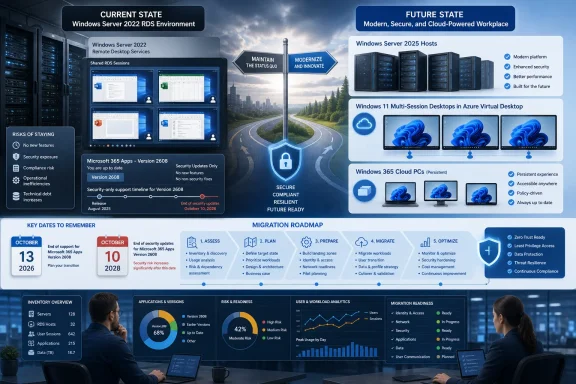 Version 2608 Starts the Freeze, Not the Outage
Microsoft says Windows Server 2022 devices will receive Microsoft 365 Apps feature updates until Version 2608 is released. Those installations will then remain on Version 2608 and receive security updates through October 10, 2028, according to Microsoft’s Windows Server support guidance for Microsoft 365 Apps.That does not mean Word, Excel, Outlook, PowerPoint, or other installed apps suddenly stop opening. It means Server 2022 becomes a frozen Office platform: security fixes continue, but new features and feature-level improvements do not.
The timing is less precise than a conventional end-of-support date. As of July 14, 2026, Current Channel and Microsoft’s newly unified enterprise channel were on Version 2606, while Microsoft had not published Version 2608 release details. The practical freeze therefore depends on when Version 2608 becomes available to each organization’s channel, rather than on one confirmed global date.
Administrators should not turn “2608” into an assumed August deadline or schedule a production change around an unannounced release day. The meaningful trigger is when Version 2608 is actually offered to the channel assigned to a particular Server 2022 installation.
The next boundary is fixed. Microsoft 365 Apps support on Windows Server 2022 ends on October 13, 2026, when the operating system leaves Mainstream Support. Windows Server 2022 itself remains in Extended Support until October 14, 2031, but that longer OS lifecycle does not extend full Microsoft 365 Apps support.
This distinction matters in support cases. A server can remain supported as a Windows Server operating system while its Microsoft 365 Apps deployment is outside the normally supported configuration.
Inventory the Estate Before Choosing a Destination
The first migration task is not selecting Azure Virtual Desktop or ordering Server 2025 licenses. It is discovering every Server 2022 system on which Microsoft 365 Apps is installed, including lightly used RDS collections, administrative jump hosts, application servers with Office automation dependencies, and dormant disaster-recovery images.Use the organization’s existing endpoint management, software inventory, configuration management, or vulnerability-management platform to build a report containing at least:
- Each device’s Windows Server edition and version.
- Whether Microsoft 365 Apps is installed.
- The installed Microsoft 365 Apps version and assigned update channel.
- Whether the server provides shared interactive sessions.
- The applications, add-ins, macros, printers, profile tools, and authentication components required by its users.
- The server owner, user group, business function, and planned retirement date.
Create a separate exception list for hosts that cannot yet move. Each exception should name an owner, explain the blocker, identify the intended replacement, and carry a target date. Without those fields, “hold at 2608” can quietly become an unplanned production standard.
Microsoft’s parallel changes around Windows 10 and Microsoft 365 Apps offer a useful warning: an operating system may continue functioning after the preferred Office configuration has stopped advancing. WindowsForum’s earlier coverage of the Windows 10 feature-update cutoff showed the same need to separate application servicing, operating-system servicing, and real-world usability rather than treating them as one deadline.
Server 2025 Is the Least Disruptive RDS Choice
Windows Server 2025 is the most direct destination for organizations that still need traditional Remote Desktop Services and want to preserve a server-based shared-session architecture. Microsoft supports Microsoft 365 Apps on Windows Server 2025 during the operating system’s Mainstream Support period, which is scheduled to end in October 2029.That provides a longer runway, but it is not a permanent resolution. An organization beginning a substantial RDS redesign should consider whether migrating to another server platform for roughly three additional years of full Microsoft 365 Apps support is preferable to moving users onto a Windows client-based desktop model.
Server 2025 is the stronger choice when the current environment depends heavily on RDS collections, established server management practices, local infrastructure, or applications already validated for Windows Server. It can also reduce the number of architectural changes introduced in one project.
The upgrade still requires application testing. Office add-ins, profile handling, authentication flows, document-management integrations, line-of-business applications, and peripheral redirection may be more important to the outcome than Office itself. A successful Microsoft 365 Apps installation does not prove that an RDS workload is ready for production.
Windows 11 Desktops Break the Server Lifecycle Link
Azure Virtual Desktop is the natural alternative when an organization wants Windows 11 multi-session rather than another server-based Office deployment. It moves the user environment onto a Windows client platform while retaining pooled, remotely delivered desktops.This route is attractive for larger or variable user populations, organizations already operating in Azure, and teams prepared to manage image lifecycle, profiles, capacity, connectivity, and cloud costs. It is not merely a hosted replacement for an RDS Session Host; it changes the control plane and operating model.
Windows 365 is better aligned with users who need persistent, individually assigned Cloud PCs and predictable per-user provisioning. It can simplify parts of desktop delivery, but dedicating a Cloud PC to each user is materially different from concentrating many users on shared RDS hosts.
Microsoft explicitly recommends Windows 365 or Azure Virtual Desktop for customers moving away from unsupported Windows Server configurations. That recommendation reflects Microsoft’s direction, but administrators should still choose according to workload density, user persistence, networking, management skills, and application behavior—not branding alone.
A third option is hosting virtual Windows client devices with Microsoft 365 Apps on Windows Server virtualization infrastructure. Microsoft says this remains supported while the host Windows Server version is supported. This model can preserve on-premises control while separating the Office desktop lifecycle from the guest host’s server-session role, although it replaces shared sessions with individually managed client virtual machines.
Holding at 2608 Requires More Control, Not Less
A controlled Version 2608 hold is reasonable when an organization cannot complete migration by October 13, 2026, provided decision-makers understand what the extension covers. Microsoft is promising security updates through October 10, 2028—not ongoing feature compatibility or a continuation of full support.Administrators should allow the production environment to reach Version 2608 through its intended servicing channel rather than treating an unpublished build as something to pin preemptively. Before broad deployment, validate 2608 in a representative test collection containing the same add-ins, profile technology, policies, authentication methods, and published applications used in production.
After the freeze begins, monitor whether Server 2022 hosts remain on Version 2608 and continue receiving security servicing. Unexpected version movement, failed updates, channel changes, or inconsistent builds across a collection should be investigated rather than accepted as harmless drift.
Keep a known-good recovery path for the shared image or host pool, and document the update state before each maintenance cycle. Troubleshooting should first establish whether the affected host is actually on Version 2608, whether it is using the expected channel, and whether other hosts in the same collection show the same behavior.
The largest risk is not that Office immediately becomes insecure after October 2026. It is that a two-year security bridge creates false confidence while newer Microsoft 365 features, service changes, add-ins, or integrations evolve around a frozen desktop release. Microsoft itself warns that using Microsoft 365 Apps on older, unsupported operating systems can lead to reliability or performance problems as features and updates change.
Match the Platform to the Constraint
The decision can be reduced to the constraint that matters most.Choose Windows Server 2025 when preserving conventional RDS architecture and minimizing operational change outweighs the limited October 2029 Microsoft 365 Apps support horizon. Choose Azure Virtual Desktop when pooled Windows 11 multi-session desktops fit the workload and the organization can operate the Azure-based platform.
Choose Windows 365 when users benefit from persistent, individually assigned desktops and the organization prefers Cloud PC provisioning over shared-session density. Choose virtual Windows client desktops on supported Windows Server hosts when on-premises infrastructure must remain but Office users can move away from server sessions.
Hold Server 2022 at Version 2608 only when migration cannot be completed safely before October 13, 2026. The hold should have executive acceptance, named workload owners, regular servicing validation, and a migration deadline comfortably ahead of October 10, 2028.
Microsoft 365 Apps LTSC may deserve evaluation where a workload needs a deliberately static Office feature set rather than the Microsoft 365 Apps service model. It should not be treated as an automatic licensing swap or a way to avoid platform planning; administrators must separately validate whether its capabilities, servicing model, and application requirements fit the users involved.
The Remaining Administrative Questions
Does Microsoft 365 Apps stop working on October 13, 2026?No. Full support ends on that date, but Microsoft says installations held on Version 2608 will continue receiving security updates until October 10, 2028.
When exactly will Server 2022 stop receiving feature updates?
Microsoft has not published a universal Version 2608 release date. The freeze occurs when Version 2608 is released through the update channel used by the device.
Does Windows Server 2022 reach end of support in 2026?
It leaves Mainstream Support on October 13, 2026, but remains in Extended Support until October 14, 2031. That OS extension does not preserve full support for Microsoft 365 Apps.
Is upgrading to Windows Server 2025 enough?
It restores a supported Microsoft 365 Apps configuration during Server 2025 Mainstream Support, currently listed through October 2029. Organizations should still decide whether that runway justifies another server-session migration instead of moving to Windows 11 desktops.
Version 2608 is a pause point, not a destination. Administrators who inventory their Server 2022 Office footprint now can use the security-only period as an engineered migration window; those who wait until October 2028 will discover that Microsoft supplied extra servicing time, not an extra migration plan.
References
- Primary source: learn.microsoft.com
Windows Server end of support and Microsoft 365 Apps - Microsoft 365 Apps | Microsoft Learn
Provides admins using Microsoft 365 Apps with information about which versions of Windows Server are supported.learn.microsoft.com - Primary source: WindowsForum
Microsoft 365 Apps: End of Updates on Windows 10 by October 2025 | Windows Forum
Microsoft is taking yet another significant step in phasing out Windows 10 support, this time by announcing the end of updates for Microsoft 365 apps like...windowsforum.com
