

Microsoft’s Copilot is crossing a meaningful line inside Office: it is moving from a helper that drafts and summarizes into a tool that can actively complete work inside Word, Excel, and PowerPoint. That shift matters because it changes Copilot from an interface to AI into something closer to a workflow layer for Microsoft 365, with obvious implications for productivity, governance, and the balance of power in the enterprise software market. The latest wave also signals that Microsoft is betting more aggressively on agentic AI, where users delegate multi-step tasks instead of just asking for one-off answers. As the forum’s reporting and analysis notes, this is no longer just about generating text; it is about planning, executing, and returning finished work across Microsoft 365 surfaces.
Microsoft has spent the past several years steadily turning Copilot from a chat-first add-on into a deeply embedded productivity platform. In its earliest form, Copilot was primarily a conversational assistant layered into Word, Excel, PowerPoint, Outlook, and Teams, designed to help users draft content, summarize information, and speed up routine tasks. That first phase established the core promise: keep people inside the Microsoft 365 ecosystem while reducing the friction of content creation and information retrieval.
The challenge, of course, was that first-generation copilots mostly answered prompts rather than doing the work. They could propose a slide outline, summarize a meeting, or suggest a formula, but the human still had to stitch everything together. Over time, Microsoft responded by pushing Copilot closer to the actual workplace artifact: the document, the spreadsheet, the deck, and the shared project space. That evolution is central to understanding the current announcement, because it reflects a broader industry shift from generative assistance toward agentic execution.
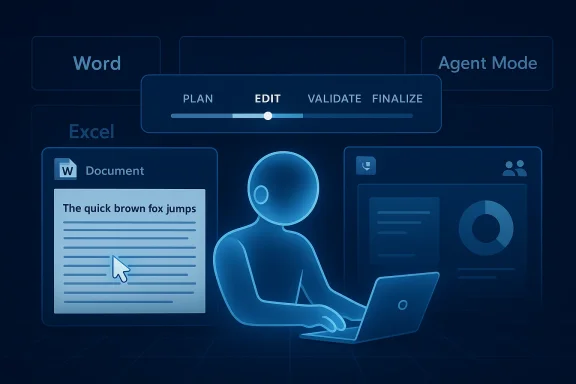
The forum’s coverage makes clear that Microsoft’s March 2026 Copilot wave was not a one-off feature update but a platform reorientation. It included in-canvas Agent Mode for Word and Excel, a chat-first Office Agent experience, and broader efforts to let Copilot plan, validate, and iterate inside the work itself. In other words, the company is no longer treating Copilot as a chatbot bolted onto Office; it is trying to make Copilot the operating layer for Office workflows.
That matters because Microsoft’s product strategy has always depended on being where work happens. If the company can make Copilot the place where work is assigned, tracked, revised, and completed, it strengthens the Microsoft 365 moat in a way that a standalone AI tool cannot easily match. It also raises the stakes for competitors, since every rival now has to answer a harder question than “can your model write well?” They have to answer, can your product stay embedded in the flow of work?
The practical difference is that users are no longer limited to asking Copilot for a paragraph, a table, or a slide outline. They can now ask it to perform a sequence of steps that culminates in a usable artifact, often with iterations and validation along the way. That is why the forum’s analysis repeatedly describes the experience as assign and audit rather than ask and receive. The user becomes less of a prompt writer and more of a manager reviewing output.
The result is a better fit for knowledge work that is repetitive but not trivial. Think monthly business reviews, sales updates, competitive summaries, board-ready presentations, or department-level planning documents. These are exactly the kinds of workflows where AI can save time without completely replacing human judgment, which is why Microsoft sees a commercial opportunity here.
This is also where Microsoft’s advantage becomes unusually strong. The company owns the app suite, the identity layer, the file format ecosystem, and the collaboration stack. Competitors can offer better models or slicker chat interfaces, but they cannot as easily own the entire workflow environment. That makes the new Copilot experience strategically significant well beyond the feature list.
Agent Mode in Word and Excel reflects that change most clearly. Instead of producing a one-shot answer, the system can work iteratively, which is closer to how humans actually finish documents and models. That makes the AI more useful for real-world business tasks, but it also makes the behavior more opaque. The better the automation gets, the more users need to know what the system did and why.
In practical terms, this makes Copilot more suitable for line-of-business work. A financial analyst may want the spreadsheet logic adjusted after a quick review. A marketing manager may want the deck rewritten to emphasize a different angle. A project lead may want the document reshaped to fit a leadership audience. The value comes from reducing the lag between intention and revision.
This is a very different product posture from the “magic AI demo” era. Microsoft seems to understand that enterprise buyers care less about theatrical novelty and more about whether AI can be supervised, restricted, and rolled back. That is why the agent conversation is increasingly inseparable from security and compliance.
Microsoft’s emphasis on central administration, approved apps, and tenant-level management shows that the company understands adoption will depend on governance. A feature that can act inside Word or Excel is only attractive if IT can determine who can use it, what data it can see, and where it can send output. Without those controls, the security team becomes the obstacle instead of the enabler.
That matters especially in regulated industries, where audit trails, permission boundaries, and data residency are not abstract concerns. If Copilot is going to touch documents that contain financial, legal, healthcare, or customer data, then the governance story has to be airtight. In that sense, Microsoft is not merely adding AI to Office. It is building an AI control plane around Office.
For enterprises, that may be acceptable if the ROI is clear. If Copilot can save hours across hundreds or thousands of employees, the economics can work even at a premium price. But that only happens if the features are reliable enough to trust and broad enough to matter in day-to-day operations.
That said, smaller users may also feel the limitations more immediately. When you have no dedicated IT staff, the burden of checking AI output falls on the person doing the work. If Copilot makes a mistake in a report, a budget model, or a slide deck, there is no governance team to catch it. There is only the user, the deadline, and the risk.
But small teams will also judge Copilot by whether it is dependable enough to become habitual. If the output needs heavy correction, the efficiency gains disappear quickly. In other words, consumer adoption will depend less on the spectacle of “agentic AI” and more on boring, repeated usefulness. Boring is good here. Boring means predictable.
That learning curve is manageable, but it should not be ignored. The smoother Copilot becomes, the more disappointing its failures will feel when they happen. That emotional mismatch is a classic problem in AI products, especially ones sold as productivity accelerators.
That is where Microsoft has a structural advantage. It does not need to persuade users to leave Office and come into a separate AI app. It can simply embed the AI where the work already lives. That is not a small difference; it is often the difference between daily use and occasional experimentation.
This also improves Microsoft’s ability to package value. It can bundle AI with identity, storage, collaboration, administration, and enterprise security. A smaller rival may have a better agent concept, but it will struggle to match the completeness of the environment. That is why the move feels strategically bigger than any single feature announcement.
This is why the announcement matters so much to the broader enterprise AI market. It suggests the next competitive phase will not be about who has the smartest assistant. It will be about who can turn AI into a durable work system with enough trust and embeddedness to survive daily use.
The forum’s analysis hints at exactly this tension. Copilot is becoming more capable, but its usefulness still depends on context, controls, and verification. In practice, a powerful AI can also become a powerful way to amplify mistakes if the inputs are poor or the permissions are too broad. That is the tradeoff Microsoft has chosen to manage rather than avoid.
That is why the governance framing is not optional. The more Copilot does, the more important it becomes to know when to stop it, inspect it, or constrain it. Microsoft’s admin-centered approach is a recognition that AI execution without oversight is not enterprise-ready.
In that sense, the biggest operational risk is not a dramatic failure. It is quiet overconfidence. If users assume the output is good because the interface looks polished, they may miss subtle mistakes in logic, tone, or data handling. That is where AI productivity software can become dangerous in the most mundane way possible.
The other thing to watch is how Microsoft balances power and restraint. If it pushes too hard on autonomy without enough controls, enterprise buyers may hesitate. If it keeps the experience too constrained, users may not feel the productivity leap Microsoft is clearly trying to sell. That balance will shape the commercial success of the entire Copilot strategy.
Source: Digital Trends Microsoft Copilot can now do actual work inside your Word, Excel, and PowerPoint files
 Background
Microsoft has spent the past several years steadily turning Copilot from a chat-first add-on into a deeply embedded productivity platform. In its earliest form, Copilot was primarily a conversational assistant layered into Word, Excel, PowerPoint, Outlook, and Teams, designed to help users draft content, summarize information, and speed up routine tasks. That first phase established the core promise: keep people inside the Microsoft 365 ecosystem while reducing the friction of content creation and information retrieval.The challenge, of course, was that first-generation copilots mostly answered prompts rather than doing the work. They could propose a slide outline, summarize a meeting, or suggest a formula, but the human still had to stitch everything together. Over time, Microsoft responded by pushing Copilot closer to the actual workplace artifact: the document, the spreadsheet, the deck, and the shared project space. That evolution is central to understanding the current announcement, because it reflects a broader industry shift from generative assistance toward agentic execution.
The forum’s coverage makes clear that Microsoft’s March 2026 Copilot wave was not a one-off feature update but a platform reorientation. It included in-canvas Agent Mode for Word and Excel, a chat-first Office Agent experience, and broader efforts to let Copilot plan, validate, and iterate inside the work itself. In other words, the company is no longer treating Copilot as a chatbot bolted onto Office; it is trying to make Copilot the operating layer for Office workflows.
That matters because Microsoft’s product strategy has always depended on being where work happens. If the company can make Copilot the place where work is assigned, tracked, revised, and completed, it strengthens the Microsoft 365 moat in a way that a standalone AI tool cannot easily match. It also raises the stakes for competitors, since every rival now has to answer a harder question than “can your model write well?” They have to answer, can your product stay embedded in the flow of work?
What Microsoft Is Actually Changing
The headline claim in the latest coverage is simple: Copilot can now do actual work inside Word, Excel, and PowerPoint instead of merely suggesting what to do next. That may sound incremental, but it is a profound product change. It moves Copilot from a source of draft output to a participant in the editing and construction process itself.The practical difference is that users are no longer limited to asking Copilot for a paragraph, a table, or a slide outline. They can now ask it to perform a sequence of steps that culminates in a usable artifact, often with iterations and validation along the way. That is why the forum’s analysis repeatedly describes the experience as assign and audit rather than ask and receive. The user becomes less of a prompt writer and more of a manager reviewing output.
From drafting to execution
This shift is important because office productivity work is rarely a single action. A report needs data pulled from somewhere, edited for tone, checked for consistency, reformatted for presentation, and then handed off. Copilot’s new value proposition is that it can compress that chain of tasks into a more continuous experience. That does not eliminate human involvement, but it changes where the effort sits.The result is a better fit for knowledge work that is repetitive but not trivial. Think monthly business reviews, sales updates, competitive summaries, board-ready presentations, or department-level planning documents. These are exactly the kinds of workflows where AI can save time without completely replacing human judgment, which is why Microsoft sees a commercial opportunity here.
- Drafting becomes only one step in a larger chain.
- Validation matters as much as generation.
- Users review outcomes instead of micromanaging every sentence.
- The tool becomes more valuable when work is already in Microsoft 365.
Why the app boundary matters
The deeper implication is that Microsoft is erasing the border between the Copilot chat surface and the Office apps themselves. Instead of a separate assistant window, AI becomes part of the document, spreadsheet, or presentation canvas. That reduces context switching, which is one of the biggest hidden costs in modern office work.This is also where Microsoft’s advantage becomes unusually strong. The company owns the app suite, the identity layer, the file format ecosystem, and the collaboration stack. Competitors can offer better models or slicker chat interfaces, but they cannot as easily own the entire workflow environment. That makes the new Copilot experience strategically significant well beyond the feature list.
Why Agent Mode Changes the Product
One of the most important ideas in the forum material is that Microsoft is framing Copilot as an agentic system. That means the AI is not just answering a question; it is taking steps, checking results, and continuing until a task is complete. This is a major departure from the old model of one prompt, one response, one human follow-up.Agent Mode in Word and Excel reflects that change most clearly. Instead of producing a one-shot answer, the system can work iteratively, which is closer to how humans actually finish documents and models. That makes the AI more useful for real-world business tasks, but it also makes the behavior more opaque. The better the automation gets, the more users need to know what the system did and why.
Iteration is the feature
Iteration is where agentic AI starts to feel materially different from classic chatbots. A conventional assistant can draft a presentation, but an agent can revise it after receiving feedback, changing tone, structure, emphasis, or layout. That matters because most work is not completed on the first pass. It is refined, approved, and often reworked several times before anyone sees it.In practical terms, this makes Copilot more suitable for line-of-business work. A financial analyst may want the spreadsheet logic adjusted after a quick review. A marketing manager may want the deck rewritten to emphasize a different angle. A project lead may want the document reshaped to fit a leadership audience. The value comes from reducing the lag between intention and revision.
- Multi-step work is easier to delegate.
- Feedback loops happen inside the same workspace.
- Users can steer output without starting over.
- The AI behaves more like a junior collaborator than a search box.
The trust problem
But iteration introduces a trust problem. The more tasks Copilot handles on its own, the harder it becomes for users to understand exactly what happened between request and result. That is why verification, auditability, and admin controls are now central to Microsoft’s Copilot story. The company is not just selling capability; it is selling confidence that the capability can be governed.This is a very different product posture from the “magic AI demo” era. Microsoft seems to understand that enterprise buyers care less about theatrical novelty and more about whether AI can be supervised, restricted, and rolled back. That is why the agent conversation is increasingly inseparable from security and compliance.
The Enterprise Angle
For enterprise customers, the announcement is more than a convenience upgrade. It is a signal that Microsoft wants Copilot to become a managed workplace system, not just an optional productivity booster. That distinction matters because enterprises buy control as much as capability.Microsoft’s emphasis on central administration, approved apps, and tenant-level management shows that the company understands adoption will depend on governance. A feature that can act inside Word or Excel is only attractive if IT can determine who can use it, what data it can see, and where it can send output. Without those controls, the security team becomes the obstacle instead of the enabler.
Governance is now part of the product
The forum material repeatedly stresses that administrators can publish, deploy, block, or remove agents. That’s not a side note; it is a core part of the enterprise value proposition. Microsoft is effectively acknowledging that every useful agent is also a potential policy issue.That matters especially in regulated industries, where audit trails, permission boundaries, and data residency are not abstract concerns. If Copilot is going to touch documents that contain financial, legal, healthcare, or customer data, then the governance story has to be airtight. In that sense, Microsoft is not merely adding AI to Office. It is building an AI control plane around Office.
- IT needs visibility into what agents can access.
- Security teams need to control deployment.
- Compliance teams need traceability.
- Business leaders need measurable productivity gains.
The licensing incentive
There is also a commercial layer here. Microsoft has been steadily using Copilot to differentiate higher-value Microsoft 365 bundles and to encourage customers to move up the stack. The forum’s analysis points to a broader commercial packaging strategy, where more advanced agentic features become part of premium tiers rather than baseline subscriptions. That is classic Microsoft: fold innovation into a platform, then monetize governance and scale.For enterprises, that may be acceptable if the ROI is clear. If Copilot can save hours across hundreds or thousands of employees, the economics can work even at a premium price. But that only happens if the features are reliable enough to trust and broad enough to matter in day-to-day operations.
The Consumer and Small-Business Perspective
For consumers and smaller businesses, the same announcement lands differently. These users care less about policy architecture and more about whether Copilot makes work feel easier, faster, and less intimidating. The practical promise is obvious: fewer blank pages, fewer spreadsheet headaches, and fewer presentation-starting anxiety attacks.That said, smaller users may also feel the limitations more immediately. When you have no dedicated IT staff, the burden of checking AI output falls on the person doing the work. If Copilot makes a mistake in a report, a budget model, or a slide deck, there is no governance team to catch it. There is only the user, the deadline, and the risk.
Simplicity is the real value
For this audience, the biggest win is not abstract automation. It is reduced friction. A small business owner who can get a first draft of a proposal, a cleaned-up spreadsheet summary, and a polished presentation in a single workflow has effectively gained a lightweight operations assistant. That is a compelling use case.But small teams will also judge Copilot by whether it is dependable enough to become habitual. If the output needs heavy correction, the efficiency gains disappear quickly. In other words, consumer adoption will depend less on the spectacle of “agentic AI” and more on boring, repeated usefulness. Boring is good here. Boring means predictable.
- Faster first drafts.
- Less tab switching.
- Better organization for routine work.
- More accessible help for non-experts.
The learning curve still exists
The consumer story also has a hidden challenge: users must learn how to direct Copilot effectively. The forum’s later analysis makes clear that prompt craft, reusable patterns, and collaborative prompting are becoming part of the beginner experience. That means the product is still not entirely effortless; it rewards users who understand how to shape requests and verify results.That learning curve is manageable, but it should not be ignored. The smoother Copilot becomes, the more disappointing its failures will feel when they happen. That emotional mismatch is a classic problem in AI products, especially ones sold as productivity accelerators.
Competitive Implications
Microsoft’s move puts pressure on several fronts at once. It raises the bar for Google Workspace, challenges independent AI productivity startups, and even complicates the positioning of newer agent-first platforms. If the center of gravity shifts from chat to workflow execution, then the winner is the company that can best own the workflow surface itself.That is where Microsoft has a structural advantage. It does not need to persuade users to leave Office and come into a separate AI app. It can simply embed the AI where the work already lives. That is not a small difference; it is often the difference between daily use and occasional experimentation.
The platform moat gets deeper
The moat here is not just software breadth but behavioral inertia. If users begin completing tasks inside Copilot-connected Office apps, the entire habit structure of work shifts toward Microsoft. That makes switching costs higher because the user is no longer merely using a model. They are using a managed workspace.This also improves Microsoft’s ability to package value. It can bundle AI with identity, storage, collaboration, administration, and enterprise security. A smaller rival may have a better agent concept, but it will struggle to match the completeness of the environment. That is why the move feels strategically bigger than any single feature announcement.
- Microsoft controls the workspace.
- It controls the licensing path.
- It controls the admin model.
- It can integrate AI into existing habits.
Rivals now have a different problem
Competitors now face a more complex challenge than model parity. They must either build their own end-to-end work environment or convince users to keep hopping between systems. That is difficult, especially if Microsoft keeps collapsing the distance between input, execution, and output inside the same product family.This is why the announcement matters so much to the broader enterprise AI market. It suggests the next competitive phase will not be about who has the smartest assistant. It will be about who can turn AI into a durable work system with enough trust and embeddedness to survive daily use.
Technical and Operational Limits
It would be a mistake to treat the new Copilot capabilities as a solved problem. Any system that can execute work inside Office has to deal with permissions, error handling, source quality, and user intent. Those are not minor issues. They are the difference between a demo and a production tool.The forum’s analysis hints at exactly this tension. Copilot is becoming more capable, but its usefulness still depends on context, controls, and verification. In practice, a powerful AI can also become a powerful way to amplify mistakes if the inputs are poor or the permissions are too broad. That is the tradeoff Microsoft has chosen to manage rather than avoid.
Reliability is the hidden benchmark
The real benchmark is not whether Copilot can complete a task once. It is whether it can do so repeatedly, across different file types, with acceptable quality. Users will forgive a missed suggestion more readily than a badly edited budget or a slide deck with flawed logic. In high-stakes work, errors compound quickly.That is why the governance framing is not optional. The more Copilot does, the more important it becomes to know when to stop it, inspect it, or constrain it. Microsoft’s admin-centered approach is a recognition that AI execution without oversight is not enterprise-ready.
- Permission boundaries must be precise.
- Output quality must be consistent.
- Failures must be easy to detect.
- Users need a clear rollback path.
Human review remains essential
Even in an agentic model, the human reviewer does not disappear. The role changes, but it does not vanish. Users now have to supervise a semi-autonomous workflow, which is arguably harder than manually building the work from scratch if they do not trust the system. That makes education and UX design critical to adoption.In that sense, the biggest operational risk is not a dramatic failure. It is quiet overconfidence. If users assume the output is good because the interface looks polished, they may miss subtle mistakes in logic, tone, or data handling. That is where AI productivity software can become dangerous in the most mundane way possible.
Strengths and Opportunities
Microsoft’s move is strong because it aligns product design, distribution, and monetization in a way few rivals can match. It also fits the direction of travel for workplace AI: not just chat, but execution; not just drafts, but deliverables. The opportunity is large because it speaks directly to the tasks workers do every day.- Deep Office integration makes the AI useful where work already happens.
- Agentic workflows reduce repetitive manual effort.
- Central governance improves enterprise buy-in.
- Context awareness can make outputs more relevant.
- Premium packaging creates a clear revenue path.
- Reduced context switching can deliver genuine time savings.
- Broader platform gravity strengthens Microsoft 365 loyalty.
Risks and Concerns
The same features that make Copilot more useful also make it more sensitive. When an AI can operate inside real work documents, errors become more consequential. The risk profile grows with every step toward autonomy, especially in environments where accuracy and traceability matter.- Incorrect output can spread faster through automated workflows.
- Permission creep could expose more data than intended.
- Overreliance may weaken user judgment over time.
- Audit complexity increases as workflows become more dynamic.
- Pricing friction could slow adoption if value is unclear.
- Vendor lock-in may deepen as more work stays inside Microsoft 365.
- User confusion may persist if feature tiers are hard to distinguish.
Looking Ahead
The next phase of this story will be defined by adoption quality, not announcement volume. Microsoft can keep layering agentic features into Word, Excel, PowerPoint, Outlook, and Teams, but the real question is whether users keep returning to them after the novelty fades. If they do, Copilot becomes a new default layer of work. If they do not, it becomes another ambitious AI feature set with limited everyday use.The other thing to watch is how Microsoft balances power and restraint. If it pushes too hard on autonomy without enough controls, enterprise buyers may hesitate. If it keeps the experience too constrained, users may not feel the productivity leap Microsoft is clearly trying to sell. That balance will shape the commercial success of the entire Copilot strategy.
- Expanded app coverage across more Office workflows.
- Stronger admin and audit tools for enterprises.
- Clearer distinctions between Copilot tiers.
- More evidence of measurable productivity gains.
- Competitive responses from Google and other AI productivity players.
Source: Digital Trends Microsoft Copilot can now do actual work inside your Word, Excel, and PowerPoint files
