

Microsoft is testing new Copilot controls for Word and PowerPoint that would make the assistant more context-aware, more limited in what it can change, and eventually more consistent across consumer and commercial Microsoft 365 experiences. The important part is not that the prompt box may get bigger. It is that Microsoft appears to be learning that productivity AI needs boundaries as much as it needs model upgrades. After two years of trying to make Copilot feel inevitable, Redmond is now trying to make it feel manageable.
The first wave of Copilot was sold as a kind of ambient intelligence layer: everywhere you worked, Microsoft’s AI would be there, watching the document, reading the meeting, summarizing the inbox, drafting the response, and, increasingly, offering to do the next step. That vision made sense on an investor slide. It made less sense to a user staring at a live Word document and wondering whether the assistant was about to help, interrupt, hallucinate, or quietly rearrange the furniture.
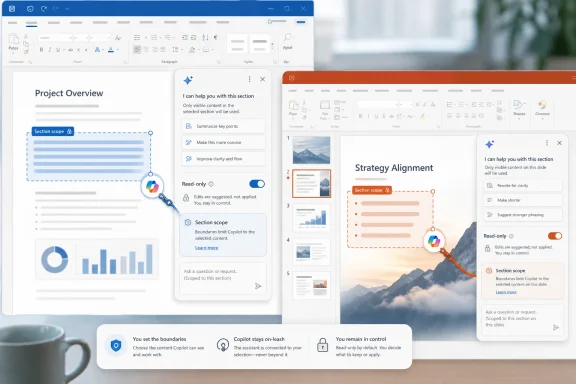
The latest reporting around Microsoft’s internal Copilot work suggests a subtler phase is taking shape. Instead of merely making Copilot more visible, Microsoft is experimenting with making it more contained. Read-only modes, section-specific scope, and context-aware prompt suggestions are not glamorous features in the way “agentic AI” demos are glamorous. But they attack the reason many people distrust AI inside productivity software: the fear that the machine is no longer just advising, but acting too broadly.
That distinction matters because Word, Excel, and PowerPoint are not social feeds or chatbots. They are work surfaces. They contain contracts, board decks, school assignments, budgets, discovery documents, compliance evidence, and half-finished thoughts that are not ready for automation. In those spaces, intelligence without restraint is not a feature; it is a liability.
Microsoft has spent years teaching users that Office documents are durable objects. The ribbon, track changes, comments, autosave, version history, and sharing permissions all exist because knowledge work depends on accountability. Copilot cannot become a serious part of that environment if its main interface remains a blank box that says, in effect, “trust me.”
That fuzziness is precisely the problem. A traditional command line is unforgiving but explicit: type the wrong thing and you usually know what you asked the machine to do. A generative AI prompt is more like delegating to an intern who is very fast, occasionally brilliant, and sometimes alarmingly confident. The interface hides the operational boundary between “answer this,” “rewrite this,” “change this file,” and “infer what I meant.”
Microsoft’s reported move toward contextually aware suggestions is an attempt to make that boundary less invisible. If the prompt box in Word understands that the user is editing a draft, it can surface actions that fit writing work rather than generic suggestions like “create” or “learn.” If the prompt box in PowerPoint understands that the user is arranging slides, it can suggest deck-specific operations rather than behaving like a chatbot stapled to a presentation app.
The risk is that context-aware suggestions become just another layer of nagging. Microsoft has a long history of mistaking discoverability for insistence, and recent complaints about floating Copilot entry points in Office show how quickly “easy access” can feel like an ad occupying the workspace. The better version of this feature is not a bigger AI billboard. It is a narrowing mechanism that helps users ask for the right thing without inviting Copilot to do everything.
In that sense, the prompt box is becoming less like a search bar and more like a permissions surface. It is where Microsoft must tell the user, implicitly or explicitly, what Copilot can see, what it can change, and how far it is allowed to roam. If the company gets that right, the prompt box becomes a useful control plane. If it gets it wrong, it becomes Clippy with write access.
This is not merely a comfort feature for nervous users. It is a workflow primitive. Lawyers, accountants, analysts, researchers, students, and administrators all spend time interrogating documents without wanting those documents changed. They ask: what is missing, where are the inconsistencies, how does this compare with the prior version, what are the action items, what is the tone, what is the risk? Those are read operations.
Once an AI assistant can also execute edits, every prompt becomes more loaded. “Make this clearer” may produce a helpful rewrite, or it may erase nuance. “Fix the formatting” may solve a minor annoyance, or it may alter the structure of a table that someone else depends on. “Summarize this section” may be harmless if the answer appears in a side pane, but not if the assistant inserts its own summary into the document body.
Microsoft’s own productivity suite already understands this distinction in other forms. Track Changes separates proposed edits from accepted edits. Comments separate conversation from content. Protected View separates inspection from trust. Read-only Copilot belongs in that lineage, not as a concession to AI skeptics but as a basic affordance for serious work.
The company’s challenge will be to make the mode legible. If users need to hunt through a settings maze to discover whether Copilot is allowed to edit, the feature will fail. The state should be visible at the point of use: this assistant can read, this assistant can suggest, this assistant can change. Anything less invites the same uncertainty that has made many users wary of AI embedded in their daily tools.
In Word, section-level scope could make Copilot genuinely useful for long documents. A user might ask it to tighten only the executive summary, convert only a selected passage into a more formal tone, or identify contradictions only within a policy section. That is different from asking an assistant to “improve this document,” a phrase so broad that it is practically an invitation to mischief.
In PowerPoint, scope may be even more important because presentations are fragile artifacts. A slide deck is not just text; it is sequencing, emphasis, layout, branding, and political compromise rendered in rectangles. Letting Copilot revise one slide or one selected portion of a deck is a different proposition from letting it rebalance the whole presentation. The former is assistance. The latter can become unauthorized editorial control.
Section locks also address a subtler psychological problem. Users are more willing to experiment when the blast radius is small. If Copilot can only touch the paragraph, table, slide, or selection in front of them, people can try prompts without feeling that the whole file is at stake. That experimentation is essential because most users still do not know which AI interactions are worth adopting.
For IT departments, scoping has governance implications. The more granular the assistant’s permissions, the easier it becomes to reason about audit, training, and acceptable use. Enterprises do not merely need Copilot to be powerful. They need it to be explainable enough that support desks, compliance teams, and records managers can live with the aftermath.
The Office suite is filled with old friction because old friction served a purpose. Save prompts, review panes, permission dialogs, sharing warnings, macro settings, and version histories are annoying until the day they prevent a mistake. Copilot has to fit into that world rather than floating above it as if documents were disposable chatbot transcripts.
This is why the “productivity leash” framing is useful. A leash is not a cage. It lets something useful move, but not beyond the handler’s reach. For Copilot, that means the assistant can inspect, recommend, draft, and even act, but only inside boundaries the user understands.
The alternative is the AI equivalent of macro chaos. Office veterans remember that automation inside documents can be both powerful and dangerous. Macros made Excel and Word astonishingly extensible, but they also became a security and governance headache because documents could carry executable behavior into environments that were not ready for it. Copilot is not the same technology, but the lesson rhymes: once documents become active surfaces, controls must mature quickly.
Microsoft has already built enormous administrative machinery around Microsoft 365, from sensitivity labels and retention policies to conditional access and audit logs. Copilot cannot remain an exception to that discipline. If it becomes an actor inside the document, it needs the cultural and technical constraints of an actor, not the vague aura of a helpful suggestion engine.
For consumers, Copilot has sometimes felt like a feature Microsoft wants them to notice more than a tool they asked to use. It appeared in Windows, Edge, Bing, mobile apps, Microsoft 365 subscriptions, and assorted sidebars with a persistence that made the product feel less like an assistant and more like a campaign. For commercial customers, Copilot has been sold as a productivity layer over Microsoft Graph, Teams, Outlook, SharePoint, OneDrive, and the Office apps, with a very different security and data story.
Those worlds cannot be identical, but they cannot be incoherent either. A user who meets Copilot at home and then meets Microsoft 365 Copilot at work should not feel as if the same brand has two personalities. An administrator evaluating the enterprise product should not have to spend half the deployment explaining how it differs from whatever showed up on an employee’s personal PC.
The unified leadership move suggests Microsoft knows that Copilot’s fragmentation is not just cosmetic. Product confusion slows adoption. It also weakens trust, because users cannot form a stable mental model of what Copilot is. Is it a chatbot? A search assistant? A writing tool? A Windows feature? A Microsoft 365 agent? A consumer subscription upsell? The answer has often been “yes,” which is not an answer at all.
The new controls reportedly being tested in productivity apps point toward a more defensible identity. Copilot in Office should be the assistant that understands the work object in front of you and respects the boundaries around it. That is a narrower promise than “AI everywhere,” but it is also a more useful one.
That difference matters. Search users expect the machine to go out into the world, collect information, and return something useful. Office users are often working inside proprietary, private, unfinished material. The assistant is not merely retrieving knowledge; it is entering the workspace.
Google’s AI ambitions raise questions about traffic, attribution, ads, and the future of search results. Microsoft’s productivity ambitions raise questions about document integrity, permission boundaries, auditability, and authorship. Both companies are pursuing the same larger thesis—that AI becomes more valuable when it is embedded in the place where work begins—but the failure modes are different.
For Microsoft, the risk is not that users will ignore Copilot entirely. The risk is that they will use it once, see it do something surprising inside an important file, and then mentally classify it as unsafe. That is a hard reputation to reverse. Productivity software is sticky because people build habits around reliability, not spectacle.
This is why incremental interface controls may matter more than another benchmark win. Users rarely care which model is behind a rewrite if they do not trust the interface that applies it. A slightly less magical Copilot that always makes its scope clear may be more valuable than a more capable Copilot that feels like it has wandered into the file with a master key.
Read-only and section-locked interactions do not answer all of those questions, but they send the right signal. They show Microsoft is thinking about least privilege at the user-interface level, not only in backend compliance language. That is important because many AI governance failures will happen in the last inch of the product: the moment when a user asks for help and the assistant does more than the user thought it would.
The Microsoft 365 customer base includes organizations that move slowly for good reasons. Hospitals, law firms, schools, manufacturers, government agencies, and financial institutions cannot treat AI document editing as a casual experiment. Even when they are interested in Copilot, they need deployment patterns that let them stage risk.
A read-only-first posture could become a sane default for many organizations. Let employees use Copilot to summarize, compare, and critique documents before granting broader editing rights. Let departments test scoped edits before enabling more autonomous workflows. Let training focus on observable, bounded tasks rather than telling everyone to “prompt better” and hoping for the best.
The phrase “human in the loop” has been overused into near meaninglessness, but in Office it can be made concrete. The human should decide the scope. The human should approve edits. The human should know when the assistant is reading versus writing. If Microsoft turns those principles into obvious controls rather than compliance slogans, Copilot has a better chance of surviving contact with enterprise reality.
The complaints have been remarkably consistent. Copilot appears in places people did not expect. Buttons move. Entry points multiply. Subscription tiers become harder to parse. Consumer Microsoft 365 plans gain AI features with pricing changes. Windows surfaces keep acquiring assistant hooks. The product can feel less like help and more like pressure.
That pressure creates a trust deficit before the assistant even answers a question. If users believe Microsoft is trying to force Copilot into their muscle memory, they will judge every imperfection more harshly. A bad summary becomes proof that the feature was not ready. An intrusive button becomes proof that the company values engagement metrics over workflow. A confusing permission boundary becomes proof that the assistant is not safe.
The reported leash features are a tacit acknowledgment of that backlash. They do not remove Copilot from Office, and Microsoft has no intention of retreating from AI as a central product strategy. But they suggest the company understands that adoption cannot be built solely by increasing surface area. At some point, making Copilot less overwhelming becomes the path to making it more widely used.
This is where Microsoft’s institutional memory should help. The company has survived multiple eras of interface backlash, from Office ribbon complaints to Windows Start menu fights to browser bundling wars. The lesson is not that users hate change. It is that users hate losing control over familiar work patterns without a compelling exchange.
Copilot has to be better than those habits often enough to justify its presence. Not theoretically better. Not demo-day better. Better on a Tuesday afternoon when a deadline is real, the document is messy, and the user does not want to learn a new interaction model. That is a high bar.
Contextual suggestions can help because they reduce the blank-page problem of prompting. Many users do not know what to ask an AI assistant, and generic prompt galleries often feel like corporate training posters. Suggestions that are genuinely tied to the file and the application could teach users by doing, showing them which tasks are safe and useful.
But Microsoft must resist the urge to turn suggestions into a growth hack. If every document becomes an opportunity to advertise another AI action, users will tune out. Good productivity software disappears when it is not needed. Bad productivity software keeps raising its hand.
The best Copilot experience may be one that is less visible most of the time and more precise when summoned. In Word, that means helping with a selected passage, not trying to be the co-author of everything. In PowerPoint, it means improving the slide at hand, not hallucinating a strategy deck. In Excel, it means explaining a formula or applying a formatting fix without pretending to understand the business better than the person who owns the spreadsheet.
Agentic AI raises the stakes because it expands both time and scope. A chatbot response is bounded by a conversation. An agent may work across applications, over minutes or hours, making a series of decisions that are harder to inspect. If users are uneasy about Copilot editing one paragraph, they will be far more uneasy about Copilot coordinating a workflow across Outlook, Teams, Word, and SharePoint.
That is why read-only modes and section locks are not merely incremental UI polish. They are training wheels for the agent era. They teach users that AI authority can be scoped. They teach Microsoft’s product teams that autonomy must be negotiated, not assumed. They give administrators concepts they can map to policy.
The industry often talks as if the future arrives by making AI more capable. In enterprise software, the future often arrives when capability becomes governable. The difference between a clever demo and a deployed tool is usually a pile of boring controls: permissions, logs, defaults, undo, review, rollback, and documentation.
Microsoft is unusually well positioned to build those controls because it owns the productivity stack. It also has unusually little excuse not to. If Copilot is going to live inside the world’s most widely used office suite, it must inherit the obligations of that suite. The assistant cannot be treated as a magic overlay exempt from the discipline of software that people use to run institutions.
 Microsoft Discovers That Permission Is a Product Feature
The first wave of Copilot was sold as a kind of ambient intelligence layer: everywhere you worked, Microsoft’s AI would be there, watching the document, reading the meeting, summarizing the inbox, drafting the response, and, increasingly, offering to do the next step. That vision made sense on an investor slide. It made less sense to a user staring at a live Word document and wondering whether the assistant was about to help, interrupt, hallucinate, or quietly rearrange the furniture.The latest reporting around Microsoft’s internal Copilot work suggests a subtler phase is taking shape. Instead of merely making Copilot more visible, Microsoft is experimenting with making it more contained. Read-only modes, section-specific scope, and context-aware prompt suggestions are not glamorous features in the way “agentic AI” demos are glamorous. But they attack the reason many people distrust AI inside productivity software: the fear that the machine is no longer just advising, but acting too broadly.
That distinction matters because Word, Excel, and PowerPoint are not social feeds or chatbots. They are work surfaces. They contain contracts, board decks, school assignments, budgets, discovery documents, compliance evidence, and half-finished thoughts that are not ready for automation. In those spaces, intelligence without restraint is not a feature; it is a liability.
Microsoft has spent years teaching users that Office documents are durable objects. The ribbon, track changes, comments, autosave, version history, and sharing permissions all exist because knowledge work depends on accountability. Copilot cannot become a serious part of that environment if its main interface remains a blank box that says, in effect, “trust me.”
The Prompt Box Was Never Just a Text Field
The prompt box has become the symbolic center of the generative AI era, and that is a strange fate for a rectangle. Google is expanding Gemini’s role in search, OpenAI keeps turning ChatGPT into a workspace, and Microsoft has been trying to insert Copilot into nearly every corner of Windows and Microsoft 365. The prompt box is now treated like a command line for ordinary people, except the commands are fuzzy, the outputs are probabilistic, and the consequences can touch real work.That fuzziness is precisely the problem. A traditional command line is unforgiving but explicit: type the wrong thing and you usually know what you asked the machine to do. A generative AI prompt is more like delegating to an intern who is very fast, occasionally brilliant, and sometimes alarmingly confident. The interface hides the operational boundary between “answer this,” “rewrite this,” “change this file,” and “infer what I meant.”
Microsoft’s reported move toward contextually aware suggestions is an attempt to make that boundary less invisible. If the prompt box in Word understands that the user is editing a draft, it can surface actions that fit writing work rather than generic suggestions like “create” or “learn.” If the prompt box in PowerPoint understands that the user is arranging slides, it can suggest deck-specific operations rather than behaving like a chatbot stapled to a presentation app.
The risk is that context-aware suggestions become just another layer of nagging. Microsoft has a long history of mistaking discoverability for insistence, and recent complaints about floating Copilot entry points in Office show how quickly “easy access” can feel like an ad occupying the workspace. The better version of this feature is not a bigger AI billboard. It is a narrowing mechanism that helps users ask for the right thing without inviting Copilot to do everything.
In that sense, the prompt box is becoming less like a search bar and more like a permissions surface. It is where Microsoft must tell the user, implicitly or explicitly, what Copilot can see, what it can change, and how far it is allowed to roam. If the company gets that right, the prompt box becomes a useful control plane. If it gets it wrong, it becomes Clippy with write access.
Read-Only Copilot Is an Admission That Action Has a Cost
A read-only option sounds modest, almost obvious. It is also one of the most important ideas in productivity AI. The ability to ask Copilot for analysis without granting it authority to alter the underlying document restores a separation that software has spent decades building: viewing is not editing, suggesting is not committing, and drafting is not publishing.This is not merely a comfort feature for nervous users. It is a workflow primitive. Lawyers, accountants, analysts, researchers, students, and administrators all spend time interrogating documents without wanting those documents changed. They ask: what is missing, where are the inconsistencies, how does this compare with the prior version, what are the action items, what is the tone, what is the risk? Those are read operations.
Once an AI assistant can also execute edits, every prompt becomes more loaded. “Make this clearer” may produce a helpful rewrite, or it may erase nuance. “Fix the formatting” may solve a minor annoyance, or it may alter the structure of a table that someone else depends on. “Summarize this section” may be harmless if the answer appears in a side pane, but not if the assistant inserts its own summary into the document body.
Microsoft’s own productivity suite already understands this distinction in other forms. Track Changes separates proposed edits from accepted edits. Comments separate conversation from content. Protected View separates inspection from trust. Read-only Copilot belongs in that lineage, not as a concession to AI skeptics but as a basic affordance for serious work.
The company’s challenge will be to make the mode legible. If users need to hunt through a settings maze to discover whether Copilot is allowed to edit, the feature will fail. The state should be visible at the point of use: this assistant can read, this assistant can suggest, this assistant can change. Anything less invites the same uncertainty that has made many users wary of AI embedded in their daily tools.
Section Locks Turn AI From a Roaming Assistant Into a Scoped Tool
The reported ability to lock Copilot to a specific document section may prove even more consequential than read-only mode. Scoping is how professionals control risk. A sysadmin does not give a script access to the whole tenant if it only needs one mailbox. A developer does not hand a service account production-wide permissions to run a narrow job. A writer should not have to give an AI assistant the entire document if the task concerns three paragraphs.In Word, section-level scope could make Copilot genuinely useful for long documents. A user might ask it to tighten only the executive summary, convert only a selected passage into a more formal tone, or identify contradictions only within a policy section. That is different from asking an assistant to “improve this document,” a phrase so broad that it is practically an invitation to mischief.
In PowerPoint, scope may be even more important because presentations are fragile artifacts. A slide deck is not just text; it is sequencing, emphasis, layout, branding, and political compromise rendered in rectangles. Letting Copilot revise one slide or one selected portion of a deck is a different proposition from letting it rebalance the whole presentation. The former is assistance. The latter can become unauthorized editorial control.
Section locks also address a subtler psychological problem. Users are more willing to experiment when the blast radius is small. If Copilot can only touch the paragraph, table, slide, or selection in front of them, people can try prompts without feeling that the whole file is at stake. That experimentation is essential because most users still do not know which AI interactions are worth adopting.
For IT departments, scoping has governance implications. The more granular the assistant’s permissions, the easier it becomes to reason about audit, training, and acceptable use. Enterprises do not merely need Copilot to be powerful. They need it to be explainable enough that support desks, compliance teams, and records managers can live with the aftermath.
The Office Apps Need a Seatbelt More Than a Jetpack
Microsoft’s AI messaging has often emphasized acceleration: faster drafts, faster meetings, faster analysis, faster presentations. That pitch is not wrong, but it is incomplete. Knowledge workers do not only want speed. They want confidence that the thing they are speeding up is still under their control.The Office suite is filled with old friction because old friction served a purpose. Save prompts, review panes, permission dialogs, sharing warnings, macro settings, and version histories are annoying until the day they prevent a mistake. Copilot has to fit into that world rather than floating above it as if documents were disposable chatbot transcripts.
This is why the “productivity leash” framing is useful. A leash is not a cage. It lets something useful move, but not beyond the handler’s reach. For Copilot, that means the assistant can inspect, recommend, draft, and even act, but only inside boundaries the user understands.
The alternative is the AI equivalent of macro chaos. Office veterans remember that automation inside documents can be both powerful and dangerous. Macros made Excel and Word astonishingly extensible, but they also became a security and governance headache because documents could carry executable behavior into environments that were not ready for it. Copilot is not the same technology, but the lesson rhymes: once documents become active surfaces, controls must mature quickly.
Microsoft has already built enormous administrative machinery around Microsoft 365, from sensitivity labels and retention policies to conditional access and audit logs. Copilot cannot remain an exception to that discipline. If it becomes an actor inside the document, it needs the cultural and technical constraints of an actor, not the vague aura of a helpful suggestion engine.
Consumer Copilot and Enterprise Copilot Cannot Keep Living Apart
Microsoft’s March leadership reorganization is part of the same story. By bringing consumer and commercial Copilot efforts under a more unified structure, the company is trying to solve a branding and product problem of its own making. There have been too many Copilots, too many entry points, and too many slightly different promises attached to the same name.For consumers, Copilot has sometimes felt like a feature Microsoft wants them to notice more than a tool they asked to use. It appeared in Windows, Edge, Bing, mobile apps, Microsoft 365 subscriptions, and assorted sidebars with a persistence that made the product feel less like an assistant and more like a campaign. For commercial customers, Copilot has been sold as a productivity layer over Microsoft Graph, Teams, Outlook, SharePoint, OneDrive, and the Office apps, with a very different security and data story.
Those worlds cannot be identical, but they cannot be incoherent either. A user who meets Copilot at home and then meets Microsoft 365 Copilot at work should not feel as if the same brand has two personalities. An administrator evaluating the enterprise product should not have to spend half the deployment explaining how it differs from whatever showed up on an employee’s personal PC.
The unified leadership move suggests Microsoft knows that Copilot’s fragmentation is not just cosmetic. Product confusion slows adoption. It also weakens trust, because users cannot form a stable mental model of what Copilot is. Is it a chatbot? A search assistant? A writing tool? A Windows feature? A Microsoft 365 agent? A consumer subscription upsell? The answer has often been “yes,” which is not an answer at all.
The new controls reportedly being tested in productivity apps point toward a more defensible identity. Copilot in Office should be the assistant that understands the work object in front of you and respects the boundaries around it. That is a narrower promise than “AI everywhere,” but it is also a more useful one.
The Gemini Comparison Shows Two Very Different AI Battlegrounds
The comparison with Google is unavoidable because both companies are reworking the prompt box at the center of their AI experiences. But the battlegrounds are not identical. Google’s challenge is to combine search, answers, and actions without destroying the open web economics that made Google search dominant. Microsoft’s challenge in Office is to combine assistance and authorship without destroying user agency inside documents.That difference matters. Search users expect the machine to go out into the world, collect information, and return something useful. Office users are often working inside proprietary, private, unfinished material. The assistant is not merely retrieving knowledge; it is entering the workspace.
Google’s AI ambitions raise questions about traffic, attribution, ads, and the future of search results. Microsoft’s productivity ambitions raise questions about document integrity, permission boundaries, auditability, and authorship. Both companies are pursuing the same larger thesis—that AI becomes more valuable when it is embedded in the place where work begins—but the failure modes are different.
For Microsoft, the risk is not that users will ignore Copilot entirely. The risk is that they will use it once, see it do something surprising inside an important file, and then mentally classify it as unsafe. That is a hard reputation to reverse. Productivity software is sticky because people build habits around reliability, not spectacle.
This is why incremental interface controls may matter more than another benchmark win. Users rarely care which model is behind a rewrite if they do not trust the interface that applies it. A slightly less magical Copilot that always makes its scope clear may be more valuable than a more capable Copilot that feels like it has wandered into the file with a master key.
Enterprise IT Will Read These Features as Governance Signals
For administrators, Copilot’s evolution is not a philosophical debate about the future of work. It is a deployment problem. Who gets access? Which data can it read? What logs exist? What happens when it produces wrong or sensitive content? How do you train users not to paste secrets into prompts or rely on generated summaries without verification?Read-only and section-locked interactions do not answer all of those questions, but they send the right signal. They show Microsoft is thinking about least privilege at the user-interface level, not only in backend compliance language. That is important because many AI governance failures will happen in the last inch of the product: the moment when a user asks for help and the assistant does more than the user thought it would.
The Microsoft 365 customer base includes organizations that move slowly for good reasons. Hospitals, law firms, schools, manufacturers, government agencies, and financial institutions cannot treat AI document editing as a casual experiment. Even when they are interested in Copilot, they need deployment patterns that let them stage risk.
A read-only-first posture could become a sane default for many organizations. Let employees use Copilot to summarize, compare, and critique documents before granting broader editing rights. Let departments test scoped edits before enabling more autonomous workflows. Let training focus on observable, bounded tasks rather than telling everyone to “prompt better” and hoping for the best.
The phrase “human in the loop” has been overused into near meaninglessness, but in Office it can be made concrete. The human should decide the scope. The human should approve edits. The human should know when the assistant is reading versus writing. If Microsoft turns those principles into obvious controls rather than compliance slogans, Copilot has a better chance of surviving contact with enterprise reality.
The Backlash Was Not Anti-AI; It Was Anti-Overreach
There is a temptation in the industry to frame resistance to Copilot as resistance to AI itself. That is too convenient. Many users are not angry that AI tools exist. They are angry that AI has been inserted into workflows with the subtlety of a browser toolbar from 2006.The complaints have been remarkably consistent. Copilot appears in places people did not expect. Buttons move. Entry points multiply. Subscription tiers become harder to parse. Consumer Microsoft 365 plans gain AI features with pricing changes. Windows surfaces keep acquiring assistant hooks. The product can feel less like help and more like pressure.
That pressure creates a trust deficit before the assistant even answers a question. If users believe Microsoft is trying to force Copilot into their muscle memory, they will judge every imperfection more harshly. A bad summary becomes proof that the feature was not ready. An intrusive button becomes proof that the company values engagement metrics over workflow. A confusing permission boundary becomes proof that the assistant is not safe.
The reported leash features are a tacit acknowledgment of that backlash. They do not remove Copilot from Office, and Microsoft has no intention of retreating from AI as a central product strategy. But they suggest the company understands that adoption cannot be built solely by increasing surface area. At some point, making Copilot less overwhelming becomes the path to making it more widely used.
This is where Microsoft’s institutional memory should help. The company has survived multiple eras of interface backlash, from Office ribbon complaints to Windows Start menu fights to browser bundling wars. The lesson is not that users hate change. It is that users hate losing control over familiar work patterns without a compelling exchange.
The Real Competition Is the User’s Existing Workflow
Microsoft does not merely compete with Google, OpenAI, Anthropic, or every startup selling an AI writing assistant. It competes with the way people already get work done. That includes copy and paste, comments, templates, macros, search, email threads, old files reused as new files, and the colleague down the hall who knows how the budget deck is supposed to look.Copilot has to be better than those habits often enough to justify its presence. Not theoretically better. Not demo-day better. Better on a Tuesday afternoon when a deadline is real, the document is messy, and the user does not want to learn a new interaction model. That is a high bar.
Contextual suggestions can help because they reduce the blank-page problem of prompting. Many users do not know what to ask an AI assistant, and generic prompt galleries often feel like corporate training posters. Suggestions that are genuinely tied to the file and the application could teach users by doing, showing them which tasks are safe and useful.
But Microsoft must resist the urge to turn suggestions into a growth hack. If every document becomes an opportunity to advertise another AI action, users will tune out. Good productivity software disappears when it is not needed. Bad productivity software keeps raising its hand.
The best Copilot experience may be one that is less visible most of the time and more precise when summoned. In Word, that means helping with a selected passage, not trying to be the co-author of everything. In PowerPoint, it means improving the slide at hand, not hallucinating a strategy deck. In Excel, it means explaining a formula or applying a formatting fix without pretending to understand the business better than the person who owns the spreadsheet.
Microsoft’s Agent Future Needs Boring Controls First
The broader AI industry is racing toward agents that can plan and execute multistep work. Microsoft is no exception. Its Copilot roadmap increasingly points toward assistants that do not just answer but act across calendars, files, chats, meetings, and business applications. That future will fail if users do not trust the smaller interventions happening today.Agentic AI raises the stakes because it expands both time and scope. A chatbot response is bounded by a conversation. An agent may work across applications, over minutes or hours, making a series of decisions that are harder to inspect. If users are uneasy about Copilot editing one paragraph, they will be far more uneasy about Copilot coordinating a workflow across Outlook, Teams, Word, and SharePoint.
That is why read-only modes and section locks are not merely incremental UI polish. They are training wheels for the agent era. They teach users that AI authority can be scoped. They teach Microsoft’s product teams that autonomy must be negotiated, not assumed. They give administrators concepts they can map to policy.
The industry often talks as if the future arrives by making AI more capable. In enterprise software, the future often arrives when capability becomes governable. The difference between a clever demo and a deployed tool is usually a pile of boring controls: permissions, logs, defaults, undo, review, rollback, and documentation.
Microsoft is unusually well positioned to build those controls because it owns the productivity stack. It also has unusually little excuse not to. If Copilot is going to live inside the world’s most widely used office suite, it must inherit the obligations of that suite. The assistant cannot be treated as a magic overlay exempt from the discipline of software that people use to run institutions.
The Leash Is the Feature Microsoft Should Have Led With
The concrete lesson from this round of Copilot work is that Microsoft’s most useful AI features may be the ones that make AI less presumptuous. A bigger prompt box is a UI trend. A scoped assistant is a product strategy.- Microsoft is testing Copilot changes that would make prompts in Word and PowerPoint more aware of the current app and task rather than relying on generic suggestions.
- A read-only mode would let users ask Copilot to analyze or advise without granting it permission to alter the document.
- Section-specific locking would reduce the risk of broad, unwanted edits by limiting Copilot’s attention and action to selected content.
- The March 2026 Copilot leadership reorganization fits the same pattern: Microsoft is trying to make a fragmented AI brand feel more coherent across consumer and commercial products.
- For enterprise IT, the most important signal is not that Copilot can do more, but that Microsoft appears to be designing more visible boundaries around what it can do.
- The success of Copilot in Microsoft 365 will depend less on how often Microsoft surfaces it and more on whether users trust it at the exact moment it asks to touch their work.
References
- Primary source: PCWorld
Published: 2026-05-28T19:26:13.056550
Microsoft is putting Copilot on a productivity leash | PCWorld
Microsoft is redesigning how Copilot works within its Microsoft 365 productivity apps, letting you choose what it works on and what it doesn't. And yes, like Google, the prompt box will expand.www.pcworld.com - Official source: learn.microsoft.com
Interact with documents in Microsoft 365 apps with a declarative agent | Microsoft Learn
Learn how to interact with documents in Microsoft 365 apps with a declarative agentlearn.microsoft.com - Related coverage: windowscentral.com
This is Microsoft's new "Copilot Cowork": An experiment with Anthropic's Claude AI models that plans and delegates your work | Windows Central
Microsoft ships Copilot Cowork to its Frontier program.www.windowscentral.com - Official source: support.microsoft.com
The Copilot Dynamic Action Button in Word Excel and PowerPoint - Microsoft Support
Learn about the Copilot Dynamic Action Button (DAB) in Word, Excel, and PowerPoint - how to open Copilot, dock the button, and find it if it's missing.support.microsoft.com - Related coverage: computerworld.com
Inside Microsoft’s plans to reshape M365 apps with AI – Computerworld
The evolution of the company’s productivity apps continues with the integration of generative AI tools. Microsoft's Aparna Chennapragada, chief product officer of experiences and devices, offers insights into what’s going on. www.computerworld.com
- Related coverage: windowsreport.com
Microsoft Rolls Back Floating Copilot Button in Word, Excel, and PowerPoint
Microsoft is rolling back part of its floating Copilot button changes in Word, Excel, and PowerPoint after user complaints. windowsreport.com
- Related coverage: virtualizationreview.com
'The Prompt Box Is the New Blank Page' -- What's Coming for Microsoft 365 Copilot -- Virtualization Review
In announcing its fourth annual Work Trend Index report yesterday, Microsoft teased AI features coming up for Microsoft 365, its cloud-based productivity suite.virtualizationreview.com - Related coverage: aiforautomation.io
Microsoft Copilot Silently Edits Word Docs in 2026 | AI for Automation
Microsoft Copilot now auto-edits Word, Excel & PowerPoint without asking — it's 21st century Clippy that actually rewrites your files. Here's how to stop iaiforautomation.io - Related coverage: office-watch.com
Microsoft buries the Copilot button and floats a nag in its place
Microsoft has quietly removed the Copilot button from the Home tab in Word, Excel and PowerPoint and replaced it with a permanent floating icon at the bottom rioffice-watch.com
- Official source: news.microsoft.com
- Official source: cdn-dynmedia-1.microsoft.com
- Official source: microsoft.com
</rdf:Alt> </dc:title> <dc:description> <rdf:Alt> <rdf:li xml:lang="x-default"/> </rdf:Alt> </dc:description> <dc:creator> <rdf:Seq> <rdf:li>Lukas V
</rdf:Alt> </dc:description> <dc:creator> <rdf:Seq> <rdf:li>Lukas Velushwww.microsoft.com
- Related coverage: smartlab.gov.hk
- Official source: adoption.microsoft.com
- Official source: blogs.microsoft.com
Announcing Copilot leadership update - The Official Microsoft Blog
Satya Nadella, Chairman and CEO, and Mustafa Suleyman, Executive Vice President and CEO of Microsoft AI, shared the below communications with Microsoft employees this morning. SATYA NADELLA MESSAGE I want to share two org changes we’re making to our Copilot org and superintelligence effort. It’s...blogs.microsoft.com - Related coverage: techradar.com
Microsoft is mixing up its Copilot AI leadership, so Suleyman can 'build enterprise tuned lineages' | TechRadar
Microsoft brings consumer and enterprise Copilot into closer alignmentwww.techradar.com - Related coverage: samexpert.com
Inside Microsoft's March 2026 Copilot Reorg | SAMexpert Blog
SAMexpert on Microsoft's Copilot reorg: consumer and commercial Copilot unified, Suleyman pivots to in-house AI models, Jha retires after 35 years.samexpert.com - Related coverage: investing.com
Microsoft rejigs Copilot teams, freeing up AI chief for superintelligence push By Reuters
Microsoft rejigs Copilot teams, freeing up AI chief for superintelligence pushwww.investing.com - Related coverage: redmondmag.com
Microsoft Centralizes AI Leadership to Push Unified Copilot Vision -- Redmondmag.com
Microsoft is consolidating its AI efforts under a single banner. CEO Satya Nadella announced on the company's Web site that the Copilot integrated system now supports both commercial and consumer use.redmondmag.com - Related coverage: rcpmag.com
Microsoft Consolidates AI Leadership Towards a Unified Copilot Vision -- Redmond Channel Partner
Microsoft announced that it is reorganizing its artificial intelligence leadership structure in a bid to unify its Copilot strategy.rcpmag.com - Related coverage: techbooky.com
Microsoft Restructures Copilot Leadership as Suleyman Shifts Focus
Microsoft is restructuring its Copilot and AI operations, bringing its consumer and commercial Copilot work into a single organization andwww.techbooky.com - Related coverage: gamesradar.com
Xbox CEO confirms it's "winding down" Microsoft Copilot on mobile and ending it on console | GamesRadar+
Xbox originally announced Copilot for console in Marchwww.gamesradar.com - Related coverage: techxplore.com
- Related coverage: techriver.com
