

Microsoft has moved sensitivity labels for Microsoft Entra cloud security groups into public preview, extending Microsoft Purview-governed access controls to static, non-mail-enabled security groups used across Azure, SharePoint, Power BI, and other corporate resources. The change sounds narrow, but it lands in one of the most consequential corners of enterprise identity: the group membership layer where convenience, delegation, and blast radius collide. Microsoft’s own IT organization, Microsoft Digital, helped drive the work after years of relying on custom workflows, Active Directory synchronization, and after-the-fact scans to police who could join sensitive groups. The result is both a product feature and a confession: in modern cloud administration, security policy that arrives after group creation is already late.
Sensitivity labels have spent years being treated primarily as a data governance tool. They mark documents, containers, Teams, Microsoft 365 groups, and SharePoint sites with a policy meaning: public, internal, confidential, highly confidential, or whatever taxonomy an organization chooses to impose on its own sprawl. The user-facing experience can feel like compliance wallpaper, but the administrative logic is more ambitious: labels translate business intent into enforceable technical behavior.
The missing piece was security groups. Microsoft 365 groups could already carry sensitivity labels that governed sharing and membership behavior, but traditional Entra security groups remained outside the same policy system. That mattered because these groups are often the actual switchboard for access to privileged resources: Azure subscriptions, reports, apps, sites, and custom enterprise systems.
Microsoft’s Inside Track account frames the problem through its own corporate tenant, where security groups operate as the backbone of access control. For years, those groups lacked consistent, policy-based guardrails. Administrators could restrict group creation, run scans, build forms, or chase violations after they happened, but they could not uniformly say: this kind of group must never include guests, this kind of group must be created with this membership model, and this classification must follow the group wherever it is used.
That is the deeper significance of the preview. Microsoft is not merely letting admins decorate another object type with another metadata field. It is moving sensitivity labels closer to the point where access decisions are born.
That kind of workflow is not irrational. In a large tenant, unmanaged group creation can be a risk factory. If a user can create a group, add the wrong people, and attach that group to sensitive resources, the group becomes a policy bypass disguised as collaboration. Centralizing creation gives IT a checkpoint.
But centralization also imposes a tax on the organization. Every request becomes a ticket-shaped drag on work. Every exception becomes tribal knowledge. Every sync delay becomes another reason for users to route around the system with an existing group, a broadly scoped group, or a less controlled collaboration surface.
The paradox is that crude control often creates the behavior it is trying to prevent. If getting a properly governed group takes too long, employees reuse whatever group already exists. If membership changes require on-premises tooling and synchronization, owners may delay cleanup. If policy enforcement depends on scans, then violations exist in production before the governance engine notices them.
Microsoft’s shift toward label-driven controls is an attempt to remove that tax without removing the boundary. The company’s own framing is explicit: the goal is to make reactive governance proactive. In plain English, that means catching the bad membership decision when someone tries to make it, not days later in an audit report.
This is why sensitivity labels for security groups matter more than their administrative modesty suggests. A label that prevents guests from joining an internal-only group is not just a classification badge. It is a guardrail placed on the membership transaction itself.
Enterprises have spent years investing in guest collaboration, B2B identity, conditional access, privileged identity management, access reviews, and data loss prevention. Those controls are valuable, but they can still leave a gap if group membership is treated as a routine administrative act rather than a security-sensitive decision. The group becomes the quiet hinge between identity and authorization.
Microsoft’s preview aims to make that hinge policy-aware. Instead of hoping that group owners remember which groups may include guests, the label encodes the rule. Instead of relying on security teams to find violations after the fact, the platform can block the violation before it becomes an incident.
That is the right architectural instinct. Security that depends on every employee understanding the full downstream meaning of every group assignment is not security; it is a training program waiting to fail.
Large organizations already struggle with label proliferation. Security teams define taxonomies, compliance teams refine them, legal teams contest wording, business units demand exceptions, and users ultimately see a dropdown that may or may not match how work actually happens. Creating another parallel label set for security groups would have made the feature cleaner from a product boundary perspective and worse from an administrative one.
By reusing Purview labels, Microsoft makes a strategic bet on consistency. A label such as “Confidential” or “Highly Confidential” can carry meaning across collaboration spaces and identity groups rather than being reinterpreted by each workload. That does not eliminate complexity, but it reduces semantic drift.
The tradeoff is that administrators now need to think more carefully about labels as cross-workload policy objects. A sensitivity label is no longer merely a content-handling instruction or a container governance setting. It becomes part of access control architecture. That raises the stakes for label design, publishing scope, naming, and lifecycle management.
For mature tenants, this will be welcome. For messy tenants, it will expose the mess. If labels were created casually, inconsistently, or with too many exceptions, extending them to security groups may force a cleanup that should have happened years ago.
That immutability is more than a preview limitation. It reveals how Microsoft is thinking about the threat model. If a group’s label determines whether guests or agents can join, changing that label becomes a security event, not a cosmetic edit. Allowing casual relabeling would invite downgrade attacks, accidental policy weakening, and governance ambiguity.
Still, administrators should not mistake public preview for finished architecture. Static group support will help many scenarios, but some of the most elegant identity designs rely on dynamic membership. Mail-enabled security groups remain common in Exchange-flavored environments, especially where organizations have accumulated years of distribution and authorization overlap. Distribution lists may not be security principals in the same way, but in the lived reality of Microsoft 365 administration, group types often blur in users’ expectations.
This is where Microsoft’s parity argument becomes both persuasive and incomplete. Customers do expect governance consistency across group types, but Microsoft’s group model has never been simple. Microsoft 365 groups, security groups, mail-enabled security groups, distribution lists, Teams, SharePoint sites, and Entra roles form a taxonomy that is easy to diagram and hard to live with. Sensitivity labels for Entra security groups move the model in the right direction, but they do not erase the underlying sprawl.
There is a long tradition of vendors claiming that if a product works internally, it will work for customers. Sometimes that is true. Sometimes it masks the fact that the vendor’s internal environment has engineering access, influence channels, and tolerance for preview rough edges that normal customers do not. Microsoft’s tenant is not a small business, and it is not a Fortune 500 company operating with a thin IT staff and a three-person identity team. It is its own category.
But for an identity feature like this, Microsoft’s internal deployment is still meaningful. The hard problems are not only technical scale; they are policy scale. Can a label model survive thousands of group owners? Can it support security administrators without freezing employee self-service? Can it fit into existing Purview taxonomies without demanding a governance reset? Can it block dangerous membership without turning every group creation into a help desk escalation?
The co-development story also exposes how feature design changes when the first serious customer is security-paranoid and large. Microsoft Digital reportedly pushed the Entra team to think about AI agents joining sensitive security groups, a scenario not in the original plan. That is exactly the kind of concern a smaller or less security-mature customer might not raise until after the feature had shipped.
The lesson for IT pros is not that Microsoft’s internal process is automatically a seal of quality. It is that identity features increasingly need adversarial product design before general availability. A checkbox that controls guest membership today may become the policy surface for non-human actors tomorrow.
For decades, enterprise identity revolved around human users, service accounts, applications, and devices. AI agents complicate that map because they may act on behalf of users, operate across systems, and request or inherit access in ways that feel more fluid than traditional app identities. Whether an agent should be allowed into a security group is not merely a technical question. It is a question about delegation, accountability, and the boundary between human intent and automated action.
Microsoft is trying to get ahead of that boundary by using Purview policies and sensitivity labels to control whether an agent can join a group. That suggests the company sees labels not just as data classification but as a general-purpose policy fabric. If a label can govern guests, owners, sharing behavior, and agent participation, it becomes a compact expression of organizational risk appetite.
The danger is that labels become overloaded. A single term like “Confidential” may have to answer too many questions: who can read this file, who can join this group, whether guests are allowed, whether agents are allowed, whether external sharing is permitted, and whether additional auditing applies. If the policy behind the label grows faster than users’ understanding of it, the label can become a black box.
That does not make the approach wrong. It means admins will need to document and communicate labels as operational controls, not just compliance categories. The more Microsoft ties labels to active enforcement, the less acceptable it becomes for a label taxonomy to be vague.
Self-service has always been one of the promises of cloud administration. Users create the spaces they need, invite the collaborators they need, and move faster than centralized IT ever could. But self-service without guardrails becomes sprawl. Guardrails without self-service become bureaucracy.
Sensitivity labels for security groups try to split the difference. They allow the organization to delegate routine group creation while preserving central policy. The employee sees a label choice or group configuration; the platform enforces membership boundaries behind the scenes. That is the right direction for identity governance because it aligns control with the moment of action.
There is still a human factor. If users choose the wrong label at creation time, the wrong policy may apply. If admins publish labels too broadly or define them poorly, enforcement may be technically correct and organizationally useless. If initial immutability frustrates legitimate changes, administrators may need exception workflows.
Even so, prevention beats cleanup. Most IT departments do not lack scanning tools. They lack enough hours to remediate every finding, chase every owner, and validate every exception before the next audit cycle begins. A policy that stops a risky membership assignment at creation is worth more than a dashboard that confirms it happened last Tuesday.
That is a sensible direction because enterprise risk does not respect product boundaries. A confidential SharePoint site, a Teams workspace, a Power BI report, and an Azure subscription may all be part of the same business process. If each workload requires separate governance logic, the organization gets inconsistency by default.
But shared policy currency creates its own concentration risk. A misconfigured label can have consequences across multiple services. A poorly scoped policy can block legitimate work in unexpected places. A taxonomy designed for documents may not map cleanly to cloud resource access. The more powerful the label becomes, the more disciplined its governance must be.
This is where Microsoft’s preview should prompt administrators to revisit their own label maturity. Many organizations adopted sensitivity labels to satisfy compliance requirements or enable encryption and marking in Office documents. Extending those labels to security groups demands a more architectural conversation. Which labels should be available for groups? Who can apply them? Which settings should be mandatory? What is the exception path? How are changes audited?
The answer cannot be “whatever we already had.” Reuse is efficient, but only if the reused object was designed well enough to carry more weight.
But the work does not disappear. It moves upward into taxonomy, policy design, and lifecycle governance. That is a healthier place for the work to live, but it still requires skill.
Admins will need to understand the difference between label availability and label enforcement. They will need to test creation flows, group ownership scenarios, guest addition behavior, and downstream access effects. They will need to document which group types are covered by the preview and which still require existing controls. They will also need to manage user expectations when a label cannot be changed after creation.
This is especially important in hybrid environments. Microsoft’s own story includes on-premises Active Directory, synchronization, tooling, and customization. Many customers live in the same world. A cloud-only security group label feature does not instantly rationalize decades of hybrid identity practice. It gives organizations a target state, not a magic migration.
Still, the target state is clearer now. If a security group controls sensitive access, the policy governing that group should be visible, enforced, and consistent with the rest of the tenant’s information protection model. Anything else is legacy debt with a nice admin portal.
Security groups are mundane. They are created, renamed, nested, abandoned, reused, synchronized, audited, and misunderstood every day. Precisely because they are mundane, they are dangerous. The biggest enterprise risks often live not in obscure zero-days but in routine control planes that no one wants to redesign.
Reactive governance became popular because it was easier to bolt onto existing systems. Scan the groups. Find the guests. Detect unlabeled resources. Email the owners. Escalate after thirty days. Produce a report. This model satisfies auditors better than attackers because it proves awareness, not prevention.
Microsoft’s feature is part of a necessary turn away from that model. If an organization knows that guests should not be in a class of group, the platform should block it. If an AI agent should not join a sensitive group, the platform should refuse it. If a highly confidential resource should not be assigned to an unlabeled group, the future state should make that assignment impossible.
That last goal is not fully here yet, but Microsoft is pointing directly at it. The company says the longer-term vision is to prevent oversharing beyond Entra itself, making it impossible rather than merely detectable to assign highly confidential resources to unlabeled or inappropriately scoped security groups. That is the correct ambition, and it will be hard.
Licensing, role permissions, label publishing scope, and administrative responsibility will also matter. A feature that crosses Entra and Purview is inherently cross-team. Identity admins, compliance admins, security operations, SharePoint admins, and cloud platform teams may all have a stake. If those groups already disagree about labels, extending labels into security groups will surface the disagreement.
The more interesting question is whether Microsoft can make the user experience obvious enough for group owners. Security people love centralized policy. Users love getting work done. The success of this feature depends on whether the label model is clear at the moment of group creation and whether enforcement failures explain themselves without sending everyone to a documentation cave.
Microsoft has an advantage here because the concept of sensitivity labels is already familiar in many Microsoft 365 environments. It also has a burden because familiarity can breed assumptions. A user who thinks of a label as a document marking may not understand why it blocks a guest from joining a group. Admins will need to bridge that gap.
This preview is especially relevant for organizations that have restricted group creation because they cannot trust users to classify or protect groups correctly. It gives those organizations a possible path back to controlled self-service. It is also relevant for tenants with guest collaboration anxiety, where external identities are necessary but the boundary between collaboration and overexposure remains fragile.
The best early adopters will be organizations that already have a disciplined sensitivity label taxonomy. If your labels are clean, meaningful, and mapped to real access policies, extending them to security groups may be straightforward. If your labels are confusing, duplicated, politically compromised, or understood only by the compliance team, this feature will amplify those weaknesses.
The worst adoption pattern would be to enable the preview as a checkbox exercise. Label-driven group governance is not just another portal setting. It is a chance to decide what kinds of groups your organization permits, who can create them, what membership they allow, and how sensitive access should be protected before the first user is added.
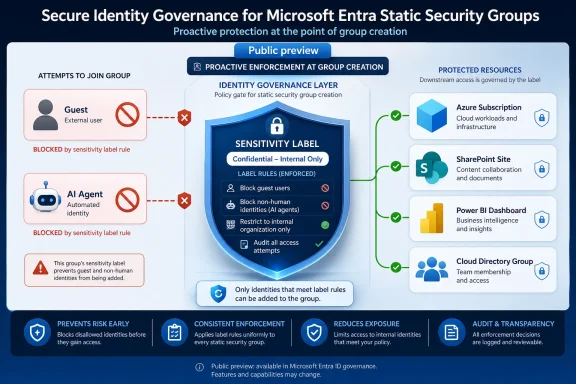 Microsoft Puts a Label on the Identity Layer
Sensitivity labels have spent years being treated primarily as a data governance tool. They mark documents, containers, Teams, Microsoft 365 groups, and SharePoint sites with a policy meaning: public, internal, confidential, highly confidential, or whatever taxonomy an organization chooses to impose on its own sprawl. The user-facing experience can feel like compliance wallpaper, but the administrative logic is more ambitious: labels translate business intent into enforceable technical behavior.The missing piece was security groups. Microsoft 365 groups could already carry sensitivity labels that governed sharing and membership behavior, but traditional Entra security groups remained outside the same policy system. That mattered because these groups are often the actual switchboard for access to privileged resources: Azure subscriptions, reports, apps, sites, and custom enterprise systems.
Microsoft’s Inside Track account frames the problem through its own corporate tenant, where security groups operate as the backbone of access control. For years, those groups lacked consistent, policy-based guardrails. Administrators could restrict group creation, run scans, build forms, or chase violations after they happened, but they could not uniformly say: this kind of group must never include guests, this kind of group must be created with this membership model, and this classification must follow the group wherever it is used.
That is the deeper significance of the preview. Microsoft is not merely letting admins decorate another object type with another metadata field. It is moving sensitivity labels closer to the point where access decisions are born.
The Old Model Made Security a Workflow Tax
Microsoft Digital’s previous workaround will be familiar to many enterprise administrators: when the platform does not provide a guardrail, IT builds a process. Employees who needed certain security groups had to request them through a form. Behind that form sat custom business logic, on-premises Active Directory infrastructure, synchronization into Entra, and the operational delay that comes with stitching yesterday’s directory model into today’s cloud estate.That kind of workflow is not irrational. In a large tenant, unmanaged group creation can be a risk factory. If a user can create a group, add the wrong people, and attach that group to sensitive resources, the group becomes a policy bypass disguised as collaboration. Centralizing creation gives IT a checkpoint.
But centralization also imposes a tax on the organization. Every request becomes a ticket-shaped drag on work. Every exception becomes tribal knowledge. Every sync delay becomes another reason for users to route around the system with an existing group, a broadly scoped group, or a less controlled collaboration surface.
The paradox is that crude control often creates the behavior it is trying to prevent. If getting a properly governed group takes too long, employees reuse whatever group already exists. If membership changes require on-premises tooling and synchronization, owners may delay cleanup. If policy enforcement depends on scans, then violations exist in production before the governance engine notices them.
Microsoft’s shift toward label-driven controls is an attempt to remove that tax without removing the boundary. The company’s own framing is explicit: the goal is to make reactive governance proactive. In plain English, that means catching the bad membership decision when someone tries to make it, not days later in an audit report.
Guest Access Is the Small Setting With the Large Blast Radius
The most obvious risk is guest access. In Microsoft’s example, a guest account added to a security group that controls an Azure subscription can inherit access to all resources associated with that subscription. That is not an edge case in spirit, even if the exact consequences vary by role assignment and resource configuration. Identity groups are frequently used as abstraction layers precisely because they make access easier to manage at scale; the same abstraction can make mistakes scale just as efficiently.This is why sensitivity labels for security groups matter more than their administrative modesty suggests. A label that prevents guests from joining an internal-only group is not just a classification badge. It is a guardrail placed on the membership transaction itself.
Enterprises have spent years investing in guest collaboration, B2B identity, conditional access, privileged identity management, access reviews, and data loss prevention. Those controls are valuable, but they can still leave a gap if group membership is treated as a routine administrative act rather than a security-sensitive decision. The group becomes the quiet hinge between identity and authorization.
Microsoft’s preview aims to make that hinge policy-aware. Instead of hoping that group owners remember which groups may include guests, the label encodes the rule. Instead of relying on security teams to find violations after the fact, the platform can block the violation before it becomes an incident.
That is the right architectural instinct. Security that depends on every employee understanding the full downstream meaning of every group assignment is not security; it is a training program waiting to fail.
Reusing Purview Labels Is the Feature That Makes This Deployable
One of the smarter design choices is that Entra security groups reuse the same sensitivity labels already configured in Microsoft Purview for Microsoft 365 groups and SharePoint sites. Microsoft did not create a separate label universe for Entra security groups, and that matters.Large organizations already struggle with label proliferation. Security teams define taxonomies, compliance teams refine them, legal teams contest wording, business units demand exceptions, and users ultimately see a dropdown that may or may not match how work actually happens. Creating another parallel label set for security groups would have made the feature cleaner from a product boundary perspective and worse from an administrative one.
By reusing Purview labels, Microsoft makes a strategic bet on consistency. A label such as “Confidential” or “Highly Confidential” can carry meaning across collaboration spaces and identity groups rather than being reinterpreted by each workload. That does not eliminate complexity, but it reduces semantic drift.
The tradeoff is that administrators now need to think more carefully about labels as cross-workload policy objects. A sensitivity label is no longer merely a content-handling instruction or a container governance setting. It becomes part of access control architecture. That raises the stakes for label design, publishing scope, naming, and lifecycle management.
For mature tenants, this will be welcome. For messy tenants, it will expose the mess. If labels were created casually, inconsistently, or with too many exceptions, extending them to security groups may force a cleanup that should have happened years ago.
Preview Scope Keeps the Promise Smaller Than the Ambition
The preview is not a universal answer for every group type. Microsoft says the initial scope applies to static, non-mail-enabled security groups. Dynamic membership groups, mail-enabled security groups, and distribution lists are not supported at launch. Sensitivity labels on security groups are also initially immutable, meaning the label is set at creation and cannot be casually changed afterward, with controlled mutability expected later.That immutability is more than a preview limitation. It reveals how Microsoft is thinking about the threat model. If a group’s label determines whether guests or agents can join, changing that label becomes a security event, not a cosmetic edit. Allowing casual relabeling would invite downgrade attacks, accidental policy weakening, and governance ambiguity.
Still, administrators should not mistake public preview for finished architecture. Static group support will help many scenarios, but some of the most elegant identity designs rely on dynamic membership. Mail-enabled security groups remain common in Exchange-flavored environments, especially where organizations have accumulated years of distribution and authorization overlap. Distribution lists may not be security principals in the same way, but in the lived reality of Microsoft 365 administration, group types often blur in users’ expectations.
This is where Microsoft’s parity argument becomes both persuasive and incomplete. Customers do expect governance consistency across group types, but Microsoft’s group model has never been simple. Microsoft 365 groups, security groups, mail-enabled security groups, distribution lists, Teams, SharePoint sites, and Entra roles form a taxonomy that is easy to diagram and hard to live with. Sensitivity labels for Entra security groups move the model in the right direction, but they do not erase the underlying sprawl.
Customer Zero Is Microsoft’s Best Product Lab and Its Most Convenient Story
Microsoft’s Inside Track post leans heavily on the company’s “Customer Zero” model: Microsoft Digital works with the product team as an internal implementation partner, critic, and test bed. In this case, that arrangement appears genuinely useful. Microsoft’s own tenant is enormous, politically complex, security-sensitive, and full of the kind of legacy process that product teams can underestimate from the outside.There is a long tradition of vendors claiming that if a product works internally, it will work for customers. Sometimes that is true. Sometimes it masks the fact that the vendor’s internal environment has engineering access, influence channels, and tolerance for preview rough edges that normal customers do not. Microsoft’s tenant is not a small business, and it is not a Fortune 500 company operating with a thin IT staff and a three-person identity team. It is its own category.
But for an identity feature like this, Microsoft’s internal deployment is still meaningful. The hard problems are not only technical scale; they are policy scale. Can a label model survive thousands of group owners? Can it support security administrators without freezing employee self-service? Can it fit into existing Purview taxonomies without demanding a governance reset? Can it block dangerous membership without turning every group creation into a help desk escalation?
The co-development story also exposes how feature design changes when the first serious customer is security-paranoid and large. Microsoft Digital reportedly pushed the Entra team to think about AI agents joining sensitive security groups, a scenario not in the original plan. That is exactly the kind of concern a smaller or less security-mature customer might not raise until after the feature had shipped.
The lesson for IT pros is not that Microsoft’s internal process is automatically a seal of quality. It is that identity features increasingly need adversarial product design before general availability. A checkbox that controls guest membership today may become the policy surface for non-human actors tomorrow.
AI Agents Turn Group Membership Into a New Governance Frontier
The article’s most forward-looking detail is not guest access; it is agents. Microsoft says the team added the ability to prevent AI agents from joining sensitive security groups after Microsoft Digital raised the issue. That detail deserves more attention than it may get in a routine feature announcement.For decades, enterprise identity revolved around human users, service accounts, applications, and devices. AI agents complicate that map because they may act on behalf of users, operate across systems, and request or inherit access in ways that feel more fluid than traditional app identities. Whether an agent should be allowed into a security group is not merely a technical question. It is a question about delegation, accountability, and the boundary between human intent and automated action.
Microsoft is trying to get ahead of that boundary by using Purview policies and sensitivity labels to control whether an agent can join a group. That suggests the company sees labels not just as data classification but as a general-purpose policy fabric. If a label can govern guests, owners, sharing behavior, and agent participation, it becomes a compact expression of organizational risk appetite.
The danger is that labels become overloaded. A single term like “Confidential” may have to answer too many questions: who can read this file, who can join this group, whether guests are allowed, whether agents are allowed, whether external sharing is permitted, and whether additional auditing applies. If the policy behind the label grows faster than users’ understanding of it, the label can become a black box.
That does not make the approach wrong. It means admins will need to document and communicate labels as operational controls, not just compliance categories. The more Microsoft ties labels to active enforcement, the less acceptable it becomes for a label taxonomy to be vague.
The Real Win Is Restoring Self-Service Without Pretending Trust Is Enough
The business value Microsoft emphasizes is safe self-service. Employees can create and manage Entra security groups without IT having to fear that they will accidentally invite guests into internal-only groups. That is the kind of sentence that sounds banal until you have worked in a large tenant where every convenience feature is weighed against the possibility of a front-page breach.Self-service has always been one of the promises of cloud administration. Users create the spaces they need, invite the collaborators they need, and move faster than centralized IT ever could. But self-service without guardrails becomes sprawl. Guardrails without self-service become bureaucracy.
Sensitivity labels for security groups try to split the difference. They allow the organization to delegate routine group creation while preserving central policy. The employee sees a label choice or group configuration; the platform enforces membership boundaries behind the scenes. That is the right direction for identity governance because it aligns control with the moment of action.
There is still a human factor. If users choose the wrong label at creation time, the wrong policy may apply. If admins publish labels too broadly or define them poorly, enforcement may be technically correct and organizationally useless. If initial immutability frustrates legitimate changes, administrators may need exception workflows.
Even so, prevention beats cleanup. Most IT departments do not lack scanning tools. They lack enough hours to remediate every finding, chase every owner, and validate every exception before the next audit cycle begins. A policy that stops a risky membership assignment at creation is worth more than a dashboard that confirms it happened last Tuesday.
Security Labels Are Becoming Microsoft’s Policy Currency
Microsoft’s move fits a broader pattern across its cloud stack. Purview, Entra, Defender, SharePoint, Teams, and Microsoft 365 increasingly depend on shared policy signals rather than isolated workload settings. Labels, risk scores, conditional access states, compliance boundaries, and identity attributes are becoming the currency of administration.That is a sensible direction because enterprise risk does not respect product boundaries. A confidential SharePoint site, a Teams workspace, a Power BI report, and an Azure subscription may all be part of the same business process. If each workload requires separate governance logic, the organization gets inconsistency by default.
But shared policy currency creates its own concentration risk. A misconfigured label can have consequences across multiple services. A poorly scoped policy can block legitimate work in unexpected places. A taxonomy designed for documents may not map cleanly to cloud resource access. The more powerful the label becomes, the more disciplined its governance must be.
This is where Microsoft’s preview should prompt administrators to revisit their own label maturity. Many organizations adopted sensitivity labels to satisfy compliance requirements or enable encryption and marking in Office documents. Extending those labels to security groups demands a more architectural conversation. Which labels should be available for groups? Who can apply them? Which settings should be mandatory? What is the exception path? How are changes audited?
The answer cannot be “whatever we already had.” Reuse is efficient, but only if the reused object was designed well enough to carry more weight.
The Administrative Burden Moves From Tickets to Taxonomy
It would be tempting to frame this feature as labor-saving, and in some ways it is. Microsoft Digital can reduce reliance on forms, custom workflows, on-premises management, and reactive scans. Customers can potentially enable more self-service group creation without accepting guest-access chaos.But the work does not disappear. It moves upward into taxonomy, policy design, and lifecycle governance. That is a healthier place for the work to live, but it still requires skill.
Admins will need to understand the difference between label availability and label enforcement. They will need to test creation flows, group ownership scenarios, guest addition behavior, and downstream access effects. They will need to document which group types are covered by the preview and which still require existing controls. They will also need to manage user expectations when a label cannot be changed after creation.
This is especially important in hybrid environments. Microsoft’s own story includes on-premises Active Directory, synchronization, tooling, and customization. Many customers live in the same world. A cloud-only security group label feature does not instantly rationalize decades of hybrid identity practice. It gives organizations a target state, not a magic migration.
Still, the target state is clearer now. If a security group controls sensitive access, the policy governing that group should be visible, enforced, and consistent with the rest of the tenant’s information protection model. Anything else is legacy debt with a nice admin portal.
Microsoft’s Preview Also Reveals the Limits of After-the-Fact Governance
The rhetoric of proactive governance is not new. Every security vendor claims to shift left, prevent misconfiguration, and reduce risk before it materializes. What makes this case interesting is that Microsoft is applying that logic to an ordinary administrative object rather than an exotic attack vector.Security groups are mundane. They are created, renamed, nested, abandoned, reused, synchronized, audited, and misunderstood every day. Precisely because they are mundane, they are dangerous. The biggest enterprise risks often live not in obscure zero-days but in routine control planes that no one wants to redesign.
Reactive governance became popular because it was easier to bolt onto existing systems. Scan the groups. Find the guests. Detect unlabeled resources. Email the owners. Escalate after thirty days. Produce a report. This model satisfies auditors better than attackers because it proves awareness, not prevention.
Microsoft’s feature is part of a necessary turn away from that model. If an organization knows that guests should not be in a class of group, the platform should block it. If an AI agent should not join a sensitive group, the platform should refuse it. If a highly confidential resource should not be assigned to an unlabeled group, the future state should make that assignment impossible.
That last goal is not fully here yet, but Microsoft is pointing directly at it. The company says the longer-term vision is to prevent oversharing beyond Entra itself, making it impossible rather than merely detectable to assign highly confidential resources to unlabeled or inappropriately scoped security groups. That is the correct ambition, and it will be hard.
The Preview Is a Governance Milestone, Not a Finish Line
Public preview status should keep expectations grounded. Enterprises should test this in a controlled slice of the tenant, not flip assumptions overnight. The unsupported group types are not footnotes if they represent major parts of your access model. Initial label immutability may be a feature for security architects and a frustration for service owners.Licensing, role permissions, label publishing scope, and administrative responsibility will also matter. A feature that crosses Entra and Purview is inherently cross-team. Identity admins, compliance admins, security operations, SharePoint admins, and cloud platform teams may all have a stake. If those groups already disagree about labels, extending labels into security groups will surface the disagreement.
The more interesting question is whether Microsoft can make the user experience obvious enough for group owners. Security people love centralized policy. Users love getting work done. The success of this feature depends on whether the label model is clear at the moment of group creation and whether enforcement failures explain themselves without sending everyone to a documentation cave.
Microsoft has an advantage here because the concept of sensitivity labels is already familiar in many Microsoft 365 environments. It also has a burden because familiarity can breed assumptions. A user who thinks of a label as a document marking may not understand why it blocks a guest from joining a group. Admins will need to bridge that gap.
The Practical Reading for WindowsForum’s IT Crowd
For Windows enthusiasts and sysadmins, the immediate temptation may be to file this under Microsoft 365 compliance news and move on. That would be a mistake. Entra security groups are part of the administrative bloodstream for modern Windows and Azure estates, and label-driven governance is becoming one of Microsoft’s preferred ways to attach policy to that bloodstream.This preview is especially relevant for organizations that have restricted group creation because they cannot trust users to classify or protect groups correctly. It gives those organizations a possible path back to controlled self-service. It is also relevant for tenants with guest collaboration anxiety, where external identities are necessary but the boundary between collaboration and overexposure remains fragile.
The best early adopters will be organizations that already have a disciplined sensitivity label taxonomy. If your labels are clean, meaningful, and mapped to real access policies, extending them to security groups may be straightforward. If your labels are confusing, duplicated, politically compromised, or understood only by the compliance team, this feature will amplify those weaknesses.
The worst adoption pattern would be to enable the preview as a checkbox exercise. Label-driven group governance is not just another portal setting. It is a chance to decide what kinds of groups your organization permits, who can create them, what membership they allow, and how sensitive access should be protected before the first user is added.
The Admin Checklist Hiding Inside Microsoft’s Tenant Story
Microsoft’s own rollout offers a useful pattern, not because every tenant resembles Microsoft’s, but because the company’s pain points are common at a smaller scale. The old model mixed centralized request forms, on-premises dependencies, synchronization delays, and reactive scans. The new model tries to place enforceable policy at the point of group creation and membership management.- Organizations should inventory which sensitive resources depend on static, non-mail-enabled Entra security groups before testing the preview.
- Administrators should review existing Purview sensitivity labels to confirm that names, descriptions, and policies make sense when applied to security groups.
- Tenants that rely heavily on dynamic groups, mail-enabled security groups, or distribution lists should treat the preview as partial coverage rather than a complete governance replacement.
- Security teams should define who can create labeled security groups and how exceptions will be handled while labels remain initially immutable.
- Group owners should receive plain-language guidance explaining that labels now enforce membership behavior, not just describe sensitivity.
- AI agent access should be considered early, because non-human membership is becoming part of the same governance surface as guest access.
References
- Primary source: Microsoft
Published: 2026-05-28T17:30:20.949211
Transforming our approach to sensitivity labels at Microsoft with Microsoft Entra - Inside Track Blog
Learn how we extend sensitivity labels to our Microsoft Entra security groups using labels policy to prevent oversharing and enable secure self-service.www.microsoft.com - Official source: learn.microsoft.com
Use sensitivity labels to protect collaborative workspaces (groups and sites) | Microsoft Learn
Use sensitivity labels to protect collaborative workspaces that include SharePoint and Teams sites, Microsoft 365 groups, Viva Engage communities, and Loop workspaces.learn.microsoft.com - Related coverage: thepurviewpractitioner.com
Sensitivity label groups are replacing parent labels - what you need to do | The Purview Practitioner | The Purview Practitioner
Microsoft is replacing the parent-sublabel hierarchy with label groups. The migration is irreversible and rolling out now. Here is what changed, why it matters, and how to prepare.www.thepurviewpractitioner.com - Related coverage: mssecurity365.com
Sensitivity Label Groups in Microsoft Purview - MSSecurity365
Simplifying Information Protection If you’ve ever scrolled endlessly through sensitivity labels in Word, Outlook, or Teams, you know the frustration. Long lists of labels or confusing parent/child hierarchies can make data protection harder for end users — and messy for admins to manage. To...mssecurity365.com - Official source: techcommunity.microsoft.com
Use sensitivity labels with Microsoft Teams, Office 365 groups, and SharePoint sites
PDF documenttechcommunity.microsoft.com
