

Microsoft has marked Microsoft 365 Roadmap item 553136 as launched, bringing Copilot Chat directly into Microsoft Forms and adding access to the Surveys Agent from within the web app. The feature reached general availability in May 2026 for worldwide standard multi-tenant tenants, according to Microsoft’s updated roadmap entry.
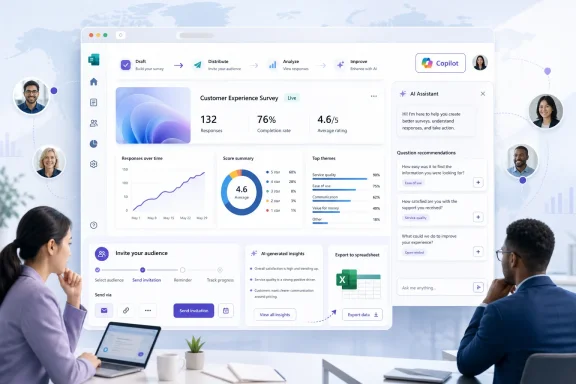
Users with a Microsoft 365 Copilot license can open the agent by selecting the Copilot icon in Forms. Microsoft describes Surveys Agent as a task-focused assistant for the full survey lifecycle: it can review a form or quiz, recommend and apply improvements, help draft and distribute invitations, and analyze collected responses.
Copilot already had a presence in Microsoft Forms for generating draft surveys and questions from a prompt. The Surveys Agent expands that role beyond initial authoring. Microsoft says the agent can help determine distribution approaches, monitor response progress, prepare follow-ups, and turn results into insights.
That positioning makes it closer to a guided workflow than a question-writing tool. For organizations that regularly run employee feedback, event, customer, or internal IT surveys, the useful change is that drafting, sending, and reviewing no longer need to start in separate Copilot experiences.
Microsoft’s support documentation says Surveys Agent can generate a survey preview for editing, recommend channels and a response strategy, and support analysis after a response threshold has been met. It can also export raw responses and summarized findings to an Excel workbook for further work and collaboration.
That distinction matters for admins. Forms may be broadly available across a tenant, while the Copilot icon and Surveys Agent capabilities depend on the individual user’s Copilot licensing. Organizations should also expect the normal governance questions around AI-generated survey wording, invitations, and interpretation of feedback—particularly for HR, compliance, or customer-facing forms.
The immediate practical consequence is that licensed Microsoft 365 Copilot users can now access survey-specific AI assistance without leaving Microsoft Forms.
Users with a Microsoft 365 Copilot license can open the agent by selecting the Copilot icon in Forms. Microsoft describes Surveys Agent as a task-focused assistant for the full survey lifecycle: it can review a form or quiz, recommend and apply improvements, help draft and distribute invitations, and analyze collected responses.
 More than form generation
Copilot already had a presence in Microsoft Forms for generating draft surveys and questions from a prompt. The Surveys Agent expands that role beyond initial authoring. Microsoft says the agent can help determine distribution approaches, monitor response progress, prepare follow-ups, and turn results into insights.That positioning makes it closer to a guided workflow than a question-writing tool. For organizations that regularly run employee feedback, event, customer, or internal IT surveys, the useful change is that drafting, sending, and reviewing no longer need to start in separate Copilot experiences.
Microsoft’s support documentation says Surveys Agent can generate a survey preview for editing, recommend channels and a response strategy, and support analysis after a response threshold has been met. It can also export raw responses and summarized findings to an Excel workbook for further work and collaboration.
Licensing and availability
The integration is web-only and listed as generally available for Microsoft Forms and Microsoft 365 Copilot. It is not a new entitlement for ordinary Forms users: Microsoft says access requires a Microsoft 365 Copilot license.That distinction matters for admins. Forms may be broadly available across a tenant, while the Copilot icon and Surveys Agent capabilities depend on the individual user’s Copilot licensing. Organizations should also expect the normal governance questions around AI-generated survey wording, invitations, and interpretation of feedback—particularly for HR, compliance, or customer-facing forms.
What to do
There is no client update or deployment action attached to the roadmap item. Admins and licensed users can check the Forms web experience for the Copilot icon and validate the workflow with a low-risk internal survey before using it for sensitive or high-volume collections.The immediate practical consequence is that licensed Microsoft 365 Copilot users can now access survey-specific AI assistance without leaving Microsoft Forms.
References
- Primary source: Microsoft 365 Roadmap
Published: 2026-07-13T23:07:14.8221961Z
Microsoft 365 Roadmap | Microsoft 365
The Microsoft 365 Roadmap lists updates that are currently planned for applicable subscribers. Check here for more information on the status of new features and updates.www.microsoft.com
- Official source: support.microsoft.com
Get started with Surveys Agent in Microsoft 365 Copilot | Microsoft Support
Get started with Surveys Agent in Microsoft 365 Copilotsupport.microsoft.com
