

Microsoft Purview File Quarantine for SharePoint Online and OneDrive for Business should be piloted now, not broadly deployed now, unless an organization can reliably classify its most sensitive files and support a manual restore process that rebuilds permissions, sharing links, and business access. For everyone else, conventional DLP blocking remains the safer production control because quarantine does more than deny access: it removes the matched file from its working location.
Microsoft 365 Roadmap ID 557190 reached worldwide general availability in mid-July 2026 after entering public preview in mid-April. Microsoft’s Purview documentation makes the operational distinction clear: a matching file is moved into an administrator-controlled SharePoint quarantine site, while the original location receives a configurable
That is a powerful containment action for genuinely high-risk content. It is also potentially disruptive for a financial workbook being coauthored, a document behind a business workflow, or a file distributed through established sharing links. File Quarantine deserves a place in the DLP toolkit, but it is not a blanket upgrade over blocking.
A traditional DLP block leaves the file where it is and restricts access according to the policy action. File Quarantine changes the storage and collaboration state of the content itself. Microsoft Purview moves the matched item to the designated quarantine SharePoint site and leaves a tombstone at the original path.
The tombstone can tell users that the document was removed by policy and identify a compliance contact. Microsoft says it also displays the relative path of the quarantined file. That is useful for an employee who needs to report a false positive, but it does not preserve the original document’s role in a team’s daily work.
The recovery limitations are the reason to treat quarantine as an incident-handling mechanism rather than a routine enforcement default. A manual restore brings back only the latest version. It does not restore the original sharing permissions or sharing links. In practice, the compliance team may return the file, while the business owner still has to reconstruct the collaboration model around it.
That makes quarantine best suited to content where the security value of immediate isolation clearly exceeds the cost of temporary operational breakage: highly sensitive regulated data, a narrowly defined label-and-data-pattern match, or material that should be reviewed before anyone continues using it.
The organization should also exclude the quarantine site from on-demand classification scans if it uses that capability, as Microsoft recommends, to avoid unnecessary processing. That detail becomes increasingly relevant as Purview expands scanning of data already at rest in SharePoint and OneDrive.
Create an isolated test SharePoint site and several test OneDrive accounts. Use clearly synthetic documents that resemble the types of files the eventual policy would inspect, but do not use live customer, employee, financial, or regulated data. Include files with intentional matches, near-matches, and content that should not match at all.
Test files should be placed in conditions that mirror real work:
A successful pilot should establish that intended matches are identified, nonmatching business files are not unexpectedly selected, and alerts give the operations team enough detail to identify the owner and original path. Microsoft says the alert includes the file owner, original file path, and quarantine location; test whether that is sufficient for the people actually expected to respond.
The pilot should also set a business standard, not merely a technical one. If the file cannot be restored and returned to productive use quickly enough for the affected business process, the policy should not move from simulation to enforcement for that workload.
Before enforcement, write a short runbook that assigns those responsibilities across compliance, SharePoint administration, the service desk, and the business owner. The team should be able to answer four questions for every quarantined file: Was the match correct? Who authorizes a restore? Who rebuilds access? Who confirms the file is usable?
The restore validation should include:
WindowsForum readers tracking Purview’s new controls should view this alongside Microsoft’s July 2026 DLP action for blocking specified SharePoint and OneDrive guests. Blocking named external recipients is often a more proportionate response when the content itself remains legitimate and the exposure concern is a particular audience. Similarly, Purview’s widening controls over Copilot processing of labeled files make accurate classification more valuable—but also make inaccurate classification more costly.
Use alert-only enforcement where the rule is new, the data pattern is broad, or the organization cannot yet identify a reliable business owner for affected files. Alert-only is also the sensible starting point for large, diverse SharePoint estates where a single policy can touch teams with very different dependencies.
Use conventional blocking or access restriction where the content needs protection but must remain in place for continuity. This is the safer default for shared working documents, active projects, and locations where sync, automation, or sharing links are integral to operations.
Use quarantine when the policy match is highly trustworthy and the protected material should not remain available while a human decides what to do next. Combining a narrowly chosen sensitive-information condition with a high-confidence sensitivity label can make that case stronger than relying on a generic data pattern alone.
The first production rollout should be narrow: one sensitive content class, a limited SharePoint scope, a trained ownership group, and a support path that has already passed restore testing. Microsoft’s policy design guidance emphasizes avoiding costly business disruption; File Quarantine makes that warning especially concrete.
File Quarantine is now generally available, but its safe adoption still depends on work Microsoft cannot automate for customers: tuning classification, deciding which files merit isolation, and restoring business collaboration when a policy is wrong or an exception is justified. Organizations that can prove those capabilities in a narrow pilot should begin testing now; those that cannot should keep DLP blocking as the production safeguard while they build the operating model quarantine requires.
Microsoft 365 Roadmap ID 557190 reached worldwide general availability in mid-July 2026 after entering public preview in mid-April. Microsoft’s Purview documentation makes the operational distinction clear: a matching file is moved into an administrator-controlled SharePoint quarantine site, while the original location receives a configurable
.txt tombstone explaining what happened.That is a powerful containment action for genuinely high-risk content. It is also potentially disruptive for a financial workbook being coauthored, a document behind a business workflow, or a file distributed through established sharing links. File Quarantine deserves a place in the DLP toolkit, but it is not a blanket upgrade over blocking.
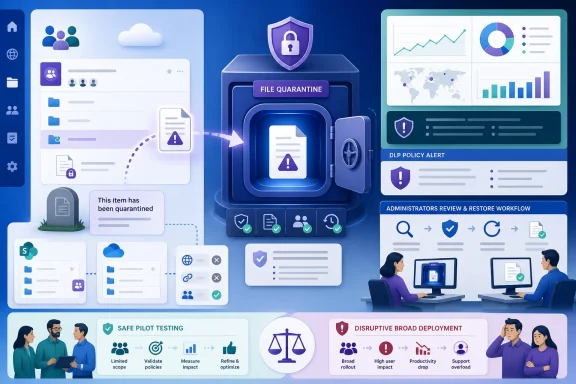 This Is Isolation, Not a More Severe Access Denial
A traditional DLP block leaves the file where it is and restricts access according to the policy action. File Quarantine changes the storage and collaboration state of the content itself. Microsoft Purview moves the matched item to the designated quarantine SharePoint site and leaves a tombstone at the original path.The tombstone can tell users that the document was removed by policy and identify a compliance contact. Microsoft says it also displays the relative path of the quarantined file. That is useful for an employee who needs to report a false positive, but it does not preserve the original document’s role in a team’s daily work.
The recovery limitations are the reason to treat quarantine as an incident-handling mechanism rather than a routine enforcement default. A manual restore brings back only the latest version. It does not restore the original sharing permissions or sharing links. In practice, the compliance team may return the file, while the business owner still has to reconstruct the collaboration model around it.
That makes quarantine best suited to content where the security value of immediate isolation clearly exceeds the cost of temporary operational breakage: highly sensitive regulated data, a narrowly defined label-and-data-pattern match, or material that should be reviewed before anyone continues using it.
Configure the Control, Then Keep It in Simulation
Microsoft’s documented setup is straightforward, but the deployment decision is not. The first configuration point is the Purview portal’s quarantine setting, not the DLP rule itself.- In the Microsoft Purview portal, open Data loss prevention > Settings > File quarantine.
- Select a dedicated SharePoint quarantine site from the tenant’s available sites. Microsoft says the destination must be a SharePoint site in the tenant and cannot be a OneDrive location.
- Restrict that site to the administrators responsible for quarantine operations. Do not use a site that contains active business content, and set a tombstone message that tells users whom to contact.
- Create or edit a Purview DLP policy scoped only to SharePoint sites and OneDrive accounts. File Quarantine is available for these locations and requires Microsoft 365 E5 licensing.
- Use advanced DLP rules to define the content conditions, then select Restrict access or encrypt the content in Microsoft 365 locations > Block everyone and move file to quarantine location.
- Turn on administrator alerts and, where appropriate, user policy-tip notifications. Before enabling enforcement, select Run the policy in simulation mode.
The organization should also exclude the quarantine site from on-demand classification scans if it uses that capability, as Microsoft recommends, to avoid unnecessary processing. That detail becomes increasingly relevant as Purview expands scanning of data already at rest in SharePoint and OneDrive.
A Pilot Needs Deliberately Safe Files and Measurable Exit Criteria
The weak version of a File Quarantine pilot is a policy created in simulation mode, followed by a few days of looking at alerts. The useful version is a controlled service test that proves the technical action, the help-desk response, and the business recovery path.Create an isolated test SharePoint site and several test OneDrive accounts. Use clearly synthetic documents that resemble the types of files the eventual policy would inspect, but do not use live customer, employee, financial, or regulated data. Include files with intentional matches, near-matches, and content that should not match at all.
Test files should be placed in conditions that mirror real work:
- Put a file in a shared library with multiple users expected to access it.
- Upload a file from a OneDrive sync client and observe the local user experience after the policy match.
- Use a document that is being coauthored when the test match occurs.
- Place a test file behind a workflow or approval process used by the pilot team.
- Create multiple versions before quarantine, then verify exactly what comes back after restoration.
- Create a duplicate file name in a controlled test to expose naming and collision behavior.
A successful pilot should establish that intended matches are identified, nonmatching business files are not unexpectedly selected, and alerts give the operations team enough detail to identify the owner and original path. Microsoft says the alert includes the file owner, original file path, and quarantine location; test whether that is sufficient for the people actually expected to respond.
The pilot should also set a business standard, not merely a technical one. If the file cannot be restored and returned to productive use quickly enough for the affected business process, the policy should not move from simulation to enforcement for that workload.
The Restore Runbook Is the Real Production Readiness Test
Quarantine turns DLP into a service operation. Someone must own the decision to restore, the administrative action, communication with the file owner, and the validation that the returned document works.Before enforcement, write a short runbook that assigns those responsibilities across compliance, SharePoint administration, the service desk, and the business owner. The team should be able to answer four questions for every quarantined file: Was the match correct? Who authorizes a restore? Who rebuilds access? Who confirms the file is usable?
The restore validation should include:
- Confirming that the restored content is the required current version, because Microsoft says only the latest version is restored.
- Reapplying necessary access for owners, collaborators, and approved external users where policy permits.
- Recreating sharing links that business processes, email threads, or documentation may still reference.
- Checking whether coauthoring, sync, workflow, retention, and records-management dependencies work after the document returns.
- Recording the incident outcome so policy engineers can distinguish a false positive from a correct quarantine that exposed an undocumented business dependency.
WindowsForum readers tracking Purview’s new controls should view this alongside Microsoft’s July 2026 DLP action for blocking specified SharePoint and OneDrive guests. Blocking named external recipients is often a more proportionate response when the content itself remains legitimate and the exposure concern is a particular audience. Similarly, Purview’s widening controls over Copilot processing of labeled files make accurate classification more valuable—but also make inaccurate classification more costly.
Match the Enforcement Action to Confidence and Consequence
The practical decision is not “quarantine versus no protection.” It is selecting the right action for the confidence level of the detection and the consequence of a mistake.Use alert-only enforcement where the rule is new, the data pattern is broad, or the organization cannot yet identify a reliable business owner for affected files. Alert-only is also the sensible starting point for large, diverse SharePoint estates where a single policy can touch teams with very different dependencies.
Use conventional blocking or access restriction where the content needs protection but must remain in place for continuity. This is the safer default for shared working documents, active projects, and locations where sync, automation, or sharing links are integral to operations.
Use quarantine when the policy match is highly trustworthy and the protected material should not remain available while a human decides what to do next. Combining a narrowly chosen sensitive-information condition with a high-confidence sensitivity label can make that case stronger than relying on a generic data pattern alone.
The first production rollout should be narrow: one sensitive content class, a limited SharePoint scope, a trained ownership group, and a support path that has already passed restore testing. Microsoft’s policy design guidance emphasizes avoiding costly business disruption; File Quarantine makes that warning especially concrete.
Frequently Asked Questions
Does File Quarantine work in OneDrive as well as SharePoint?
Yes. Microsoft Purview supports the action in DLP policies scoped to SharePoint Online and OneDrive for Business. The quarantine destination itself must be a SharePoint site, not a OneDrive location.Can users simply recover their own quarantined files?
No. Microsoft describes restoration as manual. Organizations should define who can approve and perform restoration before enabling enforcement.Does restoring the file put collaboration back exactly as it was?
No. Microsoft says a restore returns only the latest version and does not restore original sharing permissions or sharing links. That must be handled as part of the operational recovery process.Is File Quarantine available to every Microsoft 365 tenant?
No. The capability is available with Microsoft 365 E5 licensing.File Quarantine is now generally available, but its safe adoption still depends on work Microsoft cannot automate for customers: tuning classification, deciding which files merit isolation, and restoring business collaboration when a policy is wrong or an exception is justified. Organizations that can prove those capabilities in a narrow pilot should begin testing now; those that cannot should keep DLP blocking as the production safeguard while they build the operating model quarantine requires.
References
- Primary source: learn.microsoft.com
Create a DLP policy to quarantine files in SharePoint and OneDrive | Microsoft Learn
Create a DLP policy that automatically quarantines files containing sensitive information in SharePoint and OneDrive.learn.microsoft.com - Independent coverage: mc.merill.net
MC1288527 - Microsoft Purview: Data Loss Prevention – File Quarantine action for SharePoint and OneDrive | Microsoft 365 Message Center Archive
Microsoft Purview introduces a File Quarantine action for SharePoint and OneDrive DLP policies, isolating violating files in an admin-controlled location with a tombstone…mc.merill.net - Independent coverage: microsoft.com
Microsoft 365 Roadmap | Microsoft 365
The Microsoft 365 Roadmap lists updates that are currently planned for applicable subscribers. Check here for more information on the status of new features and updates.www.microsoft.com
- Independent coverage: techcommunity.microsoft.com
Prevent data loss across your ever-expanding data estate with Microsoft Purview Data Loss Prevention | Microsoft Community Hub
Organizations today grapple with securing data across the various devices, platforms, and data sources that comprise their modern ecosystem. This challenge... techcommunity.microsoft.com
- Primary source: WindowsForum
Microsoft Purview DLP Blocks Specific SharePoint and OneDrive Guests in July 2026 | Windows Forum
Microsoft has started general availability rollout of a Microsoft Purview DLP action that can block external access to sensitive SharePoint Online and...windowsforum.com
