

Microsoft has quietly removed an April 2026 Windows Learning Center article that said most Windows 11 users do not need third-party antivirus software, replacing a blunt pro-Defender message with older, more cautious guidance that frames built-in protection as strong but not universal. The deletion matters less because Microsoft changed its mind than because it exposed the fault line in modern Windows security: Defender is good enough for many people, but “good enough” is not the same thing as “the only answer.” In consumer security, the dangerous claim is rarely the technical one; it is the one that sounds too simple to be misread.
The removed article reportedly carried the headline “Best antivirus software for 2026: The built-in Windows protection you need.” That is the kind of headline Microsoft could not have written with a straight face in the Windows XP era, when third-party antivirus was less a preference than a survival mechanism. In 2026, though, the claim is not absurd. Windows 11 does ship with a competent security stack, and Microsoft Defender Antivirus is no longer the unloved safety net people tolerated until they installed something else.
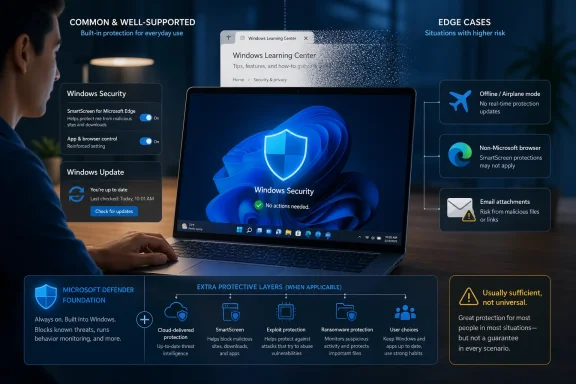
The article’s argument was straightforward: Microsoft Defender Antivirus, SmartScreen, Smart App Control, ransomware mitigations, and cloud-delivered protection give ordinary Windows 11 users a baseline that covers common attack paths without requiring another security suite. It also included sensible caveats. Windows protection was described as usually sufficient when default protections remain enabled, updates are installed regularly, and users make deliberate choices about downloads.
That last clause is doing a lot of work. “Usually sufficient” is not the same as “sufficient for everyone,” and Microsoft apparently had a second, more measured article already live from January 2026. That older piece, “Trusted antivirus protection for PCs,” presents Defender as built-in, real-time protection for many users while acknowledging that third-party products can add identity monitoring, VPNs, and broader layered features.
The problem was not that Microsoft praised Defender. The problem was that a consumer-facing advice page began to sound like a verdict on an entire industry, a threat model, and a set of operational choices that vary wildly between a retired home user, a developer running unsigned tools, a journalist handling hostile files, and an enterprise laptop moving between managed and unmanaged networks.
That evolution is one of Microsoft’s underappreciated Windows achievements. The company did not merely bundle an antivirus engine and call it a platform strategy. It integrated reputation systems, telemetry, operating-system hardening, browser protections, cloud intelligence, and enterprise-grade security concepts into the default Windows experience.
This shift has practical consequences. For millions of users, the best antivirus is the one that is already installed, already updated, and not nagging them into disabling protections with pop-ups, renewal screens, browser extensions, and “PC tune-up” upsells. Defender’s greatest advantage is not just detection. It is frictionlessness.
That is why many experienced Windows users now uninstall trialware security suites from new PCs and let Windows Security handle the basics. For a careful home user who runs Windows Update, uses mainstream software, avoids piracy sites, and does not click every attachment that lands in their inbox, Defender is often enough. Microsoft’s controversial article was directionally right for that user.
But security advice that is correct for a median user can be wrong at the edges, and attackers increasingly live at the edges.
Microsoft’s deleted page reportedly included a warning against running multiple real-time antivirus engines at once. That warning is sound. Layering security does not mean stacking two kernel-level scanners until the machine becomes slow, unstable, and confused about which product owns remediation. Anyone who has administered Windows fleets has seen “more protection” turn into driver conflicts, performance degradation, broken updates, and inscrutable help desk tickets.
Still, avoiding multiple real-time engines is not the same as avoiding third-party security altogether. A layered security model might include one endpoint protection agent, DNS filtering, browser isolation, email gateway scanning, identity monitoring, phishing-resistant authentication, least privilege, application control, backup discipline, and EDR telemetry. Antivirus is only one layer, and increasingly not the most interesting one.
That is where Microsoft’s message became too compressible. “Defender is usually sufficient” is defensible. “You do not need third-party antivirus” is a headline that strips away the conditions and leaves a universal-sounding recommendation. Once a security claim becomes a slogan, it stops being guidance and starts becoming liability.
The organization did not portray Defender as weak. Quite the opposite. It acknowledged that Microsoft’s built-in protection has matured into a credible modern security product and that Windows users benefit from that progress. That matters because this debate often collapses into tribal shouting between “Defender is all you need” and “never trust Microsoft security.” Both positions are stale.
The more interesting evidence is in the details. AV-Comparatives pointed to its March 2026 Malware Protection Test, where Defender performed strongly online but had a lower offline detection rate than several competitors. The reported gap was significant: Defender’s offline detection rate was 89.2 percent, while some competing products reached 98.6 percent.
That does not mean Defender is bad. It means Defender’s protection model leans heavily on cloud intelligence, reputation systems, and telemetry. In a connected, default Windows 11 environment, that can work extremely well. In an airplane, on a restricted corporate network, behind privacy controls, during captive-portal weirdness, or inside a deliberately segmented environment, the balance shifts toward what the product can detect locally.
This is the kind of distinction that disappears in consumer advice but matters in the field. A product can be excellent under normal conditions and less ideal under constrained ones. The security question is not whether Defender passes a vibe check; it is whether its assumptions match the user’s operating reality.
But Windows users do not all live in that stack. Many use Chrome, Firefox, Brave, Vivaldi, Thunderbird, third-party webmail, developer tools, side-loaded utilities, niche enterprise applications, and browser extensions that Microsoft neither owns nor fully mediates. In those environments, the practical coverage of URL filtering, phishing detection, attachment scanning, and behavioral alerts can differ from the idealized Windows-plus-Edge scenario.
Third-party suites often compete by being less dependent on Microsoft’s application ecosystem. They add browser-independent phishing filters, mail scanning, banking modes, VPNs, password monitoring, parental controls, dark web alerts, or identity-theft services. Some of those features are useful; some are marketing fluff; some duplicate protections users already have elsewhere.
The key point is not that third-party suites are inherently better. It is that they may cover different ground. A user who spends all day in Edge and Outlook has a different exposure profile from a user who lives in Firefox, uses Thunderbird, downloads open-source tools, tests scripts, and connects to hotel Wi-Fi every week. The same Windows Security dashboard can sit under both lives, but it is not protecting identical behavior.
Microsoft publicly saying that most Windows 11 users do not need third-party antivirus is awkward in that ecosystem. It potentially irritates security vendors, OEM partners, and retailers that benefit from bundled trials and renewals. It also risks confusing users who see Microsoft’s operating system warning them about one security provider while the manufacturer promotes another.
This does not prove that partner pressure caused the article’s removal. Microsoft has not publicly explained the deletion, and it may have been a simple editorial correction. But the silence invites speculation because the page sat at the intersection of technical truth, consumer advice, and commercial relationships.
The irony is that users have been making the same judgment for years. Many enthusiasts already remove bundled Norton or McAfee trials not because they hate antivirus, but because they dislike noisy, duplicative software on a system that already has competent baseline protection. Microsoft merely appeared to say the quiet part in official copy.
This argument is old, but it feels newly relevant. AI-assisted vulnerability research, automated malware mutation, large-scale phishing generation, and faster exploit development are changing the economics of attack. Attackers do not need every sample to work forever. They need enough variants to slip through enough defaults for long enough to monetize the gap.
Microsoft is not blind to this. Its own security strategy increasingly leans on cloud-scale telemetry, AI-assisted detection, automated response, and secure-by-default engineering. The company’s Secure Future Initiative, Windows hardening work, Smart App Control improvements, NTLM deprecation push, and broader Defender XDR efforts all point in the same direction: identity, endpoint, cloud, and developer workflows are merging into one security plane.
But that only makes diversity more valuable, not less. Different vendors bring different research teams, telemetry sources, behavioral models, browser hooks, exploit mitigations, and incident response instincts. In enterprise environments, vendor diversity can also be a hedge against platform bugs, supply-chain compromise, and detection blind spots.
For home users, this may sound abstract. For administrators, it is Tuesday.
Enterprises care about reporting, policy enforcement, incident timelines, endpoint isolation, attack surface reduction rules, SIEM integration, compliance evidence, conditional access, privileged identity, and how quickly a vendor can explain what happened after a bad morning. Antivirus detection is table stakes. The purchasing decision is increasingly about operational visibility.
That is why some organizations standardize on Microsoft’s security stack, while others choose CrowdStrike, SentinelOne, Sophos, Bitdefender, ESET, Palo Alto, Trend Micro, or another vendor. The decision is not merely “which antivirus catches more files.” It is about architecture, staff skill, licensing bundles, audit requirements, cloud strategy, and how well the tools fit the organization’s response model.
Microsoft’s consumer article was not aimed at CISOs, but public guidance has a way of escaping its intended audience. A small business owner might read “you don’t need third-party antivirus” and decide that endpoint protection strategy is solved. A school, nonprofit, or clinic might mistake baseline security for managed security. That is where blunt advice becomes operationally dangerous.
Defender is a good default. It is not a security program.
That is not ideal for a company asking users to trust its security guidance. Documentation is not just content marketing; it is part of the product surface. When Microsoft tells users how to secure Windows, those words influence buying decisions, support practices, and risk tolerance.
Quiet edits are especially awkward in security. If the company removed the article because it overstated Defender’s sufficiency, saying so would be useful. If it removed the article because the January guidance was better, saying so would be harmless. If it removed the article because partner politics got uncomfortable, silence is predictable but still corrosive.
The broader Windows Learning Center is designed for ordinary users, not security architects. That makes clarity more important, not less. Beginner-facing guidance should be cautious about universal claims because beginners are least equipped to understand the exceptions.
The case for third-party security is strongest when the user wants features Defender does not provide in the same way, or when the environment makes Defender’s assumptions less reliable. That includes offline work, non-Microsoft browsers and mail clients, family monitoring needs, identity protection, advanced anti-phishing, managed response, or organizational policy requirements.
It is also reasonable to choose Defender because it is quiet. Security software that annoys users into ignoring it is not good security. A clean default configuration with fewer pop-ups can be safer than an overstuffed suite that trains users to click through warnings.
But “Defender is enough for me” should remain a personal or organizational assessment, not a universal law. The smartest position is boring: use one reputable real-time endpoint protection layer, keep it updated, understand its limits, and build other protections around it.
 Microsoft’s Vanishing Antivirus Advice Said the Quiet Part Too Loudly
The removed article reportedly carried the headline “Best antivirus software for 2026: The built-in Windows protection you need.” That is the kind of headline Microsoft could not have written with a straight face in the Windows XP era, when third-party antivirus was less a preference than a survival mechanism. In 2026, though, the claim is not absurd. Windows 11 does ship with a competent security stack, and Microsoft Defender Antivirus is no longer the unloved safety net people tolerated until they installed something else.The article’s argument was straightforward: Microsoft Defender Antivirus, SmartScreen, Smart App Control, ransomware mitigations, and cloud-delivered protection give ordinary Windows 11 users a baseline that covers common attack paths without requiring another security suite. It also included sensible caveats. Windows protection was described as usually sufficient when default protections remain enabled, updates are installed regularly, and users make deliberate choices about downloads.
That last clause is doing a lot of work. “Usually sufficient” is not the same as “sufficient for everyone,” and Microsoft apparently had a second, more measured article already live from January 2026. That older piece, “Trusted antivirus protection for PCs,” presents Defender as built-in, real-time protection for many users while acknowledging that third-party products can add identity monitoring, VPNs, and broader layered features.
The problem was not that Microsoft praised Defender. The problem was that a consumer-facing advice page began to sound like a verdict on an entire industry, a threat model, and a set of operational choices that vary wildly between a retired home user, a developer running unsigned tools, a journalist handling hostile files, and an enterprise laptop moving between managed and unmanaged networks.
Defender Earned the Right to Be Taken Seriously
The most important context is that Microsoft was not selling vapor. Defender has improved enormously over the past decade, and the Windows security baseline in 2026 is meaningfully stronger than it was in the Windows 7 era. The default state of a Windows PC now includes real-time scanning, cloud-assisted reputation checks, tamper resistance, ransomware controls, phishing warnings in Microsoft’s ecosystem, and security features increasingly tied to hardware-backed protections.That evolution is one of Microsoft’s underappreciated Windows achievements. The company did not merely bundle an antivirus engine and call it a platform strategy. It integrated reputation systems, telemetry, operating-system hardening, browser protections, cloud intelligence, and enterprise-grade security concepts into the default Windows experience.
This shift has practical consequences. For millions of users, the best antivirus is the one that is already installed, already updated, and not nagging them into disabling protections with pop-ups, renewal screens, browser extensions, and “PC tune-up” upsells. Defender’s greatest advantage is not just detection. It is frictionlessness.
That is why many experienced Windows users now uninstall trialware security suites from new PCs and let Windows Security handle the basics. For a careful home user who runs Windows Update, uses mainstream software, avoids piracy sites, and does not click every attachment that lands in their inbox, Defender is often enough. Microsoft’s controversial article was directionally right for that user.
But security advice that is correct for a median user can be wrong at the edges, and attackers increasingly live at the edges.
The Deleted Page Ran Into the Oldest Problem in Security: Context
Security vendors love absolutes because absolutes sell. Platform vendors also love absolutes because absolutes simplify support. But actual security is conditional: it depends on behavior, connectivity, tooling, privileges, browser choice, email client, network policy, and the value of the data on the machine.Microsoft’s deleted page reportedly included a warning against running multiple real-time antivirus engines at once. That warning is sound. Layering security does not mean stacking two kernel-level scanners until the machine becomes slow, unstable, and confused about which product owns remediation. Anyone who has administered Windows fleets has seen “more protection” turn into driver conflicts, performance degradation, broken updates, and inscrutable help desk tickets.
Still, avoiding multiple real-time engines is not the same as avoiding third-party security altogether. A layered security model might include one endpoint protection agent, DNS filtering, browser isolation, email gateway scanning, identity monitoring, phishing-resistant authentication, least privilege, application control, backup discipline, and EDR telemetry. Antivirus is only one layer, and increasingly not the most interesting one.
That is where Microsoft’s message became too compressible. “Defender is usually sufficient” is defensible. “You do not need third-party antivirus” is a headline that strips away the conditions and leaves a universal-sounding recommendation. Once a security claim becomes a slogan, it stops being guidance and starts becoming liability.
AV-Comparatives Gave Microsoft an Exit Ramp
AV-Comparatives, the independent testing organization, noticed the disappearance and called the removal a constructive step. That phrasing is diplomatic, but the underlying critique is clear: Microsoft’s current, older guidance is more realistic because it positions Defender as a strong baseline rather than a universal replacement for every third-party tool.The organization did not portray Defender as weak. Quite the opposite. It acknowledged that Microsoft’s built-in protection has matured into a credible modern security product and that Windows users benefit from that progress. That matters because this debate often collapses into tribal shouting between “Defender is all you need” and “never trust Microsoft security.” Both positions are stale.
The more interesting evidence is in the details. AV-Comparatives pointed to its March 2026 Malware Protection Test, where Defender performed strongly online but had a lower offline detection rate than several competitors. The reported gap was significant: Defender’s offline detection rate was 89.2 percent, while some competing products reached 98.6 percent.
That does not mean Defender is bad. It means Defender’s protection model leans heavily on cloud intelligence, reputation systems, and telemetry. In a connected, default Windows 11 environment, that can work extremely well. In an airplane, on a restricted corporate network, behind privacy controls, during captive-portal weirdness, or inside a deliberately segmented environment, the balance shifts toward what the product can detect locally.
This is the kind of distinction that disappears in consumer advice but matters in the field. A product can be excellent under normal conditions and less ideal under constrained ones. The security question is not whether Defender passes a vibe check; it is whether its assumptions match the user’s operating reality.
The Browser Choice Matters More Than Microsoft’s Marketing Implies
Microsoft’s security stack is strongest when the user lives inside Microsoft’s world. Edge, Outlook, SmartScreen, Windows Security, Microsoft account protections, cloud reputation, and Defender telemetry reinforce one another. That integration is a feature, not a conspiracy. A platform vendor can protect users more effectively when it controls more of the surface area.But Windows users do not all live in that stack. Many use Chrome, Firefox, Brave, Vivaldi, Thunderbird, third-party webmail, developer tools, side-loaded utilities, niche enterprise applications, and browser extensions that Microsoft neither owns nor fully mediates. In those environments, the practical coverage of URL filtering, phishing detection, attachment scanning, and behavioral alerts can differ from the idealized Windows-plus-Edge scenario.
Third-party suites often compete by being less dependent on Microsoft’s application ecosystem. They add browser-independent phishing filters, mail scanning, banking modes, VPNs, password monitoring, parental controls, dark web alerts, or identity-theft services. Some of those features are useful; some are marketing fluff; some duplicate protections users already have elsewhere.
The key point is not that third-party suites are inherently better. It is that they may cover different ground. A user who spends all day in Edge and Outlook has a different exposure profile from a user who lives in Firefox, uses Thunderbird, downloads open-source tools, tests scripts, and connects to hotel Wi-Fi every week. The same Windows Security dashboard can sit under both lives, but it is not protecting identical behavior.
OEM Trialware Still Haunts the Debate
There is also a business layer Microsoft would rather not discuss too loudly. Many consumer PCs still arrive with preloaded third-party antivirus trials. These deals have long been part of the PC economics that help OEMs squeeze margin out of commodity hardware. Users know the pattern: a new laptop boots for the first time and immediately introduces them to a subscription countdown.Microsoft publicly saying that most Windows 11 users do not need third-party antivirus is awkward in that ecosystem. It potentially irritates security vendors, OEM partners, and retailers that benefit from bundled trials and renewals. It also risks confusing users who see Microsoft’s operating system warning them about one security provider while the manufacturer promotes another.
This does not prove that partner pressure caused the article’s removal. Microsoft has not publicly explained the deletion, and it may have been a simple editorial correction. But the silence invites speculation because the page sat at the intersection of technical truth, consumer advice, and commercial relationships.
The irony is that users have been making the same judgment for years. Many enthusiasts already remove bundled Norton or McAfee trials not because they hate antivirus, but because they dislike noisy, duplicative software on a system that already has competent baseline protection. Microsoft merely appeared to say the quiet part in official copy.
The Monoculture Argument Is Back, and AI Makes It Less Academic
The strongest argument against universal Defender reliance is not that Defender is inadequate. It is that monocultures are risky. If a massive share of Windows endpoints relies on the same detection engine, the same telemetry assumptions, the same cloud reputation pathways, and the same default configuration, attackers have a single target model to study at scale.This argument is old, but it feels newly relevant. AI-assisted vulnerability research, automated malware mutation, large-scale phishing generation, and faster exploit development are changing the economics of attack. Attackers do not need every sample to work forever. They need enough variants to slip through enough defaults for long enough to monetize the gap.
Microsoft is not blind to this. Its own security strategy increasingly leans on cloud-scale telemetry, AI-assisted detection, automated response, and secure-by-default engineering. The company’s Secure Future Initiative, Windows hardening work, Smart App Control improvements, NTLM deprecation push, and broader Defender XDR efforts all point in the same direction: identity, endpoint, cloud, and developer workflows are merging into one security plane.
But that only makes diversity more valuable, not less. Different vendors bring different research teams, telemetry sources, behavioral models, browser hooks, exploit mitigations, and incident response instincts. In enterprise environments, vendor diversity can also be a hedge against platform bugs, supply-chain compromise, and detection blind spots.
For home users, this may sound abstract. For administrators, it is Tuesday.
Enterprise IT Was Never Going to Read This as Consumer Advice
The phrase “most users” is doing political work. It lets Microsoft speak to the consumer middle while avoiding the enterprise edge cases where Defender becomes one component in a much larger architecture. In managed environments, Microsoft Defender for Endpoint can be very powerful, but it is not the same product experience as the free baseline Windows Security app on a home PC.Enterprises care about reporting, policy enforcement, incident timelines, endpoint isolation, attack surface reduction rules, SIEM integration, compliance evidence, conditional access, privileged identity, and how quickly a vendor can explain what happened after a bad morning. Antivirus detection is table stakes. The purchasing decision is increasingly about operational visibility.
That is why some organizations standardize on Microsoft’s security stack, while others choose CrowdStrike, SentinelOne, Sophos, Bitdefender, ESET, Palo Alto, Trend Micro, or another vendor. The decision is not merely “which antivirus catches more files.” It is about architecture, staff skill, licensing bundles, audit requirements, cloud strategy, and how well the tools fit the organization’s response model.
Microsoft’s consumer article was not aimed at CISOs, but public guidance has a way of escaping its intended audience. A small business owner might read “you don’t need third-party antivirus” and decide that endpoint protection strategy is solved. A school, nonprofit, or clinic might mistake baseline security for managed security. That is where blunt advice becomes operationally dangerous.
Defender is a good default. It is not a security program.
Microsoft’s Documentation Problem Is a Trust Problem
The deletion itself is almost as interesting as the article. Microsoft did not issue a visible correction, explain the change, or publish a clear update note. The URL reportedly redirects to the Windows Learning Center home page, leaving users to infer whether the advice was wrong, too strong, outdated, or merely inconvenient.That is not ideal for a company asking users to trust its security guidance. Documentation is not just content marketing; it is part of the product surface. When Microsoft tells users how to secure Windows, those words influence buying decisions, support practices, and risk tolerance.
Quiet edits are especially awkward in security. If the company removed the article because it overstated Defender’s sufficiency, saying so would be useful. If it removed the article because the January guidance was better, saying so would be harmless. If it removed the article because partner politics got uncomfortable, silence is predictable but still corrosive.
The broader Windows Learning Center is designed for ordinary users, not security architects. That makes clarity more important, not less. Beginner-facing guidance should be cautious about universal claims because beginners are least equipped to understand the exceptions.
The Practical Advice Has Not Changed Much
For ordinary Windows 11 users, the practical takeaway is not to panic-buy antivirus. If Windows Security is enabled, updates are current, SmartScreen and reputation protections are active, and the user practices basic hygiene, the baseline is strong. The average person is better served by keeping Windows updated, using a modern browser, enabling multifactor authentication, avoiding pirated software, and maintaining backups than by obsessing over brand names.The case for third-party security is strongest when the user wants features Defender does not provide in the same way, or when the environment makes Defender’s assumptions less reliable. That includes offline work, non-Microsoft browsers and mail clients, family monitoring needs, identity protection, advanced anti-phishing, managed response, or organizational policy requirements.
It is also reasonable to choose Defender because it is quiet. Security software that annoys users into ignoring it is not good security. A clean default configuration with fewer pop-ups can be safer than an overstuffed suite that trains users to click through warnings.
But “Defender is enough for me” should remain a personal or organizational assessment, not a universal law. The smartest position is boring: use one reputable real-time endpoint protection layer, keep it updated, understand its limits, and build other protections around it.
The Disappearing Page Leaves Windows Users With a More Honest Rulebook
The argument should now move away from whether Microsoft was “right” or “wrong.” It was mostly right about the progress of Windows Security and too loose about the universality of its conclusion. The deletion leaves a more useful set of rules for Windows users and administrators.- Microsoft Defender is now a credible default antivirus for many Windows 11 users, not a placeholder waiting to be replaced.
- The strongest case for relying on Defender is a fully updated Windows 11 system with default protections enabled and relatively ordinary browsing and download habits.
- The strongest case for third-party protection is not nostalgia for old antivirus suites, but specific needs such as offline detection, cross-browser phishing protection, identity monitoring, endpoint management, or defense diversity.
- Running multiple real-time antivirus engines is still a bad idea, even if layered security remains essential.
- Microsoft should treat deleted security guidance as a documentation event worth explaining, because silent reversals make users guess about risk.
- The real security boundary is no longer “Defender versus antivirus,” but baseline protection versus a layered model matched to the user’s actual threat profile.
References
- Primary source: Windows Latest
Published: Fri, 05 Jun 2026 20:35:26 GMT
Microsoft just quietly retracted its Windows Defender is enough antivirus claim, you might still need a third-party
Microsoft deleted an official Windows 11 blog that claimed users no longer needed third-party antivirus software like McAfee or Norton. www.windowslatest.com
- Related coverage: windowscentral.com
Microsoft says Windows 11’s Defender is enough for most users but admits some third‑party tools still offer extras | Windows Central
While Windows 11’s Defender delivers strong built‑in security, Microsoft acknowledges that third‑party tools add extra layers of protection.www.windowscentral.com - Related coverage: techradar.com
50 Microsoft tools you can use for free just in time for Build 2026 | TechRadar
Free tools from across the Microsoft ecosystemwww.techradar.com - Official source: microsoft.com
Windows Learning Center | Microsoft
Whether you’re working, gaming, or just browsing, Windows Learning Center has helpful tips, tricks, and tools to help make the everyday easier.www.microsoft.com
- Related coverage: forbes.com
The Main Street Tech Report: Microsoft Says Third Party Antivirus Software Is No Longer Needed
Weekly small business tech news: AI tools, cybersecurity, ChatGPT ads, Yelp automation, Google AI Studio, and HubSpot pricing—what it means for your business.www.forbes.com - Related coverage: pcworld.com
Is Windows 11's built-in antivirus security enough for normal people? | PCWorld
See where Windows Security stands tall and where it falls short for regular, daily use.www.pcworld.com
- Official source: learn.microsoft.com
Microsoft Defender Antivirus in Windows Overview - Microsoft Defender for Endpoint | Microsoft Learn
Learn how to manage, configure, and use Microsoft Defender Antivirus, built-in anti-malware and antivirus protection.learn.microsoft.com - Related coverage: techrepublic.com
Microsoft: Most Windows 11 Users Don’t Need Third-Party Antivirus
Microsoft says Windows 11’s built-in security is strong enough for most users, though power users and enterprises may still want third-party protection.www.techrepublic.com
- Official source: support.microsoft.com
Antivirus and antimalware software: FAQ | Microsoft Support
Find answers to common questions about Microsoft security software, including updates, where to download, and common software errors.support.microsoft.com - Related coverage: pureinfotech.com
Microsoft says Defender is enough for Windows 11 users, no third-party antivirus needed - Pureinfotech
Microsoft confirms Windows 11 Defender is enough for most users with built-in protection against malware, phishing, and ransomware threats. pureinfotech.com
- Related coverage: tomsguide.com
Bitdefender review: The ultimate antivirus software for all-round protection | Tom's Guide
Bitdefender offers excellent protection with Full Scanning, Anti-Theft, Scam Protection Pro, and many other goodies which make it fantastic value for money.www.tomsguide.com - Official source: download.microsoft.com
Microsoft - Technology Support for our Older Adults Community
Global Playbookdownload.microsoft.com
- Related coverage: av-comparatives.org
Is Microsoft Defender Enough? An Independent View | AV-Comparatives
Is Microsoft Defender enough? An independent perspective on built-in protection, defense diversity, and the changing threat landscape in 2026.av-comparatives.org
- Related coverage: betanews.com
Microsoft quietly removes a blog post claiming Windows 11 offers sufficient security - BetaNews
Microsoft recently made a pretty bold claim in saying that the security tools built into Windows 11 are enough to keep users protected. It was back in Januarybetanews.com
- Related coverage: jp.inoreader.com
Build your own newsfeed | Inoreader
With Inoreader, content comes to you the minute it's available. Follow websites, social media feeds, podcasts, blogs, and newsletters.jp.inoreader.com - Related coverage: inoreader.com
Build your own newsfeed | Inoreader
With Inoreader, content comes to you the minute it's available. Follow websites, social media feeds, podcasts, blogs, and newsletters.www.inoreader.com
