

Microsoft is replacing shared-secret authentication in the Microsoft Rights Management connector with certificate-based authentication, shifting responsibility for the connector’s Microsoft Entra identity and credentials to customers. Preview availability is scheduled for July 2026, followed by general availability in September 2026 for worldwide standard multi-tenant environments.
The change appears under Microsoft 365 Roadmap ID 564617, which Microsoft updated on July 13. Administrators installing or upgrading the connector will need to create an Entra app registration, provide a certificate, and configure each connected workload through a new PowerShell module.
This is more than an authentication toggle. Microsoft is removing the setup process that previously created a service principal and issued a shared secret on the customer’s behalf, making certificate preparation a deployment prerequisite rather than a post-installation security improvement.
The Rights Management connector provides a bridge between on-premises servers and the cloud-based Azure Rights Management service used by Microsoft Purview Information Protection. Microsoft’s deployment documentation identifies Exchange Server, SharePoint Server, and Windows file servers using File Classification Infrastructure, or FCI, as supported workloads.
Once deployed, the connector relays requests from those on-premises systems to Microsoft’s cloud protection service. That allows organizations to retain existing Information Rights Management capabilities while applying cloud-based protection to documents, email, and other supported content.
Until now, connector setup handled an important part of that cloud identity configuration. It provisioned the necessary Entra service principal and supplied a shared secret, reducing the number of identity objects and credentials administrators had to prepare manually.
Under the revised model, the installer will no longer perform those tasks. The customer must instead register an application in Microsoft Entra ID and upload the public portion of an authentication certificate before installing or upgrading the connector.
The application registration becomes an asset that the organization owns and governs. Administrators will therefore be responsible for its permissions, certificate lifecycle, monitoring, and eventual cleanup.
That is a meaningful operational change even if the resulting authentication method is stronger. Teams accustomed to treating the RMS connector as a mostly self-contained installation will now need coordination between Purview, Entra, Windows Server, and workload administrators.
The new cmdlets are intended to handle several steps that would otherwise require administrators to manipulate certificates and Windows configuration manually. According to the roadmap entry, they will support certificate import, registry configuration, private-key permissions, and validation.
That scope matters because installing a certificate is only one part of certificate-based application authentication. The relevant Windows service identity must be able to access the certificate’s private key, while workload-specific settings must direct requests through the connector correctly.
Microsoft’s existing RMS connector documentation already shows that deployment spans multiple systems. The connector runs on separate Windows Server computers, while Exchange, SharePoint, and FCI servers require their own configuration to use it. Registry-based service-location settings are part of that arrangement, although Microsoft recommends its configuration tooling over manual registry editing.
The new module should make the revised authentication chain repeatable, but administrators should not assume that one command will cover an entire environment. Microsoft explicitly describes configuration occurring for each workload, which suggests that mixed Exchange, SharePoint, and file-server estates will need workload-aware deployment steps.
Organizations running redundant connector servers must also account for every node. Microsoft recommends multiple connector systems for fault tolerance, and each server that needs to authenticate using the application certificate will require the correct certificate installation, private key, permissions, and configuration.
Certificate consistency across connector nodes will be especially important. A load-balanced deployment can appear healthy while one node fails authentication if its certificate or private-key access differs from the rest of the pool.
The change does not eliminate credential management. It changes its shape.
Certificates expire, and an expired certificate can stop unattended authentication just as decisively as an expired secret. Administrators will need a renewal process that accounts for the certificate uploaded to the Entra app registration and the corresponding private-key certificate installed on connector systems.
A safe rotation process will likely involve overlapping the old and new credentials rather than replacing them at the last possible moment. Teams should verify the exact behavior during preview, including whether multiple certificates can remain valid during a transition and how the new validation cmdlets report mismatches.
Private-key protection also becomes part of the threat model. The public certificate uploaded to Entra is not sufficient to impersonate the connector, but theft of the private key from a connector server could expose the application identity. Export permissions, backup handling, service-account access, and administrative access to those servers deserve review before deployment.
For production environments, certificate issuance should fit the organization’s established PKI and renewal procedures. A quickly generated certificate may be adequate for a lab, but it can create an unsupported operational island if nobody owns its expiration alerts or replacement process.
Microsoft’s roadmap description does not yet specify supported certificate authorities, key lengths, cryptographic providers, storage locations, or renewal behavior. Those details will need to come from the updated deployment documentation and PowerShell help accompanying the preview.
Microsoft is telling customers to register the application and upload a certificate before installing or upgrading the connector. That prerequisite should be added to change records, maintenance plans, rollback procedures, and any internal runbooks built around the current installer.
Before moving a production connector, administrators should inventory:
Deleting it too early could interrupt service, while leaving an unused application credential active creates unnecessary exposure. Organizations should identify the current identity before the change and document how they will confirm that it is no longer being used.
A staged rollout is the safer approach where architecture permits it. One connector node can be updated and validated before the rest of a load-balanced group, provided the old and new nodes can coexist and Microsoft supports that configuration. The preview documentation will need to settle that point before administrators rely on rolling upgrades.
IT teams should use the preview to answer practical questions that the roadmap entry cannot: which Entra API permissions the app requires, whether admin consent is necessary, how certificates are selected, what event logs record authentication failures, and how rotation works without downtime.
Testing should also cover negative conditions. An expired certificate, missing private-key permission, incorrect thumbprint, absent registry value, or incomplete workload configuration should generate errors that monitoring systems can detect before users encounter failures opening or protecting content.
The security improvement is straightforward; the migration is not. By ending automatic service-principal and secret provisioning, Microsoft is giving customers clearer control over a sensitive application identity, but it is also turning identity and certificate readiness into hard dependencies for every future RMS connector installation and upgrade.
For administrators, September is not the date to begin. The work starts with the July preview: build the Entra registration process, establish certificate ownership and rotation, test the new PowerShell module, and ensure every connector node and workload can be validated before the old shared-secret path disappears.
The change appears under Microsoft 365 Roadmap ID 564617, which Microsoft updated on July 13. Administrators installing or upgrading the connector will need to create an Entra app registration, provide a certificate, and configure each connected workload through a new PowerShell module.
This is more than an authentication toggle. Microsoft is removing the setup process that previously created a service principal and issued a shared secret on the customer’s behalf, making certificate preparation a deployment prerequisite rather than a post-installation security improvement.
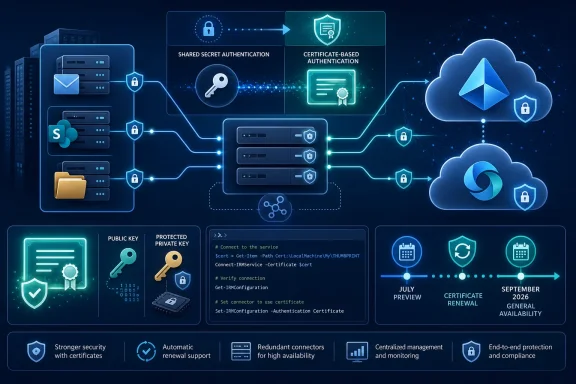 Microsoft Hands Ownership of the Identity to Administrators
The Rights Management connector provides a bridge between on-premises servers and the cloud-based Azure Rights Management service used by Microsoft Purview Information Protection. Microsoft’s deployment documentation identifies Exchange Server, SharePoint Server, and Windows file servers using File Classification Infrastructure, or FCI, as supported workloads.Once deployed, the connector relays requests from those on-premises systems to Microsoft’s cloud protection service. That allows organizations to retain existing Information Rights Management capabilities while applying cloud-based protection to documents, email, and other supported content.
Until now, connector setup handled an important part of that cloud identity configuration. It provisioned the necessary Entra service principal and supplied a shared secret, reducing the number of identity objects and credentials administrators had to prepare manually.
Under the revised model, the installer will no longer perform those tasks. The customer must instead register an application in Microsoft Entra ID and upload the public portion of an authentication certificate before installing or upgrading the connector.
The application registration becomes an asset that the organization owns and governs. Administrators will therefore be responsible for its permissions, certificate lifecycle, monitoring, and eventual cleanup.
That is a meaningful operational change even if the resulting authentication method is stronger. Teams accustomed to treating the RMS connector as a mostly self-contained installation will now need coordination between Purview, Entra, Windows Server, and workload administrators.
PowerShell Takes Over the Workload Configuration
Microsoft says a new PowerShell module will configure certificate authentication for the connector and its supported workloads. The module will cover the connector itself as well as Exchange, SharePoint, and FCI deployments.The new cmdlets are intended to handle several steps that would otherwise require administrators to manipulate certificates and Windows configuration manually. According to the roadmap entry, they will support certificate import, registry configuration, private-key permissions, and validation.
That scope matters because installing a certificate is only one part of certificate-based application authentication. The relevant Windows service identity must be able to access the certificate’s private key, while workload-specific settings must direct requests through the connector correctly.
Microsoft’s existing RMS connector documentation already shows that deployment spans multiple systems. The connector runs on separate Windows Server computers, while Exchange, SharePoint, and FCI servers require their own configuration to use it. Registry-based service-location settings are part of that arrangement, although Microsoft recommends its configuration tooling over manual registry editing.
The new module should make the revised authentication chain repeatable, but administrators should not assume that one command will cover an entire environment. Microsoft explicitly describes configuration occurring for each workload, which suggests that mixed Exchange, SharePoint, and file-server estates will need workload-aware deployment steps.
Organizations running redundant connector servers must also account for every node. Microsoft recommends multiple connector systems for fault tolerance, and each server that needs to authenticate using the application certificate will require the correct certificate installation, private key, permissions, and configuration.
Certificate consistency across connector nodes will be especially important. A load-balanced deployment can appear healthy while one node fails authentication if its certificate or private-key access differs from the rest of the pool.
Better Credentials Bring a New Expiration Clock
Moving away from a shared secret improves the connector’s security posture by replacing a password-like application credential with possession of a certificate’s private key. Certificates can be governed through enterprise public key infrastructure, protected in Windows certificate stores, and identified by properties such as their thumbprint.The change does not eliminate credential management. It changes its shape.
Certificates expire, and an expired certificate can stop unattended authentication just as decisively as an expired secret. Administrators will need a renewal process that accounts for the certificate uploaded to the Entra app registration and the corresponding private-key certificate installed on connector systems.
A safe rotation process will likely involve overlapping the old and new credentials rather than replacing them at the last possible moment. Teams should verify the exact behavior during preview, including whether multiple certificates can remain valid during a transition and how the new validation cmdlets report mismatches.
Private-key protection also becomes part of the threat model. The public certificate uploaded to Entra is not sufficient to impersonate the connector, but theft of the private key from a connector server could expose the application identity. Export permissions, backup handling, service-account access, and administrative access to those servers deserve review before deployment.
For production environments, certificate issuance should fit the organization’s established PKI and renewal procedures. A quickly generated certificate may be adequate for a lab, but it can create an unsupported operational island if nobody owns its expiration alerts or replacement process.
Microsoft’s roadmap description does not yet specify supported certificate authorities, key lengths, cryptographic providers, storage locations, or renewal behavior. Those details will need to come from the updated deployment documentation and PowerShell help accompanying the preview.
Upgrades Now Need a Preflight Phase
The largest immediate risk is not to new deployments but to connector upgrades performed under old assumptions. Because setup will no longer create the Entra service principal and secret, an administrator who begins an upgrade without preparing the application and certificate may be unable to complete the new configuration.Microsoft is telling customers to register the application and upload a certificate before installing or upgrading the connector. That prerequisite should be added to change records, maintenance plans, rollback procedures, and any internal runbooks built around the current installer.
Before moving a production connector, administrators should inventory:
- Every connector server and any load balancer directing traffic to it.
- The Exchange, SharePoint, and FCI systems configured to use those connectors.
- The Windows identities under which connector components operate.
- Existing Entra enterprise applications or service principals associated with the deployment.
- Certificate stores, private-key access controls, and certificate-expiration monitoring.
- Firewall, proxy, TLS 1.2, and directory-synchronization prerequisites that remain applicable.
Deleting it too early could interrupt service, while leaving an unused application credential active creates unnecessary exposure. Organizations should identify the current identity before the change and document how they will confirm that it is no longer being used.
A staged rollout is the safer approach where architecture permits it. One connector node can be updated and validated before the rest of a load-balanced group, provided the old and new nodes can coexist and Microsoft supports that configuration. The preview documentation will need to settle that point before administrators rely on rolling upgrades.
The July Preview Is the Real Planning Deadline
Although general availability is targeted for September 2026, the July preview is the point at which Microsoft’s implementation details should become testable. The roadmap remains marked In development, and Microsoft cautions that roadmap dates are estimates subject to change.IT teams should use the preview to answer practical questions that the roadmap entry cannot: which Entra API permissions the app requires, whether admin consent is necessary, how certificates are selected, what event logs record authentication failures, and how rotation works without downtime.
Testing should also cover negative conditions. An expired certificate, missing private-key permission, incorrect thumbprint, absent registry value, or incomplete workload configuration should generate errors that monitoring systems can detect before users encounter failures opening or protecting content.
The security improvement is straightforward; the migration is not. By ending automatic service-principal and secret provisioning, Microsoft is giving customers clearer control over a sensitive application identity, but it is also turning identity and certificate readiness into hard dependencies for every future RMS connector installation and upgrade.
For administrators, September is not the date to begin. The work starts with the July preview: build the Entra registration process, establish certificate ownership and rotation, test the new PowerShell module, and ensure every connector node and workload can be validated before the old shared-secret path disappears.
References
- Primary source: Microsoft 365 Roadmap
Published: 2026-07-13T23:07:14.8221961Z
Microsoft 365 Roadmap | Microsoft 365
The Microsoft 365 Roadmap lists updates that are currently planned for applicable subscribers. Check here for more information on the status of new features and updates.www.microsoft.com
- Official source: learn.microsoft.com
PowerShell Connector | Microsoft Learn
This article describes how to configure Microsoft's Windows PowerShell Connector.learn.microsoft.com
