

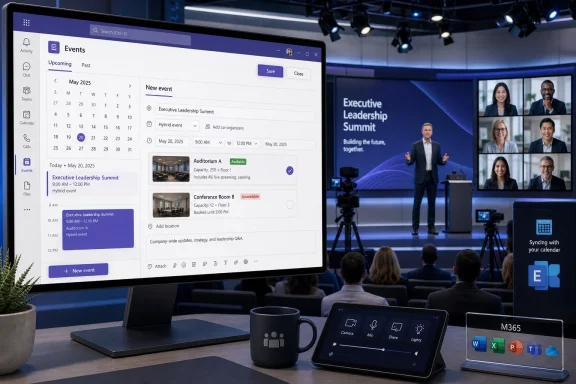
Microsoft has launched a deceptively important scheduling improvement for the Events app in Microsoft Teams: organizers can now see whether a selected room or physical space is available at the time of an event. The room availability signal gives planners earlier warning of a scheduling conflict, closing a practical gap between designing a digital event and reserving the real-world venue from which it will be produced. Listed under Microsoft 365 Roadmap ID 561647, the desktop feature reached general availability in June 2026 for eligible Teams Enterprise users in Worldwide Standard Multi-Tenant environments, with Microsoft marking it as launched in its July 20 roadmap update.
Microsoft Teams events increasingly occupy a hybrid middle ground. They may be delivered online to hundreds or thousands of attendees, but organizers, presenters, producers, executives, camera operators, and support staff often gather in a conference room, auditorium, training center, or production studio.
Microsoft’s newer Events app moves toward a unified creation and management experience. Organizers can choose registration, audience, engagement, and production settings according to the event’s purpose and expected capacity rather than treating every format as a completely separate scheduling system.
That shift makes the Events app more useful as an operational hub. It also raises expectations that the app will handle the surrounding logistics of an event, not merely create a join link and populate a calendar.
Customer webinars can have similar requirements. Presenters might need a quiet studio, controlled lighting, a dedicated wired network, multiple displays, professional microphones, or access to specialized demonstration equipment.
Training events add another variation. Some participants may attend from a classroom while remote attendees join through Teams, turning the room itself into a shared resource that must be coordinated with the online event.
Until now, organizers working inside the Events app could select a space without necessarily receiving an immediate, clearly surfaced indication that the room was already occupied. The new availability signal addresses that disconnect at the point where it is most useful: during event planning.
The Worldwide Standard Multi-Tenant designation also means administrators in sovereign or government cloud environments should not infer availability from the commercial launch. Features frequently arrive in GCC, GCC High, or Department of Defense environments on different schedules, if they are announced for those environments at all.
It should not be confused with an unconditional reservation guarantee. Microsoft 365 resource booking can involve automatic acceptance, booking restrictions, delegates, working-hour limits, duration limits, recurring-meeting rules, and organization-specific policies.
A room that appears free may still require approval. Conversely, a resource that appears busy may have been blocked by a tentative hold, a private appointment, maintenance, or another event that could later be moved.
The safest interpretation is that the Events app is exposing a scheduling signal derived from the room’s calendar state. Final booking behavior remains subject to the policies governing that resource.
An embedded signal reduces that cognitive load. The event time and selected location remain visible in the same planning context, making a conflict harder to overlook.
The cost rises rapidly after invitations are distributed. Marketing teams may have published a registration page, executives may have reserved travel time, interpreters may have been contracted, and IT staff may have allocated equipment.
Early conflict detection is therefore a risk-control feature, not merely a convenience. A small indicator during setup can prevent a much larger recovery effort days or weeks later.
The mailbox calendar stores reservations and supplies free/busy information. Exchange’s resource booking logic can then accept, decline, or route requests for approval according to administrator-defined rules.
Room lists organize larger estates of resource mailboxes. An enterprise with multiple campuses might group rooms by city, building, floor, or function, improving discovery when users search for an appropriate location.
This architecture means the Teams Events app is not operating as a separate facilities database. It is participating in the broader Microsoft 365 scheduling model, where Outlook, Teams, Exchange, room panels, and room devices may all interact with the same underlying resource calendar.
The subsequent reservation request answers a broader governance question: Is this organizer allowed to use this room under these conditions?
That principle is especially important for executive rooms, human resources spaces, legal departments, and merger or acquisition teams. Microsoft 365 administrators can expose free/busy information without granting general access to sensitive calendar details.
A useful room signal should therefore remain deliberately minimal. “Unavailable” is usually enough to help the next organizer choose another time or space.
When the time changes, the organizer needs to revalidate every dependent resource. That includes the physical room, equipment, support staff, catering, security, and any adjacent setup periods.
The new Teams signal can make the room check more immediate, but organizations should still treat a schedule change as a broader operational event. Moving the broadcast by one hour does not automatically move every external dependency with it.
If the room mailbox is booked only for the audience-facing event window, another employee could reserve the space during setup. The Events app might correctly show the room as available for the broadcast while failing to account for unrecorded production time.
Experienced organizers should reserve a sufficiently wide block. For critical events, they may also need a rehearsal booking on an earlier day and a technical hold immediately before the live session.
A room availability warning can stop an organizer from building an event around a space already committed to another function. That is particularly valuable when an executive’s calendar is flexible but the production room is not.
Communications teams can also use the signal during initial option analysis. Instead of selecting a date and discovering the venue problem later, they can compare a small number of acceptable time slots while the decision remains open.
For these teams, availability is not just about avoiding two meetings in one room. It supports consistent delivery across a recurring program.
A visible conflict can encourage planners to address the problematic occurrence before inviting a cohort. However, recurring events deserve additional caution because a room may be available for most dates but unavailable for one or two sessions.
Facilities may rename, divide, combine, renovate, or decommission rooms without immediately updating Microsoft 365. IT may retain obsolete room mailboxes or create duplicate entries that confuse users.
Organizations should assign ownership for the room directory. The responsible team should maintain names, capacities, locations, accessibility information, booking rules, and operational status.
The licensing requirement reinforces that separation. Microsoft is positioning room-aware event planning as part of an enterprise communications environment rather than a universal Teams scheduling feature.
This may disappoint organizations using lower-tier subscriptions, particularly nonprofits, clubs, and small businesses that still organize hybrid events. Their logistical needs can resemble those of larger enterprises even when their licensing budget does not.
The administrative challenge is proportionally different. A small company may not have dedicated Exchange or Teams specialists, so room mailboxes are often configured once and then forgotten.
For these organizations, the launch is a useful reason to audit resource calendars. A clean set of five accurate rooms is more valuable than a directory of fifty entries containing duplicates, vague names, and outdated locations.
Useful attributes include building, floor, capacity, wheelchair accessibility, conferencing equipment, display capabilities, and room type. A label such as “Conf Room 4” may be clear to the local facilities team but useless to an organizer working from another office.
Duplicate or abandoned room mailboxes are particularly dangerous. They can produce an apparently available result for a resource that no longer represents the authoritative calendar.
Administrators should test representative scenarios:
Endpoint teams should keep the Teams desktop client current and investigate whether update policies delay new capabilities. The modern Teams service can deliver many changes independently, but client age and deployment controls still influence feature visibility and reliability.
Help-desk guidance should also explain the distinction between availability and acceptance. Otherwise, support tickets will simply shift from “Why did I not know the room was busy?” to “Why did an available room decline my event?”
The online component requires identity, media delivery, attendee permissions, chat, recording, and content sharing. The physical component requires space, equipment, network access, environmental controls, and sometimes on-site support.
By bringing room availability into the Events app, Microsoft is making the digital planning surface more aware of the physical workplace. The change is small, but the direction is strategically important.
A conference room can have a mailbox without containing a Teams Rooms device. Likewise, a properly licensed Teams Rooms system relies on accurate resource configuration to receive invitations and present the correct schedule.
The new availability signal therefore complements, rather than replaces, Teams Rooms management. It helps organizers choose an open location before they depend on one-touch join, room displays, cameras, microphones, and other in-room capabilities.
That creates multiple paths into the same calendar: Outlook, Teams meetings, the Events app, room panels, mobile experiences, and administrative tools. Consistency across those surfaces becomes critical.
If one interface shows a room as available while another reflects a reservation, users will quickly lose confidence. Exchange resource calendars must remain the dependable system of record behind these experiences.
Microsoft does not need every enhancement to introduce a new technical category. Removing friction between Teams, Exchange, Outlook, and workplace devices can produce substantial value because those services already sit at the center of many enterprise processes.
The Events app becomes more credible when organizers can manage both audience-facing settings and practical logistics. Each added dependency handled within the same experience reduces the temptation to adopt a separate event-management product.
Room awareness strengthens that position for internal communications and hybrid enterprise events. It does not eliminate the need for advanced platforms at complex conferences, but it narrows the gap for routine webinars, town halls, training programs, and leadership broadcasts.
The competitive question is whether Microsoft will continue beyond simple availability. Capacity recommendations, equipment matching, automated setup buffers, campus-aware suggestions, and integrated support requests would make the Events app a more comprehensive operational tool.
Another opportunity is buffer-aware scheduling. Organizers could specify rehearsal, setup, and teardown periods, allowing the app to evaluate the complete production window rather than only the public event time.
A deeper integration could also identify mismatches between event requirements and room capabilities. If an organizer enables advanced production features, the app might recommend a room with appropriate cameras, microphones, displays, networking, and Teams Rooms licensing.
Organizations should avoid solving that problem with excessive restrictions. Requiring manual approval for every room may reduce double bookings, but it can also create bottlenecks and encourage employees to bypass the formal system.
A better approach is tiered governance. Ordinary rooms can accept valid requests automatically, while executive suites, studios, auditoriums, and regulated spaces can use delegates or restricted booking groups.
Feature parity would reduce confusion and support organizations that use browser-based desktops, virtual environments, or mixed endpoint fleets. Microsoft has not established such expansion through this roadmap item, so administrators should plan around the documented desktop scope.
Organizations operating across commercial and government tenants should not build a single support document that assumes identical behavior. Their organizers may encounter different event capabilities depending on the account and tenant used.
Administrators should monitor user reports after deployment. If the signal repeatedly disagrees with actual booking outcomes, the underlying cause may be resource policy or directory hygiene rather than the Events app itself.
Organizations that treat this launch as an invitation to improve room data will gain more than a new indicator. They will strengthen every Microsoft 365 experience that depends on the same resource calendars.
Microsoft’s room availability signal is a modest interface enhancement with unusually practical consequences. By warning Teams Enterprise event organizers that a selected physical space is already occupied, the Events app can prevent avoidable conflicts before they disrupt registrations, presenters, production crews, and audiences. Its success will depend on accurate Exchange resource mailboxes, sensible booking policies, current desktop clients, and a clear understanding that available does not always mean approved. If Microsoft builds on this foundation with room recommendations, equipment awareness, production buffers, and broader client support, Teams could evolve from an online event tool into a much more complete control center for the hybrid events that now define enterprise communication.
 Background
Microsoft Teams events increasingly occupy a hybrid middle ground. They may be delivered online to hundreds or thousands of attendees, but organizers, presenters, producers, executives, camera operators, and support staff often gather in a conference room, auditorium, training center, or production studio.The evolution of Teams events
Teams originally presented meetings, webinars, and town halls as relatively distinct formats. That distinction helped users understand the intended scale and interaction model, but it also forced organizers to decide which product category they needed before configuring the event.Microsoft’s newer Events app moves toward a unified creation and management experience. Organizers can choose registration, audience, engagement, and production settings according to the event’s purpose and expected capacity rather than treating every format as a completely separate scheduling system.
That shift makes the Events app more useful as an operational hub. It also raises expectations that the app will handle the surrounding logistics of an event, not merely create a join link and populate a calendar.
Why physical rooms still matter
A virtual event rarely eliminates physical dependencies. A company town hall may be streamed to employees worldwide while the chief executive, communications team, and production crew work from a corporate auditorium.Customer webinars can have similar requirements. Presenters might need a quiet studio, controlled lighting, a dedicated wired network, multiple displays, professional microphones, or access to specialized demonstration equipment.
Training events add another variation. Some participants may attend from a classroom while remote attendees join through Teams, turning the room itself into a shared resource that must be coordinated with the online event.
Until now, organizers working inside the Events app could select a space without necessarily receiving an immediate, clearly surfaced indication that the room was already occupied. The new availability signal addresses that disconnect at the point where it is most useful: during event planning.
What Microsoft Has Launched
The feature has a narrowly worded description, but its practical consequences extend beyond a simple status icon. When an organizer selects a room or space for a Teams event, the Events app can indicate whether that resource is available at the designated time.Roadmap scope and availability
Microsoft lists the capability with the following deployment characteristics:- Roadmap ID 561647 identifies the room availability signal for Teams events.
- The feature is marked as launched rather than merely rolling out or remaining in development.
- General availability began in June 2026.
- The supported platform is the Teams desktop client.
- The listed cloud scope is Worldwide Standard Multi-Tenant.
- The release phases include General Availability and Targeted Release.
- The organizer must have an eligible Teams Enterprise license.
The Worldwide Standard Multi-Tenant designation also means administrators in sovereign or government cloud environments should not infer availability from the commercial launch. Features frequently arrive in GCC, GCC High, or Department of Defense environments on different schedules, if they are announced for those environments at all.
What the signal does—and does not do
The feature communicates availability for the selected time. That helps an organizer identify a likely conflict before proceeding too far into registration, presenter coordination, promotional material, or production planning.It should not be confused with an unconditional reservation guarantee. Microsoft 365 resource booking can involve automatic acceptance, booking restrictions, delegates, working-hour limits, duration limits, recurring-meeting rules, and organization-specific policies.
A room that appears free may still require approval. Conversely, a resource that appears busy may have been blocked by a tentative hold, a private appointment, maintenance, or another event that could later be moved.
The safest interpretation is that the Events app is exposing a scheduling signal derived from the room’s calendar state. Final booking behavior remains subject to the policies governing that resource.
Why a Room Signal Matters
Room availability has been visible elsewhere in Microsoft 365 for years, particularly through Outlook’s Scheduling Assistant. The significance of this launch lies less in inventing free/busy data and more in placing it directly inside the workflow used to create a structured Teams event.Preventing split-brain scheduling
Without an in-context signal, an organizer may need to alternate between Teams and Outlook:- The organizer begins creating the event in Teams.
- The organizer opens Outlook to inspect room availability.
- The organizer returns to Teams to adjust the event.
- The time changes after a presenter reports a conflict.
- The organizer must check the room again.
- A separate booking request is sent or updated.
- The organizer waits to learn whether the room accepted it.
An embedded signal reduces that cognitive load. The event time and selected location remain visible in the same planning context, making a conflict harder to overlook.
Catching expensive mistakes earlier
A double-booked conference room is inconvenient for an ordinary meeting. A double-booked production venue can threaten an event involving senior leaders, external customers, hundreds of registrants, or a substantial communications campaign.The cost rises rapidly after invitations are distributed. Marketing teams may have published a registration page, executives may have reserved travel time, interpreters may have been contracted, and IT staff may have allocated equipment.
Early conflict detection is therefore a risk-control feature, not merely a convenience. A small indicator during setup can prevent a much larger recovery effort days or weeks later.
The Technical Foundation
Although the feature appears in Teams, room scheduling across Microsoft 365 generally depends on Exchange resource mailboxes and their calendars. Understanding that foundation helps administrators predict where the signal will work well and where configuration problems may undermine it.Rooms as Exchange resources
A room mailbox represents a physical location such as a conference room, classroom, auditorium, studio, or training area. Users schedule that resource by adding it to a meeting or event, much as they would invite another attendee.The mailbox calendar stores reservations and supplies free/busy information. Exchange’s resource booking logic can then accept, decline, or route requests for approval according to administrator-defined rules.
Room lists organize larger estates of resource mailboxes. An enterprise with multiple campuses might group rooms by city, building, floor, or function, improving discovery when users search for an appropriate location.
This architecture means the Teams Events app is not operating as a separate facilities database. It is participating in the broader Microsoft 365 scheduling model, where Outlook, Teams, Exchange, room panels, and room devices may all interact with the same underlying resource calendar.
Availability is not the entire booking decision
Exchange can apply numerous controls after an organizer identifies an open slot. Administrators may configure a room to:- Automatically accept requests when no conflict exists.
- Require approval from a resource delegate.
- Reject bookings outside defined working hours.
- Limit how far in advance the room can be reserved.
- Restrict the maximum duration of a booking.
- Permit only selected users or groups to schedule automatically.
- Decline conflicting occurrences in a recurring series.
- Include customized instructions in the response to organizers.
The subsequent reservation request answers a broader governance question: Is this organizer allowed to use this room under these conditions?
Free/busy privacy
Availability indicators also preserve an important privacy boundary. Most organizers need to know whether a room is occupied, but they do not need to see the title, attendee list, or confidential purpose of the existing reservation.That principle is especially important for executive rooms, human resources spaces, legal departments, and merger or acquisition teams. Microsoft 365 administrators can expose free/busy information without granting general access to sensitive calendar details.
A useful room signal should therefore remain deliberately minimal. “Unavailable” is usually enough to help the next organizer choose another time or space.
How the Event Workflow Changes
The improvement is most valuable when it prompts organizers to validate the location while the event remains easy to change. It encourages room planning to become part of initial event configuration rather than an administrative task postponed until later.A more reliable planning sequence
Organizations can adapt their event procedures around the new signal. A practical workflow is:- Define the event format and audience. Decide whether the session requires registration, moderated interaction, controlled presentation, or large-scale delivery.
- Choose a provisional date and time. Account for presenter availability, audience time zones, setup time, and post-event teardown.
- Select the intended room or production space. Use a properly configured Microsoft 365 room resource rather than typing an unstructured location name.
- Review the availability signal. If the room is unavailable, change the time or select another suitable resource before publishing.
- Submit or confirm the reservation. Wait for automatic acceptance or delegate approval when required.
- Verify the final calendar state. Confirm that the room appears as accepted, not merely requested, tentative, or awaiting action.
- Continue with production planning. Assign presenters, test equipment, configure attendee settings, and publish registration information only after critical dependencies are stable.
Better handling of event changes
Large events rarely remain static. A speaker becomes unavailable, an executive asks for a different time, or expected attendance outgrows the original room.When the time changes, the organizer needs to revalidate every dependent resource. That includes the physical room, equipment, support staff, catering, security, and any adjacent setup periods.
The new Teams signal can make the room check more immediate, but organizations should still treat a schedule change as a broader operational event. Moving the broadcast by one hour does not automatically move every external dependency with it.
Setup and teardown remain hidden complications
The advertised event time may not represent the full room requirement. A one-hour town hall could need two hours of camera setup beforehand and another hour for dismantling equipment afterward.If the room mailbox is booked only for the audience-facing event window, another employee could reserve the space during setup. The Events app might correctly show the room as available for the broadcast while failing to account for unrecorded production time.
Experienced organizers should reserve a sufficiently wide block. For critical events, they may also need a rehearsal booking on an earlier day and a technical hold immediately before the live session.
Enterprise Impact
Large organizations stand to benefit most because they manage the greatest number of rooms, event organizers, office locations, and approval policies. At that scale, even a low percentage of scheduling failures can generate frequent disruption.Corporate communications and executive events
Company-wide broadcasts often originate from premium rooms with limited availability. These spaces may have fixed cameras, acoustic treatment, stage lighting, teleprompters, confidence monitors, or resilient network connections.A room availability warning can stop an organizer from building an event around a space already committed to another function. That is particularly valuable when an executive’s calendar is flexible but the production room is not.
Communications teams can also use the signal during initial option analysis. Instead of selecting a date and discovering the venue problem later, they can compare a small number of acceptable time slots while the decision remains open.
Training, onboarding, and internal programs
Training departments frequently combine physical classrooms with remote participation. They may run repeated sessions, reserve rooms for entire days, and rely on equipment that cannot easily be relocated.For these teams, availability is not just about avoiding two meetings in one room. It supports consistent delivery across a recurring program.
A visible conflict can encourage planners to address the problematic occurrence before inviting a cohort. However, recurring events deserve additional caution because a room may be available for most dates but unavailable for one or two sessions.
Facilities and IT alignment
The feature also creates an incentive for closer collaboration between Teams administrators, Exchange administrators, and facilities teams. A signal is only useful when the resource data accurately represents the physical estate.Facilities may rename, divide, combine, renovate, or decommission rooms without immediately updating Microsoft 365. IT may retain obsolete room mailboxes or create duplicate entries that confuse users.
Organizations should assign ownership for the room directory. The responsible team should maintain names, capacities, locations, accessibility information, booking rules, and operational status.
Consumer and Small-Business Impact
The feature targets Teams Enterprise organizers, so it is not primarily a consumer enhancement. Its design nevertheless highlights the increasing sophistication of event management within Microsoft Teams.Limited direct relevance for personal users
Home users rarely maintain Exchange room mailboxes or schedule formal events from enterprise-managed venues. A personal Teams user arranging a family call or community gathering is unlikely to encounter this workflow.The licensing requirement reinforces that separation. Microsoft is positioning room-aware event planning as part of an enterprise communications environment rather than a universal Teams scheduling feature.
This may disappoint organizations using lower-tier subscriptions, particularly nonprofits, clubs, and small businesses that still organize hybrid events. Their logistical needs can resemble those of larger enterprises even when their licensing budget does not.
Value for smaller organizations with formal spaces
Some smaller businesses operate boardrooms, studios, clinics, training suites, or shared venues. If they use Teams Enterprise and properly configured room resources, the feature can still provide meaningful value.The administrative challenge is proportionally different. A small company may not have dedicated Exchange or Teams specialists, so room mailboxes are often configured once and then forgotten.
For these organizations, the launch is a useful reason to audit resource calendars. A clean set of five accurate rooms is more valuable than a directory of fifty entries containing duplicates, vague names, and outdated locations.
Administrative Readiness
Microsoft describes the feature as available to eligible organizers, but administrators should not equate launch status with operational readiness. Tenant configuration, licensing, client versions, and resource quality can all affect the experience.Room mailbox hygiene
Administrators should begin with an inventory of room resources. Each mailbox should map to a real, schedulable space and use a naming convention that employees can understand.Useful attributes include building, floor, capacity, wheelchair accessibility, conferencing equipment, display capabilities, and room type. A label such as “Conf Room 4” may be clear to the local facilities team but useless to an organizer working from another office.
Duplicate or abandoned room mailboxes are particularly dangerous. They can produce an apparently available result for a resource that no longer represents the authoritative calendar.
Booking policy review
The availability signal may expose inconsistencies that previously remained hidden. A room can appear free yet repeatedly decline organizers because its policy allows only a specific group, accepts bookings only during narrow hours, or requires an inactive delegate.Administrators should test representative scenarios:
- An authorized organizer books an available room.
- An unauthorized organizer attempts the same booking.
- A request overlaps an existing reservation.
- A booking falls outside permitted hours.
- A recurring event contains one conflicting occurrence.
- A request requires delegate approval.
- A booking changes time after initially being accepted.
- A cancelled event properly releases the room.
Client deployment and support
Because the roadmap specifies desktop, support teams should document where users can expect to see the feature. An organizer working in Teams on the web may report that the signal is missing even though the tenant has received the launch.Endpoint teams should keep the Teams desktop client current and investigate whether update policies delay new capabilities. The modern Teams service can deliver many changes independently, but client age and deployment controls still influence feature visibility and reliability.
Help-desk guidance should also explain the distinction between availability and acceptance. Otherwise, support tickets will simply shift from “Why did I not know the room was busy?” to “Why did an available room decline my event?”
Hybrid-Work Implications
The launch reflects a broader change in collaboration software. Teams is no longer concerned solely with remote communication; it increasingly coordinates people, digital sessions, physical workplaces, and intelligent room systems.Digital and physical scheduling converge
Hybrid work exposed the weaknesses of treating meeting links and physical rooms as separate systems. A successful session depends on both.The online component requires identity, media delivery, attendee permissions, chat, recording, and content sharing. The physical component requires space, equipment, network access, environmental controls, and sometimes on-site support.
By bringing room availability into the Events app, Microsoft is making the digital planning surface more aware of the physical workplace. The change is small, but the direction is strategically important.
Relationship with Teams Rooms
A room mailbox and a Microsoft Teams Rooms system are related but not identical. The mailbox represents the schedulable resource, while the Teams Rooms deployment supplies the in-room hardware and meeting experience.A conference room can have a mailbox without containing a Teams Rooms device. Likewise, a properly licensed Teams Rooms system relies on accurate resource configuration to receive invitations and present the correct schedule.
The new availability signal therefore complements, rather than replaces, Teams Rooms management. It helps organizers choose an open location before they depend on one-touch join, room displays, cameras, microphones, and other in-room capabilities.
Room panels and shared spaces
Microsoft has also expanded scheduling through Teams panels and shared-space experiences. Employees can inspect room schedules outside a space and, where configured, reserve future slots.That creates multiple paths into the same calendar: Outlook, Teams meetings, the Events app, room panels, mobile experiences, and administrative tools. Consistency across those surfaces becomes critical.
If one interface shows a room as available while another reflects a reservation, users will quickly lose confidence. Exchange resource calendars must remain the dependable system of record behind these experiences.
Competitive and Strategic Significance
Room availability is not a dramatic differentiator by itself. Competing collaboration and workplace platforms also integrate calendars, resources, and room scheduling. Microsoft’s advantage lies in connecting these functions across a widely deployed productivity stack.Integration over novelty
The feature uses an established Microsoft 365 asset—resource availability—to improve a newer Teams workflow. That is a classic platform-integration move.Microsoft does not need every enhancement to introduce a new technical category. Removing friction between Teams, Exchange, Outlook, and workplace devices can produce substantial value because those services already sit at the center of many enterprise processes.
The Events app becomes more credible when organizers can manage both audience-facing settings and practical logistics. Each added dependency handled within the same experience reduces the temptation to adopt a separate event-management product.
Pressure on specialist event platforms
Specialist platforms often differentiate themselves through production controls, registration, branding, analytics, speaker management, sponsor tools, and venue operations. Microsoft Teams has historically been strongest where organizations already use Microsoft 365 and want events tied to corporate identity and collaboration.Room awareness strengthens that position for internal communications and hybrid enterprise events. It does not eliminate the need for advanced platforms at complex conferences, but it narrows the gap for routine webinars, town halls, training programs, and leadership broadcasts.
The competitive question is whether Microsoft will continue beyond simple availability. Capacity recommendations, equipment matching, automated setup buffers, campus-aware suggestions, and integrated support requests would make the Events app a more comprehensive operational tool.
Strengths and Opportunities
The room availability signal offers several immediate benefits while opening the door to more ambitious event-planning capabilities.Practical strengths
- It surfaces conflicts earlier. Organizers can identify an unavailable room before registrations, announcements, and production plans become difficult to change.
- It reduces application switching. Users have less need to interrupt event creation to inspect the room calendar elsewhere.
- It aligns Teams events with Microsoft 365 resource scheduling. The feature builds on existing room mailboxes rather than creating a separate reservation database.
- It improves hybrid-event planning. Organizers can account for the physical origin of an online event within the digital workflow.
- It supports operational discipline. The signal encourages teams to validate critical resources during initial planning.
- It preserves privacy. Availability can be communicated without exposing the details of another room reservation.
- It benefits high-value events disproportionately. Preventing one conflict involving executives, customers, or a large audience can justify the workflow improvement.
Future opportunities
Microsoft could extend the signal into richer recommendations. The app might suggest comparable available rooms based on capacity, equipment, building, or accessibility.Another opportunity is buffer-aware scheduling. Organizers could specify rehearsal, setup, and teardown periods, allowing the app to evaluate the complete production window rather than only the public event time.
A deeper integration could also identify mismatches between event requirements and room capabilities. If an organizer enables advanced production features, the app might recommend a room with appropriate cameras, microphones, displays, networking, and Teams Rooms licensing.
Risks and Concerns
The feature can reduce mistakes, but it may also create false confidence if users or administrators misunderstand what the signal represents.Operational risks
- Availability may be mistaken for confirmation. A free room can still require approval or reject a request under its booking policy.
- Stale resource data can mislead organizers. Obsolete or duplicate room mailboxes may appear selectable even when the physical space has changed.
- Unrecorded setup time can create collisions. The event slot may be open while the production team needs the room before or afterward.
- Recurring events may hide isolated conflicts. A room can be available for most dates but unavailable for one occurrence.
- Desktop-only scope can create inconsistent experiences. Users planning through other Teams clients may not see the same signal.
- Licensing can fragment workflows. Organizers without Teams Enterprise may lack the capability even when they work with colleagues who have it.
- Government-cloud users are not included in the stated launch scope. Administrators should wait for explicit cloud-specific availability rather than assuming parity.
- Free/busy data depends on calendar integrity. Manual holds, delayed updates, synchronization issues, and incorrectly processed cancellations can distort the result.
Governance concerns
The feature can reveal that room governance is fragmented across IT and facilities. Neither team may have complete responsibility for the accuracy of resource objects, booking policies, and physical-room status.Organizations should avoid solving that problem with excessive restrictions. Requiring manual approval for every room may reduce double bookings, but it can also create bottlenecks and encourage employees to bypass the formal system.
A better approach is tiered governance. Ordinary rooms can accept valid requests automatically, while executive suites, studios, auditoriums, and regulated spaces can use delegates or restricted booking groups.
What to Watch Next
The roadmap entry is now marked launched, but the room availability signal should be viewed as an early step in the maturation of the unified Teams event experience.Expansion beyond desktop
The most obvious question is whether Microsoft will bring equivalent functionality to Teams on the web, macOS where platform labeling is distinct, or mobile planning interfaces. Organizers increasingly begin work on one device and finalize it on another.Feature parity would reduce confusion and support organizations that use browser-based desktops, virtual environments, or mixed endpoint fleets. Microsoft has not established such expansion through this roadmap item, so administrators should plan around the documented desktop scope.
Additional cloud environments
Government and sovereign cloud availability will also be worth monitoring. These environments often require separate validation, deployment planning, and compliance review.Organizations operating across commercial and government tenants should not build a single support document that assumes identical behavior. Their organizers may encounter different event capabilities depending on the account and tenant used.
Richer resource intelligence
A binary free-or-busy result is useful, but event planning involves more than time. Microsoft has an opportunity to make the Events app reason about:- Room capacity relative to the expected in-person audience.
- Available audiovisual and conferencing equipment.
- Accessibility requirements.
- Building access and working hours.
- Setup and teardown buffers.
- Presenter locations and travel time.
- Alternative rooms when the preferred space is occupied.
- Technical support or event-monitor availability.
- The health and readiness of a Teams Rooms system.
Reliability in real organizations
The most important test will not occur in a Microsoft demonstration tenant. It will occur in enterprises with thousands of room mailboxes, multiple Exchange configurations, delegated spaces, recurring reservations, acquisitions, and inconsistent facilities data.Administrators should monitor user reports after deployment. If the signal repeatedly disagrees with actual booking outcomes, the underlying cause may be resource policy or directory hygiene rather than the Events app itself.
Organizations that treat this launch as an invitation to improve room data will gain more than a new indicator. They will strengthen every Microsoft 365 experience that depends on the same resource calendars.
Microsoft’s room availability signal is a modest interface enhancement with unusually practical consequences. By warning Teams Enterprise event organizers that a selected physical space is already occupied, the Events app can prevent avoidable conflicts before they disrupt registrations, presenters, production crews, and audiences. Its success will depend on accurate Exchange resource mailboxes, sensible booking policies, current desktop clients, and a clear understanding that available does not always mean approved. If Microsoft builds on this foundation with room recommendations, equipment awareness, production buffers, and broader client support, Teams could evolve from an online event tool into a much more complete control center for the hybrid events that now define enterprise communication.
References
- Primary source: Microsoft 365 Roadmap
Published: 2026-07-20T22:37:15.9046041Z
Microsoft 365 Roadmap | Microsoft 365
The Microsoft 365 Roadmap lists updates that are currently planned for applicable subscribers. Check here for more information on the status of new features and updates.www.microsoft.com
- Official source: learn.microsoft.com
Room and Equipment Mailboxes FAQ | Microsoft Learn
Find answers to common questions about room and equipment mailboxes in Microsoft 365, including booking, availability, and licensing. Read the FAQ.learn.microsoft.com - Official source: adoption.microsoft.com
Page not found – Microsoft Adoption
 adoption.microsoft.com
