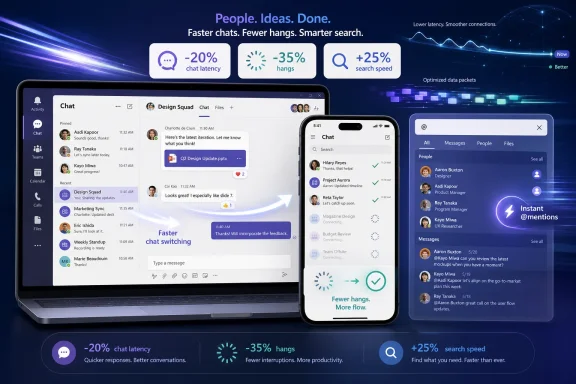
Microsoft says it spent the first half of 2026 cutting Microsoft Teams chat-switching latency by 20 percent across devices, while reducing app hangs on Apple hardware by 35 percent and making people search on iOS 25 percent faster. That is not the sort of announcement that normally gets a keynote slot, but it may matter more to daily users than another Copilot pane. Teams has long been Microsoft 365’s unavoidable meeting room, hallway, phone booth, and inbox-adjacent work surface; when it stutters, the whole workday feels worse. The interesting part is not that Microsoft made Teams faster, but that the company is now talking as if basic responsiveness is a strategic feature again.
For years, Teams has occupied a strange place in Microsoft’s product universe. It is both indispensable and routinely resented, deployed by IT departments at enormous scale while many end users experience it as a tax on attention and hardware. The app became the front door to hybrid work, but it also became a symbol of modern enterprise software’s habit of absorbing everything until even simple actions feel mediated by a platform committee.
That is why a 20 percent improvement in chat switching lands differently from a typical performance brag. Switching between chats is not an edge case. It is the muscle memory of the workday: manager to project room, project room to customer thread, customer thread back to a one-on-one where the actual decision was made.
When that transition is slow, even by fractions of a second, users do not experience it as a benchmark. They experience it as friction. The app feels like it is thinking before it lets them think.
Microsoft’s framing is telling. The company is not selling this as a shiny new collaboration paradigm. It is describing a repair job on one of Teams’ most common paths, with explicit attention to older devices and slower networks. In 2026, that sounds almost old-fashioned: software engineering aimed at making the thing people already use less annoying.
But there is a limit to how much enthusiasm users can muster for intelligence layered on top of sluggishness. A meeting recap may be useful, but it does not erase the irritation of a chat list that lags, a search box that takes too long to return a colleague, or a Mac client that hangs during routine navigation. The user’s first judgment of software is not whether it is strategically aligned with the vendor’s AI roadmap. It is whether the click they just made produced the expected response.
That is the quiet lesson in Microsoft’s Teams performance push. AI features can raise the ceiling of a product, but latency lowers the floor. When the floor is too low, everything above it looks decorative.
Microsoft has been here before. Windows, Office, Edge, and Teams have all gone through cycles where capability outran coherence. The company adds features because customers ask for them, competitors force them, and revenue models reward them. Then, periodically, the weight of all that expansion becomes visible, and Redmond remembers that speed is not a luxury feature.
Chat switching sits right in that danger zone. It is a simple action in the user’s mind, but not necessarily a simple action in the software. Teams has to manage conversation state, message rendering, identity data, unread markers, presence, attachments, policy boundaries, and a UI that is increasingly expected to preserve context across work surfaces.
The same is true of people search. On paper, finding a person in an organization should be trivial. In a real Microsoft 365 tenant, it can involve directory scale, federation, external collaborators, policy controls, caching, mobile constraints, and a user expectation that typing three letters should immediately surface the right colleague.
That mismatch between conceptual simplicity and engineering complexity is where enterprise software earns or loses credibility. Users do not care that a chat switch wakes up a stack of services and client-side rendering paths. They care that their conversation appears before their train of thought leaves the station.
In many professional environments, the Mac is no longer an exception to be tolerated. It is common among executives, developers, designers, sales teams, and mobile-heavy workers. The iPhone, meanwhile, is often the device where Teams becomes most intrusive: the place where work follows the user into transit, school pickup, or a hallway between meetings.
A hang on macOS or iOS is not just a technical defect. It is a reputational one. It reinforces the old suspicion that Microsoft’s cross-platform apps are best on Microsoft’s own platform and merely acceptable elsewhere.
That suspicion is not always fair, especially given how much modern Microsoft software has moved beyond Windows-first assumptions. But perception matters. If Teams is supposed to be the universal collaboration fabric for Microsoft 365, it has to feel native enough everywhere that users stop thinking about the platform split.
The iOS people-search improvement is especially practical. Mobile Teams use often starts with intent under time pressure: message a colleague, join a meeting, respond to a thread, find the person who owns a decision. Shaving time off search is not glamorous, but mobile productivity is full of these small gates. If the gate opens faster, the app feels smarter even when no AI is involved.
Responsiveness changes what a product is. A chat client that switches instantly encourages quick context changes. A chat client that hesitates encourages users to batch, defer, or move the conversation elsewhere. A search interface that reliably finds people becomes a navigation tool. One that lags becomes a last resort.
This is especially true for collaboration software because collaboration is interruption formalized into interface design. Teams is not a single-purpose app that users open, complete a task, and close. It is ambient. It competes with email, calendars, browsers, documents, ticketing systems, line-of-business apps, and the operating system itself.
In that environment, latency is not merely wasted time. It is cognitive leakage. Every pause gives the user a chance to lose context, get distracted, or resent the tool.
Microsoft’s best argument for Teams has always been integration. Chat, meetings, files, calls, apps, calendars, and identity live under one Microsoft 365 roof. Its biggest weakness is that integration can feel like accumulation. Performance work is how Microsoft turns accumulation back into cohesion.
But rewrites do not end performance work. They reset the baseline. Once users are moved to the new client, they stop comparing it with the old one and start judging it against the feeling of modern software generally.
That is a tougher contest. Teams is not only competing against Slack, Zoom, Google Meet, Discord, iMessage, WhatsApp, and native phone dialers in isolated categories. It is competing against the expectation that software on fast hardware should feel immediate. A modern laptop that can compile code, edit video, and run local AI workloads should not appear to struggle with a list of conversations.
This is where Microsoft’s 2026 numbers are useful but incomplete. A 20 percent latency reduction is meaningful, but the lived question is whether Teams crosses the threshold from “better” to “I no longer notice it.” Performance matters most when it disappears from user consciousness.
The company appears to understand that. Its emphasis on common actions suggests a move away from benchmark theater toward workflow repair. That is the right instinct, because users rarely judge collaboration software by its best demo. They judge it by its 47th interaction of the day.
When Teams hangs, users do not file a nuanced report about client state and rendering latency. They say Teams is broken. When search is slow, they say the directory is unreliable. When chat switching drags on older hardware, they say their laptop needs replacing. Each complaint may point to a different root cause, but they all arrive at the help desk as dissatisfaction with the work environment.
That matters because Teams is now bound up with Microsoft 365 licensing strategy. Many organizations choose it not because every user loves it, but because it is already in the stack, governed by existing identity policies, and integrated with compliance tooling. The financial argument is strong. The user-experience argument has to be strong enough to prevent shadow collaboration from creeping back in.
Performance improvements can therefore reduce more than milliseconds. They can reduce the number of moments where employees ask why they are using this instead of something else.
For sysadmins, the Apple fixes are also notable because mixed-device fleets are harder to defend when a core app behaves unevenly. A Mac user with Teams hangs is not just an unhappy Mac user; they are a recurring exception in a standardized Microsoft 365 deployment. Fewer hangs means fewer awkward conversations about whether the sanctioned tool is the right one for the job.
A frontline worker may be on a shared mobile device. A school district may be running aging Windows laptops. A remote employee may be on inconsistent home broadband. A field team may be moving between cellular dead zones. A contractor may be connecting from a managed device loaded with security agents that impose their own overhead.
Teams lives in all of those conditions. That makes performance engineering harder but also more valuable. The closer an app gets to infrastructure status, the less it can assume premium conditions.
The slow-network point also cuts through a convenient excuse. Collaboration software often blames the network because meetings, presence, chat sync, and file access are genuinely networked experiences. But users do not care where the boundary sits between client and cloud. They experience the product as a whole.
If Microsoft can make chat switching feel smoother under degraded conditions, that is not just a client win. It is a product win. It means the Teams team is optimizing for the world its customers actually inhabit.
The danger for Microsoft is not that every company will rip out Teams tomorrow. The danger is that Teams becomes the thing people use because they must, while the energy of work moves elsewhere. Shadow Slack workspaces, WhatsApp groups, unofficial Zoom links, personal notes apps, and side-channel email chains are all symptoms of a sanctioned collaboration tool that does not quite earn the user’s trust.
Speed is one of the most direct ways to earn that trust back. People may disagree about interface design, notification philosophy, threaded conversations, or whether channels should behave more like forums or chat rooms. But almost nobody wants the app to be slower.
This is why Microsoft’s performance messaging should not be dismissed as minor. In bundled enterprise software, “good enough” is often the real competitor. A faster Teams is Microsoft arguing that the default tool should not feel like the default punishment.
That creates the central tension. Microsoft is trying to make Teams feel lighter while asking it to do more. Every new capability risks adding state, UI complexity, policy interactions, telemetry, and edge cases. Every AI feature introduces expectations around context, permissions, data retrieval, and explainability.
The company’s 2026 performance work therefore cannot be a one-time cleanup. It has to become a counterweight built into the product culture. If every new feature arrives faster than the performance debt is paid down, Teams will eventually repeat the same cycle: expansion, drag, user backlash, optimization campaign.
The encouraging sign is that Microsoft is measuring specific user journeys. Chat switching, hangs, and people search are not abstract engineering metrics. They are concrete interactions. If that discipline survives the next wave of AI additions, Teams has a chance to get better without becoming bloated all over again.
The less encouraging possibility is that performance gains become marketing cover for renewed complexity. A faster app can still be a confusing app. A more responsive interface can still bury settings, over-notify users, or make simple information architecture feel like archaeology.
Windows is still central to Microsoft’s enterprise story, but Microsoft 365 is bigger than Windows. Teams has to operate as a service layer across devices, browsers, mobile platforms, virtual desktops, meeting rooms, and managed endpoints. The better Teams becomes outside Windows, the more Microsoft 365 remains sticky even in heterogeneous environments.
That can be good for Windows users, too. Cross-platform pressure often forces Microsoft to confront assumptions that Windows-only software can hide. If Teams has to feel responsive on iOS, macOS, VDI, older PCs, and slow networks, the engineering lessons should feed back into the Windows client.
It also changes what Windows itself must prove. The operating system can no longer rely on Microsoft apps being best by default. If a Microsoft 365 workflow feels equally strong on a MacBook or iPhone, Windows has to compete on manageability, compatibility, hardware diversity, gaming, security, and the quality of its own shell experience.
In that sense, a better Teams on Apple hardware is both a Microsoft strength and a Windows challenge. The company’s cloud-era success depends on meeting users wherever they are. Windows’ continued relevance depends on being one of the best places to be met.
That does not make the numbers meaningless. It means they are the start of the conversation, not the end. Microsoft deserves credit for publishing concrete improvements, especially in areas users can feel. But the real validation will come from whether complaints decline, support tickets change, and users stop treating Teams as the app they tolerate between other tools.
The hang metric is particularly important because hangs are more damaging than ordinary slowness. A slow app still feels alive. A hung app breaks the user’s sense of control. Reducing hangs by 35 percent on Apple hardware is therefore more than a smoothness improvement; it is a reliability claim.
The people-search metric is similarly concrete. Search is one of those features that users judge harshly because the desired result is usually obvious to them. If the app cannot find “Alex from finance” quickly, the user does not care how complex the directory is. They conclude the product is dumb.
Microsoft’s challenge is to keep investing after the first round of gains. Teams is now too central to be tuned episodically. It needs the same kind of continuous performance discipline that browser teams apply to rendering engines and operating system teams apply to boot paths, battery life, and memory pressure.
That means treating regressions as product failures, not engineering trivia. It means giving teams permission to delay features that make common paths worse. It means testing on machines that resemble customer fleets, not just developer workstations. It means remembering that enterprise users may not choose their tools, but they absolutely judge them.
The good news is that Microsoft has the telemetry, engineering capacity, and platform reach to do this well. The bad news is that Microsoft also has a strong institutional habit of packing strategic ambition into every surface it owns. Teams will remain a battleground between focus and accretion.
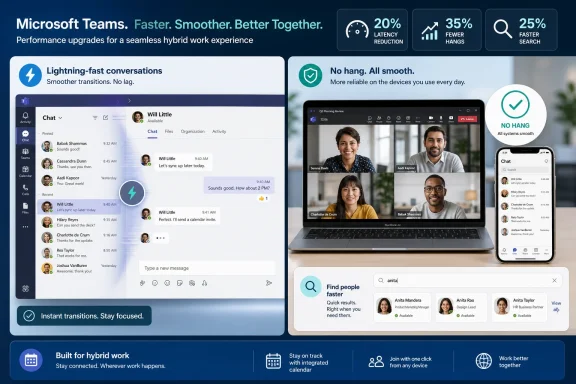 Microsoft Rediscovers the Radical Appeal of an App That Keeps Up
For years, Teams has occupied a strange place in Microsoft’s product universe. It is both indispensable and routinely resented, deployed by IT departments at enormous scale while many end users experience it as a tax on attention and hardware. The app became the front door to hybrid work, but it also became a symbol of modern enterprise software’s habit of absorbing everything until even simple actions feel mediated by a platform committee.That is why a 20 percent improvement in chat switching lands differently from a typical performance brag. Switching between chats is not an edge case. It is the muscle memory of the workday: manager to project room, project room to customer thread, customer thread back to a one-on-one where the actual decision was made.
When that transition is slow, even by fractions of a second, users do not experience it as a benchmark. They experience it as friction. The app feels like it is thinking before it lets them think.
Microsoft’s framing is telling. The company is not selling this as a shiny new collaboration paradigm. It is describing a repair job on one of Teams’ most common paths, with explicit attention to older devices and slower networks. In 2026, that sounds almost old-fashioned: software engineering aimed at making the thing people already use less annoying.
The Copilot Era Hit a Wall Called Everyday Software Quality
The backdrop matters because Microsoft has spent the last several years repositioning almost everything around AI. Teams became a natural host for that push: meeting summaries, intelligent recaps, agents, suggested actions, and Copilot-mediated workflows all make conceptual sense inside the product. If any Microsoft app was destined to become an AI control surface for office life, Teams was it.But there is a limit to how much enthusiasm users can muster for intelligence layered on top of sluggishness. A meeting recap may be useful, but it does not erase the irritation of a chat list that lags, a search box that takes too long to return a colleague, or a Mac client that hangs during routine navigation. The user’s first judgment of software is not whether it is strategically aligned with the vendor’s AI roadmap. It is whether the click they just made produced the expected response.
That is the quiet lesson in Microsoft’s Teams performance push. AI features can raise the ceiling of a product, but latency lowers the floor. When the floor is too low, everything above it looks decorative.
Microsoft has been here before. Windows, Office, Edge, and Teams have all gone through cycles where capability outran coherence. The company adds features because customers ask for them, competitors force them, and revenue models reward them. Then, periodically, the weight of all that expansion becomes visible, and Redmond remembers that speed is not a luxury feature.
Teams’ Problem Was Never Just That It Was “Slow”
The easiest version of the Teams complaint is that the app is slow. The more accurate version is that Teams often feels unpredictably slow. Users can forgive heavy software when the heaviness is consistent; they adapt, build habits, and understand the cost of certain actions. What breaks trust is when a basic path feels instant one moment and sticky the next.Chat switching sits right in that danger zone. It is a simple action in the user’s mind, but not necessarily a simple action in the software. Teams has to manage conversation state, message rendering, identity data, unread markers, presence, attachments, policy boundaries, and a UI that is increasingly expected to preserve context across work surfaces.
The same is true of people search. On paper, finding a person in an organization should be trivial. In a real Microsoft 365 tenant, it can involve directory scale, federation, external collaborators, policy controls, caching, mobile constraints, and a user expectation that typing three letters should immediately surface the right colleague.
That mismatch between conceptual simplicity and engineering complexity is where enterprise software earns or loses credibility. Users do not care that a chat switch wakes up a stack of services and client-side rendering paths. They care that their conversation appears before their train of thought leaves the station.
The Apple Numbers Are the Most Politically Interesting
The headline improvement across all devices is the 20 percent reduction in chat-switching latency. But the Apple-specific numbers may be more revealing. Microsoft says it cut Teams hangs on Apple hardware by 35 percent and improved iOS people search by 25 percent. That is a conspicuous concession to the fact that Teams is not merely a Windows client with some companion apps.In many professional environments, the Mac is no longer an exception to be tolerated. It is common among executives, developers, designers, sales teams, and mobile-heavy workers. The iPhone, meanwhile, is often the device where Teams becomes most intrusive: the place where work follows the user into transit, school pickup, or a hallway between meetings.
A hang on macOS or iOS is not just a technical defect. It is a reputational one. It reinforces the old suspicion that Microsoft’s cross-platform apps are best on Microsoft’s own platform and merely acceptable elsewhere.
That suspicion is not always fair, especially given how much modern Microsoft software has moved beyond Windows-first assumptions. But perception matters. If Teams is supposed to be the universal collaboration fabric for Microsoft 365, it has to feel native enough everywhere that users stop thinking about the platform split.
The iOS people-search improvement is especially practical. Mobile Teams use often starts with intent under time pressure: message a colleague, join a meeting, respond to a thread, find the person who owns a decision. Shaving time off search is not glamorous, but mobile productivity is full of these small gates. If the gate opens faster, the app feels smarter even when no AI is involved.
Performance Work Is Product Work, Not Plumbing
One of the recurring mistakes in how the tech industry talks about performance is treating it as plumbing. Features are product; speed is infrastructure. The Teams update argues against that distinction.Responsiveness changes what a product is. A chat client that switches instantly encourages quick context changes. A chat client that hesitates encourages users to batch, defer, or move the conversation elsewhere. A search interface that reliably finds people becomes a navigation tool. One that lags becomes a last resort.
This is especially true for collaboration software because collaboration is interruption formalized into interface design. Teams is not a single-purpose app that users open, complete a task, and close. It is ambient. It competes with email, calendars, browsers, documents, ticketing systems, line-of-business apps, and the operating system itself.
In that environment, latency is not merely wasted time. It is cognitive leakage. Every pause gives the user a chance to lose context, get distracted, or resent the tool.
Microsoft’s best argument for Teams has always been integration. Chat, meetings, files, calls, apps, calendars, and identity live under one Microsoft 365 roof. Its biggest weakness is that integration can feel like accumulation. Performance work is how Microsoft turns accumulation back into cohesion.
The New Teams Rewrite Set the Bar, Then Raised Expectations
Microsoft’s broader Teams performance story did not begin in 2026. The company previously made a major architectural turn with the new Teams client, pitching it as faster and lighter than the older Electron-era experience. That transition was important because it acknowledged what users had been saying for years: Teams had become too heavy for something that functioned as daily infrastructure.But rewrites do not end performance work. They reset the baseline. Once users are moved to the new client, they stop comparing it with the old one and start judging it against the feeling of modern software generally.
That is a tougher contest. Teams is not only competing against Slack, Zoom, Google Meet, Discord, iMessage, WhatsApp, and native phone dialers in isolated categories. It is competing against the expectation that software on fast hardware should feel immediate. A modern laptop that can compile code, edit video, and run local AI workloads should not appear to struggle with a list of conversations.
This is where Microsoft’s 2026 numbers are useful but incomplete. A 20 percent latency reduction is meaningful, but the lived question is whether Teams crosses the threshold from “better” to “I no longer notice it.” Performance matters most when it disappears from user consciousness.
The company appears to understand that. Its emphasis on common actions suggests a move away from benchmark theater toward workflow repair. That is the right instinct, because users rarely judge collaboration software by its best demo. They judge it by its 47th interaction of the day.
Admins Care About Snappiness Because Complaints Become Tickets
For IT departments, Teams performance is not a soft user-experience issue. It is a support load, a device planning problem, a network diagnostic headache, and sometimes a political fight with business units that compare Microsoft’s bundled value against point solutions they find more pleasant.When Teams hangs, users do not file a nuanced report about client state and rendering latency. They say Teams is broken. When search is slow, they say the directory is unreliable. When chat switching drags on older hardware, they say their laptop needs replacing. Each complaint may point to a different root cause, but they all arrive at the help desk as dissatisfaction with the work environment.
That matters because Teams is now bound up with Microsoft 365 licensing strategy. Many organizations choose it not because every user loves it, but because it is already in the stack, governed by existing identity policies, and integrated with compliance tooling. The financial argument is strong. The user-experience argument has to be strong enough to prevent shadow collaboration from creeping back in.
Performance improvements can therefore reduce more than milliseconds. They can reduce the number of moments where employees ask why they are using this instead of something else.
For sysadmins, the Apple fixes are also notable because mixed-device fleets are harder to defend when a core app behaves unevenly. A Mac user with Teams hangs is not just an unhappy Mac user; they are a recurring exception in a standardized Microsoft 365 deployment. Fewer hangs means fewer awkward conversations about whether the sanctioned tool is the right one for the job.
The Slow Network Clause Is Doing a Lot of Work
Microsoft’s mention of slower networks and older devices deserves attention. It is easy for large software vendors to optimize for the machines their engineers use: current hardware, clean test environments, fast corporate networks, and predictable telemetry. Real organizations are messier.A frontline worker may be on a shared mobile device. A school district may be running aging Windows laptops. A remote employee may be on inconsistent home broadband. A field team may be moving between cellular dead zones. A contractor may be connecting from a managed device loaded with security agents that impose their own overhead.
Teams lives in all of those conditions. That makes performance engineering harder but also more valuable. The closer an app gets to infrastructure status, the less it can assume premium conditions.
The slow-network point also cuts through a convenient excuse. Collaboration software often blames the network because meetings, presence, chat sync, and file access are genuinely networked experiences. But users do not care where the boundary sits between client and cloud. They experience the product as a whole.
If Microsoft can make chat switching feel smoother under degraded conditions, that is not just a client win. It is a product win. It means the Teams team is optimizing for the world its customers actually inhabit.
“Good Enough” Is a Dangerous Standard for Bundled Software
Teams benefits from distribution power that most collaboration products can only envy. It is deeply attached to Microsoft 365, backed by enterprise identity, and already approved in organizations where procurement is a bigger barrier than user preference. That position can breed complacency.The danger for Microsoft is not that every company will rip out Teams tomorrow. The danger is that Teams becomes the thing people use because they must, while the energy of work moves elsewhere. Shadow Slack workspaces, WhatsApp groups, unofficial Zoom links, personal notes apps, and side-channel email chains are all symptoms of a sanctioned collaboration tool that does not quite earn the user’s trust.
Speed is one of the most direct ways to earn that trust back. People may disagree about interface design, notification philosophy, threaded conversations, or whether channels should behave more like forums or chat rooms. But almost nobody wants the app to be slower.
This is why Microsoft’s performance messaging should not be dismissed as minor. In bundled enterprise software, “good enough” is often the real competitor. A faster Teams is Microsoft arguing that the default tool should not feel like the default punishment.
The Feature Race Still Has Not Stopped
None of this means Microsoft has abandoned the feature race. Teams continues to absorb more meeting features, phone capabilities, AI recaps, workflow hooks, app integrations, security controls, and admin surfaces. The product is not becoming smaller. If anything, its mandate keeps expanding.That creates the central tension. Microsoft is trying to make Teams feel lighter while asking it to do more. Every new capability risks adding state, UI complexity, policy interactions, telemetry, and edge cases. Every AI feature introduces expectations around context, permissions, data retrieval, and explainability.
The company’s 2026 performance work therefore cannot be a one-time cleanup. It has to become a counterweight built into the product culture. If every new feature arrives faster than the performance debt is paid down, Teams will eventually repeat the same cycle: expansion, drag, user backlash, optimization campaign.
The encouraging sign is that Microsoft is measuring specific user journeys. Chat switching, hangs, and people search are not abstract engineering metrics. They are concrete interactions. If that discipline survives the next wave of AI additions, Teams has a chance to get better without becoming bloated all over again.
The less encouraging possibility is that performance gains become marketing cover for renewed complexity. A faster app can still be a confusing app. A more responsive interface can still bury settings, over-notify users, or make simple information architecture feel like archaeology.
Windows Users Should Not Miss the Cross-Platform Message
For a WindowsForum audience, the Apple improvements may seem like someone else’s problem. They are not. Microsoft’s willingness to tune Teams across macOS and iOS says something about the future of the Windows ecosystem itself.Windows is still central to Microsoft’s enterprise story, but Microsoft 365 is bigger than Windows. Teams has to operate as a service layer across devices, browsers, mobile platforms, virtual desktops, meeting rooms, and managed endpoints. The better Teams becomes outside Windows, the more Microsoft 365 remains sticky even in heterogeneous environments.
That can be good for Windows users, too. Cross-platform pressure often forces Microsoft to confront assumptions that Windows-only software can hide. If Teams has to feel responsive on iOS, macOS, VDI, older PCs, and slow networks, the engineering lessons should feed back into the Windows client.
It also changes what Windows itself must prove. The operating system can no longer rely on Microsoft apps being best by default. If a Microsoft 365 workflow feels equally strong on a MacBook or iPhone, Windows has to compete on manageability, compatibility, hardware diversity, gaming, security, and the quality of its own shell experience.
In that sense, a better Teams on Apple hardware is both a Microsoft strength and a Windows challenge. The company’s cloud-era success depends on meeting users wherever they are. Windows’ continued relevance depends on being one of the best places to be met.
The Metrics Are Welcome, but They Are Not the Whole Story
Vendor performance numbers always need careful reading. A percentage improvement sounds precise, but it raises questions: measured from what baseline, on which builds, across which tenants, in which network conditions, and at what percentile? A 20 percent reduction in latency can be transformative if it affects the slowest interactions; it can be modest if it improves already-acceptable cases.That does not make the numbers meaningless. It means they are the start of the conversation, not the end. Microsoft deserves credit for publishing concrete improvements, especially in areas users can feel. But the real validation will come from whether complaints decline, support tickets change, and users stop treating Teams as the app they tolerate between other tools.
The hang metric is particularly important because hangs are more damaging than ordinary slowness. A slow app still feels alive. A hung app breaks the user’s sense of control. Reducing hangs by 35 percent on Apple hardware is therefore more than a smoothness improvement; it is a reliability claim.
The people-search metric is similarly concrete. Search is one of those features that users judge harshly because the desired result is usually obvious to them. If the app cannot find “Alex from finance” quickly, the user does not care how complex the directory is. They conclude the product is dumb.
The Real Test Is Whether Microsoft Can Keep Boring Work Interesting
Performance work is difficult to sustain because it rarely produces the same organizational glamour as a new feature. It involves profiling, regression hunting, architectural trade-offs, cache behavior, rendering paths, service dependencies, and a thousand small decisions that are invisible when done well. It is the sort of work users only notice when it is absent.Microsoft’s challenge is to keep investing after the first round of gains. Teams is now too central to be tuned episodically. It needs the same kind of continuous performance discipline that browser teams apply to rendering engines and operating system teams apply to boot paths, battery life, and memory pressure.
That means treating regressions as product failures, not engineering trivia. It means giving teams permission to delay features that make common paths worse. It means testing on machines that resemble customer fleets, not just developer workstations. It means remembering that enterprise users may not choose their tools, but they absolutely judge them.
The good news is that Microsoft has the telemetry, engineering capacity, and platform reach to do this well. The bad news is that Microsoft also has a strong institutional habit of packing strategic ambition into every surface it owns. Teams will remain a battleground between focus and accretion.
The Six-Month Fix Says More Than the Percentages
The concrete lesson from Microsoft’s Teams overhaul is not that every user will suddenly love Teams. It is that Microsoft appears to be responding to a credibility problem with the right kind of work: less spectacle, more responsiveness.- Microsoft says Teams chat switching became 20 percent faster during the first half of 2026, targeting one of the app’s most repeated daily actions.
- The company says it reduced Teams hangs on Apple hardware by 35 percent, a meaningful reliability improvement for mixed-platform organizations.
- Microsoft says people search on iOS is 25 percent faster, which matters because mobile Teams usage often starts with urgent, narrowly focused intent.
- The improvements are most important for users on older devices and slower networks, where collaboration software can otherwise feel like a hardware upgrade tax.
- The broader significance is that Microsoft is treating performance as a product feature at a time when much of its messaging still revolves around Copilot and AI.
References
- Primary source: XDA
Published: Thu, 11 Jun 2026 05:00:47 GMT
Microsoft spent six months overhauling Teams, and now it feels as responsive as it should
Plus, iOS and macOS users will find their apps freezing a lot less. www.xda-developers.com
- Official source: techcommunity.microsoft.com
Performance enhancements to Microsoft Teams lead to faster response times | Microsoft Community Hub
Over the past year we’ve delivered enhancements to Teams that improve its overall interaction responsiveness time and creates a more fluid experience for the... techcommunity.microsoft.com
- Related coverage: blog-en.topedia.com
Microsoft Teams will automatically restore the conversation or view state when you switch away briefly | Topedia Blog
Teams will soon restore users' previously selected tab, open side panels, and message selection when they return to a chat, channel, or Quick View within 30 minutes - helping them pick up right where they left off.blog-en.topedia.com - Official source: support.microsoft.com
Wat is er nieuw in Microsoft Teams | Microsoft Support
Ontvang updates over nieuwe functies voor Microsoft Teams in deze regelmatig bijgewerkte opmerkingen bij releases.support.microsoft.com - Related coverage: techspot.com
Microsoft says the revamped Teams app is twice as fast, uses half the memory | TechSpot
Microsoft has released a revamped and redesigned Teams app for Windows and macOS. The preview version was launched back in March, with the company planning for a...www.techspot.com - Related coverage: windowslatest.com
Microsoft admits Teams UI is crowded and causes embarrassing accidental screen shares, confirms a fix
Microsoft admits Teams UI is crowded, causes embarrassing accidental screen share problem, but it's getting fixed. www.windowslatest.com
- Official source: microsoft.com
Microsoft Teams News and Insights | Microsoft 365 Blog
Get the latest product updates for Microsoft Teams , along with helpful tips to make sure you get the most out of your experience.www.microsoft.com - Related coverage: windowscentral.com
Microsoft Teams finally fixes the Enter key (yes, really) and adds more long‑awaited tweaks — Here is everything else new in March 2026 | Windows Central
Microsoft delivered a massive quality-of-life update to Teams with new privacy protections, notification shortcuts, and a smarter way to manage drafts.www.windowscentral.com - Official source: adoption.microsoft.com
- Official source: cdn-dynmedia-1.microsoft.com
- Related coverage: panagenda.com
- Official source: cdn.techcommunity.microsoft.com