Windows 8 Need Windows 8 Help Immediatly

aiqbal16

Senior Member
Joined
Feb 25, 2014
Messages
4
Yesterday, when I got on my computer ( ASUS WINDOWS 8 - CORE: I5) java wanted an update. I usually update EVRYTHING so I decided "why not?" I clicked on the pop up from java and continued. You know the part where you have to put in an administrator password? Well, instead of that, there's a message saying, please connect smart card. I took it to my tech teacher for repair, he didn't know! HOW DO I GET PASSED IT? And now, its not only java, its stuff I need for school.(Microsoft, photoshop etc.) And no, I don't download viruses/ ads.
I'll try to put snapshot.
 

Solution
I guess I misunderstood this completely I thought that you were having problems accessing the data on your computer.

If you have access to everything on your computer I'd back up the really important files to DVDs just to be safe in case you do have something serious.

Are you saying that when you try and open Photoshop, it asks you to insert a smart card?

Can you try this...
I found this on another forum in response to someone having a problem like yours.

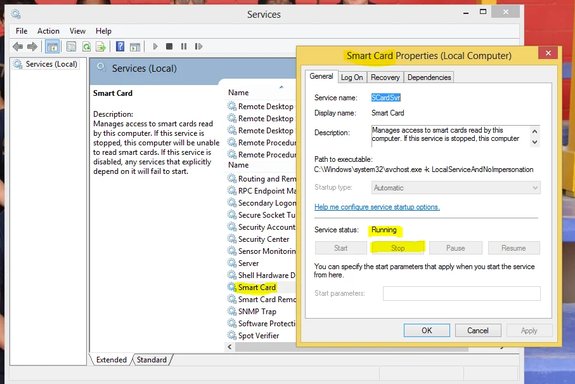
For the smart card pop up, if you don't have a smart card, you need to go into your services (start>control panel>administrative tools>services) and stop the smart card service, then set the startup type to manual or disabled. That removed the smart card pop up for my users...
Hi

This is what mine looks like...

Link Removed

All I have to do to change it, is to right click on it, select Properties, and change it to disabled.

If it is denying access, you can try logging in, in Administrator mode.

Here's how to do that....

How to Enable the Administrator Account

Open the command prompt with elevated privileges by clicking the Start orb, All Programs, Accessories, right-click Command Prompt and then select Run as administrator.

Type or cut and paste…

net user administrator /active:yes

then press Enter.

Log out and log back in as Administrator.

When you are done undue the process by doing the same thing and pasting in

net user administrator /active:no

Let us know if this works.

Mike
 

Smart card is a business system that computers can use to make them more secure… like the thumb print reader. If the account needs that input to open the files then it is locked and a format or hack is normally needed… same as losing your password.
 

the thing is I can sign as admin cause it says connect a smart card! here ill take a snap
 

this should help :(
 

Attachments

  • .....webp
    .....webp
    60.3 KB · Views: 345
You don't have any idea how it got turned on, is your computer part of any network or anything that requires use of a smart card?

You may still have to do the factory to reset everything back to normal, since everything seems to be set to operate only if accessed via a smart card.

It may be possible to change the setting in the registry but I don't know how, or where you would look for it.
Maybe someone else here does.

OK, I found this...

Boot into Safe Mode and logon as "administrator"

Run; Regedit.exe

Find...

HKLM\Software\Microsoft\Windows\CurrentVersion\Policies\system

Delete the key... SCForceOption

I would back up anything important before I did this just to be safe, it should be safe to do this.
But better safe then sorry.

If it won't let you do this either then I think you'll have to reset the computer to factory specs to fix this.
Is there a problem with reinstalling your software after you get it back to factory specs?

With the factory reset you could be back up and running in an hour, but you will lose everything on your computer!

The only other option would be logging in with some kind of Windows system disk that will boot into the Windows environment independent of the installed OS and creating a disk like that requires a Windows installation disk and some work.

http://windows.microsoft.com/en-us/windows7/create-a-system-repair-disc

I think it would be easier just to start over.

Mike

 

Last edited:
Back
Top