

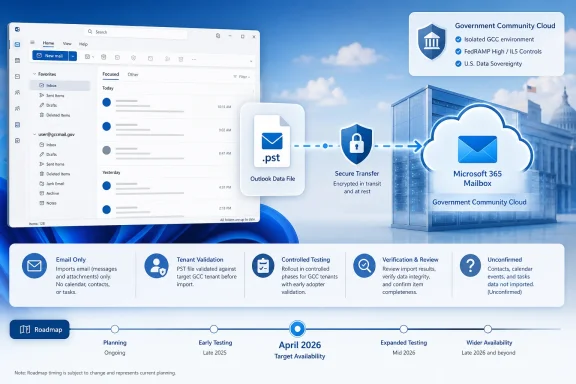
Microsoft has marked a GCC roadmap item for importing email from Outlook Data Files into a mailbox in the new Outlook for Windows as launched. Microsoft 365 Roadmap ID 485740 lists General Availability in April 2026, limits the item to Government Community Cloud, and says additional PST capabilities are planned for future releases. This is a rollout milestone for a specific cloud environment—not evidence of universal availability or complete PST parity.
Microsoft’s supplied roadmap entry does not publish an end-user navigation path for this feature. It does not identify the exact menu used to select a PST, choose a destination mailbox or folder, start the import, monitor progress, or verify completion.
Accordingly, WindowsForum cannot provide a verified sequence such as “select this menu, click this command, and choose this destination.” Substituting the classic Outlook Import and Export wizard would be misleading because Roadmap ID 485740 specifically concerns the new Outlook for Windows.
Treat this article as a rollout watch until the command appears in the target GCC tenant and Microsoft publishes—or an administrator validates—the complete interface. When testing, document the actual sequence in your environment:
That wording supports saying that Roadmap ID 485740 promises email import. It does not support claiming that the feature imports every item, setting, or organizational structure that might exist in a PST.
A PST can contain more than email, but this roadmap entry does not confirm the handling of:
The same restraint applies to folder preservation. An email import could preserve a hierarchy, flatten it, merge folders, or ask the user to choose a target. The roadmap description alone does not answer that question. Administrators need to test the released interface rather than infer its behavior from the word “import.”
It does not establish that the same feature is available in every commercial, education, consumer, sovereign, or specialized Microsoft environment. It also does not prove that the command has reached every user or device in a GCC organization.
For support desks, the decisive evidence is straightforward: is the import command present and functional for the intended user, with the intended account, in the target tenant?
A roadmap page can establish Microsoft’s stated scope and rollout status. It cannot replace a tenant-level test. Internal support documentation should therefore avoid statements such as “new Outlook now supports PST import for everyone.” A safer statement is:
April 2026 — The roadmap lists this month for General Availability in GCC.
Launched status — Microsoft now marks the GCC roadmap item as launched.
Future releases — Microsoft says PST capabilities will expand, but this entry does not define the additional capabilities or provide dates for them.
The timeline should not be extended with inferred release stages, client versions, or deployment dates that are absent from the supplied source.
That does not mean every PST should be imported. It means organizations need a repeatable decision process for determining which files should move, who should control the operation, and how success will be measured.
The roadmap item gives GCC users a potential client-based path for moving email from a local file into a mailbox. It does not define the organizational consequences of doing so.
Capacity, retention, discovery, legal hold, records classification, ownership, privacy, duplicates, and deletion authority remain local policy considerations. Their treatment depends on the destination service, licenses, tenant configuration, organizational rules, and the contents of the source file. Roadmap ID 485740 does not promise any particular outcome in those areas.
For example, administrators should not claim solely from this announcement that imported messages will:
The minimum promise is email import from a PST into a mailbox. The boundary is that other data types and behaviors are not explained in this entry.
This distinction matters during user acceptance. A user may confirm that old messages are visible and assume the entire PST has been migrated. A proper verification process must first establish what the PST contains and then compare that inventory with what the released feature actually processes.
A representative test PST should include, where appropriate:
The test record should distinguish among four results:
A controlled organizational migration is more appropriate when any of the following applies:
Organizations may have other Microsoft services or established migration tools available, but those should be evaluated under their own current documentation. They should not be presented as part of this GCC client feature unless Microsoft explicitly connects them.
A completion message, if the released interface provides one, would indicate that Outlook stopped processing the selected operation. Migration success requires checking the result against an agreed acceptance standard.
For a small user-level test, verification can include:
The source PST should remain preserved until the responsible person accepts the migration. Preservation does not require keeping every PST forever; it means avoiding irreversible cleanup before the destination has been checked and the applicable retention decision has been made.
The next step is therefore tenant validation, not assumption. Administrators should confirm the command, record its navigation, test destination selection, observe progress and completion behavior, and verify representative content. They should also keep non-email PST data, duplicates, capacity, retention, legal hold, and ownership in the preflight process because this roadmap entry does not settle those questions.
Microsoft says additional PST capabilities are planned. Until those capabilities are separately defined and delivered, Roadmap ID 485740 should be treated as a GCC email-import milestone—not as universal new-Outlook availability, complete PST migration, or proof that every historical Outlook workflow has been reproduced.
 Before You Look for the Import Button
Microsoft’s supplied roadmap entry does not publish an end-user navigation path for this feature. It does not identify the exact menu used to select a PST, choose a destination mailbox or folder, start the import, monitor progress, or verify completion.Accordingly, WindowsForum cannot provide a verified sequence such as “select this menu, click this command, and choose this destination.” Substituting the classic Outlook Import and Export wizard would be misleading because Roadmap ID 485740 specifically concerns the new Outlook for Windows.
Treat this article as a rollout watch until the command appears in the target GCC tenant and Microsoft publishes—or an administrator validates—the complete interface. When testing, document the actual sequence in your environment:
- Record where the PST import command appears in the new Outlook for Windows.
- Confirm how the user browses to and selects the source
.pstfile. - Record whether the interface permits selection of the entire file, individual folders, or another scope.
- Confirm how the destination mailbox is selected.
- Confirm whether a destination folder can be selected or created.
- Record the button or command that starts the import.
- Capture any progress, completion, warning, or failure message.
- Verify the result by comparing controlled source messages and folders with the destination.
- Do not delete, move, or retire the source PST until verification is complete.
Rollout answer
What changed: Roadmap ID 485740 promises email import from a PST into a mailbox through the new Outlook for Windows.
Who gets it: The roadmap item is scoped to Government Community Cloud.
What is not confirmed: The roadmap does not publish the click path, prerequisites, duplicate-handling behavior, destination-folder rules, progress reporting, failure recovery, or treatment of non-email PST content.
What to do now: Test availability and behavior in the intended GCC tenant with a controlled PST before publishing instructions or authorizing production migrations.
Roadmap details: New Outlook for Windows; GCC; email import from PST to mailbox; Roadmap ID 485740; General Availability listed for April 2026; status marked Launched.
Microsoft Connects a PST to a Mailbox—Within a Defined Scope
The confirmed feature is narrowly stated: users can import emails from a PST, also known as an Outlook Data File, into a mailbox using the new Outlook for Windows.That wording supports saying that Roadmap ID 485740 promises email import. It does not support claiming that the feature imports every item, setting, or organizational structure that might exist in a PST.
A PST can contain more than email, but this roadmap entry does not confirm the handling of:
- Contacts
- Calendar appointments
- Tasks
- Notes
- Journal items
- Attachments
- Folder structures
- Categories
- Rules
- Views
- Permissions
- Custom properties
- Message metadata
- Duplicate items
- Password-protected files
The same restraint applies to folder preservation. An email import could preserve a hierarchy, flatten it, merge folders, or ask the user to choose a target. The roadmap description alone does not answer that question. Administrators need to test the released interface rather than infer its behavior from the word “import.”
| Question | Confirmed by Roadmap ID 485740? | Required action |
|---|---|---|
| Is this for the new Outlook for Windows? | Yes | Test with that client, not a classic Outlook procedure |
| Is the roadmap scope GCC? | Yes | Confirm the destination tenant is GCC |
| Does it promise PST email import into a mailbox? | Yes | Validate the command with a controlled PST |
| Is General Availability listed for April 2026? | Yes | Use the date as roadmap scheduling information |
| Is the item marked Launched? | Yes | Do not equate the status with universal user availability |
| Is an exact click path published in the supplied entry? | No | Record the path during tenant validation |
| Are contacts and calendars covered? | Not confirmed | Inventory them separately before migration |
| Are attachments, folders, and metadata preserved? | Not confirmed | Test representative content |
| Is duplicate handling defined? | Not confirmed | Run an overlap test before production use |
| Are mailbox-capacity effects defined? | Not confirmed | Apply local capacity policy and monitoring |
| Are retention or legal-hold outcomes defined? | Not confirmed | Obtain approval from the responsible governance team |
| Is the feature available outside GCC? | Not established by this item | Do not use this roadmap entry as proof of availability elsewhere |
“Launched” Does Not Mean Universal
Roadmap ID 485740 is a GCC roadmap item. Its launched status should be read within that scope.It does not establish that the same feature is available in every commercial, education, consumer, sovereign, or specialized Microsoft environment. It also does not prove that the command has reached every user or device in a GCC organization.
For support desks, the decisive evidence is straightforward: is the import command present and functional for the intended user, with the intended account, in the target tenant?
A roadmap page can establish Microsoft’s stated scope and rollout status. It cannot replace a tenant-level test. Internal support documentation should therefore avoid statements such as “new Outlook now supports PST import for everyone.” A safer statement is:
That wording gives technicians useful information without promising an interface they may not see.Microsoft has marked GCC Roadmap ID 485740 as launched for email import from PST files into mailboxes in the new Outlook for Windows. Availability and behavior must be validated in the target tenant.
Timeline
Roadmap publication — Microsoft created Roadmap ID 485740 to track email import from PST files into mailboxes through the new Outlook for Windows.April 2026 — The roadmap lists this month for General Availability in GCC.
Launched status — Microsoft now marks the GCC roadmap item as launched.
Future releases — Microsoft says PST capabilities will expand, but this entry does not define the additional capabilities or provide dates for them.
The timeline should not be extended with inferred release stages, client versions, or deployment dates that are absent from the supplied source.
Why the Feature Deserves Attention
PST files remain part of many Windows and Outlook support environments. They may represent user-created archives, data copied during a machine replacement, material retained from an older account, or records collected during a previous migration.That does not mean every PST should be imported. It means organizations need a repeatable decision process for determining which files should move, who should control the operation, and how success will be measured.
The roadmap item gives GCC users a potential client-based path for moving email from a local file into a mailbox. It does not define the organizational consequences of doing so.
Capacity, retention, discovery, legal hold, records classification, ownership, privacy, duplicates, and deletion authority remain local policy considerations. Their treatment depends on the destination service, licenses, tenant configuration, organizational rules, and the contents of the source file. Roadmap ID 485740 does not promise any particular outcome in those areas.
For example, administrators should not claim solely from this announcement that imported messages will:
- Synchronize to every client or device
- Enter a particular retention scope
- Become searchable through a specific discovery tool
- Inherit a particular sensitivity label
- Be placed under an existing hold
- Consume a predictable amount of mailbox capacity
- Preserve every property from the PST
- Retain the original folder hierarchy
- Avoid creating duplicates
- Produce a reversible transaction
Email Import Is Not the Same as Complete PST Migration
The roadmap uses the word “emails.” That gives administrators a clear minimum promise and an equally clear boundary for planning.The minimum promise is email import from a PST into a mailbox. The boundary is that other data types and behaviors are not explained in this entry.
This distinction matters during user acceptance. A user may confirm that old messages are visible and assume the entire PST has been migrated. A proper verification process must first establish what the PST contains and then compare that inventory with what the released feature actually processes.
A representative test PST should include, where appropriate:
- Messages without attachments
- Messages with small and large attachments
- Nested mail folders
- Duplicate messages
- Messages with categories or flags
- Sent and received messages
- Drafts
- Deleted items
- Contacts
- Calendar appointments
- Tasks or notes
- Unusual characters in folder and item names
- Items from different date ranges
The test record should distinguish among four results:
- Imported as expected
- Imported with changes
- Not imported
- Unable to verify
Preflight Decision Tree
Use the following decision tree before deciding whether this should be a one-user operation or a controlled organizational migration.1. Is the target tenant GCC?
- No or unknown: Stop. Roadmap ID 485740 does not establish availability for the environment.
- Yes: Continue.
2. Is the user running the new Outlook for Windows?
- No: This roadmap item is not the basis for the planned procedure.
- Yes: Continue.
3. Is the import command visible and functional?
- No: Treat the feature as unavailable for that user. Record the client and tenant details, then follow the organization’s escalation process.
- Yes: Continue with a nonproduction test.
4. Is this one known PST for one active user?
- Yes: The file may be suitable for a supervised self-service test.
- No: Move to a controlled migration assessment.
5. Is ownership clear?
- Yes: Continue.
- No: Stop until the organization identifies the data owner or custodian.
archive.pst does not prove who owns every item inside it.6. Does the PST contain only email that the user is authorized to move?
- Yes, based on inspection: Continue.
- No or unknown: Escalate for administrative review.
7. Are capacity, retention, hold, and records requirements understood?
- Yes: Continue according to local policy.
- No: Obtain approval before importing.
8. Are overlapping PSTs or previous imports possible?
- No: Continue.
- Yes or unknown: Run duplicate tests and define an authoritative source before production import.
9. Can the result be verified without deleting the source?
- Yes: Proceed with a controlled import.
- No: Improve the backup and verification plan first.
10. Is the request part of a department-wide, acquisition, departure, investigation, or records project?
- No: A supervised user-level workflow may be appropriate.
- Yes: Treat it as an organizational migration, not a convenience feature.
One-User Self-Service Versus Controlled Migration
A self-service workflow is most defensible when the user has one clearly owned PST, understands what it contains, has an approved destination, and can verify the result. Even then, the first attempt should use controlled data or a preserved copy.A controlled organizational migration is more appropriate when any of the following applies:
- Multiple PSTs exist for one user.
- Multiple users or former employees are involved.
- Files contain overlapping exports or backups.
- Ownership is disputed or unclear.
- The content may be subject to retention, investigation, discovery, or legal hold.
- The PST may contain non-email Outlook items that must also be preserved.
- Administrators need consistent folder mapping or naming.
- The operation must produce a formal audit record.
- The destination mailbox or folder must be approved in advance.
- The organization needs a repeatable exception and failure process.
- A large number of imports must be coordinated.
Organizations may have other Microsoft services or established migration tools available, but those should be evaluated under their own current documentation. They should not be presented as part of this GCC client feature unless Microsoft explicitly connects them.
Verification Must Be Defined Before Import Starts
“Import completed” and “migration succeeded” are not the same statement.A completion message, if the released interface provides one, would indicate that Outlook stopped processing the selected operation. Migration success requires checking the result against an agreed acceptance standard.
For a small user-level test, verification can include:
- Confirming that the intended destination mailbox was used.
- Confirming that the intended destination folder was used or created.
- Comparing the number of representative source and destination messages.
- Opening messages from the oldest, newest, and middle date ranges.
- Opening several imported attachments.
- Checking nested folders.
- Searching for known senders, subjects, and dates.
- Checking whether duplicates appeared.
- Recording items or folders that were skipped or changed.
- Restarting Outlook and confirming that the imported content remains visible.
- Confirming the result through another approved mailbox access method, if organizational policy calls for that check.
The source PST should remain preserved until the responsible person accepts the migration. Preservation does not require keeping every PST forever; it means avoiding irreversible cleanup before the destination has been checked and the applicable retention decision has been made.
Action Checklist for Administrators
Scope and availability
- Confirm that the target tenant is in the GCC cloud instance covered by Roadmap ID 485740.
- Confirm that the user is working in the new Outlook for Windows.
- Verify that the import option is actually visible for the test user.
- Test that the command opens and permits selection of a PST.
- Record the Outlook build, Windows build, account type, tenant, test date, and policy context.
- Do not infer availability for other tenants from the GCC launched status.
- Do not publish a click-by-click guide until the actual interface has been validated.
Source inventory
- Preserve an unchanged copy of the source PST.
- Record the file name, owner, location, size, date range, and known origin.
- Determine whether the file contains data from more than one person or account.
- Inventory email and any non-email item types that may be present.
- Identify overlapping PSTs, previous exports, and earlier import attempts.
- Confirm that the person requesting the import is authorized to move the content.
Destination planning
- Confirm the exact destination mailbox.
- Decide whether local policy calls for a dedicated destination folder.
- Check mailbox and archive capacity under the organization’s existing rules.
- Decide how imported folders should be named if the feature allows destination control.
- Define how accidental import into the wrong location will be handled.
- Do not assume that capacity use will match the PST’s file size.
Governance review
- Ask the records owner whether the material should be imported, retained separately, or excluded.
- Ask the compliance or legal team whether any relevant hold or investigation applies.
- Determine whether the destination’s retention configuration is appropriate.
- Decide whether historical data from another custodian may enter the user’s mailbox.
- Record approvals and exceptions.
- Treat capacity, retention, discovery, legal-hold, and deletion questions as local policy matters—not guaranteed feature outcomes.
Pilot import
- Use a controlled PST or preserved working copy.
- Capture the exact navigation and click path presented in the tenant.
- Record all available source-scope and destination options.
- Record any duplicate-handling choices.
- Record progress indicators, warnings, and completion messages.
- Stop if the destination is ambiguous or cannot be confirmed.
- Avoid using irreplaceable source data for the first tenant test.
Result verification
- Confirm that expected email appears in the selected destination.
- Compare representative folders and messages.
- Open attachments and inspect date ranges.
- Search for known test messages.
- Check for duplicated or missing content.
- Record the treatment of contacts, calendars, tasks, notes, folders, and metadata without assuming an outcome.
- Document warnings, failures, skipped items, and unexplained differences.
- Obtain user or records-owner acceptance before retiring the source.
Rollout decision
- Approve self-service only for scenarios that meet the organization’s defined criteria.
- Route multi-user, mixed-owner, sensitive, or high-volume work through a controlled migration process.
- Train the help desk to distinguish “roadmap launched” from “command verified.”
- Label internal instructions as GCC-specific unless another environment has been separately validated.
- State clearly that this roadmap item confirms email import, while other PST content remains unconfirmed by the entry.
- Recheck Microsoft’s roadmap and support guidance before each broader deployment phase.
- Retain a rollback, escalation, and exception process.
What Administrators Should Say to Users
A concise help-desk response can avoid both overpromising and unnecessary confusion:That response answers the immediate question without turning a roadmap entry into an unsupported product specification.Microsoft has marked a GCC feature for importing email from a PST into a mailbox in the new Outlook for Windows as launched under Roadmap ID 485740. The roadmap lists General Availability in April 2026, but it does not provide the exact import procedure or confirm the handling of every type of data stored in a PST. We must first verify that the command is available in your tenant, inventory the file, confirm the destination, and test the result before the original PST is removed.
The Next Milestone Is a Verified Workflow
Roadmap ID 485740 establishes a meaningful but limited fact: Microsoft is delivering PST email import into mailboxes through the new Outlook for Windows for GCC. The launched status is useful deployment information, but the roadmap does not provide enough operational detail for WindowsForum to publish an exact end-user procedure.The next step is therefore tenant validation, not assumption. Administrators should confirm the command, record its navigation, test destination selection, observe progress and completion behavior, and verify representative content. They should also keep non-email PST data, duplicates, capacity, retention, legal hold, and ownership in the preflight process because this roadmap entry does not settle those questions.
Microsoft says additional PST capabilities are planned. Until those capabilities are separately defined and delivered, Roadmap ID 485740 should be treated as a GCC email-import milestone—not as universal new-Outlook availability, complete PST migration, or proof that every historical Outlook workflow has been reproduced.
References
- Primary source: Microsoft 365 Roadmap
Published: 2026-07-10T21:58:35.1674832Z
Microsoft 365 Roadmap | Microsoft 365
The Microsoft 365 Roadmap lists updates that are currently planned for applicable subscribers. Check here for more information on the status of new features and updates.www.microsoft.com
- Official source: support.microsoft.com
Import email, contacts, and calendar from an Outlook .pst file | Microsoft Support
Import all of your Outlook email, contacts, or calendar events that you saved to a .pst so you can view them in Outlook.support.microsoft.com - Official source: learn.microsoft.com
Learn about importing organization PST files | Microsoft Learn
Learn how to use the Import service in the Microsoft Purview portal to bulk-import email data (PST files) to user mailboxes.learn.microsoft.com - Related coverage: surfpac.navy.mil
- Related coverage: drssoftech.com
Import PST to New Outlook: Simple Steps for All Users
Can't import PST to New Outlook? Follow our complete guide to import PST into the new Outlook app and recover emails, contacts & calendar.www.drssoftech.com - Related coverage: robert365.com
How to backup New Outlook Account Configuration and Mailbox Data - Robert 365
This is a full backup guide for New Outlook. Learn how to successfully backup and restore your Account Settings, Mailbox data, Calendar and Contacts. Additional preparations and workarounds are needed due to limitations in New Outlook, which could prevent you from being able to recover your...robert365.com
- Related coverage: windowslatest.com
Microsoft says New Outlook is now closer to Outlook Classic, adds .PST advanced support and other features
The good news is Microsoft is bridging the gap and rolling out support for advanced .PST and other features. www.windowslatest.com
- Related coverage: remosoftware.com
Quick and Easy Way to Import a PST File into Outlook.
In this article, find an effective method to import a PST file into Outlook versions 2021, 2019, 2019, and older versions like a pro.www.remosoftware.com - Related coverage: nucleustechnologies.com
How to Migrate Emails to Office 365 Mailbox? Top 3 Solutions
Do you want to migrate emails to Office 365? Follow the article and learn about the proven methods to move email to Microsoft 365 with zero data loss.www.nucleustechnologies.com - Related coverage: blog.perfectdatasolutions.com
Simply use the PDS OST to Office 365 Converter Software - Blog For Perfect Data Solutions
How do you open, import, and access OST files in Outlook 365? Just follow up all the steps in this blog and use an PDS OST to Office 365 Converter for solving all issue in OST files under Office 365. A lot of preparation and administration go into opening an OST file to Office 365 &hellip...blog.perfectdatasolutions.com - Related coverage: stellarinfo.com
OLM File Extension – What is an .OLM File?
Microsoft Outlook uses data files, such as .OST, .PST and .OLM to store the mailbox data on your local system storage. However, the OLM file is not created by default. Instead, Outlook for Mac creates a .OLK file to store a local synchronized copy of mailbox items, such as emails, contacts,...www.stellarinfo.com - Related coverage: workspacemigration.com
Email Migration Services - Microsoft 365 & Google Workspace
Data migration, cold email infrastructure, and email deliverability for growth teams. Expert email migration services for Microsoft 365 tenant-to-tenant, Google Workspace, GoDaddy defederation, IONOS, Rackspace & more. Zero downtime, 1,200+ migrations, 700+ five-star reviews. Free quote. workspacemigration.com
- Related coverage: bleepingcomputer.com
- Related coverage: e-stat.go.jp
