

Microsoft plans to bring Power Automate integration for Microsoft Purview Data Lifecycle Management and records management to GCC, GCC High, and DoD tenants in July 2026, letting administrators trigger workflows when content reaches the end of its retention period. That sounds like a narrow compliance feature, but it points to a larger shift in how Microsoft wants government cloud customers to run records programs. Instead of treating disposition as a final checkbox inside Purview, Microsoft is making the end of retention a programmable event. For agencies and regulated contractors, that may be the difference between a retention policy that merely exists and one that actually fits the messy business process around it.
For years, records management in Microsoft 365 has been built around the idea that content eventually reaches a decision point. A document, message, or file is retained for a defined period, then Purview applies whatever end-of-retention action the label specifies: delete it, relabel it, deactivate the label, or send it into a disposition review.
The new roadmap item extends that model for U.S. government cloud environments by allowing a Power Automate workflow to start when an item reaches the end of its retention period. In plain terms, the expiration of a record’s retention clock can now become a trigger for a business process, not just a prompt inside a compliance portal.
That matters because real-world disposition is rarely a single-click operation. A contract may need legal review, program-owner approval, metadata export, archive movement, or a final check against pending investigations. Purview can govern the retention schedule, but the surrounding workflow often lives across SharePoint, Teams, email, ticketing systems, line-of-business databases, and human review chains.
Microsoft’s bet is that Power Automate can become the connective tissue. The retention label remains the compliance anchor, while the flow handles the practical choreography that follows.
Microsoft 365 government environments live under a different operating promise. Features must clear security, compliance, data residency, and operational boundaries that commercial tenants do not always share. Power Automate itself also behaves differently across sovereign and government clouds depending on connector availability, service boundaries, and certification status.
That is why this roadmap item should not be read as a flashy new automation toy. It is better understood as another step in the slow normalization of modern Microsoft 365 compliance tooling inside government cloud tenants. The commercial world has already been moving toward programmable governance; government tenants are now being offered a similar pattern, but on a more controlled schedule.
The timing also says something about Purview’s maturation. Records management used to be an island of policy configuration and legal defensibility. Increasingly, it is becoming an orchestration layer, where labels and retention schedules initiate downstream work rather than merely recording that work happened elsewhere.
But file plans are static by design. They define what should happen, not necessarily how a department, agency, contractor, or records office actually makes it happen. The gap between policy and execution is where administrators spend much of their time.
A retention label can say that procurement documents must be retained for seven years and then reviewed. It cannot, by itself, know that one contract requires export to a legacy archive, another needs a litigation-hold check from counsel, and a third must be routed to a program manager who left the agency two years ago. Those are process problems, not label problems.
Power Automate integration gives Purview a way to hand off that complexity at the precise moment it becomes relevant. The item reaches the end of retention; the workflow begins; the organization’s own logic takes over. That is a cleaner model than asking records managers to monitor queues manually or build unsupported scripts around compliance data.
That tension is especially sharp in government environments. Agencies and contractors face overlapping requirements from federal records rules, mission-specific regulations, cybersecurity mandates, procurement rules, privacy laws, and internal audit controls. A single document can sit at the intersection of several obligations, and the safest answer is not always obvious.
A simple disposition review can handle some of that. But more complex organizations need conditional paths. One class of records may require review by legal and records officers. Another may need export to a long-term archive. Another may need a ticket opened in an external records system before deletion can proceed.
Power Automate is attractive because it already speaks the language of conditional workflow. It can branch, notify, update fields, call approved connectors, wait for approvals, and write to other systems. In the records context, that means the compliance event can become the first step in a defensible chain of actions rather than the last thing a user sees in a portal.
But the more interesting use cases are not just about moving files. They are about adding intelligence and accountability around the moment when the organization decides what the file still means.
A flow might notify a records manager, capture the creator and last modifier, copy metadata into a register, ask a legal team to confirm that no hold applies, relabel the item, and then route it into a final approval process. It might write an audit trail into a separate compliance system or open a service desk ticket for an archive team. It might apply different actions depending on department, sensitivity label, file type, contract status, or project code.
That is where the feature becomes more than convenience. It allows organizations to encode their real disposition rules without waiting for Purview itself to support every edge case as a native button.
In a purely Purview-managed model, administrators worry about label scope, retention period, disposition stages, reviewer assignments, and policy precedence. Those are still hard problems, but they sit inside a compliance product built for governance. With Power Automate in the loop, organizations inherit the risks of workflow design: bad conditions, broken connectors, orphaned owners, licensing gaps, throttling, permission sprawl, and flows that silently stop behaving the way their authors intended.
That does not make the integration a bad idea. It does mean that records teams and Power Platform administrators will need to work together instead of treating each other as separate worlds. A flow that determines the fate of a record is not the same as a flow that posts a Teams message when a list item changes.
Government tenants should be especially cautious about connector governance. If a disposition workflow can move files, send messages, write to external systems, or call APIs, then data loss prevention policies and environment strategy become part of the records architecture. The automation layer must be governed with the same seriousness as the retention labels that trigger it.
The owner of a flow may leave the organization. A connector may be disabled. A target archive may change. A service account may lose permission. A flow may depend on a SharePoint column that someone renames. In ordinary business automation, these failures are irritating. In records management, they can undermine defensibility.
That means administrators should not treat this roadmap item as merely a Purview feature. It is also a Power Platform governance feature by implication. The same organizations that have spent years tightening retention policies will need to document flows, monitor run history, control ownership, manage environments, and test failure modes.
A mature deployment will likely separate production records workflows from casual automation environments. It will use named owners or service principals where supported, enforce connector policies, and create operational alerts for failed runs. Most importantly, it will make the flow itself part of the records management documentation.
The new integration is most compelling where the native model is too rigid. Multi-stage review, reviewer assignment, and auto-approval cover a meaningful range of scenarios, but they do not cover every operational need. Some records must be archived, not deleted. Some must trigger external business processes. Some must be checked against systems that Purview does not understand.
That distinction matters because IT departments often over-automate. A workflow should exist because the records process requires it, not because Power Automate makes it possible. Every custom branch introduces maintenance burden and new failure points.
The best use of this feature may be selective. High-value records, complex regulatory classes, and agency-specific workflows are good candidates. Routine low-risk content may be better served by standard retention actions.
The old world was often site-centric and administrator-driven. Retention behavior lived close to libraries, content types, and information architecture. The Purview world is broader and more policy-oriented, spanning Exchange, SharePoint, OneDrive, Teams, and other Microsoft 365 workloads through centralized compliance controls.
That centralization is powerful, but it can feel abstract. Records managers may understand file plans; SharePoint owners may understand libraries and folders; Power Platform makers may understand flows. Purview asks those groups to agree on a shared operating model.
Power Automate integration can help bridge that divide. A retention label can remain centrally governed, while the resulting workflow can speak to local business processes. But it can also worsen fragmentation if every department builds its own disposition automation without common standards.
That does not mean agencies should wait until July to think about it. The hard work is not clicking the feature on. The hard work is deciding which retention labels need workflow integration, what the flows should do, who owns them, and how failures will be handled.
This is a classic Microsoft 365 governance trap. The feature arrives as a small line item in a roadmap, but the operational implications touch compliance, legal, records management, Power Platform administration, SharePoint architecture, and security. Organizations that wait for General Availability before gathering those stakeholders will be late before the first flow runs.
A sensible preparation effort starts with inventory. Which labels currently trigger disposition review? Which labels represent record classes with external steps? Which end-of-retention actions are handled manually today? Which processes are documented only in email or tribal knowledge?
Purview already has concepts around disposition proof and audit activity, but Power Automate introduces another operational record. Flow run history, approval records, connector logs, and target-system entries may all become part of the evidence chain. That evidence chain must be understandable to auditors who may not care how elegant the flow looked in the designer.
This is where Microsoft’s integration design will matter. Administrators will want clarity on what metadata is passed from Purview to the flow, what actions are supported, how authentication is handled, and how failures are surfaced. They will also want to know whether the compliance event and the workflow actions can be correlated cleanly during an audit.
The feature’s success will depend less on whether a flow can be triggered and more on whether organizations can prove that the right flow ran for the right item under the right label at the right time.
Some workflows may rely on standard Microsoft 365 connectors. Others may need premium connectors, custom connectors, HTTP actions, Dataverse, or integration with external archives and records systems. Those choices affect cost, availability, and governance review.
This is not a minor procurement footnote. If a records process depends on a premium connector, then the licensing model becomes part of the compliance design. If the organization cannot sustain the license, the workflow may not be sustainable either.
Administrators should therefore design for the least complicated dependency set that satisfies the records requirement. Elegant automation that no one can license or support is not governance. It is technical debt with a compliance label on it.
The obvious questions come quickly. Which identity runs the flow? Can the flow access only the item that triggered it, or broader repositories? Can it send data outside approved boundaries? Can makers modify it after approval? Are changes logged? Are test flows separated from production flows? What happens if a user with flow ownership leaves?
These are not blockers. They are the questions that turn a promising feature into a production-safe system. Microsoft has spent years encouraging organizations to automate routine work; government records workflows are where automation must graduate from convenience to control.
The best deployments will likely involve change management around flow edits, pre-production testing with representative content, separation of duties, and periodic review of both labels and flows. In other words, the workflow becomes a governed artifact, not an invisible helper.
But the dependency cuts both ways. Records managers will need enough fluency in Power Automate to understand what a flow does, even if they do not build it themselves. They will need to know which parts of the process are enforced by Purview and which parts are simply workflow logic.
That distinction is crucial. A retention label is a compliance configuration. A flow is an automation artifact. Both can be governed, but they are not the same kind of control. Confusing them invites trouble.
The healthiest model is partnership. Records managers define policy intent and evidence requirements. IT and Power Platform administrators implement the workflow safely. Legal and security validate risk. Business owners confirm that the process reflects reality.
That shadow process layer is one reason records governance gets messy. Purview may contain the formal policy, while the actual disposition work happens elsewhere. When auditors ask what happened, the organization has to reconcile portal data, emails, file moves, and human memory.
Triggering Power Automate from the retention event offers a path to consolidate that sprawl. It does not magically fix bad process design, but it gives organizations a sanctioned integration point. The end of retention can become the single moment that starts the documented process.
That is the real value of the roadmap item. It is not merely that Power Automate can send an email. It is that the automation can begin from the compliance event itself rather than from someone remembering to check a queue.
That is a coherent platform story. Microsoft wants Purview, Defender, Entra, Intune, and Power Platform to form a mesh of policy, signal, and action. The more customers buy into that model, the more Microsoft 365 becomes not just a productivity suite but an operating system for enterprise governance.
The risk is complexity. Event-driven governance can be powerful, but it can also become opaque. If every policy triggers a flow, every flow calls a connector, and every connector updates another system, administrators may struggle to explain the chain of custody.
Government customers should therefore resist the temptation to build clever automations before they build clear ones. A boring, auditable workflow is better than a dazzling one that no one can defend two years later.
End-of-retention workflows need failure paths as carefully designed as success paths. If a flow fails, does the item remain protected? Who is notified? Is the failure logged in a place records staff actually monitor? Can the workflow be retried without creating duplicate approvals or inconsistent archive entries?
These questions should be answered before production deployment. They are especially important because retention events may not occur evenly. A label with a seven-year retention period might produce bursts of disposition activity tied to old migrations, policy changes, or bulk labeling efforts.
Administrators should test with scale and weirdness in mind. Old files, missing metadata, locked records, inherited labels, changed owners, and unusual permissions are not edge cases in mature Microsoft 365 tenants. They are the tenant.
Organizations should map their current records lifecycle from label creation to final disposition. They should identify which steps are native Purview controls, which are manual processes, and which are handled by external systems. Then they should decide where Power Automate genuinely improves defensibility, speed, or consistency.
That exercise will also expose uncomfortable gaps. Some labels may have unclear owners. Some disposition reviews may route to groups that no longer reflect the organization. Some archive locations may be poorly governed. Some manual approvals may have no reliable evidence trail.
The arrival of Power Automate integration is an opportunity to fix those problems before automation freezes them into code. Automating a weak records process does not make it strong. It makes it faster.
A few concrete planning moves stand out:
Microsoft’s upcoming Purview and Power Automate integration for government clouds is modest in interface but significant in consequence. It turns the end of retention into a moment where policy can hand off to process, and that is exactly where many records programs need help. If agencies use it to formalize messy workflows, improve evidence trails, and reduce shadow disposition processes, it will be a quiet but meaningful upgrade. If they use it as another place to bury undocumented automation, it will simply move records risk from the compliance portal into the flow designer.
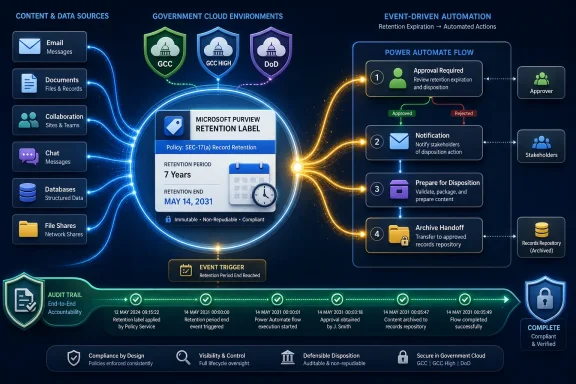 Microsoft Turns Disposition Into an Automation Trigger
For years, records management in Microsoft 365 has been built around the idea that content eventually reaches a decision point. A document, message, or file is retained for a defined period, then Purview applies whatever end-of-retention action the label specifies: delete it, relabel it, deactivate the label, or send it into a disposition review.The new roadmap item extends that model for U.S. government cloud environments by allowing a Power Automate workflow to start when an item reaches the end of its retention period. In plain terms, the expiration of a record’s retention clock can now become a trigger for a business process, not just a prompt inside a compliance portal.
That matters because real-world disposition is rarely a single-click operation. A contract may need legal review, program-owner approval, metadata export, archive movement, or a final check against pending investigations. Purview can govern the retention schedule, but the surrounding workflow often lives across SharePoint, Teams, email, ticketing systems, line-of-business databases, and human review chains.
Microsoft’s bet is that Power Automate can become the connective tissue. The retention label remains the compliance anchor, while the flow handles the practical choreography that follows.
Government Clouds Get a Feature the Commercial Tenant Already Signaled
The roadmap details are specific: the feature is listed as in development, targeted for General Availability in July 2026, and scoped to GCC, GCC High, and DoD cloud instances. That specificity is important because government cloud parity is never just a matter of flipping on a commercial feature.Microsoft 365 government environments live under a different operating promise. Features must clear security, compliance, data residency, and operational boundaries that commercial tenants do not always share. Power Automate itself also behaves differently across sovereign and government clouds depending on connector availability, service boundaries, and certification status.
That is why this roadmap item should not be read as a flashy new automation toy. It is better understood as another step in the slow normalization of modern Microsoft 365 compliance tooling inside government cloud tenants. The commercial world has already been moving toward programmable governance; government tenants are now being offered a similar pattern, but on a more controlled schedule.
The timing also says something about Purview’s maturation. Records management used to be an island of policy configuration and legal defensibility. Increasingly, it is becoming an orchestration layer, where labels and retention schedules initiate downstream work rather than merely recording that work happened elsewhere.
The File Plan Is No Longer the Whole Story
Traditional records programs often begin with a file plan: classes of records, retention periods, regulatory justifications, and final disposition rules. Purview’s records management tooling maps naturally to that world because retention labels can represent those categories and enforce the required lifecycle across Microsoft 365 content.But file plans are static by design. They define what should happen, not necessarily how a department, agency, contractor, or records office actually makes it happen. The gap between policy and execution is where administrators spend much of their time.
A retention label can say that procurement documents must be retained for seven years and then reviewed. It cannot, by itself, know that one contract requires export to a legacy archive, another needs a litigation-hold check from counsel, and a third must be routed to a program manager who left the agency two years ago. Those are process problems, not label problems.
Power Automate integration gives Purview a way to hand off that complexity at the precise moment it becomes relevant. The item reaches the end of retention; the workflow begins; the organization’s own logic takes over. That is a cleaner model than asking records managers to monitor queues manually or build unsupported scripts around compliance data.
The Appeal Is Obvious: Disposition Is Where Governance Gets Political
Retention is often treated as a technical control, but disposition is where the politics of information governance become unavoidable. Keeping data too long increases risk, cost, and discovery exposure. Deleting data too aggressively can violate legal obligations, destroy institutional memory, or trigger public-records failures.That tension is especially sharp in government environments. Agencies and contractors face overlapping requirements from federal records rules, mission-specific regulations, cybersecurity mandates, procurement rules, privacy laws, and internal audit controls. A single document can sit at the intersection of several obligations, and the safest answer is not always obvious.
A simple disposition review can handle some of that. But more complex organizations need conditional paths. One class of records may require review by legal and records officers. Another may need export to a long-term archive. Another may need a ticket opened in an external records system before deletion can proceed.
Power Automate is attractive because it already speaks the language of conditional workflow. It can branch, notify, update fields, call approved connectors, wait for approvals, and write to other systems. In the records context, that means the compliance event can become the first step in a defensible chain of actions rather than the last thing a user sees in a portal.
The Archive Example Is Simple, but the Implications Are Larger
Microsoft’s example of moving a file to an archive is easy to understand, and it will likely be one of the first scenarios administrators test. A document reaches the end of its retention period, a flow runs, and the item is moved to a designated SharePoint location or archival repository.But the more interesting use cases are not just about moving files. They are about adding intelligence and accountability around the moment when the organization decides what the file still means.
A flow might notify a records manager, capture the creator and last modifier, copy metadata into a register, ask a legal team to confirm that no hold applies, relabel the item, and then route it into a final approval process. It might write an audit trail into a separate compliance system or open a service desk ticket for an archive team. It might apply different actions depending on department, sensitivity label, file type, contract status, or project code.
That is where the feature becomes more than convenience. It allows organizations to encode their real disposition rules without waiting for Purview itself to support every edge case as a native button.
The Risk Moves From Policy Misconfiguration to Workflow Misdesign
There is a catch, and it is not a small one. Once disposition becomes programmable, the risk shifts.In a purely Purview-managed model, administrators worry about label scope, retention period, disposition stages, reviewer assignments, and policy precedence. Those are still hard problems, but they sit inside a compliance product built for governance. With Power Automate in the loop, organizations inherit the risks of workflow design: bad conditions, broken connectors, orphaned owners, licensing gaps, throttling, permission sprawl, and flows that silently stop behaving the way their authors intended.
That does not make the integration a bad idea. It does mean that records teams and Power Platform administrators will need to work together instead of treating each other as separate worlds. A flow that determines the fate of a record is not the same as a flow that posts a Teams message when a list item changes.
Government tenants should be especially cautious about connector governance. If a disposition workflow can move files, send messages, write to external systems, or call APIs, then data loss prevention policies and environment strategy become part of the records architecture. The automation layer must be governed with the same seriousness as the retention labels that trigger it.
Power Automate Becomes Part of the Compliance Boundary
Power Automate’s strength is also its danger: it is accessible. Business users can build workflows quickly, and that is why the platform has spread so widely across Microsoft 365 environments. But records disposition is not a citizen-development playground.The owner of a flow may leave the organization. A connector may be disabled. A target archive may change. A service account may lose permission. A flow may depend on a SharePoint column that someone renames. In ordinary business automation, these failures are irritating. In records management, they can undermine defensibility.
That means administrators should not treat this roadmap item as merely a Purview feature. It is also a Power Platform governance feature by implication. The same organizations that have spent years tightening retention policies will need to document flows, monitor run history, control ownership, manage environments, and test failure modes.
A mature deployment will likely separate production records workflows from casual automation environments. It will use named owners or service principals where supported, enforce connector policies, and create operational alerts for failed runs. Most importantly, it will make the flow itself part of the records management documentation.
Disposition Review Still Has a Place
The arrival of Power Automate integration does not make Purview’s built-in disposition review obsolete. For many organizations, the native review model is simpler, more defensible, and easier to administer. If the process is straightforward — notify reviewers, approve deletion, preserve proof of disposition — the built-in approach may still be the right one.The new integration is most compelling where the native model is too rigid. Multi-stage review, reviewer assignment, and auto-approval cover a meaningful range of scenarios, but they do not cover every operational need. Some records must be archived, not deleted. Some must trigger external business processes. Some must be checked against systems that Purview does not understand.
That distinction matters because IT departments often over-automate. A workflow should exist because the records process requires it, not because Power Automate makes it possible. Every custom branch introduces maintenance burden and new failure points.
The best use of this feature may be selective. High-value records, complex regulatory classes, and agency-specific workflows are good candidates. Routine low-risk content may be better served by standard retention actions.
The SharePoint Legacy Shadow Still Hangs Over Records Management
This development also fits into Microsoft’s broader push away from older SharePoint information management patterns and toward Purview as the center of Microsoft 365 compliance. For longtime SharePoint administrators, that migration has been a mixed experience.The old world was often site-centric and administrator-driven. Retention behavior lived close to libraries, content types, and information architecture. The Purview world is broader and more policy-oriented, spanning Exchange, SharePoint, OneDrive, Teams, and other Microsoft 365 workloads through centralized compliance controls.
That centralization is powerful, but it can feel abstract. Records managers may understand file plans; SharePoint owners may understand libraries and folders; Power Platform makers may understand flows. Purview asks those groups to agree on a shared operating model.
Power Automate integration can help bridge that divide. A retention label can remain centrally governed, while the resulting workflow can speak to local business processes. But it can also worsen fragmentation if every department builds its own disposition automation without common standards.
The July 2026 Date Is a Planning Signal, Not a Deployment Plan
Roadmap dates are directional, not contractual. The July 2026 General Availability target gives government customers a planning window, but administrators should assume the usual caveats: rollout may vary by tenant, region, cloud boundary, and feature readiness.That does not mean agencies should wait until July to think about it. The hard work is not clicking the feature on. The hard work is deciding which retention labels need workflow integration, what the flows should do, who owns them, and how failures will be handled.
This is a classic Microsoft 365 governance trap. The feature arrives as a small line item in a roadmap, but the operational implications touch compliance, legal, records management, Power Platform administration, SharePoint architecture, and security. Organizations that wait for General Availability before gathering those stakeholders will be late before the first flow runs.
A sensible preparation effort starts with inventory. Which labels currently trigger disposition review? Which labels represent record classes with external steps? Which end-of-retention actions are handled manually today? Which processes are documented only in email or tribal knowledge?
Auditability Will Decide Whether This Is Trusted
For records managers, automation is only valuable if it remains defensible. A workflow that moves a file or requests approval must leave enough evidence to show what happened, when it happened, who approved it, and why the resulting action was permitted.Purview already has concepts around disposition proof and audit activity, but Power Automate introduces another operational record. Flow run history, approval records, connector logs, and target-system entries may all become part of the evidence chain. That evidence chain must be understandable to auditors who may not care how elegant the flow looked in the designer.
This is where Microsoft’s integration design will matter. Administrators will want clarity on what metadata is passed from Purview to the flow, what actions are supported, how authentication is handled, and how failures are surfaced. They will also want to know whether the compliance event and the workflow actions can be correlated cleanly during an audit.
The feature’s success will depend less on whether a flow can be triggered and more on whether organizations can prove that the right flow ran for the right item under the right label at the right time.
The Power Platform Licensing Question Will Not Stay Quiet
Any time Power Automate enters a Microsoft 365 governance scenario, licensing questions follow. Government tenants are often more constrained than commercial ones, and licensing assumptions that work in one environment can collapse in another.Some workflows may rely on standard Microsoft 365 connectors. Others may need premium connectors, custom connectors, HTTP actions, Dataverse, or integration with external archives and records systems. Those choices affect cost, availability, and governance review.
This is not a minor procurement footnote. If a records process depends on a premium connector, then the licensing model becomes part of the compliance design. If the organization cannot sustain the license, the workflow may not be sustainable either.
Administrators should therefore design for the least complicated dependency set that satisfies the records requirement. Elegant automation that no one can license or support is not governance. It is technical debt with a compliance label on it.
Security Teams Will Ask the Right Uncomfortable Questions
Security teams should welcome this integration, but not uncritically. A disposition workflow may touch sensitive government records at a moment when those records are about to be deleted, archived, or relabeled. That is a high-value point in the data lifecycle.The obvious questions come quickly. Which identity runs the flow? Can the flow access only the item that triggered it, or broader repositories? Can it send data outside approved boundaries? Can makers modify it after approval? Are changes logged? Are test flows separated from production flows? What happens if a user with flow ownership leaves?
These are not blockers. They are the questions that turn a promising feature into a production-safe system. Microsoft has spent years encouraging organizations to automate routine work; government records workflows are where automation must graduate from convenience to control.
The best deployments will likely involve change management around flow edits, pre-production testing with representative content, separation of duties, and periodic review of both labels and flows. In other words, the workflow becomes a governed artifact, not an invisible helper.
Records Managers Get Leverage, but Also a New Dependency
For records managers, the upside is real. Power Automate can reduce manual tracking, accelerate approvals, and make complex end-of-retention processes repeatable. It can also make records teams less dependent on bespoke development.But the dependency cuts both ways. Records managers will need enough fluency in Power Automate to understand what a flow does, even if they do not build it themselves. They will need to know which parts of the process are enforced by Purview and which parts are simply workflow logic.
That distinction is crucial. A retention label is a compliance configuration. A flow is an automation artifact. Both can be governed, but they are not the same kind of control. Confusing them invites trouble.
The healthiest model is partnership. Records managers define policy intent and evidence requirements. IT and Power Platform administrators implement the workflow safely. Legal and security validate risk. Business owners confirm that the process reflects reality.
The Quiet Win Is Reducing Shadow Records Processes
Many organizations already have custom disposition processes. They just do not always call them that. They may be spreadsheet trackers, email approvals, SharePoint lists, service desk tickets, or scripts written by an administrator who has since moved on.That shadow process layer is one reason records governance gets messy. Purview may contain the formal policy, while the actual disposition work happens elsewhere. When auditors ask what happened, the organization has to reconcile portal data, emails, file moves, and human memory.
Triggering Power Automate from the retention event offers a path to consolidate that sprawl. It does not magically fix bad process design, but it gives organizations a sanctioned integration point. The end of retention can become the single moment that starts the documented process.
That is the real value of the roadmap item. It is not merely that Power Automate can send an email. It is that the automation can begin from the compliance event itself rather than from someone remembering to check a queue.
Microsoft’s Compliance Strategy Is Becoming Event-Driven
This feature reflects a broader direction in Microsoft’s cloud strategy: policy engines generate events, and automation layers respond. Security alerts trigger playbooks. Data loss prevention events trigger remediation. Identity risk triggers conditional access. Now retention expiration can trigger records workflow.That is a coherent platform story. Microsoft wants Purview, Defender, Entra, Intune, and Power Platform to form a mesh of policy, signal, and action. The more customers buy into that model, the more Microsoft 365 becomes not just a productivity suite but an operating system for enterprise governance.
The risk is complexity. Event-driven governance can be powerful, but it can also become opaque. If every policy triggers a flow, every flow calls a connector, and every connector updates another system, administrators may struggle to explain the chain of custody.
Government customers should therefore resist the temptation to build clever automations before they build clear ones. A boring, auditable workflow is better than a dazzling one that no one can defend two years later.
The Real Test Will Come After the First Failed Flow
Every automation looks good in a demo. The real test comes when the target archive is unavailable, the reviewer has left, the connector is throttled, or the item no longer exists where the flow expects it to be.End-of-retention workflows need failure paths as carefully designed as success paths. If a flow fails, does the item remain protected? Who is notified? Is the failure logged in a place records staff actually monitor? Can the workflow be retried without creating duplicate approvals or inconsistent archive entries?
These questions should be answered before production deployment. They are especially important because retention events may not occur evenly. A label with a seven-year retention period might produce bursts of disposition activity tied to old migrations, policy changes, or bulk labeling efforts.
Administrators should test with scale and weirdness in mind. Old files, missing metadata, locked records, inherited labels, changed owners, and unusual permissions are not edge cases in mature Microsoft 365 tenants. They are the tenant.
The July Feature Should Start a Records Architecture Review
The most practical response to this roadmap item is not excitement or skepticism. It is architecture review.Organizations should map their current records lifecycle from label creation to final disposition. They should identify which steps are native Purview controls, which are manual processes, and which are handled by external systems. Then they should decide where Power Automate genuinely improves defensibility, speed, or consistency.
That exercise will also expose uncomfortable gaps. Some labels may have unclear owners. Some disposition reviews may route to groups that no longer reflect the organization. Some archive locations may be poorly governed. Some manual approvals may have no reliable evidence trail.
The arrival of Power Automate integration is an opportunity to fix those problems before automation freezes them into code. Automating a weak records process does not make it strong. It makes it faster.
The Calendar Gives Agencies Time to Avoid the Obvious Mistakes
The July 2026 target gives government tenants enough time to prepare, but not enough time to treat this as somebody else’s problem. The feature sits at the intersection of compliance policy and operational automation, which means it will fail if either side owns it alone.A few concrete planning moves stand out:
- Agencies should inventory retention labels that already require end-of-retention decisions and identify which ones need custom workflow beyond native disposition review.
- Records teams should document the evidence they need from any automated process before Power Platform makers begin designing flows.
- Power Platform administrators should define production environments, ownership rules, connector policies, and monitoring expectations for records-related flows.
- Security teams should review how workflow identities, permissions, and data movement will be constrained in GCC, GCC High, and DoD tenants.
- Pilot deployments should use a small number of high-value labels rather than trying to automate every retention class at once.
- Administrators should build failure handling, alerting, and retry logic into the workflow design from the beginning.
Microsoft’s upcoming Purview and Power Automate integration for government clouds is modest in interface but significant in consequence. It turns the end of retention into a moment where policy can hand off to process, and that is exactly where many records programs need help. If agencies use it to formalize messy workflows, improve evidence trails, and reduce shadow disposition processes, it will be a quiet but meaningful upgrade. If they use it as another place to bury undocumented automation, it will simply move records risk from the compliance portal into the flow designer.
References
- Primary source: Microsoft 365 Roadmap
Published: 2026-06-22T23:00:47.0315291Z
Microsoft 365 Roadmap | Microsoft 365
The Microsoft 365 Roadmap lists updates that are currently planned for applicable subscribers. Check here for more information on the status of new features and updates.www.microsoft.com
- Official source: techcommunity.microsoft.com
Microsoft Purview Ecosystem with new APIs, Power Automate and built-in integrations
Microsoft Purview aims to help customers govern and protect data across their multicloud, multiplatform data estates, while meeting the compliance... techcommunity.microsoft.com
- Related coverage: d365hub.com
- Related coverage: m365admin.handsontek.net
Microsoft Purview compliance portal: Data Lifecycle Management - Power Automate integration (U.S. Government clouds) - M365 Admin
Initiate a Power Automate workflow when the item reaches the end of its retention period. For example, execute a complex disposition approval process or move the file to an archive. Product Release phase General Availability Release date July CY2023 Platform Web Cloud Instance GCC High, DoD, GCC...m365admin.handsontek.net - Official source: learn.microsoft.com
Use Microsoft Purview risk and compliance solutions instead of the older information management and records management features in SharePoint for Microsoft 365 - SharePoint in Microsoft 365 | Microsoft Learn
Learn how to use Microsoft Purview risk and compliance solutions instead of the older information management and records management features in SharePoint for Microsoft 365.learn.microsoft.com - Related coverage: ryantechinc.com

Microsoft Purview: Data Lifecycle Management - Power Automate integration with records management
Microsoft Purview: Data Lifecycle Management - Power Automate integration with records management
ryantechinc.com
- Official source: cdn-dynmedia-1.microsoft.com
