

Microsoft has launched a Microsoft Purview Information Protection feature that lets Teams meeting recordings, transcripts, and Loop notes automatically inherit the sensitivity label assigned to the meeting, with preview beginning in May 2026 and general availability listed for June 2026 worldwide. The change, recorded under Microsoft 365 Roadmap ID 558686 and updated on July 7, 2026, looks modest on paper. In practice, it closes one of the more awkward gaps in Microsoft 365 governance: meetings are no longer just calendar events, but content factories. If the meeting is confidential, the artifacts it produces should not have to rediscover that fact after the fact.
For years, the compliance model around Teams meetings has lagged behind the way people actually work. A sensitive meeting could be protected at the invite or meeting-options layer, while the recording, transcript, and collaborative notes became separate objects with their own protection story. That separation made architectural sense inside Microsoft 365, but it made less sense to the administrator explaining why a confidential call produced an artifact that still needed another control applied.
The new Purview capability changes the default assumption. When configured, meeting-generated artifacts can inherit the meeting’s sensitivity label automatically. Microsoft’s roadmap entry names recordings, transcripts, and Loop notes specifically, which matters because those are no longer peripheral outputs; they are often the most durable and searchable record of what happened.
This is not merely a convenience feature. It is Microsoft acknowledging that governance has to follow the workflow, not wait for users to tidy up after it. A meeting about a merger, an incident response, a customer dispute, or a product roadmap does not become less sensitive when Teams converts speech into text or stores a recording in Microsoft 365.
The timing is also revealing. Microsoft has spent the last several years making Teams meetings more useful after they end, with searchable transcripts, AI summaries, collaborative notes, and Copilot-style recaps turning live discussion into reusable knowledge. Purview now has to keep pace with that transformation, because every productivity improvement also creates another copy of potentially regulated information.
Teams meetings blurred those boundaries. A single meeting can begin as an Outlook calendar item, become a Teams session, produce a chat thread, store files in SharePoint or OneDrive, generate a transcript, create a recording, and spawn Loop-based collaborative notes. Each artifact may be stored, searched, shared, retained, or discovered differently.
That is the governance problem this update is trying to reduce. If the label sits only on the meeting itself, the most valuable downstream artifacts may not consistently carry the same classification. If users must label each artifact manually, the control becomes dependent on memory, training, and discipline at exactly the point where the user thinks the meeting is over.
Microsoft’s own Purview documentation has long emphasized that automatic labeling reduces reliance on users choosing the right classification every time. This Teams inheritance feature applies that same logic to a newer class of content: not the file someone deliberately created, but the record a collaboration system generated for them.
The distinction matters for admins. Manual classification assumes intent. Meeting artifacts are often produced as a side effect of normal collaboration. A user clicks “record,” enables transcription, or opens collaborative notes; the compliance footprint grows instantly.
That is why inheritance is more important for transcripts than it may first appear. Video is rich but cumbersome; text is portable. Once spoken words become searchable text, they become easier to index, export, include in eDiscovery, feed into AI systems, or accidentally overshare.
Loop notes add another twist. They are collaborative by design, meant to remain alive after the meeting as participants edit, assign actions, and reuse content. If those notes inherit the meeting label, the protection posture travels with the working surface rather than depending on someone to remember that the notes came from a confidential conversation.
This is the quiet center of the announcement. Microsoft is not simply labeling files. It is trying to preserve context as work changes form.
That is the right architecture, but it also raises expectations. If Purview is the source of truth for information protection, then Teams meeting artifacts cannot remain an exception. The more Microsoft positions Teams as the hub for collaboration, and Copilot as the interface for recalling that collaboration, the more classification needs to be automatic, persistent, and predictable.
Admins should see this as part of a broader shift from user-driven labeling to event-driven labeling. The user labels the meeting, or the organization applies a default or policy-driven label, and the system propagates that decision to the things the meeting creates. The label becomes metadata with consequences, not decoration in a toolbar.
That is where Purview’s promise becomes concrete. A sensitivity label can be tied to encryption, access controls, visual markings, external sharing restrictions, and compliance workflows depending on how an organization configures it. Inheritance is valuable because it reduces the number of moments where those protections can fall away.
The risk, of course, is false confidence. A label inheritance feature is not a data protection program by itself. It works only if labels are well-designed, published to the right users, scoped appropriately, and tested against real workflows.
That is useful when access is correct. It is dangerous when access is too broad.
Microsoft has repeatedly framed Purview as part of the security and compliance foundation for Copilot-era work. That framing only holds if sensitive meeting content carries the right classification into the places Copilot and search can see it. If a confidential meeting produces unlabeled notes or transcripts, the organization has created a neatly packaged knowledge source without equally neat controls.
Label inheritance does not solve every AI governance issue. It does not replace permission hygiene, retention policies, oversharing reviews, or auditing. But it makes the content’s declared sensitivity more likely to survive the transformation from live meeting to searchable organizational memory.
That is the real story behind a roadmap item that could otherwise look administrative. Microsoft is hardening the connective tissue between collaboration and compliance because AI makes every weak seam more visible.
But this is not a “set it and forget it” feature. Admins will need to decide which labels should apply to meetings, whether meeting organizers can change labels, how default labels should behave, and how inherited labels interact with existing permissions on recordings, transcripts, and Loop components. They will also need to communicate the change, because users may suddenly see labels applied to artifacts that previously felt informal.
The rollout details matter here. The Microsoft 365 Roadmap lists the feature as launched, with preview availability in May 2026 and general availability in June 2026 for Worldwide Standard Multi-Tenant cloud customers. Organizations in other cloud environments should not assume parity unless Microsoft separately lists support.
The platform is listed as web, which is unsurprising given where Purview configuration and many Teams meeting artifacts live. Still, admins should validate the experience across the actual clients their users rely on. Teams desktop, Teams web, Outlook, SharePoint, OneDrive, Stream-on-SharePoint storage, and Loop all have roles to play in the full lifecycle.
Testing should focus less on the happy path and more on edge cases. Recurring meetings, changed labels, downgraded labels, externally shared meetings, channel meetings, ad hoc meetings, organizer changes, and artifacts created before the feature is enabled are the places where governance policies often reveal their real behavior.
That is not a bug. The point of sensitivity labels is to make sensitive content behave differently. But the more restrictive the label, the more important it is that organizations avoid turning ordinary meetings into compliance traps.
A poorly designed label taxonomy can create friction everywhere. Too many labels confuse users. Labels with unclear names invite inconsistent choices. Labels that apply heavy restrictions too broadly can disrupt legitimate collaboration. Labels that are too weak become theater.
Meeting artifacts intensify those tradeoffs because meetings are socially and operationally messy. A meeting may include internal employees, guests, vendors, legal counsel, or customers. A transcript may be useful to people who missed the call but should not be visible to everyone in the broader team. Loop notes may begin as scratch notes and later become the working plan.
Inheritance helps preserve sensitivity, but it does not answer every access question. Administrators still need to understand where the artifact is stored, who can access it, and how the label’s protection settings interact with sharing permissions.
Organizations with messy labels may experience the opposite. If “Confidential” means one thing to legal, another to engineering, and another to sales, automatically propagating that label makes inconsistency more durable. If default labels are applied too broadly, artifacts may inherit classifications that users do not understand and admins cannot easily defend.
That is the uncomfortable truth of automation in compliance systems. Automation does not fix weak policy; it scales it. A clean Purview deployment becomes more powerful. A confused one becomes harder to unwind.
Microsoft’s roadmap language is careful: artifacts “can now be configured” to inherit the meeting label. That wording suggests an admin-controlled capability, not a universal behavior imposed on every tenant. That is the right choice, because different organizations will have different risk appetites and different readiness levels.
The feature should therefore prompt a review, not just a toggle. Which labels are published for meetings? Which labels should be available to organizers? Are meeting labels aligned with document labels? Do labels that apply encryption behave correctly for recordings and transcripts? Are guest and external access scenarios understood?
This matters in investigations and audits. Meeting recordings and transcripts are increasingly discoverable business records. Regulators, litigators, and internal investigators may care not only about what was said, but also about how the resulting records were governed.
A consistent label can help retention, access review, legal hold, and eDiscovery processes operate with clearer metadata. It can also reduce the number of unlabeled artifacts that require after-the-fact remediation. Anyone who has tried to clean up old collaboration data knows that retroactive classification is slower, noisier, and less reliable than getting it right when content is created.
There is also a behavioral effect. When users see that a confidential meeting produces confidential artifacts, the system reinforces the idea that classification is meaningful. When labels disappear between surfaces, users learn the opposite lesson.
The important caveat is that labels are not the same as permissions. A sensitivity label can influence access and protection depending on configuration, but admins still need to verify the effective permissions on recordings, transcripts, and notes. The label may describe sensitivity; the access model determines who can actually open the content.
Modern Teams meetings are not ephemeral. They are scheduled, recorded, transcribed, summarized, searched, shared, and revisited. They produce evidence. They produce knowledge. They produce risk.
Microsoft’s inheritance feature recognizes that the meeting is no longer just an event in a calendar. It is the parent object for a cluster of content. If that parent object has a sensitivity classification, the children should not begin life unclassified.
This framing will be familiar to administrators who have managed labels for Microsoft 365 groups, Teams, and SharePoint sites. Container-level governance works best when it sets expectations for the content created inside the container. Meeting inheritance applies a similar idea to a smaller, more dynamic unit of collaboration.
That does not mean every meeting needs a label. But it does mean organizations should decide deliberately which meetings do. Executive meetings, board discussions, regulated project reviews, incident response calls, procurement negotiations, customer escalations, and HR conversations are obvious candidates.
Recurring meetings are one likely pressure point. If a recurring meeting’s sensitivity label changes, organizations should confirm whether new artifacts inherit the new label, whether older artifacts remain as they were, and how exceptions are represented. The same applies to meetings where the organizer updates the sensitivity label during or after the meeting.
Another question is how inherited labels interact with artifacts that already have labels. Microsoft’s broader Purview behavior often treats manually applied labels and higher-priority labels carefully, rather than casually overwriting them. But meeting artifacts are a specific workflow, and admins should not infer behavior without testing.
Guest access also deserves attention. Teams meetings frequently include external participants, and recordings or transcripts may later be shared beyond the original attendee list. If a label applies encryption or access restrictions, that may change who can open the artifact after the meeting. That may be exactly what the organization wants, but it should not be discovered during an executive escalation.
Finally, there is the question of legacy content. The roadmap language points to automatic inheritance for generated artifacts, not a broad relabeling of historical recordings or transcripts. Organizations with a large backlog of meeting content should plan separately for discovery and remediation if older artifacts are a concern.
For WindowsForum readers managing Microsoft 365 tenants, the practical lessons are narrow but important:
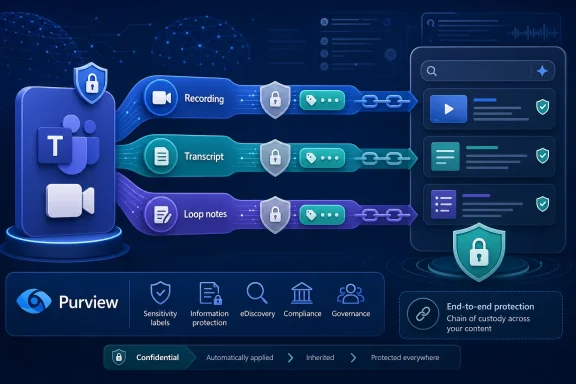 Microsoft Finally Treats the Meeting as the Source of the Data
For years, the compliance model around Teams meetings has lagged behind the way people actually work. A sensitive meeting could be protected at the invite or meeting-options layer, while the recording, transcript, and collaborative notes became separate objects with their own protection story. That separation made architectural sense inside Microsoft 365, but it made less sense to the administrator explaining why a confidential call produced an artifact that still needed another control applied.The new Purview capability changes the default assumption. When configured, meeting-generated artifacts can inherit the meeting’s sensitivity label automatically. Microsoft’s roadmap entry names recordings, transcripts, and Loop notes specifically, which matters because those are no longer peripheral outputs; they are often the most durable and searchable record of what happened.
This is not merely a convenience feature. It is Microsoft acknowledging that governance has to follow the workflow, not wait for users to tidy up after it. A meeting about a merger, an incident response, a customer dispute, or a product roadmap does not become less sensitive when Teams converts speech into text or stores a recording in Microsoft 365.
The timing is also revealing. Microsoft has spent the last several years making Teams meetings more useful after they end, with searchable transcripts, AI summaries, collaborative notes, and Copilot-style recaps turning live discussion into reusable knowledge. Purview now has to keep pace with that transformation, because every productivity improvement also creates another copy of potentially regulated information.
The Old Labeling Model Broke at the Moment Work Became Fluid
Sensitivity labels were born in a world where documents and emails were the obvious containers for business data. A Word file had a label. An email had a label. A SharePoint site or Microsoft 365 group could have container-level controls. The model was imperfect, but the object boundaries were legible.Teams meetings blurred those boundaries. A single meeting can begin as an Outlook calendar item, become a Teams session, produce a chat thread, store files in SharePoint or OneDrive, generate a transcript, create a recording, and spawn Loop-based collaborative notes. Each artifact may be stored, searched, shared, retained, or discovered differently.
That is the governance problem this update is trying to reduce. If the label sits only on the meeting itself, the most valuable downstream artifacts may not consistently carry the same classification. If users must label each artifact manually, the control becomes dependent on memory, training, and discipline at exactly the point where the user thinks the meeting is over.
Microsoft’s own Purview documentation has long emphasized that automatic labeling reduces reliance on users choosing the right classification every time. This Teams inheritance feature applies that same logic to a newer class of content: not the file someone deliberately created, but the record a collaboration system generated for them.
The distinction matters for admins. Manual classification assumes intent. Meeting artifacts are often produced as a side effect of normal collaboration. A user clicks “record,” enables transcription, or opens collaborative notes; the compliance footprint grows instantly.
Recordings and Transcripts Are Not Meeting Debris
The word artifact undersells the risk. A Teams recording can capture strategy, legal advice, personal data, financial forecasts, security procedures, source code discussions, HR decisions, and customer information in one convenient package. A transcript can make all of that easier to search, copy, summarize, and expose.That is why inheritance is more important for transcripts than it may first appear. Video is rich but cumbersome; text is portable. Once spoken words become searchable text, they become easier to index, export, include in eDiscovery, feed into AI systems, or accidentally overshare.
Loop notes add another twist. They are collaborative by design, meant to remain alive after the meeting as participants edit, assign actions, and reuse content. If those notes inherit the meeting label, the protection posture travels with the working surface rather than depending on someone to remember that the notes came from a confidential conversation.
This is the quiet center of the announcement. Microsoft is not simply labeling files. It is trying to preserve context as work changes form.
Purview Is Becoming the Memory Layer for Microsoft 365
The feature lands in Microsoft Purview, not as a Teams-only preference, and that placement is important. Microsoft’s compliance strategy increasingly depends on Purview acting as the policy and classification layer across Microsoft 365, rather than leaving every application to invent its own controls.That is the right architecture, but it also raises expectations. If Purview is the source of truth for information protection, then Teams meeting artifacts cannot remain an exception. The more Microsoft positions Teams as the hub for collaboration, and Copilot as the interface for recalling that collaboration, the more classification needs to be automatic, persistent, and predictable.
Admins should see this as part of a broader shift from user-driven labeling to event-driven labeling. The user labels the meeting, or the organization applies a default or policy-driven label, and the system propagates that decision to the things the meeting creates. The label becomes metadata with consequences, not decoration in a toolbar.
That is where Purview’s promise becomes concrete. A sensitivity label can be tied to encryption, access controls, visual markings, external sharing restrictions, and compliance workflows depending on how an organization configures it. Inheritance is valuable because it reduces the number of moments where those protections can fall away.
The risk, of course, is false confidence. A label inheritance feature is not a data protection program by itself. It works only if labels are well-designed, published to the right users, scoped appropriately, and tested against real workflows.
Microsoft Is Also Cleaning Up a Copilot Problem Before It Gets Worse
The rise of AI in Microsoft 365 makes this update feel less like housekeeping and more like preemptive damage control. Meeting recordings and transcripts are precisely the kind of content that AI assistants are designed to mine. They contain decisions, rationale, disagreements, and context that never make it into formal documents.That is useful when access is correct. It is dangerous when access is too broad.
Microsoft has repeatedly framed Purview as part of the security and compliance foundation for Copilot-era work. That framing only holds if sensitive meeting content carries the right classification into the places Copilot and search can see it. If a confidential meeting produces unlabeled notes or transcripts, the organization has created a neatly packaged knowledge source without equally neat controls.
Label inheritance does not solve every AI governance issue. It does not replace permission hygiene, retention policies, oversharing reviews, or auditing. But it makes the content’s declared sensitivity more likely to survive the transformation from live meeting to searchable organizational memory.
That is the real story behind a roadmap item that could otherwise look administrative. Microsoft is hardening the connective tissue between collaboration and compliance because AI makes every weak seam more visible.
The Admin Benefit Is Fewer Exceptions, Not Less Work
Microsoft’s pitch is straightforward: consistent protection without manual labeling. That will be attractive to every tenant administrator who has watched governance policies fail at the final mile because users were expected to make perfect decisions repeatedly.But this is not a “set it and forget it” feature. Admins will need to decide which labels should apply to meetings, whether meeting organizers can change labels, how default labels should behave, and how inherited labels interact with existing permissions on recordings, transcripts, and Loop components. They will also need to communicate the change, because users may suddenly see labels applied to artifacts that previously felt informal.
The rollout details matter here. The Microsoft 365 Roadmap lists the feature as launched, with preview availability in May 2026 and general availability in June 2026 for Worldwide Standard Multi-Tenant cloud customers. Organizations in other cloud environments should not assume parity unless Microsoft separately lists support.
The platform is listed as web, which is unsurprising given where Purview configuration and many Teams meeting artifacts live. Still, admins should validate the experience across the actual clients their users rely on. Teams desktop, Teams web, Outlook, SharePoint, OneDrive, Stream-on-SharePoint storage, and Loop all have roles to play in the full lifecycle.
Testing should focus less on the happy path and more on edge cases. Recurring meetings, changed labels, downgraded labels, externally shared meetings, channel meetings, ad hoc meetings, organizer changes, and artifacts created before the feature is enabled are the places where governance policies often reveal their real behavior.
The User Experience Will Depend on How Aggressive the Label Is
For end users, inherited labels may be invisible until they are not. If a label simply classifies content, the change may feel seamless. If it applies encryption, limits sharing, blocks external access, or adds markings, the user may notice quickly.That is not a bug. The point of sensitivity labels is to make sensitive content behave differently. But the more restrictive the label, the more important it is that organizations avoid turning ordinary meetings into compliance traps.
A poorly designed label taxonomy can create friction everywhere. Too many labels confuse users. Labels with unclear names invite inconsistent choices. Labels that apply heavy restrictions too broadly can disrupt legitimate collaboration. Labels that are too weak become theater.
Meeting artifacts intensify those tradeoffs because meetings are socially and operationally messy. A meeting may include internal employees, guests, vendors, legal counsel, or customers. A transcript may be useful to people who missed the call but should not be visible to everyone in the broader team. Loop notes may begin as scratch notes and later become the working plan.
Inheritance helps preserve sensitivity, but it does not answer every access question. Administrators still need to understand where the artifact is stored, who can access it, and how the label’s protection settings interact with sharing permissions.
The Feature Rewards Organizations That Already Did the Hard Governance Work
The organizations that benefit most from this update are the ones that already have a mature labeling strategy. They know which labels correspond to which business scenarios. They have trained users on when to label meetings. They have tested label behavior in SharePoint, OneDrive, Outlook, Teams, and Purview. For them, inheritance closes a gap.Organizations with messy labels may experience the opposite. If “Confidential” means one thing to legal, another to engineering, and another to sales, automatically propagating that label makes inconsistency more durable. If default labels are applied too broadly, artifacts may inherit classifications that users do not understand and admins cannot easily defend.
That is the uncomfortable truth of automation in compliance systems. Automation does not fix weak policy; it scales it. A clean Purview deployment becomes more powerful. A confused one becomes harder to unwind.
Microsoft’s roadmap language is careful: artifacts “can now be configured” to inherit the meeting label. That wording suggests an admin-controlled capability, not a universal behavior imposed on every tenant. That is the right choice, because different organizations will have different risk appetites and different readiness levels.
The feature should therefore prompt a review, not just a toggle. Which labels are published for meetings? Which labels should be available to organizers? Are meeting labels aligned with document labels? Do labels that apply encryption behave correctly for recordings and transcripts? Are guest and external access scenarios understood?
Compliance Teams Gain a Cleaner Story for Audit and eDiscovery
From a compliance perspective, inherited labels make the story easier to tell. If a meeting is labeled sensitive and the transcript carries the same label, an organization can better demonstrate that classification followed the content. That does not guarantee compliance, but it strengthens the chain of custody.This matters in investigations and audits. Meeting recordings and transcripts are increasingly discoverable business records. Regulators, litigators, and internal investigators may care not only about what was said, but also about how the resulting records were governed.
A consistent label can help retention, access review, legal hold, and eDiscovery processes operate with clearer metadata. It can also reduce the number of unlabeled artifacts that require after-the-fact remediation. Anyone who has tried to clean up old collaboration data knows that retroactive classification is slower, noisier, and less reliable than getting it right when content is created.
There is also a behavioral effect. When users see that a confidential meeting produces confidential artifacts, the system reinforces the idea that classification is meaningful. When labels disappear between surfaces, users learn the opposite lesson.
The important caveat is that labels are not the same as permissions. A sensitivity label can influence access and protection depending on configuration, but admins still need to verify the effective permissions on recordings, transcripts, and notes. The label may describe sensitivity; the access model determines who can actually open the content.
The Teams Meeting Has Become a Compliance Boundary
The deeper shift is that the Teams meeting itself is becoming a compliance boundary. That is a significant change from the older mental model in which meetings were ephemeral conversations and documents were the real records.Modern Teams meetings are not ephemeral. They are scheduled, recorded, transcribed, summarized, searched, shared, and revisited. They produce evidence. They produce knowledge. They produce risk.
Microsoft’s inheritance feature recognizes that the meeting is no longer just an event in a calendar. It is the parent object for a cluster of content. If that parent object has a sensitivity classification, the children should not begin life unclassified.
This framing will be familiar to administrators who have managed labels for Microsoft 365 groups, Teams, and SharePoint sites. Container-level governance works best when it sets expectations for the content created inside the container. Meeting inheritance applies a similar idea to a smaller, more dynamic unit of collaboration.
That does not mean every meeting needs a label. But it does mean organizations should decide deliberately which meetings do. Executive meetings, board discussions, regulated project reviews, incident response calls, procurement negotiations, customer escalations, and HR conversations are obvious candidates.
Where the Rollout Could Still Surprise Tenants
Roadmap entries are not full documentation, and this one leaves several operational questions that tenants should test in their own environments. Microsoft says the feature covers Teams meeting artifacts including recordings, transcripts, and Loop notes, but admins will want to confirm exact behavior across meeting types and artifact lifecycles.Recurring meetings are one likely pressure point. If a recurring meeting’s sensitivity label changes, organizations should confirm whether new artifacts inherit the new label, whether older artifacts remain as they were, and how exceptions are represented. The same applies to meetings where the organizer updates the sensitivity label during or after the meeting.
Another question is how inherited labels interact with artifacts that already have labels. Microsoft’s broader Purview behavior often treats manually applied labels and higher-priority labels carefully, rather than casually overwriting them. But meeting artifacts are a specific workflow, and admins should not infer behavior without testing.
Guest access also deserves attention. Teams meetings frequently include external participants, and recordings or transcripts may later be shared beyond the original attendee list. If a label applies encryption or access restrictions, that may change who can open the artifact after the meeting. That may be exactly what the organization wants, but it should not be discovered during an executive escalation.
Finally, there is the question of legacy content. The roadmap language points to automatic inheritance for generated artifacts, not a broad relabeling of historical recordings or transcripts. Organizations with a large backlog of meeting content should plan separately for discovery and remediation if older artifacts are a concern.
The Small Roadmap Item That Changes the Meeting Afterlife
The most concrete way to understand this feature is to follow the content after the call ends. The meeting label becomes more than a visible tag; it becomes a policy signal that can travel to the recording, transcript, and notes. That is the difference between labeling a moment and protecting the record of that moment.For WindowsForum readers managing Microsoft 365 tenants, the practical lessons are narrow but important:
- Microsoft lists sensitivity label inheritance for Teams meeting artifacts as launched, with preview in May 2026 and general availability in June 2026 for Worldwide Standard Multi-Tenant customers.
- The feature applies to Microsoft Purview Information Protection and covers Teams meeting artifacts including recordings, transcripts, and Loop notes.
- Administrators should test inheritance behavior across recurring meetings, channel meetings, external participants, label changes, and artifacts that already have labels.
- The feature reduces reliance on manual labeling, but it does not replace permission reviews, retention planning, eDiscovery configuration, or user education.
- Organizations with mature label taxonomies will gain consistency, while organizations with confusing or overly broad labels may simply automate confusion.
- The feature is especially relevant in Copilot-era Microsoft 365 environments because transcripts and notes are high-value, searchable sources of organizational knowledge.
References
- Primary source: Microsoft 365 Roadmap
Published: 2026-07-07T23:01:01.6729014Z
Loading…
www.microsoft.com - Official source: support.microsoft.com
Loading…
support.microsoft.com - Official source: learn.microsoft.com
Automatically apply a sensitivity label to Microsoft 365 data | Microsoft Learn
When you create a sensitivity label, you can automatically assign a label to data stored in Microsoft 365, or you can prompt users to select the label that you recommend.learn.microsoft.com - Official source: directionsonmicrosoft.com
Purview Information Protection & Governance Roadmap - Directions on Microsoft
Purview Information Protection & Governance is a collection of Microsoft cloud services intended to help organizations meet their legal- and regulatory-compliance requirements by helping them label, protect, and manage the flow of internal information. Product: Purview Information...www.directionsonmicrosoft.com - Official source: cdn-dynmedia-1.microsoft.com
- Official source: techcommunity.microsoft.com
Use sensitivity labels with Microsoft Teams, Office 365 groups, and SharePoint sites
PDF documenttechcommunity.microsoft.com
