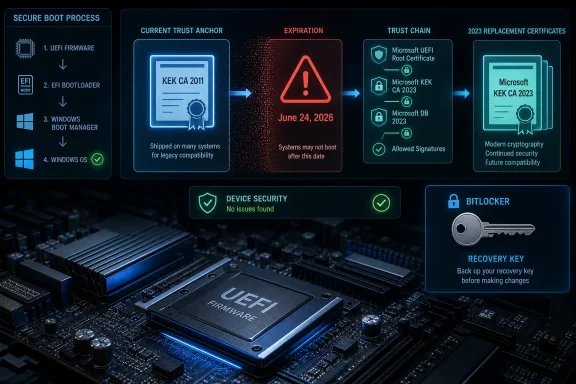
On June 24, 2026, Microsoft’s original Secure Boot Key Exchange Key from 2011 reaches its expiration date, forcing Windows PCs, servers, virtual machines, and dual-boot systems to move onto Microsoft’s newer 2023 Secure Boot certificate chain. The deadline will not brick ordinary Windows machines, and it will not stop monthly patches from installing. But it does expose a more subtle failure mode: devices that miss the transition can fall out of the mechanism Microsoft uses to harden the earliest moments of the boot process. For IT departments, that makes this less like a Patch Tuesday problem and more like a firmware estate problem that has been waiting fifteen years to become urgent.
The most useful thing to say first is also the least dramatic: June 24 is not a mass outage date. A Windows laptop with old Secure Boot certificates will not necessarily refuse to start on Thursday morning. Users should not expect a Y2K-style cliff where millions of PCs suddenly stop at a firmware screen.
That does not make the deadline benign. Secure Boot’s certificate chain is not merely another Windows component that can be patched, rolled back, or reinstalled from the comfort of the operating system. Its keys live in UEFI firmware variables, and those variables decide what code is trusted before Windows has loaded, before endpoint security agents are active, and before most administrators have any visibility at all.
Microsoft’s own guidance frames the issue as a degradation of future early-boot protection. Devices that do not receive the 2023 certificates may continue to run and receive standard Windows updates, but they may not be able to receive future Secure Boot protections for boot managers, databases, revocation lists, and newly discovered boot-level vulnerabilities. That distinction matters because it separates availability from assurance. Your machine may work exactly as it did yesterday while silently losing part of its future defensive machinery.
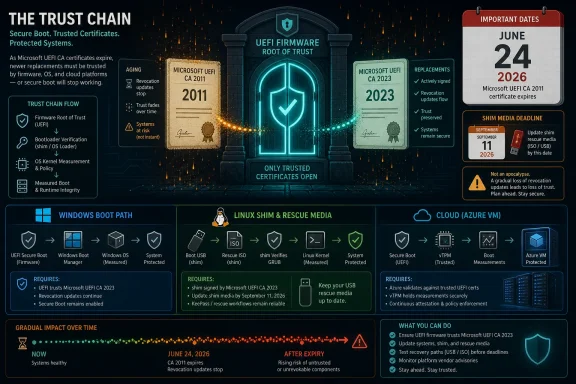
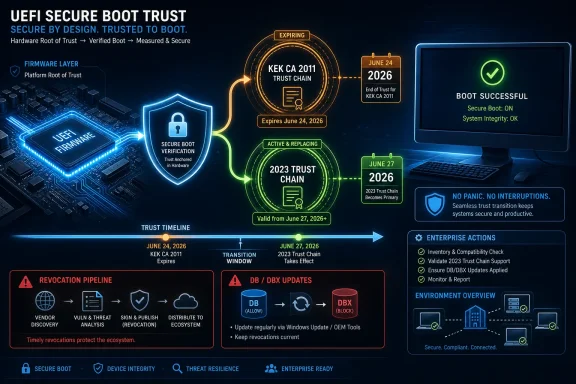
The deadline also arrives in pieces. The Microsoft Corporation KEK CA 2011 expires on June 24, 2026. The Microsoft UEFI CA 2011, widely used for third-party bootloaders and EFI applications, follows on June 27. The Microsoft Windows Production PCA 2011, used for the Windows bootloader, expires on October 19. The calendar therefore creates not one failure mode, but a rolling certificate migration that touches firmware, Windows servicing, Linux boot shims, option ROMs, BitLocker behavior, and virtual machine templates.
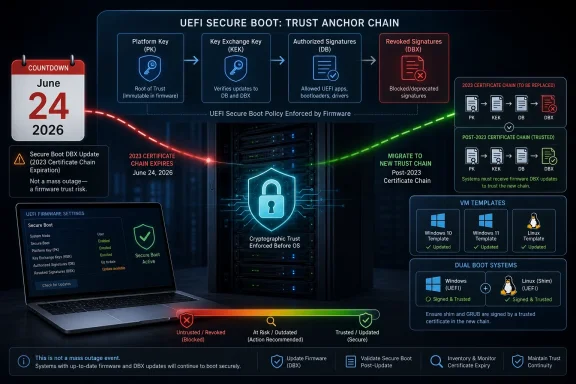
At power-on, UEFI firmware checks pre-OS components against trust databases stored in firmware. The allowed database, usually called DB, contains trusted certificates and signatures. The forbidden database, DBX, contains signatures that should be blocked because they belong to known-vulnerable or malicious components. The firmware decides what can execute before the operating system is in a position to defend itself.
The authority structure sits above those databases. The Platform Key, normally controlled by the hardware maker or platform owner, anchors the Secure Boot policy. The Key Exchange Key, or KEK, authorizes updates to DB and DBX. Microsoft’s 2011 KEK has been one of the central mechanisms by which Windows devices receive Secure Boot database updates through the Windows servicing ecosystem.
That is why the KEK date is operationally more interesting than the average certificate expiry. If a browser certificate expires, the browser can reject a website or the site owner can install a replacement. If a code-signing certificate expires, software distribution can move to a new signature chain. But Secure Boot certificates are buried in the policy store that determines whether the next stage of boot is trusted at all.
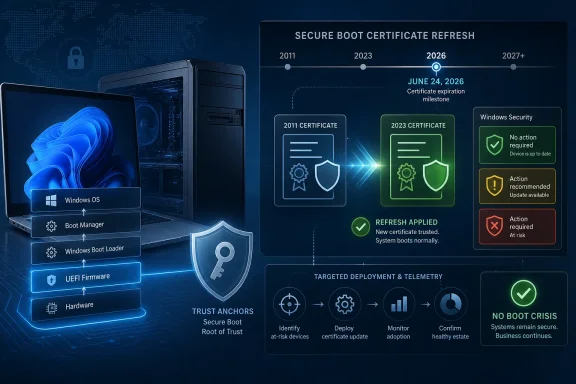
The 2023 replacements are meant to carry that trust chain forward. Microsoft Corporation KEK 2K CA 2023 replaces the expiring KEK role. Windows UEFI CA 2023 takes over Windows bootloader signing. Microsoft UEFI CA 2023 and Microsoft Option ROM UEFI CA 2023 split duties that were previously bundled under the older Microsoft UEFI CA 2011. That restructuring is not cosmetic; it reflects a more granular view of what firmware should trust.
That is what DBX updates are for. They allow Microsoft and the broader UEFI ecosystem to block known-bad or known-vulnerable boot components at firmware level. The machine does not have to wait for Windows to notice the attack. It can refuse to launch the offending component before the operating system starts.
BlackLotus made that abstract model painfully concrete. The bootkit showed that Secure Boot’s promise could be undermined by abusing vulnerable boot components and rollback paths. Microsoft’s response required staged mitigations because revoking boot components is risky: block too aggressively and legitimate systems may fail to start; move too slowly and attackers retain a path through the pre-OS chain.
That history should shape how administrators read this week’s certificate deadline. The danger is not that every machine missing the 2023 certificates becomes infected on June 25. The danger is that a machine can become stranded on an old early-boot trust baseline while future threats continue to evolve. In practical terms, the system may remain patched at the Windows layer while becoming stale at the firmware policy layer.
This is where some of the loudest phrasing around the deadline needs nuance. “Forever” is a powerful word, but firmware security is rarely that clean. Some devices may later be remediated through OEM firmware, supported servicing paths, manual key enrollment, or platform-specific recovery procedures. The real risk is narrower and still serious: if a device cannot receive or apply the 2023 certificate chain through a supported path, its ability to accept future Secure Boot trust and revocation updates can be impaired in a way ordinary Windows patching will not fix.
The 2023 model is more segmented. The old Microsoft UEFI CA 2011 covered a wide set of third-party pre-OS software, including bootloaders and option ROMs. The new architecture separates third-party bootloader signing from option ROM signing. That lets platform owners make more specific trust decisions about what kind of pre-boot code they want to allow.
That matters for servers, workstations, and security-sensitive fleets. An option ROM is firmware associated with hardware such as a network adapter, storage controller, or graphics card. During boot, those components may need to run code before the operating system takes over. Trusting that code is not the same thing as trusting a Linux shim or another third-party bootloader, and bundling both under one umbrella certificate was always a broad grant of confidence.
The split does not magically solve supply-chain risk, but it gives administrators and OEMs a sharper instrument. A device that needs to trust third-party bootloaders does not necessarily need to trust every category of option ROM in the same way. In an era when firmware implants, compromised hardware supply chains, and pre-OS persistence are no longer theoretical, narrower trust is a security improvement.
This is the part of the story that is easy to miss if the deadline is framed only as an expiring certificate. Microsoft is not just keeping Secure Boot alive through 2038. It is also tightening the shape of the trust model that Windows inherited from the first mass deployment of UEFI Secure Boot.
That quiet outcome is by design. Secure Boot is supposed to be part of the platform plumbing. If the average user has to understand KEKs, DBX entries, and firmware NV-RAM before a laptop can remain secure, the platform has failed at consumer abstraction.
But the consumer edge cases are real. Older PCs, especially those from the pre-Windows 11 era, may depend on OEM firmware behavior that Microsoft cannot fully control. A machine can be fully updated from Windows’ perspective and still have firmware quirks that complicate Secure Boot certificate changes. Some platforms require BIOS or UEFI updates before certificate updates can be safely applied.
BitLocker adds another layer of friction. Secure Boot changes can alter measured boot values, and BitLocker may respond by asking for a recovery key on the next startup. That is expected behavior in many managed environments, but it becomes a crisis if the user or help desk cannot retrieve the key. A security update that is technically correct can still become an operational outage if recovery material is missing.
The practical consumer advice is therefore modest: do not panic, but do not ignore firmware updates. Check Windows Update, including optional firmware or manufacturer updates where appropriate. Make sure BitLocker recovery keys are backed up before major firmware or Secure Boot changes. If Windows Security reports a Secure Boot problem, treat it as a platform issue, not as a cosmetic warning.
Microsoft’s guidance points administrators toward registry status, event logs, Intune, Windows Configuration System tooling, Group Policy, and staged deployment methods. The relevant signals include UEFICA2023Status and event IDs that indicate whether certificate updates have been applied or have failed. A device that reports Secure Boot as enabled is not necessarily a device that has the right certificate state.
That distinction is the operational trap. Many asset and vulnerability tools are good at OS build numbers, application versions, missing KBs, and exposed services. They are much less good at enumerating UEFI variable contents and comparing DBX state against expected revocation baselines. Firmware security vendors have been saying this for years, but the certificate rollover gives the problem a deadline.
The safest enterprise posture is not “wait for Microsoft to handle it.” Microsoft can automate a substantial part of the transition, but it cannot guarantee that every OEM firmware implementation, every blocked update channel, every air-gapped network, every lab image, and every long-lived server platform will cooperate. The real work is not merely applying a setting; it is proving which classes of hardware are safe, which are paused, which need firmware first, and which are too old to trust.
That also means pilot groups matter. Secure Boot certificate updates should be tested across representative models, BIOS versions, BitLocker configurations, docking scenarios, add-in card profiles, and dual-boot use cases. The worst fleet strategy is a last-minute broad push that discovers a firmware-specific boot problem at the same time the business discovers it cannot unlock affected machines.
The expiry of Microsoft UEFI CA 2011 therefore matters to Linux users because that certificate has historically signed third-party bootloaders and EFI applications. Distributions have been preparing updated shims signed for the newer certificate chain. Red Hat, Fedora, Ubuntu, Debian, and others have all had to coordinate around the reality that Secure Boot on PCs remains entangled with Microsoft’s certificate authority.
The timing is awkward because dual-boot systems depend on both sides of the house being ready. A Windows certificate update without a compatible Linux boot path can surprise users. A Linux shim update on firmware that has not accepted the newer certificate chain can also cause trouble. The right answer is coordinated updating, not treating Windows Update and Linux package updates as unrelated events.
For enthusiasts, this is also a reminder that Secure Boot is not synonymous with Microsoft lock-in, even if Microsoft’s certificate infrastructure is central to how most PCs implement it. Advanced users can manage their own keys, enroll their own trust anchors, or disable Secure Boot entirely. But those choices have consequences, and the default ecosystem exists because most users do not want to become their own firmware PKI administrator.
The rollover will likely produce its share of forum threads from users who discover that their boot menu, shim, GPU option ROM, or old rescue media no longer behaves as expected. Those cases should be diagnosed as trust-chain transitions, not as generic “Windows broke Linux” folklore. The certificate calendar is finally making visible a dependency that has been present for more than a decade.
Cloud providers and virtualization platforms therefore need separate handling. A guest created years ago can carry older Secure Boot state even if the host platform has moved forward. Templates used for golden images, virtual desktop pools, lab environments, and disaster recovery systems may preserve outdated certificate databases unless they are explicitly updated or regenerated.
This matters because virtual machines are often treated as more disposable than physical endpoints. If a VM has a problem, rebuild it. But in regulated or high-availability environments, some VMs have long lifespans, complex boot chains, and carefully managed images. Secure Boot state becomes part of the configuration baseline that must be inventoried and versioned like any other security setting.
The cloud angle also weakens the comforting idea that this is only about dusty consumer laptops. Secure Boot is now tied to trusted launch, confidential computing, measured boot, attestation, and platform integrity features across enterprise cloud deployments. A stale certificate chain in a VM may not look like a laptop firmware issue, but it belongs to the same class of problem: early-boot trust that sits below ordinary patch management.
Admins should be especially careful with images that are cloned repeatedly. A bad template can reproduce stale Secure Boot state at scale. A corrected template can quietly eliminate the problem for future deployments. The difference is whether anyone thinks to inspect firmware policy as part of image hygiene.
That is not necessarily negligence. Hardware support lifecycles are finite, and Secure Boot’s original certificates lasted long enough to outlive many devices that carried them. The result is a messy collision between cryptographic planning and consumer hardware economics. A certificate with a fifteen-year lifespan can still expire after the vendor has stopped caring about the motherboard.
Enterprise buyers should treat that as a procurement lesson. Firmware support is security support. A device that receives Windows patches but not firmware updates is not fully supported in any meaningful platform-security sense. The Secure Boot rollover merely makes that gap measurable.
The vendor dependency also explains why forcing updates can be dangerous. Microsoft’s staged approach exists because Secure Boot mistakes can produce boot failures, BitLocker recovery prompts, or systems stuck in repair loops. A paused platform should not be treated as an obstacle to bulldoze through a registry setting. It should be treated as a device class needing evidence.
For organizations with older fleets, the hard conversation is about risk acceptance. If an OEM does not provide firmware support and the device cannot receive the new certificate chain reliably, the choices narrow: isolate it, replace it, manually manage keys where feasible, or accept a degraded boot-security posture. None of those choices belongs in a help desk ticket the morning after the deadline.
This is the same pattern the industry has seen across other security baselines. “TPM present” does not mean a device is properly attested. “BitLocker enabled” does not mean recovery keys are escrowed or PCR binding is healthy. “EDR installed” does not mean the sensor can see firmware-level compromise. A green light can be accurate and incomplete at the same time.
Secure Boot’s certificate rollover punishes that incompleteness because the state that matters lives below the tools many organizations rely on. If the fleet report only says Secure Boot is enabled, it is not answering the deadline question. If the vulnerability scanner cannot read UEFI variables, it is not answering the deadline question. If the CMDB knows the laptop model but not the BIOS version, it is not answering the deadline question.
A serious readiness effort needs to connect OS-level telemetry with firmware state and vendor support data. Which models are updated? Which models are capable? Which models are blocked? Which models have BitLocker recovery risk? Which VMs inherit old templates? Which Linux dual-boot machines need shim coordination? These are not exotic questions anymore; they are the baseline for managing Windows hardware in 2026.
The uncomfortable lesson is that Secure Boot has matured from a checkbox into an ecosystem dependency. For years, most users could treat it as a default firmware feature that was either enabled or not. Now the certificate rollover forces administrators to manage it as a living trust chain.
Near the deadline, the highest-value actions are the ones that produce certainty rather than comfort. A green Secure Boot toggle is not enough. A successful Windows Update history is not enough. A vendor model name is not enough unless it is tied to firmware support and certificate state.
 The Secure Boot Deadline Is Not a Power-Off Event
The most useful thing to say first is also the least dramatic: June 24 is not a mass outage date. A Windows laptop with old Secure Boot certificates will not necessarily refuse to start on Thursday morning. Users should not expect a Y2K-style cliff where millions of PCs suddenly stop at a firmware screen.That does not make the deadline benign. Secure Boot’s certificate chain is not merely another Windows component that can be patched, rolled back, or reinstalled from the comfort of the operating system. Its keys live in UEFI firmware variables, and those variables decide what code is trusted before Windows has loaded, before endpoint security agents are active, and before most administrators have any visibility at all.
Microsoft’s own guidance frames the issue as a degradation of future early-boot protection. Devices that do not receive the 2023 certificates may continue to run and receive standard Windows updates, but they may not be able to receive future Secure Boot protections for boot managers, databases, revocation lists, and newly discovered boot-level vulnerabilities. That distinction matters because it separates availability from assurance. Your machine may work exactly as it did yesterday while silently losing part of its future defensive machinery.
The deadline also arrives in pieces. The Microsoft Corporation KEK CA 2011 expires on June 24, 2026. The Microsoft UEFI CA 2011, widely used for third-party bootloaders and EFI applications, follows on June 27. The Microsoft Windows Production PCA 2011, used for the Windows bootloader, expires on October 19. The calendar therefore creates not one failure mode, but a rolling certificate migration that touches firmware, Windows servicing, Linux boot shims, option ROMs, BitLocker behavior, and virtual machine templates.
Fifteen Years of Trust Are Ending in Firmware, Not Windows
Secure Boot was introduced with the Windows 8 era as a response to a particular class of threat: malware that wants to run before the operating system. A bootkit does not need to beat Windows Defender at the Windows desktop if it can compromise the chain that loads Windows in the first place. Secure Boot’s job is to make that chain cryptographically boring.At power-on, UEFI firmware checks pre-OS components against trust databases stored in firmware. The allowed database, usually called DB, contains trusted certificates and signatures. The forbidden database, DBX, contains signatures that should be blocked because they belong to known-vulnerable or malicious components. The firmware decides what can execute before the operating system is in a position to defend itself.
The authority structure sits above those databases. The Platform Key, normally controlled by the hardware maker or platform owner, anchors the Secure Boot policy. The Key Exchange Key, or KEK, authorizes updates to DB and DBX. Microsoft’s 2011 KEK has been one of the central mechanisms by which Windows devices receive Secure Boot database updates through the Windows servicing ecosystem.
That is why the KEK date is operationally more interesting than the average certificate expiry. If a browser certificate expires, the browser can reject a website or the site owner can install a replacement. If a code-signing certificate expires, software distribution can move to a new signature chain. But Secure Boot certificates are buried in the policy store that determines whether the next stage of boot is trusted at all.
The 2023 replacements are meant to carry that trust chain forward. Microsoft Corporation KEK 2K CA 2023 replaces the expiring KEK role. Windows UEFI CA 2023 takes over Windows bootloader signing. Microsoft UEFI CA 2023 and Microsoft Option ROM UEFI CA 2023 split duties that were previously bundled under the older Microsoft UEFI CA 2011. That restructuring is not cosmetic; it reflects a more granular view of what firmware should trust.
The DBX Is the Part Users Never See Until It Is Too Late
The least visible part of Secure Boot is often the most consequential. DBX is the revocation list, and revocation is how the ecosystem responds when a boot component that was once trusted becomes dangerous. If a signed bootloader contains a vulnerability that attackers can abuse, Secure Boot cannot simply decide that signatures no longer matter. It needs a way to say: this particular signed thing is no longer acceptable.That is what DBX updates are for. They allow Microsoft and the broader UEFI ecosystem to block known-bad or known-vulnerable boot components at firmware level. The machine does not have to wait for Windows to notice the attack. It can refuse to launch the offending component before the operating system starts.
BlackLotus made that abstract model painfully concrete. The bootkit showed that Secure Boot’s promise could be undermined by abusing vulnerable boot components and rollback paths. Microsoft’s response required staged mitigations because revoking boot components is risky: block too aggressively and legitimate systems may fail to start; move too slowly and attackers retain a path through the pre-OS chain.
That history should shape how administrators read this week’s certificate deadline. The danger is not that every machine missing the 2023 certificates becomes infected on June 25. The danger is that a machine can become stranded on an old early-boot trust baseline while future threats continue to evolve. In practical terms, the system may remain patched at the Windows layer while becoming stale at the firmware policy layer.
This is where some of the loudest phrasing around the deadline needs nuance. “Forever” is a powerful word, but firmware security is rarely that clean. Some devices may later be remediated through OEM firmware, supported servicing paths, manual key enrollment, or platform-specific recovery procedures. The real risk is narrower and still serious: if a device cannot receive or apply the 2023 certificate chain through a supported path, its ability to accept future Secure Boot trust and revocation updates can be impaired in a way ordinary Windows patching will not fix.
Microsoft’s Certificate Rollover Is Also a Design Correction
It is tempting to describe the 2023 certificate family as a renewal, as though Microsoft simply replaced an old expiration date with a later one. That understates what is changing. The original 2011 certificate arrangement reflected the Secure Boot ecosystem of its time, when the immediate goal was to get a broad chain of trust deployed across new Windows 8-class hardware.The 2023 model is more segmented. The old Microsoft UEFI CA 2011 covered a wide set of third-party pre-OS software, including bootloaders and option ROMs. The new architecture separates third-party bootloader signing from option ROM signing. That lets platform owners make more specific trust decisions about what kind of pre-boot code they want to allow.
That matters for servers, workstations, and security-sensitive fleets. An option ROM is firmware associated with hardware such as a network adapter, storage controller, or graphics card. During boot, those components may need to run code before the operating system takes over. Trusting that code is not the same thing as trusting a Linux shim or another third-party bootloader, and bundling both under one umbrella certificate was always a broad grant of confidence.
The split does not magically solve supply-chain risk, but it gives administrators and OEMs a sharper instrument. A device that needs to trust third-party bootloaders does not necessarily need to trust every category of option ROM in the same way. In an era when firmware implants, compromised hardware supply chains, and pre-OS persistence are no longer theoretical, narrower trust is a security improvement.
This is the part of the story that is easy to miss if the deadline is framed only as an expiring certificate. Microsoft is not just keeping Secure Boot alive through 2038. It is also tightening the shape of the trust model that Windows inherited from the first mass deployment of UEFI Secure Boot.
The Consumer Story Is Mostly Quiet, Until It Is Not
For most mainstream Windows 11 users on relatively recent hardware, the transition should be uneventful. Microsoft has been preparing certificate deployment through Windows Update, and newer machines may already include the 2023 certificates. A user who leaves automatic updates enabled, runs supported hardware, and does not dual-boot or manage custom firmware settings may never notice the change.That quiet outcome is by design. Secure Boot is supposed to be part of the platform plumbing. If the average user has to understand KEKs, DBX entries, and firmware NV-RAM before a laptop can remain secure, the platform has failed at consumer abstraction.
But the consumer edge cases are real. Older PCs, especially those from the pre-Windows 11 era, may depend on OEM firmware behavior that Microsoft cannot fully control. A machine can be fully updated from Windows’ perspective and still have firmware quirks that complicate Secure Boot certificate changes. Some platforms require BIOS or UEFI updates before certificate updates can be safely applied.
BitLocker adds another layer of friction. Secure Boot changes can alter measured boot values, and BitLocker may respond by asking for a recovery key on the next startup. That is expected behavior in many managed environments, but it becomes a crisis if the user or help desk cannot retrieve the key. A security update that is technically correct can still become an operational outage if recovery material is missing.
The practical consumer advice is therefore modest: do not panic, but do not ignore firmware updates. Check Windows Update, including optional firmware or manufacturer updates where appropriate. Make sure BitLocker recovery keys are backed up before major firmware or Secure Boot changes. If Windows Security reports a Secure Boot problem, treat it as a platform issue, not as a cosmetic warning.
Enterprise IT Has to Inventory the Thing It Usually Ignores
The enterprise version of this story is less forgiving because scale turns firmware drift into a governance problem. A fleet of 20 laptops can be checked manually. A fleet of 20,000 endpoints, kiosks, servers, engineering workstations, and virtual desktops cannot be managed by vibes.Microsoft’s guidance points administrators toward registry status, event logs, Intune, Windows Configuration System tooling, Group Policy, and staged deployment methods. The relevant signals include UEFICA2023Status and event IDs that indicate whether certificate updates have been applied or have failed. A device that reports Secure Boot as enabled is not necessarily a device that has the right certificate state.
That distinction is the operational trap. Many asset and vulnerability tools are good at OS build numbers, application versions, missing KBs, and exposed services. They are much less good at enumerating UEFI variable contents and comparing DBX state against expected revocation baselines. Firmware security vendors have been saying this for years, but the certificate rollover gives the problem a deadline.
The safest enterprise posture is not “wait for Microsoft to handle it.” Microsoft can automate a substantial part of the transition, but it cannot guarantee that every OEM firmware implementation, every blocked update channel, every air-gapped network, every lab image, and every long-lived server platform will cooperate. The real work is not merely applying a setting; it is proving which classes of hardware are safe, which are paused, which need firmware first, and which are too old to trust.
That also means pilot groups matter. Secure Boot certificate updates should be tested across representative models, BIOS versions, BitLocker configurations, docking scenarios, add-in card profiles, and dual-boot use cases. The worst fleet strategy is a last-minute broad push that discovers a firmware-specific boot problem at the same time the business discovers it cannot unlock affected machines.
Linux and Dual-Boot Systems Sit in the Blast Radius
Windows owns much of the Secure Boot certificate story on commodity PCs, but Windows is not the only operating system affected by it. Many Linux distributions rely on a first-stage bootloader called shim, which exists largely to bridge the gap between Microsoft-signed Secure Boot trust and the distribution’s own boot chain. That design has always been a pragmatic compromise: it lets Linux boot on Secure Boot-enabled PCs without every user manually managing firmware keys.The expiry of Microsoft UEFI CA 2011 therefore matters to Linux users because that certificate has historically signed third-party bootloaders and EFI applications. Distributions have been preparing updated shims signed for the newer certificate chain. Red Hat, Fedora, Ubuntu, Debian, and others have all had to coordinate around the reality that Secure Boot on PCs remains entangled with Microsoft’s certificate authority.
The timing is awkward because dual-boot systems depend on both sides of the house being ready. A Windows certificate update without a compatible Linux boot path can surprise users. A Linux shim update on firmware that has not accepted the newer certificate chain can also cause trouble. The right answer is coordinated updating, not treating Windows Update and Linux package updates as unrelated events.
For enthusiasts, this is also a reminder that Secure Boot is not synonymous with Microsoft lock-in, even if Microsoft’s certificate infrastructure is central to how most PCs implement it. Advanced users can manage their own keys, enroll their own trust anchors, or disable Secure Boot entirely. But those choices have consequences, and the default ecosystem exists because most users do not want to become their own firmware PKI administrator.
The rollover will likely produce its share of forum threads from users who discover that their boot menu, shim, GPU option ROM, or old rescue media no longer behaves as expected. Those cases should be diagnosed as trust-chain transitions, not as generic “Windows broke Linux” folklore. The certificate calendar is finally making visible a dependency that has been present for more than a decade.
Virtual Machines Inherit Firmware Problems in Software Clothing
Virtual machines make this transition easier to misunderstand. Because a VM’s firmware is virtual, administrators may assume updating the host, hypervisor, or guest operating system is enough. In many environments, that assumption is wrong. Secure Boot-enabled VMs have their own UEFI variable stores, templates, and platform security settings.Cloud providers and virtualization platforms therefore need separate handling. A guest created years ago can carry older Secure Boot state even if the host platform has moved forward. Templates used for golden images, virtual desktop pools, lab environments, and disaster recovery systems may preserve outdated certificate databases unless they are explicitly updated or regenerated.
This matters because virtual machines are often treated as more disposable than physical endpoints. If a VM has a problem, rebuild it. But in regulated or high-availability environments, some VMs have long lifespans, complex boot chains, and carefully managed images. Secure Boot state becomes part of the configuration baseline that must be inventoried and versioned like any other security setting.
The cloud angle also weakens the comforting idea that this is only about dusty consumer laptops. Secure Boot is now tied to trusted launch, confidential computing, measured boot, attestation, and platform integrity features across enterprise cloud deployments. A stale certificate chain in a VM may not look like a laptop firmware issue, but it belongs to the same class of problem: early-boot trust that sits below ordinary patch management.
Admins should be especially careful with images that are cloned repeatedly. A bad template can reproduce stale Secure Boot state at scale. A corrected template can quietly eliminate the problem for future deployments. The difference is whether anyone thinks to inspect firmware policy as part of image hygiene.
The OEM Layer Is Where the Promise Meets Reality
Microsoft can publish guidance, ship Windows updates, and coordinate the certificate program, but PC firmware remains an OEM battlefield. Every vendor has its own models, BIOS versions, support windows, quirks, and update delivery practices. Some systems will take the 2023 certificates smoothly. Others need firmware updates first. Some old systems may never receive a clean vendor-supported path.That is not necessarily negligence. Hardware support lifecycles are finite, and Secure Boot’s original certificates lasted long enough to outlive many devices that carried them. The result is a messy collision between cryptographic planning and consumer hardware economics. A certificate with a fifteen-year lifespan can still expire after the vendor has stopped caring about the motherboard.
Enterprise buyers should treat that as a procurement lesson. Firmware support is security support. A device that receives Windows patches but not firmware updates is not fully supported in any meaningful platform-security sense. The Secure Boot rollover merely makes that gap measurable.
The vendor dependency also explains why forcing updates can be dangerous. Microsoft’s staged approach exists because Secure Boot mistakes can produce boot failures, BitLocker recovery prompts, or systems stuck in repair loops. A paused platform should not be treated as an obstacle to bulldoze through a registry setting. It should be treated as a device class needing evidence.
For organizations with older fleets, the hard conversation is about risk acceptance. If an OEM does not provide firmware support and the device cannot receive the new certificate chain reliably, the choices narrow: isolate it, replace it, manually manage keys where feasible, or accept a degraded boot-security posture. None of those choices belongs in a help desk ticket the morning after the deadline.
The Real Failure Is Believing “Secure Boot On” Means “Secure Boot Current”
The most dangerous status indicator in this story may be the simplest one: Secure Boot is on. That statement sounds definitive, and for many purposes it is useful. But it does not tell administrators whether the correct certificates are present, whether DBX contains current revocations, whether the firmware has accepted the 2023 chain, or whether a boot manager signed with the newer certificate is in use.This is the same pattern the industry has seen across other security baselines. “TPM present” does not mean a device is properly attested. “BitLocker enabled” does not mean recovery keys are escrowed or PCR binding is healthy. “EDR installed” does not mean the sensor can see firmware-level compromise. A green light can be accurate and incomplete at the same time.
Secure Boot’s certificate rollover punishes that incompleteness because the state that matters lives below the tools many organizations rely on. If the fleet report only says Secure Boot is enabled, it is not answering the deadline question. If the vulnerability scanner cannot read UEFI variables, it is not answering the deadline question. If the CMDB knows the laptop model but not the BIOS version, it is not answering the deadline question.
A serious readiness effort needs to connect OS-level telemetry with firmware state and vendor support data. Which models are updated? Which models are capable? Which models are blocked? Which models have BitLocker recovery risk? Which VMs inherit old templates? Which Linux dual-boot machines need shim coordination? These are not exotic questions anymore; they are the baseline for managing Windows hardware in 2026.
The uncomfortable lesson is that Secure Boot has matured from a checkbox into an ecosystem dependency. For years, most users could treat it as a default firmware feature that was either enabled or not. Now the certificate rollover forces administrators to manage it as a living trust chain.
The Two-Day Sprint Is Really a Fifteen-Year Audit
The immediate work is practical, but the broader lesson is architectural. Microsoft’s 2011 Secure Boot certificates did exactly what long-lived platform certificates are supposed to do: they made a vast ecosystem function with minimal user involvement. Their expiry is not a surprise; it is the planned end of a trust epoch.Near the deadline, the highest-value actions are the ones that produce certainty rather than comfort. A green Secure Boot toggle is not enough. A successful Windows Update history is not enough. A vendor model name is not enough unless it is tied to firmware support and certificate state.
- Organizations should verify UEFICA2023Status and Secure Boot event log signals across representative hardware, not merely check whether Secure Boot is enabled.
- Firmware updates should be applied and tested before forcing certificate deployment on hardware classes that Microsoft or the OEM has not validated.
- BitLocker recovery keys should be confirmed before Secure Boot certificate changes reach users, because a correct platform update can still trigger a recovery prompt.
- Virtual machine templates and existing Secure Boot-enabled guests should be treated as separate firmware estates rather than assumed to inherit host remediation.
- Dual-boot Linux users should coordinate firmware, Windows, and shim updates so that the newer Microsoft UEFI trust chain is present before older assumptions disappear.
- End-of-support hardware that cannot accept the 2023 chain should be classified as a platform-security exception, not as merely “old but patched.”
The Next Secure Boot Crisis Will Not Wait Fifteen Years
The 2026 rollover is the first major Secure Boot certificate expiration Windows users have had to live through at ecosystem scale, and it probably will not be the last trust-chain migration administrators face. Microsoft’s 2023 certificates push the horizon into the late 2030s, but firmware security is moving toward a world shaped by stronger supply-chain controls, measured boot requirements, confidential computing, and eventually post-quantum cryptography. That future will not be kind to organizations that still treat firmware as a black box beneath Windows. The machines that come through this week cleanly will do so because someone understood that boot security is not a toggle; it is a maintained chain of trust, and chains only work when every link is still being looked after.References
- Primary source: Tech Times
Published: 2026-06-22T14:23:16.073969
Secure Boot 2011 Certificates Expire Wednesday: Unupdated Devices Lose Bootkit Revocation Forever
Secure Boot certificate expiry 2026 arrives June 24 when Microsoft’s KEK CA 2011 expires. Devices missing the UEFI 2023 update are permanently frozen out of future Secure Boot DBX revocations —www.techtimes.com - Related coverage: eclypsium.com
Microsoft Secure Boot Expires 2026: Enterprise Impact- Eclypsium | Supply Chain Security for the Modern Enterprise
Microsoft's 2011 Secure Boot certificates expire in June 2026. Without a valid KEK, devices can't receive new bootkit revocations, freezing your defenses.eclypsium.com - Official source: learn.microsoft.com
Update Secure Boot Certificates for Windows Devices - Windows Client | Microsoft Learn
Update your Windows devices to maintain Secure Boot protection with 2023 certificates before they expire in June 2026.learn.microsoft.com - Official source: docs.cloud.google.com
Microsoft Secure Boot certificates expiration guide | Compute Engine | Google Cloud Documentation
Guidance for migrating Shielded VM instances to support the Microsoft UEFI CA 2023 for Secure Boot.docs.cloud.google.com
- Official source: techcommunity.microsoft.com
Act now: Secure Boot certificates expire in June 2026 - Windows IT Pro Blog
Get tips to prepare for the rollout of updated certificates across your organization. techcommunity.microsoft.com
- Related coverage: notebookcheck.net
Windows Secure Boot certificates start expiring June 24 - Notebookcheck News
Windows Secure Boot certificates from 2011 expire June 24. Devices without the update will lose boot-level security protections, with no fix for some older PCs. www.notebookcheck.net
- Related coverage: allthings.how
Windows Secure Boot certificates expire in June 2026: what to check now
The 2011 certificates are aging out, but your PC will still boot — here's how to confirm the 2023 update landed.allthings.how - Related coverage: windowscentral.com
Microsoft warns Secure Boot certificates will expire in 2026 | Windows Central
After 15 years, the original Secure Boot certificates that keep your PC secure during boot are expiring. Here's what you need to know.www.windowscentral.com - Related coverage: securitytoday.de
Secure Boot Certificates Expire in June 2026: What IT Teams Must Prepare for The
Secure Boot Certificates: Microsoft retires 2011 CAs starting June 2026. What IT teams need to implement now for Windows fleets, UEFI, and Linux dual-boot setups.www.securitytoday.de
- Related coverage: patchwindow.serverdigital.net
Secure Boot certs expire June 2026: May 12 can't slip | PW
Microsoft's 2011 Secure Boot certificates expire in June 2026. May 12 Patch Tuesday ships the 2023 replacements. Deferring to June leaves no margin.patchwindow.serverdigital.net - Related coverage: pcgamer.com
Secure Boot certificates used by anti-cheat software are set to expire in June but new ones are already in the mail | PC Gamer
You shouldn't have to worry about expired certificates if you keep your PC up-to-date.www.pcgamer.com - Related coverage: tomshardware.com
Microsoft is refreshing Secure Boot certificates to plug security holes before they happen — if you bought a PC last year, you should be set | Tom's Hardware
Be sure to keep Windows 11 systems updated to get refreshed security certificates.www.tomshardware.com - Related coverage: cisco.com
- Related coverage: tbs.tech