

The New Privacy Fight Is Happening Above the Encryption Layer
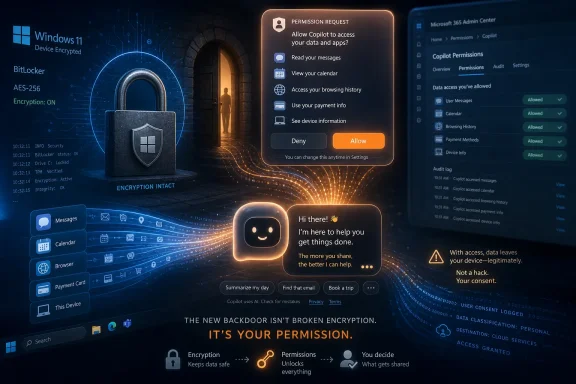
For years, the privacy debate around messaging apps has centered on encryption: whether governments should be able to compel access, whether platforms can scan content before it is encrypted, and whether metadata is enough to expose users even when message bodies remain protected. Whittaker’s warning shifts the fight to a more uncomfortable place. The next privacy breach may not look like a broken cipher or a court-ordered backdoor; it may look like a helpful assistant asking for permission.
That is what makes the chatbot moment different from the old app-permission era. A weather app requesting location access is intrusive but comprehensible. An AI agent that promises to “handle your life” needs a much stranger bundle of authority: read the group chat, infer what relatives want, open the browser, spend money, send messages, remember preferences, and explain itself afterward in calm conversational prose.
In that world, the user is not merely sharing data with a service. The user is delegating agency to a system whose usefulness depends on dissolving the boundaries between apps. For Signal, an app built around the idea that private communication should stay private even from the service provider, that is a philosophical and technical collision.
Whittaker’s phrase that chatbots “are not your friends” lands because it attacks the marketing layer as much as the technology. The assistant is designed to feel available, warm, and responsive. But behind that interface is a corporate system with logs, policies, product incentives, model updates, and integration roadmaps.
The Chatbot as Confidant Is a Product Strategy, Not an Accident
The modern AI assistant does not merely answer questions. It is increasingly sold as a companion, coach, organizer, search engine, writing partner, shopping aide, and emotional sounding board. That convergence is not incidental. The more roles the assistant occupies, the more data it can justify collecting and the more difficult it becomes for users to remember where the machine begins and the person ends.
Whittaker’s refusal to treat chatbots as interlocutors is therefore more than personal discipline. She described using AI tools only in limited ways, such as formatting documents, while avoiding dependence on them for thinking and writing. That distinction matters because the act of asking a chatbot to “help me think” is also the act of giving it raw material that is often more sensitive than the polished document that follows.
For Windows users, this should sound familiar. Microsoft has spent the past several years trying to reposition Windows from an operating system you operate into an environment that anticipates, summarizes, searches, recalls, and acts. Copilot, Recall, Copilot Vision, and agentic Windows features all point in the same direction: less typing, more observation; fewer commands, more inference.
That may be convenient. It may also be a remarkable expansion of the attack surface. The privacy question is no longer only whether Microsoft, OpenAI, Anthropic, Google, or Meta can protect stored prompts. It is whether users should normalize pouring their private lives into assistants merely because those assistants respond with human-like confidence.
Agentic AI Turns Convenience Into a Permission Problem
The industry’s current favorite word is agent. It suggests competence and autonomy, but it also obscures a basic security fact: an agent cannot do much for you unless it can access the things you use. The smarter and more useful the agent becomes, the more permissions it requires.
This is the heart of Whittaker’s critique of a future in which Copilot might handle Christmas shopping by reading family group chats, interpreting preferences, and making purchases. That scenario sounds trivial because the task is trivial. Gifts, wish lists, calendars, sibling messages, home addresses, payment cards, browser sessions, and account credentials are not trivial.
A human being can move across those contexts because other humans understand social boundaries. Your sibling may tell you something in a family chat that is not intended for your employer’s AI system, your operating system vendor, your browser vendor, or a shopping partner. An AI agent, unless very carefully constrained, treats context as fuel.
The result is a new kind of privacy failure: not one app betraying its users, but one authorized assistant collapsing the separation between many apps. That is why Whittaker calls such a system a backdoor in the context of Signal. It does not need to defeat end-to-end encryption if the user voluntarily installs a layer above the conversation that can read, summarize, and act on what appears on the device.
Windows Is Becoming the Test Case for Ambient AI
Microsoft is not the only company pushing assistants into daily computing, but Windows makes the stakes unusually visible. It remains the default work platform for much of the enterprise world, the home of countless personal documents, and the place where browsers, password managers, email clients, messaging apps, cloud drives, and business systems converge. If an AI layer becomes normal there, it becomes normal everywhere.
Microsoft has tried to answer privacy concerns with controls: local processing, opt-in flows, pause buttons, app filters, sensitive-information detection, Windows Hello requirements, BitLocker protections, enterprise policy controls, and promises that certain data is not shared with Microsoft or third parties. Those controls matter. They are also not the same thing as proving that users, administrators, and developers can safely reason about agentic access over time.
The history of Windows security is the history of useful features becoming dangerous because they were too broad, too trusted, or too hard to audit. Macros were useful. Browser plugins were useful. Remote administration tools were useful. The problem was never that utility and risk are opposites; it was that utility often wins the first design meeting and security gets the cleanup job.
AI agents intensify that pattern because they operate through language and interpretation rather than predictable buttons and scripts. A conventional app either has access or does not. An AI agent may have access, partial access, temporary access, delegated access, remembered context, tool permissions, and the ability to make mistakes that look like plausible actions.
The Real Backdoor Is the One Users Install Themselves
The word “backdoor” usually implies sabotage: a hidden mechanism inserted by a vendor, hacker, or government. Whittaker’s argument is more subtle and more damning. A backdoor can also emerge from design incentives that persuade users to place a universal reader-and-actor on top of otherwise secure systems.
End-to-end encryption protects messages in transit and, depending on implementation, limits what the service provider can see. It does not prevent a compromised phone from reading a message after it is decrypted. It does not stop a screen scraper. It does not stop a user from copying private text into a chatbot. And it may not stop an approved agent from accessing the conversation if the operating system or user grants it that ability.
That is the uncomfortable boundary of encryption. It is powerful, necessary, and worth defending. But it cannot protect users from every layer of software they invite into the room.
This is why the “just don’t use it” answer is insufficient. In consumer life, refusal can be inconvenient. In workplaces, refusal may be impossible. If the next version of a productivity suite assumes AI summarization, if the next endpoint-management workflow assumes AI triage, if the next browser assumes AI shopping and AI search, then individual restraint becomes a weak defense against institutional defaults.
The Enterprise Problem Is Not Whether AI Is Useful
IT departments are not going to reject AI wholesale. They will use it for ticket summaries, log analysis, document drafting, meeting notes, compliance workflows, software development, procurement, and help-desk automation. Some of those uses will be productive. Some will be wasteful. The hard part is separating bounded automation from ambient surveillance.
Whittaker’s critique should resonate with administrators because enterprise security is built on segmentation, least privilege, auditability, and revocation. AI assistants pressure all four principles. They want broad context, persistent memory, cross-app access, and enough autonomy to perform tasks without constant user intervention.
That creates a governance challenge. If an employee asks an assistant to summarize a Teams thread, that may be acceptable. If the assistant can also read email, browse SharePoint, inspect files, open customer records, and message colleagues, the permission model becomes far more consequential. The risk is not merely that the assistant might leak data to a vendor. It is that the assistant might expose information internally to the wrong user, preserve sensitive context in a place administrators do not expect, or act on manipulated instructions.
Prompt injection is the canonical example, but the broader issue is trust confusion. AI systems ingest untrusted text and then act in trusted contexts. That is a dangerous combination on any platform, and Windows is full of trusted contexts.
The Emotional Interface Makes the Security Model Worse
The security industry is comfortable talking about tokens, permissions, policies, and data flows. It is less comfortable talking about loneliness, persuasion, and anthropomorphism. Yet Whittaker’s “not your friends” warning matters precisely because the emotional design of chatbots weakens the user’s defensive posture.
A command line does not pretend to care about you. A spreadsheet macro does not ask how your day went. A chatbot can apologize, flatter, encourage, mirror your language, and produce the sensation of being understood. That does not make it conscious. It makes it an unusually effective interface for extracting disclosure.
This is not only a consumer mental-health issue, though that deserves attention. It is also a workplace security issue. Employees who would never paste credentials into a random website may still confide sensitive operational details to a sanctioned assistant because it appears embedded, helpful, and approved. The assistant’s tone becomes part of the threat model.
Whittaker’s insistence on preserving her own thinking and writing process may sound almost old-fashioned in an industry obsessed with productivity metrics. But it is a useful corrective. There is a difference between using a tool to reduce drudgery and outsourcing judgment to a statistical system optimized to produce an answer.
Signal’s Position Is Principled, but Also Strategic
Signal occupies a rare place in tech: a widely known consumer service that is nonprofit, privacy-centered, and openly hostile to surveillance-based business models. That gives Whittaker room to say things that leaders at ad-funded or cloud-platform companies are less likely to say plainly. It also means Signal has a product interest in drawing a hard line around private messaging.
That does not invalidate the argument. If anything, it clarifies the conflict. Signal’s value proposition depends on minimizing trust. AI assistants, as currently imagined by major platform companies, depend on expanding trust dramatically.
The clash is not really Signal versus Microsoft, or privacy advocates versus AI optimists. It is a disagreement over where computing should be going. One camp wants devices to become more like sealed personal spaces, with less data leaving and fewer intermediaries watching. The other wants devices to become intelligent brokers that see more, remember more, and act more.
Those visions cannot be reconciled with a settings toggle. A toggle can mitigate a feature. It cannot answer whether the dominant interface to computing should be a machine that needs to know everything to be useful.
Microsoft’s Privacy Controls Are Necessary but Not Reassuring Enough
To Microsoft’s credit, the company has clearly absorbed some of the backlash from earlier AI feature rollouts. Recall, for example, has been reframed around local storage, authentication, deletion controls, sensitive-information filtering, and manageability. Agentic Windows features are being discussed with language about least privilege, isolation, user approval, and preview-stage refinement.
Those are serious concessions. They are also evidence that critics were right to push hard. The first version of a feature is often the purest expression of product ambition; the revised version reveals what the company learned after users, researchers, and administrators objected.
The larger concern is durability. Privacy controls introduced under pressure can erode later through dark patterns, default changes, enterprise licensing incentives, or feature sprawl. A user may disable one memory feature but enable another. An administrator may block one AI pathway but inherit three more through Microsoft 365, Edge, Teams, or Windows updates.
For WindowsForum readers, the practical lesson is not panic. It is inventory. Know which AI features are present, which are enabled, which data they can access, which policies govern them, and which logs prove what happened. The age of AI on the desktop will reward the administrators who treat assistants like privileged software, not like animated search boxes.
The Industry Keeps Selling a Future That Requires Forgetting the Past
Every platform shift arrives wrapped in inevitability. Cloud was inevitable. Mobile was inevitable. Subscription software was inevitable. Now AI agents are being marketed as inevitable, with the implication that anyone who objects is merely nostalgic for friction.
But much of what AI assistants promise is a repackaging of old automation dreams: the computer that organizes your life, the personal digital secretary, the universal command interface, the smart home that knows what you meant, the browser that buys things for you. The difference is that today’s systems sit atop decades of accumulated personal data and corporate telemetry.
That makes the old trade-off sharper. A calendar assistant in 2006 knew your meetings. A modern agent may know your meetings, email, documents, location, purchases, messages, screenshots, browser history, voice patterns, and social graph. Scale changes the ethical character of the feature.
Whittaker’s comments cut through the novelty. The issue is not whether AI can be charming or useful. The issue is whether convenience is being used to normalize a model of computing where private life becomes machine-readable by default.
The Sensible User Becomes a Systems Thinker
The most important response to Whittaker’s warning is not to swear off every chatbot. It is to stop thinking of AI interactions as isolated chats. Every prompt belongs to a system: a vendor, an account, a retention policy, a model-training rule, an enterprise tenant, a plugin framework, a tool permission, and sometimes an operating-system feature.
That is where privacy-minded Windows users should focus. The safest use of AI is narrow, deliberate, and reversible. Formatting a document, summarizing public information, or generating boilerplate code is a different risk category from handing an assistant your inbox, private messages, browser session, and payment credentials.
The same distinction applies in organizations. A help-desk bot limited to a ticket queue is not the same as a general-purpose agent with access to collaboration tools, customer data, and file shares. A local feature with clear deletion controls is not the same as a cloud service with ambiguous retention. A disabled-by-default preview is not the same as a productivity feature quietly enabled across a tenant.
The operational question is simple: if this assistant made the wrong decision, exposed the wrong information, or preserved the wrong context, would you know? If the answer is no, the system is not ready for sensitive work.
The Lesson for Windows Users Is Written in the Permissions Dialog
Whittaker’s warning is most useful when translated into habits rather than slogans. The point is not that every AI feature is malicious. The point is that AI systems become dangerous when their social presentation hides their technical appetite.
- Treat AI assistants as third-party processors of information, even when they are built into familiar products.
- Do not give an assistant access to private messages, payment tools, calendars, files, or browsers unless the benefit is specific and worth the exposure.
- In managed Windows environments, inventory Copilot, Recall, agentic features, browser integrations, and Microsoft 365 AI settings as part of normal endpoint governance.
- Prefer narrow, task-specific AI uses over broad agents that can observe and act across multiple applications.
- Assume that emotional fluency is an interface design choice, not evidence of understanding, loyalty, or confidentiality.
- Revisit permissions over time, because an access grant that seemed harmless for one task can become risky after updates, integrations, or organizational changes.
The next phase of AI will not be decided only in model labs or policy hearings. It will be decided in operating-system defaults, enterprise admin centers, app permissions, and the quiet moment when a chatbot asks for just a little more access. Whittaker’s warning is blunt because the industry’s pitch is seductive: let the machine know you deeply, and life will get easier. Windows users and IT pros should answer with an older rule that still works: trust is not a feeling a product gives you; it is a boundary a system proves it can respect.