

Microsoft is preparing to roll out an Efficiency Mode for Microsoft Teams by the end of June 2026, targeting Windows and macOS devices that struggle with limited memory or CPU headroom by reducing resource use, lowering video demands, and changing how chats load. The feature is small in the roadmap sense, but large in what it admits. Teams, the default office switchboard for millions of workers, still needs a special mode to behave acceptably on ordinary PCs. That says as much about modern Windows software as it does about Teams itself.
For much of the last decade, 8GB of RAM was the acceptable floor for a mainstream Windows laptop. It was not luxurious, but it was plausible: enough for a browser, Office, a few background agents, and the daily churn of work. Then the industry’s AI turn briefly made 16GB feel like the new baseline, especially after Microsoft’s Copilot+ PC push set expectations around NPUs, SSDs, and more memory.
Now the market is drifting back toward a less glamorous reality. Memory pricing pressure, AI-driven component demand, and aggressive PC segmentation have kept 8GB machines alive in ways the premium laptop narrative would rather ignore. Schools buy them. Small businesses buy them. Frontline workers use them. Enterprises keep them in circulation because four-year depreciation cycles do not bend to keynote logic.
That is the awkward context for Teams Efficiency Mode. Microsoft can sell the future as an AI PC with dedicated silicon and generous RAM, but Microsoft 365 still has to run on the machines people actually have. If Teams cannot keep a meeting responsive on a constrained laptop, the problem is not merely the user’s hardware. It is the software stack’s appetite.
Efficiency Mode is therefore less a breakthrough than a reconciliation. Microsoft is acknowledging that the everyday collaboration client has become one of the workloads that defines whether a Windows PC feels usable at all.
That distinction matters because Teams is not judged like a creative suite or a game. Users do not open it expecting a heavyweight workload. They expect it to idle quietly until a message arrives, then become instantly responsive when someone starts a call or shares a screen. The gap between that expectation and the lived experience is where years of complaints about Teams performance have accumulated.
Microsoft has already made a major architectural turn here. The “new Teams” client moved away from the old Electron-era reputation and toward a WebView2-based architecture with React and Fluent UI elements. Microsoft has claimed large gains over classic Teams, including faster performance and lower memory use, and in many environments those gains are real.
But “better than classic Teams” is not the same as “lightweight.” WebView2 may be a more strategic Microsoft stack than Electron, but it still means a large slice of web application behavior is living inside a desktop shell. That architecture brings cross-platform velocity, familiar developer tooling, and Microsoft Edge plumbing. It also brings the familiar cost of modern web apps: memory overhead, complex rendering paths, and an unnerving tendency for simple-looking interfaces to consume resources like entire applications.
The most visible compromise is video quality. Teams can dynamically reduce video resolution during meetings, even if the user has a capable camera. That is a sensible engineering trade: video encoding, decoding, compositing, background effects, and meeting UI all compete for CPU, GPU, memory, and battery. Lowering the video load can be the difference between a choppy call and a merely less polished one.
The second reported change is more revealing. Instead of trying to load everything at startup, Teams can launch into a pre-selected chat and use a static image in the message pane while it avoids heavier initial rendering. That is the sort of optimization users may barely notice when it works, but it exposes the underlying problem: the application’s default path has become too eager.
This is not unusual in modern productivity software. Apps prefetch, hydrate, cache, animate, index, sync, and personalize in the name of responsiveness. On high-end hardware, the cost is masked. On lower-end machines, the bill arrives all at once.
Efficiency Mode essentially says Teams will stop pretending every PC has the same budget.
Every strategic layer wants a seat inside Teams. Meetings need avatars, transcription, background blur, intelligent recap, live reactions, panels, apps, loops, channels, shared files, compliance hooks, call queues, admin policy surfaces, and now Copilot. Each feature may be defensible on its own. Together they form the classic enterprise software trap: the product becomes indispensable by becoming everything, and then becomes resented because it is everything.
The bloat is not merely technical. It is organizational. Teams has to satisfy end users, IT administrators, compliance teams, developers, meeting room vendors, Microsoft 365 sellers, and the Copilot roadmap. The result is a client that must behave like a nimble chat app while carrying the responsibilities of a platform.
Efficiency Mode is Microsoft admitting that platform ambition has to meet device economics. It is also a quiet reversal of the old assumption that hardware growth would absorb software growth indefinitely. For years, the industry treated RAM as the cheapest answer to inefficient software. Now AI demand has made memory a strategic commodity, and the old bargain looks less safe.
That is why this feature lands differently in 2026 than it would have in 2021. It is not just “Teams gets a performance toggle.” It is “Microsoft’s flagship work app now needs adaptive austerity because the PC market cannot be assumed to move upward in a straight line.”
But users do not care why an app is portable when their laptop fan spins up during a meeting. They do not care whether a client is “not Electron anymore” if Task Manager still shows hundreds of megabytes or more consumed at idle. They do not care whether the performance budget is being spent on sync state, meeting readiness, compliance hooks, or a future Copilot panel. They experience it as lag.
This is where the web-app desktop runs into a political limit. IT departments can tolerate heavy software when it delivers obvious value. They are less patient when every vendor ships a browser-in-a-box and then blames the endpoint for being constrained. A single WebView2 app is manageable; a fleet of them is a memory tax.
Teams is the most visible example because it is ubiquitous. But the pattern is broader. Modern Windows users often run multiple persistent web-wrapped clients: chat, password managers, design tools, support consoles, softphones, device management agents, and line-of-business portals. Each one is defensible. Together they recreate the browser tab problem outside the browser.
Efficiency Mode does not challenge that model. It makes the model more survivable.
That is why the video-resolution trade-off matters. Microsoft appears to be choosing continuity over fidelity: keep the meeting smooth even if the image quality steps down. That is the right priority for most business scenarios. A slightly softer webcam feed is usually better than a stalled call.
But there is a reputational cost. Users with good cameras and decent broadband may resent Teams deciding that their device cannot handle the full experience. Administrators may field complaints from users who interpret lower resolution as a camera, network, or policy failure. Help desks will need to understand when Efficiency Mode is active, what it changes, and how to opt out.
The opt-out is important, but it also complicates the story. If Microsoft enables Efficiency Mode by default, it is making a judgment on behalf of the user. If it leaves the feature off, the users who need it most may never find it. This is the classic Windows settings dilemma: automatic behavior reduces friction until it surprises someone.
Microsoft’s challenge is not only to make Teams lighter. It is to make the trade-offs legible.
The official minimums for Teams have long been less meaningful than the practical minimums for a good workday. A device may meet the requirements and still feel miserable under real workloads: Teams meeting, Outlook, Edge with a dozen tabs, endpoint protection, OneDrive sync, VPN, remote management, and whatever line-of-business app the company forgot to modernize. The question is not whether Teams launches. The question is whether the machine remains usable during the busiest hour of the day.
That distinction becomes sharper in shared-device and frontline environments. A lightly managed 8GB laptop used for occasional email is one thing. A call-center desktop, a nurse’s station PC, a classroom cart laptop, or a virtual desktop session running Teams all day is another. Efficiency Mode could help those environments, but it should not become an excuse to under-provision them.
The risk is that procurement teams see Microsoft’s optimization work as permission to buy down. IT pros should resist that simple reading. Efficiency Mode may make constrained PCs less painful, but it does not turn them into machines with spare capacity. It changes how Teams spends a limited budget; it does not increase the budget.
For VDI and Windows 365 scenarios, the lesson is similar. Resource shaping is useful, but collaboration workloads remain among the hardest to virtualize cleanly because audio, video, device redirection, and real-time responsiveness leave little room for abstraction overhead. A more frugal Teams client helps, but it does not repeal physics.
Teams is especially exposed because it is where meetings, messages, files, calendars, and organizational context converge. That makes it a natural home for AI recap, action items, screen-aware assistance, and agent workflows. It also means the app is likely to keep absorbing new features that want to be present before, during, and after a meeting.
Efficiency Mode therefore has to be more than a one-time cleanup. If Microsoft treats it as a low-end hardware patch while continuing to pour complexity into the default client, the gains will erode. Performance work is not a sprint in a product that doubles as a platform. It is a governance discipline.
This is where Microsoft’s incentives are mixed. The company wants Teams to be the front door to Microsoft 365 value, and AI features are central to that value story. But if the front door is heavy, slow, or unpredictable, users will route around it where they can. They will use browser tabs, mobile devices, third-party chat, or old-fashioned email because reliability beats integration in the moment.
The best version of Efficiency Mode would not be a low-spec penalty box. It would be the beginning of a broader design principle: Teams should scale down gracefully, and the default experience should stop assuming infinite local capacity.
Teams sits inside that trust problem. When users complain that Windows feels heavy, they often mean the combined experience of Windows, Edge, Teams, Office, OneDrive, security software, OEM utilities, and background update mechanisms. No single component owns the feeling, but Microsoft owns enough of the stack that it cannot credibly shrug.
Efficiency Mode helps because it targets a visible pain point. A smoother Teams meeting on an 8GB laptop is something users can feel. Faster chat switching is something they can feel. Fewer accidental screen shares, less sluggishness, and reduced startup weight are not abstract benchmark wins; they are quality-of-life improvements.
But trust is cumulative. Users remember the years of bloat before they notice the month of optimization. IT departments remember the support tickets, the pilot failures, and the hardware exceptions. Microsoft does not get full credit for making Teams less hungry if the broader Windows workday still feels like a contest for RAM.
That is why the feature’s optics are both helpful and damaging. It shows Microsoft is listening. It also reminds everyone why it had to listen.
The mistake was assuming that a foundation reset would settle the performance debate. Users do not compare Teams only with old Teams. They compare it with the responsiveness they expect from every app on the machine. They compare it with a browser tab, a phone app, a native messaging client, or the memory footprint they see in Task Manager.
That is a harsher benchmark. The new Teams may be architecturally better and still not good enough for constrained hardware. It may use less memory than its predecessor and still use too much in context. It may improve cold chat switching and still feel sluggish when the machine is under load.
Efficiency Mode is the second phase of the reset. The first phase was moving the client to a more sustainable architecture. The second is accepting that sustainability means adapting to hardware tiers, workload state, and meeting conditions in real time.
That is a more mature view of desktop software. It is also less flattering, because it concedes that one default experience cannot serve every endpoint well.
Efficiency Mode could reduce that burden if it is implemented cleanly. The best version detects constrained conditions, makes conservative adjustments, and tells the user enough to understand what changed. The worst version silently degrades quality, creates inconsistent meeting behavior, and becomes another setting help desks have to check.
Microsoft should resist the temptation to bury this behind vague language. If Teams lowers video resolution to preserve responsiveness, it should say so in a way normal users can understand. If the app is limiting startup loading to reduce memory use, administrators should have policy visibility. If a 16GB machine can still qualify as constrained because of CPU pressure, that logic needs documentation.
The point is not to expose every heuristic. The point is to prevent mystery. Enterprise software becomes hated when it behaves differently from day to day without explanation.
A good Efficiency Mode would feel like seatbelts, not like a governor. It should protect the user from the worst effects of constrained hardware without making them feel punished for owning the wrong laptop.
That is the danger here. Efficiency Mode can be a genuine improvement and still fail strategically if it merely creates room for more bloat. Microsoft has to decide whether performance is a feature in its own right or merely a cleanup cost after the roadmap has had its say.
The company’s best argument is that performance and AI ambition are not opposites. A responsive Teams client makes Copilot more useful because users are more likely to keep the app open and trust it during meetings. A lighter baseline makes advanced features easier to justify because the default experience is not already straining the machine. Efficiency is not anti-platform; it is what lets the platform survive contact with real hardware.
That argument will only hold if Microsoft measures success from the user’s seat. Not just memory deltas in a lab. Not just startup benchmarks on a clean image. The real metric is whether Teams remains responsive on a managed, aging, security-loaded, browser-heavy Windows PC at 9:05 a.m. on a Monday when the meeting has already started.
That is the environment where reputations are made.
Microsoft’s Efficiency Mode is a welcome correction because it recognizes the truth Windows users have lived with for years: performance is not a luxury feature, and “minimum requirements” are not the same as a good day at work. If Microsoft can turn this from a Teams-specific patch into a design ethic across Microsoft 365 and Windows, the next generation of PCs may feel less like hardware trying to outrun software and more like a platform finally learning to live within its means.
 Teams Finally Meets the 8GB PC Again
For much of the last decade, 8GB of RAM was the acceptable floor for a mainstream Windows laptop. It was not luxurious, but it was plausible: enough for a browser, Office, a few background agents, and the daily churn of work. Then the industry’s AI turn briefly made 16GB feel like the new baseline, especially after Microsoft’s Copilot+ PC push set expectations around NPUs, SSDs, and more memory.Now the market is drifting back toward a less glamorous reality. Memory pricing pressure, AI-driven component demand, and aggressive PC segmentation have kept 8GB machines alive in ways the premium laptop narrative would rather ignore. Schools buy them. Small businesses buy them. Frontline workers use them. Enterprises keep them in circulation because four-year depreciation cycles do not bend to keynote logic.
That is the awkward context for Teams Efficiency Mode. Microsoft can sell the future as an AI PC with dedicated silicon and generous RAM, but Microsoft 365 still has to run on the machines people actually have. If Teams cannot keep a meeting responsive on a constrained laptop, the problem is not merely the user’s hardware. It is the software stack’s appetite.
Efficiency Mode is therefore less a breakthrough than a reconciliation. Microsoft is acknowledging that the everyday collaboration client has become one of the workloads that defines whether a Windows PC feels usable at all.
The Collaboration App Became the Operating Environment
Teams began as a Slack competitor and became something much larger: chat client, meeting room, calendar surface, file browser, app host, phone system, webinar platform, AI recap layer, and corporate notification feed. In many organizations, it is open all day, starts with the machine, and sits between the user and nearly every other task. A bloated app is annoying; a bloated always-on app is infrastructure.That distinction matters because Teams is not judged like a creative suite or a game. Users do not open it expecting a heavyweight workload. They expect it to idle quietly until a message arrives, then become instantly responsive when someone starts a call or shares a screen. The gap between that expectation and the lived experience is where years of complaints about Teams performance have accumulated.
Microsoft has already made a major architectural turn here. The “new Teams” client moved away from the old Electron-era reputation and toward a WebView2-based architecture with React and Fluent UI elements. Microsoft has claimed large gains over classic Teams, including faster performance and lower memory use, and in many environments those gains are real.
But “better than classic Teams” is not the same as “lightweight.” WebView2 may be a more strategic Microsoft stack than Electron, but it still means a large slice of web application behavior is living inside a desktop shell. That architecture brings cross-platform velocity, familiar developer tooling, and Microsoft Edge plumbing. It also brings the familiar cost of modern web apps: memory overhead, complex rendering paths, and an unnerving tendency for simple-looking interfaces to consume resources like entire applications.
Efficiency Mode Is a Throttle, Not a Cure
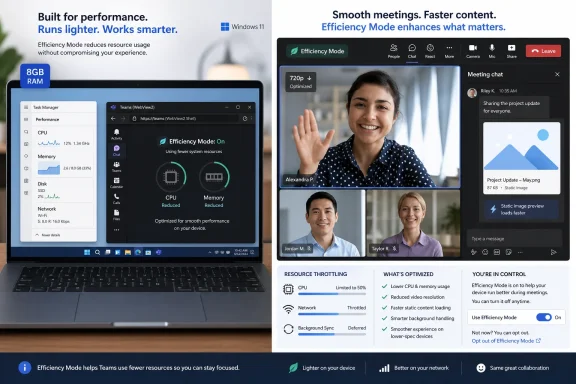
The reported shape of Teams Efficiency Mode is pragmatic. When Teams detects a hardware-constrained device, it can reduce resource usage automatically, tune meeting behavior, and avoid loading more interface state than necessary. Microsoft is expected to enable it by default for qualifying devices, with an opt-out in settings for users who prefer the full experience.The most visible compromise is video quality. Teams can dynamically reduce video resolution during meetings, even if the user has a capable camera. That is a sensible engineering trade: video encoding, decoding, compositing, background effects, and meeting UI all compete for CPU, GPU, memory, and battery. Lowering the video load can be the difference between a choppy call and a merely less polished one.
The second reported change is more revealing. Instead of trying to load everything at startup, Teams can launch into a pre-selected chat and use a static image in the message pane while it avoids heavier initial rendering. That is the sort of optimization users may barely notice when it works, but it exposes the underlying problem: the application’s default path has become too eager.
This is not unusual in modern productivity software. Apps prefetch, hydrate, cache, animate, index, sync, and personalize in the name of responsiveness. On high-end hardware, the cost is masked. On lower-end machines, the bill arrives all at once.
Efficiency Mode essentially says Teams will stop pretending every PC has the same budget.
Microsoft’s Bloat Problem Is Now a Product Management Problem
The easy criticism is that Teams is bloated because Microsoft allowed it to become bloated. That is true, but incomplete. Teams is bloated because Microsoft uses it as a distribution vehicle for the entire Microsoft 365 strategy.Every strategic layer wants a seat inside Teams. Meetings need avatars, transcription, background blur, intelligent recap, live reactions, panels, apps, loops, channels, shared files, compliance hooks, call queues, admin policy surfaces, and now Copilot. Each feature may be defensible on its own. Together they form the classic enterprise software trap: the product becomes indispensable by becoming everything, and then becomes resented because it is everything.
The bloat is not merely technical. It is organizational. Teams has to satisfy end users, IT administrators, compliance teams, developers, meeting room vendors, Microsoft 365 sellers, and the Copilot roadmap. The result is a client that must behave like a nimble chat app while carrying the responsibilities of a platform.
Efficiency Mode is Microsoft admitting that platform ambition has to meet device economics. It is also a quiet reversal of the old assumption that hardware growth would absorb software growth indefinitely. For years, the industry treated RAM as the cheapest answer to inefficient software. Now AI demand has made memory a strategic commodity, and the old bargain looks less safe.
That is why this feature lands differently in 2026 than it would have in 2021. It is not just “Teams gets a performance toggle.” It is “Microsoft’s flagship work app now needs adaptive austerity because the PC market cannot be assumed to move upward in a straight line.”
The Web App Desktop Has Reached Its Political Limit
Web technologies won the enterprise desktop for understandable reasons. They let vendors ship faster, reuse code across platforms, standardize UI patterns, and avoid maintaining separate native clients for every operating system. For a company like Microsoft, WebView2 also pulls developers toward Edge’s runtime and gives IT a more manageable substrate than a zoo of embedded browsers.But users do not care why an app is portable when their laptop fan spins up during a meeting. They do not care whether a client is “not Electron anymore” if Task Manager still shows hundreds of megabytes or more consumed at idle. They do not care whether the performance budget is being spent on sync state, meeting readiness, compliance hooks, or a future Copilot panel. They experience it as lag.
This is where the web-app desktop runs into a political limit. IT departments can tolerate heavy software when it delivers obvious value. They are less patient when every vendor ships a browser-in-a-box and then blames the endpoint for being constrained. A single WebView2 app is manageable; a fleet of them is a memory tax.
Teams is the most visible example because it is ubiquitous. But the pattern is broader. Modern Windows users often run multiple persistent web-wrapped clients: chat, password managers, design tools, support consoles, softphones, device management agents, and line-of-business portals. Each one is defensible. Together they recreate the browser tab problem outside the browser.
Efficiency Mode does not challenge that model. It makes the model more survivable.
The Meeting Is Where Performance Excuses Die
Chat latency is irritating, but meetings are where Teams performance becomes personal. A slow chat switch wastes seconds. A frozen meeting wastes credibility. The user who appears blurry, delayed, robotic, or unable to share a screen is not thinking about JavaScript frameworks; they are thinking about the client sitting between them and their job.That is why the video-resolution trade-off matters. Microsoft appears to be choosing continuity over fidelity: keep the meeting smooth even if the image quality steps down. That is the right priority for most business scenarios. A slightly softer webcam feed is usually better than a stalled call.
But there is a reputational cost. Users with good cameras and decent broadband may resent Teams deciding that their device cannot handle the full experience. Administrators may field complaints from users who interpret lower resolution as a camera, network, or policy failure. Help desks will need to understand when Efficiency Mode is active, what it changes, and how to opt out.
The opt-out is important, but it also complicates the story. If Microsoft enables Efficiency Mode by default, it is making a judgment on behalf of the user. If it leaves the feature off, the users who need it most may never find it. This is the classic Windows settings dilemma: automatic behavior reduces friction until it surprises someone.
Microsoft’s challenge is not only to make Teams lighter. It is to make the trade-offs legible.
Enterprise IT Will Read This as a Hardware Signal
For sysadmins, the arrival of Efficiency Mode is not just a client feature. It is a planning input. If Teams needs an adaptive low-resource mode, then endpoint sizing, VDI profiles, meeting-room standards, and refresh cycles all deserve another look.The official minimums for Teams have long been less meaningful than the practical minimums for a good workday. A device may meet the requirements and still feel miserable under real workloads: Teams meeting, Outlook, Edge with a dozen tabs, endpoint protection, OneDrive sync, VPN, remote management, and whatever line-of-business app the company forgot to modernize. The question is not whether Teams launches. The question is whether the machine remains usable during the busiest hour of the day.
That distinction becomes sharper in shared-device and frontline environments. A lightly managed 8GB laptop used for occasional email is one thing. A call-center desktop, a nurse’s station PC, a classroom cart laptop, or a virtual desktop session running Teams all day is another. Efficiency Mode could help those environments, but it should not become an excuse to under-provision them.
The risk is that procurement teams see Microsoft’s optimization work as permission to buy down. IT pros should resist that simple reading. Efficiency Mode may make constrained PCs less painful, but it does not turn them into machines with spare capacity. It changes how Teams spends a limited budget; it does not increase the budget.
For VDI and Windows 365 scenarios, the lesson is similar. Resource shaping is useful, but collaboration workloads remain among the hardest to virtualize cleanly because audio, video, device redirection, and real-time responsiveness leave little room for abstraction overhead. A more frugal Teams client helps, but it does not repeal physics.
The Copilot Era Makes Local Efficiency Harder, Not Easier
The uncomfortable backdrop to all of this is Microsoft’s AI strategy. Copilot is being threaded through Windows, Office, Teams, Edge, and the Microsoft 365 admin story. Even when inference happens in the cloud, AI features add UI surfaces, context gathering, indexing, policy checks, telemetry, and new user expectations. The client does not get simpler just because the model runs elsewhere.Teams is especially exposed because it is where meetings, messages, files, calendars, and organizational context converge. That makes it a natural home for AI recap, action items, screen-aware assistance, and agent workflows. It also means the app is likely to keep absorbing new features that want to be present before, during, and after a meeting.
Efficiency Mode therefore has to be more than a one-time cleanup. If Microsoft treats it as a low-end hardware patch while continuing to pour complexity into the default client, the gains will erode. Performance work is not a sprint in a product that doubles as a platform. It is a governance discipline.
This is where Microsoft’s incentives are mixed. The company wants Teams to be the front door to Microsoft 365 value, and AI features are central to that value story. But if the front door is heavy, slow, or unpredictable, users will route around it where they can. They will use browser tabs, mobile devices, third-party chat, or old-fashioned email because reliability beats integration in the moment.
The best version of Efficiency Mode would not be a low-spec penalty box. It would be the beginning of a broader design principle: Teams should scale down gracefully, and the default experience should stop assuming infinite local capacity.
Windows Performance Is Becoming a Trust Issue
Microsoft has spent the past year talking more openly about Windows responsiveness, memory use, and interface latency. That is not accidental. The Windows ecosystem is under pressure from Apple Silicon’s efficiency story, from Chromebooks in education, from Linux among developers, and from users who increasingly understand that “newer” does not always mean “faster.”Teams sits inside that trust problem. When users complain that Windows feels heavy, they often mean the combined experience of Windows, Edge, Teams, Office, OneDrive, security software, OEM utilities, and background update mechanisms. No single component owns the feeling, but Microsoft owns enough of the stack that it cannot credibly shrug.
Efficiency Mode helps because it targets a visible pain point. A smoother Teams meeting on an 8GB laptop is something users can feel. Faster chat switching is something they can feel. Fewer accidental screen shares, less sluggishness, and reduced startup weight are not abstract benchmark wins; they are quality-of-life improvements.
But trust is cumulative. Users remember the years of bloat before they notice the month of optimization. IT departments remember the support tickets, the pilot failures, and the hardware exceptions. Microsoft does not get full credit for making Teams less hungry if the broader Windows workday still feels like a contest for RAM.
That is why the feature’s optics are both helpful and damaging. It shows Microsoft is listening. It also reminds everyone why it had to listen.
The New Teams Was a Reset, Not a Finish Line
When Microsoft pushed the new Teams client, the promise was straightforward: faster, leaner, more modern. Compared with classic Teams, the new client did improve important areas. It reduced some of the worst legacy baggage and gave Microsoft a better foundation for future development.The mistake was assuming that a foundation reset would settle the performance debate. Users do not compare Teams only with old Teams. They compare it with the responsiveness they expect from every app on the machine. They compare it with a browser tab, a phone app, a native messaging client, or the memory footprint they see in Task Manager.
That is a harsher benchmark. The new Teams may be architecturally better and still not good enough for constrained hardware. It may use less memory than its predecessor and still use too much in context. It may improve cold chat switching and still feel sluggish when the machine is under load.
Efficiency Mode is the second phase of the reset. The first phase was moving the client to a more sustainable architecture. The second is accepting that sustainability means adapting to hardware tiers, workload state, and meeting conditions in real time.
That is a more mature view of desktop software. It is also less flattering, because it concedes that one default experience cannot serve every endpoint well.
The User Should Not Have to Become a Performance Engineer
There is a familiar genre of enterprise troubleshooting advice that asks users to clear caches, disable animations, close apps, update runtimes, toggle GPU acceleration, reinstall clients, and pray to the profile directory. Teams has inspired its share of that folklore. Some of it works. Much of it is a symptom of software pushing complexity onto the person least equipped to diagnose it.Efficiency Mode could reduce that burden if it is implemented cleanly. The best version detects constrained conditions, makes conservative adjustments, and tells the user enough to understand what changed. The worst version silently degrades quality, creates inconsistent meeting behavior, and becomes another setting help desks have to check.
Microsoft should resist the temptation to bury this behind vague language. If Teams lowers video resolution to preserve responsiveness, it should say so in a way normal users can understand. If the app is limiting startup loading to reduce memory use, administrators should have policy visibility. If a 16GB machine can still qualify as constrained because of CPU pressure, that logic needs documentation.
The point is not to expose every heuristic. The point is to prevent mystery. Enterprise software becomes hated when it behaves differently from day to day without explanation.
A good Efficiency Mode would feel like seatbelts, not like a governor. It should protect the user from the worst effects of constrained hardware without making them feel punished for owning the wrong laptop.
The Real Test Is Whether Microsoft Can Stop Spending the Savings
The history of performance optimization is full of reclaimed headroom immediately consumed by the next feature wave. Faster CPUs gave us heavier web pages. More RAM gave us always-on background agents. SSDs made startup faster, so startup lists grew longer. If Teams becomes 20 percent faster at one interaction, the product organization will be tempted to spend that budget on the next integrated experience.That is the danger here. Efficiency Mode can be a genuine improvement and still fail strategically if it merely creates room for more bloat. Microsoft has to decide whether performance is a feature in its own right or merely a cleanup cost after the roadmap has had its say.
The company’s best argument is that performance and AI ambition are not opposites. A responsive Teams client makes Copilot more useful because users are more likely to keep the app open and trust it during meetings. A lighter baseline makes advanced features easier to justify because the default experience is not already straining the machine. Efficiency is not anti-platform; it is what lets the platform survive contact with real hardware.
That argument will only hold if Microsoft measures success from the user’s seat. Not just memory deltas in a lab. Not just startup benchmarks on a clean image. The real metric is whether Teams remains responsive on a managed, aging, security-loaded, browser-heavy Windows PC at 9:05 a.m. on a Monday when the meeting has already started.
That is the environment where reputations are made.
The June Rollout Turns Teams Into a Hardware Honesty Test
Efficiency Mode is not a reason to panic, and it is not a miracle fix. It is a useful admission that collaboration software has to respect the endpoint again. For Windows users and IT teams, the practical read is straightforward:- Teams Efficiency Mode is expected to roll out broadly by the end of June 2026 after slipping from an earlier May target.
- The feature is designed to activate automatically on hardware-constrained devices, including low-RAM PCs and potentially some systems limited more by CPU than memory.
- The most noticeable compromise will likely be reduced video resolution during meetings in exchange for better responsiveness and lower resource use.
- Teams startup and chat loading behavior should become less aggressive, reducing the amount of interface state the app tries to hydrate at once.
- Users who dislike the degraded experience are expected to be able to opt out through Teams settings.
- IT departments should treat the feature as mitigation, not as proof that 8GB PCs are suddenly ideal for modern Microsoft 365 workloads.
Microsoft’s Efficiency Mode is a welcome correction because it recognizes the truth Windows users have lived with for years: performance is not a luxury feature, and “minimum requirements” are not the same as a good day at work. If Microsoft can turn this from a Teams-specific patch into a design ethic across Microsoft 365 and Windows, the next generation of PCs may feel less like hardware trying to outrun software and more like a platform finally learning to live within its means.
References
- Primary source: Windows Latest
Published: Tue, 16 Jun 2026 04:03:51 GMT
Microsoft reveals Teams can't run well on low-RAM PCs, builds Efficiency Mode after years of bloat
Microsoft Teams is testing a new feature called "Efficiency mode," and it will become available for everyone by the end of June 2026. www.windowslatest.com
- Related coverage: windowscentral.com
Microsoft fixed the issues that made Teams feel slow, but is it enough? | Windows Central
Microsoft has rolled out engineering changes that speed up chat switching, reduce app hangs, and make people search faster across Teams.www.windowscentral.com - Official source: microsoft.com
Microsoft 365 Roadmap | Microsoft 365
The Microsoft 365 Roadmap lists updates that are currently planned for applicable subscribers. Check here for more information on the status of new features and updates.www.microsoft.com
- Official source: learn.microsoft.com
System requirements for the Teams client - Microsoft Teams | Microsoft Learn
Information about the system requirements, minimum hardware requirements, for the Teams client, what customers need to be able to install and use the Teams client.learn.microsoft.com - Official source: techcommunity.microsoft.com
Goodbye Together mode, hello simplified meeting layouts in Microsoft Teams | Microsoft Community Hub
Beginning June 30th, the Together mode experience will no longer be available. We recommend using the modern Gallery view. techcommunity.microsoft.com
- Related coverage: cultura-informatica.com
Microsoft Teams activa modo de eficiencia para PC limitados | Cultura Informática
Microsoft Teams lanza un modo de eficiencia para equipos con pocos recursos. Ajusta vídeo y rendimiento automáticamente desde mayo de 2026 | Cultura Informáticacultura-informatica.com
- Related coverage: windowsforum.com
Microsoft Teams Gets Faster in 2026: 20% Less Chat Latency, 35% Fewer iOS/Mac Hangs | Windows Forum
Microsoft says it spent the first half of 2026 cutting Microsoft Teams chat-switching latency by 20 percent across devices, while reducing app hangs on...windowsforum.com - Related coverage: insentragroup.com
- Related coverage: reality-tech.com
- Related coverage: help.syspro.com
- Related coverage: nubis365.com
</rdf:Alt> </dc:title> <dc:description> <rdf:Alt> <rdf:li xml:lang="x-default"/> </rdf:Alt> </dc:description> <dc:creator> <rdf:Seq> <rdf:li>Mike Wi
</rdf:Alt> </dc:description> <dc:creator> <rdf:Seq> <rdf:li>Mike Windsornubis365.com
- Official source: download.microsoft.com
- Official source: cdn-dynmedia-1.microsoft.com
