

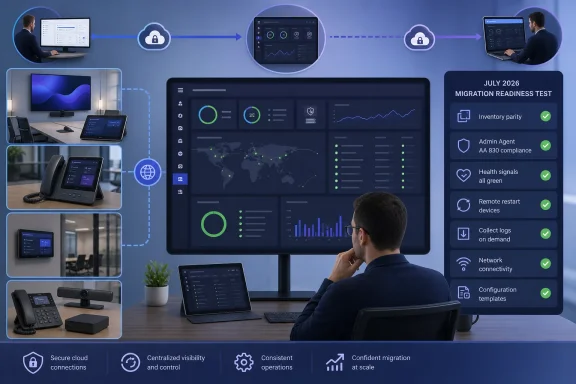
Microsoft Teams administrators should treat the July 2026 move of Android device management to the Teams Rooms Pro Management portal as a live operational test, not a passive portal change. Before Teams admin center workflows begin redirecting in August, verify that every device appears in the Pro portal, runs Admin Agent AA 830, responds to remote commands, reports health data, receives configuration, and remains under update control.
Microsoft Roadmap ID 555235 covers Teams Rooms on Android, Teams phones, Teams panels, and SIP devices. Microsoft says existing TAC-enrolled devices should appear automatically in the Teams Rooms Pro Management portal, so there is no manual fleet migration—but an invisible or outdated device can still become effectively unmanageable once overlapping TAC functions retire in September 2026.
Detailed in Microsoft’s Teams management guidance, the immediate readiness procedure is:
The first meaningful check is inventory parity. Export or otherwise record the Teams Rooms on Android, Teams phones, Teams panels, and SIP devices managed through TAC, then compare that population with what appears in PMP.
Do not settle for a handful of recognizable conference rooms appearing in the new portal. The comparison should account for the entire enrolled fleet, including devices at small offices, restricted network locations, shared spaces, and sites that receive less routine administrator attention.
An absent device is not evidence that Microsoft expects a manual migration. Existing TAC-enrolled Android devices are supposed to appear automatically in PMP. A mismatch should instead be treated as a signal to investigate the device’s Admin Agent level and network access.
Network validation must cover the required Microsoft Teams device URLs, not merely prove that the room can join a meeting. A device may retain its user-facing Teams functionality while management traffic is blocked by firewall, proxy, filtering, or allowlisting policy. That creates the dangerous appearance of a healthy endpoint whose administrative channel is unavailable.
WindowsForum previously covered the broader June 2026 introduction of Android devices in the Teams Rooms Pro portal. The sharper issue in July is no longer whether the new inventory view exists, but whether administrators can demonstrate that it contains every device they will need to operate after TAC retirement.
The risk is highest where automatic updates are unavailable or have been deliberately disabled. Microsoft says those organizations should manually bring devices to the minimum Admin Agent before TAC management capabilities are deprecated.
The failure path is unusually awkward. Once the relevant TAC capability is gone, an outdated device may no longer be updatable through TAC and may require an OEM portal firmware update before PMP management can resume. The endpoint has not failed as hardware, and it has not necessarily lost Teams service, but the organization has lost its preferred control plane.
That is why agent compliance must be completed while TAC remains available. Waiting for an August redirect to reveal the affected devices sacrifices the easiest recovery route.
Administrators should pay particular attention to update exceptions that were introduced intentionally. A pause used to protect a sensitive meeting space, accommodate an OEM issue, or preserve a tested firmware baseline can leave that device behind the new management prerequisite.
At minimum, test a remote restart and verify that the target device actually completes the action and returns to a manageable state. Test sign-in and sign-out where operationally safe, and confirm that the portal accurately reports the result rather than leaving an indefinite pending state.
Log collection deserves its own test. Administrators generally request logs when a room or phone is already misbehaving, making the incident itself the worst possible time to discover that collection fails through PMP. Generate a test collection now and confirm that the output is accessible to the staff expected to investigate future incidents.
Health signals should also be evaluated for usefulness, not just presence. Confirm that the portal is receiving current state from representative Teams Rooms on Android devices, panels, phones, and SIP endpoints. A stale or incomplete health view can conceal the same network or agent problems that will later block remote administration.
This is the practical distinction between portal access and management readiness. An administrator can successfully sign in, see part of the fleet, and still be unable to perform the actions required during an outage.
The word “import” should not be interpreted as proof of equivalence. Check that the expected template is associated with the correct devices and that the target hardware receives the intended configuration. Record any profile that is obsolete, duplicated, or no longer appropriate rather than transferring years of configuration history without review.
This is also an opportunity to verify administrative access boundaries. The staff responsible for rooms, phones, panels, or SIP devices must be able to reach the appropriate PMP views and perform their assigned work before TAC redirects begin. Testing only with a broadly privileged emergency account can conceal access failures affecting daily operators.
The portal is already taking on a wider role in Microsoft’s rooms strategy. WindowsForum has also examined Teams Rooms Pro building insights for BYOD upgrade planning, while Teams Rooms on Android is receiving separate July changes such as the modernized Gallery. Those feature rollouts make reliable centralized management more important: the device fleet is changing at the same time as its administrative home.
Those dates describe a progressive transition rather than a single cutover night. That reduces the likelihood of one fleet-wide incident, but it also makes incomplete preparation easier to miss. Different administrators may encounter redirects at different points in their normal work and assume a missing function is temporary or role-related.
A useful internal deadline is therefore earlier than Microsoft’s September retirement target. Organizations should complete inventory reconciliation, AA 830 compliance, network validation, remote-action testing, Settings Template imports, health checks, logging tests, and update-control verification while TAC can still serve as a comparison and recovery path.
The essential pre-July and early-July evidence should be concise:
By August, a TAC redirect should feel uneventful because PMP has already become the team’s working console. If that redirect is the first time an administrator discovers a missing device, blocked network path, failed remote action, or obsolete Admin Agent, Microsoft’s automatic transition will have exposed a management outage that could have been found weeks earlier.
Microsoft Roadmap ID 555235 covers Teams Rooms on Android, Teams phones, Teams panels, and SIP devices. Microsoft says existing TAC-enrolled devices should appear automatically in the Teams Rooms Pro Management portal, so there is no manual fleet migration—but an invisible or outdated device can still become effectively unmanageable once overlapping TAC functions retire in September 2026.
Detailed in Microsoft’s Teams management guidance, the immediate readiness procedure is:
- Sign in to the Teams Rooms Pro Management portal using an account with the required portal access.
- Compare the PMP inventory with the device inventory currently visible in the Teams admin center.
- Confirm that every Android device has Admin Agent AA 830, version 1.0.0.202606082157.product, or later.
- Correct network policy if devices are missing, offline, or unable to communicate with PMP.
- Test restart, sign-in, sign-out, and log collection against representative production devices.
- Confirm that health signals and monitoring data are arriving.
- Import required TAC configuration profiles into PMP as Settings Templates.
- Validate update controls before TAC redirects become the default experience.
 Prove That the Fleet Exists Before Testing Features
The first meaningful check is inventory parity. Export or otherwise record the Teams Rooms on Android, Teams phones, Teams panels, and SIP devices managed through TAC, then compare that population with what appears in PMP.Do not settle for a handful of recognizable conference rooms appearing in the new portal. The comparison should account for the entire enrolled fleet, including devices at small offices, restricted network locations, shared spaces, and sites that receive less routine administrator attention.
An absent device is not evidence that Microsoft expects a manual migration. Existing TAC-enrolled Android devices are supposed to appear automatically in PMP. A mismatch should instead be treated as a signal to investigate the device’s Admin Agent level and network access.
Network validation must cover the required Microsoft Teams device URLs, not merely prove that the room can join a meeting. A device may retain its user-facing Teams functionality while management traffic is blocked by firewall, proxy, filtering, or allowlisting policy. That creates the dangerous appearance of a healthy endpoint whose administrative channel is unavailable.
WindowsForum previously covered the broader June 2026 introduction of Android devices in the Teams Rooms Pro portal. The sharper issue in July is no longer whether the new inventory view exists, but whether administrators can demonstrate that it contains every device they will need to operate after TAC retirement.
AA 830 Is the Gate Between Visible and Manageable
Microsoft requires Admin Agent AA 830, specifically version 1.0.0.202606082157.product, for Android management in PMP. Administrators should therefore make the agent check a fleet-wide requirement rather than relying on automatic update assumptions.The risk is highest where automatic updates are unavailable or have been deliberately disabled. Microsoft says those organizations should manually bring devices to the minimum Admin Agent before TAC management capabilities are deprecated.
The failure path is unusually awkward. Once the relevant TAC capability is gone, an outdated device may no longer be updatable through TAC and may require an OEM portal firmware update before PMP management can resume. The endpoint has not failed as hardware, and it has not necessarily lost Teams service, but the organization has lost its preferred control plane.
That is why agent compliance must be completed while TAC remains available. Waiting for an August redirect to reveal the affected devices sacrifices the easiest recovery route.
Administrators should pay particular attention to update exceptions that were introduced intentionally. A pause used to protect a sensitive meeting space, accommodate an OEM issue, or preserve a tested firmware baseline can leave that device behind the new management prerequisite.
Remote Actions Are the Real Acceptance Test
Seeing a device tile in PMP proves enrollment and reporting, but it does not prove operational management. Each device class should undergo representative remote-action testing before the transition reaches its default phase.At minimum, test a remote restart and verify that the target device actually completes the action and returns to a manageable state. Test sign-in and sign-out where operationally safe, and confirm that the portal accurately reports the result rather than leaving an indefinite pending state.
Log collection deserves its own test. Administrators generally request logs when a room or phone is already misbehaving, making the incident itself the worst possible time to discover that collection fails through PMP. Generate a test collection now and confirm that the output is accessible to the staff expected to investigate future incidents.
Health signals should also be evaluated for usefulness, not just presence. Confirm that the portal is receiving current state from representative Teams Rooms on Android devices, panels, phones, and SIP endpoints. A stale or incomplete health view can conceal the same network or agent problems that will later block remote administration.
This is the practical distinction between portal access and management readiness. An administrator can successfully sign in, see part of the fleet, and still be unable to perform the actions required during an outage.
TAC Profiles Need a Deliberate Landing Place
Microsoft says existing TAC configuration profiles can be imported into PMP as Settings Templates. Administrators should identify the profiles that matter, perform that import, and validate the resulting settings against representative devices.The word “import” should not be interpreted as proof of equivalence. Check that the expected template is associated with the correct devices and that the target hardware receives the intended configuration. Record any profile that is obsolete, duplicated, or no longer appropriate rather than transferring years of configuration history without review.
This is also an opportunity to verify administrative access boundaries. The staff responsible for rooms, phones, panels, or SIP devices must be able to reach the appropriate PMP views and perform their assigned work before TAC redirects begin. Testing only with a broadly privileged emergency account can conceal access failures affecting daily operators.
The portal is already taking on a wider role in Microsoft’s rooms strategy. WindowsForum has also examined Teams Rooms Pro building insights for BYOD upgrade planning, while Teams Rooms on Android is receiving separate July changes such as the modernized Gallery. Those feature rollouts make reliable centralized management more important: the device fleet is changing at the same time as its administrative home.
July Is Validation; August Is Exposure
Microsoft’s current schedule places full PMP management workflows in July 2026. TAC workflows are expected to redirect increasingly to PMP in August, followed by retirement of remaining overlapping TAC device-management functions in September.Those dates describe a progressive transition rather than a single cutover night. That reduces the likelihood of one fleet-wide incident, but it also makes incomplete preparation easier to miss. Different administrators may encounter redirects at different points in their normal work and assume a missing function is temporary or role-related.
A useful internal deadline is therefore earlier than Microsoft’s September retirement target. Organizations should complete inventory reconciliation, AA 830 compliance, network validation, remote-action testing, Settings Template imports, health checks, logging tests, and update-control verification while TAC can still serve as a comparison and recovery path.
The essential pre-July and early-July evidence should be concise:
- Every expected Android room, phone, panel, and SIP device appears in PMP.
- Every Android endpoint meets the AA 830 minimum requirement.
- Required management traffic passes current network policy.
- Authorized administrators can access the portal and their assigned fleet.
- Restart, sign-in, sign-out, and log collection work on representative devices.
- Health and monitoring signals are current.
- Required TAC configuration profiles have become validated PMP Settings Templates.
- Update behavior remains understood and controlled.
By August, a TAC redirect should feel uneventful because PMP has already become the team’s working console. If that redirect is the first time an administrator discovers a missing device, blocked network path, failed remote action, or obsolete Admin Agent, Microsoft’s automatic transition will have exposed a management outage that could have been found weeks earlier.
References
- Primary source: learn.microsoft.com
Transitioning Teams Android Device Management from Teams Admin Center to the Teams Rooms Pro Management Portal - Microsoft Teams | Microsoft Learn
Transitioning Teams Android Device Management from Teams Admin Center to the Teams Rooms Pro Management Portallearn.microsoft.com - Independent coverage: microsoft.com
Microsoft 365 Roadmap | Microsoft 365
The Microsoft 365 Roadmap lists updates that are currently planned for applicable subscribers. Check here for more information on the status of new features and updates.www.microsoft.com
- Independent coverage: app.cloudscout.one
MC1227622 - (Updated) Transitioning Teams Android Device Management from Teams admin Center to the Teams Rooms Pro Management portal
By mid-2026, Microsoft will consolidate the management of Teams Android and Windows devices into the Teams Rooms Pro Management portal, allowing IT admins to manage, update, and monitor all devices… app.cloudscout.one
- Independent coverage: note.com
Migration plan from Teams Admin Center to Teams Rooms Pro management portal for Teams Android device management|Yuki Iwagishi
Currently, devices represented by Microsoft Teams Rooms / Microsoft Teams Panels are managed in the Teams Admin Center,In the Microsoft roadmap, 555235, it was announced that each Android device, similar to Microsoft Teams Rooms on Windows, will be migrated to management in the Microsoft Teams Rnote.com - Independent coverage: ucstatus.com
UCStatus Podcast Episode 71: Recent Teams News around ISE 2026
In Episode 71 of the UCStatus Podcast, hosts Randy, Mark, and Shawn discuss recent updates in Microsoft Teams, including the transition of Android Device Management, new meeting features, and AI in…ucstatus.com - Independent coverage: thegrahamwalsh.com
Teams Rooms on Android – June 2026 Release Highlights and Demos
Teams Rooms on Android (June Update): SIP/H.323 Dialing, Webinar Front-of-Room Control, Pexip Interop & Pro Management Portal ShiftGraham from Neat walks through the latest Teams Rooms on Android release, highlighting new front-of-room controls for webinars and structured meetings, private chat...www.thegrahamwalsh.com
