

Visual Studio Code 1.117, released in April 2026 for Windows, macOS, Linux, and the web, adds Bring Your Own Key support for Copilot Business and Enterprise users while tightening the editor’s chat, agent, terminal, and TypeScript experience. The headline is not that VS Code got another AI feature. It is that Microsoft is making the editor a broker between enterprise policy, developer preference, and a fast-fragmenting model market. For administrators, that makes 1.117 a governance release disguised as a productivity update.
For years, VS Code’s power came from extension sprawl. If a developer wanted a formatter, debugger, database client, container workflow, or language server, the answer was usually an extension and a little patience. Version 1.117 shows how that same philosophy is being reworked for the AI era, where the extension model alone is not enough and the editor itself has to understand models, policies, keys, quotas, and agent behavior.
The most important change is Bring Your Own Key, or BYOK, for GitHub Copilot Business and Enterprise customers. In plain terms, organizations can connect their own API keys for supported model providers and make those models available inside VS Code chat. Microsoft lists providers such as OpenRouter, Ollama, Google, and OpenAI, with the practical effect that an organization no longer has to treat Copilot’s default model choices as the entire menu.
That matters because enterprise AI adoption is no longer a simple contest over which chatbot gives the best answer in a demo. Large organizations care about procurement, data handling, latency, regional availability, auditability, cost allocation, and internal model standards. A team that has already approved a particular provider, private endpoint, or local model path does not want every developer wiring that up manually through shadow tooling.
VS Code 1.117 nudges that reality into the editor. It makes model choice an administrative surface rather than a collection of developer workarounds. That is a subtle but important shift: the editor is no longer merely where code is written; it is becoming where AI access is distributed and normalized.
But this is not a jailbreak from the Copilot architecture. BYOK in 1.117 is tied to Copilot Business and Enterprise usage, and the release notes make clear that the feature is primarily about chat. Inline suggestions are not suddenly handed over wholesale to an arbitrary model key. Other Copilot service features, including operations that depend on repository indexing or side queries, still rely on Copilot’s own service APIs.
That boundary is the real story. Microsoft is not abandoning Copilot as the control plane; it is letting organizations bring more models into Copilot’s orbit. The company gets to tell enterprises that model choice is supported, while still preserving the parts of the system that make Copilot more than a text box pointed at an API.
For IT leaders, that distinction should be comforting and frustrating in equal measure. It is comforting because unmanaged model sprawl is a nightmare, and a centrally governed VS Code pathway is better than every developer pasting secrets into random extensions. It is frustrating because the promise of “bring your own” still comes with a Microsoft-shaped perimeter.
That is not the traditional mental model for a code editor. Historically, VS Code administration has meant extension recommendations, settings sync decisions, workspace trust, remote development policies, and maybe some telemetry settings. AI changes the stakes because the editor is now a place where source code, terminal output, repository context, prompts, generated patches, and organizational secrets may all pass through language-model workflows.
Version 1.117 does not solve all of that. It does, however, acknowledge the direction of travel. If developers are going to use AI assistance inside the IDE, the organization needs a way to channel that use through approved providers and plans rather than pretending the problem can be solved with a stern internal memo.
The catch is that policy surfaces are only useful when they are legible. Microsoft will need to keep improving documentation, admin tooling, and reporting around these features, because model access is not like choosing a theme. A poorly configured model route can mean unexpected bills, compliance exposure, or inconsistent developer behavior across teams.
That sounds cosmetic until you spend a day using AI tools in a coding loop. Waiting for a response is not only about raw latency. It is about whether the interface feels alive, whether partial answers are readable, and whether the developer can begin evaluating output before the model has fully finished.
VS Code 1.117 also adds options around buffering and animation style. The practical effect is that users can choose whether they prefer cleaner rendered responses or more immediate raw output as text arrives. That sort of choice may seem minor, but it recognizes a split in developer preference: some people want polish, while others want every token as soon as it exists.
The animation setting is the least consequential but the most revealing. Fade or slide is not going to change the correctness of generated code. Still, it shows Microsoft treating AI chat as a first-class editor experience with UX knobs of its own, rather than a generic webview pasted into the sidebar.
More interesting is the improved shell recognition for agent CLIs. Tools such as Copilot CLI, Claude Code, and Gemini CLI often run as Node processes, which meant VS Code could label them generically as “node” in the terminal title. That is technically understandable and practically annoying.
By recognizing these processes more intelligently, VS Code can show the model or agent identity instead of a useless process label. In a workspace with multiple terminals, agents, scripts, test watchers, and shells running at once, naming is not decoration. It is operational hygiene.
The update also surfaces status notifications for long-running background terminal commands in chat. That matters because agentic coding workflows often bounce between chat and terminal execution. If a model asks to run tests, start a build, inspect output, or execute a migration, the user should not have to babysit a terminal pane just to know whether the work is still running.
That may not sound dramatic, but agent workflows live or die on state management. A single chat response is easy to track. A multi-step agent session that edits files, runs commands, revises plans, and spawns follow-up work is much harder to reason about. The more autonomous the tooling becomes, the more the interface has to show its work.
Inline change presentation is especially important. Developers do not only need AI to generate patches; they need to understand what changed, why it changed, and how risky the patch is. If the agent experience makes diffs easier to spot and compare, it moves closer to a reviewable workflow rather than a magic trick.
This is where Microsoft is clearly trying to keep VS Code relevant against specialized agent apps and terminal-native AI tools. The company’s bet is that developers do not want a separate cockpit for every coding agent. They want agent sessions, diffs, chat, terminals, repository context, and editor state to meet in one place.
TypeScript is not just a compiler in the VS Code world. It powers IntelliSense, quick fixes, navigation, refactoring, error reporting, JavaScript editing features, and a large part of the modern web development experience. When TypeScript language service behavior regresses, developers feel it immediately in completions, imports, diagnostics, and build reliability.
The inclusion of a recovery release suggests this update is partly about stabilizing the developer loop after earlier issues. That is worth emphasizing because the AI narrative can drown out the boring core work that makes VS Code useful. An editor that can summon five models but stumbles on imports is not a serious tool.
The better way to read 1.117 is as a layered release. BYOK changes who controls model access. Chat changes how responses feel. Terminal updates change how AI tools participate in real workflows. TypeScript fixes keep the non-AI substrate from cracking underneath all of it.
That is a cultural mismatch. Developers tend to like rapid updates because they bring fixes, performance improvements, and new toys. Administrators want predictability, documentation, policy hooks, and time to test. AI features make that tension sharper because they touch security, billing, and data governance more directly than a new minimap option or debug adapter tweak.
BYOK being enabled by default for the relevant business and enterprise contexts is therefore not just a convenience choice. It is a signal that Microsoft wants model integration to become normal quickly. Organizations that do not want that behavior need to understand where the controls are and how the feature fits their internal rules.
For Windows-heavy shops, the issue is familiar. Microsoft’s strongest products often evolve by making the new behavior the path of least resistance, then giving administrators levers to constrain it afterward. VS Code 1.117 follows that pattern, but in an area where the cost of misunderstanding the default can be higher.
The ambiguity comes from the growing number of places where “Copilot” no longer means one thing. There is Copilot Chat. There is Copilot CLI. There are BYOK models inside chat. There are agent sessions. There are built-in providers and language-model extensions. There are still limits around inline suggestions and service-backed features.
That complexity is manageable for power users, but it can confuse teams. One developer may assume that a response came from a standard Copilot model, another may be using a provider key configured by the organization, and a third may be interacting through a CLI agent that behaves differently again. If teams are going to compare outputs, set coding standards, or write security guidance, they need to be precise about which workflow they mean.
This is where documentation inside companies will matter as much as Microsoft’s release notes. “Use Copilot” is no longer an adequate policy. Teams will need guidance that distinguishes approved chat models, permitted agent actions, terminal command practices, and review requirements for generated code.
But the more interesting contest is between integrated and fragmented workflows. Developers have been stitching together browser-based chatbots, terminal agents, local models, cloud APIs, code review bots, and editor extensions. That works for experimentation, but it is messy at scale. VS Code 1.117 is Microsoft’s attempt to make the editor the integration point before someone else owns that layer.
BYOK is crucial because no single vendor can credibly tell enterprises that one model family will satisfy every coding, compliance, privacy, and cost requirement. The winning product surface is more likely to be the one that can host multiple models while preserving enough policy, identity, and workflow control to satisfy management. VS Code has a natural advantage there because it is already installed everywhere.
Still, that advantage is not permanent. Developers are willing to move if the AI loop is significantly better elsewhere. Microsoft has to keep the core editor fast, the AI experience transparent, and the administrative controls credible. If VS Code becomes a cluttered AI dashboard that merely happens to edit files, competitors will have an opening.
That has practical consequences for Windows shops. Developers using Windows laptops, WSL environments, Dev Drive configurations, remote containers, or cloud workstations will increasingly expect AI tools to work across the editor and terminal without special ceremony. Administrators will increasingly be asked why one model provider is allowed, why another is blocked, and how usage is monitored.
Security teams should also pay attention to the terminal integration. Agentic tools that run commands are more powerful than chatbots that merely suggest commands. Surfacing background command status in chat is convenient, but the larger governance question is what agents are allowed to run, how users approve actions, and how logs are retained.
The Windows desktop has always been a place where enterprise control and user productivity collide. VS Code 1.117 brings that collision into the AI coding workflow. The right response is not panic, but it is not indifference either.
Taken together, they show Microsoft turning VS Code into an AI control plane for software development. The models may come from multiple providers. The commands may run in integrated terminals. The agents may operate through preview surfaces. The diffs may be reviewed inline. But the gravitational center is the editor.
That is why 1.117 deserves more attention than a routine point release. Microsoft is not merely chasing AI fashion; it is embedding AI governance and workflow coordination into the tool developers already use. The result is more useful than a flashy demo and more consequential than another chatbot panel.
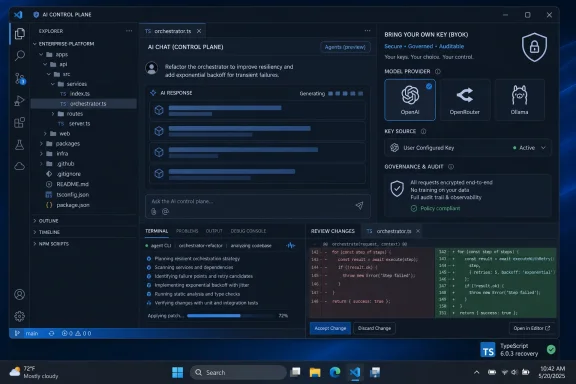 Microsoft Turns VS Code Into the Place Where Model Choice Gets Managed
For years, VS Code’s power came from extension sprawl. If a developer wanted a formatter, debugger, database client, container workflow, or language server, the answer was usually an extension and a little patience. Version 1.117 shows how that same philosophy is being reworked for the AI era, where the extension model alone is not enough and the editor itself has to understand models, policies, keys, quotas, and agent behavior.The most important change is Bring Your Own Key, or BYOK, for GitHub Copilot Business and Enterprise customers. In plain terms, organizations can connect their own API keys for supported model providers and make those models available inside VS Code chat. Microsoft lists providers such as OpenRouter, Ollama, Google, and OpenAI, with the practical effect that an organization no longer has to treat Copilot’s default model choices as the entire menu.
That matters because enterprise AI adoption is no longer a simple contest over which chatbot gives the best answer in a demo. Large organizations care about procurement, data handling, latency, regional availability, auditability, cost allocation, and internal model standards. A team that has already approved a particular provider, private endpoint, or local model path does not want every developer wiring that up manually through shadow tooling.
VS Code 1.117 nudges that reality into the editor. It makes model choice an administrative surface rather than a collection of developer workarounds. That is a subtle but important shift: the editor is no longer merely where code is written; it is becoming where AI access is distributed and normalized.
BYOK Is Freedom, But Only Inside Microsoft’s Frame
BYOK sounds like a pure openness story, and to a point it is. If a business wants to use a specialized model for compliance, experimentation, or cost reasons, VS Code 1.117 gives that decision a sanctioned path. Administrators can enable language-model extensions and built-in providers so developers can select approved models inside the chat experience instead of hopping between browser tabs, command-line tools, and third-party plugins.But this is not a jailbreak from the Copilot architecture. BYOK in 1.117 is tied to Copilot Business and Enterprise usage, and the release notes make clear that the feature is primarily about chat. Inline suggestions are not suddenly handed over wholesale to an arbitrary model key. Other Copilot service features, including operations that depend on repository indexing or side queries, still rely on Copilot’s own service APIs.
That boundary is the real story. Microsoft is not abandoning Copilot as the control plane; it is letting organizations bring more models into Copilot’s orbit. The company gets to tell enterprises that model choice is supported, while still preserving the parts of the system that make Copilot more than a text box pointed at an API.
For IT leaders, that distinction should be comforting and frustrating in equal measure. It is comforting because unmanaged model sprawl is a nightmare, and a centrally governed VS Code pathway is better than every developer pasting secrets into random extensions. It is frustrating because the promise of “bring your own” still comes with a Microsoft-shaped perimeter.
The Editor Is Becoming a Policy Surface
The enterprise implications are bigger than the feature checkbox. BYOK means administrators can start thinking about VS Code settings as part of AI governance. Which providers are permitted? Which keys are exposed? Which model extensions are allowed? Which user groups should have access? Which traffic should stay local, and which can leave the organization?That is not the traditional mental model for a code editor. Historically, VS Code administration has meant extension recommendations, settings sync decisions, workspace trust, remote development policies, and maybe some telemetry settings. AI changes the stakes because the editor is now a place where source code, terminal output, repository context, prompts, generated patches, and organizational secrets may all pass through language-model workflows.
Version 1.117 does not solve all of that. It does, however, acknowledge the direction of travel. If developers are going to use AI assistance inside the IDE, the organization needs a way to channel that use through approved providers and plans rather than pretending the problem can be solved with a stern internal memo.
The catch is that policy surfaces are only useful when they are legible. Microsoft will need to keep improving documentation, admin tooling, and reporting around these features, because model access is not like choosing a theme. A poorly configured model route can mean unexpected bills, compliance exposure, or inconsistent developer behavior across teams.
Chat Gets Faster Because Perception Is Part of Productivity
The chat improvements in VS Code 1.117 are smaller than BYOK, but they point to the same product strategy. Microsoft is not just adding AI to the editor; it is sanding down the friction that makes AI feel bolted on. The new incremental rendering work allows chat responses to appear block by block rather than waiting on a timed rendering approach.That sounds cosmetic until you spend a day using AI tools in a coding loop. Waiting for a response is not only about raw latency. It is about whether the interface feels alive, whether partial answers are readable, and whether the developer can begin evaluating output before the model has fully finished.
VS Code 1.117 also adds options around buffering and animation style. The practical effect is that users can choose whether they prefer cleaner rendered responses or more immediate raw output as text arrives. That sort of choice may seem minor, but it recognizes a split in developer preference: some people want polish, while others want every token as soon as it exists.
The animation setting is the least consequential but the most revealing. Fade or slide is not going to change the correctness of generated code. Still, it shows Microsoft treating AI chat as a first-class editor experience with UX knobs of its own, rather than a generic webview pasted into the sidebar.
The Terminal Becomes Part of the Agent Loop
The terminal changes are more practical. VS Code 1.117 fixes the ability to launch GitHub Copilot CLI from any terminal profile, addressing a failure mode where choosing it from the profile picker could break the expected flow. For users who live in multiple shells or custom profiles, that kind of fix removes a silly but real point of friction.More interesting is the improved shell recognition for agent CLIs. Tools such as Copilot CLI, Claude Code, and Gemini CLI often run as Node processes, which meant VS Code could label them generically as “node” in the terminal title. That is technically understandable and practically annoying.
By recognizing these processes more intelligently, VS Code can show the model or agent identity instead of a useless process label. In a workspace with multiple terminals, agents, scripts, test watchers, and shells running at once, naming is not decoration. It is operational hygiene.
The update also surfaces status notifications for long-running background terminal commands in chat. That matters because agentic coding workflows often bounce between chat and terminal execution. If a model asks to run tests, start a build, inspect output, or execute a migration, the user should not have to babysit a terminal pane just to know whether the work is still running.
Agents Are Still Preview, But the Direction Is Obvious
The Agents App remains an Insiders preview feature, which means it should not be mistaken for a finished enterprise surface. Still, the work in 1.117 makes Microsoft’s intentions clear. Agent sessions can be sorted more usefully by recent activity and update time, the interface gets visual polish, and inline changes become easier to inspect and compare.That may not sound dramatic, but agent workflows live or die on state management. A single chat response is easy to track. A multi-step agent session that edits files, runs commands, revises plans, and spawns follow-up work is much harder to reason about. The more autonomous the tooling becomes, the more the interface has to show its work.
Inline change presentation is especially important. Developers do not only need AI to generate patches; they need to understand what changed, why it changed, and how risky the patch is. If the agent experience makes diffs easier to spot and compare, it moves closer to a reviewable workflow rather than a magic trick.
This is where Microsoft is clearly trying to keep VS Code relevant against specialized agent apps and terminal-native AI tools. The company’s bet is that developers do not want a separate cockpit for every coding agent. They want agent sessions, diffs, chat, terminals, repository context, and editor state to meet in one place.
TypeScript 6.0.3 Is the Quiet Stability Patch Developers Will Actually Feel
VS Code 1.117 includes the TypeScript 6.0.3 recovery release. Compared with BYOK and agents, that sounds unglamorous. But for day-to-day VS Code users, language service quality is still the foundation the AI features sit on top of.TypeScript is not just a compiler in the VS Code world. It powers IntelliSense, quick fixes, navigation, refactoring, error reporting, JavaScript editing features, and a large part of the modern web development experience. When TypeScript language service behavior regresses, developers feel it immediately in completions, imports, diagnostics, and build reliability.
The inclusion of a recovery release suggests this update is partly about stabilizing the developer loop after earlier issues. That is worth emphasizing because the AI narrative can drown out the boring core work that makes VS Code useful. An editor that can summon five models but stumbles on imports is not a serious tool.
The better way to read 1.117 is as a layered release. BYOK changes who controls model access. Chat changes how responses feel. Terminal updates change how AI tools participate in real workflows. TypeScript fixes keep the non-AI substrate from cracking underneath all of it.
The Weekly Release Cadence Raises the Stakes
VS Code has been moving faster, and 1.117 landed in a period where the editor’s stable releases are arriving at a noticeably brisk rhythm. That cadence is good for shipping fixes and iterating on AI features, but it complicates the job of enterprise IT. A feature that matters to administrators can arrive in what looks like a routine editor update.That is a cultural mismatch. Developers tend to like rapid updates because they bring fixes, performance improvements, and new toys. Administrators want predictability, documentation, policy hooks, and time to test. AI features make that tension sharper because they touch security, billing, and data governance more directly than a new minimap option or debug adapter tweak.
BYOK being enabled by default for the relevant business and enterprise contexts is therefore not just a convenience choice. It is a signal that Microsoft wants model integration to become normal quickly. Organizations that do not want that behavior need to understand where the controls are and how the feature fits their internal rules.
For Windows-heavy shops, the issue is familiar. Microsoft’s strongest products often evolve by making the new behavior the path of least resistance, then giving administrators levers to constrain it afterward. VS Code 1.117 follows that pattern, but in an area where the cost of misunderstanding the default can be higher.
Developers Get More Choice, But Also More Ambiguity
From the individual developer’s perspective, VS Code 1.117 is mostly upside. More models in chat means more flexibility. Better rendering makes conversations feel less sluggish. Terminal recognition makes agent workflows easier to follow. Agent session polish helps keep context from turning into mush.The ambiguity comes from the growing number of places where “Copilot” no longer means one thing. There is Copilot Chat. There is Copilot CLI. There are BYOK models inside chat. There are agent sessions. There are built-in providers and language-model extensions. There are still limits around inline suggestions and service-backed features.
That complexity is manageable for power users, but it can confuse teams. One developer may assume that a response came from a standard Copilot model, another may be using a provider key configured by the organization, and a third may be interacting through a CLI agent that behaves differently again. If teams are going to compare outputs, set coding standards, or write security guidance, they need to be precise about which workflow they mean.
This is where documentation inside companies will matter as much as Microsoft’s release notes. “Use Copilot” is no longer an adequate policy. Teams will need guidance that distinguishes approved chat models, permitted agent actions, terminal command practices, and review requirements for generated code.
The Real Contest Is Not Editor Versus Editor
It is tempting to frame every VS Code release as part of a fight with JetBrains, Zed, Cursor, Windsurf, or whatever AI-first coding environment is gaining mindshare that month. There is some truth there. Microsoft does not want VS Code to become the place where developers write code only after planning and generating it somewhere else.But the more interesting contest is between integrated and fragmented workflows. Developers have been stitching together browser-based chatbots, terminal agents, local models, cloud APIs, code review bots, and editor extensions. That works for experimentation, but it is messy at scale. VS Code 1.117 is Microsoft’s attempt to make the editor the integration point before someone else owns that layer.
BYOK is crucial because no single vendor can credibly tell enterprises that one model family will satisfy every coding, compliance, privacy, and cost requirement. The winning product surface is more likely to be the one that can host multiple models while preserving enough policy, identity, and workflow control to satisfy management. VS Code has a natural advantage there because it is already installed everywhere.
Still, that advantage is not permanent. Developers are willing to move if the AI loop is significantly better elsewhere. Microsoft has to keep the core editor fast, the AI experience transparent, and the administrative controls credible. If VS Code becomes a cluttered AI dashboard that merely happens to edit files, competitors will have an opening.
Windows Users Should Read This as an Enterprise AI Signal
For WindowsForum readers, the significance of VS Code 1.117 extends beyond developers who use the editor every day. VS Code is one of Microsoft’s clearest indicators of where the company thinks professional software workflows are going. This release says the future is not just Copilot answering questions; it is Copilot acting as a managed hub for models, agents, terminals, and code changes.That has practical consequences for Windows shops. Developers using Windows laptops, WSL environments, Dev Drive configurations, remote containers, or cloud workstations will increasingly expect AI tools to work across the editor and terminal without special ceremony. Administrators will increasingly be asked why one model provider is allowed, why another is blocked, and how usage is monitored.
Security teams should also pay attention to the terminal integration. Agentic tools that run commands are more powerful than chatbots that merely suggest commands. Surfacing background command status in chat is convenient, but the larger governance question is what agents are allowed to run, how users approve actions, and how logs are retained.
The Windows desktop has always been a place where enterprise control and user productivity collide. VS Code 1.117 brings that collision into the AI coding workflow. The right response is not panic, but it is not indifference either.
The 1.117 Upgrade Is Small Only If You Ignore the Control Plane
The danger with a release like this is that it looks incremental. BYOK for a subset of Copilot customers, some chat rendering changes, terminal fixes, agent polish, and a TypeScript recovery release do not sound like a revolution. In isolation, they are not.Taken together, they show Microsoft turning VS Code into an AI control plane for software development. The models may come from multiple providers. The commands may run in integrated terminals. The agents may operate through preview surfaces. The diffs may be reviewed inline. But the gravitational center is the editor.
That is why 1.117 deserves more attention than a routine point release. Microsoft is not merely chasing AI fashion; it is embedding AI governance and workflow coordination into the tool developers already use. The result is more useful than a flashy demo and more consequential than another chatbot panel.
The Upgrade Notes That Should Actually Shape Your Rollout
VS Code 1.117 is best treated as a policy-aware developer tooling update, not just another editor refresh. Teams that already use Copilot Business or Enterprise should review it with administrators, security staff, and senior developers in the same room, because the practical questions cross all three groups.- Organizations can connect approved model provider keys for use in VS Code chat through BYOK, but that does not mean every Copilot feature automatically uses those models.
- Inline completions and service-backed Copilot capabilities remain separate from the new chat-focused BYOK path in important ways.
- Terminal improvements make AI CLI workflows easier to identify and monitor, especially when multiple agent processes are active.
- Chat rendering changes are about perceived responsiveness as much as raw speed, and that matters for developers who keep AI conversations open all day.
- The Agents App remains a preview experience, so production teams should treat its improvements as a signpost rather than a settled workflow.
- The TypeScript 6.0.3 inclusion is a reminder that language-service stability still matters more than AI polish when real projects are on the line.
References
- Primary source: Guiding Tech
Published: 2026-06-06T05:50:49.423381
What’s New With VS Code 1.117 - Guiding Tech
New updates bring new improvements and features. Join us as we take a look at VS Code 1.117 and what it offers users.www.guidingtech.com
- Related coverage: visualstudiomagazine.com
Visual Studio Code 1.117 Expands Copilot Controls for Business and Enterprise User -- Visual Studio Magazine
VS Code 1.117 adds bring-your-own model key support for Copilot Business and Enterprise users and introduces a set of chat, agent, terminal, and TypeScript updates.visualstudiomagazine.com - Related coverage: code.visualstudio.com
- Related coverage: ntcompatible.com
Visual Studio Code 1.117 released
Visual Studio Code 1.117 finally lets business users plug their own API keys directly into Copilot chat, keeping teams compliant without forcing them out of the editor.www.ntcompatible.com - Related coverage: warp2search.net
Visual Studio Code 1.117 released
Visual Studio Code 1.117 introduces significant updates for business users, allowing them to integrate their own API keys into the Copilot chat for better compliance without leaving the editor.www.warp2search.net - Related coverage: windowsreport.com
VS Code Update Brings More Flexible Copilot Integration and Faster Chat Experience
Visual Studio Code 1.117 adds Copilot BYOK, faster chat streaming, and terminal fixes, giving developers more control. windowsreport.com
- Related coverage: tech.xebia.ms
Visual Studio Code and GitHub Copilot - What's new in 1.117 - Tech Hub
Fokko at Work walks through what’s new for Visual Studio Code and GitHub Copilot in VS Code 1.117, focusing on Copilot BYOK for Business/Enterprise plans,...tech.xebia.ms - Related coverage: elevenforum.com
Visual Studio Code version 1.117.0 release available | Windows 11 Forum
Visual Studio Code github: Release date: April 22, 2026 Welcome to the 1.117 release of Visual Studio Code. This release adds new capabilities for Copilot...www.elevenforum.com - Related coverage: letsdatascience.com
VS Code Adds BYOK for Copilot and Streaming | Let's Data Science
Visual Studio Code **1.117** introduces three practical updates for developers: **Bring Your Own Key (BYOK)** for Copilot Business and Enterprise users, experimental incremental chat rendering to stream responses block-by-block, and a terminal fix that lets the Copilot CLI launch from any... letsdatascience.com
- Related coverage: docs.cloud.oracle.com
