

On Windows 11 version 24H2 and the current 25H2 release, Microsoft’s old systemreset command is no longer present in System32, so Command Prompt cannot factory-reset a PC the way years of tutorials still claim it can in 2026 with one line. That is the uncomfortable truth behind a lot of stale Windows advice still floating around the web. The reset feature is not gone, but the old shortcut into it effectively is. For home users, this is mostly an annoyance; for administrators, it is another small example of Microsoft moving Windows plumbing without clearly documenting the operational fallout.
For years,
That matters because Windows recovery has always lived in two worlds. There is the consumer-facing world of Settings pages, blue recovery screens, and hand-holding language about keeping files. Then there is the admin-facing world where someone wants to trigger a rebuild remotely, from a terminal, during enrollment, or while rescuing a half-broken machine over a support session.
Windows 11 24H2 appears to be where that old bridge collapsed. On systems where
The important distinction is that Microsoft did not remove “Reset this PC.” The reset engine, the recovery environment, cloud download, local reinstall, and the keep-or-remove-files choices still exist. What disappeared is the old public-looking entry point that tutorials, help desks, and forum posts had trained people to use.
That is exactly what happened here. Many guides still tell users to open CMD and run
The resulting user experience is maddeningly Windows-like. The feature is present. The official Settings path works. The recovery environment works. But the command that many people were told to use fails with an error that implies user mistake rather than platform change.
Microsoft’s silence makes the confusion worse. When a command vanishes without a clear deprecation note, the community fills the gap with experiments, Reddit threads, vendor blog posts, and half-confirmed workarounds. That is useful, but it is not the same as a supported administrative contract.
The command currently used by many testers and admins is:
Run from an elevated Command Prompt, it can open the “Reset this PC” wizard on current Windows 11 builds. From there, the user still chooses “Keep my files” or “Remove everything,” then selects cloud download or local reinstall. In practical terms, it gets you to the right screen.
But it is not the same kind of thing as the old
That distinction matters. A workaround that opens a UI is fine for a technician sitting at a machine. It is much less satisfying for fleet management, remote repair, or automation. If Microsoft changes that argument name, moves the component, or blocks the flow behind a different policy path, scripts built around it may break just as abruptly as the old command did.
That flow gives the same major choices users already know. “Keep my files” reinstalls Windows while preserving personal files in standard user locations, but it removes apps and resets many settings. “Remove everything” is the more destructive option, intended for a clean start, resale, handoff, or a system so compromised that preserving the existing profile is not desirable.
The second choice is just as important. “Cloud download” pulls Windows installation files from Microsoft, which can be useful when local system files are damaged or stale. “Local reinstall” rebuilds from files already on the PC, which is usually faster and avoids a large download but may inherit problems if the local image is unhealthy.
None of that requires Command Prompt. That is precisely Microsoft’s point. The company has spent years dragging Windows administration and recovery from Control Panel-era tools into Settings, Windows RE, Intune, and Microsoft Account-backed restore experiences. The missing
When Windows does not boot at all, the same environment can often be reached by interrupting startup repeatedly. After multiple failed boots, Windows normally attempts automatic repair and presents recovery options. From there, reset is available without signing into the broken desktop.
This is where the loss of
If Windows RE is damaged, disabled, or missing, the answer becomes external installation media. A Windows 11 USB installer can boot the machine, expose repair options, and get users back to recovery tools. At that point, however, the line between “reset” and “reinstall” starts to blur, especially for anyone already prepared to wipe the machine.
Modern managed Windows environments are supposed to use management channels instead. Intune wipe actions, Autopilot Reset, device retirement workflows, and MDM-backed wipe methods are the more appropriate tools for enrolled endpoints. Those paths provide policy awareness and auditability that a local command never really offered.
Still, there is a gap between Microsoft’s ideal architecture and the machines admins actually inherit. Not every device is cleanly enrolled. Not every remote support case begins from a healthy management state. Not every small business has mature Intune workflows. In those messy middle cases, losing a simple local reset command removes one more tool from the bag.
The workaround through
That ambiguity sends users down the wrong road. They check environment variables. They run SFC. They run DISM. They search for missing EXE downloads, which is exactly the kind of behavior Windows should not encourage when dealing with system recovery tools.
The safest advice is simple: do not download
If reset fails from Settings or Windows RE, troubleshoot reset itself. That means checking recovery partitions, BitLocker state, storage health, available disk space, and whether installation media is needed. Chasing the old command is a detour.
Before any reset, users should copy important data to an external drive or a cloud service and then verify that the copied files open. That second step matters. A backup that exists only as a progress bar memory is not a backup; it is wishful thinking.
BitLocker adds another layer. Many Windows 11 systems, especially laptops, use device encryption or BitLocker by default. Users should make sure they can access their recovery key through their Microsoft account or organizational recovery system before pushing a machine into recovery operations.
The same caution applies to app licenses and local-only data. Resetting Windows may preserve documents, but it will not preserve every installed application, activation state, driver customization, or niche utility. A reset is a repair operation, not a time machine.
Microsoft’s newer Windows design often places the durable interface in Settings, MDM policy, PowerShell management providers, or cloud management portals rather than in old standalone EXEs. Sometimes that is progress. Sometimes it is churn wearing a modern UI. In this case, it is a bit of both.
From a security and support perspective, Microsoft may prefer reset flows that run through controlled UI and management channels. A factory reset is destructive, and hiding it behind a more deliberate workflow is defensible. But from an administrative transparency perspective, silently removing a known executable is sloppy.
Windows succeeds when its layers are discoverable. It struggles when the official path, the legacy path, and the community-discovered path all differ, and only one of them is documented. The
For users sitting at a working desktop, Settings is the least clever and most reliable option. For users with a damaged desktop, Windows Recovery Environment is the proper fallback. For machines that cannot reach recovery, a Windows 11 USB installer is the tool to keep nearby.
The unofficial Settings-admin-flow command is useful, but it belongs in the category of workaround, not gospel. It may save time today. It should not be the only process written into an organization’s recovery documentation.
Source: H2S Media Can You Factory Reset Windows 11 Using CMD? Here's the Truth
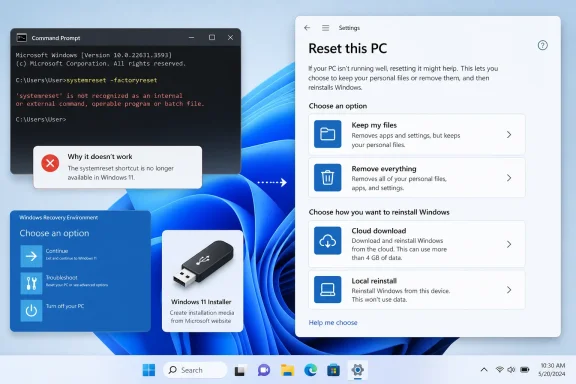 Microsoft Did Not Kill Reset, It Killed the Shortcut
For years, systemreset.exe was the neat trick hiding in plain sight. Open an elevated Command Prompt, run systemreset or systemreset -factoryreset, and Windows would throw you into the familiar “Reset this PC” flow. It was not magic, but it was simple, memorable, and easy to script around.That matters because Windows recovery has always lived in two worlds. There is the consumer-facing world of Settings pages, blue recovery screens, and hand-holding language about keeping files. Then there is the admin-facing world where someone wants to trigger a rebuild remotely, from a terminal, during enrollment, or while rescuing a half-broken machine over a support session.
Windows 11 24H2 appears to be where that old bridge collapsed. On systems where
systemreset.exe is missing, Command Prompt responds with the classic “not recognized as an internal or external command” error because there is no executable for CMD to find. That is not a permissions problem, not a corrupt path variable, and not something System File Checker is likely to resurrect.The important distinction is that Microsoft did not remove “Reset this PC.” The reset engine, the recovery environment, cloud download, local reinstall, and the keep-or-remove-files choices still exist. What disappeared is the old public-looking entry point that tutorials, help desks, and forum posts had trained people to use.
The Web Remembered a Command Windows Forgot
The reason this issue feels larger than one missing executable is that Windows advice has a long half-life. A command that worked in Windows 10, Windows 11 22H2, or Windows 11 23H2 can keep circulating for years after the implementation changes. Search results often preserve the ritual long after the product has moved on.That is exactly what happened here. Many guides still tell users to open CMD and run
systemreset -factoryreset, as if Windows 11 were a static target. But Windows 11 is now serviced as a rolling platform, with feature updates, cumulative updates, enablement packages, and Settings migrations constantly shifting the boundary between the old shell and the modern app stack.The resulting user experience is maddeningly Windows-like. The feature is present. The official Settings path works. The recovery environment works. But the command that many people were told to use fails with an error that implies user mistake rather than platform change.
Microsoft’s silence makes the confusion worse. When a command vanishes without a clear deprecation note, the community fills the gap with experiments, Reddit threads, vendor blog posts, and half-confirmed workarounds. That is useful, but it is not the same as a supported administrative contract.
The New Door Into Reset Runs Through Settings
The closest surviving command-line-style workaround is notsystemreset at all. It is launching the reset flow through SystemSettingsAdminFlows.exe, another Windows component that lives under System32 and is tied to privileged Settings operations.The command currently used by many testers and admins is:
"C:\Windows\System32\SystemSettingsAdminFlows.exe" FeaturedResetPCRun from an elevated Command Prompt, it can open the “Reset this PC” wizard on current Windows 11 builds. From there, the user still chooses “Keep my files” or “Remove everything,” then selects cloud download or local reinstall. In practical terms, it gets you to the right screen.
But it is not the same kind of thing as the old
systemreset command. It is not a well-advertised administrative interface, and Microsoft has not treated it as a stable scripting surface. It looks more like a Settings plumbing hook than a documented reset API.That distinction matters. A workaround that opens a UI is fine for a technician sitting at a machine. It is much less satisfying for fleet management, remote repair, or automation. If Microsoft changes that argument name, moves the component, or blocks the flow behind a different policy path, scripts built around it may break just as abruptly as the old command did.
Settings Is Now the Supported Path, Whether Power Users Like It or Not
For ordinary users, the right answer is boring: use Settings. In Windows 11, Microsoft wants resets to start from Settings, not from Command Prompt. The path is System, then Recovery, then Reset this PC.That flow gives the same major choices users already know. “Keep my files” reinstalls Windows while preserving personal files in standard user locations, but it removes apps and resets many settings. “Remove everything” is the more destructive option, intended for a clean start, resale, handoff, or a system so compromised that preserving the existing profile is not desirable.
The second choice is just as important. “Cloud download” pulls Windows installation files from Microsoft, which can be useful when local system files are damaged or stale. “Local reinstall” rebuilds from files already on the PC, which is usually faster and avoids a large download but may inherit problems if the local image is unhealthy.
None of that requires Command Prompt. That is precisely Microsoft’s point. The company has spent years dragging Windows administration and recovery from Control Panel-era tools into Settings, Windows RE, Intune, and Microsoft Account-backed restore experiences. The missing
systemreset.exe is part of that larger migration, even if Microsoft has not framed it that way publicly.Recovery Environment Is the Real Fallback, Not a Secret CMD Spell
When Windows still boots, Settings is enough. When Windows boots badly, Advanced Startup becomes the next practical route. Holding Shift while clicking Restart can take the machine into Windows Recovery Environment, where Troubleshoot leads to Reset this PC.When Windows does not boot at all, the same environment can often be reached by interrupting startup repeatedly. After multiple failed boots, Windows normally attempts automatic repair and presents recovery options. From there, reset is available without signing into the broken desktop.
This is where the loss of
systemreset hurts emotionally more than technically. A command sounds decisive. Recovery screens feel like a maze. But in a non-booting scenario, CMD was never a universal rescue wand unless the surrounding recovery infrastructure was intact.If Windows RE is damaged, disabled, or missing, the answer becomes external installation media. A Windows 11 USB installer can boot the machine, expose repair options, and get users back to recovery tools. At that point, however, the line between “reset” and “reinstall” starts to blur, especially for anyone already prepared to wipe the machine.
Admins Lost a Convenience, Not a Management Strategy
The sharper impact lands in IT departments.systemreset.exe was convenient because it gave support staff a simple instruction and gave scripts a visible handle. It was not necessarily the best enterprise wipe mechanism, but it was familiar.Modern managed Windows environments are supposed to use management channels instead. Intune wipe actions, Autopilot Reset, device retirement workflows, and MDM-backed wipe methods are the more appropriate tools for enrolled endpoints. Those paths provide policy awareness and auditability that a local command never really offered.
Still, there is a gap between Microsoft’s ideal architecture and the machines admins actually inherit. Not every device is cleanly enrolled. Not every remote support case begins from a healthy management state. Not every small business has mature Intune workflows. In those messy middle cases, losing a simple local reset command removes one more tool from the bag.
The workaround through
SystemSettingsAdminFlows.exe helps, but it does not fully replace what was lost. It launches an interactive wizard. It depends on current implementation details. It is not something cautious administrators should treat as a long-term contract without testing it against every Windows build they support.The Error Message Is Technically Accurate and Practically Useless
“Not recognized as an internal or external command” is one of those Windows messages that is true without being helpful. It tells the user the shell cannot find the command. It does not say that the command was once valid, that the executable is absent by design, or that the recommended path has changed.That ambiguity sends users down the wrong road. They check environment variables. They run SFC. They run DISM. They search for missing EXE downloads, which is exactly the kind of behavior Windows should not encourage when dealing with system recovery tools.
The safest advice is simple: do not download
systemreset.exe from random sites. Do not copy it from an older Windows install and assume you have restored support. Do not treat a missing reset command as proof that Windows itself is corrupt. On Windows 11 24H2 and 25H2, absence of that file is now part of the expected landscape.If reset fails from Settings or Windows RE, troubleshoot reset itself. That means checking recovery partitions, BitLocker state, storage health, available disk space, and whether installation media is needed. Chasing the old command is a detour.
“Keep My Files” Is Not a Backup Plan
The reset wizard’s friendliest phrase is also its most dangerous. “Keep my files” sounds broad, but it is not a substitute for a backup. It is designed around user profile data, not every arbitrary folder, portable application directory, virtual machine, game mod folder, or accounting database someone left on the root of C:.Before any reset, users should copy important data to an external drive or a cloud service and then verify that the copied files open. That second step matters. A backup that exists only as a progress bar memory is not a backup; it is wishful thinking.
BitLocker adds another layer. Many Windows 11 systems, especially laptops, use device encryption or BitLocker by default. Users should make sure they can access their recovery key through their Microsoft account or organizational recovery system before pushing a machine into recovery operations.
The same caution applies to app licenses and local-only data. Resetting Windows may preserve documents, but it will not preserve every installed application, activation state, driver customization, or niche utility. A reset is a repair operation, not a time machine.
The Command-Line Myth Finally Meets Modern Windows
The deeper story is that Windows still carries a reputation for being command-line recoverable in ways the modern OS increasingly is not. Power users expect there to be a verb for everything. If Settings can do it, surely CMD can call it. That assumption is less reliable every year.Microsoft’s newer Windows design often places the durable interface in Settings, MDM policy, PowerShell management providers, or cloud management portals rather than in old standalone EXEs. Sometimes that is progress. Sometimes it is churn wearing a modern UI. In this case, it is a bit of both.
From a security and support perspective, Microsoft may prefer reset flows that run through controlled UI and management channels. A factory reset is destructive, and hiding it behind a more deliberate workflow is defensible. But from an administrative transparency perspective, silently removing a known executable is sloppy.
Windows succeeds when its layers are discoverable. It struggles when the official path, the legacy path, and the community-discovered path all differ, and only one of them is documented. The
systemreset disappearance is not catastrophic, but it is a perfect small Windows mess: recoverable, explainable, and unnecessarily confusing.The Practical Truth for Anyone Resetting Windows 11 Now
The safest way to think about Windows 11 reset in 2026 is to separate “starting the wizard” from “performing the reset.” Command Prompt no longer owns the first job. Windows recovery still owns the second.For users sitting at a working desktop, Settings is the least clever and most reliable option. For users with a damaged desktop, Windows Recovery Environment is the proper fallback. For machines that cannot reach recovery, a Windows 11 USB installer is the tool to keep nearby.
The unofficial Settings-admin-flow command is useful, but it belongs in the category of workaround, not gospel. It may save time today. It should not be the only process written into an organization’s recovery documentation.
The Reset Playbook Has Changed, Even If the Goal Hasn’t
The old one-line CMD reset era is over for current Windows 11 builds, but the recovery strategy is not complicated once the mythology is stripped away. The concrete lesson is to stop treatingsystemreset as a troubleshooting step and start documenting the supported paths users and technicians can actually rely on.- Windows 11 24H2 and 25H2 systems may not include
systemreset.exe, so the oldsystemreset -factoryresetadvice is no longer dependable. - The reset feature still works through Settings, Windows Recovery Environment, and installation media.
- The
SystemSettingsAdminFlows.exe FeaturedResetPCcommand can launch the reset wizard today, but it should be treated as an unofficial workaround. - Managed business devices should use Intune, Autopilot, or MDM wipe workflows where available instead of relying on local reset commands.
- Users should back up and verify their files before choosing any reset option, including “Keep my files.”
- A Windows 11 USB installer remains the best fallback when the local recovery environment is broken or missing.
Source: H2S Media Can You Factory Reset Windows 11 Using CMD? Here's the Truth
