

Microsoft’s 90-day support notice puts two very different Windows estates on the same deadline: Windows 11 version 24H2 Home and Pro and Windows 10 Enterprise LTSB 2016 both reach end of support on October 13, 2026. For affected PCs, that date ends the regular delivery of security fixes; for IT teams, it is a prompt to distinguish a routine Windows 11 feature update from a far more consequential legacy-platform migration.
Microsoft’s Windows Release Health documentation confirms that Windows 11 24H2 Home and Pro devices will stop receiving monthly security and preview updates, known-issue fixes, time-zone data, and technical support after the October deadline. Its lifecycle documentation separately lists Windows 10 Enterprise LTSB 2016, version 1607 and build 14393, as ending extended support on the same day.
The shared date should not obscure the difference in risk. A Windows 11 24H2 consumer or small-business PC is normally one supported feature update away from safety. Windows 10 LTSB 2016 machines are often embedded in specialized environments, tied to old drivers, industrial hardware, regulated workflows, or applications that have not been revisited in a decade.
Windows 11 Home and Pro releases receive 24 months of servicing, while Enterprise and Education editions receive 36 months. That is why the October 13 cutoff applies to Home and Pro, but not to Windows 11 24H2 Enterprise and Education. The latter remain supported until October 12, 2027.
Microsoft has stated in its Windows 11 24H2 health dashboard that unmanaged Home and Pro systems will receive the Windows 11 version 25H2 update automatically, subject to normal rollout controls and restart scheduling. But there is an important wrinkle for anyone looking at the situation in July 2026: Microsoft’s current supported-version table lists Windows 11 version 26H1, build 28000, as the latest General Availability Channel release.
In practical terms, 25H2 should be understood as the immediate servicing move Microsoft initially targeted for 24H2 devices, not necessarily the final destination for every PC by October. Version 25H2 remains in support for Home and Pro until October 12, 2027, while 26H1 extends Home and Pro servicing to March 14, 2028. Eligibility, safeguard holds, hardware support, and an organization’s update policies will determine which release a device is offered and when.
For unmanaged systems, users should not treat an automatic feature update as a migration strategy. A device may be paused, blocked by a compatibility safeguard, short on disk space, or simply not checked frequently enough to complete the process before support ends. The immediate action is to open Settings > Windows Update, install current cumulative updates, and confirm that a supported feature update is being offered.
For managed Windows 11 fleets, the more useful question is not whether 24H2 can remain in service until October 13, but whether the organization has deliberately selected its next servicing baseline. Organizations that stay on Enterprise or Education have an additional year for 24H2 validation, but that year should be used to test and deploy a newer release—not to postpone application compatibility work.
Unlike a standard Windows 10 installation, LTSB 2016 was intended for fixed-purpose devices where feature churn was undesirable: medical equipment consoles, factory workstations, point-of-sale systems, kiosks, control-room PCs, and similar roles. That design choice is exactly why many deployments have lasted this long. It also means the upgrade cannot be reduced to clicking “Check for updates.”
Microsoft now offers a dedicated paid Extended Security Updates program for Windows 10 Enterprise LTSB 2016 and Windows 10 IoT Enterprise LTSB 2016. The company’s newly published deployment guidance says customers must install at least the May 2026 servicing stack update, KB5088064, and the May 2026 security update, KB5087537, before enabling ESU. Commercial customers then obtain a Multiple Activation Key through the Microsoft 365 admin center and activate covered devices.
That is a meaningful operational detail: ESU is not simply a switch that makes an obsolete image safe. It requires entitlement, device preparation, activation planning, and ongoing servicing. Microsoft describes ESU as a temporary bridge, providing Critical and Important security updates where available, but not feature work, ordinary non-security repairs, or normal technical support.
The broader Windows 10 ESU program is available for eligible Enterprise, Education, and commercial Pro installations for up to three years after the general Windows 10 end-of-support date. Its published schedule runs through October 10, 2028. That does not mean every LTSB 2016 device is automatically protected through that period. Organizations should validate the specific LTSB 2016 ESU offer, licensing route, activation requirements, and budget with their Microsoft account team or licensing partner.
Those dates should not be read as a universal migration recommendation. LTSC selection needs to follow the purpose of the endpoint, licensing eligibility, application vendor support, and hardware capabilities. A general office desktop is usually better served by a current Windows 11 Enterprise release with normal feature servicing; a dedicated device that truly requires a locked-down platform may justify LTSC.
The 2016 LTSB estate should therefore be classified before it is upgraded. Teams need to identify whether each device can run Windows 11, whether it has vendor-certified drivers for a newer Windows build, whether its application stack supports the replacement OS, and whether a replacement PC or purpose-built device is less risky than an in-place move.
A useful near-term split is simple:
After October 13, 2026, an unpatched Windows 11 24H2 Home or Pro system and an unlicensed Windows 10 LTSB 2016 system will no longer receive fixes for newly discovered vulnerabilities. For Windows 11 users, the safest answer is to complete the feature update now. For LTSB administrators, the immediate deliverable is a credible device-by-device migration plan—because an ESU key buys time, not a modern platform.
Microsoft’s Windows Release Health documentation confirms that Windows 11 24H2 Home and Pro devices will stop receiving monthly security and preview updates, known-issue fixes, time-zone data, and technical support after the October deadline. Its lifecycle documentation separately lists Windows 10 Enterprise LTSB 2016, version 1607 and build 14393, as ending extended support on the same day.
The shared date should not obscure the difference in risk. A Windows 11 24H2 consumer or small-business PC is normally one supported feature update away from safety. Windows 10 LTSB 2016 machines are often embedded in specialized environments, tied to old drivers, industrial hardware, regulated workflows, or applications that have not been revisited in a decade.
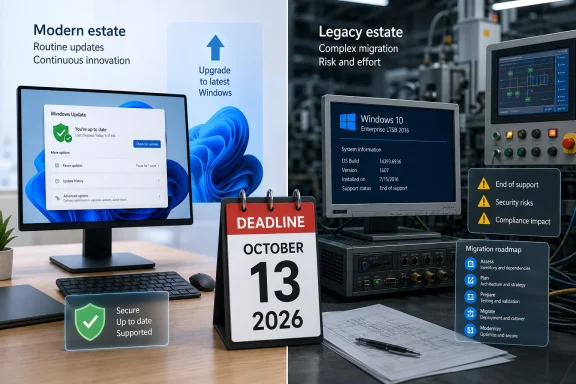 Windows 11 24H2 Has a Straightforward Upgrade Path — With One Catch
Windows 11 Home and Pro releases receive 24 months of servicing, while Enterprise and Education editions receive 36 months. That is why the October 13 cutoff applies to Home and Pro, but not to Windows 11 24H2 Enterprise and Education. The latter remain supported until October 12, 2027.Microsoft has stated in its Windows 11 24H2 health dashboard that unmanaged Home and Pro systems will receive the Windows 11 version 25H2 update automatically, subject to normal rollout controls and restart scheduling. But there is an important wrinkle for anyone looking at the situation in July 2026: Microsoft’s current supported-version table lists Windows 11 version 26H1, build 28000, as the latest General Availability Channel release.
In practical terms, 25H2 should be understood as the immediate servicing move Microsoft initially targeted for 24H2 devices, not necessarily the final destination for every PC by October. Version 25H2 remains in support for Home and Pro until October 12, 2027, while 26H1 extends Home and Pro servicing to March 14, 2028. Eligibility, safeguard holds, hardware support, and an organization’s update policies will determine which release a device is offered and when.
For unmanaged systems, users should not treat an automatic feature update as a migration strategy. A device may be paused, blocked by a compatibility safeguard, short on disk space, or simply not checked frequently enough to complete the process before support ends. The immediate action is to open Settings > Windows Update, install current cumulative updates, and confirm that a supported feature update is being offered.
For managed Windows 11 fleets, the more useful question is not whether 24H2 can remain in service until October 13, but whether the organization has deliberately selected its next servicing baseline. Organizations that stay on Enterprise or Education have an additional year for 24H2 validation, but that year should be used to test and deploy a newer release—not to postpone application compatibility work.
LTSB 2016 Is a Legacy Estate Problem, Not a Monthly Patching Problem
Windows 10 Enterprise LTSB 2016 was released on August 2, 2016, under the older Long-Term Servicing Branch model. It received mainstream support through October 12, 2021, followed by five years of extended support. October 13, 2026 is the final date in that original lifecycle.Unlike a standard Windows 10 installation, LTSB 2016 was intended for fixed-purpose devices where feature churn was undesirable: medical equipment consoles, factory workstations, point-of-sale systems, kiosks, control-room PCs, and similar roles. That design choice is exactly why many deployments have lasted this long. It also means the upgrade cannot be reduced to clicking “Check for updates.”
Microsoft now offers a dedicated paid Extended Security Updates program for Windows 10 Enterprise LTSB 2016 and Windows 10 IoT Enterprise LTSB 2016. The company’s newly published deployment guidance says customers must install at least the May 2026 servicing stack update, KB5088064, and the May 2026 security update, KB5087537, before enabling ESU. Commercial customers then obtain a Multiple Activation Key through the Microsoft 365 admin center and activate covered devices.
That is a meaningful operational detail: ESU is not simply a switch that makes an obsolete image safe. It requires entitlement, device preparation, activation planning, and ongoing servicing. Microsoft describes ESU as a temporary bridge, providing Critical and Important security updates where available, but not feature work, ordinary non-security repairs, or normal technical support.
The broader Windows 10 ESU program is available for eligible Enterprise, Education, and commercial Pro installations for up to three years after the general Windows 10 end-of-support date. Its published schedule runs through October 10, 2028. That does not mean every LTSB 2016 device is automatically protected through that period. Organizations should validate the specific LTSB 2016 ESU offer, licensing route, activation requirements, and budget with their Microsoft account team or licensing partner.
The Best Replacement Depends on the Device’s Job
Microsoft’s supported-version guidance makes clear that Windows 10 Enterprise LTSB 2016 is not the only long-term Windows client release still in the field. Windows 10 Enterprise LTSC 2019, version 1809, remains supported through January 9, 2029. Windows 10 Enterprise LTSC 2021 reaches end of updates on January 12, 2027, although its IoT Enterprise counterpart runs through January 13, 2032. Windows 11 Enterprise LTSC 2024 is supported through October 9, 2029.Those dates should not be read as a universal migration recommendation. LTSC selection needs to follow the purpose of the endpoint, licensing eligibility, application vendor support, and hardware capabilities. A general office desktop is usually better served by a current Windows 11 Enterprise release with normal feature servicing; a dedicated device that truly requires a locked-down platform may justify LTSC.
The 2016 LTSB estate should therefore be classified before it is upgraded. Teams need to identify whether each device can run Windows 11, whether it has vendor-certified drivers for a newer Windows build, whether its application stack supports the replacement OS, and whether a replacement PC or purpose-built device is less risky than an in-place move.
A useful near-term split is simple:
- Windows 11 24H2 Home and Pro devices should be moved to a supported Windows 11 release before October, with deployment failures investigated rather than deferred.
- Windows 10 Enterprise LTSB 2016 devices should be inventoried by business function and migration complexity, with ESU used only where the replacement cannot be completed in time.
- Devices controlling physical processes or handling sensitive data should receive priority because compensating controls do not substitute for operating-system security fixes.
October 13 Is the Cutoff, Not the Project Start
Microsoft’s reminder arrives with roughly three months remaining before the deadline, but the practical urgency differs sharply by platform. The Windows 11 portion is a servicing exercise with a defined successor release and automated-update support for many unmanaged PCs. The LTSB portion is an exception-management exercise that may involve procurement, application certification, hardware replacement, and paid security coverage.After October 13, 2026, an unpatched Windows 11 24H2 Home or Pro system and an unlicensed Windows 10 LTSB 2016 system will no longer receive fixes for newly discovered vulnerabilities. For Windows 11 users, the safest answer is to complete the feature update now. For LTSB administrators, the immediate deliverable is a credible device-by-device migration plan—because an ESU key buys time, not a modern platform.
References
- Primary source: Windows Report
Published: 2026-07-16T09:47:35+00:00
Microsoft Warns Windows 11 24H2 and Windows 10 LTSB 2016 Support Ends Soon
Microsoft warns that Windows 11 24H2 Home and Pro and Windows 10 Enterprise LTSB 2016 will lose support on October 13, 2026. windowsreport.com
- Official source: learn.microsoft.com
Enable Extended Security Updates (ESU) for Windows 10 LTSB 2016 | Microsoft Learn
Follow this step-by-step guidance to enable Extended Security Updates (ESU) for Windows 10 Enterprise LTSC 2016 and Windows 10 IoT Enterprise LTSB 2016.learn.microsoft.com
