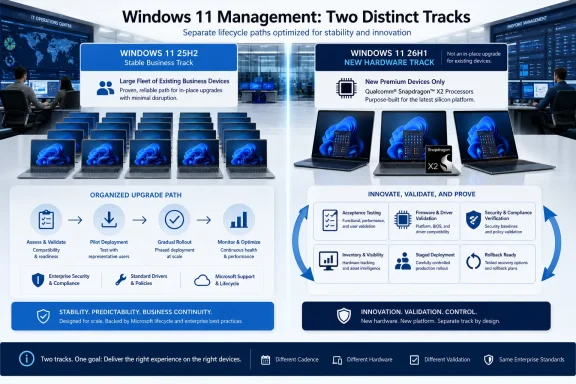
Windows 11 version 26H1 should enter the enterprise through new, qualifying Snapdragon X2 PCs—not through an upgrade campaign aimed at existing endpoints. Organizations buying those systems should accept the factory-installed operating system, qualify it as a separate hardware platform, and keep Windows 11 24H2 or 25H2 as the baseline for the rest of the fleet.
Microsoft released 26H1 on February 10, 2026, but its Windows release health documentation explicitly describes it as a hardware-optimized release for next-generation silicon rather than a conventional feature update. It ships preinstalled on select new devices, beginning with PCs using Qualcomm Snapdragon X2 Series processors, while Windows 11 24H2 and 25H2 devices will neither receive it through Windows Update nor support an in-place upgrade to it.
That distinction turns what looks like another Windows version into a procurement and fleet-management decision. The practical policy is hardware-only and separately managed: service 26H1 normally on the devices designed for it, but do not make it the organization-wide deployment target.
The first policy decision is to stop treating every Windows release as a candidate for universal rollout. Windows 11 26H1 creates two legitimate production tracks with different entry conditions.
The existing fleet should remain on Windows 11 24H2 or 25H2, according to whichever version the organization has already approved. Microsoft continues to recommend those releases for enterprise deployment, and both remain eligible for monthly updates, new features, and support under their applicable servicing timelines.
New Snapdragon X2 PCs form the second track. If a selected model ships with Windows 11 26H1, IT should evaluate the complete combination of processor, firmware, drivers, applications, management tooling, and operating system as one platform. The version number alone is not a reason to reject the hardware, nor is it a reason to redirect the wider fleet onto 26H1.
Earlier WindowsForum coverage followed the signs that 26H1 would become a device-targeted interim release for Snapdragon X2 laptops. Microsoft’s final deployment guidance confirms the central operational point behind that reporting: 26H1 is intended to enable specific new hardware, not replace 24H2 and 25H2 across established Windows environments.
A workable inventory classification should therefore distinguish at least three states:
The purchasing record should identify the model, processor family, factory-installed Windows version, intended user group, and validation owner. That gives service-desk and security teams a defensible explanation when a 26H1 machine appears beside a larger population running 24H2 or 25H2.
Organizations should also avoid specifications that blindly require every newly purchased PC to match the existing fleet’s Windows version. Requiring a Snapdragon X2 device designed around 26H1 to ship with 25H2 could undermine the reason for selecting that platform, while requiring 26H1 on unrelated purchases would misread Microsoft’s release model.
This does not require abandoning standardized deployment. It requires moving the standardization boundary upward: standardize policies, applications, identity enrollment, security controls, and provisioning outcomes while retaining the operating-system foundation intended for the Snapdragon X2 platform.
Recovery procedures deserve the same separation. A support team should know whether a failed Snapdragon X2 PC is restored with an approved 26H1 recovery path rather than being handed a generic image simply because that image works on most other Windows 11 devices.
The key is to create a dedicated 26H1 device group rather than inserting those PCs indiscriminately into policies built around 24H2 or 25H2. Administrators should review update assignments, compliance reports, and version filters to ensure that a policy intended to hold or advance the mainstream fleet does not produce noise or unintended behavior on the hardware-specific branch.
At the same time, the absence of a 26H1 offer on existing PCs should not be treated as an update failure. Microsoft says 24H2 and 25H2 devices will not receive 26H1 through Windows Update. Help-desk scripts and compliance rules must reflect that fact before dashboards begin generating unnecessary incidents.
Requests involving an OEM-installed Snapdragon X2 system can proceed through hardware qualification. Requests to install 26H1 in place over 24H2 or 25H2 should be rejected because Microsoft does not provide that upgrade path.
Lab testing may justify a narrowly controlled exception where IT needs to evaluate upcoming hardware, management behavior, or application compatibility. Such devices should remain tagged as evaluation assets until the relevant model and its production configuration receive approval.
Application validation should cover the actual programs assigned to the target users, including installation, launching, updating, authentication, and interaction with required peripherals or services. The verified facts do not establish compatibility for any particular application, driver, security product, or management agent, so organizations must test their own dependencies rather than infer readiness from the Windows branding.
Management validation should confirm that enrollment, policy application, inventory, compliance reporting, software distribution, update deployment, recovery, and remote support produce acceptable outcomes. A device that boots and runs office applications is not necessarily ready for enterprise use if the support team cannot reliably manage or restore it.
Security validation should likewise focus on the organization’s approved controls and operational visibility. The goal is not to prove that 26H1 is inherently more or less secure than 25H2; the available facts do not support that conclusion. The goal is to ensure that the Snapdragon X2 and 26H1 combination participates correctly in the organization’s established security processes.
A small production pilot should follow technical validation. The pilot group should represent the workloads for which the new hardware is being considered, while remaining limited enough that application or support gaps can be contained.
Windows 11 26H1 is generally available and receives monthly security and non-security updates. Organizations that deploy it must patch it, monitor its release-health information, and include it in incident response and compliance operations just as they would other supported production Windows releases.
The opposite mistake is equally costly: assuming that general availability means every managed PC should move to it. GA establishes that 26H1 is a released and serviced product; it does not erase Microsoft’s explicit statement that 24H2 and 25H2 remain the recommended enterprise deployment releases.
This is why a separate management track is preferable to either extreme. It allows an organization to purchase Snapdragon X2 systems where they make sense without forcing a premature baseline change or leaving those systems outside normal governance.
Version-reporting tools may still create confusion. A simple rule that marks the numerically newest Windows version as compliant and everything else as behind will misrepresent this release. Compliance logic should evaluate the approved version for the device class, not assume that 26H1 supersedes 25H2 on every endpoint.
Administrators should document 26H1 as an approved operating system only for designated hardware classes. That approval should remain conditional on the individual Snapdragon X2 model passing organizational testing, because processor branding and Windows version do not replace model-level verification.
The resulting standard is simple: Windows 11 24H2 and 25H2 remain the existing-fleet deployment baselines; Windows 11 26H1 is accepted when it arrives as the preinstalled operating system on approved Snapdragon X2 hardware; and monthly servicing continues on every supported track.
That policy gives procurement permission to consider the new PCs without telling endpoint engineering to manufacture an upgrade campaign that Microsoft does not offer. The next milestone is therefore not a 26H1 rollout deadline, but the arrival of each Snapdragon X2 model and the evidence required to move it from evaluation into production.
Microsoft released 26H1 on February 10, 2026, but its Windows release health documentation explicitly describes it as a hardware-optimized release for next-generation silicon rather than a conventional feature update. It ships preinstalled on select new devices, beginning with PCs using Qualcomm Snapdragon X2 Series processors, while Windows 11 24H2 and 25H2 devices will neither receive it through Windows Update nor support an in-place upgrade to it.
That distinction turns what looks like another Windows version into a procurement and fleet-management decision. The practical policy is hardware-only and separately managed: service 26H1 normally on the devices designed for it, but do not make it the organization-wide deployment target.
 Split the Fleet Before Snapdragon X2 Purchases Begin
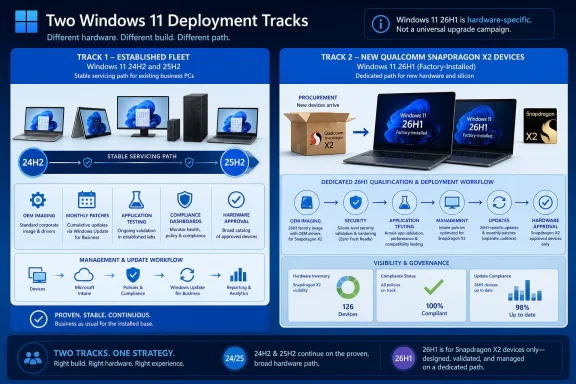
The first policy decision is to stop treating every Windows release as a candidate for universal rollout. Windows 11 26H1 creates two legitimate production tracks with different entry conditions.The existing fleet should remain on Windows 11 24H2 or 25H2, according to whichever version the organization has already approved. Microsoft continues to recommend those releases for enterprise deployment, and both remain eligible for monthly updates, new features, and support under their applicable servicing timelines.
New Snapdragon X2 PCs form the second track. If a selected model ships with Windows 11 26H1, IT should evaluate the complete combination of processor, firmware, drivers, applications, management tooling, and operating system as one platform. The version number alone is not a reason to reject the hardware, nor is it a reason to redirect the wider fleet onto 26H1.
Earlier WindowsForum coverage followed the signs that 26H1 would become a device-targeted interim release for Snapdragon X2 laptops. Microsoft’s final deployment guidance confirms the central operational point behind that reporting: 26H1 is intended to enable specific new hardware, not replace 24H2 and 25H2 across established Windows environments.
A workable inventory classification should therefore distinguish at least three states:
- Existing Windows 11 24H2 and 25H2 devices continue through their approved servicing and update rings.
- New Snapdragon X2 devices supplied with Windows 11 26H1 enter a dedicated qualification and deployment path.
- Any device presented as a 26H1 exception without qualifying hardware or an OEM-installed image is blocked pending review.
Build the Policy Around Four Operational Rules
A hardware-only deployment policy must reach beyond a sentence in the Windows standards document. Purchasing, imaging, update management, and exception handling all need rules that preserve the boundary Microsoft has established.Purchasing must approve the whole platform
Procurement teams should record Windows 11 26H1 as an expected attribute of qualifying Snapdragon X2 models, not as an optional operating-system upgrade. Purchase approval should depend on the device passing the organization’s Arm hardware and software qualification process.The purchasing record should identify the model, processor family, factory-installed Windows version, intended user group, and validation owner. That gives service-desk and security teams a defensible explanation when a 26H1 machine appears beside a larger population running 24H2 or 25H2.
Organizations should also avoid specifications that blindly require every newly purchased PC to match the existing fleet’s Windows version. Requiring a Snapdragon X2 device designed around 26H1 to ship with 25H2 could undermine the reason for selecting that platform, while requiring 26H1 on unrelated purchases would misread Microsoft’s release model.
Imaging must preserve the supported OEM path
IT should treat the OEM-provided 26H1 installation as the starting point for deployment. The organization can apply its applications, security configuration, management enrollment, and user provisioning, but it should not assume that a traditional wipe-and-load image built for 24H2 or 25H2 is the appropriate baseline.This does not require abandoning standardized deployment. It requires moving the standardization boundary upward: standardize policies, applications, identity enrollment, security controls, and provisioning outcomes while retaining the operating-system foundation intended for the Snapdragon X2 platform.
Recovery procedures deserve the same separation. A support team should know whether a failed Snapdragon X2 PC is restored with an approved 26H1 recovery path rather than being handed a generic image simply because that image works on most other Windows 11 devices.
Update rings must separate version targeting from monthly servicing
Windows 11 26H1 receives monthly security and non-security updates. It should therefore have normal pilot, broad deployment, monitoring, and rollback processes for those updates, even though it is not the enterprise feature-update baseline.The key is to create a dedicated 26H1 device group rather than inserting those PCs indiscriminately into policies built around 24H2 or 25H2. Administrators should review update assignments, compliance reports, and version filters to ensure that a policy intended to hold or advance the mainstream fleet does not produce noise or unintended behavior on the hardware-specific branch.
At the same time, the absence of a 26H1 offer on existing PCs should not be treated as an update failure. Microsoft says 24H2 and 25H2 devices will not receive 26H1 through Windows Update. Help-desk scripts and compliance rules must reflect that fact before dashboards begin generating unnecessary incidents.
Exceptions must require evidence, not enthusiasm
An exception request should answer a straightforward question: is 26H1 already part of a qualifying new hardware platform, or is someone attempting to turn it into an unsupported fleet upgrade target?Requests involving an OEM-installed Snapdragon X2 system can proceed through hardware qualification. Requests to install 26H1 in place over 24H2 or 25H2 should be rejected because Microsoft does not provide that upgrade path.
Lab testing may justify a narrowly controlled exception where IT needs to evaluate upcoming hardware, management behavior, or application compatibility. Such devices should remain tagged as evaluation assets until the relevant model and its production configuration receive approval.
Qualification Matters More Than the Version Number
The most important testing question is not whether Windows 11 26H1 looks familiar. It is whether a Snapdragon X2 PC running its intended software stack can perform the organization’s required work under production controls.Application validation should cover the actual programs assigned to the target users, including installation, launching, updating, authentication, and interaction with required peripherals or services. The verified facts do not establish compatibility for any particular application, driver, security product, or management agent, so organizations must test their own dependencies rather than infer readiness from the Windows branding.
Management validation should confirm that enrollment, policy application, inventory, compliance reporting, software distribution, update deployment, recovery, and remote support produce acceptable outcomes. A device that boots and runs office applications is not necessarily ready for enterprise use if the support team cannot reliably manage or restore it.
Security validation should likewise focus on the organization’s approved controls and operational visibility. The goal is not to prove that 26H1 is inherently more or less secure than 25H2; the available facts do not support that conclusion. The goal is to ensure that the Snapdragon X2 and 26H1 combination participates correctly in the organization’s established security processes.
A small production pilot should follow technical validation. The pilot group should represent the workloads for which the new hardware is being considered, while remaining limited enough that application or support gaps can be contained.
“Not an Upgrade Target” Does Not Mean “Unsupported”
The easiest policy mistake is to interpret Microsoft’s narrow distribution model as a warning to avoid 26H1 entirely. Microsoft is not describing an unsupported preview or an operating system that should be frozen at its factory state.Windows 11 26H1 is generally available and receives monthly security and non-security updates. Organizations that deploy it must patch it, monitor its release-health information, and include it in incident response and compliance operations just as they would other supported production Windows releases.
The opposite mistake is equally costly: assuming that general availability means every managed PC should move to it. GA establishes that 26H1 is a released and serviced product; it does not erase Microsoft’s explicit statement that 24H2 and 25H2 remain the recommended enterprise deployment releases.
This is why a separate management track is preferable to either extreme. It allows an organization to purchase Snapdragon X2 systems where they make sense without forcing a premature baseline change or leaving those systems outside normal governance.
Version-reporting tools may still create confusion. A simple rule that marks the numerically newest Windows version as compliant and everything else as behind will misrepresent this release. Compliance logic should evaluate the approved version for the device class, not assume that 26H1 supersedes 25H2 on every endpoint.
Keep the Baseline Stable While the Hardware Track Matures
Microsoft has supplied enough information to define the deployment boundary, but not enough to eliminate local qualification work. No universal application-compatibility result, migration timetable, or future convergence point can be inferred from the release description alone.Administrators should document 26H1 as an approved operating system only for designated hardware classes. That approval should remain conditional on the individual Snapdragon X2 model passing organizational testing, because processor branding and Windows version do not replace model-level verification.
The resulting standard is simple: Windows 11 24H2 and 25H2 remain the existing-fleet deployment baselines; Windows 11 26H1 is accepted when it arrives as the preinstalled operating system on approved Snapdragon X2 hardware; and monthly servicing continues on every supported track.
That policy gives procurement permission to consider the new PCs without telling endpoint engineering to manufacture an upgrade campaign that Microsoft does not offer. The next milestone is therefore not a 26H1 rollout deadline, but the arrival of each Snapdragon X2 model and the evidence required to move it from evaluation into production.
References
- Primary source: learn.microsoft.com
Windows 11, version 26H1 known issues and notifications | Microsoft Learn
View announcements and review known issues and fixes for Windows 11, version 26H1learn.microsoft.com - Independent coverage: windowscentral.com
Windows 11 version 26H2: Everything you need to know Microsoft's next OS update coming this fall | Windows Central
Microsoft is hard at work on building the next version of Windows 11 that's expected to debut this fall. Here's what to expect, and when.www.windowscentral.com - Independent coverage: support.microsoft.com
Windows 11, version 26H1 update history | Microsoft Support
Windows 11, version 26H1 update historysupport.microsoft.com - Independent coverage: techcommunity.microsoft.com
What to know about Windows 11, version 26H1 - Windows IT Pro Blog
Explore this specialized Windows release designed to support the next generation of hardware innovation. techcommunity.microsoft.com
- Independent coverage: techrepublic.com
Windows 11 26H1 to Debut This Spring, Exclusive to Snapdragon X2 PCs
Windows 11 version 26H1 launches this spring on Snapdragon X2 PCs only, bringing platform-level changes without new features for most users.www.techrepublic.com
- Independent coverage: techradar.com
Microsoft confirms Windows 11 26H1 update won't be coming to your current PC — here's why that's actually great news | TechRadar
It's all about avoiding another 24H2 disaster for existing PCs, which will stay on 25H2 and not get 26H1www.techradar.com