

On June 2, 2026, Hackaday published Jenny List’s account of returning to Microsoft Windows 11 after roughly two decades of daily Linux use, using an ex-corporate laptop whose Windows partition had sat untouched since 2024. The result was not the expected horror story, but something more awkward for both Windows critics and Windows defenders. Windows 11 remains a capable, flexible desktop operating system; it also behaves like a product that never stops negotiating with its owner. That tension is now the defining Windows experience.
The most interesting thing about List’s experiment is that Windows 11 passed the practical test almost immediately. After a long update slog, she could install software, get work done, and use the machine as a general-purpose computer. GIMP appeared in the Microsoft Store, even if not in the desired current version, and the normal Windows installer route still worked. That matters, because the strongest anti-Windows argument often implies a platform that has become functionally hostile to user choice.
It has not, at least not in the simple sense. Windows 11 is not iOS with a taskbar. It is still possible to download a program from the web, run an installer, manage files, use third-party tools, ignore the Store, and treat the machine as a personal computer rather than a terminal attached to a vendor service.
But passing that test is not the same as being pleasant. List’s piece lands because it captures the modern Windows contradiction: the operating system is technically less locked down than many of its critics claim, yet psychologically more intrusive than its defenders like to admit. Windows does not usually stop you from doing what you want. It simply keeps reminding you that Microsoft has other ideas.
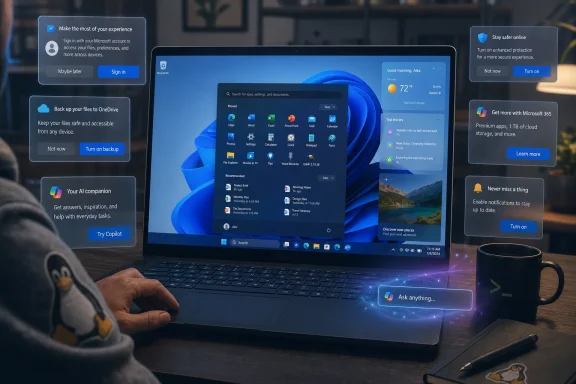
That distinction is easy to dismiss until you live with it. A locked-down system says no. Windows 11 more often says, are you sure? Are you sure you do not want a Microsoft account? Are you sure you do not want OneDrive? Are you sure you do not want news, widgets, Copilot, Edge, Microsoft 365, cloud sync, personalized recommendations, or the latest branded convenience layered on top of the desktop?
That is not the old Windows tax of driver hunting and registry weirdness. It is a newer kind of friction: the operating system as a sales surface.
This is not a universal benchmark. A neglected Windows partition from 2024 is a worst-case-ish scenario, especially if the machine had missed feature updates, cumulative updates, driver packages, Defender updates, Store app updates, and whatever provisioning leftovers came with the reseller install. Linux users are also not immune to large upgrade chains after a long absence.
Still, the emotional truth is hard to dodge. Windows Update is not just maintenance; for many users, it is the first reminder that Windows operates on Microsoft’s timetable as much as theirs. Even when Microsoft has improved restart handling, active hours, delivery optimization, and update reliability, the experience remains deeply visible in a way that macOS and mainstream Linux desktops often manage to make less theatrical.
For IT administrators, this is familiar terrain. Patch cadence, reboot control, deferrals, deployment rings, Intune policy, WSUS, Windows Update for Business, and Autopatch exist precisely because unmanaged Windows updating can feel like weather. You plan around it. You do not simply assume the machine will be ready when you open the lid.
For a returning XP-era user, though, the update ordeal is more than inconvenience. It is a tone-setter. Before Windows 11 has made its case as a modern desktop, it has already asked for hours of patience and a series of privacy decisions. That is a bad first impression from a product that increasingly wants to present itself as seamless, intelligent, and user-centered.
Microsoft’s centered taskbar was never merely aesthetic. It was part of a broader attempt to make Windows feel modern, simplified, and less like a thirty-year accumulation of menus. In some respects, it succeeded. Windows 11’s interface is cleaner than late Windows 10, less chaotic than Windows 8, and more visually coherent than the XP-to-7 lineage many enthusiasts still remember fondly.
But the redesign also created a more prominent stage for Microsoft’s own surfaces. Widgets, Search highlights, recommended items, account prompts, and cloud-linked features all compete with the user’s intention. The desktop is no longer just a launcher and workspace. It is a distribution channel.
That is why List’s comparison to macOS lands but only partially. Windows 11 did borrow some centered-dock energy from Apple, and Microsoft has spent years sanding down the visual roughness of the classic desktop. Yet macOS tends to monetize the user relationship through hardware and ecosystem gravity. Windows, particularly on third-party PCs, increasingly monetizes attention, services, and defaults.
This is where Microsoft’s problem becomes editorial rather than technical. The company can argue that widgets are optional, Copilot can be ignored, recommendations can be disabled, and privacy toggles exist. All of that is true in the narrow sense. But a system that requires users to repeatedly decline things is still making a statement about who the desktop serves by default.
That should matter to Linux-heavy audiences because it complicates the lazy version of the Windows critique. Windows 11, on ordinary PCs, is not a closed appliance. Microsoft has pushed the Store, Smart App Control, signed drivers, reputation checks, and security prompts, but the general-purpose Win32 software model remains alive. For power users, developers, hobbyists, and sysadmins, that is still the difference between Windows and a truly locked-down platform.
The software freedom is not theoretical. Windows remains one of the easiest mainstream operating systems on which to run random niche tools, legacy utilities, vendor configurators, engineering software, emulators, firmware flashers, and obscure enterprise clients. That messy compatibility layer is one of the reasons Windows survives every “year of the Linux desktop” joke and every macOS productivity renaissance.
But Microsoft’s Store problem is the mirror image of its openness problem. Because Windows still allows the old installer model, the Store cannot fully become the clean, trusted, canonical source of truth Microsoft once wanted. And because the Store is not always the best source of current software, technically literate users learn not to trust it as the first stop.
That leaves Windows 11 in an odd middle state. It is open enough that the Store is optional, but integrated enough that Microsoft can keep nudging users toward it. The result is neither the purity of a Linux repository nor the controlled polish of a mobile app store. It is the Windows compromise: broad compatibility, uneven curation, and a lot of vendor ambition in the middle.
For decades, Windows crapware was easy to identify. It came from OEMs. It was the trial antivirus, the DVD suite, the coupon launcher, the driver updater, the toolbar, the “support assistant,” the game bundle, and the mysterious branded utility whose main purpose seemed to be slowing down a brand-new laptop. Enthusiasts wiped clean installs partly because Microsoft’s copy of Windows felt better than Dell’s, HP’s, Acer’s, or Lenovo’s retail image.
List’s machine was different. As an ex-corporate reseller laptop with what she describes as a basic Windows install, it apparently lacked the traditional OEM junk pile. No dubious third-party security suite. No consumer trialware circus. No obvious preload economy hanging off the Start menu.
And yet the machine still nagged. Adobe wanted money. Microsoft pushed offers. News appeared. AI services made themselves known. The problem was not the old crapware model; it was that the operating system and application ecosystem have absorbed many of the same behaviors.
This is the crucial shift. Crapware used to be something added to Windows. Now, some of the behaviors users associate with crapware are part of the out-of-box experience, the account layer, the browser layer, the notification layer, and the service subscription layer. The machine may be clean in the forensic sense and still feel commercially noisy.
That is why “just install vanilla Windows” no longer ends the conversation. Vanilla Windows 11 is vastly better than a 2009 consumer laptop image, but it is not neutral. It arrives with Microsoft’s service strategy embedded in the chrome.
Microsoft has placed Copilot and related AI features at the center of its Windows story. Depending on hardware, region, account type, and update channel, Windows users may see AI exposed through the taskbar, Settings, Paint, Photos, Notepad, Edge, Microsoft 365, and the broader Copilot+ PC branding effort. Microsoft’s pitch is productivity, assistance, recall, summarization, creation, and natural-language control.
For some users, this is welcome. There is a real audience for on-device transcription, image generation, document summarization, accessibility improvements, and search that understands intent rather than filenames. Windows is a mass-market system, and mass-market systems chase features that reduce effort for non-experts.
But for many enthusiasts and administrators, AI features arrive with a trust deficit. They raise questions about privacy, telemetry, data boundaries, local versus cloud processing, account requirements, enterprise policy, user consent, and whether the desktop is becoming a place where experimental services are normalized before they are fully understood.
Even when Microsoft gets the privacy architecture right, the presentation can still feel wrong. If a user sits down to edit an image, write a document, or configure a machine and is repeatedly offered AI help they did not ask for, the feature becomes ambient advertising. It may be useful advertising. It may even be the future of computing. But it is still an unsolicited layer between intention and action.
That is why the phrase “I still don’t quite own it” resonates. Ownership here is not about the license agreement. It is about the felt relationship between person and machine. A computer that keeps volunteering corporate priorities feels less personal, even when it remains powerful.
But the exact path matters less than the anxiety it creates. Users do not object to Microsoft accounts merely because accounts exist. They object because the account prompt has become a proxy for a broader loss of local control. It suggests cloud backup, sync, OneDrive folder redirection, Store identity, device encryption key escrow, Edge profile integration, Microsoft 365 upsells, and a recovery model that assumes the PC is part of a Microsoft identity graph.
For ordinary consumers, that can be protective. A Microsoft account can help recover files, sync settings, restore purchases, locate devices, and preserve BitLocker recovery keys. Many users are better off with some cloud-linked safety net than with a purely local account whose password and recovery media they will misplace.
For power users, the same bundle feels coercive. They may want local accounts for lab machines, throwaway installs, offline workstations, privacy-sensitive contexts, or simply because not every computer needs a cloud identity. Administrators may want the machine joined to Entra ID, Active Directory, or management tooling on their terms, not nudged through consumer flows first.
Windows 11 therefore occupies a trust gap. Microsoft sees accounts as the connective tissue for modern computing. Many users see them as the first concession in a long sequence of defaults that will be harder to unwind later.
List’s GNOME background sharpens the comparison. Modern GNOME can be opinionated, sometimes maddeningly so, but its defaults generally do not feel like a subscription funnel. Linux distributions may promote donation links, commercial support, cloud integrations, or optional services, but the typical desktop experience is not built around an advertising-adjacent relationship with the user.
That difference has become one of Linux’s strongest desktop arguments. Not polish. Not app compatibility. Not gaming, though Proton and Steam Deck have changed that conversation dramatically. The quiet appeal is that a Linux desktop usually does less at you.
This does not make Linux frictionless. Hardware support can still vary. Creative software gaps remain real. Enterprise app compatibility is inconsistent. Battery life, fractional scaling, display docks, biometric devices, and vendor control panels can still be better or easier under Windows. The old Linux desktop caveats have not vanished.
But Windows keeps making Linux’s philosophical case for it. Every unwanted feed, upsell, AI prompt, and account nudge turns “free as in freedom” from an abstract slogan into a daily ergonomic advantage. For people who already have the skills to live outside the Microsoft ecosystem, Windows 11 offers fewer emotional reasons to come back.
From one angle, Windows 11 is undeniably superior. Security is in a different universe. Driver handling is better. Display scaling is better. Sleep, encryption, virtualization, sandboxing, accessibility, touch, Bluetooth, and hardware acceleration have all advanced enormously. XP nostalgia rarely survives direct contact with modern threat models or modern hardware.
From another angle, XP felt more locally bounded. It might have been insecure, crash-prone, and ugly without care, but it did not constantly behave like a storefront. Its annoyances were technical and aesthetic. Windows 11’s annoyances are often relational: Microsoft wants something from you.
That is why List’s reaction is not simple nostalgia. She does not say Windows 11 is unusable. She says it is better than expected and still not for her. That is more damning than a rant, because it concedes the engineering while rejecting the bargain.
Microsoft should pay attention to that kind of response. The company does not need to win over every Linux user, but it should worry when technically literate outsiders find Windows competent yet alienating. Those users influence families, small businesses, labs, classrooms, and forums. They are the people others ask when a PC starts misbehaving.
Organizations spend real time controlling notifications, Start menu layout, default apps, Edge behavior, OneDrive redirection, Copilot availability, Store access, telemetry levels, update timing, account flows, and app installation policy. They do this not because Windows is broken, but because unmanaged Windows is too expressive. It has too many channels through which vendors, Microsoft included, can talk to the user.
The consumer version of that problem is emotional. The enterprise version is operational. Every prompt becomes a help-desk ticket risk. Every AI feature becomes a data governance question. Every account nudge becomes an identity-policy problem. Every “recommended” consumer experience becomes something to suppress, document, or explain.
Microsoft knows this, which is why business editions, management policies, and enterprise controls exist. But the baseline consumer experience still shapes perception. If Windows feels noisy at home, users bring that expectation to work. If Microsoft trains people to click through prompts, administrators inherit the security consequences.
The irony is that Windows 11 is arguably strongest when centrally managed. In a well-run environment, it can be secure, predictable, patched, policy-bound, and relatively quiet. The worst parts of the consumer experience are often not inherent to the kernel, driver model, or application platform. They are defaults.
Defaults, however, are destiny for most users.
Windows 11 is not a walled garden in the strict sense. You can install outside software. You can use local tools. You can ignore the Store. You can run open-source applications. You can administer the system deeply. You can still break it in wonderfully traditional Windows ways.
But Windows 11 increasingly feels like a rented desk in a Microsoft-managed office. You can bring your own notebooks, arrange your tools, and do serious work. Yet the landlord keeps changing the signage, offering services, adjusting the lobby screens, and reminding you that the building has an app.
That metaphor explains why the walled-garden debate often misses the mark. The issue is not only what Windows permits. It is what Windows normalizes. It normalizes the idea that the OS can be an advertising surface, an identity funnel, an AI showcase, a news distributor, a cloud-storage prompt, and a subscription reminder while still calling itself the neutral ground beneath your applications.
The old PC ideal was not perfectly real, and it certainly was not always secure. But it was powerful: the machine belonged to the person sitting in front of it. Windows 11 still honors that ideal technically more than its harshest critics admit. It undermines it experientially more than Microsoft seems willing to concede.
The answer was yes. The more important answer was: not without irritation.
That irritation is not accidental noise around the product. It is now part of the product’s character. Windows 11 is polished enough that its remaining roughness often comes from business decisions rather than missing engineering. The centered taskbar, the update flow, the account pressure, the widget feed, the AI prompts, the Store ambiguity, and the subscription nudges all reveal a company trying to turn the desktop into a living services platform.
For Microsoft, that strategy makes sense. Windows is mature. PC growth is cyclical. Cloud and AI are the company’s strategic center. A billion-plus Windows users represent distribution that no sane platform company would leave idle.
For users, the bargain is less obvious. A desktop operating system should help them act on their own intent. The more Windows interrupts that intent to promote Microsoft’s roadmap, the more it invites comparison with systems that simply get out of the way.
Windows 11 will remain the daily driver for hundreds of millions of people because compatibility, familiarity, hardware availability, gaming, enterprise management, and sheer inertia still matter. But List’s visit from the Linux world shows the risk in Microsoft’s current course: the company can keep the desktop technically open and still make users feel like guests. The next version of Windows does not need to prove that it can run apps; it needs to prove that it knows when to be quiet.
 Windows 11 Wins the Test and Still Loses the Argument
The most interesting thing about List’s experiment is that Windows 11 passed the practical test almost immediately. After a long update slog, she could install software, get work done, and use the machine as a general-purpose computer. GIMP appeared in the Microsoft Store, even if not in the desired current version, and the normal Windows installer route still worked. That matters, because the strongest anti-Windows argument often implies a platform that has become functionally hostile to user choice.It has not, at least not in the simple sense. Windows 11 is not iOS with a taskbar. It is still possible to download a program from the web, run an installer, manage files, use third-party tools, ignore the Store, and treat the machine as a personal computer rather than a terminal attached to a vendor service.
But passing that test is not the same as being pleasant. List’s piece lands because it captures the modern Windows contradiction: the operating system is technically less locked down than many of its critics claim, yet psychologically more intrusive than its defenders like to admit. Windows does not usually stop you from doing what you want. It simply keeps reminding you that Microsoft has other ideas.
That distinction is easy to dismiss until you live with it. A locked-down system says no. Windows 11 more often says, are you sure? Are you sure you do not want a Microsoft account? Are you sure you do not want OneDrive? Are you sure you do not want news, widgets, Copilot, Edge, Microsoft 365, cloud sync, personalized recommendations, or the latest branded convenience layered on top of the desktop?
That is not the old Windows tax of driver hunting and registry weirdness. It is a newer kind of friction: the operating system as a sales surface.
The Three-Hour Update Is the First Editorial
List’s first real Windows 11 experience was not the desktop, the Start menu, or a dramatic security wall. It was waiting. A system update that began at 16:30 did not leave her with a usable computer until 19:16, and even then the machine still had privacy choices, permissions, offers, and setup flows waiting.This is not a universal benchmark. A neglected Windows partition from 2024 is a worst-case-ish scenario, especially if the machine had missed feature updates, cumulative updates, driver packages, Defender updates, Store app updates, and whatever provisioning leftovers came with the reseller install. Linux users are also not immune to large upgrade chains after a long absence.
Still, the emotional truth is hard to dodge. Windows Update is not just maintenance; for many users, it is the first reminder that Windows operates on Microsoft’s timetable as much as theirs. Even when Microsoft has improved restart handling, active hours, delivery optimization, and update reliability, the experience remains deeply visible in a way that macOS and mainstream Linux desktops often manage to make less theatrical.
For IT administrators, this is familiar terrain. Patch cadence, reboot control, deferrals, deployment rings, Intune policy, WSUS, Windows Update for Business, and Autopatch exist precisely because unmanaged Windows updating can feel like weather. You plan around it. You do not simply assume the machine will be ready when you open the lid.
For a returning XP-era user, though, the update ordeal is more than inconvenience. It is a tone-setter. Before Windows 11 has made its case as a modern desktop, it has already asked for hours of patience and a series of privacy decisions. That is a bad first impression from a product that increasingly wants to present itself as seamless, intelligent, and user-centered.
The Start Menu Is No Longer a Place, It Is a Pitch
The most symbolic moment in the Hackaday piece comes when List instinctively moves toward the old bottom-left Start button and instead encounters Windows 11’s centered, modernized interface and the adjacent widget/news universe. The geography of Windows has changed. The Start menu still exists, but the old muscle memory has been broken, and not always in service of clarity.Microsoft’s centered taskbar was never merely aesthetic. It was part of a broader attempt to make Windows feel modern, simplified, and less like a thirty-year accumulation of menus. In some respects, it succeeded. Windows 11’s interface is cleaner than late Windows 10, less chaotic than Windows 8, and more visually coherent than the XP-to-7 lineage many enthusiasts still remember fondly.
But the redesign also created a more prominent stage for Microsoft’s own surfaces. Widgets, Search highlights, recommended items, account prompts, and cloud-linked features all compete with the user’s intention. The desktop is no longer just a launcher and workspace. It is a distribution channel.
That is why List’s comparison to macOS lands but only partially. Windows 11 did borrow some centered-dock energy from Apple, and Microsoft has spent years sanding down the visual roughness of the classic desktop. Yet macOS tends to monetize the user relationship through hardware and ecosystem gravity. Windows, particularly on third-party PCs, increasingly monetizes attention, services, and defaults.
This is where Microsoft’s problem becomes editorial rather than technical. The company can argue that widgets are optional, Copilot can be ignored, recommendations can be disabled, and privacy toggles exist. All of that is true in the narrow sense. But a system that requires users to repeatedly decline things is still making a statement about who the desktop serves by default.
The Store Is Not the Prison Critics Predicted
One of the more important observations in List’s piece is almost understated: she used the Microsoft Store, found GIMP, discovered it was not the current version she wanted, and then installed the latest release from the project’s own website. No drama. No lockout. No app-store-only wall.That should matter to Linux-heavy audiences because it complicates the lazy version of the Windows critique. Windows 11, on ordinary PCs, is not a closed appliance. Microsoft has pushed the Store, Smart App Control, signed drivers, reputation checks, and security prompts, but the general-purpose Win32 software model remains alive. For power users, developers, hobbyists, and sysadmins, that is still the difference between Windows and a truly locked-down platform.
The software freedom is not theoretical. Windows remains one of the easiest mainstream operating systems on which to run random niche tools, legacy utilities, vendor configurators, engineering software, emulators, firmware flashers, and obscure enterprise clients. That messy compatibility layer is one of the reasons Windows survives every “year of the Linux desktop” joke and every macOS productivity renaissance.
But Microsoft’s Store problem is the mirror image of its openness problem. Because Windows still allows the old installer model, the Store cannot fully become the clean, trusted, canonical source of truth Microsoft once wanted. And because the Store is not always the best source of current software, technically literate users learn not to trust it as the first stop.
That leaves Windows 11 in an odd middle state. It is open enough that the Store is optional, but integrated enough that Microsoft can keep nudging users toward it. The result is neither the purity of a Linux repository nor the controlled polish of a mobile app store. It is the Windows compromise: broad compatibility, uneven curation, and a lot of vendor ambition in the middle.
Crapware Moved Up the Stack
The most useful phrase in List’s piece is not “walled garden.” It is “the crap is still there.” That is the modern Windows diagnosis in six words.For decades, Windows crapware was easy to identify. It came from OEMs. It was the trial antivirus, the DVD suite, the coupon launcher, the driver updater, the toolbar, the “support assistant,” the game bundle, and the mysterious branded utility whose main purpose seemed to be slowing down a brand-new laptop. Enthusiasts wiped clean installs partly because Microsoft’s copy of Windows felt better than Dell’s, HP’s, Acer’s, or Lenovo’s retail image.
List’s machine was different. As an ex-corporate reseller laptop with what she describes as a basic Windows install, it apparently lacked the traditional OEM junk pile. No dubious third-party security suite. No consumer trialware circus. No obvious preload economy hanging off the Start menu.
And yet the machine still nagged. Adobe wanted money. Microsoft pushed offers. News appeared. AI services made themselves known. The problem was not the old crapware model; it was that the operating system and application ecosystem have absorbed many of the same behaviors.
This is the crucial shift. Crapware used to be something added to Windows. Now, some of the behaviors users associate with crapware are part of the out-of-box experience, the account layer, the browser layer, the notification layer, and the service subscription layer. The machine may be clean in the forensic sense and still feel commercially noisy.
That is why “just install vanilla Windows” no longer ends the conversation. Vanilla Windows 11 is vastly better than a 2009 consumer laptop image, but it is not neutral. It arrives with Microsoft’s service strategy embedded in the chrome.
AI Makes the Ownership Problem Louder
List’s Linux comparison is blunt: nothing in her Linux install is trying to offer her AI services, while Windows seems full of them. That is not a small cultural difference. It is one of the defining distinctions between community-shaped desktop computing and platform-shaped desktop computing in 2026.Microsoft has placed Copilot and related AI features at the center of its Windows story. Depending on hardware, region, account type, and update channel, Windows users may see AI exposed through the taskbar, Settings, Paint, Photos, Notepad, Edge, Microsoft 365, and the broader Copilot+ PC branding effort. Microsoft’s pitch is productivity, assistance, recall, summarization, creation, and natural-language control.
For some users, this is welcome. There is a real audience for on-device transcription, image generation, document summarization, accessibility improvements, and search that understands intent rather than filenames. Windows is a mass-market system, and mass-market systems chase features that reduce effort for non-experts.
But for many enthusiasts and administrators, AI features arrive with a trust deficit. They raise questions about privacy, telemetry, data boundaries, local versus cloud processing, account requirements, enterprise policy, user consent, and whether the desktop is becoming a place where experimental services are normalized before they are fully understood.
Even when Microsoft gets the privacy architecture right, the presentation can still feel wrong. If a user sits down to edit an image, write a document, or configure a machine and is repeatedly offered AI help they did not ask for, the feature becomes ambient advertising. It may be useful advertising. It may even be the future of computing. But it is still an unsolicited layer between intention and action.
That is why the phrase “I still don’t quite own it” resonates. Ownership here is not about the license agreement. It is about the felt relationship between person and machine. A computer that keeps volunteering corporate priorities feels less personal, even when it remains powerful.
Microsoft Account Anxiety Is Really Control Anxiety
List expected Windows 11 to demand a Microsoft account and was pleasantly surprised that it did not. That detail deserves careful handling, because the Microsoft account story varies by edition, setup path, network state, region, device history, and whether the system was already provisioned. Windows 11 Home has long pushed Microsoft account sign-in hard during setup, and Microsoft has repeatedly narrowed or altered local-account workarounds in Insider and production builds.But the exact path matters less than the anxiety it creates. Users do not object to Microsoft accounts merely because accounts exist. They object because the account prompt has become a proxy for a broader loss of local control. It suggests cloud backup, sync, OneDrive folder redirection, Store identity, device encryption key escrow, Edge profile integration, Microsoft 365 upsells, and a recovery model that assumes the PC is part of a Microsoft identity graph.
For ordinary consumers, that can be protective. A Microsoft account can help recover files, sync settings, restore purchases, locate devices, and preserve BitLocker recovery keys. Many users are better off with some cloud-linked safety net than with a purely local account whose password and recovery media they will misplace.
For power users, the same bundle feels coercive. They may want local accounts for lab machines, throwaway installs, offline workstations, privacy-sensitive contexts, or simply because not every computer needs a cloud identity. Administrators may want the machine joined to Entra ID, Active Directory, or management tooling on their terms, not nudged through consumer flows first.
Windows 11 therefore occupies a trust gap. Microsoft sees accounts as the connective tissue for modern computing. Many users see them as the first concession in a long sequence of defaults that will be harder to unwind later.
Linux Looks Better When Windows Gets Chatty
The Hackaday context matters. This was not a review from a mainstream consumer site, nor from a Windows-only publication. Hackaday’s audience includes hardware hackers, open-source contributors, embedded tinkerers, retrocomputing fans, and people who know exactly what a bootloader is. For that audience, Windows 11 is not just an operating system; it is a cultural artifact from the other side of the fence.List’s GNOME background sharpens the comparison. Modern GNOME can be opinionated, sometimes maddeningly so, but its defaults generally do not feel like a subscription funnel. Linux distributions may promote donation links, commercial support, cloud integrations, or optional services, but the typical desktop experience is not built around an advertising-adjacent relationship with the user.
That difference has become one of Linux’s strongest desktop arguments. Not polish. Not app compatibility. Not gaming, though Proton and Steam Deck have changed that conversation dramatically. The quiet appeal is that a Linux desktop usually does less at you.
This does not make Linux frictionless. Hardware support can still vary. Creative software gaps remain real. Enterprise app compatibility is inconsistent. Battery life, fractional scaling, display docks, biometric devices, and vendor control panels can still be better or easier under Windows. The old Linux desktop caveats have not vanished.
But Windows keeps making Linux’s philosophical case for it. Every unwanted feed, upsell, AI prompt, and account nudge turns “free as in freedom” from an abstract slogan into a daily ergonomic advantage. For people who already have the skills to live outside the Microsoft ecosystem, Windows 11 offers fewer emotional reasons to come back.
The XP Gap Makes Windows 11 Look Both Better and Worse
Returning from Windows XP to Windows 11 is not like upgrading across a few release cycles. It is a jump from the pre-smartphone PC era to a cloud-and-services operating system. In XP’s day, the desktop was the product. In Windows 11, the desktop is also a gateway to subscriptions, identity, cloud storage, browser services, app distribution, security reputation systems, and now AI.From one angle, Windows 11 is undeniably superior. Security is in a different universe. Driver handling is better. Display scaling is better. Sleep, encryption, virtualization, sandboxing, accessibility, touch, Bluetooth, and hardware acceleration have all advanced enormously. XP nostalgia rarely survives direct contact with modern threat models or modern hardware.
From another angle, XP felt more locally bounded. It might have been insecure, crash-prone, and ugly without care, but it did not constantly behave like a storefront. Its annoyances were technical and aesthetic. Windows 11’s annoyances are often relational: Microsoft wants something from you.
That is why List’s reaction is not simple nostalgia. She does not say Windows 11 is unusable. She says it is better than expected and still not for her. That is more damning than a rant, because it concedes the engineering while rejecting the bargain.
Microsoft should pay attention to that kind of response. The company does not need to win over every Linux user, but it should worry when technically literate outsiders find Windows competent yet alienating. Those users influence families, small businesses, labs, classrooms, and forums. They are the people others ask when a PC starts misbehaving.
Enterprise IT Will Recognize the Consumer Problem in Different Clothes
For sysadmins, the Hackaday piece may read like a consumer anecdote, but the underlying issue is familiar. Enterprise Windows management is largely the art of separating the operating system from the things Microsoft, OEMs, users, and line-of-business software would like to attach to it.Organizations spend real time controlling notifications, Start menu layout, default apps, Edge behavior, OneDrive redirection, Copilot availability, Store access, telemetry levels, update timing, account flows, and app installation policy. They do this not because Windows is broken, but because unmanaged Windows is too expressive. It has too many channels through which vendors, Microsoft included, can talk to the user.
The consumer version of that problem is emotional. The enterprise version is operational. Every prompt becomes a help-desk ticket risk. Every AI feature becomes a data governance question. Every account nudge becomes an identity-policy problem. Every “recommended” consumer experience becomes something to suppress, document, or explain.
Microsoft knows this, which is why business editions, management policies, and enterprise controls exist. But the baseline consumer experience still shapes perception. If Windows feels noisy at home, users bring that expectation to work. If Microsoft trains people to click through prompts, administrators inherit the security consequences.
The irony is that Windows 11 is arguably strongest when centrally managed. In a well-run environment, it can be secure, predictable, patched, policy-bound, and relatively quiet. The worst parts of the consumer experience are often not inherent to the kernel, driver model, or application platform. They are defaults.
Defaults, however, are destiny for most users.
The Verdict Is Not a Walled Garden, but a Rented Desk
List asks whether Windows 11 has become the locked-down walled garden of its detractors’ warnings. Her answer is essentially no, but with an asterisk large enough to obscure the wallpaper. That is the right answer.Windows 11 is not a walled garden in the strict sense. You can install outside software. You can use local tools. You can ignore the Store. You can run open-source applications. You can administer the system deeply. You can still break it in wonderfully traditional Windows ways.
But Windows 11 increasingly feels like a rented desk in a Microsoft-managed office. You can bring your own notebooks, arrange your tools, and do serious work. Yet the landlord keeps changing the signage, offering services, adjusting the lobby screens, and reminding you that the building has an app.
That metaphor explains why the walled-garden debate often misses the mark. The issue is not only what Windows permits. It is what Windows normalizes. It normalizes the idea that the OS can be an advertising surface, an identity funnel, an AI showcase, a news distributor, a cloud-storage prompt, and a subscription reminder while still calling itself the neutral ground beneath your applications.
The old PC ideal was not perfectly real, and it certainly was not always secure. But it was powerful: the machine belonged to the person sitting in front of it. Windows 11 still honors that ideal technically more than its harshest critics admit. It undermines it experientially more than Microsoft seems willing to concede.
The Lesson From a Forgotten Partition
List’s short return to Windows works because it strips away the professional reviewer’s burden to benchmark every feature. She did not need to exhaustively test gaming performance, HDR handling, WSL, Phone Link, Dev Home, Hyper-V, DirectStorage, passkeys, or Copilot+ hardware. She asked a simpler question: can this be my computer for a day?The answer was yes. The more important answer was: not without irritation.
That irritation is not accidental noise around the product. It is now part of the product’s character. Windows 11 is polished enough that its remaining roughness often comes from business decisions rather than missing engineering. The centered taskbar, the update flow, the account pressure, the widget feed, the AI prompts, the Store ambiguity, and the subscription nudges all reveal a company trying to turn the desktop into a living services platform.
For Microsoft, that strategy makes sense. Windows is mature. PC growth is cyclical. Cloud and AI are the company’s strategic center. A billion-plus Windows users represent distribution that no sane platform company would leave idle.
For users, the bargain is less obvious. A desktop operating system should help them act on their own intent. The more Windows interrupts that intent to promote Microsoft’s roadmap, the more it invites comparison with systems that simply get out of the way.
The Hackaday Test Leaves Microsoft With a Trust Problem
The practical lessons from this experiment are narrower than the emotions around them, but they are concrete enough for anyone maintaining a Windows machine or advising someone who does.- Windows 11 remains a viable general-purpose desktop operating system, not a fully locked-down app-store appliance.
- A long-neglected Windows installation can still turn into a multi-hour update and setup event before useful work begins.
- A clean Windows install no longer guarantees a quiet Windows install, because many annoyances now come from Microsoft’s own services and defaults.
- The Microsoft Store is convenient but not definitive, and technically literate users will still need direct downloads for current or preferred software.
- AI integration is becoming a visible part of the Windows experience, and users who do not want it may experience it as another form of nagging.
- The strongest Windows alternative for some users is no longer a specific Linux feature, but the relative absence of commercial interruption.
Windows 11 will remain the daily driver for hundreds of millions of people because compatibility, familiarity, hardware availability, gaming, enterprise management, and sheer inertia still matter. But List’s visit from the Linux world shows the risk in Microsoft’s current course: the company can keep the desktop technically open and still make users feel like guests. The next version of Windows does not need to prove that it can run apps; it needs to prove that it knows when to be quiet.
References
- Primary source: Hackaday
Published: Tue, 02 Jun 2026 14:00:00 GMT
Jenny’s Daily Drivers: Microsoft Windows 11 | Hackaday
In our search for the unusual or interesting among the world of operating systems, it might seem unexpected that today’s choice for a Daily Driver is the latest version of Microsoft Windows. …hackaday.com
- Related coverage: windowscentral.com
4 Start menu changes are coming to Windows 11, and they will shape how you use your PC | Windows Central
Microsoft is finally fixing some of the biggest frustrations with the Windows 11 Start menu, including resizing and better customization controls.www.windowscentral.com - Related coverage: techradar.com
Windows 11 is finally getting the Start menu changes we all wanted — and a surprise bonus | TechRadar
The new Start menu looks excellent, and Microsoft is tackling issues with rusty old parts of the Windows 11 interfacewww.techradar.com - Official source: support.microsoft.com
Change From a Local Account to a Microsoft Account in Windows | Microsoft Support
Learn how to change your Windows sign in from a local account to a Microsoft account to sync your settings across all your devices.support.microsoft.com - Official source: learn.microsoft.com
Windows 11 requirements | Microsoft Learn
Hardware requirements to deploy Windows 11.learn.microsoft.com - Related coverage: howtogeek.com
How to Set Up Windows 11 Without a Microsoft Account
Did anyone ask for compulsory Microsoft logins? www.howtogeek.com
- Related coverage: windowslatest.com
Microsoft says it'll make Windows 11 a calmer OS with fewer upsells or ads, as it tries to win back users
Microsoft has now confirmed it’s scaling back “upsells” (or ads/recommendations) in Windows 11, as it tries to win back users. www.windowslatest.com
- Related coverage: tomshardware.com
Microsoft clamping down on Windows 11 local account setup — latest Insider build removes 'local-only commands,' skipping Microsoft account sign-in will crash setup process | Tom's Hardware
Microsoft is clamping down on the practicewww.tomshardware.com - Official source: microsoft.com
Windows 11 Specs and System Requirements | Microsoft Windows
View Windows 11 specs, system requirements, and features from Microsoft. Learn about the device specifications, versions, and languages available for Windows 11.www.microsoft.com - Related coverage: pcworld.com
Microsoft VP hints at ending Windows 11's Microsoft Account requirement | PCWorld
A Microsoft VP says he's "working on" removing the mandatory Microsoft account requirement in Windows 11, a truly controversial "feature."www.pcworld.com - Official source: techcommunity.microsoft.com

I want to install and setup windows 11 with a local account for 25H2 | Microsoft Community Hub
Hi everyone,I want to do a clean installation of Windows 11 on my new PC. I've been reading that the setup process force you to sign in with a Microsoft...
techcommunity.microsoft.com
- Related coverage: tomsguide.com
Microsoft reportedly redesigning Start Menu in Windows 11 after actually listening to user complaints | Tom's Guide
Microsoft is reportedly working on yet another redesign of the Start Menu in Windows.www.tomsguide.com
