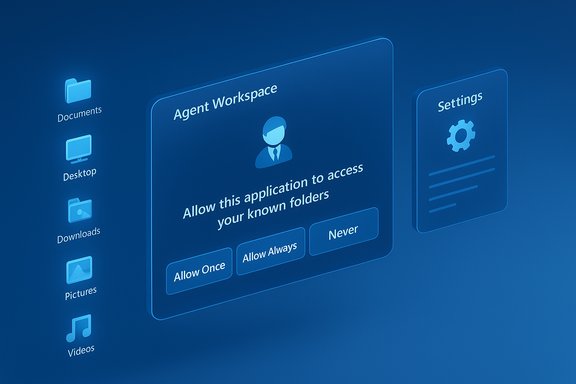
Microsoft’s recent reversal on how AI assistants interact with user files in Windows 11 marks a decisive privacy U‑turn: the operating system will now require explicit, per‑agent consent before any AI agent can read or act on content in the OS “known folders” (Desktop, Documents, Downloads, Pictures, Music, Videos).
Microsoft has been steadily repositioning Windows 11 as an “AI PC” platform that embeds Copilot‑style assistants across the desktop — voice, vision, and more experimental agentic features that can perform multi‑step tasks on a user’s behalf. Early previews pushed AI deeper into File Explorer and introduced agent models that could discover and operate on local content, which triggered intense scrutiny over whether those agents could access personal folders without clear, granular consent.
That scrutiny wasn’t new. Previous features such as the controversial Recall prototype and other telemetry discussions had already elevated user expectations for transparency and control. The combination of persistent background agents and unclear permission semantics created a credibility gap that public outcry ultimately forced Microsoft to address.
However, the devil remains in the operational details. Consent dialogs reduce risk but do not eliminate it: telemetry transparency, cloud/local processing boundaries, folder‑level granularity, and integration with endpoint protections are where the platform will be judged. If Microsoft follows this consent change with comprehensive telemetry disclosures, richer folder scoping, integrated DLP/EDR hooks, and independent audits, the company can meaningfully rebuild trust. If not, consent will be only a partial fix for deeper governance gaps.
The episode is illustrative beyond Microsoft: it shows that users will hold platform vendors to standards of control, clarity, and auditable enforcement when AI moves from advising to acting. For now, Microsoft has addressed the most visible concern; the next phase will be making the protections robust, transparent, and easy to enforce at scale.
Microsoft’s concession is a watershed moment for desktop AI: it proves that clear user consent — paired with auditable principals and visible runtime isolation — can be an effective baseline for agentic experiences. The remaining task is much harder: turning a permissioned preview into a provably safe, enterprise‑grade platform that meets regulatory demands and user expectations without sacrificing the productivity gains AI promises.
Source: WebProNews Microsoft Overhauls Windows 11 AI Privacy Policy for User Consent
 Background
Microsoft has been steadily repositioning Windows 11 as an “AI PC” platform that embeds Copilot‑style assistants across the desktop — voice, vision, and more experimental agentic features that can perform multi‑step tasks on a user’s behalf. Early previews pushed AI deeper into File Explorer and introduced agent models that could discover and operate on local content, which triggered intense scrutiny over whether those agents could access personal folders without clear, granular consent.That scrutiny wasn’t new. Previous features such as the controversial Recall prototype and other telemetry discussions had already elevated user expectations for transparency and control. The combination of persistent background agents and unclear permission semantics created a credibility gap that public outcry ultimately forced Microsoft to address.
What Microsoft Changed — The New Consent Model
Microsoft’s updated preview documentation and Insider builds now enforce a consent flow whenever an AI agent requests access to local files in known folders. The key elements announced in the clarification are:- Per‑agent permissioning: Each agent receives a distinct identity and settings page where users can manage that agent’s access to files, connectors, and OS services.
- Scoped access to “known folders” only: Access requests are limited to the six typical user folders (Desktop, Documents, Downloads, Pictures, Music, Videos) and do not grant blanket profile access by default.
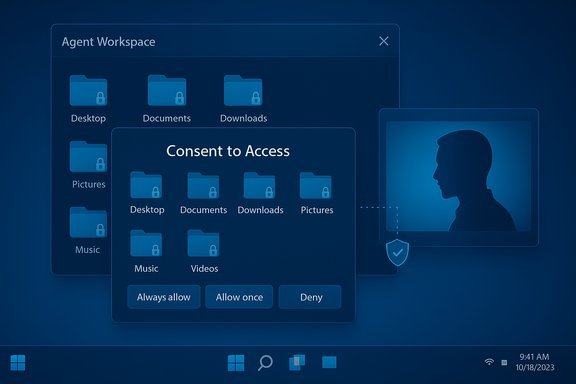
- Time‑boxed consent choices: Consent dialogs provide options such as Always allow, Allow once, and Never/Not now, enabling finer control over when agents may act on local content.
- Visible, interruptible agent runtime: Agents run in a contained “Agent Workspace” with a visible session, progress indicators, and pause/stop controls so users can intervene in real time.
How the consent UX works (preview)
- An agent initiates a task that requires local files (for example, summarizing a folder of documents).
- Windows surfaces a modal consent prompt describing the request and scope (known folders), along with the time‑granularity choices.
- The user selects Allow once, Always allow, or Deny; decisions are logged and can be reviewed or revoked later under per‑agent settings.
The Architecture Behind Agents: Isolation, Identity, and Connectors
Microsoft’s preview introduces several platform primitives intended to make agents auditable and governable:- Agent accounts: Each agent runs under a dedicated, low‑privilege Windows account that creates separate audit trails and allows administrators to apply normal ACLs and group policy controls.
- Agent Workspace: A lightweight, isolated desktop session where an agent executes UI automation and file operations without running inside the primary interactive user session. This provides a visible separation between human and agent activity.
- Model Context Protocol (MCP) and connectors: A standard protocol and connector model allow agents to discover OS services (File Explorer, Settings) and request access via a unified flow rather than bespoke integrations.
Why the Backlash Grew Loud
The public reaction combined technical concerns with cultural unease:- Social media and community forums amplified fears that AI could act as a “surveillance” layer, collecting or sharing personal content without clear permission. The visceral image of automated agents scanning a user’s Documents or Desktop produced strong pushback.
- Historical context mattered: Recall and other prior features had already primed privacy‑minded users to distrust automatic capture or background monitoring, so the idea of agents that could act — not only advise — heightened alarm.
- Enterprise customers signaled caution: Security and compliance teams worried about how agent activity, telemetry flows, and cloud‑onboarded reasoning would intersect with regulatory obligations and data governance requirements.
Strengths of Microsoft’s Revised Approach
Microsoft’s changes are not just reactive; they include several meaningful design decisions that materially improve user control:- Opt‑in by default and admin gating reduces accidental exposure at scale and forces institutions to make a deliberate decision before enabling agentic features.
- Per‑agent identity and audit trails make agents first‑class principals, enabling governance using existing Windows management tooling (Intune, group policy, auditing). This simplifies tracking what an agent actually did.
- Visible, interruptible runtime gives real‑time human‑in‑the‑loop controls — a practical safety valve compared with background processes that run headlessly.
- Standardized connectors and protocols (MCP) reduce ad‑hoc integration risk by creating a consistent surface for discovery and permissioning across third‑party agents.
Remaining Risks — Why Consent Alone Isn’t a Panacea
Consent dialogs are necessary but not sufficient. Several structural and operational risks remain:- Cross‑prompt injection (XPIA) and hallucinations: Agents that ingest content from files, images (OCR), or web previews can treat adversarial or unexpected content as instructions. Microsoft itself warns about hallucinations and novel attack vectors that arise when agents become actors.
- Data exfiltration vectors: Even scoped folder access contains sensitive items. A persistent “Always allow” grant could let a compromised or malicious agent read and export content unless endpoint DLP/EDR protections tightly integrate with agent policies.
- Telemetry and cloud boundaries: The preview documentation describes hybrid local/cloud flows but does not always fully disclose retention, telemetry, or redaction behaviors for content that an agent reads locally then sends to a cloud model. That transparency gap complicates compliance assessments.
- Coarse folder granularity: Current previews treat the six known folders as an all‑or‑none scope for an agent; users cannot yet selectively grant access to just one folder (for example, Pictures but not Documents). That coarse control unnerves privacy‑conscious users.
- Consent fatigue and UX pitfalls: Repeated prompts may train users to click “Always allow,” undermining protections. Modal prompts must be carefully engineered to avoid habituation.
- Supply chain and signing concerns: Microsoft intends to require cryptographic signing for agents, but signing and revocation systems can be abused or mismanaged; their effectiveness depends on ecosystem discipline.
Practical Guidance: What Users and IT Admins Should Do Now
For consumers and administrators alike, the immediate posture should be cautious and proactive. Recommended steps:- Confirm your build and preview posture: Agentic features appear in specific Insider build series and are gated behind Settings → System → AI Components → Agent tools (or similar). If you’re not on Insider channels, these features may not be present yet.
- Leave experimental agentic features off by default on production devices: The master toggle requires an administrator and enables device‑wide plumbing; reserve it for test fleets.
- Enforce principle of least privilege: Where agents are necessary, prefer Allow once workflows; avoid granting Always allow unless the agent is fully vetted and covered by policy.
- Integrate agent controls with endpoint protections: Ensure DLP, EDR, and SIEM ingest agent audit logs and that agent accounts are included in normal security policies.
- Review telemetry and contractual details: For organizations, assess where agent reasoning occurs (on device vs cloud), what content is sent off‑device, and how retention/processing is handled in vendor contracts.
- Educate users: Train staff on recognizing consent prompts, the dangers of reflexively approving “Always allow,” and the process for reporting suspicious agent behavior.
Market, Regulatory and Competitive Implications
Microsoft’s pivot has immediate industry reverberations:- Regulatory scrutiny is likely to follow: With governments intensifying data protection regimes, pro‑active consent controls and clear telemetry disclosures will be table stakes for consumer trust and regulatory defense. Microsoft’s moves may become a de facto benchmark other platform vendors will need to match.
- Enterprise adoption could slow or fragment: Organizations that prioritize data sovereignty and tight governance may delay enabling agentic features until richer policy and auditing controls are proven at scale. That creates an adoption gap between early‑adopter, Copilot+‑equipped knowledge workers and conservative enterprise fleets.
- Competitive comparisons: Platforms such as macOS have long required explicit permissions for file access; Microsoft’s move narrows the functional privacy gap with established OS permission models while introducing unique agentic primitives that competitors will watch closely.
Where Verification Is Solid — and Where Caution Is Warranted
The most load‑bearing technical claims are corroborated across preview documentation and independent reporting in the uploaded materials:- Per‑agent consent flows, known‑folder scoping, and the Agent Workspace model appear consistently across Microsoft preview notes and third‑party reporting.
- Microsoft’s hybrid model and Copilot+ hardware gating (local inference preferences around ~40+ TOPS baseline) are referenced repeatedly in previews and analysis.
- Specific telemetry retention policies for agent‑read content, and precise redaction/retention timelines for cloud reasoning, are not exhaustively specified in the preview notes available in the uploaded files — organizations should consult Microsoft’s published privacy statements and contractual material for binding details. Treat those telemetry assertions as qualified until confirmed by Microsoft’s official policy pages or contractual clauses.
- The exact timeline for broad roll‑out, regional gating, and OEM shipping schedules remains variable; Insider previews indicate functionality in certain build series, but GA timing and OEM rollout windows should be confirmed against Microsoft’s official release notes.
Final Analysis — A Cautious Step Toward Trust
Microsoft’s decision to require explicit, per‑agent consent for file access in Windows 11 is a meaningful course correction that addresses the most immediate privacy concern raised by the community. By pairing per‑agent identity, visible Agent Workspaces, and time‑boxed consent choices, the company has moved from an ambiguous permission model to one that is more auditable and governable.However, the devil remains in the operational details. Consent dialogs reduce risk but do not eliminate it: telemetry transparency, cloud/local processing boundaries, folder‑level granularity, and integration with endpoint protections are where the platform will be judged. If Microsoft follows this consent change with comprehensive telemetry disclosures, richer folder scoping, integrated DLP/EDR hooks, and independent audits, the company can meaningfully rebuild trust. If not, consent will be only a partial fix for deeper governance gaps.
The episode is illustrative beyond Microsoft: it shows that users will hold platform vendors to standards of control, clarity, and auditable enforcement when AI moves from advising to acting. For now, Microsoft has addressed the most visible concern; the next phase will be making the protections robust, transparent, and easy to enforce at scale.
Microsoft’s concession is a watershed moment for desktop AI: it proves that clear user consent — paired with auditable principals and visible runtime isolation — can be an effective baseline for agentic experiences. The remaining task is much harder: turning a permissioned preview into a provably safe, enterprise‑grade platform that meets regulatory demands and user expectations without sacrificing the productivity gains AI promises.
Source: WebProNews Microsoft Overhauls Windows 11 AI Privacy Policy for User Consent