

Bitdefender is warning that Windows bind links can be abused to make endpoint security products inspect a legitimate file while a different, attacker-controlled file actually runs. The technique affects Windows 10 version 1803 and later, including Windows 11, but requires an attacker to have already obtained local administrator rights.
The research, published July 15 by Bitdefender Labs and independently reported by CSO Online, describes three variants—File-Binding, Process-Binding, and Silo-Binding—that target a core assumption in many EDR products: that a file path is a reliable identity. In these attacks, it is not.
The immediate operational takeaway is not that every Windows PC has a remotely exploitable flaw. It is that administrator access does not have to mean detection is over. Ransomware operators routinely pursue local administrator or SYSTEM-level privileges after gaining a foothold; bind-link abuse could give them a way to suppress or poison the monitoring expected to catch the next stage.
Bind links are a documented Windows file-system virtualization feature implemented through the Bind Filter minifilter driver,
That behavior has legitimate uses in Windows containers, Windows Sandbox, packaged applications, and other isolation scenarios. But Bitdefender’s researchers found that a privileged attacker can use it to redirect a trusted path to another local file without altering the clean original file on disk.
The distinction matters. A symbolic link or a replaced executable leaves artifacts that security tools and administrators can often enumerate. A bind link is handled in the file-system filter stack and is memory-resident. The trusted file can remain where it belongs, signed and apparently intact, while a process opening that familiar path receives different content.
For EDR, this creates an uncomfortable split between the path reported at process creation and the file that supplied the executable image or DLL bytes. A product that trusts the former, then later reopens the path to hash or scan the file, may be looking at a clean object rather than the code that ran.
Rather than patching AMSI in memory—a highly familiar attacker technique—a bind link could cause a process loading the expected
The same pattern could be used against user-mode EDR sensor DLLs or telemetry components. Bitdefender also highlighted risks to forensic artifacts: a tool reading an event log or another standard file path could be supplied manipulated content, even though a normal directory listing still shows the original file.
That is a more subtle form of defense evasion than deleting logs or terminating endpoint agents. It attacks the relationship between a trusted pathname and the object returned by Windows when that pathname is opened.
The important point is not the specific pair of binaries. It is that process-creation telemetry and policy checks can retain the identity of the trusted source path while the backing executable is something else. An allowlist keyed to a path, a process tree built from standard image-name notifications, or an analyst reviewing a console may see
Some checks can still expose the mismatch in this simpler form, particularly when they inspect the backing image through lower-level mechanisms. Bitdefender says that limitation led to the third and most consequential technique: Silo-Binding.
Bitdefender’s method pairs a silo-specific redirect with an inverse global redirect. Inside the attacker-controlled silo, a trusted executable name can resolve to the malicious payload. Outside it, when EDR, Sysmon, AppLocker, or a forensic tool looks for the payload file, the lookup resolves back to the clean executable.
The resulting deception is unusually complete. The malicious code executes under a trusted-looking identity in one filesystem view; monitoring components operating elsewhere can see the legitimate file, calculate its legitimate hash, and record the legitimate path.
Bitdefender demonstrated Silo-Binding with Invoke-Mimikatz running behind a trusted Windows process identity. The company says the approach can undermine checks involving AppLocker, Windows Firewall, Sysmon hashing, asynchronous scanners, and path-based EDR detections.
This does not mean those products are universally defeated in every configuration. It means their path-based signals can become unreliable if they do not verify the actual file object and execution context rather than treating one reported path as definitive.
But Bitdefender’s broader argument is persuasive. The security industry does not treat administrator access as a free pass for attackers. Bring your own vulnerable driver, or BYOVD, attacks likewise commonly require elevated privileges, yet security vendors invest heavily in detecting and blocking them because attackers use those privileges to disable controls before deploying ransomware, credential theft, or lateral-movement tooling.
Bind-link abuse is potentially worse in one respect: it does not depend on loading a known-vulnerable third-party driver. It relies on documented Windows behavior and an inbox Windows driver,
Bitdefender says Windows 11 version 24H2 introduced a veto capability that can block some bind links, but it describes that protection as incomplete. The practical question for administrators is therefore not simply whether their fleet is on 24H2. It is whether their endpoint platform can recognize suspicious bind-link creation, detect redirection involving protected security components, and validate the backing object used for process and DLL loads.
Bitdefender recommends that security products revalidate the underlying file whenever it is reopened, rather than assuming that a path resolved identically at launch and at later inspection. Vendors will need to decide which kernel-level file-object information they can safely collect, while avoiding performance costs or compatibility problems in a subsystem already crowded with minifilter drivers.
For Windows administrators, the immediate defenses remain familiar: reduce the number of local administrators, protect privileged credentials, monitor unusual container or silo activity, and investigate security-agent failures even when the executable paths in logs look routine. EDR alerts that show trusted Microsoft binaries behaving inconsistently—especially around unexpected DLL loads, security telemetry gaps, or anomalous network activity—deserve extra scrutiny.
The more durable consequence is architectural. Windows paths have long been useful shorthand for program identity. Bitdefender’s bind-link research shows that, on a compromised Windows 10 or Windows 11 endpoint, a path can be a convincing label without being the file that actually executed.
The research, published July 15 by Bitdefender Labs and independently reported by CSO Online, describes three variants—File-Binding, Process-Binding, and Silo-Binding—that target a core assumption in many EDR products: that a file path is a reliable identity. In these attacks, it is not.
The immediate operational takeaway is not that every Windows PC has a remotely exploitable flaw. It is that administrator access does not have to mean detection is over. Ransomware operators routinely pursue local administrator or SYSTEM-level privileges after gaining a foothold; bind-link abuse could give them a way to suppress or poison the monitoring expected to catch the next stage.
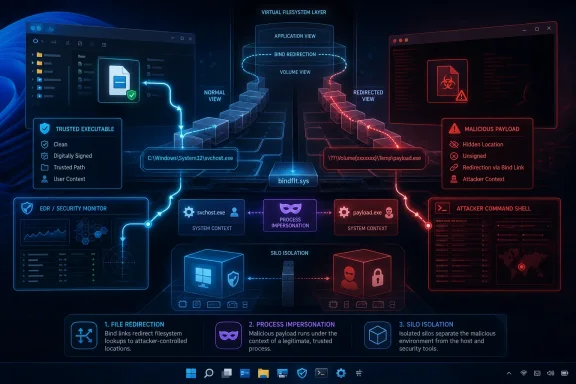 A legitimate Windows feature becomes a trust problem
Bind links are a documented Windows file-system virtualization feature implemented through the Bind Filter minifilter driver, bindflt.sys. Microsoft’s Bindlink API documentation explains that the virtual path does not create a physical file or directory of its own; it resolves to a backing path instead.That behavior has legitimate uses in Windows containers, Windows Sandbox, packaged applications, and other isolation scenarios. But Bitdefender’s researchers found that a privileged attacker can use it to redirect a trusted path to another local file without altering the clean original file on disk.
The distinction matters. A symbolic link or a replaced executable leaves artifacts that security tools and administrators can often enumerate. A bind link is handled in the file-system filter stack and is memory-resident. The trusted file can remain where it belongs, signed and apparently intact, while a process opening that familiar path receives different content.
For EDR, this creates an uncomfortable split between the path reported at process creation and the file that supplied the executable image or DLL bytes. A product that trusts the former, then later reopens the path to hash or scan the file, may be looking at a clean object rather than the code that ran.
File-Binding can target the security stack itself
The first technique, File-Binding, redirects a trusted file or DLL path to attacker-controlled content. Bitdefender demonstrated the concept againstamsi.dll, the library behind the Antimalware Scan Interface used by PowerShell, Windows Script Host, Office macro paths, and other Windows components.Rather than patching AMSI in memory—a highly familiar attacker technique—a bind link could cause a process loading the expected
C:\Windows\System32\amsi.dll path to receive a replacement that behaves as the attacker wants. The expected path remains correct from the application’s perspective, exports can be present, and the program can keep running. The security inspection simply does not occur as designed.The same pattern could be used against user-mode EDR sensor DLLs or telemetry components. Bitdefender also highlighted risks to forensic artifacts: a tool reading an event log or another standard file path could be supplied manipulated content, even though a normal directory listing still shows the original file.
That is a more subtle form of defense evasion than deleting logs or terminating endpoint agents. It attacks the relationship between a trusted pathname and the object returned by Windows when that pathname is opened.
Process-Binding makes trusted executables an alias
Process-Binding moves the same primitive from DLLs and data files to executable images. Bitdefender’s example maps the trustedwinver.exe path to cmd.exe, so a launch request for Windows Version Reporter can result in Command Prompt code executing.The important point is not the specific pair of binaries. It is that process-creation telemetry and policy checks can retain the identity of the trusted source path while the backing executable is something else. An allowlist keyed to a path, a process tree built from standard image-name notifications, or an analyst reviewing a console may see
winver.exe and infer a benign program.Some checks can still expose the mismatch in this simpler form, particularly when they inspect the backing image through lower-level mechanisms. Bitdefender says that limitation led to the third and most consequential technique: Silo-Binding.
Silo-Binding gives malware and monitoring different realities
A Windows silo is an isolation boundary used beneath technologies such as Windows containers and Windows Sandbox. Silo-Binding scopes a bind link to one of those isolated views, allowing the same pathname to resolve differently inside and outside the silo.Bitdefender’s method pairs a silo-specific redirect with an inverse global redirect. Inside the attacker-controlled silo, a trusted executable name can resolve to the malicious payload. Outside it, when EDR, Sysmon, AppLocker, or a forensic tool looks for the payload file, the lookup resolves back to the clean executable.
The resulting deception is unusually complete. The malicious code executes under a trusted-looking identity in one filesystem view; monitoring components operating elsewhere can see the legitimate file, calculate its legitimate hash, and record the legitimate path.
Bitdefender demonstrated Silo-Binding with Invoke-Mimikatz running behind a trusted Windows process identity. The company says the approach can undermine checks involving AppLocker, Windows Firewall, Sysmon hashing, asynchronous scanners, and path-based EDR detections.
This does not mean those products are universally defeated in every configuration. It means their path-based signals can become unreliable if they do not verify the actual file object and execution context rather than treating one reported path as definitive.
Microsoft’s “admin required” assessment leaves an enterprise gap
According to Bitdefender, Microsoft assessed the behavior as low severity because it requires local administrator permissions. That assessment is understandable in a conventional vulnerability model: an attacker who already controls an administrator account has extensive options.But Bitdefender’s broader argument is persuasive. The security industry does not treat administrator access as a free pass for attackers. Bring your own vulnerable driver, or BYOVD, attacks likewise commonly require elevated privileges, yet security vendors invest heavily in detecting and blocking them because attackers use those privileges to disable controls before deploying ransomware, credential theft, or lateral-movement tooling.
Bind-link abuse is potentially worse in one respect: it does not depend on loading a known-vulnerable third-party driver. It relies on documented Windows behavior and an inbox Windows driver,
bindflt.sys.Bitdefender says Windows 11 version 24H2 introduced a veto capability that can block some bind links, but it describes that protection as incomplete. The practical question for administrators is therefore not simply whether their fleet is on 24H2. It is whether their endpoint platform can recognize suspicious bind-link creation, detect redirection involving protected security components, and validate the backing object used for process and DLL loads.
Security teams need to review how they trust image paths
Organizations should treat this research as a prompt to test their EDR telemetry rather than as a reason to abandon path, signature, and hash controls. Those controls still matter; the issue is relying on any one of them as a standalone identity check after an attacker has administrator rights.Bitdefender recommends that security products revalidate the underlying file whenever it is reopened, rather than assuming that a path resolved identically at launch and at later inspection. Vendors will need to decide which kernel-level file-object information they can safely collect, while avoiding performance costs or compatibility problems in a subsystem already crowded with minifilter drivers.
For Windows administrators, the immediate defenses remain familiar: reduce the number of local administrators, protect privileged credentials, monitor unusual container or silo activity, and investigate security-agent failures even when the executable paths in logs look routine. EDR alerts that show trusted Microsoft binaries behaving inconsistently—especially around unexpected DLL loads, security telemetry gaps, or anomalous network activity—deserve extra scrutiny.
The more durable consequence is architectural. Windows paths have long been useful shorthand for program identity. Bitdefender’s bind-link research shows that, on a compromised Windows 10 or Windows 11 endpoint, a path can be a convincing label without being the file that actually executed.
References
- Primary source: IT Brief New Zealand
Published: 2026-07-16T02:50:00+00:00
Bitdefender flags Windows bind links that blind EDR
Windows fleets could be left blind to malware once attackers gain admin rights, as Bitdefender says bind links can fool endpoint security tools. itbrief.co.nz
- Related coverage: businessinsights.bitdefender.com
Bind Link Abuse: One Windows Feature, Many Ways to Blind Your EDR
A bind link is a building block that an attacker can combine into larger attacks. We've documented and named three such techniques in this new research.businessinsights.bitdefender.com - Related coverage: csoonline.com
New Windows Bind Link techniques let attackers evade EDR, security controls | CSO Online
The File-Binding, Process-Binding, and Silo-Binding techniques abuse Windows filesystem virtualization features to present trusted files to security products while malware executes undetected.www.csoonline.com
- Related coverage: ilcorrieredellasicurezza.it
Loading…
www.ilcorrieredellasicurezza.it - Related coverage: windowsforum.com
EDR-Redir V2: Windows Bind Link Abuse Blinds Defender – Risks & Defenses | Windows Forum
EDR-Redir V2 is the latest proof‑of‑concept tool to exploit Windows’ new bind link facility and the cloud filter stack to create parent‑level filesystem...windowsforum.com - Related coverage: news.backbox.org

