

Microsoft has published updated guidance explaining how monthly Windows servicing now fits together, covering the familiar Patch Tuesday cumulative update, optional preview releases, out-of-band fixes, hotpatching, and gradual Windows 11 feature delivery.
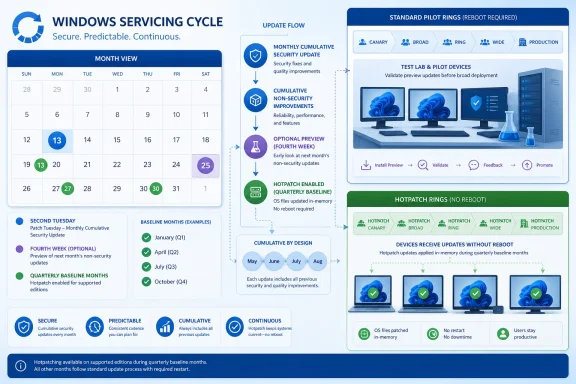
The company’s Windows IT Pro Blog says monthly security updates arrive on the second Tuesday of each month and remain cumulative: installing the latest package brings a supported Windows version current with prior security and non-security fixes. Microsoft notes that “B release,” quality update, security update, monthly cumulative update, and latest cumulative update are commonly used interchangeably.
Optional non-security preview updates generally arrive in the fourth week of the month. Formerly called “C” or “D” releases, they let administrators validate fixes and forthcoming features before those changes are folded into the following month’s security update.
For unmanaged PCs, Microsoft directs users to Settings > Windows Update > Advanced options > Optional updates to install them manually. Administrators determine their availability on managed hardware through update policies and deployment tooling.
The key practical point is that preview updates are cumulative but non-security in nature. They are best suited to a pilot ring, early adopters, or environments trying to confirm a fix before the next Patch Tuesday. They should not replace timely deployment of monthly security updates.
Microsoft also reiterates that some Windows 11 features may appear first in an optional preview package, then reach more devices later through the next cumulative update or Controlled Feature Rollout. Installing an update does not guarantee every staged feature will immediately appear.
That distinction matters for update-ring design. Microsoft’s separate Secure Boot guidance says hotpatch devices do not receive monthly non-security preview updates by design. Organizations that want to validate preview fixes and features therefore need separate cohorts: a standard servicing pilot ring for previews, and a hotpatch ring for restart reduction.
Administrators should not expect a hotpatch ring to double as a preview-validation ring. If an urgent preview-delivered fix or data update is needed, the documented approach is to use the relevant non-security preview update instead of hotpatching, with a restart, then resume the normal cycle.
The new explainer is useful as a concise map of Windows servicing, but it stops short of spelling out all operational conflicts. The hotpatch-versus-preview limitation is documented elsewhere in Microsoft’s Windows IT Pro material, while the broader implications of Insider servicing channels and feature-update policy control still require more explicit administrator guidance.
For most organizations, the immediate action is simple: keep Patch Tuesday deployment rings moving, reserve preview updates for a separate pilot population, and do not place hotpatch devices in that preview ring.
The company’s Windows IT Pro Blog says monthly security updates arrive on the second Tuesday of each month and remain cumulative: installing the latest package brings a supported Windows version current with prior security and non-security fixes. Microsoft notes that “B release,” quality update, security update, monthly cumulative update, and latest cumulative update are commonly used interchangeably.
 Preview updates are test releases, not a second Patch Tuesday
Optional non-security preview updates generally arrive in the fourth week of the month. Formerly called “C” or “D” releases, they let administrators validate fixes and forthcoming features before those changes are folded into the following month’s security update.For unmanaged PCs, Microsoft directs users to Settings > Windows Update > Advanced options > Optional updates to install them manually. Administrators determine their availability on managed hardware through update policies and deployment tooling.
The key practical point is that preview updates are cumulative but non-security in nature. They are best suited to a pilot ring, early adopters, or environments trying to confirm a fix before the next Patch Tuesday. They should not replace timely deployment of monthly security updates.
Microsoft also reiterates that some Windows 11 features may appear first in an optional preview package, then reach more devices later through the next cumulative update or Controlled Feature Rollout. Installing an update does not guarantee every staged feature will immediately appear.
Hotpatch changes the testing equation
Microsoft’s guidance describes hotpatch updates as security-only packages intended to reduce restart requirements. Devices receive a restart-required cumulative baseline in January, April, July, and October; the following two months are designed to receive security hotpatches without a reboot. Feature changes and other enhancements wait for the next baseline.That distinction matters for update-ring design. Microsoft’s separate Secure Boot guidance says hotpatch devices do not receive monthly non-security preview updates by design. Organizations that want to validate preview fixes and features therefore need separate cohorts: a standard servicing pilot ring for previews, and a hotpatch ring for restart reduction.
Administrators should not expect a hotpatch ring to double as a preview-validation ring. If an urgent preview-delivered fix or data update is needed, the documented approach is to use the relevant non-security preview update instead of hotpatching, with a restart, then resume the normal cycle.
Out-of-band fixes remain exceptions
Microsoft says out-of-band updates are reserved for known issues or immediate high-risk security concerns outside the normal calendar. They are typically cumulative and can be optional or recommended, depending on the incident.The new explainer is useful as a concise map of Windows servicing, but it stops short of spelling out all operational conflicts. The hotpatch-versus-preview limitation is documented elsewhere in Microsoft’s Windows IT Pro material, while the broader implications of Insider servicing channels and feature-update policy control still require more explicit administrator guidance.
For most organizations, the immediate action is simple: keep Patch Tuesday deployment rings moving, reserve preview updates for a separate pilot population, and do not place hotpatch devices in that preview ring.
References
- Primary source: Microsoft - Message Center
Published: 2026-07-15 10:00 PT
- Official source: techcommunity.microsoft.com
