

Microsoft’s ongoing tinkering with Windows 11 has produced one of its most practical previews yet: an experimental rework of File Explorer’s right‑click context menu combined with an optional “preload” for Explorer that aims to make opening folders feel instant — changes currently visible to Windows Insiders in Build 26220.7271.
Since Windows 11’s debut, the context (right‑click) menu has been a recurring UX flashpoint: Microsoft’s initial redesign made the menu visually modern and less cluttered, but also created a two‑tier experience that hid many legacy and power features behind “Show more options,” frustrating some power users and creating inconsistent discoverability.
The Build 26220.7271 preview — rolled to the Dev and Beta Insider channels as an experimental “exploration” rather than a committed ship‑state change — addresses two long‑standing pain points at once: the top‑level clutter of the context menu, and the perceptible first‑open latency of File Explorer. Microsoft exposes the Explorer preload with a user‑visible toggle and is reorganizing many context menu entries into grouped flyouts to reduce vertical height and improve scanability.
The intent is straightforward: reduce the vertical length of the primary menu so the most frequently used verbs (Open, Open with, Cut, Copy, Rename, Delete) are visible instantly, while keeping the advanced or rarer items accessible one click deeper. This preserves discoverability without forcing a long, screen‑dominating list.
However, precise implementation details remain intentionally vague in the preview documentation. For example:
Source: Pocket-lint Windows 11 is finally getting the context menu PC users deserve
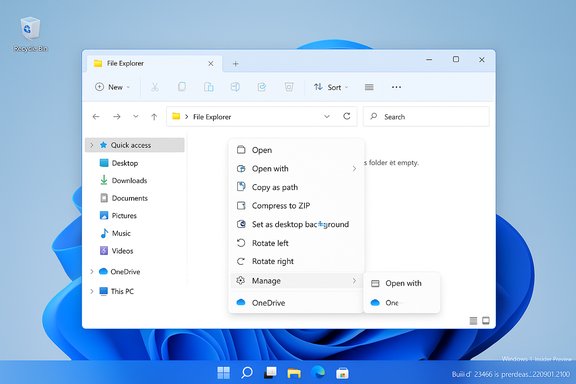 Background
Since Windows 11’s debut, the context (right‑click) menu has been a recurring UX flashpoint: Microsoft’s initial redesign made the menu visually modern and less cluttered, but also created a two‑tier experience that hid many legacy and power features behind “Show more options,” frustrating some power users and creating inconsistent discoverability.The Build 26220.7271 preview — rolled to the Dev and Beta Insider channels as an experimental “exploration” rather than a committed ship‑state change — addresses two long‑standing pain points at once: the top‑level clutter of the context menu, and the perceptible first‑open latency of File Explorer. Microsoft exposes the Explorer preload with a user‑visible toggle and is reorganizing many context menu entries into grouped flyouts to reduce vertical height and improve scanability.
What changed in Insider Preview Build 26220.7271
Context menu reorganization: the Manage file flyout and provider submenus
At the heart of the UI changes is a new top‑level grouping that hides less commonly used commands under a single flyout labelled Manage file (Microsoft says the name may change). Actions moved into that flyout include common but lower‑priority verbs such as Compress to ZIP, Copy as path, Set as desktop background, and Rotate left / Rotate right. Meanwhile, cloud provider-specific options (for example, OneDrive’s Always keep on this device and Free up space) are being moved into their own provider flyouts, and items like Send to My Phone are grouped alongside cloud entries for a more logical ordering.The intent is straightforward: reduce the vertical length of the primary menu so the most frequently used verbs (Open, Open with, Cut, Copy, Rename, Delete) are visible instantly, while keeping the advanced or rarer items accessible one click deeper. This preserves discoverability without forcing a long, screen‑dominating list.
Split context menu experiment (WinUI control)
Separately, Microsoft’s WinUI team demonstrated a split context menu concept during a WinUI Community Call. This pattern — implemented as a WinUI control previewed under names such as SplitMenuFlyoutItem — collapses related commands into a single row that acts as both a default action and a compact nested flyout. In practice this means a single menu row like “Open with Photos” can perform the default action when clicked on the left side, while a small chevron on the right opens a secondary flyout listing related actions or alternate apps (Paint, Snipping Tool, etc.. The split pattern is designed to prevent multiple near‑duplicate rows for the same app or action and to further shorten the top‑level list.File Explorer preload: “Enable window preloading for faster launch times”
Beyond menu layout, Build 26220.7271 introduces an optional preloading experiment that keeps a lightweight portion of File Explorer warmed in the background so the first visible paint and interactive state appear almost instantly when a user opens a window. Insiders who receive the experiment see a checkbox under File Explorer → View → Options → Folder Options → View labelled Enable window preloading for faster launch times; it’s enabled by default for test devices but can be disabled to restore legacy behavior. The technical aim is to shift predictable initialization to idle time — a pattern Microsoft has used in other products (Edge Startup Boost, Office prelaunch).Why these changes matter
Real user benefits
- Reduced vertical clutter speeds visual scanning and reduces pointer travel, which matters on laptops, tablets, and high‑DPI displays where long menus can dominate the screen.
- Grouping cloud provider actions and moving less‑used verbs into flyouts avoids repetitive entries and places related commands together logically (for example, Open Folder Location now sits with Open / Open with).
- Explorer preloading targets a highly visible annoyance — the “cold start” pause — and can shave fractions of a second (which add up across dozens of daily File Explorer launches). The change focuses on perceived responsiveness rather than rearchitecting enumeration or network file handling.
Developer and platform implications
The WinUI split menu control represents a platform‑level API that gives app developers a standardized way to group related verbs, reducing the historical problem of ad‑hoc shell hooks and COM extensions that clutter the menu. If broadly adopted, this could be the beginning of a migration away from chaotic context‑menu inflation toward a consistent, maintainable model. That said, early distribution is through the Windows App SDK preview/experimental channels, so real‑world impact depends on developer uptake.Critical analysis: strengths
1. Practical, low‑risk incrementality
Microsoft is using a pragmatic approach: these are experiments visible to Insiders, not irrevocable changes. The preload is opt‑in on test devices with a toggle, and the menu relayout keeps advanced features available one click deeper. This reduces the risk of breaking workflows while enabling Microsoft to gather telemetry and feedback.2. Focus on high‑frequency surface and perceived performance
File Explorer is one of Windows’ most heavily used surfaces. Small improvements to perceived launch latency and menu scanability compound into meaningful daily productivity gains — especially on lower‑spec hardware and devices with slower storage. The preload tactic mirrors proven warm‑start strategies used elsewhere in Microsoft products.3. Platform API for better organization
The split menu control is a cleaner developer story: WinUI‑driven controls encourage consistent behavior across apps and make it easier for developers to declare a single primary action plus related secondary tasks, rather than injecting multiple top‑level verbs. That structural change is potentially high value for long‑term maintainability.Critical analysis: risks and unresolved questions
1. Performance and resource tradeoffs remain uncertain
While the preload promises faster first paint, the engineering notes and preview documentation are intentionally high level. The exact memory footprint, battery impacts, and behavior on resource‑constrained devices (tablets, ultrabooks) are not published and must be validated by independent testing. Enterprises should not assume negligible cost — test fleets are recommended. Treat any memory or battery impact as provisional until benchmarked.2. Third‑party compatibility hazards
Shell extensions and enterprise overlays that expect specific initialization timing could behave differently when Explorer is pre‑warmed. Poorly maintained extensions might expose latent bugs when the process lifecycle is adjusted. Microsoft will need robust compatibility shims or migration guidance for ISVs and enterprise tooling vendors.3. Discoverability tradeoffs and muscle memory
Hiding actions under a Manage file flyout or a split menu could frustrate users who rely on muscle memory built up over years. The classic “Show more options” fallback remains available, but the two‑tier experience introduced by Windows 11 initially remains a concern until the new model proves faster for real users. Accessibility and keyboard navigation must be thoroughly vetted.4. Developer adoption is not guaranteed
The split context menu control needs developer buy‑in. Until major third‑party apps and common toolchains adopt the WinUI control or Microsoft provides a shell migration tool, many legacy entries will continue to appear, limiting the impact of these improvements.Accessibility, keyboard navigation, and discoverability
Microsoft has improved the context menu before by adding labels, dividers, and increased padding for top verbs. The new grouping and split model must maintain or improve accessibility: screen reader semantics, keyboard focus models, and high‑contrast support are critical. The WinUI control has the advantage of being part of the App SDK ecosystem, where accessibility patterns can be baked in centrally; however, developers must implement those semantics correctly in their apps. Insiders and developers should test with screen readers and high‑contrast settings as the experimental controls evolve.Enterprise and IT considerations
- Compatibility sweep: Run quick compatibility tests for shell extensions, backup clients, antivirus overlays, MDM agents, and OneDrive/Dropbox/Google Drive integrations to ensure provider flyouts and preloaded Explorer behavior don’t introduce errors.
- Policy controls: Expect Microsoft to add telemetry and group policy toggles (or to expose existing toggles) before a broad rollout; administrators should watch for Group Policy and MDM controls governing preloading and promoted verbs.
- Pilot on representative hardware: Validate memory and battery impact on lower‑end laptops and tablets, and confirm remote/roaming profiles and network share behavior remains stable. If issues arise, Insiders can toggle the preloading off via Folder Options.
Practical guidance for Insiders and enthusiasts
- If you’re curious and use a non‑critical device, enable the Insider build and test both the context menu changes and the preload checkbox. Pay attention to memory, battery, and any shell‑extension regressions.
- For power users who rely on specific full‑menu behaviors, the classic menu remains accessible via Show more options or Shift+right‑click; use that while adjusting to the new layout.
- Developers should experiment with the Windows App SDK preview and the SplitMenuFlyoutItem control in their WinUI apps to ensure a clean migration path for top‑level verbs. Prioritize keyboard and screen‑reader tests.
Verification and what remains unverified
The headline facts — that Build 26220.7271 includes an optional Explorer preload and that Microsoft is reorganizing the context menu with a Manage file flyout and provider submenus — are corroborated across multiple Insider notes and independent reporting summarized in preview materials.However, precise implementation details remain intentionally vague in the preview documentation. For example:
- Exact memory budget or the amount of Explorer state that is preloaded is not published. Treat any claim about precise RAM reservations or specific CPU impact as unverified until Microsoft publishes engineering details or independent benchmarks appear.
- The final naming of the Manage file flyout and the exact contents of split menu rows remain subject to change as Microsoft tunes the experiment with telemetry and Feedback Hub input.
Long‑term outlook: will this solve the context menu problem?
If Microsoft follows through on three fronts, the context menu experience could be meaningfully improved:- Ship a robust shell migration plan or compatibility layer that prevents regressions for legacy shell extensions and enterprise overlays.
- Ensure developer adoption of the WinUI split control so top‑level duplication is minimized across popular apps.
- Optimize performance so the modern menu is as responsive as the legacy menu, eliminating the “stuttery” feel some users still report.
Conclusion
The Windows 11 context menu changes previewed in Insider Build 26220.7271 are notable because they tackle two of the most visible daily pain points: menu bloat and perceived Explorer startup lag. By grouping lesser‑used commands in a Manage file flyout, moving cloud provider verbs into provider submenus, experimenting with a SplitMenuFlyoutItem pattern, and offering an optional Explorer preload, Microsoft is taking a measured, telemetry‑driven approach to restoring polish to File Explorer. These changes are promising and sensible, but they remain experimental: exact resource costs, enterprise compatibility, and developer adoption will determine whether the improvements are broadly successful. Insiders can test the features now and provide feedback; enterprises should pilot on representative hardware and prepare for compatibility checks before any broad deployment.Source: Pocket-lint Windows 11 is finally getting the context menu PC users deserve
