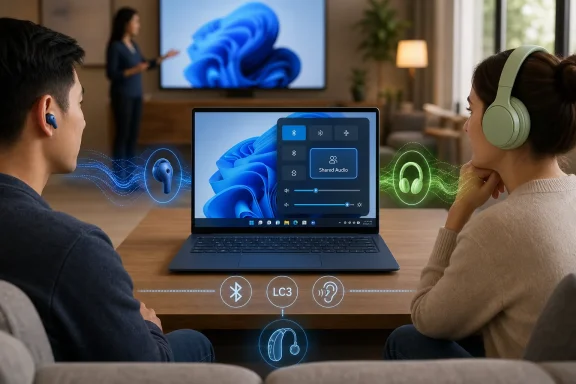
Microsoft began previewing Shared Audio for Windows 11 on October 31, 2025, letting select Copilot+ PCs transmit the same sound to two compatible Bluetooth LE Audio accessories through a new Quick Settings tile. It is a small feature with a large subtext: Windows is finally treating wireless audio as a shared, situational experience rather than a one-user, one-headset pipe. The catch is that the future arrives only if the PC, the earbuds, the Bluetooth stack, the audio drivers, the firmware, and the Windows Insider build all agree. That makes Shared Audio both one of Windows 11’s most relatable upgrades and one of its clearest reminders that modern PC features increasingly depend on hardware ecosystems, not just operating-system code.
Anyone who has tried to watch a film with another person on a laptop knows the old choreography. One person wears one earbud, the other gets the other, and both pretend the compromised stereo image is charming rather than annoying. The more technically inclined might carry a splitter, a USB audio interface, or a Bluetooth transmitter dongle, each of which solves the problem by making the PC feel less like a modern PC.
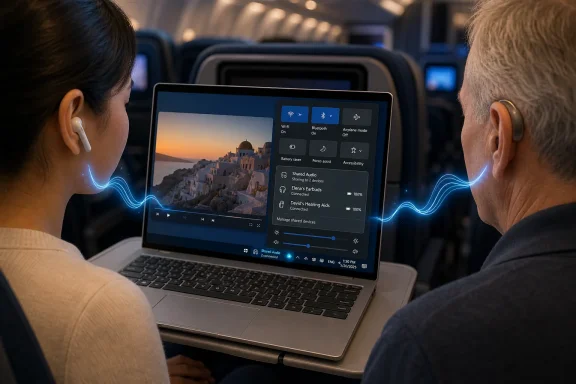
Shared Audio is Microsoft’s attempt to make that moment boring. Pair two compatible LE Audio devices, open Quick Settings, pick the accessories, and send the same stream to both. The preview UI Microsoft has shown looks intentionally ordinary, closer to joining a Wi-Fi network than configuring a virtual sound device.
That ordinariness matters. Windows has long been capable of elaborate audio routing if users are willing to spelunk through control panels, third-party tools, virtual cables, or vendor utilities. But a mainstream operating system feature is not defined by whether a forum regular can force it to work; it is defined by whether a normal person can use it five minutes before boarding a plane.
The feature’s examples are deliberately domestic: movies on flights, shared study music, a pair of hearing aids, two people listening together without swapping hardware. Microsoft is not pitching Shared Audio as a production feature for streamers or musicians. It is pitching it as an everyday convenience that Windows should arguably have had once wireless headphones became the default.
That distinction explains why Microsoft cannot simply enable the feature for every old pair of headphones. The problem is not just a missing Windows checkbox. Older Bluetooth headphones generally lack the LE Audio broadcast capabilities that Shared Audio depends on, and even newer Bluetooth hardware can be misleading because Bluetooth version numbers do not automatically guarantee feature support.
This is where the Windows enthusiast instinct can betray users. Seeing “Bluetooth 5.2,” “Bluetooth 5.3,” or “Bluetooth 5.4” on a spec sheet does not necessarily mean the whole PC pipeline supports LE Audio in the way Windows needs. The radio, driver, audio stack, firmware, and device implementation all have to line up. In the PC world, where component vendors, OEMs, and Microsoft each own different parts of the experience, that alignment is never automatic.
The supported accessory list reflects the early state of the ecosystem. Microsoft names devices such as Samsung’s Galaxy Buds2 Pro, Galaxy Buds3, Galaxy Buds3 Pro, Sony’s WH-1000XM6, and recent LE Audio-capable hearing aids from ReSound and Beltone. That is a respectable start, but it is not the same thing as saying your favorite headset will work because the box contains the right buzzwords.
That hardware targeting is unsurprising but politically awkward. Microsoft has spent the Copilot+ era trying to make new Windows PCs feel meaningfully different from old Windows PCs. Some of those differences are AI-branded and debatable. Shared Audio is not. It is a plain, understandable user benefit, and that may make its limited availability sting more.
The risk for Microsoft is that users hear “Windows 11 adds Shared Audio” and reasonably expect a Windows 11 feature. Instead, they may discover that the feature is gated behind a narrow matrix of new hardware, Insider builds, firmware revisions, and driver packages. For the average buyer, that distinction is noise. For IT departments, it is the difference between a feature they can plan around and one they cannot safely promise.
Still, Microsoft has a defensible technical argument. Bluetooth LE Audio on Windows is not merely an app feature; it is a platform capability that depends on modern silicon and carefully validated drivers. Rolling it out first on a small set of machines may be the only way to avoid the support disaster of letting millions of incompatible systems expose a button that fails unpredictably.
Windows has no such luxury. A Windows laptop may combine a Microsoft operating system, a Qualcomm or Intel platform, a third-party Bluetooth controller, an OEM-specific driver package, and earbuds from a phone ecosystem. That openness is the PC’s enduring strength, but it is also why simple-sounding features often arrive in Windows with footnotes.
Shared Audio therefore exposes a familiar bargain. The PC ecosystem offers more choice, longer tail compatibility, and a wider range of price points. In exchange, new hardware-dependent features often begin as a compatibility puzzle. Microsoft can design the UI, but it cannot retroactively make every Bluetooth stack behave like a tightly integrated consumer appliance.
That is why the Quick Settings placement is more than cosmetic. It is Microsoft trying to hide the complexity once the prerequisites are satisfied. If the tile appears, the user should not need to know which driver update made it possible. If the tile does not appear, the user is back in the old PC world of checking builds, firmware, support pages, and device lists.
That sounds like ordinary troubleshooting, but it reveals the larger rollout strategy. Shared Audio is not just being tested as a UI feature; it is being tested as a chain of vendor coordination. Microsoft needs to know which PCs expose the capability correctly, which accessories behave reliably, and which combinations generate audio glitches, choppiness, or discovery failures.
The addition of per-accessory volume sliders and a taskbar indicator during the preview suggests Microsoft is already moving beyond the initial proof of concept. Independent volume is especially important because two listeners rarely want the same loudness. A visible taskbar state also matters because shared output is the kind of feature users need to understand at a glance, particularly when moving between private and shared listening contexts.
These refinements are small, but they are the difference between a novelty and a feature that can survive daily use. Audio features fail emotionally before they fail technically. A dropped connection, uneven volume, or confusing active state can make users abandon the tool even if the underlying technology is impressive.
The consumer version of the story is two friends watching a movie. The accessibility version is a Windows PC sending audio to two hearing devices, or allowing a caregiver and user to listen together without awkward device switching. Those scenarios are less flashy than earbuds on a flight, but they are arguably more consequential.
Windows has a massive installed base in workplaces, schools, healthcare settings, and public institutions. If LE Audio support matures there, it could reduce dependence on specialized adapters and inconsistent venue systems. That will require broader hardware support than the current preview offers, but the direction is important.
The challenge is that accessibility features cannot remain trapped in premium-device previews forever. If Microsoft wants Shared Audio and related LE Audio capabilities to matter beyond tech demos, the company will need to push OEMs toward consistent implementation across business laptops, education devices, and mainstream consumer machines.
That matters because modern Windows deployment already asks administrators to track increasingly granular hardware capabilities. Copilot+ features depend on NPUs. Some security features depend on firmware and silicon support. Camera and audio enhancements depend on drivers. Shared Audio joins that broader trend: Windows features are no longer merely OS features.
In managed environments, the first question will not be whether Shared Audio is charming. It will be whether the feature is controllable, documentable, and supportable. Can it be disabled where audio privacy matters? Does it create confusion in conference rooms? How does it behave with Teams, browser media, DRM-protected content, remote desktops, or accessibility tooling? Those are the questions that determine whether a feature is welcomed or quietly ignored.
There is also a privacy angle, even if it is not sinister. A system that can intentionally broadcast audio to more than one accessory needs clear state indicators and predictable controls. Microsoft’s taskbar indicator is a good start, but enterprise trust will depend on consistency. Users should always know when audio is being shared and with what.
Insider features can change, expand, regress, or disappear behind staged rollouts. Microsoft has said broader Windows 11 PC support is expected, but it has not given a general release date. That means buyers should not purchase a laptop today solely on the assumption that Shared Audio will arrive on a specific unsupported model tomorrow.
The preview label also gives Microsoft room to learn where LE Audio’s real-world pain points are. Bluetooth has a long history of looking clean in diagrams and messy in living rooms. Pairing behavior, codec negotiation, firmware quality, and vendor-specific apps can all turn a standard into a support adventure.
For enthusiasts, that makes the feature worth testing. For everyone else, patience is the wiser move. If the tile appears on a supported PC and the accessories are ready, try it. If it does not, forcing the issue through drivers and experimental settings may produce more frustration than shared listening.
The old model of Windows upgrades was largely software-first. A new version changed the Start menu, the file manager, the security defaults, the bundled apps, or the windowing model. The new model is increasingly hardware-mediated. The operating system exposes capabilities that only appear when the machine beneath it has the right sensors, radios, processors, firmware, and drivers.
That shift is not unique to Microsoft. Phones, tablets, and Macs have been moving in this direction for years. But Windows carries the burden of the broad PC ecosystem, where a feature can be technically part of Windows 11 while practically absent from most Windows 11 PCs.
Shared Audio therefore becomes a useful test of Microsoft’s messaging discipline. If the company presents it as a universal Windows 11 upgrade, users will feel misled. If it presents it as an LE Audio feature arriving first on validated Copilot+ hardware, the story is less glamorous but more honest.
 Microsoft Turns a Travel Hack Into a Windows Feature
Anyone who has tried to watch a film with another person on a laptop knows the old choreography. One person wears one earbud, the other gets the other, and both pretend the compromised stereo image is charming rather than annoying. The more technically inclined might carry a splitter, a USB audio interface, or a Bluetooth transmitter dongle, each of which solves the problem by making the PC feel less like a modern PC.Shared Audio is Microsoft’s attempt to make that moment boring. Pair two compatible LE Audio devices, open Quick Settings, pick the accessories, and send the same stream to both. The preview UI Microsoft has shown looks intentionally ordinary, closer to joining a Wi-Fi network than configuring a virtual sound device.
That ordinariness matters. Windows has long been capable of elaborate audio routing if users are willing to spelunk through control panels, third-party tools, virtual cables, or vendor utilities. But a mainstream operating system feature is not defined by whether a forum regular can force it to work; it is defined by whether a normal person can use it five minutes before boarding a plane.
The feature’s examples are deliberately domestic: movies on flights, shared study music, a pair of hearing aids, two people listening together without swapping hardware. Microsoft is not pitching Shared Audio as a production feature for streamers or musicians. It is pitching it as an everyday convenience that Windows should arguably have had once wireless headphones became the default.
The Real Upgrade Is Bluetooth LE Audio, Not the Button
The Quick Settings tile will get the attention, but the underlying story is Bluetooth LE Audio. Classic Bluetooth audio was built around a more limited model, and while vendors have layered plenty of cleverness on top of it, native one-to-many listening has never been a clean Windows experience. Shared Audio uses LE Audio broadcast technology to transmit a stream to two accessories at once.That distinction explains why Microsoft cannot simply enable the feature for every old pair of headphones. The problem is not just a missing Windows checkbox. Older Bluetooth headphones generally lack the LE Audio broadcast capabilities that Shared Audio depends on, and even newer Bluetooth hardware can be misleading because Bluetooth version numbers do not automatically guarantee feature support.
This is where the Windows enthusiast instinct can betray users. Seeing “Bluetooth 5.2,” “Bluetooth 5.3,” or “Bluetooth 5.4” on a spec sheet does not necessarily mean the whole PC pipeline supports LE Audio in the way Windows needs. The radio, driver, audio stack, firmware, and device implementation all have to line up. In the PC world, where component vendors, OEMs, and Microsoft each own different parts of the experience, that alignment is never automatic.
The supported accessory list reflects the early state of the ecosystem. Microsoft names devices such as Samsung’s Galaxy Buds2 Pro, Galaxy Buds3, Galaxy Buds3 Pro, Sony’s WH-1000XM6, and recent LE Audio-capable hearing aids from ReSound and Beltone. That is a respectable start, but it is not the same thing as saying your favorite headset will work because the box contains the right buzzwords.
Copilot+ PCs Get the First-Class Cabin Again
The PC eligibility list is even narrower. Microsoft’s preview starts with select Copilot+ PCs, especially Surface Laptop and Surface Pro models using Qualcomm Snapdragon X chips, with required Bluetooth and audio driver updates. Samsung’s Galaxy Book4 Edge has also entered the supported group, while certain Galaxy Book5 models with Intel Core Ultra Series 200 processors are listed as coming soon.That hardware targeting is unsurprising but politically awkward. Microsoft has spent the Copilot+ era trying to make new Windows PCs feel meaningfully different from old Windows PCs. Some of those differences are AI-branded and debatable. Shared Audio is not. It is a plain, understandable user benefit, and that may make its limited availability sting more.
The risk for Microsoft is that users hear “Windows 11 adds Shared Audio” and reasonably expect a Windows 11 feature. Instead, they may discover that the feature is gated behind a narrow matrix of new hardware, Insider builds, firmware revisions, and driver packages. For the average buyer, that distinction is noise. For IT departments, it is the difference between a feature they can plan around and one they cannot safely promise.
Still, Microsoft has a defensible technical argument. Bluetooth LE Audio on Windows is not merely an app feature; it is a platform capability that depends on modern silicon and carefully validated drivers. Rolling it out first on a small set of machines may be the only way to avoid the support disaster of letting millions of incompatible systems expose a button that fails unpredictably.
Windows Is Learning From Phones, But the PC Is Messier
The obvious comparison is Apple’s audio sharing for AirPods and Beats devices. On an iPhone or iPad, the experience benefits from Apple’s vertical control over hardware, operating system, accessory firmware, and retail messaging. The user does not need to understand Bluetooth profiles because the ecosystem has already done the filtering.Windows has no such luxury. A Windows laptop may combine a Microsoft operating system, a Qualcomm or Intel platform, a third-party Bluetooth controller, an OEM-specific driver package, and earbuds from a phone ecosystem. That openness is the PC’s enduring strength, but it is also why simple-sounding features often arrive in Windows with footnotes.
Shared Audio therefore exposes a familiar bargain. The PC ecosystem offers more choice, longer tail compatibility, and a wider range of price points. In exchange, new hardware-dependent features often begin as a compatibility puzzle. Microsoft can design the UI, but it cannot retroactively make every Bluetooth stack behave like a tightly integrated consumer appliance.
That is why the Quick Settings placement is more than cosmetic. It is Microsoft trying to hide the complexity once the prerequisites are satisfied. If the tile appears, the user should not need to know which driver update made it possible. If the tile does not appear, the user is back in the old PC world of checking builds, firmware, support pages, and device lists.
The Preview Is Also a Driver Readiness Test
Microsoft’s documentation makes driver readiness a central part of the preview. Users need a compatible Windows 11 Copilot+ PC, the right Insider channel, current OS and driver updates, and accessories with LE Audio enabled. Microsoft also recommends checking the accessory maker’s app for firmware updates and re-pairing devices if they do not appear under the Shared Audio tile.That sounds like ordinary troubleshooting, but it reveals the larger rollout strategy. Shared Audio is not just being tested as a UI feature; it is being tested as a chain of vendor coordination. Microsoft needs to know which PCs expose the capability correctly, which accessories behave reliably, and which combinations generate audio glitches, choppiness, or discovery failures.
The addition of per-accessory volume sliders and a taskbar indicator during the preview suggests Microsoft is already moving beyond the initial proof of concept. Independent volume is especially important because two listeners rarely want the same loudness. A visible taskbar state also matters because shared output is the kind of feature users need to understand at a glance, particularly when moving between private and shared listening contexts.
These refinements are small, but they are the difference between a novelty and a feature that can survive daily use. Audio features fail emotionally before they fail technically. A dropped connection, uneven volume, or confusing active state can make users abandon the tool even if the underlying technology is impressive.
Accessibility May Be the Most Important Use Case
Microsoft’s examples include hearing aids, and that should not be treated as a side note. LE Audio has long been discussed as a major step for assistive listening because it can support more efficient, flexible, and standardized audio experiences. Shared Audio on Windows could make PCs more useful in classrooms, meetings, clinics, and homes where hearing devices are part of everyday life.The consumer version of the story is two friends watching a movie. The accessibility version is a Windows PC sending audio to two hearing devices, or allowing a caregiver and user to listen together without awkward device switching. Those scenarios are less flashy than earbuds on a flight, but they are arguably more consequential.
Windows has a massive installed base in workplaces, schools, healthcare settings, and public institutions. If LE Audio support matures there, it could reduce dependence on specialized adapters and inconsistent venue systems. That will require broader hardware support than the current preview offers, but the direction is important.
The challenge is that accessibility features cannot remain trapped in premium-device previews forever. If Microsoft wants Shared Audio and related LE Audio capabilities to matter beyond tech demos, the company will need to push OEMs toward consistent implementation across business laptops, education devices, and mainstream consumer machines.
Enterprise IT Will See Convenience and Another Support Matrix
For consumers, Shared Audio is a neat feature. For IT administrators, it is another compatibility matrix wearing a friendly face. A help desk cannot simply tell users that “Windows 11 supports two Bluetooth headsets now” without adding caveats about PC model, Windows channel, driver level, Bluetooth capability, accessory firmware, and whether LE Audio is enabled.That matters because modern Windows deployment already asks administrators to track increasingly granular hardware capabilities. Copilot+ features depend on NPUs. Some security features depend on firmware and silicon support. Camera and audio enhancements depend on drivers. Shared Audio joins that broader trend: Windows features are no longer merely OS features.
In managed environments, the first question will not be whether Shared Audio is charming. It will be whether the feature is controllable, documentable, and supportable. Can it be disabled where audio privacy matters? Does it create confusion in conference rooms? How does it behave with Teams, browser media, DRM-protected content, remote desktops, or accessibility tooling? Those are the questions that determine whether a feature is welcomed or quietly ignored.
There is also a privacy angle, even if it is not sinister. A system that can intentionally broadcast audio to more than one accessory needs clear state indicators and predictable controls. Microsoft’s taskbar indicator is a good start, but enterprise trust will depend on consistency. Users should always know when audio is being shared and with what.
The Insider Label Is Doing Real Work Here
It is tempting to frame Shared Audio as something Windows 11 “has” now. The more accurate framing is that Microsoft is previewing it through the Windows Insider program on a limited set of eligible PCs. That distinction is not pedantry; it is the difference between a public feature and an ecosystem rehearsal.Insider features can change, expand, regress, or disappear behind staged rollouts. Microsoft has said broader Windows 11 PC support is expected, but it has not given a general release date. That means buyers should not purchase a laptop today solely on the assumption that Shared Audio will arrive on a specific unsupported model tomorrow.
The preview label also gives Microsoft room to learn where LE Audio’s real-world pain points are. Bluetooth has a long history of looking clean in diagrams and messy in living rooms. Pairing behavior, codec negotiation, firmware quality, and vendor-specific apps can all turn a standard into a support adventure.
For enthusiasts, that makes the feature worth testing. For everyone else, patience is the wiser move. If the tile appears on a supported PC and the accessories are ready, try it. If it does not, forcing the issue through drivers and experimental settings may produce more frustration than shared listening.
A Small Feature Reveals the New Shape of Windows
Shared Audio is not a blockbuster Windows feature, and that is exactly why it is interesting. It solves a human problem that is easy to explain. It also shows how many layers now sit between a user request and a working Windows experience.The old model of Windows upgrades was largely software-first. A new version changed the Start menu, the file manager, the security defaults, the bundled apps, or the windowing model. The new model is increasingly hardware-mediated. The operating system exposes capabilities that only appear when the machine beneath it has the right sensors, radios, processors, firmware, and drivers.
That shift is not unique to Microsoft. Phones, tablets, and Macs have been moving in this direction for years. But Windows carries the burden of the broad PC ecosystem, where a feature can be technically part of Windows 11 while practically absent from most Windows 11 PCs.
Shared Audio therefore becomes a useful test of Microsoft’s messaging discipline. If the company presents it as a universal Windows 11 upgrade, users will feel misled. If it presents it as an LE Audio feature arriving first on validated Copilot+ hardware, the story is less glamorous but more honest.
The Fine Print Is the Feature
The practical lesson is that Shared Audio should be understood as an early LE Audio milestone rather than a universal multi-output switch. The feature is real, the use case is obvious, and the implementation appears pointed in the right direction, but the current preview is bounded by hardware and software constraints that users should check before chasing the setting.- Shared Audio currently depends on Bluetooth LE Audio accessories, not older classic Bluetooth headphones.
- The preview is limited to select Windows 11 Copilot+ PCs with compatible Bluetooth and audio driver updates.
- The Shared Audio tile appears in Quick Settings only when Windows sees the required system support.
- Accessory firmware and manufacturer app settings can determine whether otherwise compatible earbuds or hearing aids show up.
- Microsoft has improved the preview with per-accessory volume controls and a taskbar sharing indicator.
- Broader Windows 11 support is planned, but Microsoft has not announced a general release date.
References
- Primary source: Digital Trends
Published: 2026-06-12T11:30:07.510716
Windows 11 adds a neat upgrade that enables simultaneous streaming for two audio devices - Digital Trends
Windows 11 Shared Audio lets two people listen from one PC through Bluetooth LE Audio, but you’ll need supported Copilot+ hardware, updated drivers, and compatible accessories before the feature appears.www.digitaltrends.com - Official source: blogs.windows.com
Extending Bluetooth® LE Audio on Windows 11 with shared audio (preview)
[Updated 3/05] Shared audioblogs.windows.com - Related coverage: pcworld.com
Windows 11 can now share audio to two Bluetooth headsets at once | PCWorld
Windows 11's new Shared Audio feature lets two Bluetooth headsets play the same audio simultaneously. Here's how to use it.www.pcworld.com - Related coverage: techspot.com
Windows can now share audio to two Bluetooth headphones at once, sort of | TechSpot
In a blog post, Microsoft explained that shared audio enables a PC's audio output to be transmitted simultaneously to two Bluetooth LE audio devices.www.techspot.com - Related coverage: windowslatest.com
Microsoft brings AirPods-style audio sharing to Windows 11, letting two people listen on one PC with their own headphones
Microsoft told us that Windows 11 is rolling out Shared Audio, a Bluetooth LE Audio feature that lets two pairs of headphones work together. www.windowslatest.com
- Related coverage: pcgamer.com
Windows 11 insiders can now share Bluetooth LE audio over two pairs of headphones, so now you and your bestie can both sob over K-Pop Demon Hunters on the plane | PC Gamer
This is what it sounds like.www.pcgamer.com
- Related coverage: techtimes.com
Windows 11's June 2026 Update Lands June 9 With Shared Audio And NPU Monitoring: The 6 Features Worth Knowing
Microsoft is set to begin rolling out the June 2026 update for Windows 11 on Tuesday, June 9, and unlike a routine security patch, this one carries a handful of consumer features worth turning on.www.techtimes.com - Related coverage: windowscentral.com
Windows 11 Shared Audio: Supported PCs and Requirements | Windows Central
Microsoft is expanding its "Shared audio" preview to more hardware, yet the strict Bluetooth LE requirements leave many users in the dark.www.windowscentral.com - Related coverage: windowsforum.com
Windows 11 Shared Audio Preview Streams the Same Bluetooth LE Audio to Two Devices | Windows Forum
Microsoft has quietly added a long‑requested convenience to Windows 11: a native “Shared audio (preview)” that can stream the same Bluetooth audio feed to...windowsforum.com - Related coverage: techradar.com
Windows 11 is finally getting a handy Bluetooth headphone sharing feature for some – here's how it works | TechRadar
A nifty addition for watching a movie with a friend on the same laptopwww.techradar.com - Related coverage: tomshardware.com