

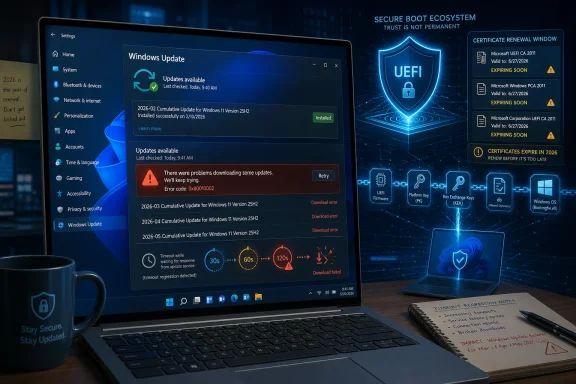
Microsoft has acknowledged a Windows 11 update bug affecting some devices that can download February 2026 security updates but fail to fetch March, April, May, and later updates through Settings with error 0x80010002. The failure is not a corrupt-PC mystery, a bad disk omen, or another case of users being told to run the same repair commands until morale improves. It is a servicing-side regression tied to Microsoft’s own download timeout changes. And because it arrives just as Secure Boot certificate renewal moves from background plumbing to deadline-driven risk management, this is the kind of small-sounding Windows Update defect that matters more than its error code suggests.
Windows Update has long been treated as both delivery mechanism and absolution ritual. If the monthly patch arrives, installs, and reboots, the machine is presumed to be moving forward; if it does not, the burden usually falls first on the endpoint, the network, the VPN, the proxy, the driver stack, or the unlucky admin staring at a fleet dashboard full of red.
This time Microsoft’s acknowledgement changes the posture. The company says affected systems may successfully receive the February monthly Windows security update and then become unable to use the Windows Update page in Settings to download updates released in March, April, or later. The stated cause is a change in download timeout requirements when starting download operations.
That distinction matters. Microsoft is not describing a device-integrity problem, nor an inability to install updates once obtained. It is describing a failure in the act of acquisition: Windows Update, as exposed through Settings, cannot reliably pull down the payload it is supposed to deliver.
For home users, that distinction may sound academic. For administrators, it is the difference between a repair job and a distribution problem. A machine that cannot install a cumulative update may need component store repair, disk inspection, cleanup, or an in-place upgrade. A machine that cannot download because the servicing path has become too brittle is a different class of incident: one where Microsoft’s cloud, client logic, timeout assumptions, and user interface become part of the blast radius.
The affected sequence is what makes it uncomfortable. Users who hit the bug could miss March’s Patch Tuesday update, then the emergency out-of-band releases that followed, then April, then May. That is not a one-off failed preview update. That is a device potentially drifting out of security compliance for months while the operating system’s own update interface remains the path most users are trained to trust.
The problem also lands after a messy spring for Windows 11 servicing. Microsoft issued out-of-band updates after March update trouble, including fixes meant to replace or supersede problematic releases. In ordinary circumstances, that is exactly why cumulative servicing exists: a later package can carry forward earlier fixes and close the loop. But cumulative servicing only works if the client can reach the cumulative package.
That is the uncomfortable inversion here. The modern Windows servicing model assumes the cure for most update weirdness is another update. If a bug prevents the system from downloading the next update, the model starts eating its own tail.
Secure Boot is not a cosmetic feature. It is part of the chain of trust that helps verify bootloaders and pre-operating-system components before Windows takes over. When it works, users rarely think about it. When its trust anchors age out, the consequences are not always immediate black-screen drama, but they can include degraded security posture and future boot-related compatibility trouble.
That is why this bug is not merely “some users cannot install the latest patch.” The May 2026 Windows 11 updates are part of a broader effort to move devices toward updated Secure Boot certificates and related readiness checks. If a device is stranded behind March, it may also miss the plumbing Microsoft is using to prepare machines for the certificate rollover.
The irony is sharp. Microsoft has centralized more Secure Boot update scripts and documentation precisely to make this transition less fragmented. But centralization only helps if the delivery channel behaves. A carefully arranged bridge is not much comfort to the endpoints that cannot get onto the road.
Some of those steps are reasonable in the right context. They are also exhausting, especially when the root cause sits outside the user’s machine. A public acknowledgement prevents needless reinstalls, needless registry surgery, and needless blame directed at endpoint health.
But timing matters. If affected users began hitting this in March and Microsoft is only now formally describing it after multiple monthly cycles, the company has allowed a confidence gap to open. A Windows Update bug is bad. A Windows Update bug that leaves users unsure whether their PCs are broken for months is worse.
For enterprise administrators, this is not just an annoyance. Patch compliance reports drive risk decisions, audit conversations, cyber-insurance questionnaires, and vulnerability management programs. A device that cannot obtain March, April, and May updates is not a quirky outlier. It is an exception that needs explanation, containment, and a remediation path that does not depend on folklore.
That creates a strange two-tier reality. Large organizations may have the monitoring and deployment options to detect failed update acquisition and attempt alternate delivery. Ordinary users may see nothing more than an error code and a button that does not do what it promises. The same Windows Update brand covers both worlds, but the practical resilience is not the same.
This is where Microsoft’s steady migration toward cloud-managed servicing shows its trade-off. The company wants Windows to be continuously serviced, continuously protected, and increasingly capable of handling platform transitions without human intervention. That is the correct strategic direction for an operating system used at this scale.
Yet every step toward invisible servicing increases the cost of invisible failure. When an update model depends on a remote orchestration service, the OS must be better at telling users whether the problem is local, transient, policy-driven, or Microsoft-side. “Something went wrong” is not enough when the thing going wrong is the security conveyor belt.
That is why a timeout change can become a meaningful incident. The timeout is not glamorous. It is not a new Start menu ad, a Copilot integration, or a kernel vulnerability. But it sits on the path between a vulnerable machine and a patched one.
The industry tends to reserve its attention for spectacular failures: blue screens, boot loops, broken VPNs, unusable recovery environments, or updates that delete user-visible functionality. Download failures occupy a quieter category. They are less cinematic, but they can be more insidious because they allow systems to remain usable while becoming stale.
A Windows PC that fails to boot gets attention immediately. A Windows PC that keeps working while silently missing critical cumulative updates may be worse from a security perspective, especially in households and small offices where nobody is reading release health dashboards.
The weakness is that cumulative servicing assumes the servicing stack itself remains sufficiently healthy to receive the next cumulative payload. When that assumption fails, users need clear escape hatches. Those escape hatches should be obvious, supported, and differentiated from guesswork.
Microsoft already has multiple update paths: Windows Update, Windows Update for Business, WSUS, Intune, the Microsoft Update Catalog, installation media, enablement packages, recovery options, and repair installs. The problem is not that no alternatives exist. The problem is that the average Windows 11 user is not given a calm, trustworthy decision tree when the primary path fails.
A mature update UX would tell an affected user something closer to the truth: this device appears unable to start a Windows Update download because of a known service issue; your installed OS appears otherwise capable of receiving updates; here are the supported alternate routes; here is whether this affects Secure Boot certificate readiness. That is not a luxury. It is what the operating system should provide when servicing becomes security infrastructure.
But “automatically” is doing a lot of work. It assumes the device is supported, connected, receiving Windows Update, compatible with the required firmware behavior, and not blocked by policy or servicing failure. Each assumption is reasonable in isolation. Together, they form a chain.
This download bug is a reminder that automatic remediation is only as reliable as the least visible part of the chain. A device can be modern enough, supported enough, and healthy enough, yet still miss the update because the update path itself has become unreliable. That does not mean the Secure Boot transition is doomed. It means the transition deserves more explicit verification than ordinary monthly patching.
Administrators should not treat the presence of Windows 11 as proof of readiness. They should inventory Secure Boot state, certificate update status, firmware dependencies, and patch level. Home users should at least confirm that Windows Update is actually completing, not merely checking, failing, and being ignored.
When users encounter a Windows Update error, many no longer assume the system is protecting them. They assume another round of troubleshooting theater is about to begin. That cynicism is corrosive, because security depends on user cooperation.
The most damaging outcome of repeated servicing problems is not one failed update. It is the user who learns to defer updates indefinitely, disable checks, ignore warnings, or wait for “the dust to settle” every month. In a world of actively exploited flaws and firmware-adjacent trust transitions, that behavior is dangerous.
Microsoft’s challenge is therefore not only technical. It must make Windows Update boring again. Boring means predictable, observable, recoverable, and honest when Microsoft’s side of the pipe is at fault.
For managed fleets, the immediate task is to identify devices that have not advanced past February or March baselines and separate download failures from install failures. A device that never obtains the payload needs a different playbook than one that downloads, stages, reboots, and rolls back. Lumping both into “patch failed” hides the useful signal.
The second task is to check whether alternate servicing paths are functioning. If catalog-based installation, management tooling, or repair-based update flows succeed, that narrows the incident. If all paths fail, the investigation returns to local servicing health, policy, disk state, component store integrity, and compatibility blocks.
The third task is to watch Secure Boot readiness as its own workstream. Treating the certificate transition as just another monthly cumulative-update side effect is convenient, but convenience is not assurance. Firmware, OS support state, and update success all need to line up.
Attackers do not need every machine to fail at updating. They benefit from pockets of lag. Consumer devices, small-office PCs, seldom-used laptops, lab machines, dual-boot systems, and unmanaged endpoints are exactly where update drift tends to hide.
This is why Microsoft’s “not related to device integrity” clarification is both reassuring and damning. Reassuring, because users do not need to assume their machines are rotten. Damning, because healthy devices can still be left behind if the servicing path makes the wrong assumption about timing.
The update client is part of the security boundary now. Not in the narrow kernel sense, but in the operational sense that a working updater is what keeps the rest of the boundary current. If a timeout tweak can strand devices across multiple patch cycles, then timeout behavior deserves the same seriousness as more visible platform changes.
That bargain can be defensible. A more secure Windows requires Microsoft to retire old trust anchors, revoke bad components, enforce baselines, and move the ecosystem away from legacy assumptions. The Secure Boot certificate refresh is a textbook example of necessary maintenance that most users should never have to understand in detail.
But central control requires central accountability. When Microsoft changes download timeout requirements and some devices stop receiving updates, the company owns the explanation, the detection guidance, and the recovery path. A vague error code is not enough. A delayed acknowledgement is not enough. A service alert hidden behind admin channels is useful for enterprises but leaves ordinary users dependent on third-party reporting.
The operating system should be able to say, in plain English, when the update failure is Microsoft’s fault. That would not eliminate the bug, but it would reduce the waste, anxiety, and bad advice that follow it.
But the affected machines matter precisely because they may look ordinary. They may boot, browse, game, work, and sleep as usual. Their only visible defect may be an update page that refuses to move forward.
Near-term, Windows users should check update history rather than assuming silence means success. Windows 11 versions 24H2 and 25H2 should be seeing the May 2026 cumulative update line if they are current through the standard channel. Systems stuck at February or March deserve investigation, especially if they report 0x80010002 when using Settings.
For admins, the more useful framing is not “Do we have this bug?” but “Which devices have not received the last several cumulative updates, and why?” That question catches this incident and many others. It is also the question auditors, insurers, and security teams increasingly care about.
 Microsoft’s Update Pipeline Has Become the Single Point of Trust
Windows Update has long been treated as both delivery mechanism and absolution ritual. If the monthly patch arrives, installs, and reboots, the machine is presumed to be moving forward; if it does not, the burden usually falls first on the endpoint, the network, the VPN, the proxy, the driver stack, or the unlucky admin staring at a fleet dashboard full of red.This time Microsoft’s acknowledgement changes the posture. The company says affected systems may successfully receive the February monthly Windows security update and then become unable to use the Windows Update page in Settings to download updates released in March, April, or later. The stated cause is a change in download timeout requirements when starting download operations.
That distinction matters. Microsoft is not describing a device-integrity problem, nor an inability to install updates once obtained. It is describing a failure in the act of acquisition: Windows Update, as exposed through Settings, cannot reliably pull down the payload it is supposed to deliver.
For home users, that distinction may sound academic. For administrators, it is the difference between a repair job and a distribution problem. A machine that cannot install a cumulative update may need component store repair, disk inspection, cleanup, or an in-place upgrade. A machine that cannot download because the servicing path has become too brittle is a different class of incident: one where Microsoft’s cloud, client logic, timeout assumptions, and user interface become part of the blast radius.
The Error Code Is Boring; the Timing Is Not
The visible symptom is the familiar Windows Update ritual: click the button, wait, receive an error, search the hexadecimal string, and discover that half the internet has a confidence trick disguised as a troubleshooting guide. In this case the reported code is 0x80010002, and the failure began showing up around the March 2026 patch cycle.The affected sequence is what makes it uncomfortable. Users who hit the bug could miss March’s Patch Tuesday update, then the emergency out-of-band releases that followed, then April, then May. That is not a one-off failed preview update. That is a device potentially drifting out of security compliance for months while the operating system’s own update interface remains the path most users are trained to trust.
The problem also lands after a messy spring for Windows 11 servicing. Microsoft issued out-of-band updates after March update trouble, including fixes meant to replace or supersede problematic releases. In ordinary circumstances, that is exactly why cumulative servicing exists: a later package can carry forward earlier fixes and close the loop. But cumulative servicing only works if the client can reach the cumulative package.
That is the uncomfortable inversion here. The modern Windows servicing model assumes the cure for most update weirdness is another update. If a bug prevents the system from downloading the next update, the model starts eating its own tail.
Secure Boot Turns a Servicing Bug Into a Platform Problem
The stakes are higher because Windows is in the middle of a Secure Boot certificate transition that has been years in the making and is now measured in weeks and months. Microsoft’s original Secure Boot certificates, issued in the Windows 8 era, begin expiring in 2026. Microsoft has been delivering updated certificate material through Windows Update and has been warning organizations to validate readiness before the deadline.Secure Boot is not a cosmetic feature. It is part of the chain of trust that helps verify bootloaders and pre-operating-system components before Windows takes over. When it works, users rarely think about it. When its trust anchors age out, the consequences are not always immediate black-screen drama, but they can include degraded security posture and future boot-related compatibility trouble.
That is why this bug is not merely “some users cannot install the latest patch.” The May 2026 Windows 11 updates are part of a broader effort to move devices toward updated Secure Boot certificates and related readiness checks. If a device is stranded behind March, it may also miss the plumbing Microsoft is using to prepare machines for the certificate rollover.
The irony is sharp. Microsoft has centralized more Secure Boot update scripts and documentation precisely to make this transition less fragmented. But centralization only helps if the delivery channel behaves. A carefully arranged bridge is not much comfort to the endpoints that cannot get onto the road.
“Not Your PC” Is Useful, but Late
Microsoft’s acknowledgement that the issue is not related to device integrity is important, because Windows Update failures are notorious for turning users into unpaid forensic technicians. The standard advice pattern is predictable: run the troubleshooter, clear SoftwareDistribution, reset update components, run DISM, run SFC, reboot, retry, and finally consider an in-place repair.Some of those steps are reasonable in the right context. They are also exhausting, especially when the root cause sits outside the user’s machine. A public acknowledgement prevents needless reinstalls, needless registry surgery, and needless blame directed at endpoint health.
But timing matters. If affected users began hitting this in March and Microsoft is only now formally describing it after multiple monthly cycles, the company has allowed a confidence gap to open. A Windows Update bug is bad. A Windows Update bug that leaves users unsure whether their PCs are broken for months is worse.
For enterprise administrators, this is not just an annoyance. Patch compliance reports drive risk decisions, audit conversations, cyber-insurance questionnaires, and vulnerability management programs. A device that cannot obtain March, April, and May updates is not a quirky outlier. It is an exception that needs explanation, containment, and a remediation path that does not depend on folklore.
The Consumer UI Is the Weakest Link in a Professional Servicing World
Microsoft’s wording points specifically to downloads via the Windows Update page under Settings. That phrasing leaves room for alternative channels, such as managed update infrastructure, catalog downloads, or enterprise deployment tooling, depending on the environment and the exact package. But most consumer PCs and many small-business devices still live almost entirely inside Settings.That creates a strange two-tier reality. Large organizations may have the monitoring and deployment options to detect failed update acquisition and attempt alternate delivery. Ordinary users may see nothing more than an error code and a button that does not do what it promises. The same Windows Update brand covers both worlds, but the practical resilience is not the same.
This is where Microsoft’s steady migration toward cloud-managed servicing shows its trade-off. The company wants Windows to be continuously serviced, continuously protected, and increasingly capable of handling platform transitions without human intervention. That is the correct strategic direction for an operating system used at this scale.
Yet every step toward invisible servicing increases the cost of invisible failure. When an update model depends on a remote orchestration service, the OS must be better at telling users whether the problem is local, transient, policy-driven, or Microsoft-side. “Something went wrong” is not enough when the thing going wrong is the security conveyor belt.
Patch Tuesday Is Now Infrastructure, Not an Event
For enthusiasts, Patch Tuesday still has the flavor of a monthly ritual: release notes, build numbers, known issues, performance complaints, new features, and the occasional late-night rollback. For IT departments, it is infrastructure. It is a recurring supply chain event in which Microsoft delivers not only bug fixes but trust updates, compatibility changes, mitigations, revocations, certificate transitions, and policy-sensitive behavior.That is why a timeout change can become a meaningful incident. The timeout is not glamorous. It is not a new Start menu ad, a Copilot integration, or a kernel vulnerability. But it sits on the path between a vulnerable machine and a patched one.
The industry tends to reserve its attention for spectacular failures: blue screens, boot loops, broken VPNs, unusable recovery environments, or updates that delete user-visible functionality. Download failures occupy a quieter category. They are less cinematic, but they can be more insidious because they allow systems to remain usable while becoming stale.
A Windows PC that fails to boot gets attention immediately. A Windows PC that keeps working while silently missing critical cumulative updates may be worse from a security perspective, especially in households and small offices where nobody is reading release health dashboards.
Microsoft’s Cumulative Model Needs Better Escape Hatches
The cumulative update model is one of Microsoft’s most important post-Windows-7 servicing reforms. It reduces combinatorial chaos, limits the number of patch states in the wild, and gives Microsoft a way to move devices forward with a single current package. It is not perfect, but the alternative was worse.The weakness is that cumulative servicing assumes the servicing stack itself remains sufficiently healthy to receive the next cumulative payload. When that assumption fails, users need clear escape hatches. Those escape hatches should be obvious, supported, and differentiated from guesswork.
Microsoft already has multiple update paths: Windows Update, Windows Update for Business, WSUS, Intune, the Microsoft Update Catalog, installation media, enablement packages, recovery options, and repair installs. The problem is not that no alternatives exist. The problem is that the average Windows 11 user is not given a calm, trustworthy decision tree when the primary path fails.
A mature update UX would tell an affected user something closer to the truth: this device appears unable to start a Windows Update download because of a known service issue; your installed OS appears otherwise capable of receiving updates; here are the supported alternate routes; here is whether this affects Secure Boot certificate readiness. That is not a luxury. It is what the operating system should provide when servicing becomes security infrastructure.
The Secure Boot Deadline Exposes the Cost of “It’ll Update Automatically”
Microsoft’s message around Secure Boot certificate renewal has generally been reassuring: most supported Windows devices should receive the necessary updates automatically. That is the right default posture, because asking hundreds of millions of users to reason about UEFI trust databases would be absurd.But “automatically” is doing a lot of work. It assumes the device is supported, connected, receiving Windows Update, compatible with the required firmware behavior, and not blocked by policy or servicing failure. Each assumption is reasonable in isolation. Together, they form a chain.
This download bug is a reminder that automatic remediation is only as reliable as the least visible part of the chain. A device can be modern enough, supported enough, and healthy enough, yet still miss the update because the update path itself has become unreliable. That does not mean the Secure Boot transition is doomed. It means the transition deserves more explicit verification than ordinary monthly patching.
Administrators should not treat the presence of Windows 11 as proof of readiness. They should inventory Secure Boot state, certificate update status, firmware dependencies, and patch level. Home users should at least confirm that Windows Update is actually completing, not merely checking, failing, and being ignored.
The Human Factor Is Update Fatigue
There is also a cultural problem Microsoft cannot fix with a single service alert. Windows users are tired of update drama. Some of that fatigue is unfair; maintaining a hardware and software ecosystem as broad as Windows is genuinely hard. Some of it is earned; Microsoft has too often shipped updates that create visible regressions while communicating in language that feels optimized for liability rather than clarity.When users encounter a Windows Update error, many no longer assume the system is protecting them. They assume another round of troubleshooting theater is about to begin. That cynicism is corrosive, because security depends on user cooperation.
The most damaging outcome of repeated servicing problems is not one failed update. It is the user who learns to defer updates indefinitely, disable checks, ignore warnings, or wait for “the dust to settle” every month. In a world of actively exploited flaws and firmware-adjacent trust transitions, that behavior is dangerous.
Microsoft’s challenge is therefore not only technical. It must make Windows Update boring again. Boring means predictable, observable, recoverable, and honest when Microsoft’s side of the pipe is at fault.
Admins Should Treat This as a Detection Problem First
The practical response starts with detection, not panic. If a device installed February’s security update and then stopped taking later updates through Settings with 0x80010002, it fits the pattern Microsoft has described. That does not mean every update failure since March is this bug, and it does not mean every 0x80010002 report has the same cause. Windows servicing errors are messy enough that pattern-matching must be done carefully.For managed fleets, the immediate task is to identify devices that have not advanced past February or March baselines and separate download failures from install failures. A device that never obtains the payload needs a different playbook than one that downloads, stages, reboots, and rolls back. Lumping both into “patch failed” hides the useful signal.
The second task is to check whether alternate servicing paths are functioning. If catalog-based installation, management tooling, or repair-based update flows succeed, that narrows the incident. If all paths fail, the investigation returns to local servicing health, policy, disk state, component store integrity, and compatibility blocks.
The third task is to watch Secure Boot readiness as its own workstream. Treating the certificate transition as just another monthly cumulative-update side effect is convenient, but convenience is not assurance. Firmware, OS support state, and update success all need to line up.
The Calendar Is Now Part of the Threat Model
The most important lesson from this bug is that Windows servicing risk is no longer confined to the patch contents. It includes the calendar. March mattered because that is when affected users began falling behind. May matters because Microsoft’s Secure Boot transition is accelerating. June matters because certificate expiration begins to leave the realm of future planning and enter operational reality.Attackers do not need every machine to fail at updating. They benefit from pockets of lag. Consumer devices, small-office PCs, seldom-used laptops, lab machines, dual-boot systems, and unmanaged endpoints are exactly where update drift tends to hide.
This is why Microsoft’s “not related to device integrity” clarification is both reassuring and damning. Reassuring, because users do not need to assume their machines are rotten. Damning, because healthy devices can still be left behind if the servicing path makes the wrong assumption about timing.
The update client is part of the security boundary now. Not in the narrow kernel sense, but in the operational sense that a working updater is what keeps the rest of the boundary current. If a timeout tweak can strand devices across multiple patch cycles, then timeout behavior deserves the same seriousness as more visible platform changes.
The Windows 11 Bargain Needs More Transparency
Windows 11 asks users and administrators to accept a lot of central control. Hardware requirements are stricter. Security features are more deeply integrated. Cloud services are more prominent. Updates are cumulative and increasingly tied to platform posture rather than simple bug repair.That bargain can be defensible. A more secure Windows requires Microsoft to retire old trust anchors, revoke bad components, enforce baselines, and move the ecosystem away from legacy assumptions. The Secure Boot certificate refresh is a textbook example of necessary maintenance that most users should never have to understand in detail.
But central control requires central accountability. When Microsoft changes download timeout requirements and some devices stop receiving updates, the company owns the explanation, the detection guidance, and the recovery path. A vague error code is not enough. A delayed acknowledgement is not enough. A service alert hidden behind admin channels is useful for enterprises but leaves ordinary users dependent on third-party reporting.
The operating system should be able to say, in plain English, when the update failure is Microsoft’s fault. That would not eliminate the bug, but it would reduce the waste, anxiety, and bad advice that follow it.
The Machines Stuck Before May Need Attention Now
This is not a crisis for every Windows 11 user. Many systems have installed March, April, and May updates normally. Many managed environments will have enough telemetry to notice lagging endpoints. Microsoft may mitigate the service-side behavior before most users ever understand what happened.But the affected machines matter precisely because they may look ordinary. They may boot, browse, game, work, and sleep as usual. Their only visible defect may be an update page that refuses to move forward.
Near-term, Windows users should check update history rather than assuming silence means success. Windows 11 versions 24H2 and 25H2 should be seeing the May 2026 cumulative update line if they are current through the standard channel. Systems stuck at February or March deserve investigation, especially if they report 0x80010002 when using Settings.
For admins, the more useful framing is not “Do we have this bug?” but “Which devices have not received the last several cumulative updates, and why?” That question catches this incident and many others. It is also the question auditors, insurers, and security teams increasingly care about.
The Patch Button Now Carries the Boot Chain
The concrete readout is less dramatic than the forum chatter will make it, but more important than Microsoft’s dry wording suggests.- Affected Windows 11 devices may be able to install the February 2026 security update and then fail to download March, April, May, or later updates through the Settings app.
- Microsoft attributes the issue to recent changes in download timeout requirements, not to broken device integrity or a general inability to install updates.
- The reported symptom is Windows Update failing from Settings with error 0x80010002 when users attempt to fetch newer updates.
- The timing is especially awkward because Microsoft is delivering Secure Boot certificate updates ahead of 2026 certificate expirations through normal Windows servicing channels.
- Administrators should distinguish download failures from installation failures before applying generic repair steps or rebuilding machines.
- Users and small organizations should verify actual update history rather than assuming Windows Update has quietly kept pace.
References
- Primary source: Neowin
Published: Mon, 18 May 2026 13:16:02 GMT
Microsoft confirms Windows 11 bug won't let you download, install new updates - Neowin
Microsoft has confirmed a new Windows 11 issue wherein users are unable to download and install new updates after KB5077181. www.neowin.net
- Related coverage: windowscentral.com
Windows 11 bug causes recent clean installs to fail at installing newer security updates | Windows Central
A new bug is causing some Windows 11 installs to fail when installing newer security updateswww.windowscentral.com - Related coverage: tomshardware.com
Microsoft issues emergency update for Windows 11 — fixes broken March preview update rollout from last week | Tom's Hardware
Out-of-band patch addresses installation failures.www.tomshardware.com - Related coverage: notebookcheck.net
Windows 11 KB5086672 out-of-band fix for KB5079391 install failures released - Notebookcheck News
Microsoft’s March 31 out-of-band release for Windows 11 24H2 and 25H2 folds the pulled KB5079391 preview back into a new cumulative update that fixes error 0x80073712. www.notebookcheck.net
- Related coverage: techradar.com
Microsoft deploys yet another emergency patch for Windows 11 — but at least the fix for the broken March update arrived quickly | TechRadar
Break things then move fastwww.techradar.com - Related coverage: pcworld.com
Microsoft confirms broken Windows 11 update, offers workaround | PCWorld
Windows 11 update KB5034765 keeps causing new problems on computers.www.pcworld.com
- Related coverage: geeksforgeeks.org
How to Fix 0x80010002 Windows Update Error? - GeeksforGeeks
Your All-in-One Learning Portal: GeeksforGeeks is a comprehensive educational platform that empowers learners across domains-spanning computer science and programming, school education, upskilling, commerce, software tools, competitive exams, and more. www.geeksforgeeks.org
- Related coverage: heise.de
Windows 11 24H2 update problems: Microsoft gives up on finding a solution | heise online
Windows 11-24H2 installations with certain update statuses can no longer install further updates. Only a manual correction will help. www.heise.de
- Related coverage: windowslatest.com
I tested Windows 11 March 2026 Updates: Everything new, improved, and fixed
Windows 11 March 2026 Patch Tuesday update adds Emoji 16.0, Sysmon, network speed test, reliability improvements, and security fixes. www.windowslatest.com
- Official source: learn-attachment.microsoft.com
- Official source: microsoft.com
Prepare your servers for Secure Boot certificate updates | Microsoft Windows Server Blog
The original Secure Boot certificates introduced in 2011 are approaching the end of their planned lifecycle, with expirations beginning in late June 2026.www.microsoft.com - Official source: support.microsoft.com
Windows Secure Boot certificate expiration and CA updates - Microsoft Support
 support.microsoft.com
- Official source: learn.microsoft.com
Update Secure Boot Certificates for Windows Devices - Windows Client | Microsoft Learn
Update your Windows devices to maintain Secure Boot protection with 2023 certificates before they expire in June 2026.learn.microsoft.com - Related coverage: allthings.how
Windows 11 KB5083631 Extra Restart Explained (Secure Boot Certificate Update)
Why the April 2026 preview update can reboot twice on some PCs, plus the BitLocker recovery prompt to watch for.allthings.how - Related coverage: notebookcheck.org
Microsoft fija el 2026 como fecha límite para la expiración del certificado Secure Boot - NotebookCheck.org News
Microsoft ha publicado nuevas directrices advirtiendo de que los certificados Secure Boot de 2011 empiezan a caducar en junio de 2026. Las actualizaciones de Windows están desplegando certificados de sustitución de 2023, y algunos PC requieren actualizaciones de firmware OEM. www.notebookcheck.org
- Related coverage: pcgamer.com
Secure Boot certificates used by anti-cheat software are set to expire in June but new ones are already in the mail | PC Gamer
You shouldn't have to worry about expired certificates if you keep your PC up-to-date.www.pcgamer.com - Related coverage: tomsguide.com
Windows 10 users warned to upgrade now or risk a ‘degraded security state’ as Microsoft ends Secure Boot support | Tom's Guide
Support for Windows 10 officially ended in October 2025, and Microsoft says devices that don’t upgrade could enter a degraded security state — leaving them vulnerable to threats. Here’s what it means for your PC and how to protect it.www.tomsguide.com - Related coverage: bleepingcomputer.com
Windows 11 KB5089549 & KB5087420 cumulative updates released
Microsoft has released Windows 11 KB5089549 and KB5087420 cumulative updates for versions 25H2/24H2 and 23H2 to fix security vulnerabilities, bugs, and add new features.www.bleepingcomputer.com - Related coverage: computerworld.com
Windows 11: A guide to the updates – Computerworld
Here’s what you need to know about the latest updates to Windows 11 as they’re released from Microsoft. Now updated for KB5094126 (Windows 11 24H2 and 25H2) and KB5095051 (Windows 11 26H1), both released on June 9, 2026. www.computerworld.com
- Related coverage: thewincentral.com
Windows 11 May 2026 Update KB5089549: Download link & What's new - WinCentral
Microsoft has released Windows 11 May 2026 update KB5089549 with Xbox Mode, File Explorer improvements, voice typing upgrades, and important security fixes. Download link. - Read in Software updates News on WinCentral thewincentral.com
- Related coverage: windowsforum.com
Windows 11 May 2026 Patch Tuesday: KB5089549 and KB5087420 Secure Boot, BitLocker | Windows Forum
Microsoft released Windows 11 cumulative updates KB5089549 and KB5087420 on May 12, 2026, moving versions 25H2 and 24H2 to builds 26200.8457 and 26100.8457...windowsforum.com - Related coverage: windowsreport.com
Microsoft releases Windows 11 (KB5058411, KB5058405) May 2026 Patch Tuesday
Microsoft has just released May 2025 Patch Tuesday for Windows 11 version 24H2, 23H2, and 22H2, with bunch of improvements and fixes. windowsreport.com
