

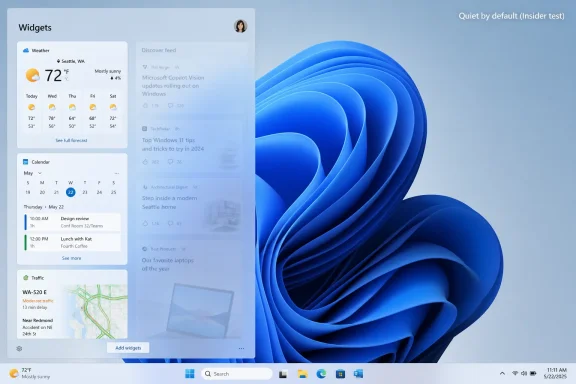
Microsoft began testing a quieter Windows 11 Widgets experience on May 1, 2026, in Insider preview builds, changing the board so it opens first to user-selected widgets instead of the MSN-powered Discover feed while disabling hover launch, taskbar badging, and some alerts by default. The practical effect is small but symbolically rich: one of Windows 11’s most irritating attention traps is being demoted from front door to side room. For users who have treated the taskbar weather button as a Trojan horse for celebrity gossip, chumbox headlines, and sponsored distraction, this is less a revolution than an overdue admission. Microsoft is not abandoning MSN, Microsoft Start, or the economics of engagement, but it is conceding that Windows has spent too much of its user trust on surfaces people never asked to become media products.
The important word in Microsoft’s latest Windows Insider language is not “widgets.” It is “quiet.” That is the company’s chosen framing for a set of default changes meant to make the Widgets board feel less distracting and less overwhelming, and it is revealing precisely because Windows users have been saying some version of that for years.
The current public experience is familiar to anyone who has brushed the lower-left corner of a Windows 11 desktop and watched a panel bloom into existence. What looks like a simple weather glance becomes a portal into Microsoft’s content business, with a news feed powered by MSN and Microsoft Start competing for attention against the actual widgets. The distinction matters. A weather tile is a utility; a feed is an editorial and advertising product.
Microsoft’s preview change rearranges that hierarchy. The board opens first to widgets rather than the Discover feed, hover launch is disabled by default, taskbar badges are turned off by default, and taskbar alerts are limited until the user engages with the experience. That is not the same as removing the feed, but in Windows design, defaults are policy. If the feed no longer wins the first click, Microsoft has changed the bargain.
This is the kind of adjustment that looks trivial until you consider the scale of Windows. A browser homepage can be changed, a mobile app can be deleted, and a website can be ignored. A Windows shell surface, by contrast, arrives preinstalled on work machines, school laptops, family PCs, gaming rigs, and cheap retail notebooks. When Microsoft puts content there by default, it is not merely offering a feature; it is spending the operating system’s credibility.
That history matters because Microsoft has repeatedly tried to make Windows not just the place where users run software, but the place where Microsoft routes attention. Internet Explorer’s old dominance made MSN a natural homepage. Later, Edge, Bing, Microsoft Start, Windows Search, lock screen tips, taskbar promotions, and the Widgets board became newer versions of the same instinct. The company has always understood that owning the doorway is almost as valuable as owning the destination.
The MSNBC history is often dragged into this discussion because Microsoft and NBC once joined forces on a cable-and-web news brand. Microsoft later exited that joint venture, and the cable network’s recent rebrand to MS NOW reflects a separate media-company restructuring rather than some new Windows integration scheme. But the broader association lingers because users are not wrong to see a through line between operating-system placement and media distribution.
Where the more partisan version of the argument usually goes wrong is in treating the entire problem as one of ideology. Plenty of users object to the political slant of stories they see in MSN surfaces, and that complaint is not imaginary simply because different users will disagree about the direction or severity of that slant. But the more durable issue is not whether a given headline flatters one political tribe or another. The issue is that Windows, a paid platform and a workplace tool, should not behave like a tabloid homepage by default.
But “you can turn it off” is not a neutral statement when the feature is shipped on by default. Defaults carry all the power in consumer software because most people do not investigate settings, most managed fleets avoid unnecessary tinkering unless something is actively breaking, and many users assume the vendor’s configuration is the intended one. Microsoft knows this. Every large platform company knows this.
That is why the new Insider behavior is so telling. Microsoft is not merely adding another toggle for people who already know where to look. It is changing what happens before the user has expressed a preference. By making the quieter configuration the starting point, the company is admitting that the previous default asked too much of the user’s attention.
This is also why the debate should not be reduced to whether MSN publishes content someone likes or dislikes. If Windows opened a full-screen feed of perfectly balanced, meticulously sourced, civic-minded reporting every morning, it would still be a questionable default for an operating system. The shell should not presume that the user came to Windows to be programmed, persuaded, teased, or monetized. The user came to get something done.
That matters because Windows occupies a strange position in 2026. It is still the default operating system of the PC world, especially in enterprise and gaming, but it is no longer culturally untouchable. Apple Silicon made the Mac a more credible everyday performance machine. ChromeOS remains entrenched in education. Linux has become less frightening for developers and tinkerers. Handheld gaming PCs have made users more aware that Windows is powerful but not always elegant on new form factors.
Microsoft’s own AI push has intensified the problem. Copilot may become a meaningful productivity layer, and on some workflows it already is. But when users see AI buttons, account prompts, content feeds, and ads as part of the same ambient pressure campaign, even good features inherit the suspicion created by bad ones. The company cannot ask users to trust deeper system intelligence while also treating every spare pixel as a promotional surface.
The security and reliability conversation compounds the issue. Microsoft has been publicly emphasizing Windows quality, performance, and calm defaults in 2026, and that language is not accidental. A platform that wants to be trusted with credentials, passkeys, enterprise data, AI recall features, endpoint management, and confidential work cannot afford to feel like it is constantly trying to bait the user into a click.
That modesty is precisely why the change is credible. Microsoft does not have to renounce content distribution to make Windows less annoying. It simply has to stop making the content feed the first-class experience in a panel that users reasonably expect to be about glanceable utilities. Weather, calendar, traffic, stocks, sports scores, package tracking, device status, and reminders all fit the widget concept. A news feed that behaves like a growth funnel does not.
The open-to-widgets-first behavior also restores a basic semantic honesty. If the button is called Widgets, the first thing it shows should be widgets. That sounds almost embarrassingly obvious, but modern platform design often fails at exactly this level because product teams optimize for engagement instead of expectation.
This is where Microsoft’s “quiet by default” phrase earns some respect. Quiet does not mean empty. Quiet means the system waits until it is summoned, presents what the user asked for, and resists the urge to turn a glance into a session. For a desktop operating system, that is not austerity. It is manners.
Administrators have long had to spend time removing consumer cruft from business devices. That can mean disabling widgets, suppressing consumer experiences, managing Edge behavior, controlling search integrations, removing app suggestions, or building deployment baselines that make Windows feel like a tool rather than a billboard. None of this is impossible, but every unnecessary default adds friction to deployment and support.
The problem is not that employees might read a news headline. The problem is that a managed endpoint should minimize unsanctioned attention surfaces, especially when those surfaces are dynamically updated by external content services. In heavily regulated environments, even a benign feed can create concerns about distraction, reputational context, data flows, personalization, or simply the perception that corporate machines are carrying consumer media channels.
Microsoft’s quieter Widgets defaults will not eliminate that management burden, but they point in the right direction. The company appears to be acknowledging that business and power users do not judge Windows only by benchmark scores or feature checklists. They judge it by whether the operating system gets out of the way.
But the strongest critique of Microsoft does not require proving that the company is trying to convert anyone’s politics through the widget pane. It is enough to observe that Microsoft placed a content feed inside the shell, made it prominent, and benefited when users engaged with it. That is an attention-economy critique, and it is harder for the company to wave away.
Partisan accusations also let Microsoft escape into a familiar defense: personalization, diversity of sources, editorial partners, and user controls. The company can argue forever about whether a given feed is balanced. It has a much harder time explaining why a productivity operating system should open a click-driven Discover page when the user thought they were checking the weather.
There is a lesson here for critics, too. If the complaint is “show my side instead,” the likely result is a more carefully tuned feed, not a quieter operating system. If the complaint is “stop treating the OS as a distribution channel for unsolicited media,” the target is the design itself. Windows users of every political persuasion should be able to agree on that.
On current Windows 11 systems, the quickest consumer fix is to open the Widgets board, go into its settings, and look for options controlling the feed, hover behavior, notifications, and the default board experience. Depending on build, region, and account state, the exact wording and layout can vary, but the goal is the same: stop the board from opening on hover, reduce badges and alerts, and make widgets rather than Discover the focus.
Users who never rely on the panel can remove the Widgets button from the taskbar entirely. That is often the cleanest option, especially on desktops where a browser bookmark, weather app, calendar app, or Start menu search already does the useful part without the feed baggage. If the taskbar is prime real estate, there is no obligation to donate part of it to Microsoft Start.
In managed environments, administrators should treat this as a baseline question rather than a personal preference. Decide whether Widgets belongs on corporate endpoints, document the policy, and apply it consistently. The point is not to win an argument about news. The point is to keep the desktop aligned with the work the device exists to do.
The Widgets board became a symbol because it was so blatant. A taskbar weather readout is useful. A glanceable panel is defensible. But putting the Discover feed in the user’s path made the whole thing feel like a bait-and-switch. It trained users to distrust even the useful part.
That is the danger Microsoft faces with Windows more broadly. If every new surface is presumed to be a funnel, users will approach genuinely helpful additions with suspicion. AI assistance, semantic search, adaptive settings, recall-like memory features, and proactive recommendations all require a reservoir of trust. Microsoft cannot build that reservoir while simultaneously draining it through noisy defaults.
The company seems to understand this at least partially. Its recent Windows quality messaging has emphasized calm, reliability, responsiveness, and user feedback. Those are the right words. The Widgets change is one of the better early tests of whether the words become operating principles.
The new Insider defaults do not make Microsoft altruistic. They make Microsoft responsive, and perhaps a little chastened. That is still progress. A platform company does not need to be morally transformed to make better defaults; it merely needs to decide that user irritation has become more expensive than feed engagement.
For Windows enthusiasts, the lesson is to keep pressing on defaults. Microsoft often responds after years of complaints not because it suddenly discovers the principle, but because telemetry, feedback, regulatory pressure, competitive anxiety, and press coverage finally point in the same direction. The Widgets board is not the only Windows surface that needs this treatment. It is just the one currently moving.
The real test will be whether Microsoft applies the same restraint elsewhere. If Start recommendations, lock screen content, Edge nudges, account prompts, and Copilot placement remain aggressive, the quieter Widgets board will look like a tactical concession. If the company makes calm defaults a broader rule, this could mark a meaningful course correction.
The concrete takeaways are narrow but useful:
 Microsoft Finally Admits the Widget Board Was Too Loud
The important word in Microsoft’s latest Windows Insider language is not “widgets.” It is “quiet.” That is the company’s chosen framing for a set of default changes meant to make the Widgets board feel less distracting and less overwhelming, and it is revealing precisely because Windows users have been saying some version of that for years.The current public experience is familiar to anyone who has brushed the lower-left corner of a Windows 11 desktop and watched a panel bloom into existence. What looks like a simple weather glance becomes a portal into Microsoft’s content business, with a news feed powered by MSN and Microsoft Start competing for attention against the actual widgets. The distinction matters. A weather tile is a utility; a feed is an editorial and advertising product.
Microsoft’s preview change rearranges that hierarchy. The board opens first to widgets rather than the Discover feed, hover launch is disabled by default, taskbar badges are turned off by default, and taskbar alerts are limited until the user engages with the experience. That is not the same as removing the feed, but in Windows design, defaults are policy. If the feed no longer wins the first click, Microsoft has changed the bargain.
This is the kind of adjustment that looks trivial until you consider the scale of Windows. A browser homepage can be changed, a mobile app can be deleted, and a website can be ignored. A Windows shell surface, by contrast, arrives preinstalled on work machines, school laptops, family PCs, gaming rigs, and cheap retail notebooks. When Microsoft puts content there by default, it is not merely offering a feature; it is spending the operating system’s credibility.
The MSN Feed Was Always More Than a News Pane
MSN began as a very different creature. The Microsoft Network launched alongside Windows 95 as an online service in an era when the web was not yet the assumed destination for every connected PC. It was Microsoft’s attempt to package the internet before the internet fully escaped packaging.That history matters because Microsoft has repeatedly tried to make Windows not just the place where users run software, but the place where Microsoft routes attention. Internet Explorer’s old dominance made MSN a natural homepage. Later, Edge, Bing, Microsoft Start, Windows Search, lock screen tips, taskbar promotions, and the Widgets board became newer versions of the same instinct. The company has always understood that owning the doorway is almost as valuable as owning the destination.
The MSNBC history is often dragged into this discussion because Microsoft and NBC once joined forces on a cable-and-web news brand. Microsoft later exited that joint venture, and the cable network’s recent rebrand to MS NOW reflects a separate media-company restructuring rather than some new Windows integration scheme. But the broader association lingers because users are not wrong to see a through line between operating-system placement and media distribution.
Where the more partisan version of the argument usually goes wrong is in treating the entire problem as one of ideology. Plenty of users object to the political slant of stories they see in MSN surfaces, and that complaint is not imaginary simply because different users will disagree about the direction or severity of that slant. But the more durable issue is not whether a given headline flatters one political tribe or another. The issue is that Windows, a paid platform and a workplace tool, should not behave like a tabloid homepage by default.
Defaults Are Where Microsoft Hides Its Strategy
Microsoft’s defenders often reach for the same answer: if you do not like the feed, turn it off. Technically, that is true. In Widgets settings, users can change how the board opens, disable parts of the experience, or remove the taskbar entry entirely. Administrators can go further with policy controls in managed environments.But “you can turn it off” is not a neutral statement when the feature is shipped on by default. Defaults carry all the power in consumer software because most people do not investigate settings, most managed fleets avoid unnecessary tinkering unless something is actively breaking, and many users assume the vendor’s configuration is the intended one. Microsoft knows this. Every large platform company knows this.
That is why the new Insider behavior is so telling. Microsoft is not merely adding another toggle for people who already know where to look. It is changing what happens before the user has expressed a preference. By making the quieter configuration the starting point, the company is admitting that the previous default asked too much of the user’s attention.
This is also why the debate should not be reduced to whether MSN publishes content someone likes or dislikes. If Windows opened a full-screen feed of perfectly balanced, meticulously sourced, civic-minded reporting every morning, it would still be a questionable default for an operating system. The shell should not presume that the user came to Windows to be programmed, persuaded, teased, or monetized. The user came to get something done.
The Backlash Was Never Just About News
The Widgets retreat arrives after a rough stretch for Windows perception. Microsoft has spent years adding cloud hooks, account prompts, Edge nudges, Bing integrations, Copilot buttons, Start menu recommendations, lock screen content, and setup screens that seem less interested in finishing setup than in cross-selling the rest of Microsoft. Some of these features are useful. Many are defensible in isolation. Together, they create a sense that Windows is increasingly a negotiation with Microsoft’s business model.That matters because Windows occupies a strange position in 2026. It is still the default operating system of the PC world, especially in enterprise and gaming, but it is no longer culturally untouchable. Apple Silicon made the Mac a more credible everyday performance machine. ChromeOS remains entrenched in education. Linux has become less frightening for developers and tinkerers. Handheld gaming PCs have made users more aware that Windows is powerful but not always elegant on new form factors.
Microsoft’s own AI push has intensified the problem. Copilot may become a meaningful productivity layer, and on some workflows it already is. But when users see AI buttons, account prompts, content feeds, and ads as part of the same ambient pressure campaign, even good features inherit the suspicion created by bad ones. The company cannot ask users to trust deeper system intelligence while also treating every spare pixel as a promotional surface.
The security and reliability conversation compounds the issue. Microsoft has been publicly emphasizing Windows quality, performance, and calm defaults in 2026, and that language is not accidental. A platform that wants to be trusted with credentials, passkeys, enterprise data, AI recall features, endpoint management, and confidential work cannot afford to feel like it is constantly trying to bait the user into a click.
The Fix Is Welcome Because It Is Modest
There is a temptation to overstate the May Insider change as Microsoft “removing” MSN from Windows 11. That is not what is happening. The feed remains available, Microsoft Start remains part of the ecosystem, and users who want proactive updates can turn some behavior back on. The company is hiding the noise, not dismantling the machine.That modesty is precisely why the change is credible. Microsoft does not have to renounce content distribution to make Windows less annoying. It simply has to stop making the content feed the first-class experience in a panel that users reasonably expect to be about glanceable utilities. Weather, calendar, traffic, stocks, sports scores, package tracking, device status, and reminders all fit the widget concept. A news feed that behaves like a growth funnel does not.
The open-to-widgets-first behavior also restores a basic semantic honesty. If the button is called Widgets, the first thing it shows should be widgets. That sounds almost embarrassingly obvious, but modern platform design often fails at exactly this level because product teams optimize for engagement instead of expectation.
This is where Microsoft’s “quiet by default” phrase earns some respect. Quiet does not mean empty. Quiet means the system waits until it is summoned, presents what the user asked for, and resists the urge to turn a glance into a session. For a desktop operating system, that is not austerity. It is manners.
The Enterprise Lesson Is Bigger Than the Consumer Toggle
For home users, the fix is mostly a quality-of-life improvement. For IT departments, it is a reminder that Microsoft’s consumer instincts routinely leak into professional environments. The same Windows image that runs in a teenager’s bedroom also runs in hospitals, law offices, logistics centers, schools, public agencies, and engineering firms. Defaults that seem merely tacky at home can become compliance irritants at work.Administrators have long had to spend time removing consumer cruft from business devices. That can mean disabling widgets, suppressing consumer experiences, managing Edge behavior, controlling search integrations, removing app suggestions, or building deployment baselines that make Windows feel like a tool rather than a billboard. None of this is impossible, but every unnecessary default adds friction to deployment and support.
The problem is not that employees might read a news headline. The problem is that a managed endpoint should minimize unsanctioned attention surfaces, especially when those surfaces are dynamically updated by external content services. In heavily regulated environments, even a benign feed can create concerns about distraction, reputational context, data flows, personalization, or simply the perception that corporate machines are carrying consumer media channels.
Microsoft’s quieter Widgets defaults will not eliminate that management burden, but they point in the right direction. The company appears to be acknowledging that business and power users do not judge Windows only by benchmark scores or feature checklists. They judge it by whether the operating system gets out of the way.
The Culture-War Framing Misses the More Damning Critique
The Blaze article that kicked this discussion back into circulation frames the MSN feed as preinstalled political propaganda, with Microsoft’s media history and MSNBC association serving as the villain origin story. That framing will resonate with some readers because MSN’s news selection often feels like something imposed rather than chosen. The anger is real, and the sense of imposition is justified.But the strongest critique of Microsoft does not require proving that the company is trying to convert anyone’s politics through the widget pane. It is enough to observe that Microsoft placed a content feed inside the shell, made it prominent, and benefited when users engaged with it. That is an attention-economy critique, and it is harder for the company to wave away.
Partisan accusations also let Microsoft escape into a familiar defense: personalization, diversity of sources, editorial partners, and user controls. The company can argue forever about whether a given feed is balanced. It has a much harder time explaining why a productivity operating system should open a click-driven Discover page when the user thought they were checking the weather.
There is a lesson here for critics, too. If the complaint is “show my side instead,” the likely result is a more carefully tuned feed, not a quieter operating system. If the complaint is “stop treating the OS as a distribution channel for unsolicited media,” the target is the design itself. Windows users of every political persuasion should be able to agree on that.
Users Can Already Take Back the Panel
The preview change is not yet a universal stable-channel reality for every Windows 11 machine. It is being tested through the Insider pipeline, and Microsoft’s standard caveat applies: preview features can change, roll out gradually, or fail to ship exactly as first described. That said, the direction is clear enough that users do not need to wait passively.On current Windows 11 systems, the quickest consumer fix is to open the Widgets board, go into its settings, and look for options controlling the feed, hover behavior, notifications, and the default board experience. Depending on build, region, and account state, the exact wording and layout can vary, but the goal is the same: stop the board from opening on hover, reduce badges and alerts, and make widgets rather than Discover the focus.
Users who never rely on the panel can remove the Widgets button from the taskbar entirely. That is often the cleanest option, especially on desktops where a browser bookmark, weather app, calendar app, or Start menu search already does the useful part without the feed baggage. If the taskbar is prime real estate, there is no obligation to donate part of it to Microsoft Start.
In managed environments, administrators should treat this as a baseline question rather than a personal preference. Decide whether Widgets belongs on corporate endpoints, document the policy, and apply it consistently. The point is not to win an argument about news. The point is to keep the desktop aligned with the work the device exists to do.
This Small Retreat Shows Where Windows Has Been Bleeding Trust
Microsoft’s challenge is that each individual annoyance is easy to dismiss. A feed here, a badge there, a Copilot prompt, an Edge recommendation, a OneDrive nudge, a Start menu suggestion — none of these alone destroys Windows. But trust does not usually fail all at once. It erodes through repeated reminders that the vendor’s priorities and the user’s priorities are not always the same.The Widgets board became a symbol because it was so blatant. A taskbar weather readout is useful. A glanceable panel is defensible. But putting the Discover feed in the user’s path made the whole thing feel like a bait-and-switch. It trained users to distrust even the useful part.
That is the danger Microsoft faces with Windows more broadly. If every new surface is presumed to be a funnel, users will approach genuinely helpful additions with suspicion. AI assistance, semantic search, adaptive settings, recall-like memory features, and proactive recommendations all require a reservoir of trust. Microsoft cannot build that reservoir while simultaneously draining it through noisy defaults.
The company seems to understand this at least partially. Its recent Windows quality messaging has emphasized calm, reliability, responsiveness, and user feedback. Those are the right words. The Widgets change is one of the better early tests of whether the words become operating principles.
The Weather Button Should Not Have Needed a Backlash
The most concrete story here is simple: Microsoft took a useful idea and wrapped it in the wrong incentive structure. Widgets should have been a lightweight dashboard from the beginning. Instead, the experience became tangled with a feed business that many users experienced as clutter, clickbait, or worse.The new Insider defaults do not make Microsoft altruistic. They make Microsoft responsive, and perhaps a little chastened. That is still progress. A platform company does not need to be morally transformed to make better defaults; it merely needs to decide that user irritation has become more expensive than feed engagement.
For Windows enthusiasts, the lesson is to keep pressing on defaults. Microsoft often responds after years of complaints not because it suddenly discovers the principle, but because telemetry, feedback, regulatory pressure, competitive anxiety, and press coverage finally point in the same direction. The Widgets board is not the only Windows surface that needs this treatment. It is just the one currently moving.
The real test will be whether Microsoft applies the same restraint elsewhere. If Start recommendations, lock screen content, Edge nudges, account prompts, and Copilot placement remain aggressive, the quieter Widgets board will look like a tactical concession. If the company makes calm defaults a broader rule, this could mark a meaningful course correction.
The New Default Is a Win, but Not a Pardon
Microsoft deserves credit for moving the Widgets board toward a quieter default, but not for requiring years of user irritation to get there. The feed was not an obscure experimental panel buried in a lab build. It sat on the taskbar of mainstream Windows machines and behaved like a media product wearing a utility costume.The concrete takeaways are narrow but useful:
- Microsoft is testing Windows 11 Widgets defaults that open first to widgets rather than the MSN-powered Discover feed.
- The same preview change disables hover launch and taskbar badging by default while limiting alerts until the user engages with Widgets.
- The MSN feed is not being removed from Windows, but it is being demoted from the first view in the tested experience.
- Users who dislike the current behavior can already reduce or disable much of it through Widgets and taskbar settings.
- IT administrators should treat Widgets as a managed desktop policy decision, not a harmless consumer flourish.
- The bigger issue is not one feed’s politics, but Microsoft’s habit of using Windows surfaces to route attention toward its services.
References
- Primary source: Blaze Media
Published: 2026-06-04T13:22:07.005983
Sick of Microsoft's preinstalled propaganda on your PC? Block it now. | Blaze Media
Time to say goodbye to the company's biased news feed.www.theblaze.com - Related coverage: windowslatest.com
Microsoft is finally turning off the MSN feed and ads in Windows 11 Widgets by default
Microsoft is making Windows 11 Widgets quiet by default. The update disables open-on-hover and hides the MSN feed for a cleaner taskbar. www.windowslatest.com
- Related coverage: windowscentral.com
Microsoft will hide Windows 11's annoying MSN feed by default as it moves to reduce ads and noise across the OS | Windows Central
A new Windows 11 preview build has confirmed that the OS will soon hide the MSN feed by default, replacing it with a new default behavior that opens straight to your widgets instead.www.windowscentral.com - Related coverage: techradar.com
Microsoft continues the good work on Windows 11, with tweaks to 'quiet' ads — and that big taskbar change is 'coming soon' | TechRadar
Useful changes for the widgets panel are in testingwww.techradar.com - Related coverage: abijita.com
Windows 11 Widgets Get Quieter as Microsoft Hides MSN Feed by Default
Microsoft is finally making a much-needed change to the widgets experience in Windows 11 by moving away from the cluttered MSN news feed.www.abijita.com - Official source: microsoft.com

Get to know MSN | Microsoft MSN
Stay up to date with MSN. Personalize your MSN feed by selecting topics and publishers that matter to you. With just a few clicks, make MSN uniquely yours.
www.microsoft.com
- Related coverage: amoledo.com
- Official source: support.microsoft.com
Stay Up to Date With News and Interests - Microsoft Support
Discover how to use the news and interests feature in Windows 10. Learn how to personalize your feed, select your interests, and follow your favorite publishers.support.microsoft.com
