

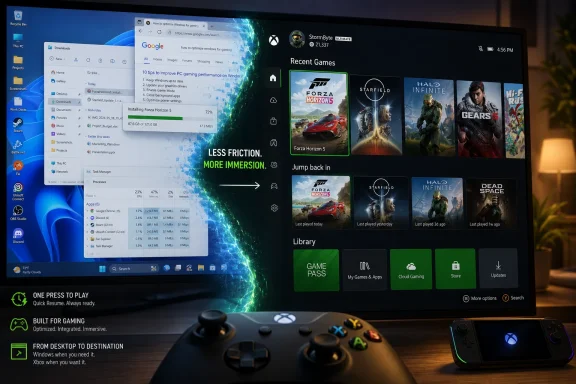
On April 30, 2026, Microsoft began rolling out Xbox mode to Windows 11 PCs in select markets, bringing a controller-optimized full-screen gaming interface from Windows handhelds to desktops, laptops, and tablets through the stable Windows update path over the coming weeks. The change is not Windows becoming an Xbox, and it is not a magic performance patch for every game. It is Microsoft admitting that the PC’s greatest strength—its openness—has become a usability tax the moment a player picks up a controller. The company’s bet is that Windows can keep its messy freedom while borrowing just enough console discipline to make PC gaming feel less like admin work.
For decades, Windows has been the default PC gaming platform because everything runs on it, not because everything feels good on it. Steam, Epic, Battle.net, EA, Ubisoft, Xbox, emulator front ends, overlay utilities, RGB tools, drivers, launchers, and storefronts all coexist in the same ecosystem. That openness is the point, but it also means a gaming PC often asks users to behave like sysadmins before they get to behave like players.
Xbox mode is Microsoft’s attempt to redraw the first screen. Instead of dropping users at the desktop, Start menu, taskbar, notifications, tray icons, and a pointer-driven interface, the mode presents a full-screen Xbox-style environment built around controller navigation. Recent games, library access, and supported storefront content are pushed forward; the rest of Windows recedes.
That matters most on handhelds, small tablets, couch PCs, and TV-connected desktops, where the traditional desktop is not just inelegant but actively hostile. A seven-inch Windows handheld can run a huge catalog of games, but using a tiny touchscreen to close launchers, tap through pop-ups, and summon an on-screen keyboard has always made the platform feel unfinished. Xbox mode does not solve every one of those problems, but it attacks the right layer: the first five minutes.
The important distinction is that Microsoft is not shipping a separate gaming OS. It is still Windows 11 underneath, with the same compatibility promises and the same accumulated baggage. The ambition is subtler and more difficult: make Windows behave like a console when you want to play, without giving up the desktop when you need it.
Handheld gaming PCs exposed Windows’ worst habits. A desktop operating system designed around windows, pointers, keyboards, and background multitasking was suddenly being asked to act like a Switch or a Steam Deck. The hardware could run games; the operating system often felt like the thing standing between the user and the game.
Microsoft’s first answer was to make the Xbox app and shell experience feel more console-like on handheld devices. The full-screen interface put controller navigation first, surfaced games more cleanly, and reduced some background distractions. Insider previews then extended that model to laptops, desktops, and tablets before the broader April 2026 rollout.
That path is telling. Microsoft did not begin by asking how to improve a high-end desktop tower with a mouse, keyboard, and three monitors. It began with devices where the old Windows model was obviously wrong. Now the company is generalizing those lessons back to the rest of the PC market.
This is how Windows often changes: not through a grand philosophical reset, but through a form factor that makes the old compromise embarrassing. Netbooks pressured Windows on footprint. Tablets pressured it on touch. Handheld gaming PCs are now pressuring it on controller-first simplicity.
A console hides the work. You turn it on, select a game, and play. A Windows gaming PC exposes the work: update the launcher, accept the prompt, close the overlay, find the executable, switch input methods, deal with a second account login, and maybe reboot after a driver change. PC gamers tolerate this because the payoff is performance, modding, flexibility, pricing, and an enormous library. But tolerance is not the same as satisfaction.
Xbox mode tries to impose a single front door on a house with many rooms. Its aggregated library is the most important part of that pitch, because Microsoft knows the Xbox app alone cannot be the center of PC gaming. A full-screen interface that only cared about Game Pass would be a walled garden with a Windows logo. A front end that can surface installed games from major PC storefronts has a chance to become a habit.
There is a strategic concession buried here. Microsoft is not pretending that PC gamers live entirely inside the Microsoft Store. It is acknowledging that Steam and other storefronts are part of the Windows gaming reality, and that the winning move may be to own the experience layer rather than every transaction.
That is why Xbox mode should be judged less like a new app and more like a shell experiment. If Microsoft can make the first screen after boot feel coherent, it can influence how users perceive the whole machine. The desktop remains available, but it no longer has to be the emotional center of a gaming session.
That does not mean the system-level work is irrelevant. On handhelds especially, reducing background activity, minimizing shell clutter, and booting into a gaming-focused environment can matter. A constrained device with limited memory, battery, and thermal headroom benefits from anything that keeps non-gaming work from crowding the game.
But there is a difference between trimming overhead and rewriting the laws of PC performance. A desktop RTX rig with plenty of RAM is unlikely to see a dramatic uplift simply because the interface changed. A handheld running close to the edge may notice smoother behavior, faster access, or fewer interruptions. Those are real benefits, but they are not the same thing as a new GPU driver or a game patch.
Microsoft is walking a narrow line. If it oversells Xbox mode as a performance feature, disappointment will follow quickly. If it undersells the reduction in friction, it risks missing the point of why console players like consoles in the first place. The real gain is less “more frames” than “less Windows in your face.”
That may sound modest, but it is not trivial. The best interface improvements disappear into muscle memory. If Xbox mode succeeds, users will stop thinking about it at all; they will simply sit down, pick up a controller, and get to the game faster.
The Steam Deck works because it makes PC games feel handheld-native even when they are not. Valve’s compatibility layer, verification program, suspend behavior, input mapping, and store integration all reinforce the same illusion: this is a console-like device powered by PC openness. Windows handhelds, by contrast, have often felt like small laptops with gamepads attached.
Xbox mode is Microsoft trying to close that perception gap without abandoning Windows compatibility. That is both its advantage and its burden. Windows can run more things with fewer translation layers, but it also carries more legacy assumptions. SteamOS can be opinionated because it is built around a narrower experience; Windows has to be permissive because permissiveness is its business model.
The question is whether Microsoft can make a permissive platform feel curated when it counts. That means more than a pretty dashboard. It means fewer modal interruptions, better controller handling, cleaner storefront integration, reliable suspend and resume behavior where hardware permits it, and sane defaults for users who do not want to tune a dozen utilities before launching a game.
Xbox mode is not yet Microsoft’s Steam Deck moment. It is the company admitting that Valve correctly identified the battlefield. The fight is no longer just about who has the bigger library. It is about who can make that library feel less fragmented.
In managed environments, the practical question is not whether Xbox mode is interesting. It is whether it appears where it should not. Schools, shared workstations, labs, and corporate laptops may need policy clarity around gaming components, Xbox app behavior, update timing, and user access. Microsoft’s gradual rollout helps, but staged availability also means administrators need to know what is arriving before users discover it.
There is also a support angle. Anything that changes shell behavior, update expectations, or full-screen system presentation can create helpdesk confusion. A user who accidentally enters a controller-first environment on a work laptop may not describe the problem as “Xbox mode.” They may simply say Windows looks strange.
That does not make the feature bad. It means Microsoft’s consumer-platform ambitions continue to spill into the same Windows estate that enterprises manage at scale. The cleanest future would include transparent controls, clear documentation, and predictable policy hooks so IT can decide where this experience belongs.
For home users, the ability to jump between Xbox mode and the standard desktop is a strength. For administrators, that same flexibility is something to inventory, govern, or disable depending on context. Windows’ greatest trick is being everywhere; its greatest management problem is also being everywhere.
That explains why the new interface is arriving on desktops and laptops, not just handhelds. Microsoft wants users to recognize Xbox across screens. The company’s long-term goal is not necessarily to make every PC owner abandon the desktop. It is to make Xbox feel like a native way to use Windows when gaming is the task.
This is also a hedge against hardware uncertainty. Console generations are slower, riskier, and more expensive to define than they used to be. PC hardware evolves continuously, handhelds have become a real category, and cloud gaming remains a strategic option even if it has not replaced local play. A consistent Xbox layer across Windows gives Microsoft more room to maneuver.
The danger is that “Xbox everywhere” becomes “Xbox nowhere in particular.” A console succeeds partly because it is specific: fixed hardware, known interface, predictable behavior. A Windows feature succeeds when it adapts to endless hardware combinations. Xbox mode has to borrow the confidence of the former while surviving the chaos of the latter.
That is a hard product problem, and Microsoft has not always been patient with hard product problems in consumer Windows. The April rollout is therefore less an ending than a test of institutional stamina. Will Xbox mode be refined until it becomes indispensable, or will it become another half-loved Windows surface that power users immediately replace?
Gradual rollout is standard Microsoft practice, but it also reflects the complexity of this feature. A full-screen gaming environment touches input, storefront discovery, installed-game detection, account state, Windows Update, the Xbox app, Game Bar, graphics settings, and potentially OEM utilities on handhelds and gaming laptops. The number of combinations is enormous.
Users eager to try it are being told to enable automatic updates and turn on the option to receive the latest updates as soon as they are available. Once it reaches a device, Xbox mode can be entered from Windows settings and exited back to the normal desktop. That reversibility is crucial, because Microsoft cannot afford to strand users in a shell that does not yet handle every edge case.
The measured rollout also gives Microsoft political cover. If the experience stumbles on certain devices, the company can tune availability rather than issue a dramatic retreat. If it works well, the phased approach lets Microsoft present expansion as momentum.
For enthusiasts, the right posture is curiosity mixed with skepticism. Try it if your setup fits the use case: controller gaming, TV output, handheld play, or a dedicated gaming profile. But do not expect a full console transformation, and do not confuse availability with maturity.
Source: Pune Mirror Xbox Mode Windows 11 delivers powerful console-style boost
 Microsoft Finally Treats the Living Room as a Windows Problem
For decades, Windows has been the default PC gaming platform because everything runs on it, not because everything feels good on it. Steam, Epic, Battle.net, EA, Ubisoft, Xbox, emulator front ends, overlay utilities, RGB tools, drivers, launchers, and storefronts all coexist in the same ecosystem. That openness is the point, but it also means a gaming PC often asks users to behave like sysadmins before they get to behave like players.Xbox mode is Microsoft’s attempt to redraw the first screen. Instead of dropping users at the desktop, Start menu, taskbar, notifications, tray icons, and a pointer-driven interface, the mode presents a full-screen Xbox-style environment built around controller navigation. Recent games, library access, and supported storefront content are pushed forward; the rest of Windows recedes.
That matters most on handhelds, small tablets, couch PCs, and TV-connected desktops, where the traditional desktop is not just inelegant but actively hostile. A seven-inch Windows handheld can run a huge catalog of games, but using a tiny touchscreen to close launchers, tap through pop-ups, and summon an on-screen keyboard has always made the platform feel unfinished. Xbox mode does not solve every one of those problems, but it attacks the right layer: the first five minutes.
The important distinction is that Microsoft is not shipping a separate gaming OS. It is still Windows 11 underneath, with the same compatibility promises and the same accumulated baggage. The ambition is subtler and more difficult: make Windows behave like a console when you want to play, without giving up the desktop when you need it.
The Handheld Experiment Escaped Its Box
Xbox mode did not appear out of nowhere. It began life as the Xbox Full Screen Experience, most visibly associated with Windows-based handhelds and the Asus ROG Xbox Ally line. That origin explains both the promise and the limitations of what is now arriving on ordinary PCs.Handheld gaming PCs exposed Windows’ worst habits. A desktop operating system designed around windows, pointers, keyboards, and background multitasking was suddenly being asked to act like a Switch or a Steam Deck. The hardware could run games; the operating system often felt like the thing standing between the user and the game.
Microsoft’s first answer was to make the Xbox app and shell experience feel more console-like on handheld devices. The full-screen interface put controller navigation first, surfaced games more cleanly, and reduced some background distractions. Insider previews then extended that model to laptops, desktops, and tablets before the broader April 2026 rollout.
That path is telling. Microsoft did not begin by asking how to improve a high-end desktop tower with a mouse, keyboard, and three monitors. It began with devices where the old Windows model was obviously wrong. Now the company is generalizing those lessons back to the rest of the PC market.
This is how Windows often changes: not through a grand philosophical reset, but through a form factor that makes the old compromise embarrassing. Netbooks pressured Windows on footprint. Tablets pressured it on touch. Handheld gaming PCs are now pressuring it on controller-first simplicity.
The Interface Is the Feature, Not the Decoration
It is tempting to dismiss Xbox mode as “just a launcher.” That critique is partly fair and mostly beside the point. In gaming, the launcher is not decoration; it is the ritual that determines whether a device feels immediate or fussy.A console hides the work. You turn it on, select a game, and play. A Windows gaming PC exposes the work: update the launcher, accept the prompt, close the overlay, find the executable, switch input methods, deal with a second account login, and maybe reboot after a driver change. PC gamers tolerate this because the payoff is performance, modding, flexibility, pricing, and an enormous library. But tolerance is not the same as satisfaction.
Xbox mode tries to impose a single front door on a house with many rooms. Its aggregated library is the most important part of that pitch, because Microsoft knows the Xbox app alone cannot be the center of PC gaming. A full-screen interface that only cared about Game Pass would be a walled garden with a Windows logo. A front end that can surface installed games from major PC storefronts has a chance to become a habit.
There is a strategic concession buried here. Microsoft is not pretending that PC gamers live entirely inside the Microsoft Store. It is acknowledging that Steam and other storefronts are part of the Windows gaming reality, and that the winning move may be to own the experience layer rather than every transaction.
That is why Xbox mode should be judged less like a new app and more like a shell experiment. If Microsoft can make the first screen after boot feel coherent, it can influence how users perceive the whole machine. The desktop remains available, but it no longer has to be the emotional center of a gaming session.
The Performance Story Needs a Cooler Head
The phrase “console-style boost” will do a lot of work in headlines, but WindowsForum readers should be careful about what kind of boost is actually on offer. Xbox mode is primarily an experience change, not a universal frame-rate upgrade. Microsoft’s language emphasizes immersion, controller navigation, library access, and reduced distractions more than hard performance claims.That does not mean the system-level work is irrelevant. On handhelds especially, reducing background activity, minimizing shell clutter, and booting into a gaming-focused environment can matter. A constrained device with limited memory, battery, and thermal headroom benefits from anything that keeps non-gaming work from crowding the game.
But there is a difference between trimming overhead and rewriting the laws of PC performance. A desktop RTX rig with plenty of RAM is unlikely to see a dramatic uplift simply because the interface changed. A handheld running close to the edge may notice smoother behavior, faster access, or fewer interruptions. Those are real benefits, but they are not the same thing as a new GPU driver or a game patch.
Microsoft is walking a narrow line. If it oversells Xbox mode as a performance feature, disappointment will follow quickly. If it undersells the reduction in friction, it risks missing the point of why console players like consoles in the first place. The real gain is less “more frames” than “less Windows in your face.”
That may sound modest, but it is not trivial. The best interface improvements disappear into muscle memory. If Xbox mode succeeds, users will stop thinking about it at all; they will simply sit down, pick up a controller, and get to the game faster.
Steam Big Picture Casts a Long Shadow
Any full-screen PC gaming interface arrives in the shadow of Steam Big Picture and, more importantly, SteamOS on the Steam Deck. Valve understood earlier than Microsoft that PC gaming’s problem was not only compatibility. It was posture.The Steam Deck works because it makes PC games feel handheld-native even when they are not. Valve’s compatibility layer, verification program, suspend behavior, input mapping, and store integration all reinforce the same illusion: this is a console-like device powered by PC openness. Windows handhelds, by contrast, have often felt like small laptops with gamepads attached.
Xbox mode is Microsoft trying to close that perception gap without abandoning Windows compatibility. That is both its advantage and its burden. Windows can run more things with fewer translation layers, but it also carries more legacy assumptions. SteamOS can be opinionated because it is built around a narrower experience; Windows has to be permissive because permissiveness is its business model.
The question is whether Microsoft can make a permissive platform feel curated when it counts. That means more than a pretty dashboard. It means fewer modal interruptions, better controller handling, cleaner storefront integration, reliable suspend and resume behavior where hardware permits it, and sane defaults for users who do not want to tune a dozen utilities before launching a game.
Xbox mode is not yet Microsoft’s Steam Deck moment. It is the company admitting that Valve correctly identified the battlefield. The fight is no longer just about who has the bigger library. It is about who can make that library feel less fragmented.
Enterprise Windows Has a Gaming Shell Now, Whether IT Likes It or Not
For sysadmins, Xbox mode will land as another reminder that Windows 11 is both a workplace platform and a consumer entertainment platform. That dual identity has always existed, but full-screen gaming experiences make it more visible. The same OS image that needs to satisfy compliance, productivity, and endpoint management expectations is also being shaped for couch gaming.In managed environments, the practical question is not whether Xbox mode is interesting. It is whether it appears where it should not. Schools, shared workstations, labs, and corporate laptops may need policy clarity around gaming components, Xbox app behavior, update timing, and user access. Microsoft’s gradual rollout helps, but staged availability also means administrators need to know what is arriving before users discover it.
There is also a support angle. Anything that changes shell behavior, update expectations, or full-screen system presentation can create helpdesk confusion. A user who accidentally enters a controller-first environment on a work laptop may not describe the problem as “Xbox mode.” They may simply say Windows looks strange.
That does not make the feature bad. It means Microsoft’s consumer-platform ambitions continue to spill into the same Windows estate that enterprises manage at scale. The cleanest future would include transparent controls, clear documentation, and predictable policy hooks so IT can decide where this experience belongs.
For home users, the ability to jump between Xbox mode and the standard desktop is a strength. For administrators, that same flexibility is something to inventory, govern, or disable depending on context. Windows’ greatest trick is being everywhere; its greatest management problem is also being everywhere.
The Bigger Play Is a Shared Xbox-PC Identity
Xbox mode matters because it fits a broader Microsoft strategy: Xbox is no longer merely a console brand. It is a services layer, a storefront, a controller vocabulary, a cloud endpoint, a Game Pass subscription, and now a Windows shell experience. The console remains important, but the boundary around it keeps getting softer.That explains why the new interface is arriving on desktops and laptops, not just handhelds. Microsoft wants users to recognize Xbox across screens. The company’s long-term goal is not necessarily to make every PC owner abandon the desktop. It is to make Xbox feel like a native way to use Windows when gaming is the task.
This is also a hedge against hardware uncertainty. Console generations are slower, riskier, and more expensive to define than they used to be. PC hardware evolves continuously, handhelds have become a real category, and cloud gaming remains a strategic option even if it has not replaced local play. A consistent Xbox layer across Windows gives Microsoft more room to maneuver.
The danger is that “Xbox everywhere” becomes “Xbox nowhere in particular.” A console succeeds partly because it is specific: fixed hardware, known interface, predictable behavior. A Windows feature succeeds when it adapts to endless hardware combinations. Xbox mode has to borrow the confidence of the former while surviving the chaos of the latter.
That is a hard product problem, and Microsoft has not always been patient with hard product problems in consumer Windows. The April rollout is therefore less an ending than a test of institutional stamina. Will Xbox mode be refined until it becomes indispensable, or will it become another half-loved Windows surface that power users immediately replace?
The First Wave Is Really a Public Beta With Better Branding
Microsoft says availability is rolling out gradually in select markets, with more users in those markets receiving access over the coming weeks. That phrasing matters. Even though Xbox mode is reaching the stable Windows 11 channel, it is still being introduced cautiously.Gradual rollout is standard Microsoft practice, but it also reflects the complexity of this feature. A full-screen gaming environment touches input, storefront discovery, installed-game detection, account state, Windows Update, the Xbox app, Game Bar, graphics settings, and potentially OEM utilities on handhelds and gaming laptops. The number of combinations is enormous.
Users eager to try it are being told to enable automatic updates and turn on the option to receive the latest updates as soon as they are available. Once it reaches a device, Xbox mode can be entered from Windows settings and exited back to the normal desktop. That reversibility is crucial, because Microsoft cannot afford to strand users in a shell that does not yet handle every edge case.
The measured rollout also gives Microsoft political cover. If the experience stumbles on certain devices, the company can tune availability rather than issue a dramatic retreat. If it works well, the phased approach lets Microsoft present expansion as momentum.
For enthusiasts, the right posture is curiosity mixed with skepticism. Try it if your setup fits the use case: controller gaming, TV output, handheld play, or a dedicated gaming profile. But do not expect a full console transformation, and do not confuse availability with maturity.
The April Rollout Draws the Shape of Microsoft’s Bet
The concrete details are simple enough, but their implications are larger than the settings toggle. Xbox mode is a statement about where Microsoft thinks Windows gaming has to go next.- Microsoft began rolling out Xbox mode for Windows 11 PCs on April 30, 2026, starting in select markets and expanding gradually over the following weeks.
- The feature brings a full-screen, controller-optimized Xbox-style interface to desktops, laptops, tablets, and handheld gaming PCs.
- The mode surfaces recent games and an aggregated library that can include Xbox Game Pass and installed games from major PC storefronts.
- Users can move between Xbox mode and the normal Windows 11 desktop, which keeps the feature from becoming a one-way shell replacement.
- The biggest immediate benefit is reduced friction, not guaranteed performance gains across every PC configuration.
- The long-term significance is Microsoft’s attempt to make Xbox an experience layer across Windows, not merely a console under the TV.
Source: Pune Mirror Xbox Mode Windows 11 delivers powerful console-style boost
