

Microsoft engineer Raymond Chen revived an old Windows emulation story on June 15, 2026, describing how a Windows x86-32 binary translator once detected a compiler-unrolled 64 KB stack-initialization routine and replaced 256 KB of generated stores with a compact loop. The anecdote is funny because it is petty in exactly the right way: an emulator team saw waste, took it personally, and fixed it below the application’s line of sight. It is also a useful reminder that Windows compatibility has never been magic. It has been an accumulation of sharp technical judgments about which inefficiencies deserve to be preserved and which deserve to be quietly corrected.
The code at the center of Chen’s story was not exotic. A program needed to allocate about 64 KB on the stack, verify that stack space existed, adjust the stack pointer, and initialize the buffer. In ordinary compiler output, that last step would be a small loop: set a count, store a byte, move to the next address, repeat.
Instead, the compiler had apparently unrolled the whole thing into 65,536 individual “write byte to memory” instructions. At four bytes per instruction, the initializer consumed roughly 256 KB of code to fill 64 KB of data. The absurdity is not just the ratio; it is the mismatch between what the program needed and what the binary demanded from every layer below it.
Loop unrolling is not inherently foolish. It can reduce branch overhead, expose instruction-level parallelism, and help a hot path run faster when the machine underneath has instruction cache, decode bandwidth, and branch prediction characteristics that reward it. But an optimization becomes a liability when it drags a simple memory clear into a quarter-megabyte slab of repetitive code.
That is what makes the old Windows story more than nostalgia. The emulator team was not merely optimizing for speed. It was defending the system against a local decision that made sense only in a narrow compiler worldview. The translator saw a pattern that was semantically simple, recognized that the byte-for-byte representation was pathological, and replaced it with the compact form the compiler should probably have emitted in the first place.
In other words, the x86-32 program became a kind of bytecode, and the emulator acted like a JIT compiler. That is a very Microsoft-flavored solution: do a lot of work behind the scenes so the user’s ancient executable does not have to know the world changed under it. It is also the kind of machinery that makes Windows compatibility simultaneously impressive and hard to explain.
The unnamed processor is left deliberately vague, and Chen notes that Windows has included x86 emulation for non-x86 systems more than once. The candidate list is not short. Windows NT had a serious multi-architecture life, with releases spanning Intel x86, MIPS, DEC Alpha, and PowerPC; later Windows eras brought Itanium and Arm into the compatibility story. Modern Windows on Arm still depends on emulation and translation to make Intel-era software feel less foreign on Qualcomm-era hardware.
That continuity is easy to miss because Microsoft markets the user-facing result, not the machinery. A Windows app launches, or it does not. A sysadmin cares whether the line-of-business installer runs, whether the VPN client loads, whether the accounting package can print, and whether the performance hit is tolerable. Underneath that binary outcome is a maze of translation, API thunking, filesystem redirection, registry redirection, processor-feature masking, and compatibility heuristics accumulated over decades.
Chen’s anecdote lands because it shows one of those heuristics in miniature. The translator did not merely preserve bad code. It understood enough about the bad code to recover the better idea hidden inside it.
The emulator team’s fix sits in that tradition, but with an interesting twist. Compatibility work is usually described as not breaking things. This was compatibility as selective improvement. The emulator preserved the program’s observable behavior while refusing to preserve its wasteful implementation strategy.
That is a delicate line. If a translator rewrites too aggressively, it risks changing semantics in some obscure edge case. If it refuses to rewrite anything, it becomes a faithful servant to every compiler mistake, malware trick, and accidental dependency in the software ecosystem. The art is knowing when a pattern is safe enough, common enough, or offensive enough to deserve a special case.
The old team evidently decided this 256 KB initializer cleared the bar. That tells us something about the engineering culture of the moment. The fix probably did not transform Windows as a whole. It probably did not move a benchmark headline. But it made a specific bad binary less bad for every machine that had to carry it.
That sort of intervention is hard to justify in modern product language. It does not produce a new feature tile. It does not make a launch keynote. It is not a Copilot button, a Store campaign, or a settings-page redesign. It is the kind of unglamorous systems work that users notice only when it is absent.
Still, the contrast stings because code size has a way of becoming invisible when hardware gets cheaper. Storage is abundant, RAM is abundant, bandwidth is abundant, and then suddenly none of it feels abundant because every layer spends the surplus before the user gets there. A 256 KB mistake once looked grotesque because it was easy to compare with the size of the data being initialized. Today, inefficiency often arrives as a thousand small dependencies, background services, preloaded runtimes, and duplicated frameworks.
The emulator story gives inefficiency a shape. Here is 64 KB of useful work. Here is 256 KB of code used to do it. Nobody needs a profiler flame graph to understand the waste.
Modern systems make that kind of accounting harder. If a Windows feature pulls in a webview, a machine-learning model, a service host, a cloud-authentication path, and a pile of UI assets, the cost is distributed across teams and justified across scenarios. Each piece may be defensible. The total can still feel absurd to the person watching updates consume disk, memory, and patience.
That does not mean the old world was better. It means the old world forced waste into the open. Constraints were brutal, but they clarified the argument.
Taste is not the same as preference. It is the trained instinct that says a solution is disproportionate, brittle, or misaligned with the machine. It is the discomfort a systems programmer feels when 256 KB of instruction stream exists to perform a job that a handful of instructions can express.
The translator special case was an act of taste encoded as software. The team decided that the binary’s literal form was not sacred. The observable behavior was sacred. The bloated representation was negotiable.
That is a powerful distinction for Windows, because Windows is full of layers that must decide what to honor. Should an app that lies about its OS version get the lie it expects? Should a game that assumes a particular CPU feature be allowed to see the real hardware? Should an installer writing into a protected location be redirected, blocked, or humored? Should a translated process receive exact guest behavior or host-optimized behavior that is indistinguishable for sane programs?
Every compatibility layer is a court of appeals for bad assumptions. The old emulator team’s ruling was clear: this code may run, but it does not get to waste a quarter-megabyte merely because a compiler once had a bad idea.
That is the danger of mechanical optimization. A transformation that improves one workload can become ridiculous when applied without proportion. Compilers are full of thresholds because performance engineering is full of tradeoffs. Unroll a loop a little and you may win. Unroll it enormously and you may punish the instruction cache, inflate the binary, slow translation, and make the rest of the system drag around your cleverness.
For a binary translator, code size is not an abstract problem. The translator has to decode guest instructions, map them to host operations, allocate space for generated code, manage caches, and maintain correctness across control flow. A huge slab of repetitive guest code can become a huge slab of generated host code unless the translator recognizes the pattern. The damage compounds.
The original compiler may have been trying to save cycles on native x86. The emulator team was dealing with the cost in a different reality. That is one of the recurring lessons of portability: an optimization tied too tightly to one machine can become pessimization on another.
This is why old binaries are not just historical artifacts. They are fossilized assumptions about the processors, memory hierarchies, compilers, and operating systems of their time. When Windows carries them forward, it carries those assumptions too.
The marketing around Windows on Arm tends to emphasize thin laptops, battery life, neural processing units, and native Arm64 apps. Those matter, but the practical adoption curve still depends on old software. Users do not buy architecture purity. They buy a Windows PC and expect their Windows things to work.
That expectation is brutal for Microsoft. Apple could push its Mac ecosystem through a more controlled transition to Apple Silicon, helped by a smaller hardware matrix, tighter developer leverage, and Rosetta 2’s reputation for doing the impossible. Microsoft’s world is messier: enterprise apps, shell extensions, anti-cheat systems, drivers, old installers, niche utilities, and software vendors that may no longer exist.
Prism is therefore not just a performance feature. It is a trust mechanism. It tells buyers that choosing Arm does not mean volunteering for incompatibility as a hobby. It tells developers that native Arm64 builds are desirable but not instantly mandatory. It tells OEMs that the app gap can be narrowed by engineering rather than wished away by branding.
Chen’s old emulator story is a useful lens for Prism because it shows what good translation often requires. The best emulator is not a literalist. It is a careful opportunist. It preserves behavior while exploiting patterns, shortcuts, caches, and host-native equivalents wherever it can prove the substitution is safe.
That is why the old story matters beyond its comic code-size ratio. A translator that silently rewrites a pathological function is doing exactly what enterprise buyers need from a compatibility layer: reducing the cost of legacy without requiring the legacy vendor to recompile. But the same silence that makes the fix elegant also makes administrators cautious. If something changes under the hood, who owns the failure when an edge case appears?
Microsoft has spent decades answering that question with a mixture of documentation, compatibility databases, app shims, support policies, and sheer inertia. The company’s institutional skill is not merely writing new APIs. It is absorbing the consequences of old ones.
The danger is that each absorbed consequence becomes part of the platform’s sediment. A special case here, a shim there, a translated path for this old app, a compatibility lie for that installer. Individually, these decisions keep customers working. Collectively, they make Windows harder to reason about, harder to slim down, and harder to modernize.
That is the bargain Windows has always struck. It wins by carrying the past forward. It pays by carrying the past forward.
But performance culture is not simply the pursuit of faster benchmark scores. It is a habit of asking whether the machine is being respected. The emulator team’s special case respected the machine by refusing to inflate generated code for no meaningful gain. That instinct remains relevant even when the machine has 32 GB of RAM and a multi-terabyte SSD.
Efficiency has also become a security and manageability issue. Smaller code can mean less attack surface, fewer cache misses, faster updates, simpler validation, and better behavior on low-end hardware. Waste is not merely inelegant; it can become operational drag.
Modern Windows has to optimize under constraints the old emulator team did not face. Spectre-class mitigations, driver hardening, virtualization-based security, encrypted storage, cloud identity, and a far larger threat model all have costs. Some bloat is really the price of surviving the present.
Yet that cannot be the end of the discussion. Security costs are easier to accept when the rest of the system looks disciplined. Users forgive overhead that protects them. They are less forgiving when the system feels heavy because product strategy, advertising surfaces, duplicated UX frameworks, or half-finished migrations have layered themselves into the daily path.
That is precisely why the story resonates. Platform trust is built from countless invisible decisions where engineers choose not to waste the user’s machine. The user rarely sees the decision. The user feels the accumulation.
Windows has always been judged by accumulations. Boot time, update time, Explorer responsiveness, memory pressure, battery life, driver stability, app launch latency, and the uncanny sense that the machine is either working with you or making you wait for reasons it refuses to explain. No single micro-optimization can redeem a platform that feels careless. But a culture of micro-optimizations can prevent that feeling from taking root.
There is also a lesson for developers outside Microsoft. Compilers are not absolution machines. Frameworks are not free. Generated code is still code. If your build system emits a mountain to express a molehill, somebody downstream may pay for it in cold-start time, cache pressure, binary size, or battery drain.
The best systems work often begins with offense. Not outrage, not performative minimalism, but the quiet professional irritation that says: this is bigger than it needs to be, slower than it needs to be, stranger than it needs to be. That irritation is productive when it leads to measurement, restraint, and fixes that make the whole stack less foolish.
The right answer is layered. Native Arm64 software should be the goal for performance-sensitive, driver-adjacent, and security-sensitive applications. Emulation should be good enough that ordinary users are not punished while the ecosystem catches up. Translation should be clever enough to identify waste, but conservative enough not to turn compatibility into guesswork.
That balance is difficult because the Windows software universe is unruly. Some apps are well-behaved Win32 citizens. Some are Electron bundles wearing native clothes. Some are ancient line-of-business programs nobody dares touch. Some depend on hooks, shell extensions, copy protection, kernel drivers, or CPU features that do not map cleanly across architectures.
Prism and its successors will succeed not by making every program fast, but by making enough programs boring. Boring is the highest compliment a compatibility layer can earn. The old emulator’s loop rewrite was boring in exactly that sense: the program still worked, the machine did less nonsense, and the user did not need to know.
Still, scarcity taught a discipline that abundance can dissolve. When every kilobyte matters, waste has a visible cost. When every machine is slow by modern standards, performance is not a feature; it is survival. When distribution is physical media or slow networks, code size is not a rounding error.
Today’s abundance is uneven. High-end desktops can hide waste. Cheap laptops cannot. Enterprise fleets cannot. Battery-powered Arm devices cannot. Virtual desktops, cloud PCs, and education machines cannot. Accessibility users and people on metered connections cannot.
That is why the 256 KB initializer is not just a museum piece. It is a warning against assuming that the platform below will always absorb careless output. Sometimes it will. Sometimes an emulator team will even save you from yourself. But every layer that makes waste tolerable also makes waste more likely.
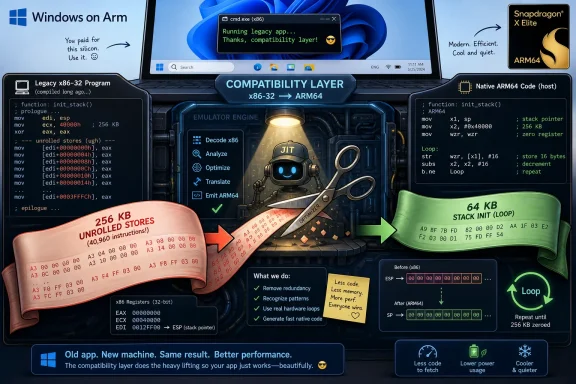 The Offense Was Not Slowness, but Waste
The code at the center of Chen’s story was not exotic. A program needed to allocate about 64 KB on the stack, verify that stack space existed, adjust the stack pointer, and initialize the buffer. In ordinary compiler output, that last step would be a small loop: set a count, store a byte, move to the next address, repeat.Instead, the compiler had apparently unrolled the whole thing into 65,536 individual “write byte to memory” instructions. At four bytes per instruction, the initializer consumed roughly 256 KB of code to fill 64 KB of data. The absurdity is not just the ratio; it is the mismatch between what the program needed and what the binary demanded from every layer below it.
Loop unrolling is not inherently foolish. It can reduce branch overhead, expose instruction-level parallelism, and help a hot path run faster when the machine underneath has instruction cache, decode bandwidth, and branch prediction characteristics that reward it. But an optimization becomes a liability when it drags a simple memory clear into a quarter-megabyte slab of repetitive code.
That is what makes the old Windows story more than nostalgia. The emulator team was not merely optimizing for speed. It was defending the system against a local decision that made sense only in a narrow compiler worldview. The translator saw a pattern that was semantically simple, recognized that the byte-for-byte representation was pathological, and replaced it with the compact form the compiler should probably have emitted in the first place.
Binary Translation Has Always Been Windows’ Uncomfortable Superpower
Chen says the unnamed emulator used binary translation rather than interpretation. That distinction matters. An interpreter reads each guest instruction and performs the equivalent host action one step at a time. A binary translator converts guest code into native host code, often caching the result so the next execution can run much faster.In other words, the x86-32 program became a kind of bytecode, and the emulator acted like a JIT compiler. That is a very Microsoft-flavored solution: do a lot of work behind the scenes so the user’s ancient executable does not have to know the world changed under it. It is also the kind of machinery that makes Windows compatibility simultaneously impressive and hard to explain.
The unnamed processor is left deliberately vague, and Chen notes that Windows has included x86 emulation for non-x86 systems more than once. The candidate list is not short. Windows NT had a serious multi-architecture life, with releases spanning Intel x86, MIPS, DEC Alpha, and PowerPC; later Windows eras brought Itanium and Arm into the compatibility story. Modern Windows on Arm still depends on emulation and translation to make Intel-era software feel less foreign on Qualcomm-era hardware.
That continuity is easy to miss because Microsoft markets the user-facing result, not the machinery. A Windows app launches, or it does not. A sysadmin cares whether the line-of-business installer runs, whether the VPN client loads, whether the accounting package can print, and whether the performance hit is tolerable. Underneath that binary outcome is a maze of translation, API thunking, filesystem redirection, registry redirection, processor-feature masking, and compatibility heuristics accumulated over decades.
Chen’s anecdote lands because it shows one of those heuristics in miniature. The translator did not merely preserve bad code. It understood enough about the bad code to recover the better idea hidden inside it.
The Compatibility Contract Includes Fixing Other People’s Mistakes
Windows’ greatest commercial advantage has often been its least elegant technical burden: old binaries keep running. That promise is not just a matter of keeping old APIs around. It requires the operating system to tolerate programs that depended on undocumented behavior, compiler quirks, timing assumptions, broken installers, and version checks that age badly.The emulator team’s fix sits in that tradition, but with an interesting twist. Compatibility work is usually described as not breaking things. This was compatibility as selective improvement. The emulator preserved the program’s observable behavior while refusing to preserve its wasteful implementation strategy.
That is a delicate line. If a translator rewrites too aggressively, it risks changing semantics in some obscure edge case. If it refuses to rewrite anything, it becomes a faithful servant to every compiler mistake, malware trick, and accidental dependency in the software ecosystem. The art is knowing when a pattern is safe enough, common enough, or offensive enough to deserve a special case.
The old team evidently decided this 256 KB initializer cleared the bar. That tells us something about the engineering culture of the moment. The fix probably did not transform Windows as a whole. It probably did not move a benchmark headline. But it made a specific bad binary less bad for every machine that had to carry it.
That sort of intervention is hard to justify in modern product language. It does not produce a new feature tile. It does not make a launch keynote. It is not a Copilot button, a Store campaign, or a settings-page redesign. It is the kind of unglamorous systems work that users notice only when it is absent.
Code Size Became Somebody Else’s Problem
The temptation is to turn this into a simple morality tale about how old programmers cared and modern programmers do not. That is too easy, and not entirely fair. Modern Windows operates in a world of different constraints: security mitigations, telemetry, localization, accessibility, driver isolation, containerization, bundled frameworks, GPU stacks, browser engines, AI components, and hardware diversity that would have seemed extravagant in the 1990s.Still, the contrast stings because code size has a way of becoming invisible when hardware gets cheaper. Storage is abundant, RAM is abundant, bandwidth is abundant, and then suddenly none of it feels abundant because every layer spends the surplus before the user gets there. A 256 KB mistake once looked grotesque because it was easy to compare with the size of the data being initialized. Today, inefficiency often arrives as a thousand small dependencies, background services, preloaded runtimes, and duplicated frameworks.
The emulator story gives inefficiency a shape. Here is 64 KB of useful work. Here is 256 KB of code used to do it. Nobody needs a profiler flame graph to understand the waste.
Modern systems make that kind of accounting harder. If a Windows feature pulls in a webview, a machine-learning model, a service host, a cloud-authentication path, and a pile of UI assets, the cost is distributed across teams and justified across scenarios. Each piece may be defensible. The total can still feel absurd to the person watching updates consume disk, memory, and patience.
That does not mean the old world was better. It means the old world forced waste into the open. Constraints were brutal, but they clarified the argument.
The Emulator Team Chose Taste Over Blind Fidelity
The most revealing phrase in Chen’s account is that the code “offended” the team. That is not a benchmark term. It is an aesthetic term, and engineering taste matters more than the industry likes to admit.Taste is not the same as preference. It is the trained instinct that says a solution is disproportionate, brittle, or misaligned with the machine. It is the discomfort a systems programmer feels when 256 KB of instruction stream exists to perform a job that a handful of instructions can express.
The translator special case was an act of taste encoded as software. The team decided that the binary’s literal form was not sacred. The observable behavior was sacred. The bloated representation was negotiable.
That is a powerful distinction for Windows, because Windows is full of layers that must decide what to honor. Should an app that lies about its OS version get the lie it expects? Should a game that assumes a particular CPU feature be allowed to see the real hardware? Should an installer writing into a protected location be redirected, blocked, or humored? Should a translated process receive exact guest behavior or host-optimized behavior that is indistinguishable for sane programs?
Every compatibility layer is a court of appeals for bad assumptions. The old emulator team’s ruling was clear: this code may run, but it does not get to waste a quarter-megabyte merely because a compiler once had a bad idea.
The Compiler Was Optimizing for a Machine That Did Not Exist
It is possible to imagine how the original compiler arrived at the unrolled monstrosity. An optimization pass saw a fixed-size initialization loop. It knew branches cost something. It knew straight-line stores might be faster. It may have had thresholds tuned for smaller loops, then failed spectacularly when handed a 65,536-iteration case.That is the danger of mechanical optimization. A transformation that improves one workload can become ridiculous when applied without proportion. Compilers are full of thresholds because performance engineering is full of tradeoffs. Unroll a loop a little and you may win. Unroll it enormously and you may punish the instruction cache, inflate the binary, slow translation, and make the rest of the system drag around your cleverness.
For a binary translator, code size is not an abstract problem. The translator has to decode guest instructions, map them to host operations, allocate space for generated code, manage caches, and maintain correctness across control flow. A huge slab of repetitive guest code can become a huge slab of generated host code unless the translator recognizes the pattern. The damage compounds.
The original compiler may have been trying to save cycles on native x86. The emulator team was dealing with the cost in a different reality. That is one of the recurring lessons of portability: an optimization tied too tightly to one machine can become pessimization on another.
This is why old binaries are not just historical artifacts. They are fossilized assumptions about the processors, memory hierarchies, compilers, and operating systems of their time. When Windows carries them forward, it carries those assumptions too.
Windows on Arm Is the Same Argument With Better Branding
The story feels ancient, but the technical argument is not. Windows on Arm lives or dies by the same question: how much of the x86 world can Microsoft translate without making users feel the translation tax? The modern answer is Prism, the emulator Microsoft introduced for Windows 11 version 24H2 to improve performance for emulated applications on Arm-based PCs.The marketing around Windows on Arm tends to emphasize thin laptops, battery life, neural processing units, and native Arm64 apps. Those matter, but the practical adoption curve still depends on old software. Users do not buy architecture purity. They buy a Windows PC and expect their Windows things to work.
That expectation is brutal for Microsoft. Apple could push its Mac ecosystem through a more controlled transition to Apple Silicon, helped by a smaller hardware matrix, tighter developer leverage, and Rosetta 2’s reputation for doing the impossible. Microsoft’s world is messier: enterprise apps, shell extensions, anti-cheat systems, drivers, old installers, niche utilities, and software vendors that may no longer exist.
Prism is therefore not just a performance feature. It is a trust mechanism. It tells buyers that choosing Arm does not mean volunteering for incompatibility as a hobby. It tells developers that native Arm64 builds are desirable but not instantly mandatory. It tells OEMs that the app gap can be narrowed by engineering rather than wished away by branding.
Chen’s old emulator story is a useful lens for Prism because it shows what good translation often requires. The best emulator is not a literalist. It is a careful opportunist. It preserves behavior while exploiting patterns, shortcuts, caches, and host-native equivalents wherever it can prove the substitution is safe.
Enterprise IT Reads Every Emulator as a Risk Ledger
For enthusiasts, emulation is a marvel. For enterprise IT, it is a risk ledger. Every translated application raises questions: does it perform well enough, does it behave consistently, does it load plugins, does it interact with endpoint security, does it survive updates, and does the vendor support the configuration when something breaks?That is why the old story matters beyond its comic code-size ratio. A translator that silently rewrites a pathological function is doing exactly what enterprise buyers need from a compatibility layer: reducing the cost of legacy without requiring the legacy vendor to recompile. But the same silence that makes the fix elegant also makes administrators cautious. If something changes under the hood, who owns the failure when an edge case appears?
Microsoft has spent decades answering that question with a mixture of documentation, compatibility databases, app shims, support policies, and sheer inertia. The company’s institutional skill is not merely writing new APIs. It is absorbing the consequences of old ones.
The danger is that each absorbed consequence becomes part of the platform’s sediment. A special case here, a shim there, a translated path for this old app, a compatibility lie for that installer. Individually, these decisions keep customers working. Collectively, they make Windows harder to reason about, harder to slim down, and harder to modernize.
That is the bargain Windows has always struck. It wins by carrying the past forward. It pays by carrying the past forward.
Performance Culture Was Never Just About Benchmarks
The Register’s jab that Microsoft engineers once cared about performance because they “rerolled” a grotesquely unrolled loop is funny because it pokes a real bruise. Many Windows users feel that modern software has become too comfortable spending resources. Updates are large. Background activity is mysterious. UI layers can feel heavier than the tasks they present.But performance culture is not simply the pursuit of faster benchmark scores. It is a habit of asking whether the machine is being respected. The emulator team’s special case respected the machine by refusing to inflate generated code for no meaningful gain. That instinct remains relevant even when the machine has 32 GB of RAM and a multi-terabyte SSD.
Efficiency has also become a security and manageability issue. Smaller code can mean less attack surface, fewer cache misses, faster updates, simpler validation, and better behavior on low-end hardware. Waste is not merely inelegant; it can become operational drag.
Modern Windows has to optimize under constraints the old emulator team did not face. Spectre-class mitigations, driver hardening, virtualization-based security, encrypted storage, cloud identity, and a far larger threat model all have costs. Some bloat is really the price of surviving the present.
Yet that cannot be the end of the discussion. Security costs are easier to accept when the rest of the system looks disciplined. Users forgive overhead that protects them. They are less forgiving when the system feels heavy because product strategy, advertising surfaces, duplicated UX frameworks, or half-finished migrations have layered themselves into the daily path.
The Small Fixes Are Where Platform Trust Is Won
The emulator team’s intervention almost certainly did not appear in release notes. Nobody bought a workstation because Microsoft converted a silly unrolled initializer back into a loop. No marketing page celebrated the quarter-megabyte not generated.That is precisely why the story resonates. Platform trust is built from countless invisible decisions where engineers choose not to waste the user’s machine. The user rarely sees the decision. The user feels the accumulation.
Windows has always been judged by accumulations. Boot time, update time, Explorer responsiveness, memory pressure, battery life, driver stability, app launch latency, and the uncanny sense that the machine is either working with you or making you wait for reasons it refuses to explain. No single micro-optimization can redeem a platform that feels careless. But a culture of micro-optimizations can prevent that feeling from taking root.
There is also a lesson for developers outside Microsoft. Compilers are not absolution machines. Frameworks are not free. Generated code is still code. If your build system emits a mountain to express a molehill, somebody downstream may pay for it in cold-start time, cache pressure, binary size, or battery drain.
The best systems work often begins with offense. Not outrage, not performative minimalism, but the quiet professional irritation that says: this is bigger than it needs to be, slower than it needs to be, stranger than it needs to be. That irritation is productive when it leads to measurement, restraint, and fixes that make the whole stack less foolish.
The 256 KB Loop Is a Tiny Parable for the Arm Transition
As Windows moves deeper into its Arm era, Microsoft needs exactly the kind of engineering judgment Chen’s story illustrates. The company cannot simply tell developers to rebuild everything as Arm64 and wait for compliance. It also cannot emulate the past so literally that Arm PCs feel like compatibility science projects.The right answer is layered. Native Arm64 software should be the goal for performance-sensitive, driver-adjacent, and security-sensitive applications. Emulation should be good enough that ordinary users are not punished while the ecosystem catches up. Translation should be clever enough to identify waste, but conservative enough not to turn compatibility into guesswork.
That balance is difficult because the Windows software universe is unruly. Some apps are well-behaved Win32 citizens. Some are Electron bundles wearing native clothes. Some are ancient line-of-business programs nobody dares touch. Some depend on hooks, shell extensions, copy protection, kernel drivers, or CPU features that do not map cleanly across architectures.
Prism and its successors will succeed not by making every program fast, but by making enough programs boring. Boring is the highest compliment a compatibility layer can earn. The old emulator’s loop rewrite was boring in exactly that sense: the program still worked, the machine did less nonsense, and the user did not need to know.
A Byte-Saving Anecdote Carries a Modern Warning
The old Windows team’s irritation should not be romanticized into a lost golden age. Old software was full of hacks, crashes, unsafe assumptions, and heroic compromises that modern users would not tolerate. The machines were smaller, but they were not purer.Still, scarcity taught a discipline that abundance can dissolve. When every kilobyte matters, waste has a visible cost. When every machine is slow by modern standards, performance is not a feature; it is survival. When distribution is physical media or slow networks, code size is not a rounding error.
Today’s abundance is uneven. High-end desktops can hide waste. Cheap laptops cannot. Enterprise fleets cannot. Battery-powered Arm devices cannot. Virtual desktops, cloud PCs, and education machines cannot. Accessibility users and people on metered connections cannot.
That is why the 256 KB initializer is not just a museum piece. It is a warning against assuming that the platform below will always absorb careless output. Sometimes it will. Sometimes an emulator team will even save you from yourself. But every layer that makes waste tolerable also makes waste more likely.
The Rerolled Loop Leaves a Trail of Practical Lessons
The most concrete value in Chen’s story is not that one emulator team saved a few bytes in one strange case. It is that the team recognized a bad abstraction boundary and repaired it where the repair would help. That is still the standard Windows must meet as it stretches from legacy x86 desktops to Arm laptops and whatever hybrid silicon comes next.- A binary translator is not merely an interpreter with better speed; it is a policy engine deciding which guest-code patterns deserve native equivalents.
- Loop unrolling can be a valid optimization, but unrolling 65,536 byte stores into roughly 256 KB of code is a reminder that optimization without proportion becomes waste.
- Windows compatibility depends on preserving application behavior, not necessarily preserving every inefficient implementation detail produced by old tools.
- Modern Windows on Arm faces the same philosophical challenge: it must make old x86 and x64 software run well enough while encouraging developers to ship native Arm64 code.
- Enterprise administrators should treat emulation as both an asset and a dependency, because it can rescue legacy workloads while adding another layer to test, support, and explain.
- The broader Windows ecosystem still benefits when engineers treat code size, cache pressure, startup time, and background overhead as first-class user experience issues.
References
- Primary source: The Register
Published: 2026-06-17T12:01:08.875919
Windows devs rerolled old code to save precious bytes
There was a time when Microsoft cared about every KBwww.theregister.com - Related coverage: elsolitario.org
Emulador x86: cuando Windows reescribía código basura
Un emulador x86 de Windows halló código tan malo —256 KB para inicializar 64 KB— que su traductor binario lo reescribía al vuelo. La historia y su lección.elsolitario.org - Related coverage: eklitzke.org
x86 Register Encoding
eklitzke.org
- Related coverage: redops.at
- Related coverage: stackoverflow.com
assembly - Set all bits in CPU register to 1 efficiently - Stack Overflow
To clear all bits you often see an exclusive or as in XOR eax, eax. Is there such a trick for the opposite too?

All I can think of is to invert the zeroes with an extra instruction.stackoverflow.com
- Official source: developer.microsoft.com
Windows Apps on Arm | Microsoft Developer
Windows PCs with Arm chip processors offer stronger battery life, cellular connectivity, and new AI-focused devices.developer.microsoft.com

- Official source: learn.microsoft.com
Windows on Arm documentation | Microsoft Learn
Learn more about running Windows on PCs powered by Arm processors. Find guidance on how to build Windows apps for Arm64 devices or iteratively update your existing Windows app to take advantage of Arm64 native capabilities.learn.microsoft.com - Official source: support.microsoft.com
Windows Arm-based PCs FAQ | Microsoft Support
Learn about using a Windows Arm-based PC and get answers to common questions about Arm-based PCs.support.microsoft.com - Related coverage: techrepublic.com
Windows on Arm: This is how well 64-bit emulation is working - TechRepublic
64-bit apps on Windows on Arm are a work in progress: some are native, many work well with the new 64-bit emulation, but others will have to wait for more support in insider builds of Windows.www.techrepublic.com
- Official source: directionsonmicrosoft.com
x86 32-bit Windows Emulation on ARM Processors - Directions on Microsoft
Always Connected devices use ARM processors but can run many existing x86 Win32 applications unmodified using Windows on Windows (WOW) emulation. As shown in the illustration, Windows 10 and most of its components, such as the Explorer shell and Edge browser, run as native processes (dark shade)...www.directionsonmicrosoft.com - Related coverage: windowscentral.com
Your Windows 11 on Arm PC can now run even more x86 apps and games thanks to Microsoft's latest Prism emulation update | Windows Central
Microsoft has released an update for its Prism emulator that adds support for x86 apps that require AVX and AVX2 extensions, such as Ableton Live 12.www.windowscentral.com - Related coverage: tomshardware.com
Xbox app is now available on all Arm-based Windows 11 devices — Microsoft says ‘more than 85% of Game Pass catalog is compatible with these PCs’ | Tom's Hardware
This move opens gaming to Snapdragon X-powered laptops.www.tomshardware.com - Related coverage: techradar.com
It took nearly a year, but Microsoft has finally improved Windows 11 to run more PC games on Arm laptops | TechRadar
Big Prism upgrade with Windows 11's October updatewww.techradar.com - Related coverage: bitsavers.org
69727 0796 Microsoft Windows NT Version 4.0 Hardware Compatibility List 199607
PDF documentwww.bitsavers.org
- Related coverage: bitsavers.computerhistory.org
