

Windows 7 Windows Movie Maker Won't Load Videos Properly/Melty

Zowie

New Member
Joined
Jan 28, 2016
Messages
10
Hello! First time posting here, I believe.
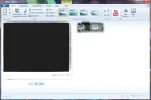
Anyway, I'm having problems with getting my Windows Movie Maker to work properly. All off the graphics inside of the frame become "melty" when I try to take any actions.

I've attached a screenshot of what happens.

This has also happened to my Microsoft Office Word, too, and I believe I had to change something to do with graphics, like the accelerator, but that fix hasn't worked for Windows Movie Maker.
 

Attachments

  • movie maker.webp
    movie maker.webp
    33.5 KB · Views: 350
Solution
Ok try this, uninstall windows essentials.

Reboot and create a system restore point.

Download Link Removed and run the registry cleaner making sure you create a back up of the original registry when prompted.

Reboot again and then look in the start menu for command prompt, right click on it and run as admin. Type:
sfc /scannow
Press enter and await results

Reboot once the scan has finished and then try installing the latest version of Essentials/Moviemaker.

Normally I wouldn't recommend using a registry cleaner but as we are getting no where it might be worth a try.

kemical

Essential Member
Joined
Aug 28, 2007
Messages
36,176
Hi Zowie,
welcome to the forum! Can you post which computer your using? Make and model please :) Also can you explain a little more on what you changed in the graphics?
Have you updated any drivers recently?
 

Zowie

New Member
Joined
Jan 28, 2016
Messages
10
I have an HP Pavilion dv7 running Windows 7. I haven't changed anything about my graphics recently, and at least not around the time this started happening again (that I know of). This is just something that happens to my Windows applications every once in awhile, not sure why. This started happening several months ago, and I kept searching for ways to uninstall/reinstall instead, but I guess I can't actually do that? Or I need to install some sort of media bundle. Been looking for a fix for quite some time.
 

kemical

Essential Member
Joined
Aug 28, 2007
Messages
36,176
Hi,
well you can download the Moviemaker here, why not try removing the app and re-installing?
Link Removed

Look in the start menu for command prompt, right click on it and run as administrator. Type:
sfc /scannow
Press enter and await results.

Check for Malware using Malwarebytes (free):
Free Anti-Malware & Internet Security Software

If you already running an anti-virus application can you post which one it is?

Try running something like Ccleaner to clean the system from temporary files and the like. Please do not use the registry cleaner part as Windows doesn't need it and it usually ends up causing issues.
Link Removed
 

Zowie

New Member
Joined
Jan 28, 2016
Messages
10
I use Avast Antivirus, already have (and ran) Malwarebytes. I also ran that scanner, but it disappeared after it was done, so I don't know what the results were.

I uninstalled Movie Maker, but then I tried downloading that bundle, and now I have all the other Windows Essentials (Live, Family Protection, etc.) but no Movie Maker.

Selecting what I wanted to download didn't work, either, as it would just "update" it rather than reinstall it.
 

kemical

Essential Member
Joined
Aug 28, 2007
Messages
36,176
Have you considered going back in time Zowie? System restore might get you back to a point when it worked?
 

kemical

Essential Member
Joined
Aug 28, 2007
Messages
36,176
It might do... Tell me did you install anything new before it stopped working or had a crash or did it just stop one day?
 

Zowie

New Member
Joined
Jan 28, 2016
Messages
10
No, this just seems to happen randomly with my Microsoft programs. Or at least random to me.
Recently I did have a bluescreen crash, with "Pfn_list_corrupt" as the problem, but it has been after the Movie Maker was messing up.
 

kemical

Essential Member
Joined
Aug 28, 2007
Messages
36,176
Hmm.. Are you running more than one Anti-virus application?

If not I'd try removing Avast as a test.
 

Zowie

New Member
Joined
Jan 28, 2016
Messages
10
I am not. But I did remove avast and try. I still can't seem to get any Movie Maker to download, now. Still says I already have the latest version of Essentials.
 

bochane

Excellent Member
Joined
Oct 18, 2012
Messages
1,403
Which display adapter do you use? Have you the latest driver for it? Is there some kind of settings option when you right click on the desktop background?
 

Zowie

New Member
Joined
Jan 28, 2016
Messages
10
Which display adapter do you use? Have you the latest driver for it? Is there some kind of settings option when you right click on the desktop background?
Would that be the AMD Catalyst Control Center, or the Intel Graphics and Media Control Panel? I have a "Graphics Properties" option.
 

bochane

Excellent Member
Joined
Oct 18, 2012
Messages
1,403
Would that be the AMD Catalyst Control Center, or the Intel Graphics and Media Control Panel? I have a "Graphics Properties" option.
Don't know, but look through them and play with settings like "Acceleration", if it is on switch it off. Do it one by one, undo every change before going to the next one. You might find the solution.
And the suggestion of Kemical sounds as a very good advice.
 

Zowie

New Member
Joined
Jan 28, 2016
Messages
10

kemical

Essential Member
Joined
Aug 28, 2007
Messages
36,176
Ok try this, uninstall windows essentials.

Reboot and create a system restore point.

Download Link Removed and run the registry cleaner making sure you create a back up of the original registry when prompted.

Reboot again and then look in the start menu for command prompt, right click on it and run as admin. Type:
sfc /scannow
Press enter and await results

Reboot once the scan has finished and then try installing the latest version of Essentials/Moviemaker.

Normally I wouldn't recommend using a registry cleaner but as we are getting no where it might be worth a try.
 

Solution

Zowie

New Member
Joined
Jan 28, 2016
Messages
10
Ok try this, uninstall windows essentials.

Reboot and create a system restore point.

Download Link Removed and run the registry cleaner making sure you create a back up of the original registry when prompted.

Reboot again and then look in the start menu for command prompt, right click on it and run as admin. Type:
sfc /scannow
Press enter and await results

Reboot once the scan has finished and then try installing the latest version of Essentials/Moviemaker.

Normally I wouldn't recommend using a registry cleaner but as we are getting no where it might be worth a try.
But I can't seem to locate Window's Essentials to uninstall it, now.
 

kemical

Essential Member
Joined
Aug 28, 2007
Messages
36,176
Hmm... What happens if you try to re-install it? If you get a window with some options like repair or uninstall then try either of those options and see what it gives you.

Failing that what results do you get if you do a search?
 

Zowie

New Member
Joined
Jan 28, 2016
Messages
10
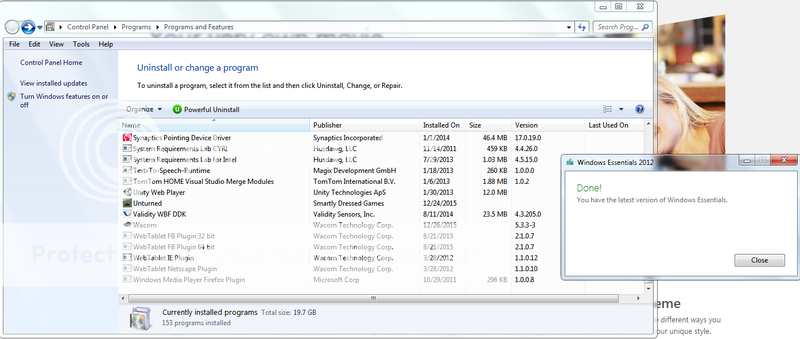
No other options appear when I try to re-install. It just says I have the newest version installed. Searching doesn't bring up any results. I can still go to "Turn Windows Features on and off" and flip it on and off, but it doesn't try reinstalling or anything. I tried a Windows Media Fixit, and now Movie Maker appears, but it gives me "The program can't start because WLXPhotobase.dll is missing from your computer. Try reinstalling the program to fix.". But I can't reinstall because it always thinks I already have essentials.
 

Back
Top