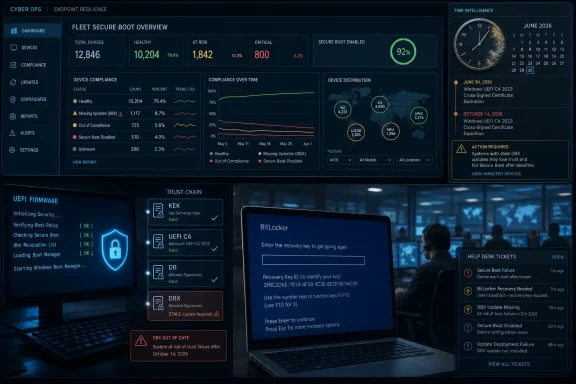
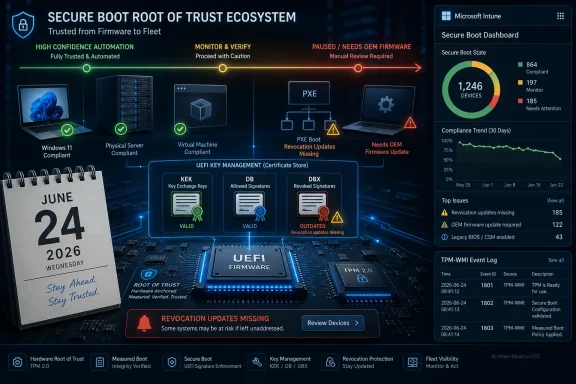
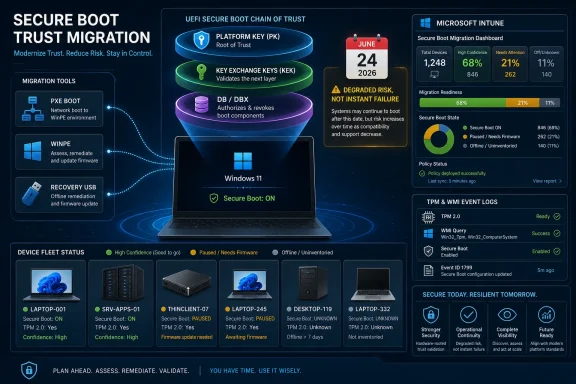
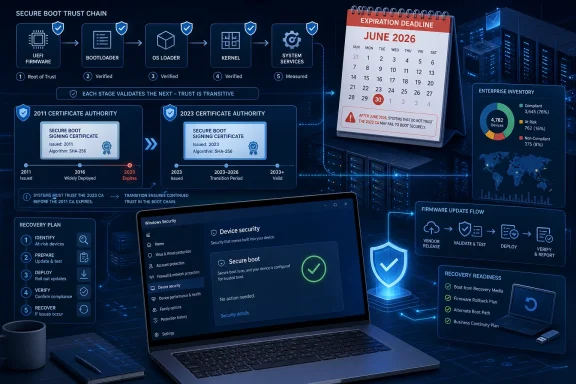
Microsoft’s 2011 Secure Boot certificate family begins expiring in June 2026, and the most consequential deadline is the Microsoft Corporation KEK CA 2011, whose replacement determines whether affected Windows devices can keep receiving future Secure Boot database and revocation updates. The unsettling part is that most machines will not fail loudly. They will keep booting, keep passing casual health checks, and still drift into a weaker security posture if the trust plumbing is not refreshed in time. That makes this less like a dramatic “PCs won’t start” event and more like the sort of infrastructure debt that punishes organizations months later, when a boot-level vulnerability needs revoking and the revocation never arrives.
Secure Boot has always been marketed as a simple promise: the PC should start only code that the firmware trusts. Underneath that slogan is a small hierarchy of UEFI variables, certificates, and signature databases that decide which bootloaders, option ROMs, and pre-OS components are allowed to run before Windows, Linux, or a hypervisor takes over.
The 2026 certificate rollover attacks that hierarchy at its most operationally awkward point. Microsoft’s 2011 Secure Boot roots were never meant to live forever, and the calendar is finally catching up with a design that was introduced in the Windows 8 era. The problem is not that cryptographic expiration is surprising. The problem is that the ecosystem has spent more than a decade treating Secure Boot state as firmware furniture rather than a living policy channel.
That distinction matters. If a device still trusts old boot material, it may continue to boot perfectly well after the relevant certificate expires. But if it cannot accept new policy updates, it loses one of Secure Boot’s main defensive advantages: the ability to revoke bad boot components after the industry discovers they are bad.
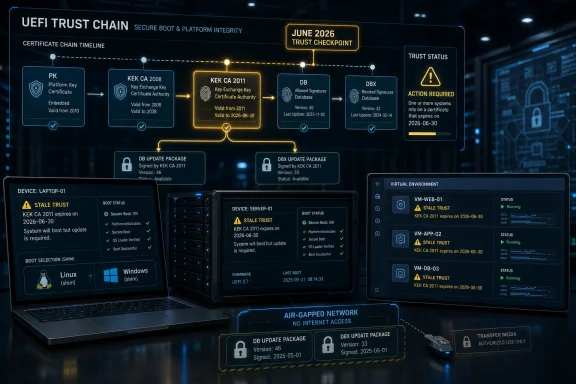
The Microsoft Corporation KEK CA 2011 is especially important because the KEK, or Key Exchange Key, authorizes updates to the Secure Boot signature database and forbidden-signature database. In plainer English, it is part of the mechanism that lets Microsoft deliver changes to what firmware should trust and what it should block. If that path goes stale, the system’s existing trust list may survive, but its future immune response is compromised.
The important stores are familiar to firmware engineers but less visible to everyone else. The DB contains trusted signatures and certificates. The DBX contains revoked signatures and hashes. The KEK database contains keys authorized to update those databases. Above that sits the platform key, which establishes ownership of the Secure Boot policy.
Microsoft’s 2011 certificates became central because Windows PC vendors broadly shipped systems with Microsoft’s Secure Boot authorities enrolled. That decision made the Windows ecosystem manageable at scale and also allowed third-party operating systems, notably Linux distributions using Microsoft-signed shim loaders, to coexist with Secure Boot. It was a pragmatic compromise: firmware vendors did not have to curate every operating system, and operating system vendors did not have to negotiate individually with every motherboard and laptop maker.
But centralized trust has centralized lifecycle problems. When the widely deployed Microsoft Corporation KEK CA 2011, Microsoft Corporation UEFI CA 2011, and Microsoft Windows Production PCA 2011 approach expiration, the consequence is not limited to one vendor’s update server. It touches OEM firmware, Windows servicing, Linux boot chains, virtual firmware, deployment images, recovery media, and any environment that depends on Secure Boot being both enabled and up to date.
The hardest part for IT teams is that Secure Boot state is not always in the place administrators instinctively look. Updating Windows does not necessarily mean every firmware variable is current. Updating a hypervisor host does not necessarily rewrite every guest’s virtual UEFI store. Updating a Linux distribution does not necessarily mean the machine’s DB contains the new authority needed to validate the next shim.
The new certificate set separates roles more clearly than the old one. The Microsoft Corporation KEK CA 2011 gives way to a 2023 KEK authority for signing DB and DBX updates. The old Microsoft Corporation UEFI CA 2011, used broadly for third-party UEFI software such as Linux shim and option ROMs, is being replaced by distinct 2023 authorities for operating-system bootloaders and hardware option ROMs. The Microsoft Windows Production PCA 2011, which signs Windows Boot Manager and other pre-OS Windows components, is replaced by Windows UEFI CA 2023.
That split is sensible. Secure Boot’s third-party trust bucket has long carried too much weight, covering both non-Windows boot paths and hardware firmware components. Separating those duties gives Microsoft and OEMs finer control over future trust decisions. It also means the migration has more edges.
A machine can be partially updated and still look healthy to someone asking only whether Secure Boot is enabled. It may have the new Windows boot authority but not the new KEK. It may accept new Windows bootloaders but still lack the right third-party authority for a Linux shim. It may be ready for day-to-day boot and still unable to consume a future DBX update that blocks a newly exploited bootkit component.
This is why the 2026 event should be treated as a trust-state audit rather than a certificate trivia exercise. Administrators need to know which devices have which authorities enrolled, which boot components are signed by which certificate, and whether the organization’s recovery paths will still work after old trust anchors are removed or deprecated.
That is exactly what makes the issue dangerous. A mass boot failure would be painful, but it would also be visible. Help desks would light up, dashboards would turn red, and executives would quickly understand that something had broken. A device that continues to boot while silently missing future Secure Boot policy changes is a more subtle failure.
DBX updates are the canonical example. When Microsoft or the broader ecosystem needs to revoke vulnerable bootloaders, signed shims, or other pre-OS components, the DBX is where that denial policy lands. A system that cannot receive future DBX updates may remain exposed to classes of boot-level attack that better-maintained systems can block.
This is not theoretical in the abstract sense. The industry has already been forced to wrestle with Secure Boot revocations tied to bootloader vulnerabilities and bypasses. Revocation is painful because it can strand old recovery media, outdated installation images, and unpatched boot chains. But the alternative is worse: a Secure Boot ecosystem that trusts known-bad components forever.
The KEK deadline therefore deserves special attention. If an expired or missing authorization path prevents new DB and DBX updates from landing, the device’s security posture becomes frozen in time. It is still “Secure Boot enabled” in the checkbox sense, but not Secure Boot maintained in the defensive sense.
The move from the 2011 UEFI CA to the 2023 authorities changes the assumptions under that arrangement. If a system removes or distrusts the old UEFI CA before the installed distribution has a shim signed by the appropriate new authority, Secure Boot can block the boot path. Conversely, if administrators leave old authorities in place indefinitely to avoid compatibility pain, they may delay the security benefits of the transition.
That tension will be most visible in dual-boot fleets, developer workstations, lab machines, and specialized appliances that use Linux but inherit PC firmware defaults designed around Windows. It will also show up in enterprises that standardize on Secure Boot as a compliance control while running mixed operating systems. For those environments, the migration is not a Windows-only housekeeping item.
Distribution vendors have to update shim packages and guidance. Administrators have to verify that systems receive those updates before old trust entries are removed. Firmware and DB state have to line up with the operating systems actually deployed, not the operating system that happened to ship on the hardware years ago.
There is also a recovery problem. Old Linux installation media may not boot on systems that move decisively to the 2023 authorities. That does not mean Secure Boot is broken; it means old media was built for an old trust world. IT teams should expect to refresh rescue media, golden images, and provisioning workflows rather than discover the mismatch during an outage.
That means a hypervisor estate can contain hundreds or thousands of little Secure Boot time capsules. Updating the physical host may update the hypervisor software, but it does not automatically guarantee that every guest’s DB, DBX, and KEK variables have been refreshed. A VM created from an old template may inherit old trust state even when it runs on brand-new hardware.
Hyper-V, VMware ESXi, KVM with OVMF, and platforms such as Proxmox all have their own management realities here. Some environments expose firmware settings cleanly. Others require template replacement, guest-level updates, variable-store manipulation, or vendor-specific tooling. The operational details differ, but the principle does not: virtual firmware is still firmware for the purpose of Secure Boot trust.
The migration is especially awkward for dormant VMs. A powered-off domain controller clone, a disaster-recovery image, an archived build server, or a test appliance may not be receiving monthly operating-system updates. If it is later revived into a post-transition environment, its Secure Boot state may be stale enough to create either a boot problem or a security gap.
Templates deserve particular suspicion. Organizations often maintain “known good” VM templates for Windows Server, Windows client testing, Linux appliances, and deployment automation. If those templates contain old Secure Boot variables, every future VM cloned from them can reproduce the problem after the rest of the estate appears fixed.
Air-gapped environments already know that patching is a logistics problem. Secure Boot certificate migration adds a firmware-policy dimension to that logistics problem. Administrators may need to import update packages, validate firmware vendor tooling, coordinate maintenance windows, and prove that the right variables changed on the right machines.
The risk is not limited to Windows. Industrial PCs, kiosk systems, imaging workstations, and lab instruments often run old operating-system builds under tight change-control rules. Some may have Secure Boot enabled because it was part of the vendor baseline. Others may have firmware passwords, custom keys, or brittle support contracts that make Secure Boot changes politically and technically difficult.
Manual work also increases the chance of inconsistency. One site may update KEK but not DB. Another may update a Windows image but forget Linux rescue media. A third may apply a firmware update that changes Secure Boot defaults in ways the endpoint team did not anticipate. These are not exotic cryptographic failures; they are the usual failures of distributed systems administration, now operating below the OS.
The compliance angle is uncomfortable. Auditors and security teams often ask whether Secure Boot is enabled, but fewer ask whether its trust databases are current and capable of receiving future revocations. The 2026 transition should force that question into the control language. A stale Secure Boot configuration is not equivalent to a maintained one.
Some systems will receive clean firmware updates that include the necessary Secure Boot materials. Some will rely primarily on operating-system-mediated updates. Some may require manual steps. Others may be old enough that vendors provide little more than a support note, if that.
This is where administrators should be wary of broad reassurance. “Supported Windows devices” is not the same category as “every device still in use.” Many organizations run hardware beyond its neat marketing lifecycle. Windows 10’s extended-support story, Windows 11 hardware requirements, and the long tail of specialized PCs all intersect with Secure Boot in ways that asset databases may not capture.
Servers add another wrinkle. Secure Boot on server hardware is often entangled with baseboard management controllers, vendor lifecycle controllers, firmware bundles, and hypervisor certification matrices. Updating a server’s Secure Boot trust state is not the same operational motion as updating a laptop through Windows Update.
The practical move is inventory. Not vibes, not assumptions, not a procurement spreadsheet, but actual state: firmware version, Secure Boot enabled status, enrolled certificates, bootloader signing chain, and update eligibility. Without that, the organization is guessing which systems will be ready for the next DBX update and which will quietly fall behind.
Administrators remember the pain around previous bootloader revocation planning because it was not just a patch. It involved sequencing, fallback keys, updated recovery media, and careful rollout. Secure Boot’s pre-OS position means mistakes can be more disruptive than ordinary application patch failures.
That is why the phrase “devices will continue to boot” should not lull anyone into passivity. Continuing to boot is the minimum standard. The more important standard is whether the device can safely evolve as the threat landscape evolves.
A frozen DBX is like an antivirus product that still launches but never downloads new definitions. The interface may look reassuring. The old protections may still catch old threats. But the security value decays every time the world changes and the endpoint does not.
Gaming and anti-cheat ecosystems have made Secure Boot more visible to consumers in recent years. Some games require Secure Boot or related platform integrity features, pushing users into firmware menus they barely understand. The certificate transition could add another layer of confusion if a system appears compliant in one tool but carries old trust material underneath.
The used-PC market will be messy. A laptop wiped and resold in late 2026 may have firmware variables that depend on whether its previous owner installed updates, whether the OEM shipped firmware support, and whether the refurbisher reset Secure Boot state. Buyers will not see that in a product listing.
For enthusiasts, the advice is different from the advice for casual users. If you dual-boot Linux, maintain custom Secure Boot keys, use older GPUs with option ROM dependencies, or keep old Windows installers for repair work, you should test deliberately. Secure Boot failures are easier to solve on a spare weekend than during a failed reinstall.
The most accurate message is also the least tweetable: the 2011 Secure Boot trust chain is aging out, newer authorities are replacing it, most supported and connected Windows systems should transition through updates, but mixed-OS, virtualized, offline, old, and poorly inventoried systems require active validation. That is not a consumer-friendly slogan. It is, however, the shape of the problem.
The distinction between signing new code and validating existing code also needs care. Certificate expiration does not automatically mean every existing binary signed under that certificate becomes unbootable on every system. Secure Boot validation depends on firmware databases, signatures, revocation state, and implementation details. Treating expiration as a universal boot guillotine is inaccurate.
But the opposite simplification is also wrong. The fact that existing systems may boot does not mean expiration is harmless. A Secure Boot ecosystem that cannot refresh DBX or accept newly signed boot components is living on borrowed time.
Organizations should start with the systems most likely to surprise them: dual-boot workstations, Linux developer machines, Secure Boot-enabled VMs, offline networks, old server platforms, embedded PCs, and anything built from stale templates. These are the places where “Windows Update will take care of it” is most likely to be incomplete.
The next step is to refresh the artifacts administrators reach for when things break. Installation ISOs, WinPE environments, Linux rescue media, imaging tools, bare-metal recovery systems, and hypervisor templates should be tested against updated Secure Boot trust states. A recovery environment that only works when Secure Boot is disabled is not useless, but it is not equivalent to one that works inside the organization’s intended security posture.
Finally, enterprises should decide how they will measure success. A report that says Secure Boot is enabled is not enough. A better report says which certificate family is enrolled, whether the new KEK is present, whether DB and DBX updates are current, and whether boot components have moved to the intended signing chain.
The most concrete lessons are already clear:
 The Real Deadline Is Not the One Users Will Notice
Secure Boot has always been marketed as a simple promise: the PC should start only code that the firmware trusts. Underneath that slogan is a small hierarchy of UEFI variables, certificates, and signature databases that decide which bootloaders, option ROMs, and pre-OS components are allowed to run before Windows, Linux, or a hypervisor takes over.The 2026 certificate rollover attacks that hierarchy at its most operationally awkward point. Microsoft’s 2011 Secure Boot roots were never meant to live forever, and the calendar is finally catching up with a design that was introduced in the Windows 8 era. The problem is not that cryptographic expiration is surprising. The problem is that the ecosystem has spent more than a decade treating Secure Boot state as firmware furniture rather than a living policy channel.
That distinction matters. If a device still trusts old boot material, it may continue to boot perfectly well after the relevant certificate expires. But if it cannot accept new policy updates, it loses one of Secure Boot’s main defensive advantages: the ability to revoke bad boot components after the industry discovers they are bad.
The Microsoft Corporation KEK CA 2011 is especially important because the KEK, or Key Exchange Key, authorizes updates to the Secure Boot signature database and forbidden-signature database. In plainer English, it is part of the mechanism that lets Microsoft deliver changes to what firmware should trust and what it should block. If that path goes stale, the system’s existing trust list may survive, but its future immune response is compromised.
Secure Boot’s Quiet Contract Comes Due
Secure Boot is often discussed as though it were a single switch in firmware setup: enabled or disabled. That simplification is useful for consumers but misleading for administrators. A Secure Boot-enabled computer is not merely enforcing a policy; it is carrying a set of enrolled authorities that determine who gets to change the policy and whose code is accepted during boot.The important stores are familiar to firmware engineers but less visible to everyone else. The DB contains trusted signatures and certificates. The DBX contains revoked signatures and hashes. The KEK database contains keys authorized to update those databases. Above that sits the platform key, which establishes ownership of the Secure Boot policy.
Microsoft’s 2011 certificates became central because Windows PC vendors broadly shipped systems with Microsoft’s Secure Boot authorities enrolled. That decision made the Windows ecosystem manageable at scale and also allowed third-party operating systems, notably Linux distributions using Microsoft-signed shim loaders, to coexist with Secure Boot. It was a pragmatic compromise: firmware vendors did not have to curate every operating system, and operating system vendors did not have to negotiate individually with every motherboard and laptop maker.
But centralized trust has centralized lifecycle problems. When the widely deployed Microsoft Corporation KEK CA 2011, Microsoft Corporation UEFI CA 2011, and Microsoft Windows Production PCA 2011 approach expiration, the consequence is not limited to one vendor’s update server. It touches OEM firmware, Windows servicing, Linux boot chains, virtual firmware, deployment images, recovery media, and any environment that depends on Secure Boot being both enabled and up to date.
The hardest part for IT teams is that Secure Boot state is not always in the place administrators instinctively look. Updating Windows does not necessarily mean every firmware variable is current. Updating a hypervisor host does not necessarily rewrite every guest’s virtual UEFI store. Updating a Linux distribution does not necessarily mean the machine’s DB contains the new authority needed to validate the next shim.
Microsoft’s 2023 Keys Are a Migration, Not a Patch Tuesday Errand
Microsoft’s replacement certificate family is already in motion, and supported Windows systems are expected to receive much of the transition through normal servicing channels. That framing is technically reassuring and operationally dangerous. “Delivered by Windows Update” can sound like “solved by Windows Update,” but those are not the same statement.The new certificate set separates roles more clearly than the old one. The Microsoft Corporation KEK CA 2011 gives way to a 2023 KEK authority for signing DB and DBX updates. The old Microsoft Corporation UEFI CA 2011, used broadly for third-party UEFI software such as Linux shim and option ROMs, is being replaced by distinct 2023 authorities for operating-system bootloaders and hardware option ROMs. The Microsoft Windows Production PCA 2011, which signs Windows Boot Manager and other pre-OS Windows components, is replaced by Windows UEFI CA 2023.
That split is sensible. Secure Boot’s third-party trust bucket has long carried too much weight, covering both non-Windows boot paths and hardware firmware components. Separating those duties gives Microsoft and OEMs finer control over future trust decisions. It also means the migration has more edges.
A machine can be partially updated and still look healthy to someone asking only whether Secure Boot is enabled. It may have the new Windows boot authority but not the new KEK. It may accept new Windows bootloaders but still lack the right third-party authority for a Linux shim. It may be ready for day-to-day boot and still unable to consume a future DBX update that blocks a newly exploited bootkit component.
This is why the 2026 event should be treated as a trust-state audit rather than a certificate trivia exercise. Administrators need to know which devices have which authorities enrolled, which boot components are signed by which certificate, and whether the organization’s recovery paths will still work after old trust anchors are removed or deprecated.
The Scariest Failure Mode Is Normal Operation
The public anxiety around Secure Boot certificate expiration often collapses into a single fear: will PCs stop booting? In many cases, no. Existing systems that already have trusted boot components installed are generally expected to continue starting, provided their firmware still contains the authorities needed to validate those components.That is exactly what makes the issue dangerous. A mass boot failure would be painful, but it would also be visible. Help desks would light up, dashboards would turn red, and executives would quickly understand that something had broken. A device that continues to boot while silently missing future Secure Boot policy changes is a more subtle failure.
DBX updates are the canonical example. When Microsoft or the broader ecosystem needs to revoke vulnerable bootloaders, signed shims, or other pre-OS components, the DBX is where that denial policy lands. A system that cannot receive future DBX updates may remain exposed to classes of boot-level attack that better-maintained systems can block.
This is not theoretical in the abstract sense. The industry has already been forced to wrestle with Secure Boot revocations tied to bootloader vulnerabilities and bypasses. Revocation is painful because it can strand old recovery media, outdated installation images, and unpatched boot chains. But the alternative is worse: a Secure Boot ecosystem that trusts known-bad components forever.
The KEK deadline therefore deserves special attention. If an expired or missing authorization path prevents new DB and DBX updates from landing, the device’s security posture becomes frozen in time. It is still “Secure Boot enabled” in the checkbox sense, but not Secure Boot maintained in the defensive sense.
Linux Is Not Collateral Damage; It Is Part of the Design
Linux users have a particular reason to watch this transition because many mainstream distributions rely on a Microsoft-signed shim to boot on Secure Boot-enabled PCs. That arrangement has always been politically awkward but practically important. It lets Linux distributions boot on commodity Windows-certified hardware without every firmware vendor directly enrolling every distribution’s keys.The move from the 2011 UEFI CA to the 2023 authorities changes the assumptions under that arrangement. If a system removes or distrusts the old UEFI CA before the installed distribution has a shim signed by the appropriate new authority, Secure Boot can block the boot path. Conversely, if administrators leave old authorities in place indefinitely to avoid compatibility pain, they may delay the security benefits of the transition.
That tension will be most visible in dual-boot fleets, developer workstations, lab machines, and specialized appliances that use Linux but inherit PC firmware defaults designed around Windows. It will also show up in enterprises that standardize on Secure Boot as a compliance control while running mixed operating systems. For those environments, the migration is not a Windows-only housekeeping item.
Distribution vendors have to update shim packages and guidance. Administrators have to verify that systems receive those updates before old trust entries are removed. Firmware and DB state have to line up with the operating systems actually deployed, not the operating system that happened to ship on the hardware years ago.
There is also a recovery problem. Old Linux installation media may not boot on systems that move decisively to the 2023 authorities. That does not mean Secure Boot is broken; it means old media was built for an old trust world. IT teams should expect to refresh rescue media, golden images, and provisioning workflows rather than discover the mismatch during an outage.
Virtual Machines Turn One Firmware Problem Into Thousands
Virtualization makes Secure Boot more elastic, but not necessarily easier. A Secure Boot-enabled VM has virtual firmware and its own UEFI variables. Those variables can outlive host updates, migrate across clusters, and sit inside templates that administrators clone for years.That means a hypervisor estate can contain hundreds or thousands of little Secure Boot time capsules. Updating the physical host may update the hypervisor software, but it does not automatically guarantee that every guest’s DB, DBX, and KEK variables have been refreshed. A VM created from an old template may inherit old trust state even when it runs on brand-new hardware.
Hyper-V, VMware ESXi, KVM with OVMF, and platforms such as Proxmox all have their own management realities here. Some environments expose firmware settings cleanly. Others require template replacement, guest-level updates, variable-store manipulation, or vendor-specific tooling. The operational details differ, but the principle does not: virtual firmware is still firmware for the purpose of Secure Boot trust.
The migration is especially awkward for dormant VMs. A powered-off domain controller clone, a disaster-recovery image, an archived build server, or a test appliance may not be receiving monthly operating-system updates. If it is later revived into a post-transition environment, its Secure Boot state may be stale enough to create either a boot problem or a security gap.
Templates deserve particular suspicion. Organizations often maintain “known good” VM templates for Windows Server, Windows client testing, Linux appliances, and deployment automation. If those templates contain old Secure Boot variables, every future VM cloned from them can reproduce the problem after the rest of the estate appears fixed.
Air-Gapped Networks Will Pay the Highest Administrative Tax
For ordinary consumer PCs and many managed Windows fleets, Microsoft’s preferred path is unsurprising: stay supported, stay updated, and let the servicing stack do as much of the work as possible. That path narrows sharply in air-gapped, classified, industrial, medical, and other constrained environments. In those places, the absence of routine Windows Update access is not an accident; it is the operating model.Air-gapped environments already know that patching is a logistics problem. Secure Boot certificate migration adds a firmware-policy dimension to that logistics problem. Administrators may need to import update packages, validate firmware vendor tooling, coordinate maintenance windows, and prove that the right variables changed on the right machines.
The risk is not limited to Windows. Industrial PCs, kiosk systems, imaging workstations, and lab instruments often run old operating-system builds under tight change-control rules. Some may have Secure Boot enabled because it was part of the vendor baseline. Others may have firmware passwords, custom keys, or brittle support contracts that make Secure Boot changes politically and technically difficult.
Manual work also increases the chance of inconsistency. One site may update KEK but not DB. Another may update a Windows image but forget Linux rescue media. A third may apply a firmware update that changes Secure Boot defaults in ways the endpoint team did not anticipate. These are not exotic cryptographic failures; they are the usual failures of distributed systems administration, now operating below the OS.
The compliance angle is uncomfortable. Auditors and security teams often ask whether Secure Boot is enabled, but fewer ask whether its trust databases are current and capable of receiving future revocations. The 2026 transition should force that question into the control language. A stale Secure Boot configuration is not equivalent to a maintained one.
OEM Firmware Is the Wild Card Microsoft Cannot Fully Control
Microsoft can publish guidance, ship Windows updates, and operate its signing infrastructure. It cannot retroactively make every OEM firmware implementation elegant. The PC ecosystem includes business laptops with active firmware support, consumer systems abandoned after a few years, white-box desktops, embedded boards, servers, and niche appliances with uneven update mechanisms.Some systems will receive clean firmware updates that include the necessary Secure Boot materials. Some will rely primarily on operating-system-mediated updates. Some may require manual steps. Others may be old enough that vendors provide little more than a support note, if that.
This is where administrators should be wary of broad reassurance. “Supported Windows devices” is not the same category as “every device still in use.” Many organizations run hardware beyond its neat marketing lifecycle. Windows 10’s extended-support story, Windows 11 hardware requirements, and the long tail of specialized PCs all intersect with Secure Boot in ways that asset databases may not capture.
Servers add another wrinkle. Secure Boot on server hardware is often entangled with baseboard management controllers, vendor lifecycle controllers, firmware bundles, and hypervisor certification matrices. Updating a server’s Secure Boot trust state is not the same operational motion as updating a laptop through Windows Update.
The practical move is inventory. Not vibes, not assumptions, not a procurement spreadsheet, but actual state: firmware version, Secure Boot enabled status, enrolled certificates, bootloader signing chain, and update eligibility. Without that, the organization is guessing which systems will be ready for the next DBX update and which will quietly fall behind.
Revocation Is Where Theory Becomes Pain
Secure Boot revocation has always been a balancing act. Revoke too slowly, and attackers can keep abusing known-vulnerable boot components. Revoke too aggressively, and legitimate systems with old bootloaders or recovery media stop working. The 2026 certificate transition raises the stakes because it changes not only what may be revoked, but whether some systems can receive the revocation at all.Administrators remember the pain around previous bootloader revocation planning because it was not just a patch. It involved sequencing, fallback keys, updated recovery media, and careful rollout. Secure Boot’s pre-OS position means mistakes can be more disruptive than ordinary application patch failures.
That is why the phrase “devices will continue to boot” should not lull anyone into passivity. Continuing to boot is the minimum standard. The more important standard is whether the device can safely evolve as the threat landscape evolves.
A frozen DBX is like an antivirus product that still launches but never downloads new definitions. The interface may look reassuring. The old protections may still catch old threats. But the security value decays every time the world changes and the endpoint does not.
The Consumer Story Is Simpler, But Not Harmless
Most home users should not need to become UEFI certificate administrators. For supported Windows PCs that receive updates normally, the least risky course is to keep Windows and firmware updates current and avoid random Secure Boot tinkering. The danger for consumers is more likely to appear around old installation media, dual-boot setups, unsupported hardware, and secondhand PCs with unknown firmware histories.Gaming and anti-cheat ecosystems have made Secure Boot more visible to consumers in recent years. Some games require Secure Boot or related platform integrity features, pushing users into firmware menus they barely understand. The certificate transition could add another layer of confusion if a system appears compliant in one tool but carries old trust material underneath.
The used-PC market will be messy. A laptop wiped and resold in late 2026 may have firmware variables that depend on whether its previous owner installed updates, whether the OEM shipped firmware support, and whether the refurbisher reset Secure Boot state. Buyers will not see that in a product listing.
For enthusiasts, the advice is different from the advice for casual users. If you dual-boot Linux, maintain custom Secure Boot keys, use older GPUs with option ROM dependencies, or keep old Windows installers for repair work, you should test deliberately. Secure Boot failures are easier to solve on a spare weekend than during a failed reinstall.
Microsoft’s Messaging Has to Thread a Narrow Needle
Microsoft has a communications problem because both panic and complacency are wrong. If the company says too loudly that certificates are expiring, many users hear “my PC will stop booting.” If it says too softly that updates will handle it, administrators may miss the parts of their estates that updates will not handle.The most accurate message is also the least tweetable: the 2011 Secure Boot trust chain is aging out, newer authorities are replacing it, most supported and connected Windows systems should transition through updates, but mixed-OS, virtualized, offline, old, and poorly inventoried systems require active validation. That is not a consumer-friendly slogan. It is, however, the shape of the problem.
The distinction between signing new code and validating existing code also needs care. Certificate expiration does not automatically mean every existing binary signed under that certificate becomes unbootable on every system. Secure Boot validation depends on firmware databases, signatures, revocation state, and implementation details. Treating expiration as a universal boot guillotine is inaccurate.
But the opposite simplification is also wrong. The fact that existing systems may boot does not mean expiration is harmless. A Secure Boot ecosystem that cannot refresh DBX or accept newly signed boot components is living on borrowed time.
The Work Belongs in Change Management Now
The calendar is close enough that this should no longer live as a background advisory. June 2026 is not a distant planning horizon; it is an active change-management deadline. October 2026, when the Windows Production PCA 2011 expiration becomes central, is not much farther behind.Organizations should start with the systems most likely to surprise them: dual-boot workstations, Linux developer machines, Secure Boot-enabled VMs, offline networks, old server platforms, embedded PCs, and anything built from stale templates. These are the places where “Windows Update will take care of it” is most likely to be incomplete.
The next step is to refresh the artifacts administrators reach for when things break. Installation ISOs, WinPE environments, Linux rescue media, imaging tools, bare-metal recovery systems, and hypervisor templates should be tested against updated Secure Boot trust states. A recovery environment that only works when Secure Boot is disabled is not useless, but it is not equivalent to one that works inside the organization’s intended security posture.
Finally, enterprises should decide how they will measure success. A report that says Secure Boot is enabled is not enough. A better report says which certificate family is enrolled, whether the new KEK is present, whether DB and DBX updates are current, and whether boot components have moved to the intended signing chain.
The Clock Is Really a Mirror
The Secure Boot certificate rollover is not just a Microsoft maintenance event; it is a mirror held up to endpoint governance. Organizations with current inventories, disciplined firmware management, tested recovery media, and good VM hygiene will find the migration annoying but manageable. Organizations that treat firmware state as unknowable will find that the unknowable part now has an expiration date.The most concrete lessons are already clear:
- The Microsoft Corporation KEK CA 2011 matters because it authorizes future Secure Boot DB and DBX updates, not merely because it is another expiring certificate.
- Systems may continue booting after the 2011 certificates expire while still losing the ability to receive future Secure Boot trust and revocation changes.
- Linux and dual-boot systems need coordinated shim, operating-system, and firmware database updates before old trust entries are removed.
- Secure Boot-enabled virtual machines must be assessed individually because host updates do not automatically rewrite every guest’s virtual UEFI variables.
- Air-gapped and tightly controlled environments need manual migration plans, updated recovery media, and proof that Secure Boot variables actually changed.
- Asset and compliance tools should distinguish between Secure Boot being enabled and Secure Boot being current.
References
- Primary source: cyberpress.org
Published: 2026-06-03T10:30:28.652459
- Official source: support.microsoft.com
- Related coverage: eclypsium.com
Microsoft Secure Boot Expires 2026: Enterprise Impact- Eclypsium | Supply Chain Security for the Modern Enterprise
Microsoft's 2011 Secure Boot certificates expire in June 2026. Without a valid KEK, devices can't receive new bootkit revocations, freezing your defenses.eclypsium.com - Official source: learn.microsoft.com
Update Secure Boot Certificates for Windows Devices - Windows Client | Microsoft Learn
Update your Windows devices to maintain Secure Boot protection with 2023 certificates before they expire in June 2026.learn.microsoft.com - Related coverage: notebookcheck.net
Windows Secure Boot 2026: Microsoft issues final warning over expiring certificates - Notebookcheck News
Microsoft warns that 2011 Secure Boot certificates expire in June 2026. Is your PC ready? We look at the OEM roadmap and how to verify your firmware status. www.notebookcheck.net
- Related coverage: cisco.com
Mitigate Microsoft Secure Boot Certificate Expiration - Cisco
This document describes how to mitigate the upcoming expiration of Microsoft Secure Boot Certificates as it pertains to Cisco UCS environments.www.cisco.com

- Official source: techcommunity.microsoft.com
Act now: Secure Boot certificates expire in June 2026 - Windows IT Pro Blog
Get tips to prepare for the rollout of updated certificates across your organization. techcommunity.microsoft.com
- Related coverage: its.wsu.edu
Windows Secure Boot Certificates Expire 2026 | Information Technology Services | Washington State University
Please see the following scheduled Microsoft change: Date: June 2026 and October 2026 The following work is being completed: Several original Microsoft certificates used by the Secure Boot feature in Unified Extensible Firmware Interface (UEFI)-based firmware are nearing expiration. These... its.wsu.edu
- Related coverage: notebookcheck.info
Windows Secure Boot 2026: Microsoft emite último aviso sobre certificados que estão expirando - NotebookCheck.info News
A Microsoft avisa que os certificados Secure Boot de 2011 expiram em junho de 2026. Seu PC está pronto? Analisamos o roteiro do OEM e como verificar o status do firmware. www.notebookcheck.info
- Related coverage: notebookcheck.org
Windows Secure Boot 2026: Microsoft emite una última advertencia sobre los certificados que caducan - NotebookCheck.org News
Microsoft advierte de que los certificados Secure Boot 2011 caducan en junio de 2026. ¿Está preparado su PC? Echamos un vistazo a la hoja de ruta de los OEM y a cómo verificar el estado de su firmware. www.notebookcheck.org
- Related coverage: windowscentral.com
Microsoft warns Secure Boot certificates will expire in 2026 | Windows Central
After 15 years, the original Secure Boot certificates that keep your PC secure during boot are expiring. Here's what you need to know.www.windowscentral.com - Related coverage: tomshardware.com
Microsoft is refreshing Secure Boot certificates to plug security holes before they happen — if you bought a PC last year, you should be set | Tom's Hardware
Be sure to keep Windows 11 systems updated to get refreshed security certificates.www.tomshardware.com - Related coverage: pcgamer.com
Secure Boot certificates used by anti-cheat software are set to expire in June but new ones are already in the mail | PC Gamer
You shouldn't have to worry about expired certificates if you keep your PC up-to-date.www.pcgamer.com - Related coverage: techradar.com
Still using Windows 10? Microsoft is automatically replacing Secure Boot certificates on older PCs ahead of expiration, so you might want to update ASAP | TechRadar
Secure Boot certificate upgrades is bad news for Windows 10www.techradar.com - Related coverage: media.defense.gov
- Official source: microsoft.com
FINAL Microsoft TRP WTNS Independent Accountant's Opinion Report and Management Assertion July 2024 (Signed)
PDF documentwww.microsoft.com