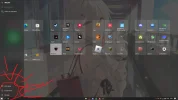
r3NA New Member Joined Mar 12, 2023 Messages 5 Mar 12, 2023 Thread Author #1 as you can see the settings icon has disappeared from the lower left corner someone can help me? Attachments Sem título.webp 104.5 KB · Views: 32
Neemobeer Windows Forum Team Staff member Joined Jul 4, 2015 Messages 8,998 Mar 13, 2023 #2 If you're running anything 3rd party utilities to customize the UI I would start by disabling or removing them. Upvote 0 Downvote
If you're running anything 3rd party utilities to customize the UI I would start by disabling or removing them.
r3NA New Member Joined Mar 12, 2023 Messages 5 Mar 13, 2023 Thread Author #3 Neemobeer said: If you're running anything 3rd party utilities to customize the UI I would start by disabling or removing them. Click to expand... I have already closed everything but none of them worked what could it be? Upvote 0 Downvote
Neemobeer said: If you're running anything 3rd party utilities to customize the UI I would start by disabling or removing them. Click to expand... I have already closed everything but none of them worked what could it be?
Neemobeer Windows Forum Team Staff member Joined Jul 4, 2015 Messages 8,998 Mar 13, 2023 #4 You'll need to uninstall them. Upvote 1 Downvote Solution
r3NA New Member Joined Mar 12, 2023 Messages 5 Mar 13, 2023 Thread Author #5 Neemobeer said: You'll need to uninstall them. Click to expand... already uninstalled bro... Upvote 0 Downvote
Neemobeer Windows Forum Team Staff member Joined Jul 4, 2015 Messages 8,998 Mar 13, 2023 #6 Which windows version and build? In powershell you can just run this Code: Get-CimInstance Win32_OperatingSystem | % { ("Windows Version: {0}`nBuild:{1}`nLast Boot:{2}" -f $_.Caption,$_.BuildNumber,$_.LastBootUpTime) } Upvote 0 Downvote
Which windows version and build? In powershell you can just run this Code: Get-CimInstance Win32_OperatingSystem | % { ("Windows Version: {0}`nBuild:{1}`nLast Boot:{2}" -f $_.Caption,$_.BuildNumber,$_.LastBootUpTime) }
r3NA New Member Joined Mar 12, 2023 Messages 5 Mar 13, 2023 Thread Author #7 Windows Version: Microsoft Windows 10 Pro Build:19045 Upvote 0 Downvote
r3NA New Member Joined Mar 12, 2023 Messages 5 Mar 13, 2023 Thread Author #8 Neemobeer said: Which windows version and build? In powershell you can just run this Code: Get-CimInstance Win32_OperatingSystem | % { ("Windows Version: {0}`nBuild:{1}`nLast Boot:{2}" -f $_.Caption,$_.BuildNumber,$_.LastBootUpTime) } Click to expand... Windows Version: Microsoft Windows 10 Pro Build:19045 Upvote 0 Downvote
Neemobeer said: Which windows version and build? In powershell you can just run this Code: Get-CimInstance Win32_OperatingSystem | % { ("Windows Version: {0}`nBuild:{1}`nLast Boot:{2}" -f $_.Caption,$_.BuildNumber,$_.LastBootUpTime) } Click to expand... Windows Version: Microsoft Windows 10 Pro Build:19045