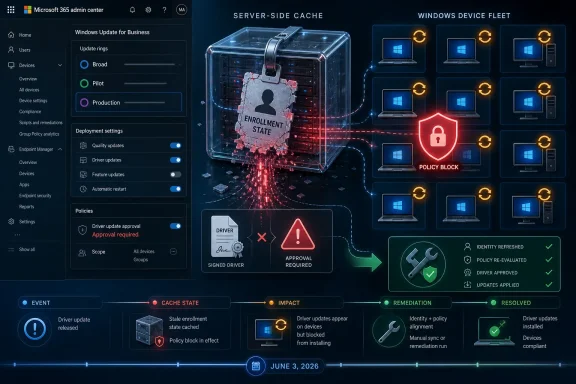
Microsoft said on June 4, 2026, that unexpected Windows driver updates were caused by a Windows Update service caching problem that temporarily caused some devices to be treated as outside their intended driver-management enrollment. The company reportedly mitigated the incident by updating the affected service cache and enrollment status, then said in a Wednesday update that the issue was resolved. For IT admins, the immediate task is to audit driver-update reports, compare newly installed drivers against approved Intune policy, and treat this as a control-plane reliability incident rather than a one-off driver surprise.
The uncomfortable part is not that Windows Update delivered a driver. Windows Update has always been a complex broker between Microsoft, OEMs, hardware IDs, firmware, policy, telemetry, and business deployment rings. The uncomfortable part is that a backend cache state reportedly changed whether policy intent was honored, which is exactly the kind of failure enterprises are least equipped to see before it lands on endpoints.
Microsoft’s reported explanation is narrowly technical: a caching issue in the Windows Update service affected device enrollment information, which meant some systems did not receive the driver-approval controls administrators expected. Once Microsoft updated the affected service cache and enrollment status, the company said the issue was resolved.
That answer may be operationally sufficient for the incident, but it is not strategically satisfying. Admins can tolerate a bad driver if they can see how it was approved, staged, deployed, and rolled back. They have a much harder time with a service-side state problem that makes a device look less managed than it is.
The practical response should start with boring hygiene. Check Intune driver update policy reports, look for recently installed drivers that do not match your approval expectations, and compare those systems against your pilot, broad, and exception groups. If you use Windows Update for Business or Windows Autopatch controls around drivers, verify both policy assignment and reporting status rather than assuming the device state in the portal was the state enforced by the update service.
The useful question is not “did Microsoft fix this cache?” It is whether enterprises now need to assume that Windows Update policy enforcement depends on a cloud-side control plane whose transient state can matter as much as the local policy they configured.
That is why this incident stings. If a tenant has explicitly moved driver servicing into a managed workflow, the expectation is not merely that Intune has a nice dashboard. The expectation is that the service will enforce the enterprise’s decision about which devices are enrolled, which drivers are approved, and which updates should wait.
Driver updates occupy a uniquely awkward place in Windows administration. They are not quite apps, not quite OS patches, and not quite firmware, even when they behave like all three. A graphics driver can destabilize a creative workstation, a storage driver can turn a routine reboot into an outage, and a firmware-adjacent package can change hardware behavior below the level where help-desk scripts are useful.
That is why Microsoft’s driver-policy architecture matters. Enterprises have spent years being told to move away from ad hoc driver packages, OEM utilities, and manual update rituals toward cloud-managed servicing. The more Microsoft centralizes that path, the more a service-side misclassification becomes a governance issue, not merely a servicing defect.
A cache bug breaks that model because it inserts an invisible dependency into the enforcement chain. If the service temporarily loses or misreads enrollment status, then the policy that matters is not only the policy the admin configured. It is the policy the backend believes applies at scan time.
That distinction is central to this incident. The reported failure was not that Intune lacked driver controls, nor that admins misunderstood the existence of driver update policies. It was that the path between those controls and Windows Update behavior briefly produced the wrong result for some devices.
That is a control-plane story. In cloud infrastructure, the control plane decides what should happen, while the data plane carries out the work. Windows Update for managed devices increasingly resembles that architecture: policy intent lives in cloud services, targeting is computed centrally, and endpoints consume the result. When the control plane has a bad state, the endpoint may do exactly what it is told while still violating what the administrator intended.
The June 4 incident challenges that promise in a subtle way. It does not prove that Windows Update is broadly unreliable. It does show that the apparent determinism of a policy console depends on backend interpretation, synchronization, and state retention that admins cannot independently inspect in real time.
That matters in regulated and tightly controlled environments. If a driver installs outside the expected approval path, the administrator still owns the incident internally. The audit conversation rarely accepts “the vendor cache got confused” as a satisfying final answer, even if it is the true one.
This is where Microsoft’s resolution needs to be read carefully. Fixing the affected service cache and enrollment status restores service behavior, but it does not by itself give customers a durable way to prove when a device was considered enrolled, what the service believed at scan time, and why a driver was offered despite policy intent. For many IT teams, that evidence gap is the more expensive part.
The logic is sound. Driver packages should contain what they claim to contain, and Windows Update should not become a distribution path for unnecessary or loosely attached files. Reducing package ambiguity reduces attack surface, reduces packaging slop, and makes the driver ecosystem more predictable.
But package integrity and policy integrity are different problems. Microsoft can make the driver package cleaner while still leaving admins worried about whether the correct policy gate was applied before that cleaner package reached a device. The former improves the cargo. The latter governs the checkpoint.
That distinction is easy to miss because both improvements live under the broad banner of Windows Update reliability. But enterprises experience them differently. A safer driver package is a security win; a mistaken policy bypass is a trust loss.
WindowsForum readers have already been tracking this broader pattern through discussions around Microsoft’s legacy-driver cleanup, driver recovery work, and update-cache oddities. Those topics look separate on the surface, but they orbit the same administrative anxiety: Windows is becoming more service-managed at precisely the moment when the consequences of a service-side mistake are harder for local admins to contain.
But recovery is not the same as prevention. If an enterprise blocks or withholds a driver, it is making a pre-install decision based on its own hardware mix, validation process, and risk tolerance. A cloud rollback mechanism can reduce blast radius after a bad install, but it does not answer why a driver crossed the approval boundary in the first place.
That difference should shape how admins read this incident. Microsoft’s driver ecosystem is gaining better cleanup tools, stricter package rules, and more cloud-assisted remediation. Yet the most important enterprise promise remains the least glamorous one: when policy says “not this driver, not for this device, not yet,” the service must honor it.
A recovery-first model is attractive because it matches the scale of Windows. Microsoft cannot manually pre-certify every driver outcome for every hardware and software combination in the field. But enterprises do not want to become unpaid participants in a rollback experiment when they already configured controls intended to prevent the install.
That means driver reporting deserves the same seriousness as vulnerability reporting or compliance reporting. A driver that appears unexpectedly should not be dismissed as “just Windows Update being Windows Update.” It should be treated as a signal that the policy pipeline, targeting logic, or device enrollment state needs review.
The useful audit is not only “what driver version is installed?” It is “what driver version was approved, for which group, through which policy, at what time, and what did the endpoint actually receive?” The gap between those answers is where this incident lives.
There is an uncomfortable operational reality here. Many organizations still lack clean driver baselines. They know their OS build, security patch level, and application inventory better than they know their driver inventory. This incident is a reminder that driver state is part of fleet state, and fleet state cannot be governed if it is treated as incidental.
The new complaint is not merely that Windows Update does too much. It is that Windows Update is becoming an enterprise policy execution engine, and execution engines need stronger guarantees than consumer update channels. Admins are not just asking Microsoft to avoid bad outcomes; they are asking Microsoft to make outcomes explainable.
That is why the caching detail matters. A backend cache is not something a help desk can inspect through Settings. It is not a registry key an admin can confidently query to reconstruct service intent. It sits in the opaque middle between Microsoft’s policy system and the endpoint’s update behavior.
Opacity is tolerable when the system is advisory. It is harder to accept when the system is authoritative. If Microsoft wants enterprises to entrust driver deployment to cloud policy, then the cloud policy path has to be observable enough to defend after an incident.
The better response is to narrow uncertainty. Identify which devices received unexpected driver updates, determine whether those devices were assigned to Intune driver policies, and check whether the installed drivers correspond to anything that had been approved or staged. Where possible, compare the timeline of driver installation against the reported incident window and Microsoft’s mitigation statement.
Admins should also revisit how they separate driver policy from general update policy. Microsoft’s driver management model is distinct enough that assumptions imported from quality update rings can mislead teams. If your operational runbook says “drivers are blocked” but only one layer of policy actually expresses that intent, this is the moment to make the runbook more precise.
Finally, treat exceptions as durable documentation, not tribal memory. If a model line, GPU class, docking station, storage controller, or firmware family requires special handling, record that decision in the same place you record update policy. Driver governance fails fastest when the real policy lives in someone’s head.
That does not make the story unimportant. It makes the story more revealing. The most consequential Windows Update incidents are not always the ones with the largest visible blast radius; they are the ones that expose a hidden dependency in the trust model.
A caching flaw is easy to make sound mundane. Every large cloud service has caches, stale state, invalidation problems, and race conditions. But when that cache participates in deciding whether a managed Windows device receives a driver, it becomes part of the enterprise control surface.
Microsoft does not need to publish every internal implementation detail to restore confidence. But enterprises need clearer incident language when policy enforcement is affected: what state was wrong, how long it could be wrong, what customer-visible evidence exists, and how admins can verify that their devices are back under the intended policy.
The larger lesson is that driver governance now depends on service trust. That trust can still be earned, but it has to be earned through transparency, reporting, and repeatable administrative checks rather than comforting assumptions.
The uncomfortable part is not that Windows Update delivered a driver. Windows Update has always been a complex broker between Microsoft, OEMs, hardware IDs, firmware, policy, telemetry, and business deployment rings. The uncomfortable part is that a backend cache state reportedly changed whether policy intent was honored, which is exactly the kind of failure enterprises are least equipped to see before it lands on endpoints.
 The Fix Is Done, but the Trust Boundary Moved
Microsoft’s reported explanation is narrowly technical: a caching issue in the Windows Update service affected device enrollment information, which meant some systems did not receive the driver-approval controls administrators expected. Once Microsoft updated the affected service cache and enrollment status, the company said the issue was resolved.That answer may be operationally sufficient for the incident, but it is not strategically satisfying. Admins can tolerate a bad driver if they can see how it was approved, staged, deployed, and rolled back. They have a much harder time with a service-side state problem that makes a device look less managed than it is.
The practical response should start with boring hygiene. Check Intune driver update policy reports, look for recently installed drivers that do not match your approval expectations, and compare those systems against your pilot, broad, and exception groups. If you use Windows Update for Business or Windows Autopatch controls around drivers, verify both policy assignment and reporting status rather than assuming the device state in the portal was the state enforced by the update service.
The useful question is not “did Microsoft fix this cache?” It is whether enterprises now need to assume that Windows Update policy enforcement depends on a cloud-side control plane whose transient state can matter as much as the local policy they configured.
Driver Management Became a Cloud Workflow Before Everyone Trusted the Cloud
Modern Windows driver servicing is no longer just a local Device Manager story. Microsoft’s Intune driver update policies are designed to let administrators review, approve, pause, and report on driver updates separately from the broader quality-update stream. That separation is the entire promise: drivers are risky enough to deserve their own approval lane.That is why this incident stings. If a tenant has explicitly moved driver servicing into a managed workflow, the expectation is not merely that Intune has a nice dashboard. The expectation is that the service will enforce the enterprise’s decision about which devices are enrolled, which drivers are approved, and which updates should wait.
Driver updates occupy a uniquely awkward place in Windows administration. They are not quite apps, not quite OS patches, and not quite firmware, even when they behave like all three. A graphics driver can destabilize a creative workstation, a storage driver can turn a routine reboot into an outage, and a firmware-adjacent package can change hardware behavior below the level where help-desk scripts are useful.
That is why Microsoft’s driver-policy architecture matters. Enterprises have spent years being told to move away from ad hoc driver packages, OEM utilities, and manual update rituals toward cloud-managed servicing. The more Microsoft centralizes that path, the more a service-side misclassification becomes a governance issue, not merely a servicing defect.
The Backend Cache Was the Real Change Window
Enterprise admins usually think in terms of visible change windows. A policy is created. A ring is assigned. A deadline passes. A device scans. A driver installs. That mental model is comforting because it turns Windows Update into a sequence that can be documented and defended.A cache bug breaks that model because it inserts an invisible dependency into the enforcement chain. If the service temporarily loses or misreads enrollment status, then the policy that matters is not only the policy the admin configured. It is the policy the backend believes applies at scan time.
That distinction is central to this incident. The reported failure was not that Intune lacked driver controls, nor that admins misunderstood the existence of driver update policies. It was that the path between those controls and Windows Update behavior briefly produced the wrong result for some devices.
That is a control-plane story. In cloud infrastructure, the control plane decides what should happen, while the data plane carries out the work. Windows Update for managed devices increasingly resembles that architecture: policy intent lives in cloud services, targeting is computed centrally, and endpoints consume the result. When the control plane has a bad state, the endpoint may do exactly what it is told while still violating what the administrator intended.
Enterprises Bought Determinism, Not Just Convenience
Microsoft’s pitch for modern update management has always been more than convenience. Cloud-managed servicing is supposed to reduce drift, replace local guesswork with centralized visibility, and let administrators make staged, auditable decisions. That is especially important for drivers, where the wrong update can create instability that looks like a hardware problem until someone correlates it across a fleet.The June 4 incident challenges that promise in a subtle way. It does not prove that Windows Update is broadly unreliable. It does show that the apparent determinism of a policy console depends on backend interpretation, synchronization, and state retention that admins cannot independently inspect in real time.
That matters in regulated and tightly controlled environments. If a driver installs outside the expected approval path, the administrator still owns the incident internally. The audit conversation rarely accepts “the vendor cache got confused” as a satisfying final answer, even if it is the true one.
This is where Microsoft’s resolution needs to be read carefully. Fixing the affected service cache and enrollment status restores service behavior, but it does not by itself give customers a durable way to prove when a device was considered enrolled, what the service believed at scan time, and why a driver was offered despite policy intent. For many IT teams, that evidence gap is the more expensive part.
Microsoft Has Been Tightening the Driver Pipeline, Which Makes This More Ironic
The caching incident arrives in the middle of a broader Microsoft push to make Windows driver delivery more controlled. In February 2026, Microsoft tightened driver-package handling by moving to remove unreferenced files from driver packages published to Windows Update. That is the kind of supply-chain hygiene administrators generally want.The logic is sound. Driver packages should contain what they claim to contain, and Windows Update should not become a distribution path for unnecessary or loosely attached files. Reducing package ambiguity reduces attack surface, reduces packaging slop, and makes the driver ecosystem more predictable.
But package integrity and policy integrity are different problems. Microsoft can make the driver package cleaner while still leaving admins worried about whether the correct policy gate was applied before that cleaner package reached a device. The former improves the cargo. The latter governs the checkpoint.
That distinction is easy to miss because both improvements live under the broad banner of Windows Update reliability. But enterprises experience them differently. A safer driver package is a security win; a mistaken policy bypass is a trust loss.
WindowsForum readers have already been tracking this broader pattern through discussions around Microsoft’s legacy-driver cleanup, driver recovery work, and update-cache oddities. Those topics look separate on the surface, but they orbit the same administrative anxiety: Windows is becoming more service-managed at precisely the moment when the consequences of a service-side mistake are harder for local admins to contain.
Cloud-Initiated Driver Recovery Is Useful, but It Does Not Solve Pre-Install Trust
Microsoft’s recent Cloud-Initiated Driver Recovery work points in the right direction. The idea that Microsoft can remotely roll back a faulty driver when telemetry or testing identifies a bad release is a meaningful improvement over waiting for every affected user, OEM, or admin to discover the problem independently. For large fleets, rollback speed matters.But recovery is not the same as prevention. If an enterprise blocks or withholds a driver, it is making a pre-install decision based on its own hardware mix, validation process, and risk tolerance. A cloud rollback mechanism can reduce blast radius after a bad install, but it does not answer why a driver crossed the approval boundary in the first place.
That difference should shape how admins read this incident. Microsoft’s driver ecosystem is gaining better cleanup tools, stricter package rules, and more cloud-assisted remediation. Yet the most important enterprise promise remains the least glamorous one: when policy says “not this driver, not for this device, not yet,” the service must honor it.
A recovery-first model is attractive because it matches the scale of Windows. Microsoft cannot manually pre-certify every driver outcome for every hardware and software combination in the field. But enterprises do not want to become unpaid participants in a rollback experiment when they already configured controls intended to prevent the install.
Reporting Is Now Part of the Security Boundary
Intune’s driver update reporting is not just a convenience dashboard in this context. It is the admin’s best evidence trail. If the service can make a device appear outside the expected enrollment state, then reports become the first place to detect whether the policy model and endpoint behavior diverged.That means driver reporting deserves the same seriousness as vulnerability reporting or compliance reporting. A driver that appears unexpectedly should not be dismissed as “just Windows Update being Windows Update.” It should be treated as a signal that the policy pipeline, targeting logic, or device enrollment state needs review.
The useful audit is not only “what driver version is installed?” It is “what driver version was approved, for which group, through which policy, at what time, and what did the endpoint actually receive?” The gap between those answers is where this incident lives.
There is an uncomfortable operational reality here. Many organizations still lack clean driver baselines. They know their OS build, security patch level, and application inventory better than they know their driver inventory. This incident is a reminder that driver state is part of fleet state, and fleet state cannot be governed if it is treated as incidental.
The Old Windows Update Complaint Has Matured Into a Governance Problem
For years, Windows Update complaints were often framed as consumer aggravations: reboots at bad times, printer breakage, graphics regressions, a mysterious cache that would not clean up cleanly. Those problems were real, but they were usually discussed as user-experience failures. In managed environments, the conversation has become more serious.The new complaint is not merely that Windows Update does too much. It is that Windows Update is becoming an enterprise policy execution engine, and execution engines need stronger guarantees than consumer update channels. Admins are not just asking Microsoft to avoid bad outcomes; they are asking Microsoft to make outcomes explainable.
That is why the caching detail matters. A backend cache is not something a help desk can inspect through Settings. It is not a registry key an admin can confidently query to reconstruct service intent. It sits in the opaque middle between Microsoft’s policy system and the endpoint’s update behavior.
Opacity is tolerable when the system is advisory. It is harder to accept when the system is authoritative. If Microsoft wants enterprises to entrust driver deployment to cloud policy, then the cloud policy path has to be observable enough to defend after an incident.
The Admin Playbook Starts With Evidence, Not Panic
The right response is not to turn off every driver update forever. That would trade one risk for another. Drivers fix real reliability, compatibility, and security problems, and stale drivers can become their own operational liability.The better response is to narrow uncertainty. Identify which devices received unexpected driver updates, determine whether those devices were assigned to Intune driver policies, and check whether the installed drivers correspond to anything that had been approved or staged. Where possible, compare the timeline of driver installation against the reported incident window and Microsoft’s mitigation statement.
Admins should also revisit how they separate driver policy from general update policy. Microsoft’s driver management model is distinct enough that assumptions imported from quality update rings can mislead teams. If your operational runbook says “drivers are blocked” but only one layer of policy actually expresses that intent, this is the moment to make the runbook more precise.
Finally, treat exceptions as durable documentation, not tribal memory. If a model line, GPU class, docking station, storage controller, or firmware family requires special handling, record that decision in the same place you record update policy. Driver governance fails fastest when the real policy lives in someone’s head.
The Thin Facts Are Themselves Part of the Story
The public facts here are limited. We have Microsoft’s reported explanation, the mitigation path, the resolution update, and the broader known shape of Intune driver policy and Windows Update driver-package tightening. We do not have a public, comprehensive device count. We do not have a detailed root-cause report. We do not have a full accounting of which driver classes or tenant configurations were most exposed.That does not make the story unimportant. It makes the story more revealing. The most consequential Windows Update incidents are not always the ones with the largest visible blast radius; they are the ones that expose a hidden dependency in the trust model.
A caching flaw is easy to make sound mundane. Every large cloud service has caches, stale state, invalidation problems, and race conditions. But when that cache participates in deciding whether a managed Windows device receives a driver, it becomes part of the enterprise control surface.
Microsoft does not need to publish every internal implementation detail to restore confidence. But enterprises need clearer incident language when policy enforcement is affected: what state was wrong, how long it could be wrong, what customer-visible evidence exists, and how admins can verify that their devices are back under the intended policy.
The Lesson for Admins Is Written in the Cache
For IT teams, the immediate lesson is to verify driver state and policy state as two separate things. A portal showing the desired configuration is not the same as proof that every endpoint was evaluated under that configuration at the moment Windows Update scanned.The larger lesson is that driver governance now depends on service trust. That trust can still be earned, but it has to be earned through transparency, reporting, and repeatable administrative checks rather than comforting assumptions.
- Administrators should review Intune driver update reports for unexpected installations around the June 4, 2026 incident window.
- Teams should compare installed drivers against approved driver policies instead of relying only on policy assignment status.
- Organizations should document driver exceptions for sensitive hardware classes such as graphics, storage, networking, docking, and firmware-adjacent devices.
- Driver update controls should be treated as a separate governance surface from ordinary Windows quality update rings.
- Microsoft’s mitigation resolves the reported incident, but it does not eliminate the need for better evidence when backend service state affects policy enforcement.
References
- Primary source: support.microsoft.com
Troubleshoot problems updating Windows | Microsoft Support
Learn how to troubleshoot problems updating Windows. Find answers to common questions and issues installing Windows updates.support.microsoft.com - Independent coverage: bleepingcomputer.com
Microsoft blames unexpected Windows driver updates on caching issue
On Wednesday, Microsoft fixed an issue that caused some Windows devices to install driver updates without notice despite policies configured to prevent auto-updates.www.bleepingcomputer.com - Independent coverage: windowscentral.com
Microsoft confirms Windows 11’s May 2026 update is failing to install with error 0x800f0922 and outlines a mitigation for affected PCs | Windows Central
Windows 11 May 2026 update fails on some PCs, but Microsoft has already shipped a workaround, and it's working on a permanent fix.www.windowscentral.com - Independent coverage: tomshardware.com
Microsoft is working on a fix to downgraded GPU drivers in Windows Update — new system uses multiple IDs | Tom's Hardware
Microsoft finally confirms that Windows 11 downgrades GPU drivers on OEM devices, and is planning to launch a partial fix by Q4 2026.www.tomshardware.com
Last edited: