

On Windows Weekly 990, Leo Laporte, Richard Campbell, and Paul Thurrott covered Microsoft’s quiet extension of consumer Windows 10 security updates to October 2027, new Windows Insider changes, fresh Windows 11 builds, agentic AI announcements, Xbox price increases, and the week’s practical PC and gaming picks. The episode’s title, “Don’t Be Nostalgic for Stupid,” is more than a throwaway line. It captures the uncomfortable mood of the Windows ecosystem in mid-2026: users are not merely resisting change, they are asking why so much of the new stuff feels less dependable than the old stuff. Microsoft’s answer, increasingly, is to buy time.
The biggest Windows story in the episode is not a flashy new Windows 11 feature. It is Microsoft quietly giving consumer Windows 10 users another year of Extended Security Updates, pushing protection into October 2027 for enrolled personal devices. That is a practical relief for millions of PCs, and an implicit admission that the Windows 11 transition remains less complete than Microsoft once hoped.
Windows 10 was supposed to be the platform Microsoft could finally leave behind on schedule. Windows 11 arrived with a hard hardware line: TPM 2.0, newer CPUs, and a security pitch that made the old installed base look like technical debt. But five years after Windows 11’s debut, the installed base did not neatly obey the narrative. Too many perfectly usable PCs still run Windows 10, and too many users see no compelling reason to scrap them.
The extension matters because it changes the psychology of the deadline. End of support was intended to become a forcing function: upgrade the OS, replace the hardware, or accept risk. By stretching consumer ESU to 2027, Microsoft softens that pressure. It does not reverse the Windows 11 strategy, but it makes the cliff look more like a ramp.
That is good security policy, even if it is awkward product policy. A large population of unpatched Windows 10 machines would be bad for everyone, not just the people who own them. Botnets do not care whether a vulnerable PC failed a Windows 11 compatibility check. If Microsoft can keep those systems patched for another year, the broader Windows ecosystem is safer.
But the decision also undermines the company’s own upgrade messaging. Microsoft spent years telling users that Windows 11 was the modern, secure future. Now it is effectively telling holdouts: you can stay where you are a little longer, and we will keep sending the important fixes. That is the correct public-health answer, but it is not a ringing endorsement of the migration campaign.
A family PC that browses the web, edits documents, joins video calls, and plays older games does not become useless because its processor falls outside a support matrix. A small business machine attached to a printer, scanner, point-of-sale device, or line-of-business app may be more valuable because it is boring. In those environments, stability is not nostalgia. It is the product.
That is why the phrase “Don’t Be Nostalgic for Stupid” cuts both ways. There is a kind of nostalgia that romanticizes old Windows flaws: registry rot, driver chaos, Control Panel archaeology, and the annual ritual of reinstalling the OS because something invisible went wrong. Nobody should want that back. But there is also a justified preference for software that gets out of the way, respects existing hardware, and does not treat every user as a conversion target.
Windows 11 has improved substantially since launch, but it still carries the burden of that first impression. The operating system arrived as a design reset wrapped around strict requirements, while many of its most visible changes felt like regressions to longtime users. The context menu changed. The taskbar lost flexibility. Default app flows became more aggressive. The desktop felt less like a toolbench and more like a managed surface.
Microsoft has spent years walking some of those choices back. The latest Insider work on taskbar sizing is a good example. A dedicated setting for taskbar size sounds minor until you remember that Windows users have been asking for practical taskbar flexibility since Windows 11 shipped. When a new feature is celebrated because it restores something that should never have disappeared, the upgrade story has already absorbed damage.
That is sensible. The old Insider model often felt like a bargain with too much fine print. Enthusiasts wanted early features, but they did not always want to live on unstable foundations. Developers and IT pros wanted to know what was coming, but not at the cost of turning a daily driver into a science experiment. Microsoft’s newer channel language suggests it understands that “early” and “dangerous” should not always be synonyms.
The trouble is that Windows itself has become a layered service, and the Insider Program now exposes that complexity. Features can be present but disabled. Builds can share numbers while differing in enablement. Capabilities can arrive through the Store, servicing stack, feature flags, cloud policy, or Windows Update. The old idea that a Windows version number tells you what a PC can do is increasingly quaint.
For enthusiasts, that creates both excitement and fatigue. You can see the OS evolving almost in real time, but you can also feel the seams. A taskbar option appears in one branch. A Copilot-adjacent experience lands in another. A shell behavior changes for some users but not others. The future of Windows is no longer a single train leaving the station; it is a switchyard.
This is where Microsoft’s engineering strategy and its communications strategy need to meet. If the company wants Insiders to test discrete features, it must explain what those features are, why they are being tested in a given channel, and what kind of feedback actually matters. Otherwise, the Insider Program risks becoming a public changelog for internal uncertainty.
Windows 11’s original taskbar simplification was one of the clearest examples of Microsoft mistaking visual cleanliness for user-centered design. By removing or delaying long-standing customization options, the company made the desktop feel less capable to the very people most likely to notice. The backlash was predictable because the taskbar is not an app. It is infrastructure.
A dedicated taskbar size control is not revolutionary. It will not convert Windows 10 loyalists by itself, and it will not solve Microsoft’s AI strategy, security posture, or hardware cutoff problem. But it signals that the company is still listening to a class of feedback that is easy to dismiss as cranky nostalgia.
That distinction matters. Some complaints are simply resistance to change. Others are warnings that a product team has optimized for screenshots over workflows. Windows is too mature, too widely used, and too embedded in professional life to treat every simplification as progress.
The best version of Windows 11 is not the one that looks least like Windows 10. It is the one that can absorb the security and platform improvements Microsoft wants while preserving the control surfaces users rely on. If that means restoring small taskbar buttons, better positioning, clearer defaults, and less promotional noise, then the path forward may look suspiciously like remembering why the old design worked.
That should make Windows users both curious and wary. The PC industry has been desperate for a new reason to sell hardware, and agentic AI provides a convenient one. If your device can run background inference, coordinate workflows, summarize messages, inspect documents, schedule meetings, and act across apps, then maybe the next PC upgrade can be framed as a productivity necessity rather than a spec bump.
HP’s OpenAI partnership is emblematic. The company is not just talking about a chatbot in a help pane. It is describing AI-assisted customer experiences, internal operations, and hardware designed for always-on agentic workloads. That is a much bigger claim than “this laptop has an NPU.” It imagines the PC as part of a managed AI service environment.
For IT departments, the promise is obvious. Agents could reduce support load, automate repetitive workflows, and give users a natural-language layer over complex systems. For security teams, the concern is equally obvious. An agent that can do useful work across systems can also make useful mistakes across systems. Identity, permissions, logging, data retention, prompt injection, and auditability become first-order infrastructure concerns.
This is where nostalgia again becomes a bad guide. The old PC model was not pure or simple; it was full of preinstalled utilities, trialware, telemetry fights, and vendor-specific control panels. But users at least understood the boundary between their actions and the machine’s actions. Agentic AI blurs that boundary. When the computer starts “helping” by taking steps on your behalf, the question shifts from what it can do to who is accountable when it does the wrong thing.
Sonnet-class models matter because they are aimed at the practical middle of AI adoption. Most users and businesses do not need the most expensive frontier model for every task. They need something that can write, code, summarize, classify, retrieve, and operate tools with acceptable reliability at a sustainable cost. “Good enough” sounds like an insult in benchmark culture, but it is often the point at which technology becomes useful.
The risk is that “good enough” also becomes the justification for deploying systems before the surrounding governance is mature. A model that is good enough to draft an email may not be good enough to negotiate a contract. A model that can classify support tickets may not be fit to triage security incidents. The difference is not just accuracy; it is consequence.
Proton’s Lumo pitch moves in the opposite emotional direction. Its privacy-first positioning appeals to users who see AI as a data-extraction machine unless proven otherwise. Memory, projects, and stronger capabilities are useful, but Proton’s real argument is that an assistant should not require surrendering your entire work life to an opaque training pipeline.
That market will grow because AI skepticism is not going away. The more agents are embedded into operating systems, productivity suites, browsers, and devices, the more some users will look for tools that promise narrower data use and clearer boundaries. Privacy-preserving AI may not dominate the mainstream, but it will become a serious buying criterion for professionals, regulated industries, and anyone burned by the last decade of cloud convenience.
That may be strategically correct. Email clients are brutally hard to differentiate, and most users already live in Gmail, Outlook, Apple Mail, or a work-mandated client. If Notion can deliver value by letting agents interact with email inside broader workflows, the separate mail interface may be redundant.
But there is a user-trust cost to this kind of pivot. People invest time in workflows, shortcuts, labels, filters, and habits. When a product is retired because the company has decided the next abstraction layer matters more, users are reminded that software-as-a-service is rented reality. The interface you learned can disappear because the vendor’s thesis changed.
This is especially relevant to Windows users watching Microsoft bolt AI into more surfaces. Copilot, Recall-like memory concepts, semantic search, and app agents may all become useful. But if the interface layer keeps shifting, users will hesitate to build durable habits around it. The more personal the workflow, the more painful the churn.
The lesson is not that companies should keep every product alive forever. The lesson is that agentic AI should not become an excuse to treat existing interfaces as disposable. People still need predictable places to see, correct, and override what automation is doing. The agent may become the assistant, but the interface remains the court of appeal.
That inversion says a lot about the state of gaming hardware. Component costs, memory pricing, tariffs, supply-chain pressure, and platform economics have all battered the old assumption that consoles become cheaper over time. But the optics are still grim. A console launched in 2020 becoming more expensive in 2026 feels less like premium positioning and more like the breakdown of the traditional bargain.
For Xbox specifically, the price hike collides with Microsoft’s broader ambiguity about what Xbox is. The company has spent years telling players that Xbox is an ecosystem, not just a console. Game Pass, cloud gaming, PC releases, cross-platform publishing, and “play anywhere” messaging all support that strategy. But if the console is no longer the center of gravity, raising its price makes the dedicated hardware look even more like a niche product.
That does not mean Xbox consoles are dead. Dedicated boxes still matter for living-room simplicity, predictable performance, and users who do not want to build or maintain a gaming PC. But the value equation is harder to defend when prices rise late in the cycle and first-party exclusivity becomes less central to the platform’s identity.
The rumored layoffs and possible studio impacts discussed in the episode deepen that anxiety. Microsoft’s gaming division has enormous assets: franchises, studios, cloud infrastructure, subscription reach, and PC integration. Yet the story users keep hearing is price hikes, restructuring, closures, and uncertainty. That is not how a platform builds confidence.
The report that Sony may stop selling PlayStation physical media in 2028, if accurate, points to a larger industry turn away from discs and toward controlled digital distribution. Microsoft has already moved aggressively in that direction. The appeal to platform holders is obvious: fewer manufacturing costs, tighter storefront control, easier bundling, and better data. The downside for users is equally obvious: less resale, less lending, less preservation, and more dependence on account systems.
Minecraft Bedrock getting closed captions is the kind of accessibility improvement that deserves praise without qualification. It is also a reminder that platform stewardship is not only about business models and hardware strategy. Small accessibility changes can materially improve the experience for players who have been underserved by default assumptions.
Still, the Xbox narrative needs more than good individual updates. It needs coherence. If Xbox is a console, price it like a compelling console. If Xbox is a service, explain why the box is still worth buying. If Xbox is a publisher, be honest about what that means for studios and platform identity. The current strategy may be rational inside Microsoft’s spreadsheets, but from the outside it often looks like several futures competing for the same brand.
Windows on Arm has spent years moving from promise to plausibility. Snapdragon X-class PCs made the category feel real for mainstream users, especially in battery life and thin-and-light designs. But gaming remains one of the hardest tests because it combines x86 compatibility, GPU drivers, anti-cheat systems, display settings, and user expectations shaped by decades of Windows-on-x86 behavior.
A control panel that helps games run better is not glamorous, but it is exactly the kind of connective tissue new platforms need. Users do not care whether a frame-rate problem lives in the game, the driver, the translation layer, the OS, or the NPU-era marketing stack. They care whether the game launches, looks right, and runs smoothly.
The broader Windows lesson is that new hardware eras require visible controls. Microsoft and Qualcomm can talk about efficiency and AI acceleration, but users need places to tune behavior, diagnose issues, and understand tradeoffs. The more heterogeneous PCs become, the more important transparent settings become.
That is why the episode’s practical tips matter. Settings paths, graphics toggles, Auto SR controls, and vendor utilities are not filler. They are the lived reality of using Windows in a transition period. The future arrives as a keynote, but it becomes usable through control panels.
Productive criticism says Windows 11 should restore useful taskbar controls because workflows matter. Ambient grievance says everything after Windows 7 is trash. Productive criticism says consumer ESU should be extended because unpatched PCs create ecosystem risk. Ambient grievance says Microsoft should support every old machine forever at no cost. Productive criticism says AI agents need auditability and user control. Ambient grievance says all AI is fake until it is suddenly unavoidable.
The Windows community is at its best when it resists both vendor hype and reactionary nostalgia. That means recognizing that Windows 10 was not perfect, Windows 11 is not doomed, AI is not magic, and Xbox is not saved or destroyed by a single pricing move. It also means refusing to let companies redefine regression as modernization.
There is a difference between wanting old bugs back and wanting old competence back. The former is nostalgia. The latter is standards.
The next year of Windows will be defined by whether Microsoft can turn these retreats and recalibrations into a more credible compact with users: secure the old systems while they remain common, make Windows 11 feel less like a forced migration and more like a better home, put AI under visible user control, and explain what Xbox hardware is for in an ecosystem-first world. Nostalgia for stupid deserves no defense, but neither does progress that asks users to forget what working software used to feel like.
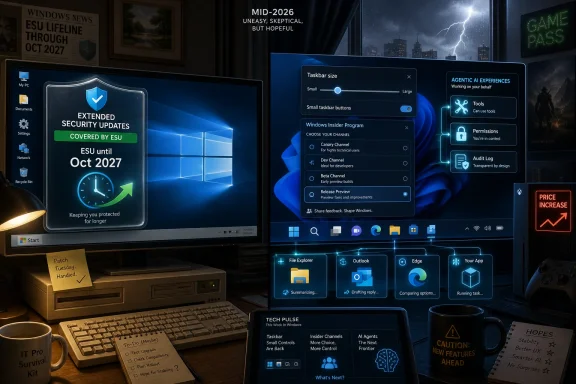 Microsoft Extends Windows 10 Because Reality Beat the Roadmap
The biggest Windows story in the episode is not a flashy new Windows 11 feature. It is Microsoft quietly giving consumer Windows 10 users another year of Extended Security Updates, pushing protection into October 2027 for enrolled personal devices. That is a practical relief for millions of PCs, and an implicit admission that the Windows 11 transition remains less complete than Microsoft once hoped.Windows 10 was supposed to be the platform Microsoft could finally leave behind on schedule. Windows 11 arrived with a hard hardware line: TPM 2.0, newer CPUs, and a security pitch that made the old installed base look like technical debt. But five years after Windows 11’s debut, the installed base did not neatly obey the narrative. Too many perfectly usable PCs still run Windows 10, and too many users see no compelling reason to scrap them.
The extension matters because it changes the psychology of the deadline. End of support was intended to become a forcing function: upgrade the OS, replace the hardware, or accept risk. By stretching consumer ESU to 2027, Microsoft softens that pressure. It does not reverse the Windows 11 strategy, but it makes the cliff look more like a ramp.
That is good security policy, even if it is awkward product policy. A large population of unpatched Windows 10 machines would be bad for everyone, not just the people who own them. Botnets do not care whether a vulnerable PC failed a Windows 11 compatibility check. If Microsoft can keep those systems patched for another year, the broader Windows ecosystem is safer.
But the decision also undermines the company’s own upgrade messaging. Microsoft spent years telling users that Windows 11 was the modern, secure future. Now it is effectively telling holdouts: you can stay where you are a little longer, and we will keep sending the important fixes. That is the correct public-health answer, but it is not a ringing endorsement of the migration campaign.
The Windows 11 Pitch Still Has a Hardware Problem
Windows 11’s adoption challenge was never just about Start menu taste or taskbar muscle memory. It was about Microsoft drawing a line through the PC market and declaring that many working machines were no longer part of the supported future. That line made sense from a security architecture perspective, but it collided with the way people actually use computers.A family PC that browses the web, edits documents, joins video calls, and plays older games does not become useless because its processor falls outside a support matrix. A small business machine attached to a printer, scanner, point-of-sale device, or line-of-business app may be more valuable because it is boring. In those environments, stability is not nostalgia. It is the product.
That is why the phrase “Don’t Be Nostalgic for Stupid” cuts both ways. There is a kind of nostalgia that romanticizes old Windows flaws: registry rot, driver chaos, Control Panel archaeology, and the annual ritual of reinstalling the OS because something invisible went wrong. Nobody should want that back. But there is also a justified preference for software that gets out of the way, respects existing hardware, and does not treat every user as a conversion target.
Windows 11 has improved substantially since launch, but it still carries the burden of that first impression. The operating system arrived as a design reset wrapped around strict requirements, while many of its most visible changes felt like regressions to longtime users. The context menu changed. The taskbar lost flexibility. Default app flows became more aggressive. The desktop felt less like a toolbench and more like a managed surface.
Microsoft has spent years walking some of those choices back. The latest Insider work on taskbar sizing is a good example. A dedicated setting for taskbar size sounds minor until you remember that Windows users have been asking for practical taskbar flexibility since Windows 11 shipped. When a new feature is celebrated because it restores something that should never have disappeared, the upgrade story has already absorbed damage.
The Insider Program Is Becoming a Control Plane
The Windows Insider changes discussed in the episode point to another shift: Microsoft is trying to make prerelease Windows less chaotic by moving more of the experience into Windows Update and clearer channel structures. Builds across Beta, Experimental, Beta for 26H1, Experimental for 26H1, and Experimental for future platforms show a company trying to separate feature testing from platform testing without losing the feedback machine.That is sensible. The old Insider model often felt like a bargain with too much fine print. Enthusiasts wanted early features, but they did not always want to live on unstable foundations. Developers and IT pros wanted to know what was coming, but not at the cost of turning a daily driver into a science experiment. Microsoft’s newer channel language suggests it understands that “early” and “dangerous” should not always be synonyms.
The trouble is that Windows itself has become a layered service, and the Insider Program now exposes that complexity. Features can be present but disabled. Builds can share numbers while differing in enablement. Capabilities can arrive through the Store, servicing stack, feature flags, cloud policy, or Windows Update. The old idea that a Windows version number tells you what a PC can do is increasingly quaint.
For enthusiasts, that creates both excitement and fatigue. You can see the OS evolving almost in real time, but you can also feel the seams. A taskbar option appears in one branch. A Copilot-adjacent experience lands in another. A shell behavior changes for some users but not others. The future of Windows is no longer a single train leaving the station; it is a switchyard.
This is where Microsoft’s engineering strategy and its communications strategy need to meet. If the company wants Insiders to test discrete features, it must explain what those features are, why they are being tested in a given channel, and what kind of feedback actually matters. Otherwise, the Insider Program risks becoming a public changelog for internal uncertainty.
The Taskbar Is Small, Which Is Why It Matters
The new taskbar size setting sounds like the sort of thing only Windows obsessives could love. In reality, it is exactly the kind of feature that determines whether an operating system feels respectful. The taskbar is not a decorative strip; it is the physical grammar of Windows usage, the place where launching, switching, monitoring, and muscle memory converge.Windows 11’s original taskbar simplification was one of the clearest examples of Microsoft mistaking visual cleanliness for user-centered design. By removing or delaying long-standing customization options, the company made the desktop feel less capable to the very people most likely to notice. The backlash was predictable because the taskbar is not an app. It is infrastructure.
A dedicated taskbar size control is not revolutionary. It will not convert Windows 10 loyalists by itself, and it will not solve Microsoft’s AI strategy, security posture, or hardware cutoff problem. But it signals that the company is still listening to a class of feedback that is easy to dismiss as cranky nostalgia.
That distinction matters. Some complaints are simply resistance to change. Others are warnings that a product team has optimized for screenshots over workflows. Windows is too mature, too widely used, and too embedded in professional life to treat every simplification as progress.
The best version of Windows 11 is not the one that looks least like Windows 10. It is the one that can absorb the security and platform improvements Microsoft wants while preserving the control surfaces users rely on. If that means restoring small taskbar buttons, better positioning, clearer defaults, and less promotional noise, then the path forward may look suspiciously like remembering why the old design worked.
AI Is Becoming the New OEM Bloatware, Only Smarter
The episode’s AI segment reads like a snapshot of an industry that has moved from “chatbots are interesting” to “agents will be everywhere whether you asked for them or not.” HP’s partnership with OpenAI, Anthropic’s Sonnet 5 push, Proton’s Lumo 2.0 upgrade, Gemini’s image features, and Notion’s retreat from a standalone mail client all point in the same direction. AI is no longer a sidecar. It is becoming the new interface layer.That should make Windows users both curious and wary. The PC industry has been desperate for a new reason to sell hardware, and agentic AI provides a convenient one. If your device can run background inference, coordinate workflows, summarize messages, inspect documents, schedule meetings, and act across apps, then maybe the next PC upgrade can be framed as a productivity necessity rather than a spec bump.
HP’s OpenAI partnership is emblematic. The company is not just talking about a chatbot in a help pane. It is describing AI-assisted customer experiences, internal operations, and hardware designed for always-on agentic workloads. That is a much bigger claim than “this laptop has an NPU.” It imagines the PC as part of a managed AI service environment.
For IT departments, the promise is obvious. Agents could reduce support load, automate repetitive workflows, and give users a natural-language layer over complex systems. For security teams, the concern is equally obvious. An agent that can do useful work across systems can also make useful mistakes across systems. Identity, permissions, logging, data retention, prompt injection, and auditability become first-order infrastructure concerns.
This is where nostalgia again becomes a bad guide. The old PC model was not pure or simple; it was full of preinstalled utilities, trialware, telemetry fights, and vendor-specific control panels. But users at least understood the boundary between their actions and the machine’s actions. Agentic AI blurs that boundary. When the computer starts “helping” by taking steps on your behalf, the question shifts from what it can do to who is accountable when it does the wrong thing.
Anthropic and Proton Show the Two AI Markets Splitting Apart
Anthropic’s Sonnet 5 push and Proton’s Lumo 2.0 upgrade illustrate a useful split in the AI market. One side is chasing broadly capable agents that are good enough, cheap enough, and controllable enough to deploy at scale. The other is trying to sell trust, privacy, and restraint as premium features. Both are responses to the same anxiety: users want AI help, but they do not want to become raw material.Sonnet-class models matter because they are aimed at the practical middle of AI adoption. Most users and businesses do not need the most expensive frontier model for every task. They need something that can write, code, summarize, classify, retrieve, and operate tools with acceptable reliability at a sustainable cost. “Good enough” sounds like an insult in benchmark culture, but it is often the point at which technology becomes useful.
The risk is that “good enough” also becomes the justification for deploying systems before the surrounding governance is mature. A model that is good enough to draft an email may not be good enough to negotiate a contract. A model that can classify support tickets may not be fit to triage security incidents. The difference is not just accuracy; it is consequence.
Proton’s Lumo pitch moves in the opposite emotional direction. Its privacy-first positioning appeals to users who see AI as a data-extraction machine unless proven otherwise. Memory, projects, and stronger capabilities are useful, but Proton’s real argument is that an assistant should not require surrendering your entire work life to an opaque training pipeline.
That market will grow because AI skepticism is not going away. The more agents are embedded into operating systems, productivity suites, browsers, and devices, the more some users will look for tools that promise narrower data use and clearer boundaries. Privacy-preserving AI may not dominate the mainstream, but it will become a serious buying criterion for professionals, regulated industries, and anyone burned by the last decade of cloud convenience.
Notion Mail Is a Warning About Interface Churn
Notion’s decision to shut down Notion Mail in favor of agent-driven workflows is one of the week’s most revealing stories. A company that once seemed to be expanding from workspace into calendar and email is now saying, in effect, that the standalone mail app is not the future it wants to maintain. The inbox becomes less important than the agent that can act on messages.That may be strategically correct. Email clients are brutally hard to differentiate, and most users already live in Gmail, Outlook, Apple Mail, or a work-mandated client. If Notion can deliver value by letting agents interact with email inside broader workflows, the separate mail interface may be redundant.
But there is a user-trust cost to this kind of pivot. People invest time in workflows, shortcuts, labels, filters, and habits. When a product is retired because the company has decided the next abstraction layer matters more, users are reminded that software-as-a-service is rented reality. The interface you learned can disappear because the vendor’s thesis changed.
This is especially relevant to Windows users watching Microsoft bolt AI into more surfaces. Copilot, Recall-like memory concepts, semantic search, and app agents may all become useful. But if the interface layer keeps shifting, users will hesitate to build durable habits around it. The more personal the workflow, the more painful the churn.
The lesson is not that companies should keep every product alive forever. The lesson is that agentic AI should not become an excuse to treat existing interfaces as disposable. People still need predictable places to see, correct, and override what automation is doing. The agent may become the assistant, but the interface remains the court of appeal.
Xbox Hardware Is Starting to Look Like a Luxury Bet
The Xbox segment lands with a very different kind of discomfort. Microsoft is raising Xbox Series X|S prices again on August 1, with increases of up to $150 depending on the model, while the 2 TB Series X configuration is reportedly going away. In a normal console cycle, prices fall as hardware ages. This generation is doing the opposite.That inversion says a lot about the state of gaming hardware. Component costs, memory pricing, tariffs, supply-chain pressure, and platform economics have all battered the old assumption that consoles become cheaper over time. But the optics are still grim. A console launched in 2020 becoming more expensive in 2026 feels less like premium positioning and more like the breakdown of the traditional bargain.
For Xbox specifically, the price hike collides with Microsoft’s broader ambiguity about what Xbox is. The company has spent years telling players that Xbox is an ecosystem, not just a console. Game Pass, cloud gaming, PC releases, cross-platform publishing, and “play anywhere” messaging all support that strategy. But if the console is no longer the center of gravity, raising its price makes the dedicated hardware look even more like a niche product.
That does not mean Xbox consoles are dead. Dedicated boxes still matter for living-room simplicity, predictable performance, and users who do not want to build or maintain a gaming PC. But the value equation is harder to defend when prices rise late in the cycle and first-party exclusivity becomes less central to the platform’s identity.
The rumored layoffs and possible studio impacts discussed in the episode deepen that anxiety. Microsoft’s gaming division has enormous assets: franchises, studios, cloud infrastructure, subscription reach, and PC integration. Yet the story users keep hearing is price hikes, restructuring, closures, and uncertainty. That is not how a platform builds confidence.
Game Pass Cannot Carry Every Contradiction
Game Pass remains one of Microsoft’s strongest consumer ideas, but it cannot solve every Xbox problem. A subscription can make software feel cheaper, but it does not make hardware sticker shock disappear. It can increase engagement, but it cannot fully compensate for doubts about platform commitment. It can broaden access, but it can also train users to value games as a rotating entitlement rather than owned media.The report that Sony may stop selling PlayStation physical media in 2028, if accurate, points to a larger industry turn away from discs and toward controlled digital distribution. Microsoft has already moved aggressively in that direction. The appeal to platform holders is obvious: fewer manufacturing costs, tighter storefront control, easier bundling, and better data. The downside for users is equally obvious: less resale, less lending, less preservation, and more dependence on account systems.
Minecraft Bedrock getting closed captions is the kind of accessibility improvement that deserves praise without qualification. It is also a reminder that platform stewardship is not only about business models and hardware strategy. Small accessibility changes can materially improve the experience for players who have been underserved by default assumptions.
Still, the Xbox narrative needs more than good individual updates. It needs coherence. If Xbox is a console, price it like a compelling console. If Xbox is a service, explain why the box is still worth buying. If Xbox is a publisher, be honest about what that means for studios and platform identity. The current strategy may be rational inside Microsoft’s spreadsheets, but from the outside it often looks like several futures competing for the same brand.
The Snapdragon Control Panel Pick Points to the Quiet PC Future
The app pick of the week, Snapdragon Control Panel, is easy to treat as a niche recommendation for Windows on Arm gamers. It is more than that. It points to the next phase of Windows hardware, where performance depends not only on silicon but on translation layers, per-game settings, Auto SR, graphics controls, driver maturity, and vendor utilities.Windows on Arm has spent years moving from promise to plausibility. Snapdragon X-class PCs made the category feel real for mainstream users, especially in battery life and thin-and-light designs. But gaming remains one of the hardest tests because it combines x86 compatibility, GPU drivers, anti-cheat systems, display settings, and user expectations shaped by decades of Windows-on-x86 behavior.
A control panel that helps games run better is not glamorous, but it is exactly the kind of connective tissue new platforms need. Users do not care whether a frame-rate problem lives in the game, the driver, the translation layer, the OS, or the NPU-era marketing stack. They care whether the game launches, looks right, and runs smoothly.
The broader Windows lesson is that new hardware eras require visible controls. Microsoft and Qualcomm can talk about efficiency and AI acceleration, but users need places to tune behavior, diagnose issues, and understand tradeoffs. The more heterogeneous PCs become, the more important transparent settings become.
That is why the episode’s practical tips matter. Settings paths, graphics toggles, Auto SR controls, and vendor utilities are not filler. They are the lived reality of using Windows in a transition period. The future arrives as a keynote, but it becomes usable through control panels.
The Useful Lesson Is Not to Worship the Past
The episode’s tip-of-the-week sentiment — help or get out of the way — is blunt, but it contains a real editorial challenge for the Windows community. It is easy to complain about Windows 11, AI, Xbox, and modern Microsoft. It is harder to separate productive criticism from ambient grievance.Productive criticism says Windows 11 should restore useful taskbar controls because workflows matter. Ambient grievance says everything after Windows 7 is trash. Productive criticism says consumer ESU should be extended because unpatched PCs create ecosystem risk. Ambient grievance says Microsoft should support every old machine forever at no cost. Productive criticism says AI agents need auditability and user control. Ambient grievance says all AI is fake until it is suddenly unavoidable.
The Windows community is at its best when it resists both vendor hype and reactionary nostalgia. That means recognizing that Windows 10 was not perfect, Windows 11 is not doomed, AI is not magic, and Xbox is not saved or destroyed by a single pricing move. It also means refusing to let companies redefine regression as modernization.
There is a difference between wanting old bugs back and wanting old competence back. The former is nostalgia. The latter is standards.
The Week Microsoft Bought Time and Raised the Price of Staying Put
This week’s stories form a pattern: Microsoft is extending timelines in Windows, complicating timelines in Insider testing, accelerating timelines in AI, and raising the cost of hardware in gaming. The company is not standing still, but neither are its users moving in the neat direction the roadmap once implied.- Microsoft’s consumer Windows 10 ESU extension to October 2027 is a security win that also weakens the urgency of the Windows 11 upgrade push.
- Windows 11’s new Insider taskbar work shows that Microsoft is still repairing early design decisions that alienated power users.
- The revamped Insider experience may make testing more coherent, but it also exposes how fragmented Windows feature delivery has become.
- Agentic AI is moving from novelty to infrastructure, which makes permissions, privacy, and auditability more important than model demos.
- Xbox’s August 2026 price increases make dedicated console hardware harder to justify at the same time Microsoft is pitching Xbox as a broader ecosystem.
- Practical Windows utilities and settings still matter because users experience platform transitions through everyday friction, not corporate strategy slides.
The next year of Windows will be defined by whether Microsoft can turn these retreats and recalibrations into a more credible compact with users: secure the old systems while they remain common, make Windows 11 feel less like a forced migration and more like a better home, put AI under visible user control, and explain what Xbox hardware is for in an ecosystem-first world. Nostalgia for stupid deserves no defense, but neither does progress that asks users to forget what working software used to feel like.
References
- Primary source: thurrott.com
Published: 2026-07-02T21:06:17.035767
Windows Weekly 990: Don't Be Nostalgic for Stupid - Thurrott.com
Leo, Richard, and Paul discuss a Windows 10 ESU extension, Windows 11, hardware, AI, Xbox and games, and more.www.thurrott.com - Related coverage: tomshardware.com
Microsoft extends free Windows 10 security updates for a second year — program now ends on October 12, 2027 | Tom's Hardware
Just as the memory shortage pushes PC prices even higher.www.tomshardware.com - Related coverage: techradar.com
Microsoft extends Windows 10 support out of the blue — consumers now get updates for another year to October 2027 | TechRadar
Windows 10 stays alive for another year with an extension for extended supportwww.techradar.com - Related coverage: windowscentral.com
Critics on Microsoft extending Windows 10 support for free through 2027: "Are they admitting Windows 11 isn't good enough 5 years later?" | Windows Central
Windows 10 holdouts are already calling on Microsoft to extend support for the operating system beyond 2027.www.windowscentral.com - Related coverage: pcgamer.com
Windows 10 gets yet another year of life as Microsoft extends security updates into 2027 | PC Gamer
Vive la Windows 10!www.pcgamer.com - Official source: blogs.windows.com
Announcing new builds for 26 June 2026, retail launch of new WIP improvements
Hello Windows Insiders, We have new releases today with builds across Beta and Experimental, and are excited to begin rolling out the new Windows Insider experience to retail Windows 11 builds this week! New Windows Insider Program changesblogs.windows.com
- Official source: microsoft.com
End of support for Windows 10, Windows 8.1, and Windows 7 | Microsoft Windows
Make a smooth transition to Windows 11 from your unsupported operating system with help from Microsoft. Enjoy the benefits of upgrading to a Windows 11 PC.www.microsoft.com - Related coverage: games.gg
Windows 10 Extended Security Updates Now Run Until October 2027 | GAMES.GG
Microsoft has extended Windows 10 Extended Security Updates to October 2027. Here's what it means for PC gamers still running the older OS.games.gg - Related coverage: euroconsumers.org
- Related coverage: aha.org
</rdf:Alt> </dc:title> <dc:description> <rdf:Alt> <rdf:li xml:lang="x-default"/> </rdf:Alt> </dc:description> <dc:creator> <rdf:Seq> <rdf:li>Katheri
</rdf:Alt> </dc:description> <dc:creator> <rdf:Seq> <rdf:li>Katherine Higgins (SLALOM INC)www.aha.org
