
📎 AI Summary:
The WindowsForum thread discusses how to run a System Health Check on Windows using the perfmon /report command, with detailed instructions and images provided in the original post. Responders express appreciation, share their experiences, and discuss the usefulness of the method, particularly for Windows 7 users. Overall, the thread is positive, highlighting helpful troubleshooting tips and user engagement with the process.
Thread Author
Run a System Health Check

Press Windows key+R

Link Removed

Then type perfmon /report and press Enter or Click OK (remember to put a space between perfmon & /)

Link Removed

Now it will generate a report, it will complete in 60 seconds.

Link Removed

Now you can view your results in great detail.

Link Removed

Link Removed

Link Removed

The report includes a whole load of things here are just a few:

Diagnostic Results Warnings, Performance,

Software Configuration, OS Checks, Security Center Information, System Services, Startup Programs

Disk, Hot files, Disk breakdown, Physical disk, NTFS Performance

CPU, Process, Service, Services, System

Hardware Configuration, Disk Checks, Systems, Desktop Rating, BIOS, Devices

Memory, Processes, Counters

Network.

Hope you found this useful!

(sorry if this has already been posted, checked but didn't see it)
 

squirtmph

Fantastic Member
Joined
Sep 26, 2012
Messages
89
WOW!!

Nice posted, Sir.
I am going to do it right away, see what I got.

and thank you for those IMAGE. and really help to understand more.

Have great Week-End.
 

squirtmph

Fantastic Member
Joined
Sep 26, 2012
Messages
89
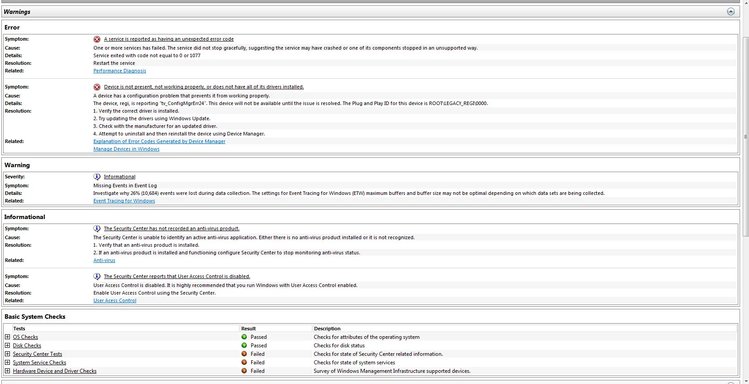
I din get result I was looking for!
I have post Image.
 

Attachments

  • System Health Check 4-1-2013 8-19-40 PM.webp
    System Health Check 4-1-2013 8-19-40 PM.webp
    110.2 KB · Views: 831
Joined
May 3, 2013
Messages
30
Really Helpful for Windows7 user on how to keep windows 7 safe
 

Stojmirov

Active Member
Joined
Feb 6, 2014
Messages
1
Nice job man

Sent from my GT-N7100 using Tapatalk