📎 AI Summary:
The thread discusses a user's intermittent Windows 7 crashes linked to ntoskrnl.exe, with diagnostic details pointing toward potential RAM compatibility issues and driver conflicts. The user provides various system details and attempts to diagnose the problem by sharing memory slot images and crash dumps. Contributors suggest that mixed RAM modules and incorrect memory timings may be causing instability, advising the user to verify and correct RAM configurations and providing troubleshooting steps to resolve the crashes.

Kultz

New Member
Member details
Joined
Aug 12, 2011
Messages
30
Thread Author #1
I have few crashes in a day.
In minidumps it always says that ntoskrnl.exe is causing the blue screens.
I dont know what do to!
I will attach those minidumps .
Please help me !

I have Windows 7 Home Premium 64 bit.
 

Attachments

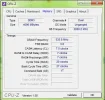
  • memory.webp
    memory.webp
    22.8 KB · Views: 486
    Microsoft Defender: No threats detected Scan details
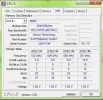
  • spd.webp
    spd.webp
    29.1 KB · Views: 482
    Microsoft Defender: No threats detected Scan details
  • Minidumps.rar
    Minidumps.rar
    52.4 KB · Views: 228
    Microsoft Defender: No threats detected Scan details
Solution
Thanks for posting the full SPD tab images (I didn't mean to nag. Honest!). OK, it's not the same batch but close enough to assume Micron had considered it good enough to be a set (or you were lucky!). A lot better than some set ups I've seen in the last 18mths!

Your RAM timings need resetting in your BIOS. It's currently set at 7-7-7-20 and should be 9-9-9-24. If you need any help with manually setting your RAM timings, feel free to ask.

Kultz

New Member
Member details
Joined
Aug 12, 2011
Messages
30
Thread Author #21
I have HP G5239sc