markemark
Extraordinary Member
Member details
- Joined
- Dec 13, 2014
- Messages
- 5
Help please.
this is driving me nuts.
I am running windows 8.1 (64bit)
Suddenly the DVD/Blu-Ray drive is missing from Explorer
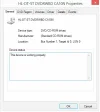
I have checked in device manager and the drive says it is working fine.
BUT why can I not see it in file explorer?
Many thanks for anyone that can offer some support
I have tried searching these forums, but the search brings back so many options for all different versions of windows, I cannot see any related to 8.1 64bit
Any ideas ?
many thanks
this is driving me nuts.
I am running windows 8.1 (64bit)
Suddenly the DVD/Blu-Ray drive is missing from Explorer
I have checked in device manager and the drive says it is working fine.
BUT why can I not see it in file explorer?
Many thanks for anyone that can offer some support
I have tried searching these forums, but the search brings back so many options for all different versions of windows, I cannot see any related to 8.1 64bit
Any ideas ?
many thanks