

📎 AI Summary:
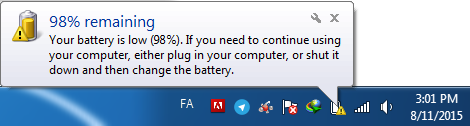
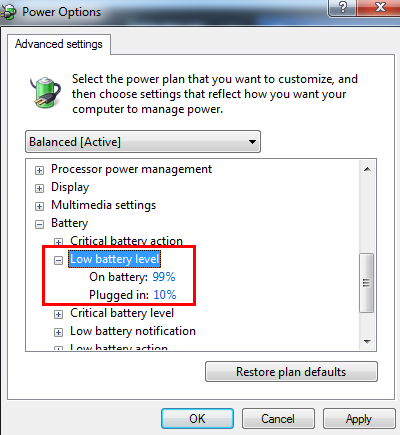
The user "phonezone" initially posted about an issue with their Fujitsu AH530 laptop displaying a problem when unplugged after replacing the battery. They sought help and later discovered that the issue was caused by an incorrect power option setting, not the battery or Windows. "kemical" provided general troubleshooting advice earlier, and after the user identified the solution, they thanked kemical for the helpful guidance. Overall, the thread concludes with the user resolving the problem by adjusting Power Options, and the discussion was constructive.
The user "phonezone" initially posted about an issue with their Fujitsu AH530 laptop displaying a problem when unplugged after replacing the battery. They sought help and later discovered that the issue was caused by an incorrect power option setting, not the battery or Windows. "kemical" provided general troubleshooting advice earlier, and after the user identified the solution, they thanked kemical for the helpful guidance. Overall, the thread concludes with the user resolving the problem by adjusting Power Options, and the discussion was constructive.

kemical
Essential Member
Member details
- Joined
- Aug 28, 2007
- Messages
- 36,163
Hi,
I did a search on your issue and didn't really come up with a great deal apart from this:
I know this was true of older battery types so it might be worth a shot. I found the above from the link here:
Link Removed
Just to add if the above doesn't work I would contact the place you bought the battery and explain the situation. You could also try posting in the forum I linked to above as other users of the same machine mat have had similar problems?
I did a search on your issue and didn't really come up with a great deal apart from this:
Some battery cells are shipped from factory in some sort of factory sleep mode. By Charging the unit 100% then letting the machine run on battery all the way down till it powers off (5%) repeat process 5-6 times should allow the battary to learn the full charge cycle and give you the maximum useage in hours (approx 4-6 hrs dependent on useage)
I know this was true of older battery types so it might be worth a shot. I found the above from the link here:
Link Removed
Just to add if the above doesn't work I would contact the place you bought the battery and explain the situation. You could also try posting in the forum I linked to above as other users of the same machine mat have had similar problems?
