📎 AI Summary:
The thread discusses converting an MBR disk to GPT without data loss, primarily using third-party tools like AOMEI Partition Assistant and EaseUS Partition Master Pro. The original poster has experienced difficulties with the process and seeks guidance from others, particularly on the correct steps to ensure successful conversion. Contributors suggest that the process can be straightforward with the right approach but emphasize backing up data and following precise steps, with some users offering detailed instructions and reassurance.

NettleWarbler

Banned
Joined
Mar 25, 2016
Messages
636
Thread Author #1
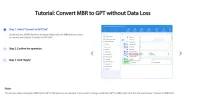
Convert MBR to GPT without Data Loss ,using AOMEI Partition Assistant . Is it that easy ? . Has anyone used AOMEI Partition Assistant , is it instant do you have to restart .
 

Attachments

  • Convert MBR to GPT without Data Loss.webp
    Convert MBR to GPT without Data Loss.webp
    44.1 KB · Views: 86

bochane

Essential Member
Joined
Oct 18, 2012
Messages
1,403
That is not what you asked in the message to which I replied, but OK.
Have you tried formatting the drive, see this description in point 5 of the section 'How to create and format partition using Disk Management' is the choise between MBR or GPT.
 

NettleWarbler

Banned
Joined
Mar 25, 2016
Messages
636
Thread Author #44
What do you mean reinstall windows , I hav'nt done owt yet I want to format the drive to gpt.
 

NettleWarbler

Banned
Joined
Mar 25, 2016
Messages
636
Thread Author #45
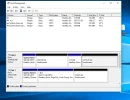
When I try to delete the volumes the area is greyed out .
 

Attachments

  • Greyed out.webp
    Greyed out.webp
    46.2 KB · Views: 47

bochane

Essential Member
Joined
Oct 18, 2012
Messages
1,403
It is greyed out, because the MBR format of drive 0 don't allow you to use it.
Sorry, but as suggested before, please go to a repair shop and let they do it for you, they should also be able to answer all your questions directly.
 

Last edited:

kemical

Essential Member
Joined
Aug 28, 2007
Messages
36,163
As I posted before probably the easiest method is simply to wait until you want to re-install windows.

Boot from the media windows is on.

Start the install process and when asked find the drive you want windows on and delete all partitions.

Click next to start the install process and the drive will automatically be formated GPT.

Job done.

(must be a uefi capable system tho)
 

NettleWarbler

Banned
Joined
Mar 25, 2016
Messages
636
Thread Author #48
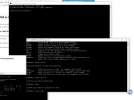
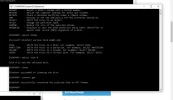
kemical , i normally delete all partitons when loading windows , i didn't know you could get gpt that way . I disk management i delleted some volumes tried to get onto the drive i was getting automatic repairs for ages i must have done something wrong . Tried diskpart again i think it may be ok .
 

Attachments

  • cleaned.webp
    cleaned.webp
    75.9 KB · Views: 42
  • gpt.webp
    gpt.webp
    56.6 KB · Views: 46

NettleWarbler

Banned
Joined
Mar 25, 2016
Messages
636
Thread Author #49
When i right click on disk 0 in disk managment it says convert to mbr , so i will load windows later tonight and try . I will make a note of kemicals idea ( in case ) he took a lucky guess .
 

kemical

Essential Member
Joined
Aug 28, 2007
Messages
36,163
When i right click on disk 0 in disk managment it says convert to mbr , so i will load windows later tonight and try . I will make a note of kemicals idea ( in case ) he took a lucky guess .
A lucky guess?

WTF?

I've been using this method since 2015.

Unfuckingbelievable.
 

Last edited:

NettleWarbler

Banned
Joined
Mar 25, 2016
Messages
636
Thread Author #51
I always use that method , delete all partitions so theres only one space to load windows . Theres keep files and folders or custom install which I use it usuly ends up as mbr . Which it has
 

Attachments

  • MBR.webp
    MBR.webp
    31.9 KB · Views: 44

NettleWarbler

Banned
Joined
Mar 25, 2016
Messages
636
Thread Author #54
It has keep files and folders , but I think something used to go wrong . It used to keep going back to install , so I just used custom install to save the hassle .
 

NettleWarbler

Banned
Joined
Mar 25, 2016
Messages
636
Thread Author #55
bochane , was going to get me to take my hard drive to the computer shop . He may be right disk management converted it to gpt I have the feeling as soon as windows is installed it will be mbr . Unless some software does the job . Does anyone know of any way to convert to gpt , it don't matter about losing files or re-installing windows .
 

kemical

Essential Member
Joined
Aug 28, 2007
Messages
36,163
Does anyone know of any way to convert to gpt , it don't matter about losing files or re-installing windows .

I fail to understand why you won't follow the link I posted above? Here it is again in case for some weird reason you can't see it:

Windows Setup: Installing using the MBR or GPT partition style

That is a method to format to GPT.

HOWEVER

If the above method is failing for you then you may have to consider your system isn't set up for uefi installs.
 

NettleWarbler

Banned
Joined
Mar 25, 2016
Messages
636
Thread Author #57
It is set up for gpt , its all I now use . I like all the area in one without 2tb partitions , I wouldn't know where everything is stored . Would seagate disc wizard convert it to gpt . I didn't try the link .
 

kemical

Essential Member
Joined
Aug 28, 2007
Messages
36,163
Would seagate disc wizard convert it to gpt .
No.

If your sure your set up for uefi then simply boot from the media windows is on.

Find the drive you want windows on and delete all partitions leaving an unallocted space.

Do not click anything else other than 'next' otherwise it will come out as mbr again.

Do not click format drive, just click next and you should find it will format it gpt automatically.
 

kemical

Essential Member
Joined
Aug 28, 2007
Messages
36,163
Look in your Bios for the heading 'Boot' or similar and then change the boot order so that your system boots from either the disk or usb you have windows on.

I should have also mentioned above that you want the 'Custom' install option followed by the drive you intend to install windows on. Delete all partitions and then click next. Job done.