

using Windows 10 in ASUS X555LN notebook with integrated Broadcom Bluetooth driver. After installing the Bluetooth software, when i pair my phone with the PC, my phone appears in the Explorer with additional hard disk partitions (Devices and drives). I do not want to unpair my bluetooth device, just want to remove the device icon from showing in Explorer. seeking for help. thanks
📎 AI Summary:
The thread discusses an issue where pairing a phone via Bluetooth in Windows 10 causes the phone to appear as additional drives in Explorer, which the original poster wants to hide without unpairing. Neemobeer suggests that the phone's storage mode settings may be responsible, while davehc proposes hiding empty drives in folder options as a possible solution. Overall, the conversation revolves around troubleshooting how to prevent the phone's storage from showing in Explorer, with no definitive fix provided.
The thread discusses an issue where pairing a phone via Bluetooth in Windows 10 causes the phone to appear as additional drives in Explorer, which the original poster wants to hide without unpairing. Neemobeer suggests that the phone's storage mode settings may be responsible, while davehc proposes hiding empty drives in folder options as a possible solution. Overall, the conversation revolves around troubleshooting how to prevent the phone's storage from showing in Explorer, with no definitive fix provided.
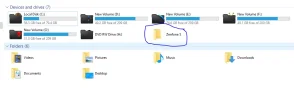
Solution

This is probably a setting on your phone. I have storage mode disabled on my phone when it gets plugged into a computer.


