📎 AI Summary:
The thread discusses frustrations with Windows Defender's protection features, specifically the frequent "Unauthorized Changes blocked" messages and folder access issues that hinder software installation and management. The original poster finds the security prompts overwhelming and considers disabling protection, fearing it affects customer operations. They express increasing frustration and question whether turning off security measures is a viable solution.

mysorian

New Member
Member details
Joined
Sep 17, 2021
Messages
3
Thread Author #1
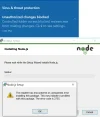
This is a facing issue for me. I get 10s of messages that the protected folders cannot be written to. I add the programs to get bypassed. It works. But how are you configuring this for a customer friendly operation. The programs I have given permission to be bypassed is in dozens. I cannot install Python, Swift and many other programs unless I give explicit permission. I am SUFFOCATING!

Is it OK to turn-off this in Security?
 

Attachments

  • ransomeware-related.webp
    ransomeware-related.webp
    65.2 KB · Views: 63

mysorian

New Member
Member details
Joined
Sep 17, 2021
Messages
3
Thread Author #2
This problem has become serious and looks like it is better to live with Ransomeware!
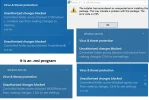
I get dozens of "Unauthorized Changes blocked", folder access blocked by "Virus & Threat protection' and it is almost near impossible to install or delete. Is there a way out of this?
 

Attachments

  • ransome.webp
    ransome.webp
    149.9 KB · Views: 64