


carsten888
Senior Member
Member details
- Joined
- Dec 25, 2009
- Messages
- 83
In the right bottom corner is the windows 10 icon. I want to hide that.
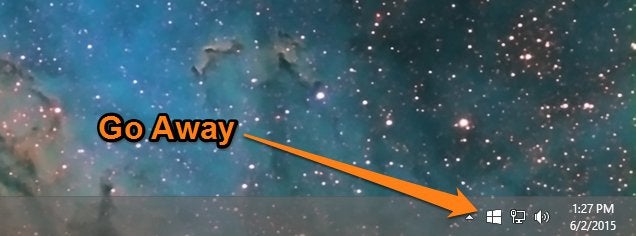
(It looks too much like thunderbirds you-got-mail-icon, which is driving me crazy!) 😕
Obviously I tried this method:
http://lifehacker.com/how-to-hide-the-get-windows-10-icon-from-your-taskbar-1708536452
which works fine, but after reboot its back.
I've read that even after downloading/reserving windows 10 (which does not work on my pc, see other thread), the icon will still show.
How to hide the windows 10 icon?
(It looks too much like thunderbirds you-got-mail-icon, which is driving me crazy!) 😕
Obviously I tried this method:
http://lifehacker.com/how-to-hide-the-get-windows-10-icon-from-your-taskbar-1708536452
which works fine, but after reboot its back.
I've read that even after downloading/reserving windows 10 (which does not work on my pc, see other thread), the icon will still show.
How to hide the windows 10 icon?


