📎 AI Summary:
The thread discusses users experiencing issues with their internal microphones after reinstalling Windows 7, where the microphone drivers are not showing up or functioning correctly. The original poster and another user both report that their internal and external microphones are not working despite having the latest drivers and proper volume settings. A suggested solution involves checking the audio device settings in the control panel, but overall, the users remain seeking further assistance to resolve the microphone detection and functioning problem.

Teh Cakinator

New Member
Joined
Jun 14, 2009
Messages
8
Thread Author #1
I recently wiped my laptop clean and reinstalled with windows 7 and the driver for my built-in microphone is not showing up and I can not use my microphone in any program.

I've tried updating everything.

Help :D?
 

Solution
Have you checked the Audio tab in control panel yet ? once there click on manage audio devices and look if your microphone is set to Default.

Teh Cakinator

New Member
Joined
Jun 14, 2009
Messages
8
Thread Author #2
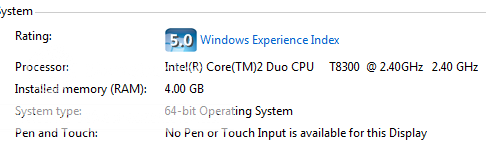
Oh here are the specs:

Specs.png
 

Mjelnir

New Member
Joined
Jun 14, 2009
Messages
12
Have you checked the Audio tab in control panel yet ? once there click on manage audio devices and look if your microphone is set to Default.
 

Solution

michelle1503

New Member
Joined
Jul 7, 2011
Messages
2
i have the same problem... i wiped my pc clean and installed windows 7 but my internal microphone does not work in any program and when i try external microphones, it does not work either meaning my port is also not functioning. i checked everything, my pc even says that i have the latest drivers and that my devise is working properly so i am very confused on what the problem is... my volume settings are all 100% and mute is off. help please.