

leosantare
Member
Member details
- Joined
- Apr 19, 2019
- Messages
- 56
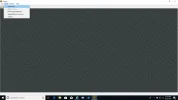
I have been determine if I need to purchase a 6th generation laptop to run Windows 7 for an application. I was having a conversation with someone else and they seemed to figure out the first half. That is, to get the application to run in Windows 10. I would appreciate if there is anyone who can help figure out the other half. Note, the person I was speaking was not aware of the second half before the conversation was terminated. Attached are two applications, well the main application (Elgar 2.6) and the add on tool DN9848 RCS 4.0. After you have installed both applications and you are able to open Elgar, then you must be able to add a device. (screen shot below)
As of now, I am able to open Elgar 2.6 but unable to add a device. In reality, if I can't add a device, I can't use the application on Windows 10. Also, for some reason when I open the Elgar 2.6 is does not display full screen, the taskbar remains visible.
Thanks,
As of now, I am able to open Elgar 2.6 but unable to add a device. In reality, if I can't add a device, I can't use the application on Windows 10. Also, for some reason when I open the Elgar 2.6 is does not display full screen, the taskbar remains visible.
Thanks,
Attachments
-
Microsoft Defender: No threats detected Scan detailsElgar 2.6.zip8.2 MB · Views: 143
-
 Microsoft Defender: No threats detected Scan detailsCan't add device.webp106.9 KB · Views: 115