

📎 AI Summary:
The thread discusses issues with upgrading or reinstalling Windows 10, particularly concerning preserving downloaded programs and resolving installation errors like access denied (Error 0005). The original poster seeks solutions that avoid reinitializing the entire OS, highlighting concerns about losing existing programs during updates. Responses suggest ensuring administrative rights and reinstallation methods, with the overall tone being a helpful exchange aimed at troubleshooting non-technical users.
The thread discusses issues with upgrading or reinstalling Windows 10, particularly concerning preserving downloaded programs and resolving installation errors like access denied (Error 0005). The original poster seeks solutions that avoid reinitializing the entire OS, highlighting concerns about losing existing programs during updates. Responses suggest ensuring administrative rights and reinstallation methods, with the overall tone being a helpful exchange aimed at troubleshooting non-technical users.
Solution

Error 0005 is Access Denied, so make sure you have administrative access and right click the installer and select "Run As Administrator"

Rapaaja
Active Member
Member details
- Joined
- Feb 18, 2019
- Messages
- 280
Sorry maybe this is the wrong casserole transfer if I put the question in the wrong place sorry thank you. That issues 3.13 start i have help him
Hi Here Skype Download Help Changed to Version 8:
https: up dates Skype new 8 versions. TO Finland
The reason may be that you are not a system administrator with rights
keep your win 10 when working on your own machine. If this doesn't work, here's how to uninstall and reinstall: How do I uninstall and reinstall Skype on desktop? | Skype Support but that givin
 HI said it
What's going on if I start this action? Do all the programs I have installed leave the machine?
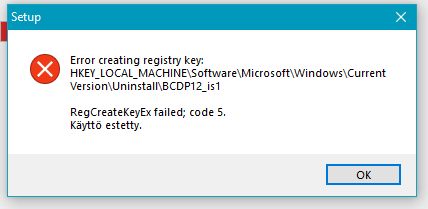
The question is related to a problem I have raised here earlier, where I cannot create a registry key during installation (Code 5 tjsp), then the installation will be canceled, and if it has been an update, then there will be no program at all! the indicated responses to previous questions "pirouettes" I've done, but does not seem to help. However, I didn't want to go back to the installation again.
Hi Here Skype Download Help Changed to Version 8:
https: up dates Skype new 8 versions. TO Finland
The reason may be that you are not a system administrator with rights
keep your win 10 when working on your own machine. If this doesn't work, here's how to uninstall and reinstall: How do I uninstall and reinstall Skype on desktop? | Skype Support but that givin
What's going on if I start this action? Do all the programs I have installed leave the machine?
The question is related to a problem I have raised here earlier, where I cannot create a registry key during installation (Code 5 tjsp), then the installation will be canceled, and if it has been an update, then there will be no program at all! the indicated responses to previous questions "pirouettes" I've done, but does not seem to help. However, I didn't want to go back to the installation again.
Last edited:

Rapaaja
Active Member
Member details
- Joined
- Feb 18, 2019
- Messages
- 280
HI Thanks for the response the user has a Win10 home in 1809 and he has made a return that has lost his old programs / posts and after the conversations he does not want to install win10 as a whole so the thing now stands when the fellow has a palm in the middle of the thumb and not a computer man so thus is ready thank you your response and patience . Rapaaja
